Secure Relay Requirements
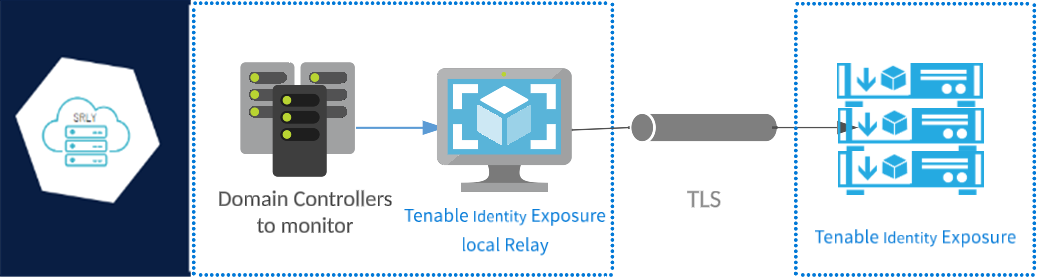
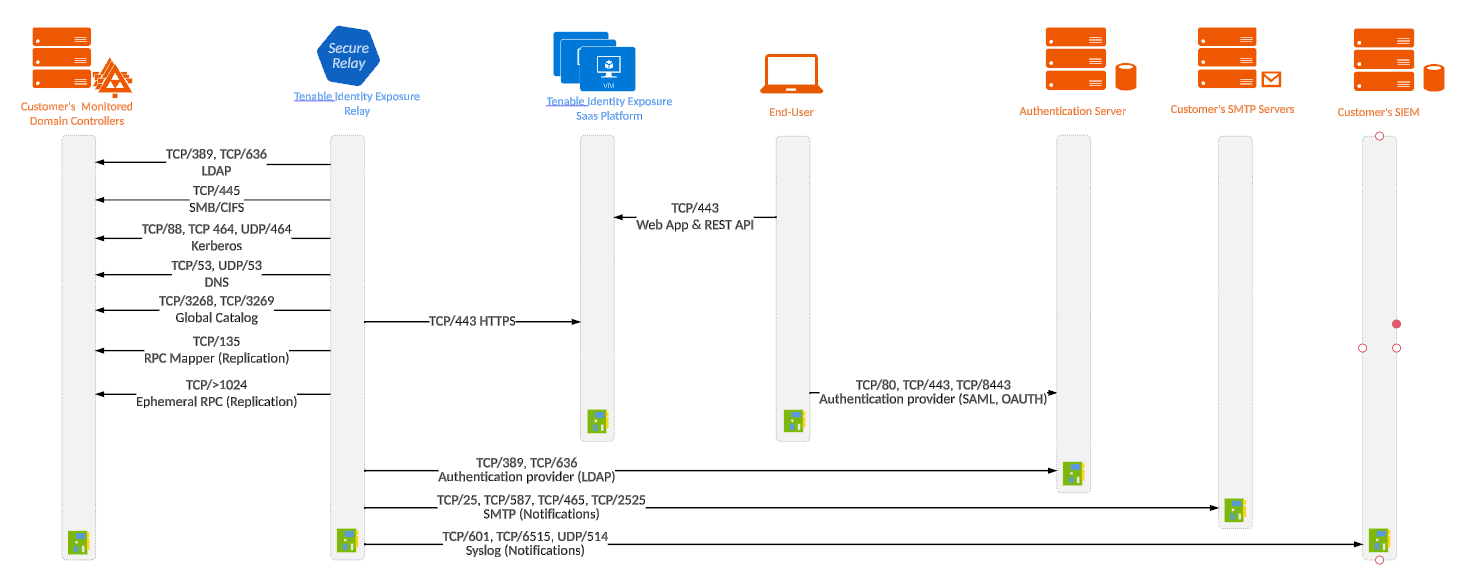
Secure Relay is a mode of transfer for your Active Directory data from your network to Tenable One Identity Exposure using Transport Layer Security (TLS) instead of a VPN, as shown in this diagram. The Relay feature also supports HTTP proxy with or without authentication if your network requires a proxy server to reach the internet.
Tenable One Identity Exposure can support multiple Secure Relays which you can map to domains according to your needs.
TLS Requirements
To use TLS 1.2, your Relay server must support at least one of the following cipher suites as of January 24, 2024:
-
TLS_ECDHE_RSA_WITH_AES_128_GCM_SHA256
-
TLS_ECDHE_RSA_WITH_AES_256_GCM_SHA384
-
TLS_ECDHE_RSA_WITH_CHACHA20_POLY1305_SHA256
Cipher Suites
Ensure that your Windows configuration aligns with the specified cipher suites for compatibility with the Relay feature.
To check for cipher suites:
-
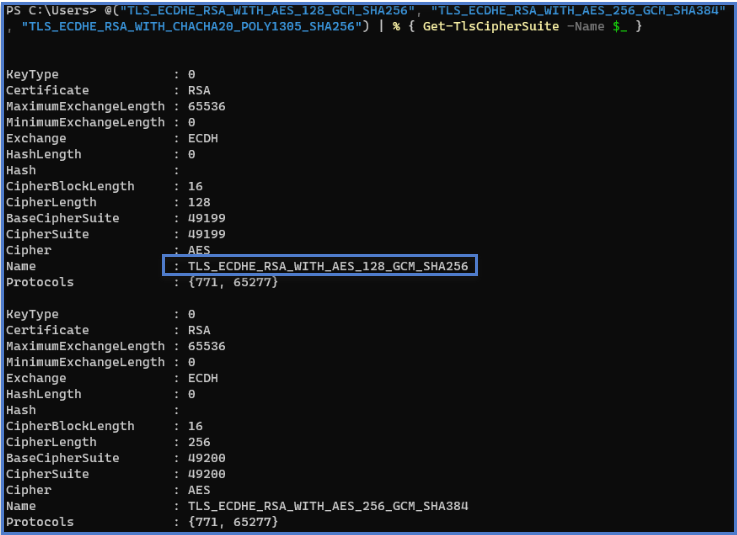
In PowerShell, run the following command:
Copy@("TLS_ECDHE_RSA_WITH_AES_128_GCM_SHA256", "TLS_ECDHE_RSA_WITH_AES_256_GCM_SHA384", "TLS_ECDHE_RSA_WITH_CHACHA20_POLY1305_SHA256") | % { Get-TlsCipherSuite -Name $_ } -
Check the output: TLS_ECDHE_RSA_WITH_CHACHA20_POLY1305_SHA256.
-
An empty output indicates that none of the required cipher suites is enabled for the Relay's TLS connection to work. Enable at least one cipher suite.
-
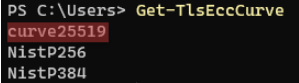
Verify the Elliptic Curve Cryptography (ECC) curve from the Relay server. This verification is mandatory for using Elliptic Curve Diffie-Hellman Ephemeral (ECDHE) cipher suites. In PowerShell, run the following command:
CopyGet-TlsEccCurve -
Check that you have curve 25519. If not, enable it.
Cryptographic Settings
To verify Windows cryptographic settings:
-
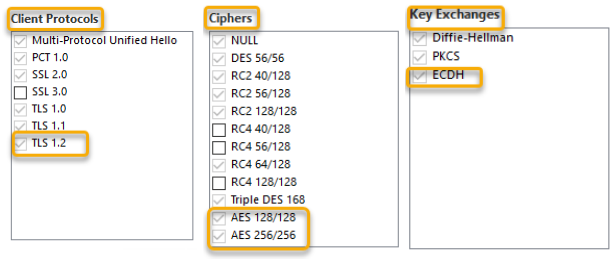
In an IIS Crypto tool, check that you have the following options enabled:
-
Client Protocols: TLS 1.2
-
Ciphers: AES 128/128 and AES 256/256
-
Key Exchanges: ECDH
-
-
After you modify the cryptographic settings, restart the machine.
Note: Modifying Windows cryptographic settings affects all applications running on the machine and using the Windows TLS library, known as "Schannel." Therefore, ensure that any adjustment you make does not cause unintended side effects. Verify that the chosen configurations align with the organization's overall hardening objectives or compliance mandates.
Required Ports
-
For a classic setup without a proxy server, the Relay requires the following ports:
For a setup using a proxy server, the Relay requires the following ports:
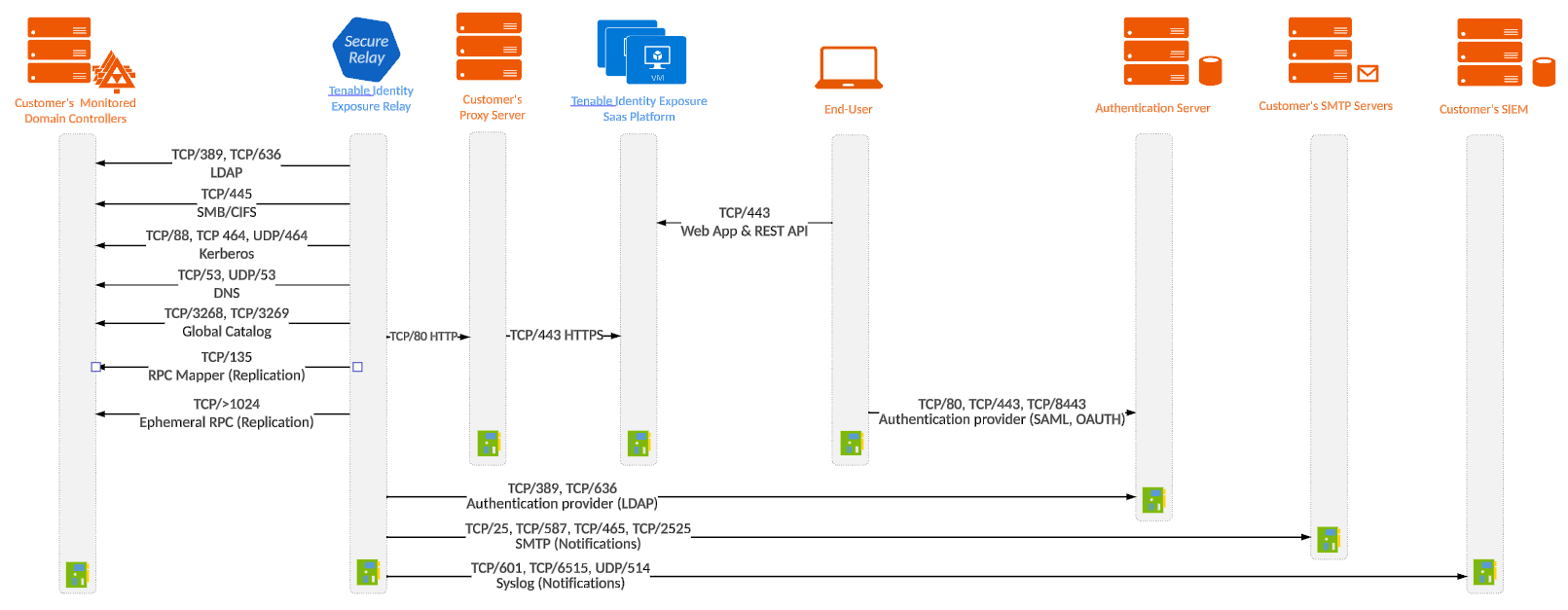
Note: The network flows work the same way for both on-premises and SaaS platforms.
Virtual machine prerequisites
The requirements for the virtual machine (VM) hosting the Secure Relay are the following:
| Customer Size | Tenable One Identity Exposure Services | Instance Required | Memory (per instance) | vCPU (per instance) | Disk Topology | Available Disk Space (per instance) |
|---|---|---|---|---|---|---|
| Any size |
|
1 | 8 GB of RAM | 2 vCPU | Partition for logs separate from the system partition | 30 GB |
The VM must also have:
-
HTTP/HTTPS traffic — Remove, disable, bypass, or allowlist any client that can steer HTTP/HTTPS traffic toward the Secure Relay machine. This action blocks the Secure Relay installation and stops or slows traffic entering the Tenable platform.
-
A Windows Server 2016+ operating system (no Linux)
-
Resolved internet-facing DNS queries and internet access for at least cloud.tenable.com and *.tenable.ad (TLS 1.2).
-
Local administrator privileges
-
EDR, antivirus, and GPO configuration:
-
Sufficient CPU remaining on the VM — for example, the Windows Defender Real-Time feature consumes a considerable amount of CPU and can saturate the machine.
-
Automatic updates:
-
Allow calls toward *.tenable.ad so that the automatic update feature can download a Relay executable file.
-
Check that there is no Group Policy Object (GPO) blocking the automatic update feature.
-
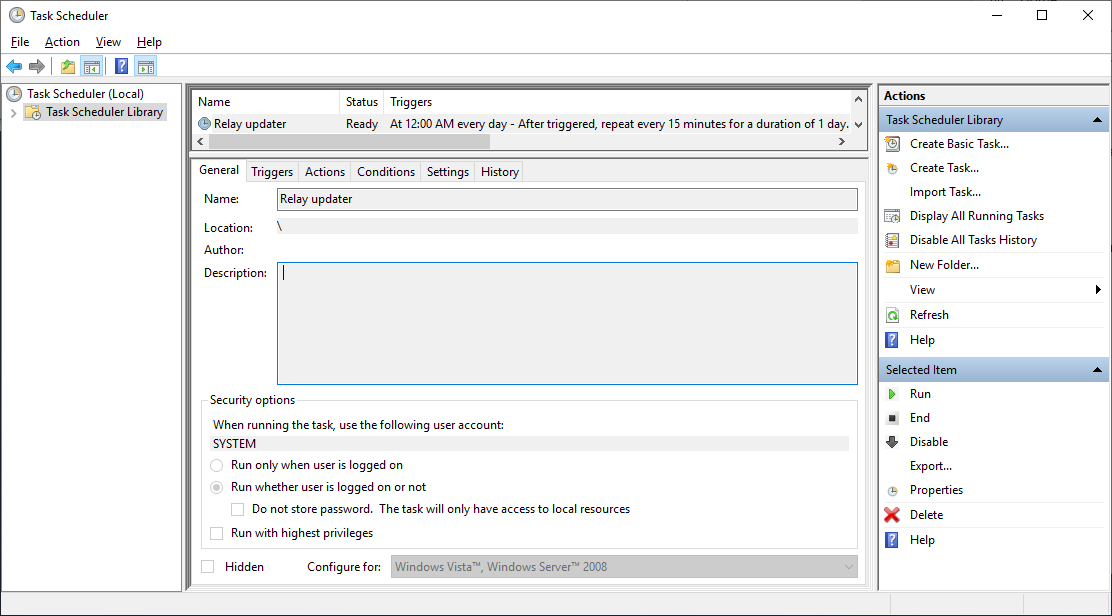
Do not delete or alter the 'Relay updater' scheduled task:
-
-
Allowed files and processes
| Windows |
|---|
| Files |
| C:\Tenable\* |
| C:\tools\* |
| C:\ProgramData\Tenable\* |
| Processes |
| nssm.exe --> Path: C:\tools\nssm.exe |
| Tenable.Relay.exe --> Path: C:\Tenable\Tenable.ad\SecureRelay\Tenable.Relay.exe |
| envoy.exe --> Path: C:\Tenable\Tenable.ad\SecureRelay\envoy.exe |
| updater.exe --> Path: C:\Tenable\Tenable.ad\updater.exe |
| powershell.exe --> Path: C:\Windows\System32\WindowsPowerShell\v1.0\powershell.exe (may be different depending on the OS version) |
| Scheduled Tasks |
| C:\Windows\System32\Tasks\Relay updater |
| C:\Windows\System32\Tasks\Manual Renew Apikey |
| C:\Windows\System32\Tasks\Tenable\Tenable.ad\SecureRelay\CompressLogsSecureRelay |
| C:\Windows\System32\Tasks\Tenable\Tenable.ad\SecureRelay\RemoveLogsSecureRelay |
| Registry Key |
| Computer\HKEY_LOCAL_MACHINE\SOFTWARE\Tenable\Tenable.ad Secure Relay |