Indicators of Attack Installation Script
Configure EDR Exclusions for IoA Deployment
To ensure a successful Indicators of Attack (IoA) deployment, you must coordinate with your endpoint security software. Because the deployment uses a PowerShell script triggered by a scheduled task, some Endpoint Detection and Response (EDR) tools may flag the activity as suspicious.
To authorize the script:
-
Generate the script signature: identify the unique file hash for your specific version of the deployment script.
-
Open PowerShell.
-
Run the following command using the Register-TenableIOA.ps1 script:
Copy.\Register-TenableIOA.ps1 -GetSignatureToWhitelist -
Copy the SHA256 file hash displayed in the output:

-
-
Authorize the Hash in Your EDR:
-
Log in to your EDR configuration interface.
-
Navigate to the Exclusions or Allowlist section.
-
Add the SHA256 hash you copied in Step 1.
-
Save the changes and allow a few moments for the policy to propagate to your endpoints.
-
-
Complete the deployment: run the IoA installation script.
Run the IoA installation Script
To run the IoA script:
-
Open PowerShell as Administrator, navigate to the script directory, adjust execution policy, and run the script:
Copy.\Register-TenableIOA.ps1 -
Enter the parameters relevant to your configuration:
Parameter Description GPODisplayName The display name of the GPO used to create the task that registers the event listener. Default: Tenable.ad. TemporaryFolderLocation The temporary folder used to store the GPO backup during deployment. Default: %TEMP%\Tenable.ad\. DomainControllerAddress The FQDN or IP address of the domain controller to deploy to. Specify this if the script is run from a server or workstation that is not a domain controller. If omitted, domain information is retrieved from the local machine. DomainControllerOU The distinguished name of the Organizational Unit containing your domain controllers. Specify this if your DCs have been moved out of the default OU. Example: OU=Domain Controllers,DC=ROOT,DC=DOMAIN. TenableServiceAccount The name of the service account used by Tenable One Identity Exposure, which requires explicit permission to read Group Policy Objects. Uninstall Uninstalls the event listener and WMI Active Script Consumer to stop event log collection. Default: false. ConfigurationFileLocation The path to the file that will be used to update the GPO configuration. Target A comma-separated list of domain controllers targeted by this registration script. Example: DC-ROOT1,DC-ROOT2. This parameter is optional.
Tip: If used, ensure the list includes the PDCE; otherwise, the IoA deployment will fail.
CleaningGPODisplayName The display name of the GPO used to create the cleanup task that removes the event listener and WMI Active Script Consumer. Default: Tenable.ad cleaning. EventLogsFileWriteFrequency The frequency (in seconds) at which the event log file is generated in DFSR mode for non-PDCE domain controllers. Default: 15 seconds. Maximum: 300 seconds (5 minutes). Optional parameter. SmbShareLocation The disk path (absolute) of the SMB share location when running on the PDCE in ‘Dedicated SMB share’ mode. This folder is managed by Tenable Identity Exposure. Default: C:\Tenable\IdentityExposure\IOALogs. Optional parameter. UseXmlEventRender Enables legacy XML-based event rendering for listeners. This method is slower but more stable than the values-based renderer. Disabled by default. OutputCertificate Allows the output the Tenable certificate in the current directory (useful when necessary to allowlist it in EDR/AV). This parameter is optional. GetSignatureToWhitelist Allows the display the hash of deployed listenerLauncher.ps1 script to allowlist it in the EDR/AV prior to the deployment. TimerInMinutes Sets a delay (in minutes) before starting the IoA deployment. Use this timer during installation to pause the process before the deployment begins.
Maintaining IoA Certificate Validity
To ensure your Indicators of Attack (IoA) deployment remains active and secure, you must regularly redeploy the newest version of the IoA script. This process allows Tenable One Identity Exposure to install an updated Tenable code-signing certificate before the current one expires.

Group Policy Object
After you download and run the Indicators of Attack (IoA) installation file, the IoA script creates a new Group Policy Object (GPO) named by default Tenable.ad in the Active Directory (AD) database. The system links the Tenable One Identity Exposure GPO only to the Domain Controllers' Organizational Unit (OU) that contains all domain controllers (DCs). The new policy automatically replicates between all DCs using the GPO mechanism.
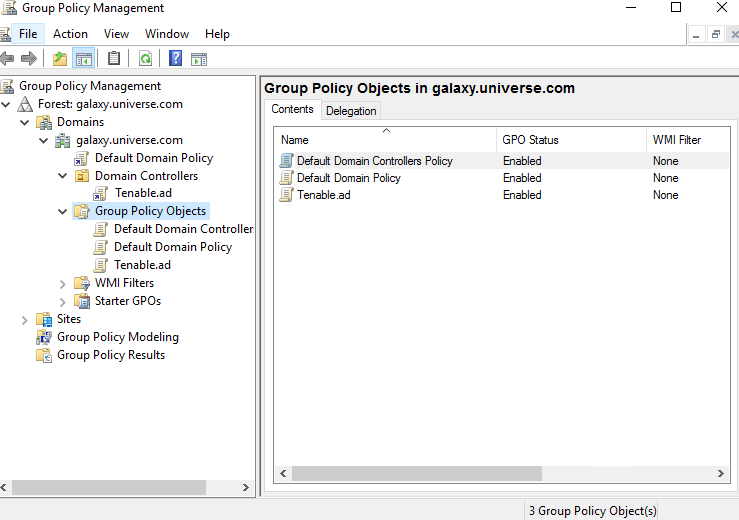
 Installation Script (Tenable One Identity Exposure v. 3.77 and later)
The GPO contains PowerShell scripts that all DCs execute locally to collect data of interest, as follows:
-
The script configures an event logs listener on each domain controller using Windows EvtSubscribe API. The script makes a subscription for each necessary event log channel, as specified in the TenableADEventsListenerConfiguration.json configuration file, by submitting a request and a callback triggered by EvtSubscribe for each matching event log.
-
The event listener receives event logs and buffers them before periodically flushing them to a file stored in a network share called SYSVOL. Each DC flushes to a single SYSVOL file that stores collected events and replicates it to other domain controllers.
-
Listener Execution Behavior: The listener is triggered by a scheduled task, which behaves differently depending on the deployment version:
-
On-premises:
-
Before v. 3.93: The listener starts via a command.
-
From v. 3.93 onward: The listener runs from a Tenable-signed PowerShell script, and the GPO includes the Tenable certificate as a trusted publisher. Ensure the script execution policy is not set to Restricted.
-
-
SaaS (from v. 3.102 onward): The listener runs from a Tenable-signed PowerShell script with the Tenable certificate as a trusted publisher. Ensure the script execution policy is not set to Restricted.
-
Important: Do not edit the Tenable Identity Exposure IOA GPO, as it is automatically managed by the listener.
-
The script also creates a WMI consumer to ensure that this mechanism is persistent by re-registering the event subscriber when a DC restarts. WMI notifies the consumer each time a DC restarts to allow the consumer to register the event listener again.
-
At this point, Distributed File System (DFS) replication occurs and automatically synchronizes files between domain controllers. Tenable One Identity Exposure's platform listens for incoming DFS replication traffic and uses this data to gather events, run a security analysis, and then generate IoA alerts.
-
Dedicated SMB share:
-
The event listener captures event logs, buffers them, and periodically flushes them to a file stored on a dedicated SMB share hosted on your PDCe. Tenable One Identity Exposure automatically maintains and secures this SMB share through the event listener. Each Domain Controller writes to a single file on the dedicated SMB share on the PDCe SMB.
-
Tenable Identity Exposure's platform listens to SMB updates on this dedicated share to collect event data, perform security analyses, and generate IoA alerts.
-
Local Data Retrieval
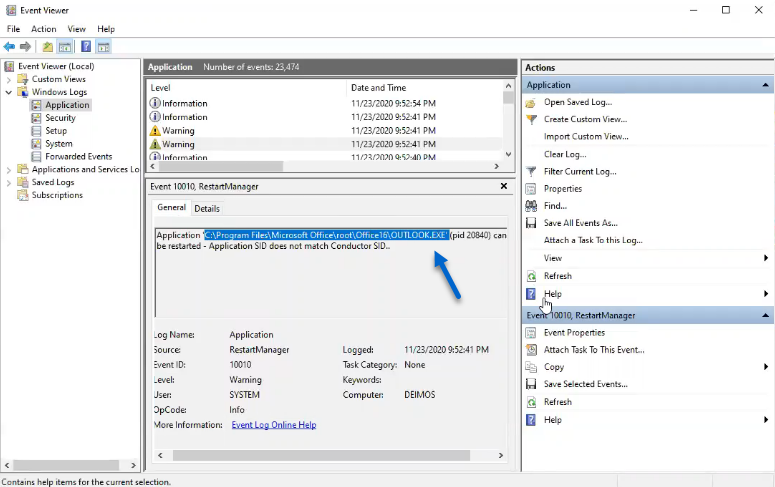
Windows event logs record all the events that occur in the operating system and its applications. Event logs rely on a framework of components integrated in Windows.
Using the EvtSubscribe API, the Tenable One Identity Exposure IoA events log listener collects only useful event logs data segments in the form of insertion strings that it extracts from the event logs. Tenable One Identity Exposure writes these insertion strings in a file stored in the SYSVOL folder and replicates them via the DFS engine. This allows Tenable One Identity Exposure to gather just the right amount of security data from event logs to run a security analysis and detect attacks.
IoA Script Summary
The following table gives an overview of the Tenable One Identity Exposure script deployment.
| Steps | Description | Component Involved | Technical Action |
|---|---|---|---|
| 1 | Register Tenable One Identity Exposure's IoA deployment | GPO Management |
Creates the Tenable.ad (default name) GPO and links it to the Domain Controllers OU. |
| 2 | Start Tenable One Identity Exposure's IoA deployment on DC | DC local system | Each DC detects the new GPO to apply, depending on the AD replication and Group Policy refresh intervals. |
| 3 | Control Advanced Logging Policy state | DC local system | The system activates the advanced logging policy by setting the registry key HKEY_LOCAL_MACHINE\System\CurrentControlSet\Control\Lsa\SCENoApplyLegacyAuditPolicy. |
| 4 | Update Local Logging policy | DC local system | Depending on the IoAs to detect, Tenable One Identity Exposure dynamically generates and activates specific audit policies. This policy does not deactivate any existing logging policy — it only enriches them if necessary. If it detects a conflict, the GPO installation script stops and shows the message "Tenable One Identity Exposure requires the audit policy '...' but the current AD configuration prevents its usage." |
| 5 | Register an event listener and a WMI producer | DC local system | The system registers and executes the script contained in the GPO. This script runs a PowerShell process to subscribe to event logs using EvtSubscribe API and to create an instance of ActiveScriptEventConsumer for persistence purposes. Tenable One Identity Exposure uses these objects to receive and store event logs contents. |
| 6 | Collect event logs messages | DC local system |
|
| 7 | Replicate files to the declared DC SYSVOL folder | Active Directory | Using DFS, the AD replicates files across the domain, and specifically in the declared DC. The Tenable One Identity Exposure platform gets notification for each file and reads their content. |
| 8 | Overwrite these files | Active Directory | Each DC automatically and continuously writes the periodically buffered events in the same file. |
See also