Tenable Patch Management SaaS vs. Self-hosted Comparison
Tenable offers both a self-hosted (on-premises) and a cloud-hosted (SaaS) model for Tenable Patch Management (TPM). This guide outlines key differences between the SaaS deployment and self-hosted versions.
Advantages of SaaS deployment
-
Fully managed SaaS deployment of TPM.
-
Offloads infrastructure, updates, and database management to Tenable Patch to manage.
-
Does not require any additional hardware.
-
The SaaS platform automatically scales.
-
Deployments receive the latest features, security patches, and improvements automatically, with no manual intervention.
-
Built-in redundancy and failover.
Key Differences
| Topic | Description |
|---|---|
|
Object Handling and Workflow Execution |
In TPM SaaS, server and business workflows are restricted to prevent changes to the shared environment. These workflows must use already signed activities that Tenable Patch Management has approved as secure. |
|
Custom Data Providers for Custom Dashboards |
Custom Data Providers cannot be created in the cloud environment. Custom Dashboards can use existing Data Providers. Subscriptions can be set up using existing Data Providers. |
|
Content Distribution and Publication |
Content distribution and publication is restricted to TPM content only. All content required by the server is stored and managed on a secure storage container in the Tenable Patch CDN. Content distribution works the same in both cloud and self-hosted models. Content is delivered through P2P methods, with fallback to the built-in CDN for Tenable Patch. Customers migrating to TPM SaaS can not leverage Tenable Patch content or ConfigMgr, Intune, or Workspace One content distribution and publication. Tenable Patch Management content cannot be created. |
|
Client Communication and Authentication |
To ensure successful communication between clients and TPM SaaS, customers must enable outbound traffic to Tenable Patch Management cloud URL's. HTTP Proxy Configuration Allow outbound traffic to Tenable Patch cloud URLs through any HTTPS proxies in your environment. Firewall Settings: Open the necessary UDP ports in your firewalls to enable peer-to-peer content distribution between client devices. See Tenable Patch Port Detail. |
|
Admin and Identity Management |
SaaS customers manage all administrator accounts and usage of identity providers (OIDC, SAML ) through the Tenable Cloud Portal (https://cloud.tenable.com/tio/app.html#/). Administrator accounts can be assigned to roles within the tenant server. |
|
Support and Troubleshooting |
Customers cannot directly manage the tenant infrastructure in the Tenable Cloud Portal. Common requests that require redirection or escalation include unsigned workflows, admin or identity configuration changes, missing content due to Tenable Patch CDN publishing errors, or integration issues caused by restricted APIs. Note: Customers with complex RBAC setups may need specific adjustments. |
|
Migrating to SaaS |
While there is currently no direct migration path from Tenable Patch Management On-Prem to the SaaS, existing on-prem users are eligible to move to the SaaS at no additional cost. Users will need to relink all clients and recreate all their patching strategies manually. Contact your Tenable sales representative for assistance on this. Note: Migration from Tenable Security Center (on-prem) to Tenable One Vulnerability Management (SaaS) is currently not supported. |
|
Locations in TPM Saas |
TPM SaaS changes the way you create and manage Locations compared to a self-hosted environment. For more information, see On-Premises Client Detection in TPM SaaS. |
Settings in Tenable Patch Management SaaS
Tenable Patch Management SaaS has some removed settings along with new additions compared to Tenable Patch Management On-Premises.
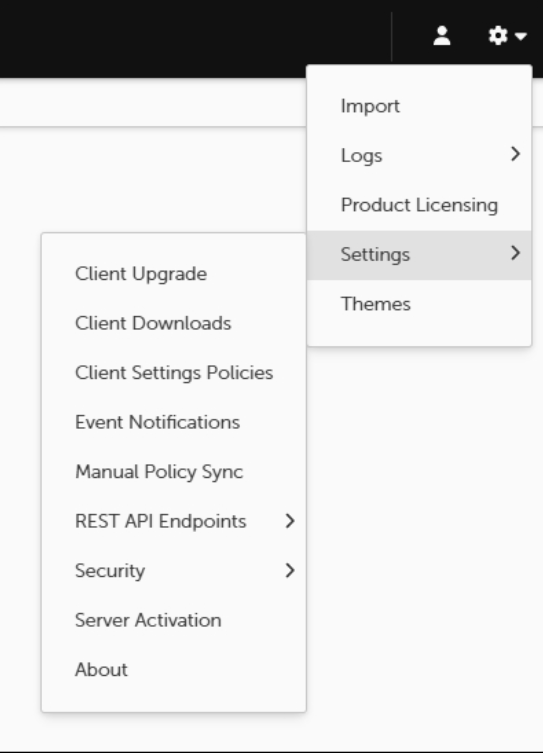
The following settings have been removed from Tenable Patch Management SaaS.
| Setting | Reason |
|---|---|
|
Tenable Patch Content Publication Cloud Storage |
Custom content is not supported in the SaaS environment. |
|
Client Authorization |
This is now managed by the tenant. |
|
Legacy Client Upgrade (Windows) |
The Tenable Patch Client Upgrade is now released automatically after the tenant is upgraded. For more information refer to Automatic Client Upgrade. |