Scan Zones
Note: Scan zone IP range validation behavior differs between legacy scans and scans linked via Sensor Proxy.
Scan zones are areas of your network that you want to target in an active scan, associating an IP address or range of IP addresses with one or more scanners in your deployment. You must create scan zones in order to run active scans in Tenable Security Center.
For more information, see Manage Scan Zones.
| Option | Description |
|---|---|
| Name | A name for the scan zone. |
| Description | (Optional) A description for the scan zone. |
| Ranges |
One or more IP addresses that you want the scan zone to target. Supported formats:
|
| Scanners |
One or more scanners that you want to use to scan the Ranges in this scan zone. Note: Do not choose scanners that cannot reach the areas of your network identified in the Ranges. Similarly, consider the quality of the network connection between the scanners you choose and the Ranges. |
Best Practices
Tenable recommends pre-planning your scan zone strategy to efficiently target discrete areas of your network. If configured improperly, scan zones prevent scanners from reaching their targets. Consider the following best practices:
- It is simplest to configure and manage a small number of scan zones with large ranges.
- It is simplest to target ranges (versus large lists of individual IP addresses).
- If you use Tenable Nessus Manager for agent management, do not target Tenable Nessus Manager in any scan zone ranges.
- Tenable Security Center fills the least-busy scanner in the zone up to its capacity before moving on to the next. During a scan, you may see one scanner more active than others at any given moment, but the workload evens out across all assigned scanners as the scan progresses.
Selectable Scan Zones
When you configure an active scan, you can select one or more scan zones to determine which scanners run the scan.
Note: If you select a single scan zone, Tenable Security Center ignores the IP ranges configured for that scan zone and scans all of the targets you specify in the scan configuration. The scan zone ranges are only used to determine scanner routing when multiple scan zones are selected.
To control which scanners are used based on target IP ranges, select multiple scan zones. Tenable Security Center will route targets to the appropriate scanner based on the ranges defined in each zone.
Overlapping Scan Zones
In some cases, you may want to configure overlapping scan zones to ensure scanning coverage or redundancy.
Note: Do not configure overlapping scan zones without pre-planning your scan zone and Distribution Method strategy.
Two or more scan zones are redundant if they target the same area of your network. If Tenable Security Center executes a scan with redundant scan zones, it first attempts the scan using the narrowest, most specific scan zone.
In this example, the red numbers represent specific IP addresses on your network. The grey circles represent the network coverage of individual scan zones.
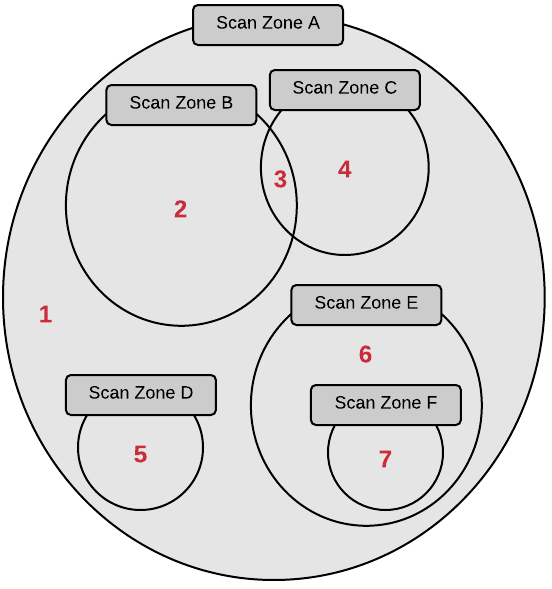
See the following table to understand the primary and redundant scan zones for the IP addresses in this example.
| IP Address | Primary Scan Zone | Redundant Scan Zones |
|---|---|---|
| 1 | Scan Zone A | None. |
| 2 | Scan Zone B | Scan Zone A. |
| 3 | Scan Zone C |
Scan Zone B, then Scan Zone A. |
| 4 | Scan Zone C | Scan Zone A. |
| 5 | Scan Zone D | Scan Zone A. |
| 6 | Scan Zone E | Scan Zone A. |
| 7 | Scan Zone F | Scan Zone E, then Scan Zone A. |