Device
The Tenable One OT Exposure setup wizard takes you through the configuration of the basic system settings.
Note: You can modify the configuration if necessary in the Settings screen in the Management Console (user interface).
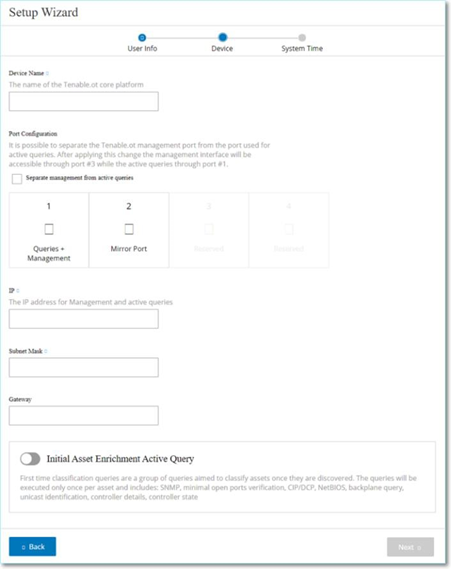
On the Device page, provide information about the Tenable One OT Exposure platform:
-
In the Device Name box, type a unique identifier for the Tenable One OT Exposure platform.
-
In the Port Configuration section, do one of the following:
-
Port separation — If you want to use one port for management and a separate port for Queries, select the Separate management from active queries checkbox. Selecting this option configures Port 1 as the Queries only port and Port 3 as the Management only port.
Note: On some systems, the Port separation option may not be available. Contact your support agent for assistance.
-
No separation — If you want to maintain the Queries and Management in the same port, do not select the Separate management from active queries checkbox. In this case, you can skip step number 3 of this procedure and proceed to step 4.
-
-
If you select the port separation option:
-
In the Active Queries IP box, type the IP address of the unit’s Queries port.
This port connects to a regular port in the network switch, which can contact or route to the controllers. As Tenable One OT Exposure connects to the controllers, it needs an IP address within the network subnet.
-
In the Active Queries Subnet Mask box, type the subnet mask of the Queries port.
-
In the Active Queries Gateway box (optional), type the IP address of the gateway in the operations network.
-
-
In the Management IP box, type an IP address (within the network subnet) to apply to the Tenable One OT Exposure platform.
This becomes the Tenable One OT Exposure management IP address. This IP address is also the Queries address if there is no separation between the ports.
-
In the Management Subnet Mask box, type the subnet mask of the network.
-
(Optional) If you want to set up a Gateway, in the Management Gateway box. type the Gateway IP for the network.
Note: If you do not provide the Management Gateway IP, Tenable One OT Exposure cannot communicate with external components outside of the subnet, such as email servers, syslog servers, and so on.
-
Initial Asset Enrichment Active Query comprises a set of queries executed on every asset detected within the system.
This allows Tenable One OT Exposure to classify the assets. To run these queries on each new asset that Tenable One OT Exposure discovers, enable the Initial Asset Enrichment Active Query toggle.
-
Click Next.
The System Time page of the setup wizard opens.
What to do next
Configure the System Time settings.