Manage Ignore Rules
Ignore rules allow you to ignore an entire rule or policy. Instead of modifying parts of it, you can choose not to enforce or evaluate the rule at all. The scope of ignoring can vary depending on granularity, for example, ignoring the rule only for a specific agent, for a particular application, or across all agents. You can create an Ignore Rule to prevent alerts on the rule or policy from appearing throughout the Tenable AI Exposure interface.
On the Ignore Rules page, you can manage your Tenable AI Exposure ignore rules in the following ways:
Create an Ignore Rule
To create an ignore rule:
-
On the Ignored Rules page, in the upper-right corner, click
 Add ignore rule.
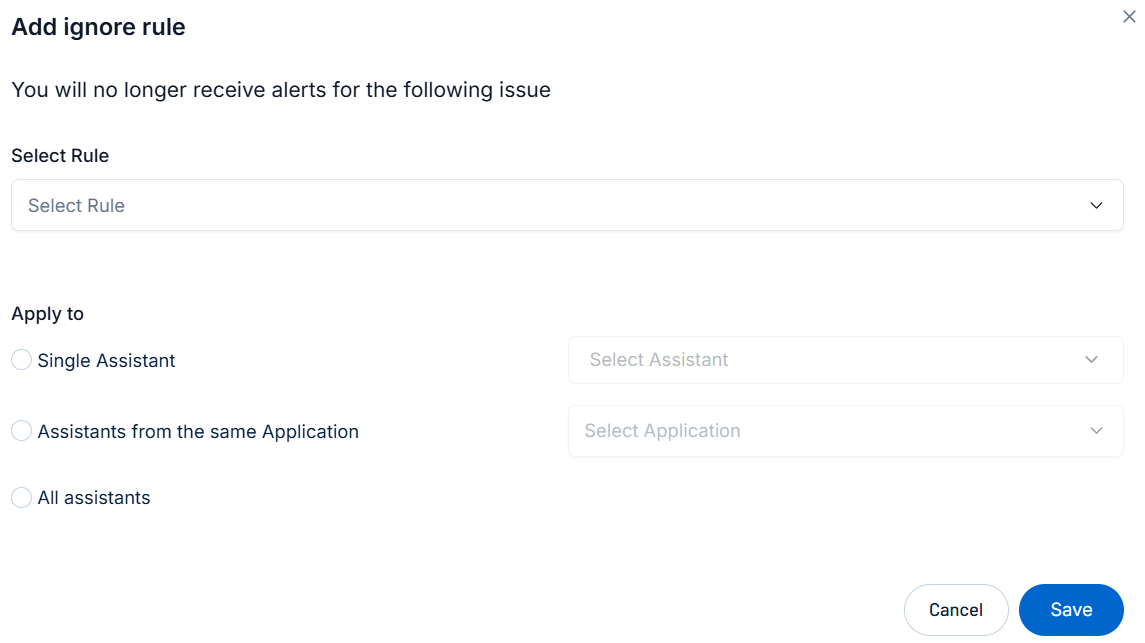
The Add ignore rule window appears.
-
From the Select Rule drop-down, select the rule you want to ignore.
Tip: For more information about policies and their related detection rules, see Tenable AI Exposure Policies and Detection Rules. -
In the Apply to section, select the assistant to which you want to apply the ignore rule:
-
Single Assistant — From the Select Assistant drop-down menu, select the individual assistant to which you want to apply the ignore rule.
-
Assistants from the same Application — From the Select Application drop-down menu, select the AI application to which you want to apply the ignore rule.
-
All assistants — Tenable AI Exposure applies the rule to all assistants used.
-
-
Click Save.
Tenable AI Exposure creates the ignore rule, adds it to the Ignore Rules list, and begins excluding the selected criteria from your issues and alerts.
Delete an Ignore Rule
To delete an ignore rule:
-
On the Ignored Rules page, in the ignored rules list, do one of the following:
-
To delete a single rule:
-
Hover over the rule you want to delete.
On the right side of the row, a
 button appears.
 -
Click the
button.
-
-
To delete multiple rules:
-
Select the check box next to each rule you want to delete.
At the bottom of the list, the
Delete button appears. -
Click
Delete.
-
A confirmation message appears. Tenable AI Exposure removes the rule from the Ignore Rules list, and stops excluding the selected criteria from your future issues and alerts.
-