Recorded Future Connector
The following is not supported in Tenable FedRAMP Moderate environments. For more information, see the Tenable FedRAMP Product Offering.
The Recorded Future Connector introduces a new Threat Intelligence category to Tenable Exposure Management, allowing you to ingest third-party threat intelligence data directly into your security workflow. This integration allows you to view Recorded Future's risk score and severity intelligence on findings.
The following steps allow you to configure this connector for use with Tenable Exposure Management from start to finish.
Connector Details
| Details | Description |
|---|---|
|
Supported products |
|
|
Category |
Threat Intelligence |
|
Ingested data |
Findings |
|
Integration type |
Unidirectional (the connector transfers data to Tenable Exposure Management in one direction) |
|
Supported version and type |
SaaS (latest) |
Prerequisites and User Permissions
Before you begin configuring the connector, make sure to:
-
Have a Recorded Future account with the Vulnerability Intelligence Module enabled. This module is required for your API token to access vulnerability data.
Generate an API Token
To generate a Recorded Future API token:
-
Log in to the Recorded Future Portal.
-
In the upper-right corner, click the menu icon and select User Settings.
-
In the User Settings menu, navigate to the API Access section.
-
Click Generate New API Token.
-
In the Name field, type a name for the token.
-
In the Description field, type a description for the token.
-
Click Create.
-
Copy and save the generated API token in a secure location. You need it to configure the connector.
Add a Connector
To add a new connector:
-
In the left navigation menu, click Connectors.
The Connectors page appears.

-
In the upper-right corner, click
 Add new connector.
The Connector Library page appears.

-
In the search box, type the name of the connector.
-
On the tile for the connector, click Connect.
The connector configuration options appear.
Configure the Connector
To configure the connector:
-
(Optional) In the Connector's Name text box, type a descriptive name for the connector.
-
In the API Token field, type the API token you generated in Recorded Future.
-
In the Test connectivity section, click the Test Connectivity button to verify that Tenable Exposure Management can connect to your connector instance.
-
A successful connectivity test confirms that the platform can connect to the connector instance. It does not, however, guarantee that the synchronization process will succeed, as additional syncing or processing issues may arise.
-
If the connectivity test fails, an error message with details about the issue appears. Click Show tests for more information about the exact error.

-
-
In the Connector scheduling section, configure the time and day(s) on which you want connector syncs to occur.
Tip: For more information, see Connector Scheduling. -
Click Create. Tenable Exposure Management begins syncing the connector. The sync can take some time to complete.
-
To confirm the sync is complete, do the following:
-
Navigate to the Connectors page and monitor the connector's status. Sync is complete once the connector status is Connected.
-
View the sync logs for the connector to monitor the logs for a successful connection.
-
Recorded Future in Tenable Exposure Management
Locate Connector Findings in Tenable Exposure Management
As the connector syncs, Tenable Exposure Management ingests Recorded Future risk scores and risk levels for the relevant CVE finding and makes them available for reporting.
To view findings by connector:
-
In Tenable Exposure Management, navigate to the Findings page.
-
In the search bar, type Recorded Future and set the required values.

Alternatively, In the Filters section, click Add filter.
-
Select Properties.
-
Search for the Recorded Future Score and/or Recorded Future Severity properties.
-
Set the desired conditions and values for these properties.
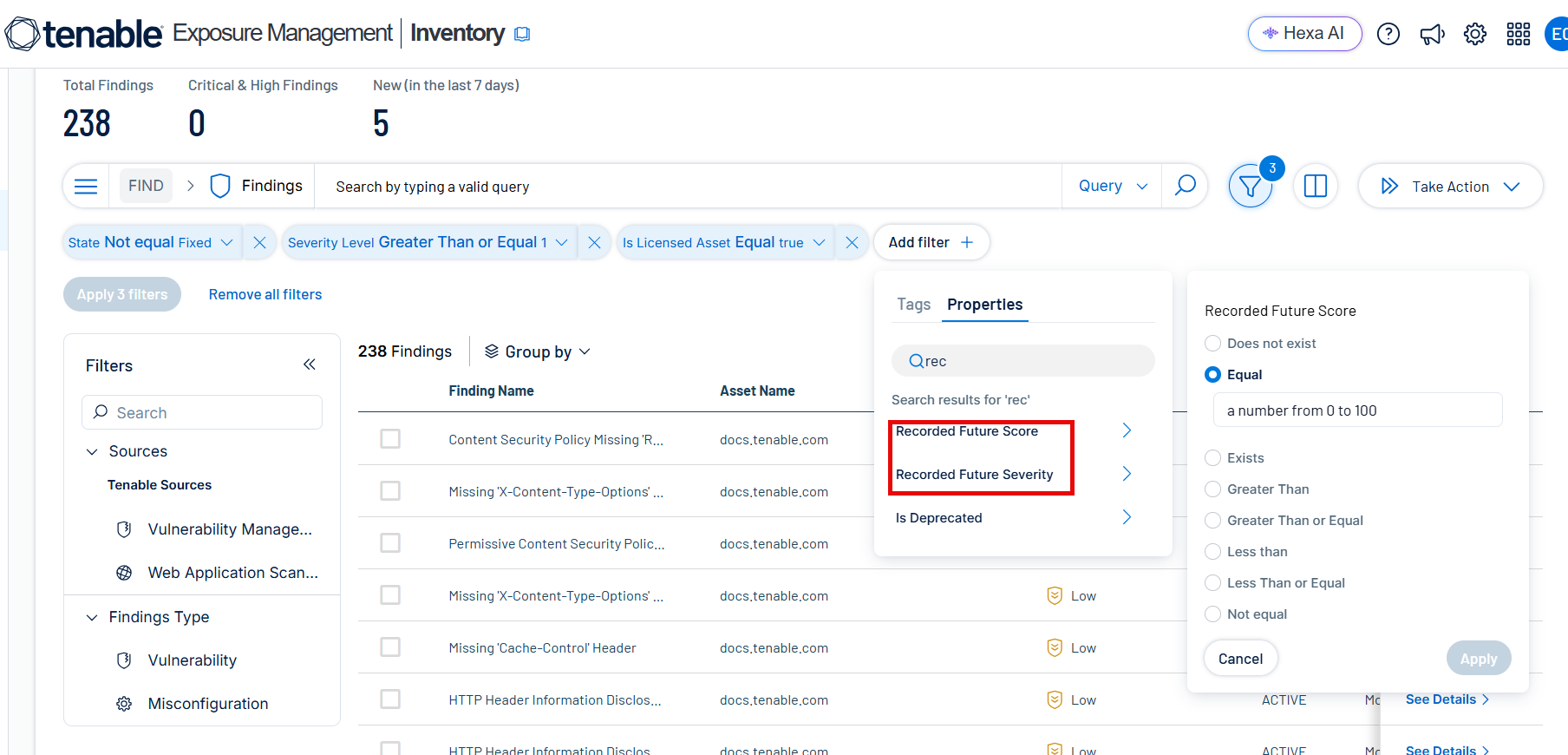
The findings list updates to show only findings that have Recorded Future score and/or severity impact reflected in their details.
-
-
Click on any finding to view itsFinding Details, including the Recorded Future Score and Recorded Future Severity fields.


Data Mapping
Tenable Exposure Management integrates with the Recorded Future connector via API to retrieve CVE risk data and maps it into Tenable Exposure Management. The following table outlines how fields are mapped from Recorded Future to Tenable Exposure Management.
Finding Mapping
| Tenable Exposure Management UI Field | Recorded Future Field | Description |
|---|---|---|
| Recorded Future Risk Score | rf_risk_score | A numeric score (0–99) representing the real-world threat level of the CVE, as calculated by Recorded Future. |
| Recorded Future Risk Level | risk_level | A severity label mapped from the Recorded Future risk score. For the full mapping, see Finding Severity Mapping. |
Finding Severity Mapping
The table below shows how Recorded Future risk scores map to severity levels in Tenable Exposure Management.
To ensure your team focuses on the most critical threats, Tenable Exposure Management only retrieves CVEs with a Recorded Future risk score higher than 64.
|
Recorded Future Risk Score |
Recorded Future Risk Level in Tenable Exposure Management |
|---|---|
| 99 or higher | Very Critical |
| 90–98 | Critical |
| 65–89 | High |
| 25–64 | Medium |
| 5–23 | Low |
| 4 or lower | No Current Risk |
Status Update Mechanisms
Every day, Tenable Exposure Management syncs with Recorded Future to receive updated risk scores and risk levels for existing CVE findings.
The table below describes how the status update mechanism works for findings ingested from this connector.
|
Update Type in Tenable Exposure Management |
Mechanism (When?) |
|---|---|
|
Risk score and risk level update |
When Recorded Future updates the risk score or risk level for a CVE, Tenable Exposure Management reflects the change after the next scheduled connector sync. |
Support and Expected Behavior
This section outlines expected behaviors and limitations related to the Recorded Future connector and Tenable Exposure Management.
-
The Recorded Future connector does not ingest new findings into Tenable Exposure Management. It only enriches the severity and risk score of findings that other Tenable scanners or third-party connectors have already ingested.
-
During each data sync, Tenable Exposure Management retrieves only CVEs with a Recorded Future risk score greater than 64 (High severity or above).
-
Tenable Exposure Management correlates Recorded Future risk scores and risk levels at the CVE level and displays them in the finding details for each affected CVE.