Identify a Hybrid Attack Path from On-Premises to a GCP Service Account
Objective
A hybrid attack path occurs when an attacker compromises an on-premises asset and uses it to pivot into a cloud environment. In this specific scenario, the path is formed when an on-premises computer holds an environment variable containing the file path to a Google Cloud Platform (GCP) Service Account configuration file (usually a .json file). By locating this file, an attacker can extract the Application Access Token and gain unauthorized access to the associated Service Account in GCP. Your objective is to find this attack path before it becomes a critical issue.
Prerequisites
-
Ensure you have the appropriate Scan permissions for discovery.
-
Ensure you have the appropriate permissions to view the data.
-
The system requires data collection from both the on-premises and the cloud environment.
Step 1: Discovery
To successfully map this hybrid path, Tenable Exposure Management must collect data from both the on-premises endpoint and the cloud environment:
On-Premises Discovery
The system scans the local machine to check if an environment variable exists that points to the Service Account configuration file.
-
In Tenable One Vulnerability Management, create a scan focused on the following Tenable Nessus plugins:
Cloud Environment Scanning
You must also scan the GCP network using Tenable One Cloud Exposure. This maps the cloud side of the equation, identifying the existing Service Accounts and their permissions within GCP.
-
Connect and configure your Tenable One Cloud Exposure environment. Tenable One Cloud Exposure automatically ingests the network data.
Step 2: Search Attack Path
Once Tenable Exposure Management correlates the data, you can locate these specific hybrid paths using the Attack Path Query Builder.
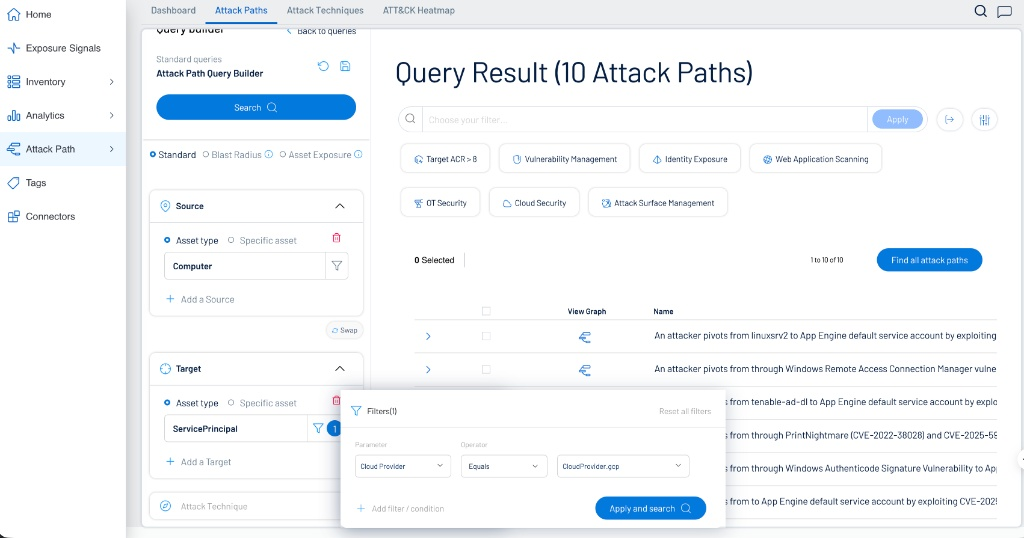
Configure the query as follows:
-
Source > Asset type: Computer
-
Target > Asset type: ServicePrincipal
-
Filters (by Target):
-
Parameter: Cloud Provider
-
Operator: Equals
-
Value: CloudProvider.gcp
-
Step 3: Verify the Attack Path Flow
-
Within the Attack Path section of the application, verify the data generated by the query as described in Interact with Attack Path Query Data.
-
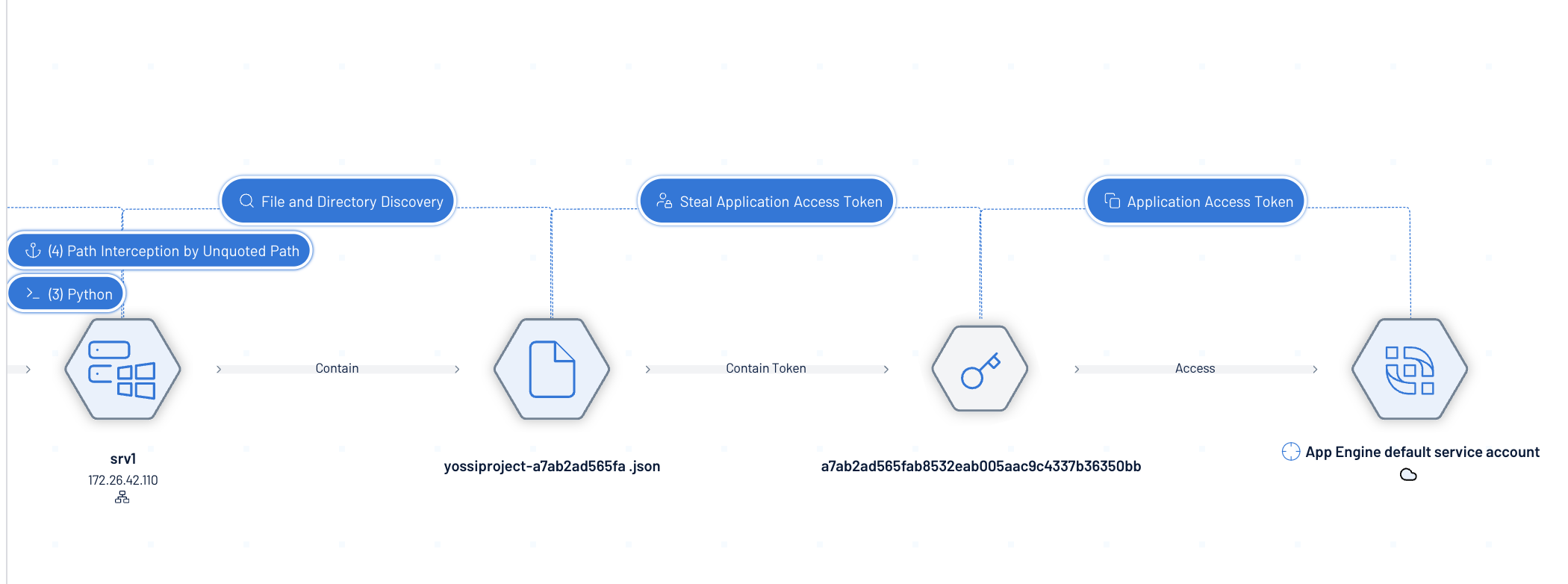
When viewing a specific attack path graph, the visualization breaks down the steps an attacker would take:
-
Initial Compromise: The attacker gains access to a local computer (e.g., srv1).
-
File Discovery: The machine contains the configuration file, such as yossiproject-a7ab2ad565fa.json.
-
Token Extraction: The attacker steals the Application Access Token contained within the file.
-
Cloud Access: The token provides direct access to the target, such as the App Engine default service account in GCP.
-