What's New
10.0.971
Tenable is thrilled to welcome you to the latest evolution of Tenable Patch Management! As of January 22, 2026, Tenable has officially unified our product experience to give you more simplicity, better control, and a modernized interface that works for everyone. We have retired the "Express" vs. "Enterprise" labels to provide one single, powerful TPM experience for everyone that delivers on the promise of autonomous patching.
Experience the Magic of Simplicity: New User Experience in TPM Version 10.0
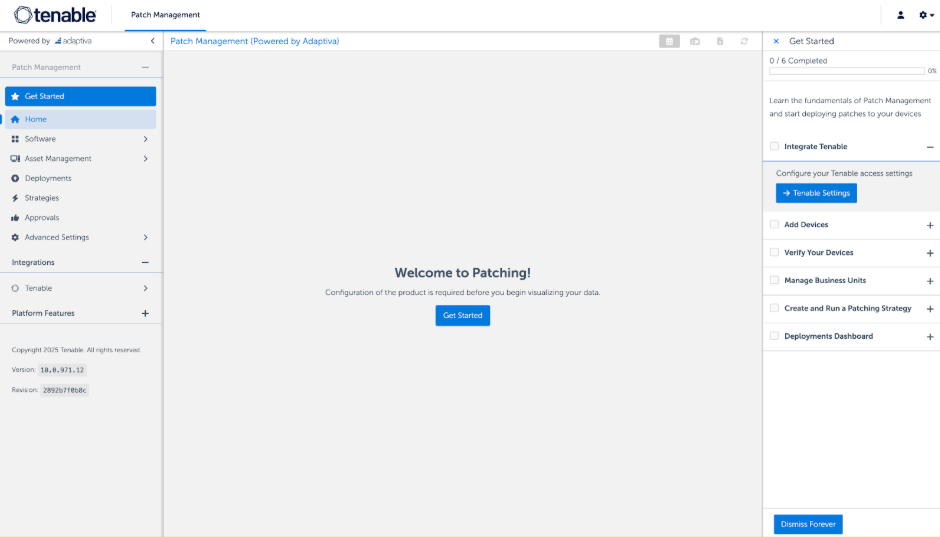
The following is your comprehensive guide to everything that’s new, along with detailed answers to help you make the most of this exciting update.
TPM Navigation Map: Version 9 vs. Version 10
The TPM user interface has undergone a significant reorganization and optimization in order to simplify the setup and operations of autonomous patching. But transitioning to a new interface can feel like moving into a new house—you know everything is there, you just need to find where it’s been unpacked!
To help you get settled into your new home (v10), here is your "where is it now" navigation map. While all common tasks are now front-and-center (thus simplifying your daily workspace), all granular configurations are waiting for you in the new Advanced Settings hub to keep your main dashboard clean and focused.
| Tenable Patch Management Version 9 | Tenable Patch Management Version 10 |
|---|---|
|
Patch Management |
-- |
|
Home |
Home |
|
Patching Analytics > Overview |
Replaced by Home and Deployments dashboard |
|
Patching Analytics > Products |
Software > Products |
|
Patching Analytics > Patches |
Software > Patches |
|
Patching Analytics > Devices |
Asset Management > Devices |
|
Patching Analytics > Strategy Operations |
Advanced Settings > Intent Schema > Strategy > Strategy Operations |
|
Flex Controls |
Advanced Settings > Flex Controls |
|
Approval Requests |
Approvals |
|
Risk Assessment Settings |
Advanced Settings > Risk Assessment Settings |
|
Intent Schema |
-- |
|
Business Units > Business Units |
Asset Management > Business Units |
|
Business Units > Rollout Processes |
Advanced Settings > Intent Schema > Rollout Processes |
|
Strategy > Patching Strategies |
Strategies |
|
Strategy > Patching Processes |
Advanced Settings > Intent Schema > Strategy > Patching Processes |
|
Bots > Patch Deployment Bots |
Advanced Settings > Intent Schema > Bots > Patch Deployment Bots |
|
Chains > Approval Chains |
Advanced Settings > Intent Schema > Chains > Approval Chains |
|
Chains > Notification Chains |
Advanced Settings > Intent Schema > Chains > Notification Chains |
|
Deployment Channels > Deployment Channels |
Advanced Settings > Intent Schema > Patch Scheduling > Deployment Channels |
|
Deployment Channels > Processes |
Advanced Settings > Intent Schema > Patch Scheduling > Deployment Channel Processes |
|
Deployment Waves |
Advanced Settings > Intent Schema > Deployment Waves |
|
Maintenance Windows |
Advanced Settings > Maintenance Windows |
|
Communication Providers |
Advanced Settings > Communication Providers |
|
User Interaction Settings |
Advanced Settings > User Interaction Settings |
|
Customized Products |
Advanced Settings > Customized Products |
Key Navigation Tips
-
The Power Hub: If you can't find a granular configuration that was previously in the Intent Schema, it is likely now under the Advanced Settings menu.
-
Consolidated Help: You no longer need to check separate manuals for different product versions; we now have one single, unified User Guide for the product .
-
Quick Access: Use the new Home Dashboard for a high-level view and the Deployments Dashboard for monitoring active patching cycles in real-time.
Frequently Asked Questions: The New Tenable Patch Management v10 Experience
General Transition & Product Vision
What has changed with Tenable Patch Management (TPM)?
We have moved to a Single SKU model and a completely redesigned UI/UX. This means we have officially retired the distinction between "Express" and "Enterprise" versions to provide a single, powerful TPM experience for everyone.
Why did we make these changes?
We listened to your feedback! You repeatedly told us that while TPM is incredibly powerful, the learning curve could be steep (especially for the Enterprise version). For many TPM Express customers, they hit a wall and had to move to the Enterprise version when needing more granular control or advanced use cases. So we set a goal to simplify product experience for all, reduce operational complexity, focus on the daily workflow of the administrator, and modernize TPM for both on-prem and cloud environments. We’ve hidden complexity where it isn’t needed and surfaced the actions that matter most. This update delivers on our promise of an autonomous patching approach that balances ease of use with deep granular control.
Where can I find instructions for the new version?
To keep things simple, we have consolidated our documentation! There is now a single, unified User Guide that replaces the old separate versions for Express and Enterprise.
User Interface & Onboarding
What is the new Guided Setup?
TPM now features a simple six-step wizard-based onboarding for all users. This new interactive Getting Started guide walks you through setup in six easy steps (most useful for new users, also as a refresher for existing users). This intuitive process covers almost all common customer needs and use cases, getting you up and running in minutes instead of hours.
I’m an advanced user. Where did my settings go?
Don't worry, the power is still there! All remaining complex use cases, advanced configurations, and granular controls are now located in a fully redesigned Advanced Settings area. This section handles complex needs like intent schemas, flex controls, exceptions, rollout processes, etc.
Where can I find granular settings that were previously in the "Intent Schema"?
To keep the main workspace clean, these advanced capabilities have been centralized into the new Advanced Settings hub. This is where you can still find and create granular configurations as needed.
What other visual changes should I expect?
The entire interface has undergone a significant reorganization. You will find completely redesigned navigation, a new Home Dashboard, a dedicated Deployments Dashboard, and modernized reporting and rollbacks.
Upgrade, Migration, and Licensing
How does this affect my current TPM SaaS/Cloud subscription?
-
Automatic Upgrade: All SaaS tenants have been automatically upgraded to the new UI as of the January GA release date (January 22, 2026). For SaaS clients, please follow the instructions here to upgrade your clients to v10.
-
SKU Update: We’ve moved to a single standard SKU for all TPM SaaS purchases. The Express SKU has reached End of Sale (EOS).
-
Renewals: While you can continue using the new UI under an existing TPM Express SKU, you will transition to the single TPM SaaS SKU at your next renewal. Our Tenable Representative or Tenable Customer Support team will be there to help you to ensure a smooth transition.
What about TPM On-Premise customers?
-
Manual Upgrade: On-premise customers will remain on the legacy UI until you manually upgrade to v10, and therefore, you remain in full control of your transition timeline. If you are choosing to stay on a legacy version (v9.3 or prior) for now, you can still access the original Express and Enterprise user guides on our documentation site. However, Tenable strongly recommends upgrading to v10 today to take advantage of our most streamlined experience yet! If you choose to upgrade now, we are facilitating zero-dollar exchange orders to move you to the new features immediately. Please speak to your Tenable Representative or contact our Tenable Customer Support team to help you with this transition.
-
SKU Consistency: The existing TPM SKU remains the official, single SKU for all on-premise purchases. And there is no Express or Enterprise distinction.
-
Mandatory Transition: Migration to the new v10 model is mandatory at the time of your renewal.
How does the upgrade to TPM 10.0 affect my current strategies?
Existing strategies are completely untouched on upgrade.
New Features & Updates
Are there improvements to security and access control?
Yes! For TPM On-Premise, we have significantly expanded Role-Based Access Control (RBAC). We have introduced new built-in security roles for TPM, including a branch office administrator role. With these enhancements you can provide scoped access to locations such as branch offices or testing labs, as well as provide read-only access for scenarios like security audits.
Note: At this time, RBAC capability is limited in scope and available exclusively for the TPM On-Premise offering. Full RBAC capabilities for both TPM On-Prem and TPM SaaS are currently on the product roadmap and are projected to be delivered during the first half of 2026.
New Strategy Creation and Setup Process in TPM 10.0
What are the new changes in Strategy Creation and Setup?
With the release of TPM v10, we have completely re-imagined how you build and manage your patching workflows. We've moved away from overwhelming single-page lists of settings to a guided, wizard-based approach focused on three simple questions: What? When? and How?
What is the new "What, When, and How" approach?
This is our new guided process for strategy creation:
-
What: You select the products you want to patch and can apply Patch Filters to target specific vulnerabilities, such as those with known exploits.
-
When: You set your deployment schedule, such as weekly, daily, or as soon as possible (ASAP).
-
How: This is where you define your Deployment Rings and automated Transitions to control how patches move through your environment.
What happened to my existing strategies?
Your legacy strategies are completely untouched. They will continue to function exactly as before without any changes or alterations.
Can I see which patches will be affected before I activate a strategy?
Yes! A new Preview feature allows you to see exactly which patches will be impacted by your filters and selections before you go live.
Deployment Rings & Transitions
Why are they now called Deployment Rings?
We have renamed "Waves" to Deployment Rings to better align with industry standards. .
How do Transitions work in v10?
Transitions allow you to automate the logic between your Deployment Rings. There are three types of transitions:
-
Delay Transitions: The system waits for a set period of time (e.g., wait a set number of days) before moving to the next ring.
-
Approval Transitions: Requires manual sign-offs from specific roles before proceeding.
-
Success Transitions: Automatically moves to the next ring only if a specific success threshold is met (e.g., 95% success with less than 5% failures).
What happens if a Success Transition threshold is not met?
You can now define automated safety actions if a patch fails to meet your success criteria:
-
Abort: Stops the deployment strategy entirely.
-
Continue: Proceeds with the deployment but logs the failure for review.
-
Rollback: Automatically rolls back the failing patch for those who received it while allowing the rest of the healthy patches in the strategy to continue forward.
Can I accelerate a deployment already in progress?
Yes! Through the new Deployment Dashboard, you have full control over active cycles. If you've validated a patch and need to secure your environment faster, you can now skip approvals to bypass wait periods and move the patch across the finish line immediately.
Setup & Built-in Features
Does v10 include any built-in groups for testing?
Yes. We have introduced new built-in business units perfect for pilot testing, such as "1% of Workstations" or "5% of devices". These allow you to set up a pilot ring without having to manually define the group.
Is there help for setting up my first strategy?
Absolutely. As mentioned before, our new Getting Started guide is an interactive, step-by-step wizard-based walkthrough. It guides you through verifying devices, managing business units, and building your very first strategy using the new wizard.
Redesigned Dashboards & Actionable Insights
What are Interactive Metrics?
Data is now at your fingertips! Almost every number you see on the new dashboard—from blocked patches to device counts—is now an interactive drill-down. Simply click any metric to go directly to the specific data or systems behind that number.
How do I track real-time changes in my environment?
We now have "Delta Numbers" prominently displayed in our insight boxes. These show you the exact change over time; for example, you can adjust your view to the last X number of days or a particular calendar date to see exactly how many new patches were installed or new products were discovered in that specific window.
What are Blind Spots?
We've surfaced critical information that used to be buried. The Insights section now highlights your environment's "Blind Spots", crucially surfacing products not covered, offline devices, and pending approvals right at the top of your homepage.
The Emergency Kit & Quick Actions
What is the Emergency Kit?
For moments when you need to act instantly, we now have an Emergency Kit right on the homepage. This gives you instant access to Flex Controls, such as the Global Pause, which stops all patching with a single click.
What happens when I use Global Pause?
Visibility is key! When an admin triggers a Global Pause, it stops all patching globally with one click. TPM 10.0 now displays a Global Banner across the console. Every other logged-in admin will see exactly who paused the system, why, and for how long.
How does the new "Block a Patch" wizard work?
Remediation is now a single, streamlined workflow. If a patch causes an issue, this wizard blocks the patch for the future. When you use the Block a Patch wizard, you can block such a problematic update and—with one click—automatically trigger a rollback for any systems that already received it in one single workflow. The wizard handles the entire "undo" process for you.
Are there any changes to Notifications?
Yes. User notifications for interfering applications have been enhanced.
Technical System Update
To ensure peak performance and security, both the Tenable Server and Client have been updated to use Java 25, and several third-party libraries have been refreshed.
Need More Details or Have Any Other Questions?
Refer to the new unified TPM User Guide, speak to your Tenable Representative, or contact our Tenable Customer Support team for any further assistance.
Full release notes
For details on any of these changes, refer to the Release Notes.