Manage Live Results
Required user role when using Tenable Nessus Manager: Standard, Administrator, or System Administrator
Use the following procedures to manage your live results. For more information about live results, see Live Results.
Enable or Disable Live Results
The first time you enable live results on a scan, the scan results update to include findings for plugins that were enabled since the last scan. The scan then updates with live results whenever there is a new plugin update. Live results are not results from an active scan; they are an assessment based on a scan's most recently collected data. Live results do not produce results for new plugins that require active detection, like an exploit, or that require data that was not previously collected.
To enable or disable live results:
- In Tenable Nessus Professional or Tenable Nessus Expert, create a new scan or edit an existing scan.
- Go to the Settings tab.
-
Under Post-Processing, enable or disable Live Results:
- To enable, select the Live Results checkbox.
- To disable, clear the Live Results checkbox.
-
Click Save.
Tenable Nessus enables or disables live results for this scan.
Remove Live Results
In Tenable Nessus Professional and Tenable Nessus Expert, if a scan includes live results, Tenable Nessus shows the following notice on the scan results page.
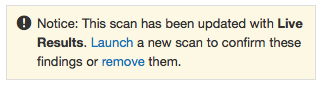
If you remove live results, they no longer appear on the scan results page. However, live results will re-appear the next time Tenable Nessus updates the plugins (unless you disable the feature for the scan).
Tip: To launch the scan and confirm the live results findings, click Launch in the notice before you remove the findings.
To remove Live Results findings from the scan results page:
-
In the notice, click remove.