Tenable One AI Exposure 2026 Q3 Release Notes
Tip: You can subscribe to receive these release notes by email or RSS.
These release notes are listed in reverse chronological order.
September 27, 2026 (Release 1.223)
New Features
 Monitor Runtime Activity for Homegrown AI Applications
AI Exposure now monitors custom-built homegrown AI applications (such as chatbots, copilots, and agents), whether they connect directly to a self-hosted model, a third-party LLM API, or a custom orchestration layer.
You connect your application through an API integration. AI Exposure analyzes the resulting prompt and response activity for risk and surfaces activity detections in the AI Exposure console, just as it does for managed cloud AI services. To detect activities from your AI applications, you must configure your applications to send logs to AI Exposure.
To view activity detections for your AI applications, navigate to the Activity Detections page in AI Exposure. For more information, see Activity Detections.
AI Exposure supports runtime monitoring (activity detections) for homegrown AI applications, but does not include posture assessment for them. Runtime monitoring or activity detections are only available with a Tenable One AI Governance add-on license.
For more information, see Connect Homegrown AI Applications.
ChatGPT Skill Inventory and Policies
AI Exposure discovers and inventories OpenAI ChatGPT skills across your environment, which provides visibility into enabled skills, skill creators, and skill content.
AI Exposure includes dedicated policies to detect exposure risks associated with these skills.
Multilingual AI Model Support
AI Exposure processes natural language input across a broad range of languages, enabling detection of AI threats in languages other than English.
Tenable's AI Exposure detections are trained to identify threats across 10 core languages:
- English
- Mandarin
- Spanish
- German
- Japanese
- French
- Arabic
- Portuguese
- Hindi
- Italian
This capability can also potentially process input in hundreds of additional languages beyond this core set. For these additional languages, success rates vary significantly by language. Tenable recommends validating any language outside the core set of languages before relying on it.
Sensitive Data Detection Policies for Skills
AI Exposure now includes sensitive data detection policies that scan the description and instructions fields on skills.
| Policy | Detects | Applies To |
|---|---|---|
| Skill contains sensitive access data | Access keys, API credentials, authentication tokens, client IDs, cookies, cryptographic keys, database connection strings, hardcoded credentials, IP addresses, private keys, access webhooks, and URLs | OpenAI |
| Skill contains sensitive PCI data | Credit card numbers and IBANs | OpenAI |
| Skill contains sensitive PII data | Addresses, business email addresses, personal email addresses, and Social Security numbers | OpenAI |
September 6, 2026 (Release 1.222)
New Features
Activity Detection Evidence Visible without AI Conversation Viewer Permission
AI Exposure displays evidence for activity detections regardless of whether you have the AI Conversation Viewer role. Previously, this evidence remained hidden from users who lacked that specific permission, even if they had access to view activity detections.
August 30, 2026 (Release 1.221)
New Features
ChatGPT Workspace Agent Inventory
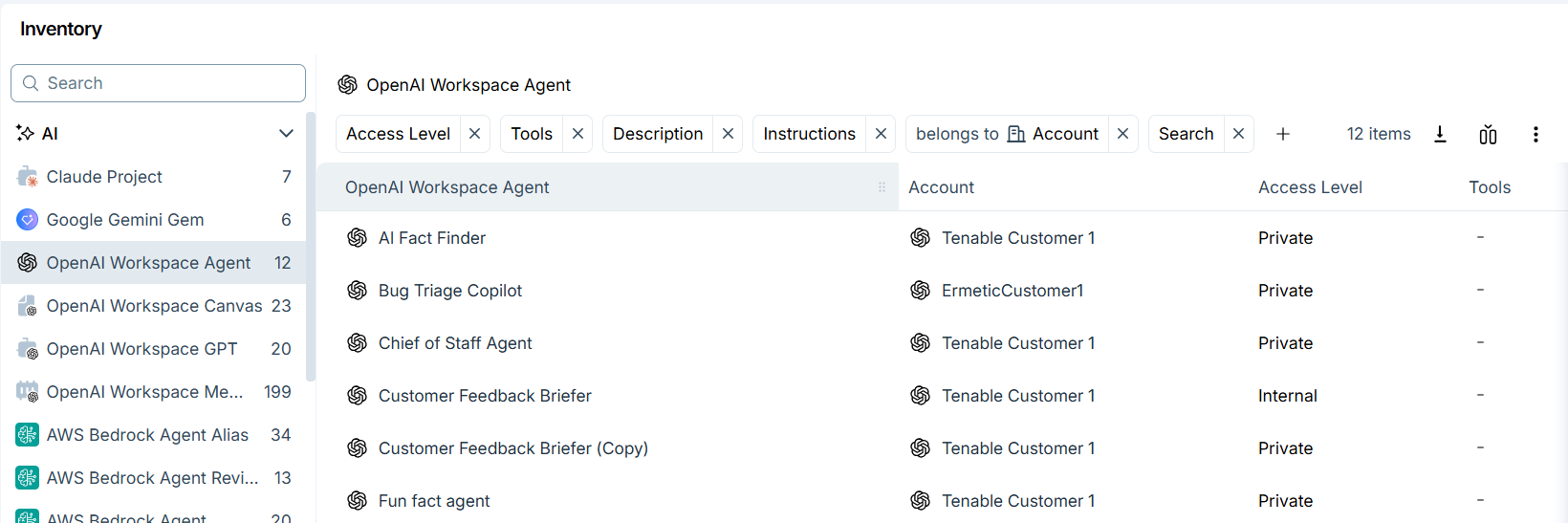
AI Exposure includes OpenAI ChatGPT Workspace Agents as an asset type in the AI inventory. AI Exposure categorizes each workspace agent as a Unified Data Model (UDM) object in the AI category, making its properties and relationships available in Query Builder, Dashboards, Reports, and custom policies.
Each workspace agent includes a dedicated profile page that displays its configuration, instructions, sharing scope, owner, and timestamps.
Sensitive Data Detection for AI Agent Descriptions
AI Exposure now includes sensitive data detection policies that scan the description and instructions fields on AI agents.
| Policy | Detects | Applies To |
|---|---|---|
| Agent's description contains sensitive access data | Access keys, API credentials, authentication tokens, client IDs, cookies, cryptographic keys, database connection strings, hardcoded credentials, IP addresses, private keys, access webhooks, and URLs | OpenAI |
| Agent's instructions contain sensitive access data | Access keys, API credentials, authentication tokens, client IDs, cookies, cryptographic keys, database connection strings, hardcoded credentials, IP addresses, private keys, access webhooks, and URLs | OpenAI, Copilot |
| Agent's description contains sensitive PCI data | Credit card numbers and IBANs | OpenAI |
| Agent's instructions contain sensitive PCI data | Credit card numbers and IBANs | OpenAI, Copilot |
| Agent's description contains sensitive PII data | Addresses, business email addresses, personal email addresses, and Social Security numbers | OpenAI |
| Agent's instructions contain sensitive PII data | Addresses, business email addresses, personal email addresses, and Social Security numbers | OpenAI, Copilot |
| Agent's instructions contain obfuscated input | Base32, Base64, hex-encoded content, and invisible characters | OpenAI, Copilot |
Support for Claude Cowork and Claude Code Conversations
AI Exposure now pulls conversation data from Claude Cowork and Claude Code sessions using Anthropic's extended Compliance API coverage. It evaluates this data for security risks using the same criteria it applies to standard Claude.ai chat interactions.
AI Exposure Reporting
AI Exposure now includes built-in reports for AI Inventory and the AI Dashboard, as well as query-based customizable reports for UDM entities.
August 16, 2026 (Release 1.219)
New Features
Content Types in Activity Rules
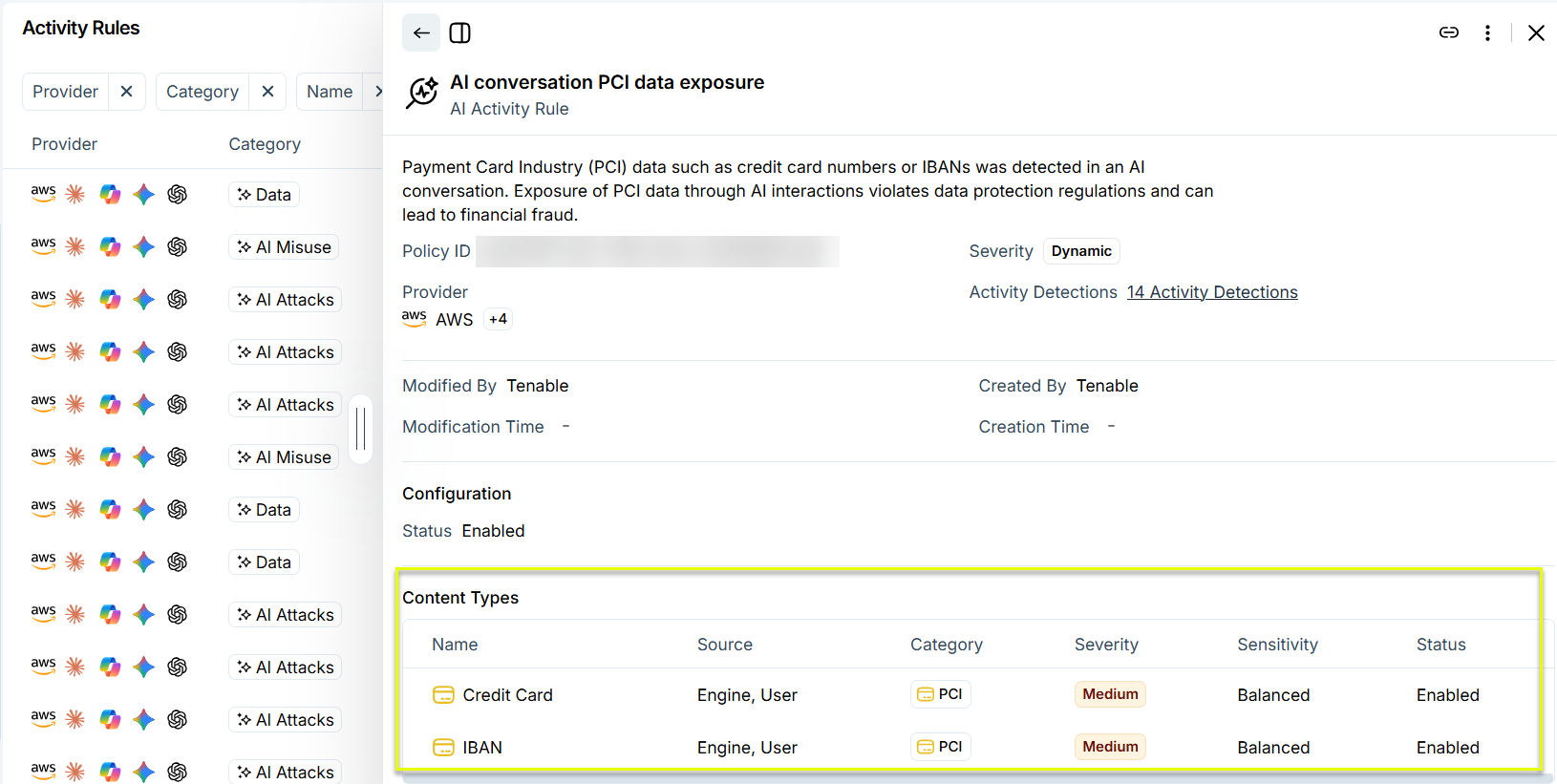
AI Exposure now displays a Content Types table in the Activity Rules details panel, providing visibility into the specific data types each rule is configured to monitor in AI conversations.
The table lists each content type with its detection source (engine output, user input, or both), classification category, severity level, sensitivity setting, and enabled status.
For more information, see View Activity Rule Details.
Filtering by Origin for Activity Detections and Conversations
You can now filter activity detections and conversations by Origin, making it easier to triage and investigate them.
Access-Level Reporting for Claude Projects in Explorer
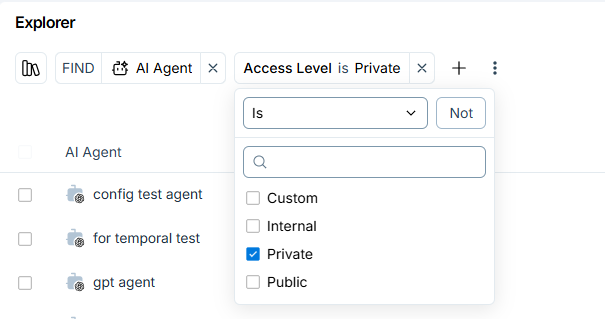
AI Exposure now reports an access level (Private, Internal, Custom, or Public) for Claude AI projects.
This is consistent with the access-level reporting already available for Copilot, OpenAI, and Gemini AI agents. You can view the access-level property in the Explorer view.
August 9, 2026 (Release 1.218)
New Features
View AI-Related Software Packages in Cloud Workloads
You can now view AI-related software packages installed in cloud workloads in your environment from Explore > Software.
For each software package, you can view details such as the package name, version, type, file paths, and the total number of detected instances. For more information, see Software.