Tenable One Vulnerability Management 2026 Release Notes
Tip: You can subscribe to receive alerts for Tenable documentation updates.
These release notes are listed in reverse chronological order.
October 15, 2026
 Adversary View Is Now Generally Available
Adversary View, a Tenable Hexa AI capability, is now generally available. It lets you look at your assets from an attacker's viewpoint. Point it at a set of assets you already scan, and ask how an attacker could move through your environment. Tenable Hexa AI builds an on-demand graph from your existing scan and finding data, with no new deployment required. It returns ranked attack paths, each hop backed by the scan evidence behind it, along with a prioritized list of what to fix.
What's New
- Ranked attack paths, powered by frontier AI: Start an Adversary View from the Adversary View tile in the Hexa AI panel, or ask Tenable Hexa AI for one by tag, network, operating system, IP range, or a mix. Review the scope summary, confirm it, and Tenable Hexa AI returns attack paths with the scan evidence behind each hop.
- Background processing: Analysis can take several minutes. You can close the Hexa AI panel, go to a different page, or switch workspaces while it runs, and the results are waiting when you return.
- Follow-up questions: Ask follow-up questions in the same conversation. Tenable Hexa AI reuses the graph it already built, so follow-ups return faster than the initial analysis.
- Administrator controls: An administrator must enable the Enable Frontier AI Model Access toggle on the Tenable Hexa AI Settings page. Users also need the Use permission for Adversary View in their custom role (also supported in the Scan Manager role and above).
- Downloadable Reports: Use Tenable Hexa AI to generate a PDF summary report that you can download from any chat.
For more information, see Adversary View in the Tenable One Vulnerability Management User Guide.
October 9, 2026
Tenable Hexa AI Now Supports Asynchronous Chatting
What's New
Tenable Hexa AI now continues to process your chats while you do other things. You can close the Hexa AI panel, go to a different page, switch workspaces, or refresh your browser, and Tenable Hexa AI keeps working. When you return to the conversation, the response is waiting for you. You can also run multiple chats at the same time.
For more information, see Work While Hexa Processes Your Chat in the Tenable One Vulnerability Management User Guide.
October 6, 2026
Offline Health Status for Inactive Linked Agents
Tenable One Vulnerability Management now displays an Offline health status for linked agents that have not checked in for 72 hours or more. Previously, the Health column on the Linked Agents page continued to show the agent's last reported health status indefinitely, even if the agent was no longer communicating. With this update, the health status automatically changes to Offline at the 72-hour mark, giving you a more accurate view of agent health across your environment.
For more information, see View Linked Agent Health Events in the Tenable One Vulnerability Management User Guide.
September 29, 2026
Platform Settings Custom Role Privileges
Tenable One Vulnerability Management now supports granular custom role privileges for platform settings. Administrators can create custom roles that grant access to specific platform-level settings, including exports and access control users, without granting broader administrative access. This helps you follow the principle of least privilege by delegating specific tasks, such as managing exports or viewing users, to the people who need them.
Key Highlights
-
Export privileges: Administrators can independently grant the privilege to manage a user's own exports or all exports.
-
Access control users privilege: Administrators can grant read access to the users module in access control settings.
-
No impact to existing roles: Existing roles that include legacy export privileges continue to work without changes.
For more information, see Custom Role Privilege Application in the Tenable One Vulnerability Management User Guide.
OAuth 2.0 Support for Jira Cloud and ServiceNow Connectors
Tenable One Vulnerability Management now supports OAuth 2.0 authentication for Jira Cloud and ServiceNow ticketing connectors. OAuth keeps your ticketing workflows running as Atlassian deprecates Basic Auth for Jira Cloud, and it replaces stored credentials with more secure, token-based access.
Key Highlights
-
OAuth 2.0 for Jira Cloud and ServiceNow: You can now authenticate ticketing connectors using OAuth 2.0 (Authorization Code grant). OAuth replaces Basic Auth, which Atlassian is deprecating for Jira Cloud. OAuth is not supported for Jira Data Center or Jira Server.
-
Create a new connector to migrate: The authentication type of an existing connector cannot be changed. To move from Basic Auth to OAuth, create a new OAuth connector.
For more information, see Configure Jira Cloud with OAuth and Configure ServiceNow with OAuth in the Tenable One Vulnerability Management User Guide.
September 17, 2026
Updates for Tenable Hexa AI
What's New
-
Scans: Troubleshoot Scan Failures and Plugin Misfires: Tenable Hexa AI can now diagnose scan issues on demand. Ask why a scan failed or why a specific plugin did not fire on an asset, and Tenable Hexa AI reviews the scan run and its results, checks plugin applicability for the asset, and returns an explanation of the failure or non-firing condition.
For more information, see Use Tenable Hexa AI via User Interface in the Tenable One Vulnerability Management User Guide.
September 14, 2026
Custom Roles for the PCI Workbench
Tenable One Vulnerability Management now supports custom roles for the Tenable One PCI ASV Workbench. Administrators can create custom roles that grant granular View, Write, and Delete permissions for each tab in the PCI Workbench, including the ASV Review tab, without granting broader access to the rest of the platform.
Key Highlights
-
Per-tab, per-action permissions: Administrators can independently enable View, Write, and Delete access for each tab in the PCI Workbench, including ASV Review.
-
Attestation submissions grouped under Write: Submitting an attestation for ASV review is a sensitive action and is included under the Write permission for the Attestation tab.
-
Implicit scan permissions: PCI custom roles automatically include the underlying Tenable One Vulnerability Management and Tenable One Web App Scanning scan template permissions required to run PCI scans, so administrators don't need to separately grant broader Vulnerability Management or Web Application Scanning access.
-
No impact to existing roles: Existing pre-configured roles, such as Administrator and Scan Manager, and Tenable-assessor access are unaffected by this update.
For more information, see PCI ASV Custom Role Privilege Application in the Tenable One Vulnerability Management User Guide.
August 24, 2026
Updates for Tenable Hexa AI
What's New
-
Scans: Paranoid Mode and Thorough Tests Accuracy Settings: Scan creation and configuration with Tenable Hexa AI now support the paranoid mode and thorough tests accuracy settings.
Bug Fixes
-
Conversations: Reliable Turn Cancellation: Tenable Hexa AI now blocks you from starting a second turn while one is still running, and canceling a turn now works reliably.
-
Conversations: Faster Deletion for Large Histories: Deleting all conversations no longer times out on accounts with a large conversation history.
For more information, see Use Tenable Hexa AI via User Interface in the Tenable One Vulnerability Management User Guide.
August 19, 2026
Updates for Tenable Hexa AI
Bug Fixes
-
Scans: Vulnerability Lookup No Longer Requires an Unusable Reference: Vulnerability lookups no longer ask for a scan history reference that Tenable Hexa AI cannot use.
For more information, see Use Tenable Hexa AI via User Interface in the Tenable One Vulnerability Management User Guide.
August 18, 2026
Updates for Tenable Hexa AI
Improvements
-
Answer Quality: Consolidated Product Links: Links into the product now appear once at the end of an answer instead of repeating throughout.
-
Answer Quality: Consistent Refusals on Unanswerable Requests: Tenable Hexa AI no longer substitutes data from another product area when it cannot answer a question, and it now holds firm with a refusal when pressed.
-
File Uploads: Clearer Workflow Guidance: Uploading a file now states which workflows can use it, so Tenable Hexa AI stops offering workflows that cannot use the file.
For more information, see Use Tenable Hexa AI via User Interface in the Tenable One Vulnerability Management User Guide.
August 17, 2026
Trending Widgets
Tenable One Vulnerability Management now supports custom trending widgets that track findings or asset data as a line chart over time. Each widget displays up to five independently configured trend lines, each with its own dataset, entity type, and optional filter. Trend data accumulates once per day from the date the widget is saved, up to 90 days — there is no backfill of historical data.
A collection of pre-built trending widgets is also available in the widget library. To browse them, open the widget library and search for trending. Unlike custom trending widgets, data collection for pre-built widgets begins when you add the widget to a dashboard.
For more information, see Create a Custom Trending Widget in the Tenable One Vulnerability Management User Guide.
August 10, 2026
Updates for Tenable Hexa AI
Improvements
-
Identity: Unified Inventory Search: Identity searches now run through the same inventory search that Tenable Hexa AI uses for other assets.
-
Token Usage: Improved Caching Efficiency: Tenable Hexa AI significantly improves token caching read utilization, resulting in lower overall token utilization when you prompt it.
Bug Fixes
-
Filters: VPR v2 Repairs Explore Links: Vulnerability priority filters now use VPR v2, which repairs broken links into Explore.
For more information, see Use Tenable Hexa AI via User Interface in the Tenable One Vulnerability Management User Guide.
August 6, 2026
Updates for Tenable Hexa AI
Improvements
-
Jamf: Activity Log Visibility: Tenable Hexa AI's Jamf reads and writes now correctly appear in the Activity Log.
-
Routines: Upfront Tool-Licensing Checks: Creating a routine now checks tool licensing upfront instead of failing when the routine runs.
For more information, see Use Tenable Hexa AI via User Interface in the Tenable One Vulnerability Management User Guide.
August 4, 2026
Agent Center: Manage Routines at Scale
As teams scale Tenable Hexa AI routines across their environment, keeping track of what's running, what needs attention, and what already happened becomes its own job. Agent Center solves this with a single, dedicated page that gives you oversight of every routine in your instance, so you can spend less time hunting for status and more time acting on what matters.
Routines are now easier to manage day-to-day too: paused routines that need your input are called out clearly, you can force-relaunch a routine without waiting for its schedule, and every run keeps a conversation log so you can see exactly what a routine did — or pick up right where it left off if it's waiting on you.
As your routine count grows, Agent Center scales with you: once you pass 200 routines, a direct link to it appears right in the Routines panel, so managing at scale never requires digging through navigation.
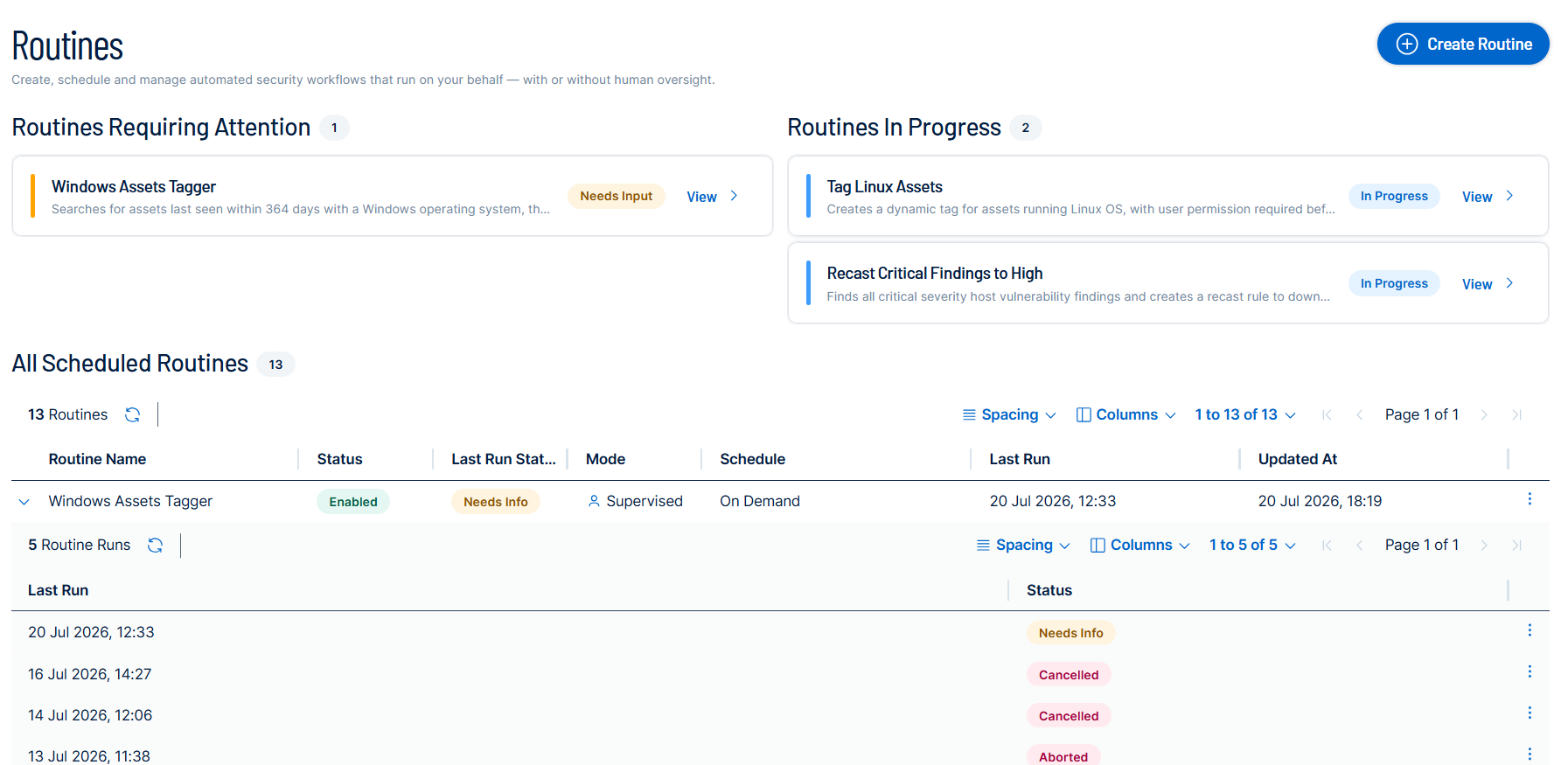
For more information, see Agent Center in the Tenable One Vulnerability Management User Guide.
Jamf Pro Integration for Tenable Hexa AI
Managing Apple devices usually means bouncing between two consoles: Tenable for the vulnerability picture, Jamf Pro for actually doing something about it. Tenable Hexa AI closes that gap. Once you connect a Jamf Pro account, you can ask Tenable Hexa AI to look up device inventory, patch status, and group membership, correlate the results to your Tenable assets, and act on what it finds by creating Jamf groups, patch policies, and software update plans.
Every action that changes something in Jamf Pro goes through your approval first: Tenable Hexa AI proposes the action in a card describing exactly what it's about to do, and nothing happens until you confirm it.
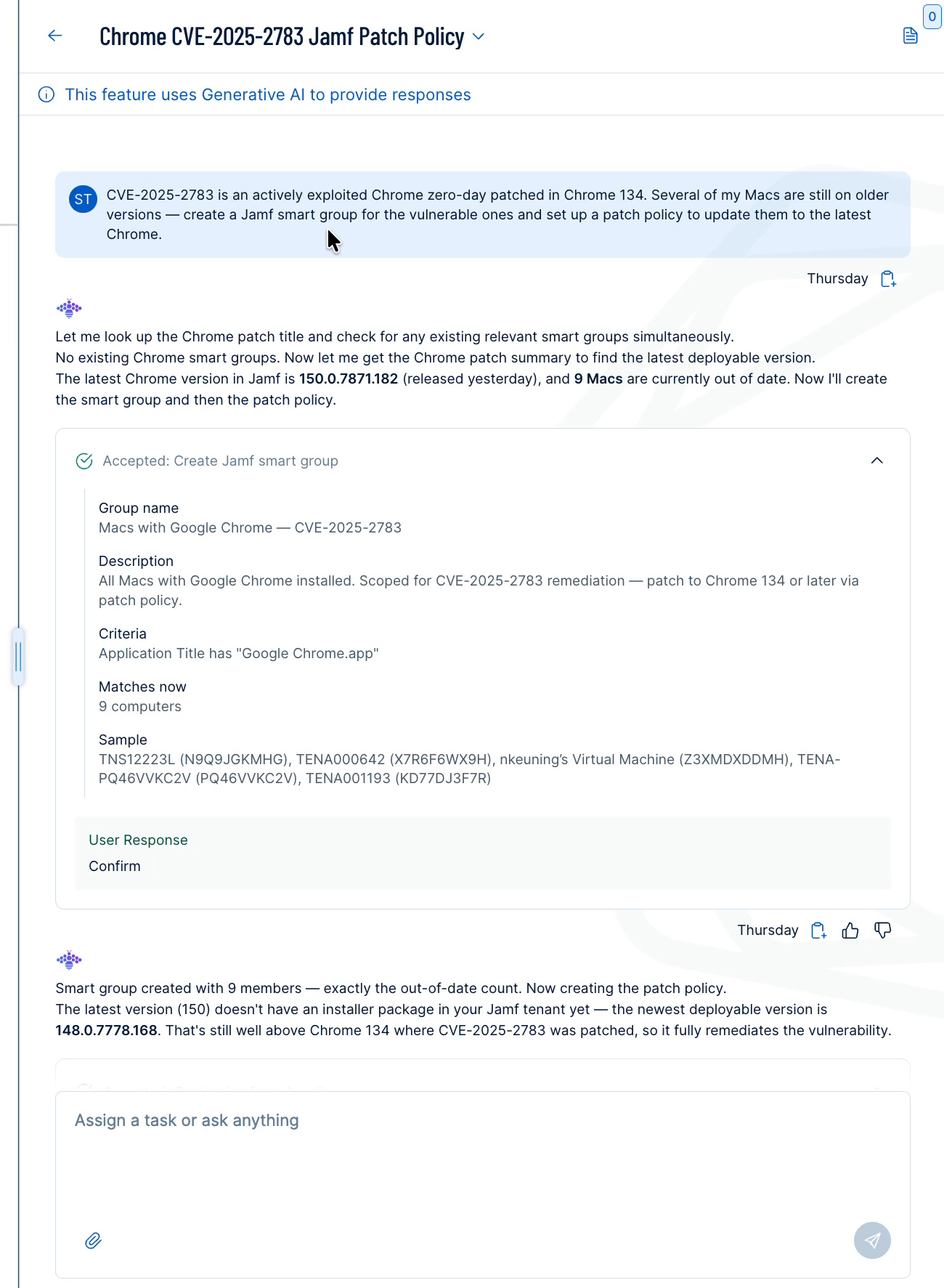
For more information, see Use Jamf Pro with Tenable Hexa AI in the Tenable One Vulnerability Management User Guide.
Updates for Tenable Hexa AI
Bug Fixes
-
Scans: False-Positive Diagnosis Routing: Questions about a plugin firing on the wrong component now route to false-positive diagnosis.
-
Scans: Scan Configuration and Debugging Requests: Tenable Hexa AI no longer declines requests to configure or debug a scan.
For more information, see Use Tenable Hexa AI via User Interface in the Tenable One Vulnerability Management User Guide.
August 3, 2026
Updates for Tenable Hexa AI
Improvements
-
Routines: Clearer Stop Reasons: A stopped routine now shows why it stopped, such as an exceeded quota or a failed sign-in.
-
Answer Quality: Accurate Task-Completion Guidance: Tenable Hexa AI no longer points you to a related feature that cannot finish your task.
Bug Fixes
-
Routines: Skill Access Restored: Routines can now use skills such as Identity search, which were in some cases blocked without warning.
-
Routines: Scheduled Routines Run in Local Time: Scheduled routines now run at the local time you set, fixing an issue that shifted the run time to UTC.
-
Filters: In the News Filter Correction: Tenable corrected the operators on the In the News, Last 30 Days filter so that it matches what the platform accepts.
For more information, see Use Tenable Hexa AI via User Interface in the Tenable One Vulnerability Management User Guide.
July 30, 2026
Updates for Tenable Hexa AI
What's New
-
Filters: 34 New Fields: Tenable Hexa AI adds 34 vulnerability filter fields, covering CVSSv3 and CVSSv4 metrics, VPR key drivers, exploit dates, and EPSS percentile.
For more information, see Use Tenable Hexa AI via User Interface in the Tenable One Vulnerability Management User Guide.
July 29, 2026
Updates for Tenable Hexa AI
Improvements
-
Answer Quality: No Internal Reasoning in Answers: Tenable Hexa AI no longer shows its internal reasoning in an answer.
-
Scans: Clearer Troubleshooting Answers: Scan troubleshooting answers are now clearer about what they do and do not know.
Bug Fixes
-
Scans: Asset UUID Support in Troubleshooting: Scan troubleshooting now accepts an asset UUID, not just a numeric ID.
For more information, see Use Tenable Hexa AI via User Interface in the Tenable One Vulnerability Management User Guide.
July 27, 2026
Software Tab in Explore
Tenable One Vulnerability Management now includes a new Software tab in Explore, providing a centralized inventory of software discovered across your assets from credentialed and agent scans. With the Software tab, you can:
- Browse software by vendor or product type using the side tree
- Search and filter by vendor, product name, version, and product type
- Group results by asset or vendor
- Drill into software details
- Export software data for offline analysis
For more information, see Software in the Tenable One Vulnerability Management User Guide.
Updates for Tenable Hexa AI
Bug Fixes
-
Reliability: Idle Request Connection Errors Resolved: Tenable fixed intermittent connection errors on idle requests.
-
Feedback: Feedback on Error Responses: You can now give feedback on a response that ended in an error.
For more information, see Use Tenable Hexa AI via User Interface in the Tenable One Vulnerability Management User Guide.
July 14, 2026
Tenable Hexa AI– Ticket and Initiative Creation
You can now ask Hexa to create Jira or ServiceNow tickets and Exposure Response initiatives directly from findings data. Describe what you need — for example, "Create a SNOW ticket for active findings with CVE-XXXX-XXXX and assign it to [user]" — and Hexa handles the rest, prompting you for any missing details. Created tickets are reflected in the Finding details ticket log, and new initiatives are added to the Exposure Response initiative library.
For more information, see Use Tenable Hexa AI via User Interface in the Tenable One Vulnerability Management User Guide.
Plugin Output in Tickets
Tenable now automatically attaches plugin output as a .txt file when you create a Jira or ServiceNow ticket from Tenable Vulnerability Management or Exposure Management. Previously, users had to return to Explore Findings to locate plugin output after a ticket was created — now it travels with the ticket. For more information, see Create a Ticket from a Finding in the Tenable Vulnerability Management User Guide.
For more information, see Create a Ticket from a Finding in the Tenable One Vulnerability Management User Guide.
Host Audits Tab in Explore
Tenable One Vulnerability Management now includes a new Host Audits tab in Explore, providing a dedicated view of host audit results within the platform. With the Host Audits tab, you can:
- Browse audit results
- Search and filter by audit file, result, asset name, and much more
- Group results by asset or audit file
- Drill into audit details
- Export audit data for analysis outside of Explore
For more information, see Host Audits in the Tenable One Vulnerability Management User Guide.
July 13, 2026
Updates for Tenable Hexa AI
What's New
For Tenable One Web App Scanning scans, you can now launch scans using saved credentials you've already stored in the platform with Tenable Hexa AI Just tell Hexa the credential name — no need to look up IDs manually.
Bug Fixes
-
Tenable One Web App Scanning: Scan schedules now validate frequency before submitting: If you ask Tenable Hexa AI to schedule a scan more frequently than once per hour, it will provide guidance upfront and prevent downstream failures.
-
Tenable One Web App Scanning: Scan credential lookup fixed: In some cases, attaching a credential to a scan by name wasn't resolving correctly. This is now fixed.
-
Jira: Ticket reporter and assignee resolved correctly: In some projects, Tenable Hexa AI was failing to assign a reporter or assignee when creating Jira tickets. It now looks up valid assignees for the specific project and falls back gracefully if the preferred user isn't available.
-
Hexa responses improved when hitting complexity limits: When Hexa reached its internal step limit on a complex task, the final summary sometimes included raw formatting artifacts. The response is now clean.
-
"High-risk ACR-10 remediation" One-click action moved to the correct category: This precanned prompt was appearing under Combinations in theTenable Hexa AI user interface. It's now correctly listed under Assets.
For more information, see Use Tenable Hexa AI via User Interface in the Tenable One Vulnerability Management User Guide.
July 8, 2026
Exposure Management Export Privilege in Custom Roles
Tenable One Vulnerability Management now includes Export as a generally available privilege option forTenable Exposure Management when creating or editing a custom role. This privilege allows administrators to grant or restrict the ability to export data from Tenable Exposure Management as part of a role's granular permission set.
Key Highlights
-
Granular export control: Administrators can independently enable or disable the ability to export Tenable Exposure Management data per custom role, without affecting other permissions.
-
Consistent permissions model: The Export privilege follows the same No Access / Can Use permission pattern used across other Tenable One Vulnerability Management role capabilities.
-
No user action required: Existing custom roles are not affected. Administrators can add the Export privilege to new or existing custom roles at any time.
For more information, see Custom Roles in the Tenable One Vulnerability Management User Guide.
Updates to Linked Agent Permissions in Custom Roles
Tenable One Vulnerability Management has updated the custom role permissions model to include dedicated controls for the Linked Agents tab. Administrators can now explicitly govern visibility and access to Linked Agents using No Access and Can Use permissions within the custom role creation workflow.
This update aligns Linked Agent permission behavior with the existing Linked Scanner workflow, ensuring a consistent approach to managing sensor-level access across your environment.
Key Highlights
-
Tab-level visibility control: The Linked Agents tab is now shown or hidden based on the user's assigned role permission, consistent with how Linked Scanners are governed.
-
No Access / Can Use model: Follows the same permission pattern as other sensor-related privileges in the custom role matrix.
-
No user action required: Existing role assignments are not affected. Administrators can update custom roles to reflect the new Linked Agent permission at any time.
For more information, see Agents in the Tenable One Vulnerability Management User Guide.
July 7, 2026
(Early Access) Software Tab in Explore
Tenable One Vulnerability Management now includes a new Software tab in Explore, providing a centralized inventory of software discovered across your assets from credentialed and agent scans. With the Software tab, you can:
- Browse software by vendor or product type using the side tree
- Search and filter by vendor, product name, version, and product type
- Group results by asset or vendor
- Drill into software details
- Export software data for offline analysis
For more information, see Software in the Early Access Tenable One Vulnerability Management User Guide.
July 1, 2026
Unified Risk Scoring (formerly VPR v2)
Tenable has consolidated its risk scoring models into a single, high-fidelity risk prioritization standard. As part of this transition, your Cyber Exposure Score (CES) and Asset Exposure Score (AES) may change to reflect a more precise understanding of your attack surface. Any internal SLA tracking and statistics tied to these scores will automatically shift to the updated model.
Action required for some users: If you have any combinations that use VPR v1 as a filter, you will need to manually update those combinations to resolve errors.
For all other users, no action is required. These updates occur automatically within your Tenable console. Depending on the size of your environment, score recalculation may take some time to be fully reflected.
For more information, see the Tenable Connect post on standardizing Tenable risk scoring.
June 29, 2026
Default Data Hygiene Settings for New Tenable One Containers
Tenable One Foundation and Tenable One Advanced containers are now provisioned with automated data hygiene settings enabled by default. Asset Age-Out is set to 180 days (configurable from 14–730 days) and Agent Auto-Unlink is set to 60 days (configurable from 5–365 days). Aged-out assets and unlinked agents are immediately removed from your license count. Note that auto-unlinked agents do not relink automatically if they come back online — a manual relink is required. You can modify or disable these settings at any time in Sensors > Networks (Asset Age-Out) or Sensors > Agents > Settings (Agent Auto-Unlink).
For more information, see the following resources:
- Configure Asset Age Out in the Tenable One Vulnerability Management User Guide
- Modify Global Agent Settings in the Tenable One Vulnerability Management User Guide
June 24, 2026
(General Availability) External Attack Surface Findings in Explore
Tenable One Vulnerability Management now surfaces External Attack Surface (ASM) findings directly in Explore alongside your existing vulnerability data. Three finding subtypes are available: SSL/TLS (cipher suites, certificate expiration, issuer details, SAN entries, and protocol information), HTTP Metadata (response codes, security headers, server info, redirect chains, and screenshots), and WHOIS (registrant details, registrar, domain expiration, and administrative contacts). These findings apply to Host and Web Application assets discovered by ASM, enabling a unified view of your external attack surface without running a scan. Use passive reconnaissance data — such as expired certificates or missing security headers — to prioritize assets for scanning. You can filter, search, and group ASM findings in Explore using the same query builder as other finding types.
For more information, see the following resources:
-
Finding Types in the Tenable One Vulnerability Management User Guide
-
External Attack Surface Finding Details in the Tenable One Vulnerability Management User Guide
June 10, 2026
RBAC for VM Custom Role
Tenable One Vulnerability Management now includes a new VM Custom Role for Role-based Access Control (RBAC). This update provides granular flexibility when creating a custom role, allowing you to define:
-
Which navigation areas within Vulnerability Management are accessible
Which key actions users can perform within those accessible areas
Key Highlights
-
Navigation-based permissions: Mirror the navigation bar for intuitive permission mapping.
-
Granular toggles: Enable or disable specific areas, like scans, sensors, or reports with one click.
-
Action-based matrix: Set precise read vs. full write access. Restricted actions are removed from the user interface entirely.
No user action is required. All legacy Tenable One Vulnerability Management custom roles will be automatically mapped to this new model.
For more information, see the following resources:
-
Custom Roles in the Tenable Vulnerability Management User Guide
June 9, 2026
(Early Access) External Attack Surface Findings in Explore
Tenable One Vulnerability Management now surfaces External Attack Surface (ASM) findings directly in Explore alongside your existing vulnerability data. Three finding subtypes are available: SSL/TLS (cipher suites, certificate expiration, issuer details, SAN entries, and protocol information), HTTP Metadata (response codes, security headers, server info, redirect chains, and screenshots), and WHOIS (registrant details, registrar, domain expiration, and administrative contacts). These findings apply to Host and Web Application assets discovered by ASM, enabling a unified view of your external attack surface without running a scan. Use passive reconnaissance data — such as expired certificates or missing security headers — to prioritize assets for scanning. You can filter, search, and group ASM findings in Explore using the same query builder as other finding types.
For more information, see External Attack Surface Finding Details in the Tenable One Vulnerability Management User Guide.
May 27, 2026
Mixed Severity Display in Group By Plugin View
The Severity column in the Group By Plugin view now displays Mixed when a plugin row contains findings at multiple severity levels due to partial recast or accept rule application. Hovering over Mixed shows a tooltip listing each severity and the count of findings at that level, and the Plugin Details panel displays a Mixed Severity badge for affected rows.
For more information, see Group By Options in the Tenable One Vulnerability Management User Guide.
May 26, 2026
Continuous Assessment Scanning for Windows
Agents that are installed on Windows hosts and linked to Tenable One Vulnerability Management now support the continuous assessment scanning feature. Continuous assessment scanning enables continuous software inventory monitoring on the host.
You can configure continuous assessment scanning at the agent profile level. To enable continuous assessment scanning, select the Enable Continuous Assessment Scan option in the Agent Profile menu and configure the profile's Baseline scan frequency. Once you enable the setting, configure the baseline scan frequency, and save the agent profile changes, the agents assigned to that profile begin to perform continuous assessment scanning.
For more information, see Continuous Assessment Scanning and Agent Profiles in the Tenable One Vulnerability Management User Guide.
May 19, 2026
Tenable Hexa AI
Tenable Hexa AI — the agentic engine of the Tenable One Exposure Management Platform — is now generally available. Tenable Hexa AI moves cybersecurity beyond the chatbot: instead of answering questions about your exposure data, it executes the complex, multi-step actions that allow security teams to begin operating at machine speed.
This GA release introduces two surfaces for the same agentic engine
- Hexa UI: Embedded directly into the Tenable One platform, with Tenable's out-of-the-box agents ready to act on day one.
- Hexa MCP: A Tenable-hosted Model Context Protocol (MCP) server that lets power users and AI-savvy teams bring their own LLM and orchestrate custom agents on top of the Tenable Exposure Data Fabric.
Both formats share the same foundation: Tenable's Exposure Data Fabric, the industry's most comprehensive repository of contextualized exposure data.
Tenable Hexa AI Pre-Built Agents
Pre-built agents in the Tenable UI provide the agentic experience for the security practitioner who wants the outcome, not the plumbing. Tenable Hexa AI is embedded in the Tenable One platform and grounded in your live exposure data, so every recommendation reflects your environment and not a generic playbook.
The first generation of Tenable-built agents covers the areas where customers reported the highest administrative load:
-
Contextual Asset Management: Organize and search your attack surface at machine scale instead of by spreadsheet.
-
Dynamic Visualization: Turn raw exposure data into dashboards from existing Tenable templates and in-chat reports on request.
-
Assessment Configuration: Take the mystery out of failed scans and risk adjustments so your data stays trustworthy.
-
Risk Adjustment: Recast findings and their severity according to your internal guidelines.
-
Remediation Workflows: Mobilize findings and create Exposure Initiatives, Combinations, and Jira tickets.
Tenable will continue to expand this collection of capabilities. Customers should expect new agents to appear in-product without requiring action from administrators, as long as Tenable Hexa AI is enabled for that user.
Trust and Governance
-
Tenable Hexa AI respects existing role-based access control (RBAC). It never operates with elevated privileges.
-
Container administrators can enable or disable Tenable Hexa AI for the entire environment.
-
Every Tenable Hexa AI action resulting in a state change is captured in the standard Tenable audit log.
-
Human-in-the-loop confirmation is required before any state-changing operation.
For more information, see Use Tenable Hexa AI via User Interface in the Tenable One Vulnerability Management User Guide.
Tenable Hexa AI Custom Agents via MCP
With Tenable Hexa AI, you can build custom agents via the MCP server to achieve unique security workflows. It exposes Tenable's Exposure Data Fabric as a set of structured, governed tools to any MCP-compatible AI client. It lets your team bring its own LLM and orchestrate bespoke agents that reflect your unique workflows, vocabulary, and priorities.
This is how Tenable customers can implement a tailored maturity model: your model, your prompts, Tenable ground truth. This includes:
-
Universal AI adapter: A single, Tenable-hosted HTTPS endpoint at cloud.tenable.com/mcp/, compatible with Claude Desktop, Claude Code, Cursor, and any client that supports MCP over HTTP. No local install, no proxy, no infrastructure to maintain.
-
Agentic command of your Tenable environment: Tools spanning scan management, asset and finding search across your Tenable One inventory, dashboards and widgets, tagging, reporting, policy, and agent operations.
-
Bring your own LLM, keep our ground truth: Whichever model your organization standardizes on; your data is reasoned over by your model of choice, while every action is executed against the same governed Tenable MCP.
-
Cross-platform orchestration: Combine Tenable Hexa AI via MCP with other MCP servers (ITSM, IdP, ticketing, patching) to compose end-to-end workflows that span Tenable and the rest of your stack.
Tenable Hexa AI is included at no additional cost with Tenable One Foundation and Tenable One Advanced licensing packages. Token-based limits apply per tier. You can view your consumption on the Account Details and Tenable Hexa AI Settings pages within your Tenable One workspace.
Trust and Governance
-
Authentication uses standard Tenable One Vulnerability Management API keys via the X-ApiKeys header. No new identity model to manage.
-
The MCP server has no elevated privileges. Every call is executed under the authenticated user's existing Tenable role and permissions.
-
All actions are written to the standard Tenable audit log.
-
The MCP server does not run autonomously, does not store conversation state, and does not make decisions on your behalf; every action originates from a user request through their AI client.
-
Because Tenable Hexa AI via MCP is a Bring Your Own LLM model, customers select an LLM provider whose data-handling practices meet their compliance requirements.
For more information, see Use Tenable Hexa AI via MCP Server in the Tenable One Vulnerability Management User Guide.
May 12, 2026
General Availability: Mobilization Phase 2
Tenable is pleased to announce the release of new mobilization capabilities in Tenable One Vulnerability Management. These updates enhance workflow integration and ticket management within the Tenable One platform.
Key Highlights
Initiate Workflows in Context
-
Manually create tickets: You can now manually create Jira or ServiceNow tickets directly from the Explore > Findings page.
-
Create Exposure Response initiatives: You can create an Exposure Response initiative directly within the Vulnerability Intelligence tab.
-
Automate ticket closure: Moving forward, Tenable will automatically close Jira or ServiceNow tickets when a finding reaches a fixed state.
Workflow Enhancements
-
Ticket log details: The Finding Details page now includes comprehensive ticket log details.
-
Finding table filters: You can use new ticket filters within the Explore > Findings table to sort your data.
-
Exposure Response logs: You can now filter and export ticket logs within the Exposure Response section.
For more information, see the following topics in the Tenable One Vulnerability Management User Guide:
(Early Access) Continuous Assessment Scanning for Windows
Agents that are installed on Windows hosts and linked to Tenable One Vulnerability Management now support the continuous assessment scanning feature. Continuous assessment scanning enables continuous software inventory monitoring on the host.
You can configure continuous assessment scanning at the agent profile level. To enable continuous assessment scanning, select the Enable Continuous Assessment Scan option in the Agent Profile menu and configure the profile's Baseline scan frequency. Once you enable the setting, configure the baseline scan frequency, and save the agent profile changes, the agents assigned to that profile begin to perform continuous assessment scanning.
For more information, see Continuous Assessment Scanning and Agent Profiles in the Tenable One Vulnerability Management User Guide.
April 28, 2026
AI Aware Filter
Tenable has added the AI Aware button to the Findings page in Explore. Before this update, you had to manually create a filter to view AI-related findings. You can now click AI Aware to the right of the Query Builder to automatically filter findings where Plugin Family is equal to Artificial Intelligence.
For more information, see Use the Findings Page in the Tenable One Vulnerability Management User Guide.
April 27, 2026
VPR Default Severity Availability
Tenable has added the ability to select Vulnerability Priority Rating (VPR) as the primary severity metric within the Tenable One Vulnerability Management settings. This update enables you to standardize risk scoring across your organization, ensuring that remediation efforts are prioritized based on real-world threat intelligence and data-driven urgency.
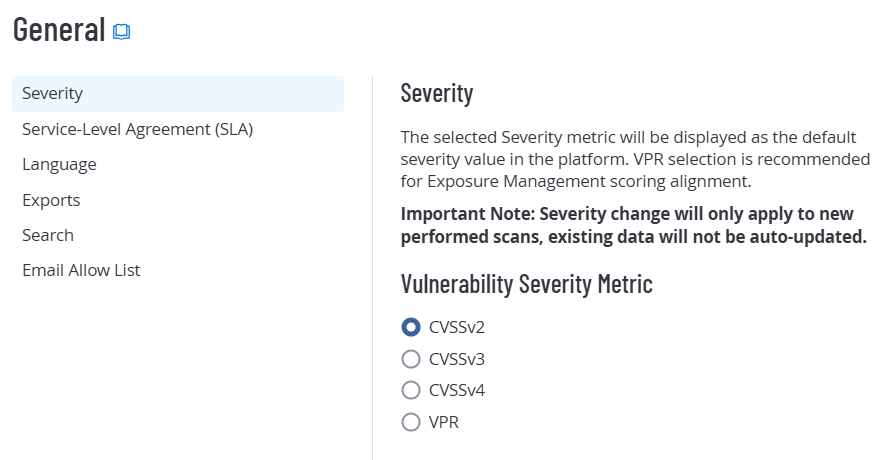
For more information, see General Settings in the Tenable One Vulnerability Management User Guide.
March 31, 2026
Passkey Support for User Authentication
As part of Tenable's commitment to the CISA Secure by Design pledge and ongoing platform security enhancements, you can now use passkeys for a more secure and streamlined sign-in experience. By configuring a passkey in your account settings, you can replace traditional passwords with cryptographically strong, phishing-resistant authentication, improving both security and ease of access to the Tenable platform.
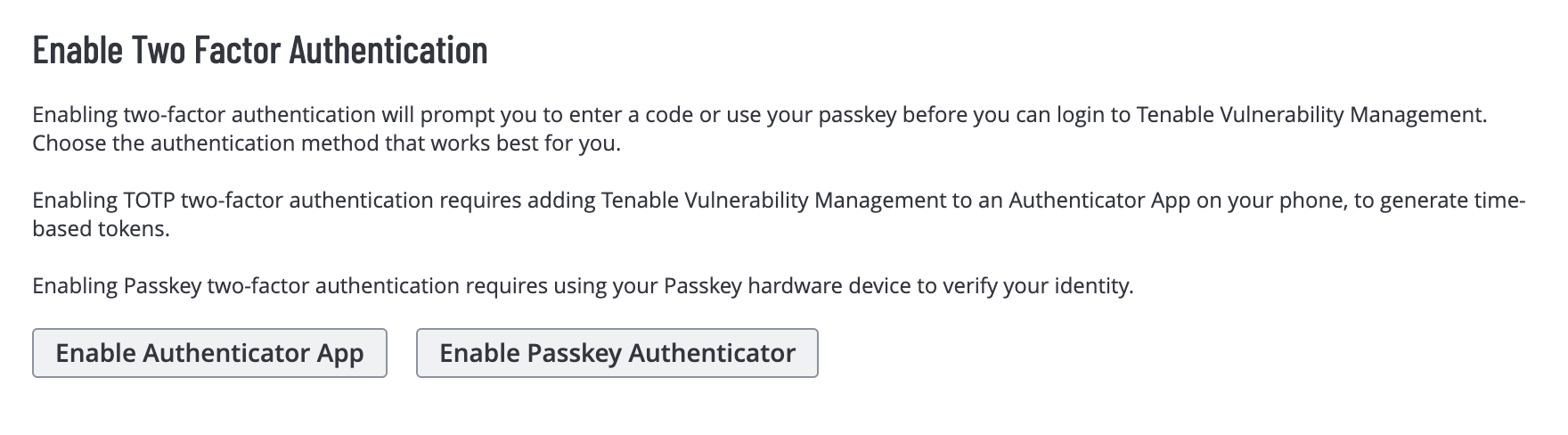
For more information, see Configure Two-Factor Authentication for your Own Account in the Tenable One Vulnerability Management User Guide.
March 16, 2026
Exploit Prediction Scoring System (EPSS) Filter Data Accuracy
Tenable fixed an issue in Tenable One Vulnerability Management where Exploit Prediction Scoring System (EPSS Score) filters on the Combinations page returned inaccurate data due to a scale mismatch.
Previously, the system saved EPSS values as raw numbers (0-100), but the search API required decimal values (0-1). This fix ensures that the system correctly transforms EPSS scores entered as percentages before saving. This change provides accurate asset and finding results for your vulnerability management initiatives.
March 12, 2026
Custom Roles: Tags and Target Group Updates
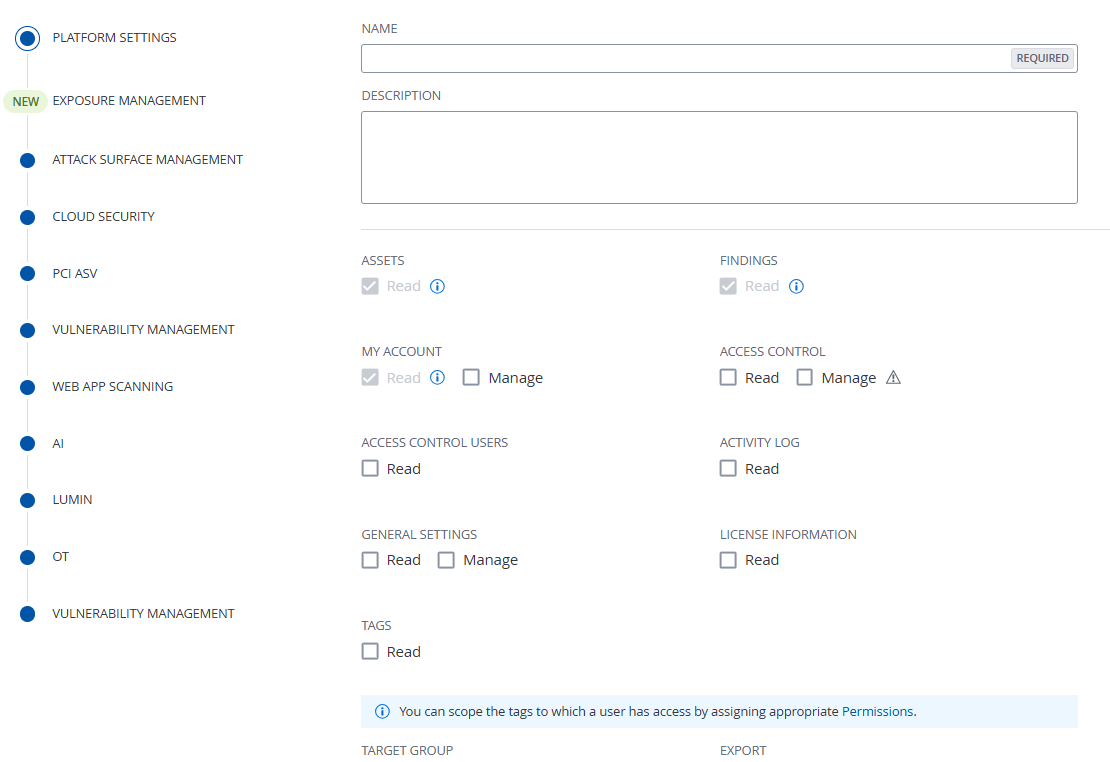
In preparation for upcoming custom role updates within Tenable One Vulnerability Management, Tenable has relocated the following options from the Vulnerability Management Settings section to the Platform Settings section of the custom role creation workflow:
-
Tags
-
Read
-
-
Target Group
-
Read
-
Manage
-
For more information, see Create a Custom Role in the Tenable One Vulnerability Management User Guide.
March 4, 2026
Scan Operational Technology Devices with OT Discovery
Tenable introduces OT Discovery, which is available in Tenable One Vulnerability Management and Tenable Security Center. This capability allows you to identify operational technology (OT) assets by using your existing vulnerability management platform. This feature eliminates the need to deploy new hardware or point solutions for basic OT inventory.
With this feature, you can do the following:
-
Safe OT Asset Identification — Safely identify programmable logic controllers (PLCs), human-machine interfaces (HMIs), and other critical OT devices.
-
Unified Exposure Management — View OT data and context to support a comprehensive view of your entire attack surface.
-
Comprehensive Visibility — Integrate discovery across your IT and OT environments.
-
Protocol-Specific Discovery — Identify live devices and retrieve granular attributes, such as manufacturer, model, and firmware version, by using non-disruptive queries.
This feature includes the following additions to the user interface:
-
OT Recon scan template — A dedicated, pre-configured scan template optimized for OT environments. For more information, see Scan Templates.
-
Safely Scan Operation Technology Devices setting — A toggle within scan settings that ensures scans remain non-intrusive and do not disrupt industrial processes. For more information, see Discovery Settings.
February 18, 2026
Custom Roles: Export Updates
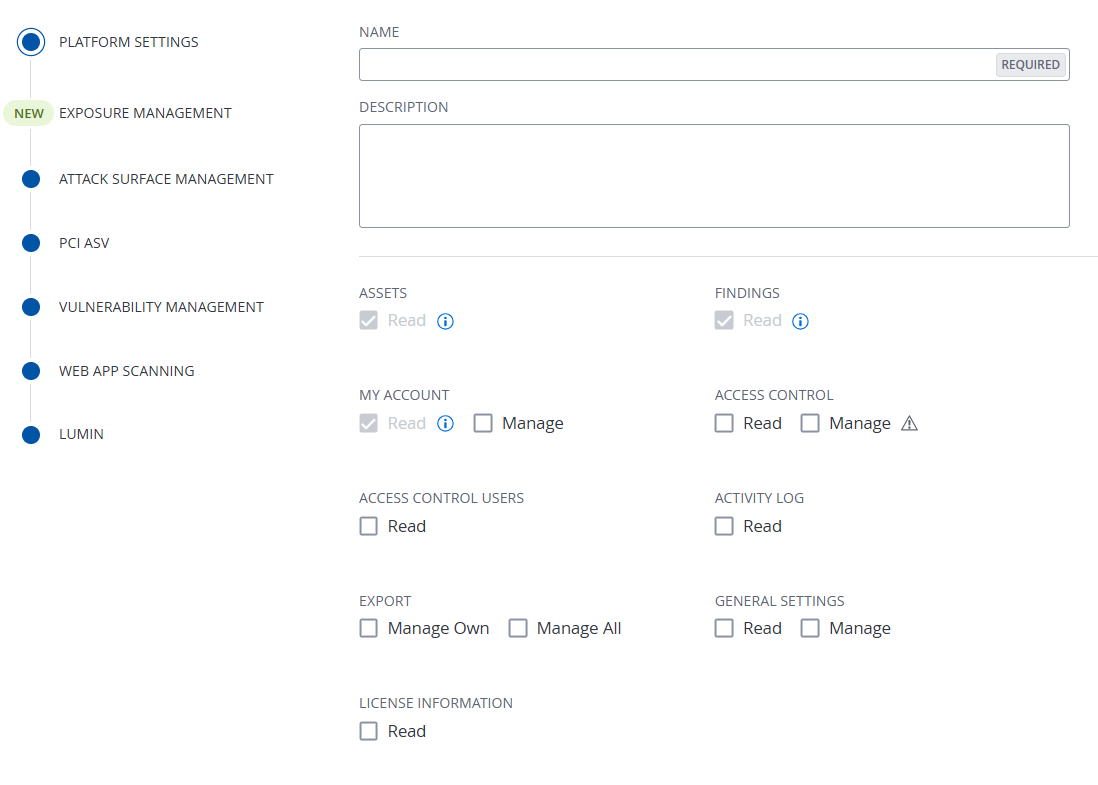
In preparation for upcoming custom role updates within Tenable One Vulnerability Management, Tenable has relocated the Export > Manage Own and Manage All options from the Vulnerability Management Settings section to the Platform Settings section of the custom role creation workflow.
For more information, see Create a Custom Role in the Tenable One Vulnerability Management User Guide.
February 2, 2026
Unified Asset Classification Naming
Tenable has standardized the naming conventions for asset classification across Tenable Exposure Management (EM) and Tenable One Vulnerability Management (VM). Previously referred to as Device Profiling, this feature is now universally titled Asset Classification. This alignment ensures that risk drivers and asset properties are labeled identically regardless of which platform or view you are using, providing a seamless experience for cross-platform analysis.
Key Terminology Updates:
-
Asset Category: Replaces Device Class (VM) and Device Profile (EM).
-
Asset Function: Replaces Device Subclasses (VM) and Device Functionality (EM).
-
Categorization Confidence/Drivers: Replaces all Profile Confidence/Drivers labels.
-
Unified Value Display: Data values are now standardized across the platform. For example, inconsistent labels like "Workload device" vs. "VM or Workload" have been unified into a single, clear naming convention based on the Tenable standard.
For more information, see the Asset Categorization Quick Reference Guide.
January 27, 2026
Plugin Download Concurrency
Tenable has added two Plugin Download Concurrency global settings to Tenable One Vulnerability Management: one for linked Tenable Nessus scanners and one for linked Tenable Agents.
When enabled, this setting determines how many linked Tenable Nessus scanners or Tenable Agents can download plugins from Tenable One Vulnerability Management at the same time. This can help with managing network bandwidth and preventing resource exhaustion due to large-scale updates.
For more information, see Manage Linked Scanners and Modify Global Agent Settings in the Tenable One Vulnerability Management User Guide.
Agent Profile CPU Utilization Controls
Tenable has added the CPU Utilization Controls setting to agent profiles in Tenable One Vulnerability Management.
When enabled, this setting allows you to configure the maximum percentage of a host's CPU that a Tenable Agent can use when installed on Windows or Linux hosts. This allows you to manage the performance impact of agent scans on critical host systems.
For more information, see Manage Agent Profiles in the Tenable One Vulnerability Management User Guide.
January 23, 2026
Tenable Data Stream Finding Enriched Attributes
Tenable is excited to announce the addition of the Finding Enriched Attributes stream to Tenable Data Stream. This new stream provides a centralized, push-based mechanism to export all manual risk adjustments — including vulnerability recasts, risk acceptances, and host audit result changes — directly to your AWS S3 bucket in JSON format. This feature automates the delivery of the override data currently managed within the Vulnerability Management Recast user interface, allowing you to integrate your manual risk decisions with external reporting and analysis tools.
What's New?
This enhancement expands the metadata available within the Tenable Data Stream ecosystem, capturing modifications that override automated Tenable findings:
-
Manual Risk Management (Vulnerability & WAS) — Continuously export details for findings that have been recast (severity changed) or accepted (risk accepted), including the source system and the original versus current risk levels.
-
Host Audit Overrides — Track when the results of a host audit have been manually changed or accepted (for example, changing a result to PASSED, FAILED, or WARNING), ensuring compliance visibility for configuration audits.
-
Full Contextual Audit Log — Each entry includes the specific Rule ID, the user-provided comment or justification, the modification target (RISK or RESULT), and expiration timestamps for temporary rules.
Manual Risk Management (Vulnerability & WAS) — Continuously export details for findings that have been Recast (severity changed) or Accepted (risk accepted), including the source system and the original versus current risk levels.
Host Audit Overrides — Track when the results of a Host Audit have been manually changed or accepted (for example, changing a result to PASSED, FAILED, or WARNING), ensuring compliance visibility for configuration audits.
Full Contextual Audit Log — Each entry includes the specific Rule ID, the user-provided comment or justification, the modification target (RISK or RESULT), and expiration timestamps for temporary rules.
For more information, see the following topics in the Tenable One Vulnerability Management User Guide:
January 22, 2026
FedRAMP Availability: Mobilization for Vulnerability Management Data
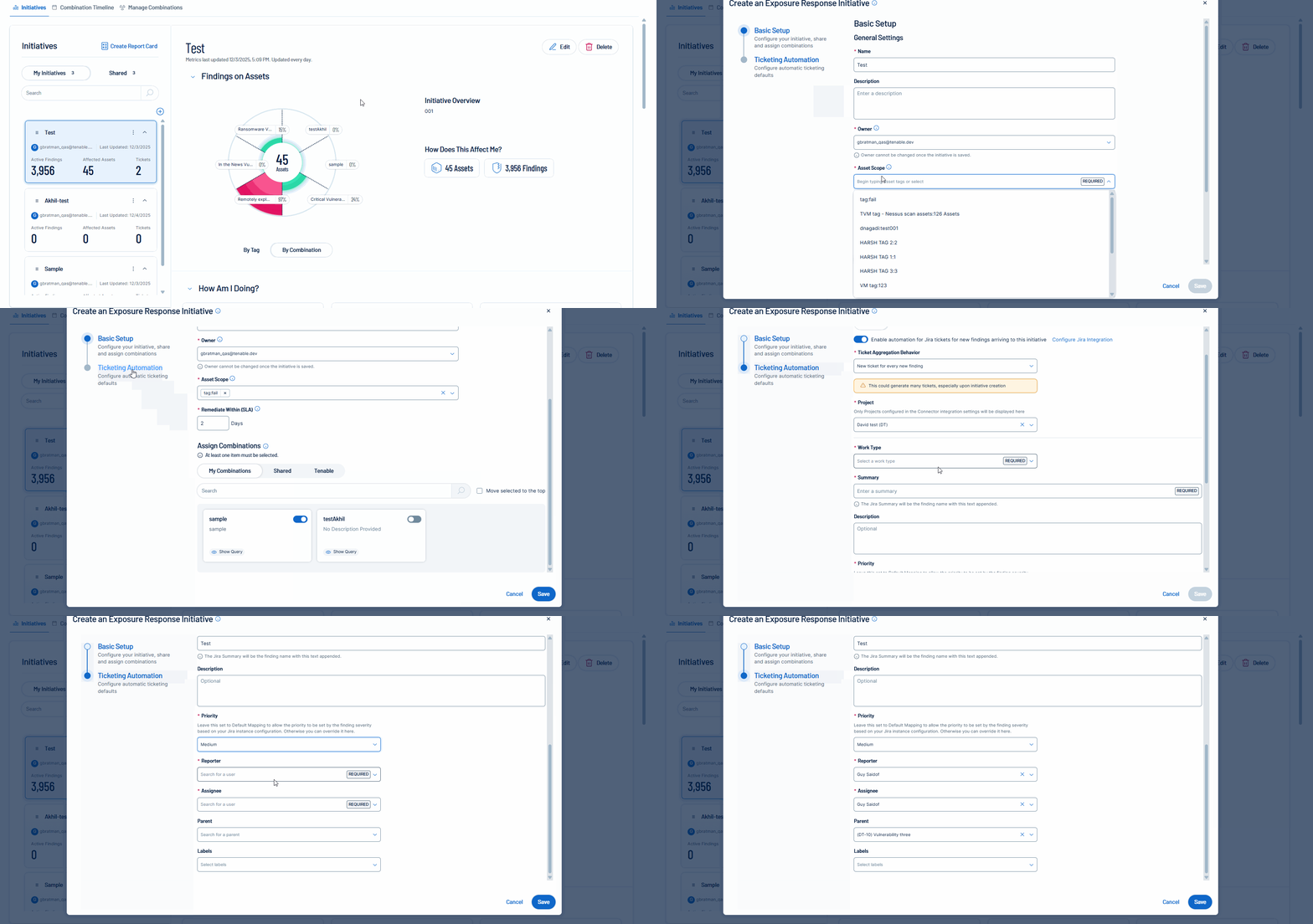
Tenable is excited to announce the Tenable FedRAMP Moderate availability of mobilization services in Tenable One Vulnerability Management. Unify teams and streamline remediation workflows by automatically or manually creating bi-directional tickets via Exposure Response initiatives. This capability accelerates response times by synchronizing your security findings with tickets in Jira Cloud or ServiceNow.
For more information, see:
-
Storylane demo for Tenable Mobilization
-
Create an Initiative in the Tenable One Vulnerability Management User Guide
-
Mobilization Quick Reference Guide
January 13, 2026
(Early Access) Plugin Download Concurrency
Tenable has added two Plugin Download Concurrency global settings to Tenable One Vulnerability Management: one for linked Tenable Nessus scanners and one for linked Tenable Agents.
When enabled, this setting determines how many linked Tenable Nessus scanners or Tenable Agents can download plugins from Tenable One Vulnerability Management at the same time. This can help with managing network bandwidth and preventing resource exhaustion due to large-scale updates.
For more information, see Manage Linked Scanners and Modify Global Agent Settings in the Early Access Tenable One Vulnerability Management User Guide.
(Early Access) Agent Profile CPU Utilization Controls
Tenable has added the CPU Utilization Controls setting to agent profiles in Tenable One Vulnerability Management.
When enabled, this setting allows you to configure the maximum percentage of a host's CPU that a Tenable Agent can use when installed on Windows or Linux hosts. This allows you to manage the performance impact of agent scans on critical host systems.
For more information, see Manage Agent Profiles in the Early Access Tenable One Vulnerability Management User Guide.