CVEs
On the Vulnerability Intelligence Overview page, the CVEs tab shows vulnerabilities from Tenable's database. All vulnerabilities appear by default, but you can refine the results with vulnerability categories and the Query Builder.
Tip: Select the checkbox to only show CVEs affecting your assets.
The table in the CVEs tab has the following columns, which you can show or hide as described in Column Management.
|
Column |
Description |
|---|---|
|
CVE ID |
The Common Vulnerability and Exposure (CVE) identifier for the vulnerability, as assigned by the CISA-sponsored CVE Program. |
|
Common Name |
The informal name of the vulnerability (for example, Log4Shell). Not all vulnerabilities have a common name. |
|
VPR |
The VPR score for the vulnerability. This Vulnerability Priority Rating (VPR) score is calculated by Tenable and ranges from 0.1 to 10. |
| VPR (Beta) | The VPR (Beta) score for the vulnerability. This updated version of your Vulnerability Priority Rating (VPR) score is calculated by Tenable and ranges from 0.1 to 10. |
|
CVSSv2 |
The CVSSv2 score for the vulnerability. When not available from NVD, Tenable determines this score. To learn more, see CVSS vs. VPR. |
|
CVSSv3 |
The CVSSv3 score for the vulnerability. When not available from NVD, Tenable determines this score. |
| CVSSv4 |
The CVSSv4 score for the vulnerability. When not available from NVD, Tenable determines this score. |
|
Exploit Maturity |
The highest level of exploit maturity for the vulnerability: Unproven, PoC, Functional, or High. Drawn from Tenable’s research, as well as key external sources. |
|
EPSS |
The likelihood that the vulnerability will be actively exploited, based on the third-party Exploit Prediction Scoring System (EPSS). |
|
First Discovered |
When the vulnerability was first identified. |
|
First Exploited |
The date of the vulnerability’s first-known exploitation. |
|
First PoC |
When the vulnerability’s first proof of concept was discovered. |
| Zero Day |
Yes - This vulnerability was originally identified as a zero-day vulnerability. This value displays Yes even if a fix was made available after the vulnerability was publicized. No - This vulnerability has a publicly available fix that existed before the vulnerability was publicly disclosed or known to be exploited. |
|
Plugin IDs |
The IDs for the Tenable plugins that detected the vulnerability. |
Affected Assets
In any row, click the drop-down > to reveal a table of assets on which that CVE appears. This table includes the following columns, which you can show or hide as described in Column Management.
|
Column |
Description |
|---|---|
| Original Severity | The initial severity rating assigned to a vulnerability by the plugin author or a third-party source (such as CVSS) before any local recasting or organizational risk rules are applied. |
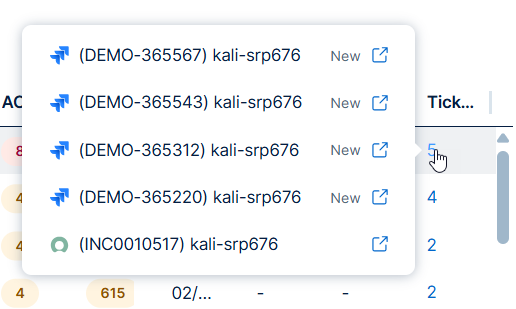
| Tickets |
The number of third party ticketing integration tickets associated with the finding. Do any of the following:
|
| Port | The port the scanner used to connect to the asset where the scan detected the vulnerability. |
| Protocol | The standardized set of rules (such as TCP, UDP, or ICMP) used by the asset to format and process data during network communications. |
|
Asset Name |
A unique identifier that Tenable assigns based on the availability of the following attributes: Agent Name, Local hostname, NetBIOS Name, DNS (FQDN) (Fully Qualified Domain Name), IPv4 Address, and IPv6 Address. |
| Operating Systems | The operating system running on the asset, for example Linux Kernel 3.13. |
|
IPv4 Addresses |
The IPv4 address for the asset. |
|
IPv6 Addresses |
The IPv6 address for the asset. |
| Plugin Count | The number of plugins that identified the CVE on the asset. |
|
ACR |
(Requires Tenable One / Tenable Lumin license) The Tenable-defined Asset Criticality Rating (ACR) is an integer from 1 to 10. |
|
AES |
(Requires Tenable One / Tenable Lumin license) The Tenable-defined Asset Exposure Score as an integer from 0 to 1000. |
|
Last Seen |
The date when the asset last appeared on a scan. |
| Source | The scanner or sensor that identified the finding, for example Nessus network-based assessment. |
|
Tags |
Any asset tags you applied in Tenable One Vulnerability Management. |
| Product Type | A high-level classification of the asset's software or hardware category, such as Operating System, Web Server, or Database. |
| Vendor | The name of the organization or entity that developed, manufactured, or branded the software or hardware identified on the asset. |
| Product | The specific name of the software application, framework, or hardware model detected on the asset. |
| Version | The specific release identifier (numeric, alphanumeric, or date-based) assigned by the vendor to a product to track its development iteration. |
| Vuln SLA Date | The target deadline by which a vulnerability must be remediated to remain compliant with your organization’s Service Level Agreement (SLA) policies. |
Take Action on your CVEs
Required User Role: Basic, Scan Operator, Standard, Scan Manager, or Administrator
On the CVEs tab, you can take action on your CVEs in the following ways:
Create an Exposure Response Initiative based on your CVE Query
You can create Exposure Response Initiatives directly from the CVEs tab. These initiatives contain combinations based on the query applied to the data in the CVE list.
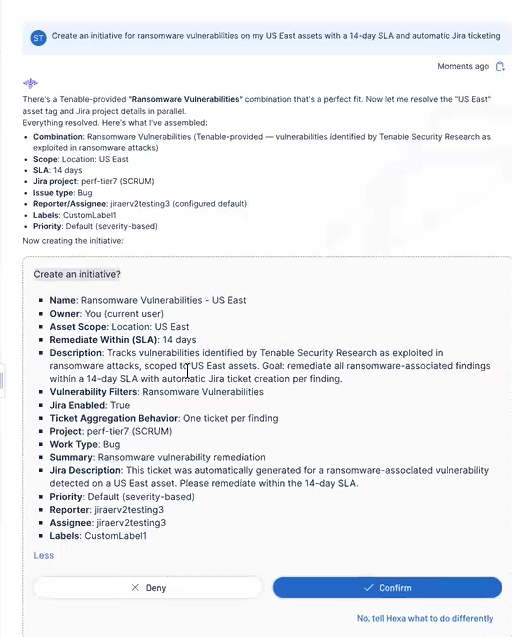
Create Initiatives in Seconds with Tenable Hexa AI
Did you know that you can use Tenable Hexa AI to create an initiative for you? Simply click the  button in the upper-right corner of any page to open the Hexa AI panel.
For example, you can ask Tenable Hexa AI to create an initiative based on specific vulnerabilities:
For more information about using Tenable Hexa AI, see the following topics:
Manually Create an Initiative
To create an initiative based on your query in the CVEs tab:
-
Build a query to filter the list of CVEs as described in Query Builders.
-
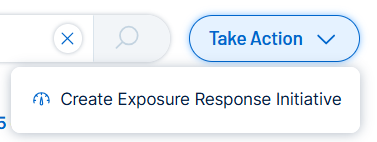
In the upper-right corner of the page, click Take Action
 .
.A drop-down menu appears.
-
Click
 Create Exposure Response Initiative.
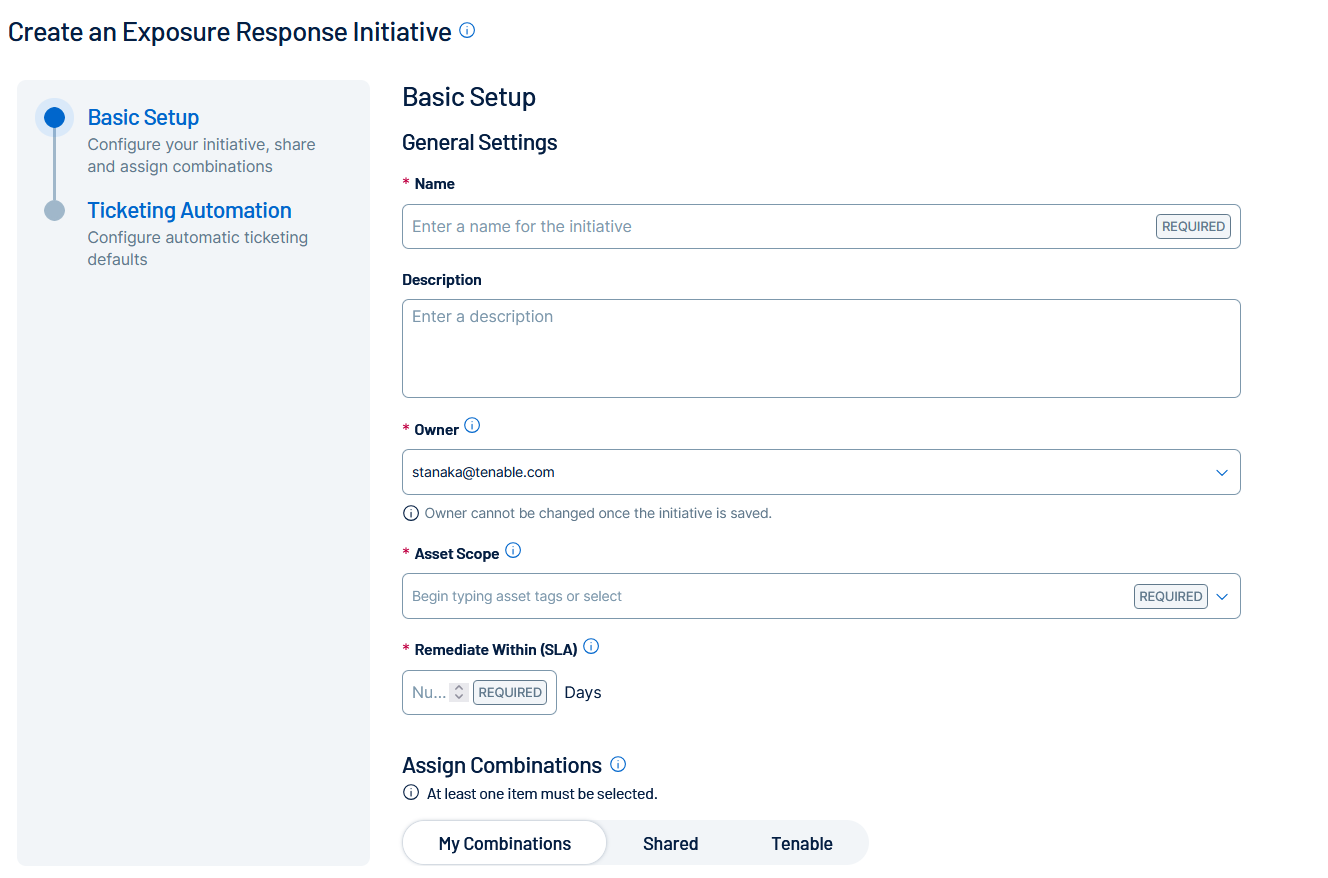
You navigate directly to the Create an Exposure Response Initiative page.
-
Configure the initiative as described in Create an Exposure Response Initiative.
-
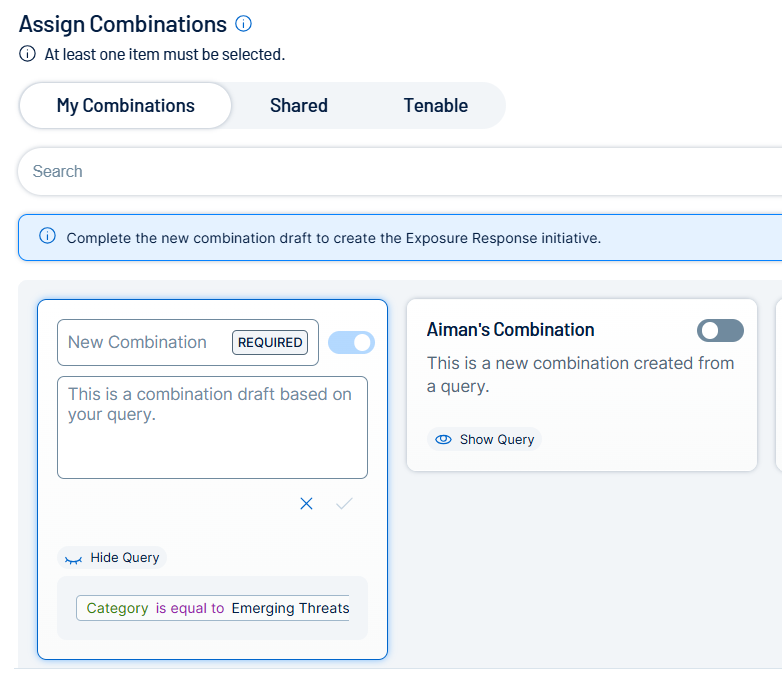
In the Assign Combinations section, Tenable One Vulnerability Management automatically creates a combination draft based on the query you used on the CVEs tab.
-
Configure the combination as desired.
Important! You must configure the combination to proceed and save the overall exposure response initiative. -
Do one of the following:
-
Click Save.
Tenable One Vulnerability Management saves the initiative.
-
Click Save and Go to Exposure Response.
Tenable One Vulnerability Management saves the initiative and you navigate directly to the Exposure Response page.
-