Splunk
Integrate with Splunk Enterprise or Splunk Cloud Platform to send Tenable One AI Exposure findings to your Splunk instance.
What to do next:
-
To start sending data for findings, you need to also configure automation rules or manually trigger an action after you add the integration. Successfully completing all integration steps doesn't trigger the sending of any data on its own.
Add a Splunk Instance
To enable notifications in Splunk, you first need to create an HTTP Event Collector (HEC) and an HEC token. These are used to allow Splunk to receive findings sent by Tenable.
To integrate with Splunk:
-
In Splunk, enable HEC and configure an HEC token. Refer to Splunk documentation for instructions on how to do this for either Splunk Enterprise or Splunk Cloud Platform. As you perform these steps, record the following information:
- Whether SSL is enabled for the HEC.
- The HTTP port number used by the HEC.
- The value of the token you configure.
Note: On Splunk Cloud Platform, HEC is enabled by default, and the SSL/HTTP port number settings are automatically set and cannot be changed: SSL is enabled, and the port is 8088. On Splunk Enterprise, you must actively enable HEC, and the SSL/HTTP port number settings are configurable. - In the AI Exposure Console, navigate to Settings > Integrations.
- (Options) Select a scope in the Organization dropdown.
- Click Add Integration.
- In the Integrations Library, click Splunk and then click Next to proceed to Step 2 (Provide Splunk HTTP Event Collector Info).
- Enter a Display name for the Splunk integration in AI Exposure.
- Enter the Event Collector URL. This is the Splunk platform instance address, together with the HTTP port number used by HEC. For example, https://splunkcloud.com:8088
- Check Accept any server SSL certificates if SSL is enabled for the HEC.
- Enter the HEC token value that you configured in Splunk.
-
Click Finish.
After your integration is added successfully, click Done to return to the Integrations page, where you will see your newly added integration.
View Tenable Findings in Splunk
To view findings in Splunk:
- Log into your Splunk Cloud or Enterprise instance.
-
Search for events using a relevant search term for AI Exposure findings.
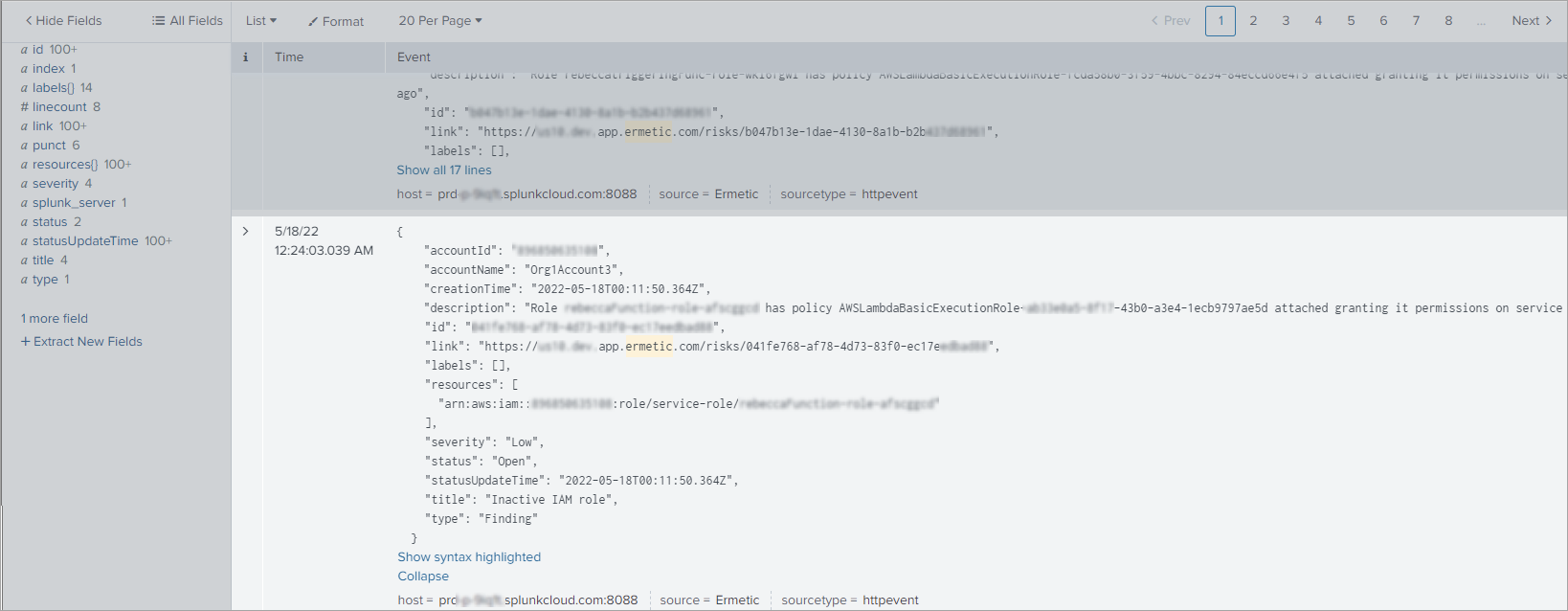
Sample JSON
JSON
{
  "preview": false,
  "lastrow": true,
  "result": {
    "_raw": "{\n    \"accountId\": \"***\",\n    \"accountName\": \"***\",\n    \"creationTime\": \"2022-05-18T00:11:50.364Z\",\n    \"description\": \"Role Function-role-afscggcd has policy AWSLambdaBasicExecutionRole-************************************ attached granting it permissions on service Amazon CloudWatch Logs, but it has not used it and was last active one month ago\",\n    \"id\": \"************************************\",\n    \"link\": \"https://****.***.app.ermetic.com/risks/************************************\",\n    \"labels\": [],\n    \"resources\": [\n      \"arn:aws:iam::"
    ************
    ",:role/service-role/Function-role-afscggcd\"\n    ],\n    \"severity\": \"Low\",\n    \"status\": \"Open\",\n    \"statusUpdateTime\": \"2022-05-18T00:11:50.364Z\",\n    \"title\": \"Inactive IAM role\",\n    \"type\": \"Finding\"\n  }",
    "_time": "2022-05-18T00:24:03.039+0000",
    "accountId": "************",
    "accountName": "Org1Account3",
    "creationTime": "2022-05-18T00:11:50.364Z",
    "description": "Role rebeccaFunction-role-afscggcd has policy AWSLambdaBasicExecutionRole-************************************ attached granting it permissions on service Amazon CloudWatch Logs, but it has not used it and was last active one month ago",
    "host": "********.splunkcloud.com:8088",
    "id": "************************************",
    "index": "main",
    "linecount": "17",
    "link": "https://******.app.ermetic.com/risks/************************************",
    "punct": "{____\"\":_\"\",____\"\":_\"\",____\"\":_\"--::.\",____\"\":_\"_-",
    "resource{}": "arn:aws:iam::************:role/service-role/Function-role-afscggcd",
    "severity": "Low",
    "source": "Ermetic",
    "sourcetype": "httpevent",
    "splunk_server": "si-i-*****************.*****.splunkcloud.com",
    "status": "Open",
    "statusUpdateTime": "2022-05-18T00:11:50.364Z",
    "policyName": "Inactive IAM role",
    "type": "Finding",
    "ticketLinks": [
      "https://tenablecustomer1.atlassian.net/browse/DAV-24140",
      "https://tenablecustomer1.atlassian.net/browse/DAV-24144",
      "https://tenablecustomer1.atlassian.net/browse/DAV-24148",
      "https://tenablecustomer1.atlassian.net/browse/DAV-24152"
    ],
    "comments": [
      {
        "message": "created a ServiceNow incident for this threat story",
        "time": "2026-07-29T09:00:13.124307Z",
        "userName": "Tenable"
      },
      {
        "message": "created a Jira ticket for this threat story",
        "time": "2026-07-29T09:00:05.609867Z",
        "userName": "Tenable"
      }
    ]
  }
}