Tenable One Attack Surface Management 2026 Release Notes
Tip: You can subscribe to receive alerts for Tenable documentation updates.
These release notes are listed in reverse chronological order.
August 17, 2026
 Keep Your Inventory Clean with Elastic Asset Patterns
Tenable One Attack Surface Management now lets you define elastic asset patterns for an inventory, so you can track hosts with changing or multiple IP addresses as a single, continuously tracked asset instead of creating a new asset for each IP address. You can match patterns on hostname, IP address, or CNAME/MX record value, and set each pattern to make matching assets elastic or exempt them from a broader elastic pattern. Tenable One Attack Surface Management also provides a curated set of global baseline patterns for widely used provider infrastructure that you can inherit or copy into your inventory.
For more information, see Manage Elastic Asset Patterns.
July 15, 2026
Web Application Firewall Detection
Tenable One Attack Surface Management now detects Web Application Firewalls (WAFs) deployed in front of your assets, giving you visibility into the protective controls already present across your attack surface. Detection uses passive techniques only and does not attempt any exploits.
Detection results appear in the new Web Application Firewall column (wtech.Web Application Firewall in the API), available in both the new and legacy user interfaces. You can filter on this column and display it under column settings in the assets table. For example, a detected firewall appears as ["Cloudflare"].
For more information, see Inventory Columns.
More Accurate Inventory Capacity Utilization
| Improvement |
|---|
| Tenable One Attack Surface Management now fills available inventory capacity up to the asset limit more accurately, so you make fuller use of your licensed capacity. |
July 1, 2026
New Features
Automatic Elastic Asset Handling
Tenable One Attack Surface Management now automatically treats certain hostnames as Elastic Assets when they cause an inventory to grow unexpectedly due to a large number of associated IP addresses. As with sources configured as Elastic sources, Tenable One Attack Surface Management omits the IP addresses for these hosts. The following hostnames are affected:
-
autodiscover.*
-
*.google.com
-
*.googlemail.com
-
*.mail.protection.outlook.com
-
*.olc.protection.outlook.com
For more information, see Add a Source.
Improvements
| Improvement |
|---|
| Tenable One Attack Surface Management now consolidates cloud scanner IP addresses into a smaller set of CIDR blocks to improve readability. |
June 18, 2026
Bug Fixes
| Bug Fix |
|---|
|
Tenable One Attack Surface Management no longer supports a set of deprecated columns in both the legacy and new user interfaces. These columns contained outdated data that had not been updated for an extended period. Existing data for these columns continues to be returned by the API for at least 30 days. The following columns are affected:
|
March 31, 2026
New Features
Set a Default Inventory
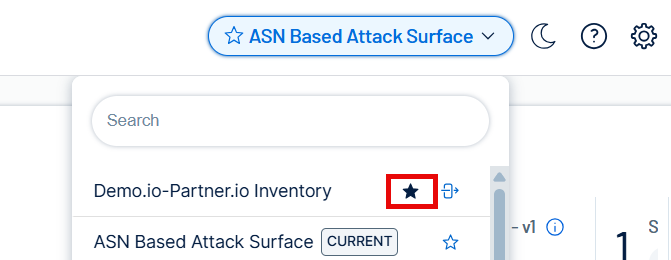
Tenable One Attack Surface Management now allows you to specify a default inventory, ensuring your preferred data set automatically loads every time you log in. You can easily designate your default view by selecting the star icon next to an inventory name in the dropdown menu, allowing for faster access to your most important assets.
For more information, see Set a Default Inventory.
January 20, 2026
Bug Fixes
| Bug Fix |
|---|
|
Tenable One Attack Surface Management now correctly validates empty values in filters on the new UI. |
| Tenable One Attack Surface Management resolves an issue where copying custom dashboards failed if they contained data from subscriptions with names exceeding 50 characters. |