Admission Controller Policies
This article is a how-to guide about configuring admission controller policies in Tenable One Cloud Exposure.
- For a how-to guide about exploring events, see Kubernetes Admission Controller Events.
- For a conceptual overview of the admission controller feature in Cloud Exposure, see Admission Controller.
View the full list of admission controller policies on the Admission Controller Policies page. On this page you can review policy details or configure policies.
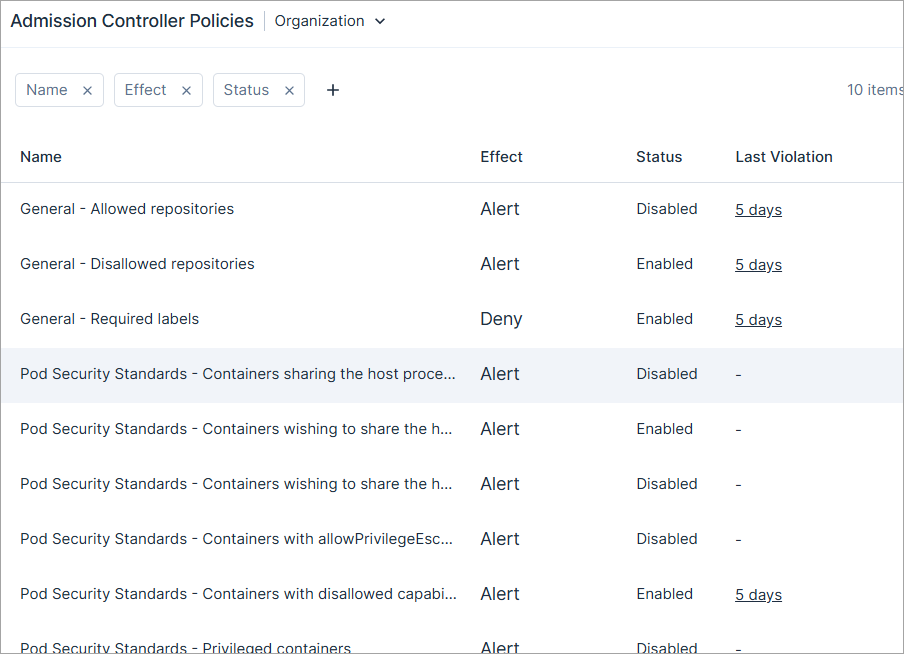
To manage policies:
- In the Cloud Exposure Console, go to Policies > Admission Controller Policies.
- Select an account scope in the Organization drop-down to view and manage policies for a specific subset of accounts. By default, the entire Organization (all accounts) is selected.
- Click on a policy to open a slideout panel with more information.
-
Find the policy you want to configure and click the three dots menu
 . You can perform the following policy management activities:
- Edit, including:
- Enable or disable the policy.
- Configure the violation effect.
- Edit the policy parameters.
- View events — This opens the Kubernetes Admission Controller Events page, filtered to show only the violation logs for that policy.
- Edit, including:
Configure Admission Controller Policies
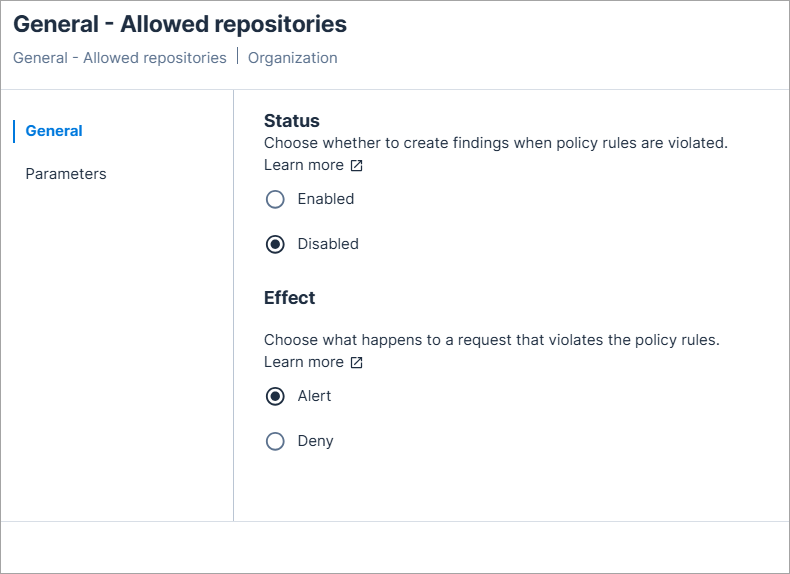
By default, new admission controller policies are disabled. Once a policy is enabled, it applies only to clusters with the admission controller installed that reside within the selected scope.
You can also configure the violation effect for each policy when it is violated.
To enable and configure an admission controller policy:
- In the Cloud Exposure Console, click on Policies > Admission Controller Policies.
- Find the policy you want to configure and click the three dots menu and Edit.
- In the General tab, set the Status to Enabled.
-
Under Violation Effect, choose what happens when the policy is violated:
- Deny the action.
- Allow the action, but receive an Alert. The alert violation is displayed on the Admission Controller Events page.
- In the Parameters tab, configure the policy parameters. Each policy has different parameters you can configure. See the Admission Controller Policy List for more information about each policy.
- Click Save.
An enabled policy applies only to clusters with the admission controller installed.
Admission Controller Policy List
This section provides an overview of the admission controller policies supported by Tenable, and the configurable parameters available for each. Admission controller policies let you tailor specific controls over Kubernetes resources, aligning deployments with security and compliance requirements.
| Policy Name | Validation Type | Description | Parameters |
|---|---|---|---|
| Vulnerable container images | General | Alerts on or blocks Kubernetes workloads that use container images with known vulnerabilities. The policy evaluates images against Tenable Cloud Workload Protection scan results at admission time. For full configuration details, see Vulnerable Container Images. | See Vulnerable Container Images Settings. |
| Allowed repositories | General | Requires container images to match a pattern of an allowed repository. | Allowed repositories: Patterns of repositories that can be used. The policy is violated if a repository that doesn’t match a pattern from this list is used. |
| Automount service account token for pod | General | Requires pods to not automatically mount the service account token by setting automountServiceAccountToken to false. | No configurable parameters |
| Block endpoint edit default role | General | Requires that default roles do not grant edit or write access to the Endpoints resource. | No configurable parameters |
| Block NodePort | General | Requires Services to not use the NodePort type, which exposes workloads on a static port on every node in the cluster. | No configurable parameters |
| Block updating service account | General | Requires that a pod's service account cannot be changed after the pod is created. | No configurable parameters |
| Block wildcard ingress | General | Requires Ingress host definitions to not use wildcard (*) subdomains, leave the host blank, or omit it entirely. These configurations may result in services responding to unintended or unauthorized traffic. | No configurable parameters |
| Container images require digest | General | Requires container images to have a digest. | No configurable parameters |
| Disallow anonymous access | General | Requires a role/cluster role to not be associated with system:anonymous user or system:unauthenticated group. | No configurable parameters |
| Disallow interactive TTY containers | General | Requires containers to not enable interactive TTY sessions by setting both tty and stdin to true. These fields must be set to false or left unset to prevent interactive shell access into containers. | No configurable parameters |
| Disallowed repositories | General | Requires container images to not match a pattern of a disallowed repository. | Disallowed repositories: Repositories that cannot be used. The policy is violated if a repository that matches a pattern from this list is used. |
| External IPs | General | Requires services to only have external IPs from the allowed external IPs list. | A comma separated list of allowed IP Addresses |
| HTTPS only | General | Requires that Ingress resources only expose services over HTTPS. This helps ensure encrypted traffic and prevents accidental exposure over unencrypted HTTP. | Requires TLS |
| Required labels | General | Requires resources from the resource types list to contain specified labels, with keys and values from the required labels list. |
|
| Required request and limit bounds | General | Requires containers to have resource requests and limits defined. Configurable which resource types (CPU, memory) must be specified for limits and requests. Optionally enforces maximum values for resource limits and requests. |
Required limits:
Required requests:
|
| Allowed users | Pod Security Standards | Requires containers to specify applicable runAsUser, runAsGroup, supplementalGroups or fsGroup from the corresponding parameter lists. For more information, see Kubernetes documentation. |
|
| AppArmor | Pod Security Standards | Controls which AppArmor profiles containers are permitted to use. Without an AppArmor profile, containers have unrestricted access to files, network sockets, and Linux capabilities on the host, allowing a compromised container to read sensitive files, establish unauthorized network connections, or escalate privileges beyond its intended scope. |
|
| Containers sharing the host process ID namespace | Pod Security Standards | Requires containers to not have the hostPID field set as true. For more information, see Kubernetes documentation. | No configurable parameters |
| Containers wishing to share the host IPC namespace | Pod Security Standards | Requires containers to not have the hostPID field set as true. For more information, see Kubernetes documentation. | No configurable parameters |
| Containers wishing to share the host network namespace | Pod Security Standards | Requires containers to not have the hostNetwork field set as true. For more information, see Kubernetes documentation. | No configurable parameters |
| Containers with allowPrivilegeEscalation | Pod Security Standards | Requires containers to have the allowPrivilegeEscalation field set as false. For more information, see Kubernetes documentation. | No configurable parameters |
| Containers with disallowed capabilities | Pod Security Standards | Requires containers to only have capabilities from the allowed capabilities list, and to drop all capabilities from the capabilities to drop list. For more information, see Kubernetes documentation. |
|
| Disallowed tags | Pod Security Standards | Requires container images to not use tags from the disallowed tags list. For more information, see Kubernetes documentation. | Comma separated list of tags . |
| Host filesystem | Pod Security Standards | Restricts pods to mounting only explicitly allowed host filesystem paths. Unrestricted hostPath volumes give containers direct access to sensitive node files, such as kubelet credentials, container runtime sockets, or cloud provider tokens, which can let a compromised container escape isolation and compromise the underlying node. | Allowed HostPaths: The host path prefixes that pods can mount. Every hostPath volume must start with one of these prefixes. Matching is prefix-aware and path-segment aware, and the most specific matching prefix takes precedence. If the policy is enabled with an empty list, all hostPath volumes are blocked. Each prefix can be set to read only, which requires every container that mounts the path to declare the mount as read only. |
| Read only root filesystem | Pod Security Standards | Requires containers to run with a read-only root filesystem by setting readOnlyRootFilesystem to true. | No configurable parameters |
| Privileged containers | Pod Security Standards | Requires containers to not have the privileged field set as true. For more information, see Kubernetes documentation. | No configurable parameters |
| Root containers | Pod Security Standards | Requires containers to be non-root by defining either the runAsNonRoot field as true, or the runAsUser as any value other than 0. For more information, see Kubernetes documentation. | No configurable parameters |
| Seccomp | Pod Security Standards | Controls which seccomp profiles containers are permitted to use. Without a seccomp profile, containers can make unrestricted Linux kernel syscalls, allowing a compromised container to exploit kernel vulnerabilities or perform dangerous operations such as mounting filesystems and tracing other processes. |
|
| Host networking ports | Pod Security Standards | Restricts which host ports containers may bind to when host networking is used. Unrestricted host port binding allows containers to listen on privileged or reserved ports directly on the node, bypassing pod network isolation. | Minimum port Maximum port |
| Flex volumes | Pod Security Standards | Restricts which FlexVolume drivers pods are permitted to use. FlexVolume drivers are executables installed directly on nodes that run with elevated privileges. Allowing unapproved drivers enables pods to mount arbitrary storage backends, potentially exfiltrating data or executing malicious code on the node. | Allowed flex volume drivers: Each entry must be a single driver string in vendor/driver format. No wildcards allowed. If the list is empty, all FlexVolume usage is blocked. |
| Forbidden sysctls | Pod Security Standards | Controls which Linux kernel parameters (sysctls) pods are permitted to modify. Unrestricted sysctl access allows pods to alter node-wide kernel settings such as networking stack behavior and IPC limits that can destabilize the node, affect other workloads, or enable privilege escalation. | Allowed sysctls: The sysctls a pod is allowed to configure. |
| Volume types | Pod Security Standards | Restricts the volume types pods are permitted to mount. For example, volume types such as hostPath grant containers direct access to the node filesystem, enabling a compromised container to read sensitive host files or escape container isolation. | Volume Types: The volume types a pod can configure in volumes.spec. |
Vulnerable Container Images
The Vulnerable Container Images admission controller policy lets you alert on or block Kubernetes workloads that use container images with known vulnerabilities. By integrating with Tenable Cloud Workload Protection (CWP) scan data at the Kubernetes admission layer, the policy enforces a vulnerability gate at deploy time, before any vulnerable image reaches your cluster.
Prerequisites
Before enabling this policy, confirm the following:
- The Cloud Exposure Admission Controller is deployed to the target cluster.
- Tenable Kubernetes Helm chart version 1.1.6 or later is installed, and the admission controller has read permissions to the cluster's secrets.
- Admission Controller pods are deployed with secrets access enabled (--set admissionController.readSecrets=true).
- Admission Controller pods have network connectivity to your container registry.
- You have the KubernetesClusterConnectorRead permission.
Tenable also recommends that container image CI/CD scanning or outpost/sensor-based scanning is configured and actively scans your container images. The policy does not require scan coverage to function, but images without a scan result are treated as unscanned. See the Trust Unscanned Container Images setting to control how the policy handles those images.
How Vulnerable Container Images Works
When a workload is submitted to the cluster (Create or Update), the admission controller intercepts the request and evaluates each container image. The policy applies to the following workload types: cronjobs, daemonsets, deployments, jobs, replicasets, statefulsets, deploymentconfigs, and pods.
For each container image, the admission controller:
- Resolves the image digest from the registry.
- Retrieves the most recent scan result for that digest from Tenable CWP.
- Checks whether the scan falls within the configured maximum age and whether the image contains vulnerabilities at or above the configured severity threshold, ignoring any vulnerabilities that match an excluded CVE pattern.
-
Applies the configured effect when violations are found:
- Deny — The deployment is blocked and returns an error message.
- Alert — The deployment proceeds and an admission control event is recorded.
If evaluation times out after 30 seconds, the policy fails open: the deployment is allowed and a timeout event is recorded for investigation.
Enable Vulnerable Container Images
To enable the policy:
- In the Cloud Exposure Console, go to Policies > Admission Controller Policies.
- Find the policy named General - Vulnerable container images and click the three dots menu, then click Edit.
- Under Status, select Enabled.
-
Expand Advanced and under Effect, select one of the following:
- Alert — The admission controller allows the deployment and records a warning event.
- Deny — The admission controller blocks the deployment.
Tenable recommends starting with Alert and running it briefly before switching to Deny.
- (Optional) In the Parameters panel, expand Container Image Validation to configure the settings described in Vulnerable Container Images Settings.
- (Optional) Expand Exclusions to configure container image URL or CVE pattern exclusions.
- Click Save.
Vulnerable Container Images Settings
The following settings are available under Container Image Validation.
| Setting | Default | Description |
|---|---|---|
| Minimum vulnerability severity | High | The severity threshold for violations. Images containing vulnerabilities at or above this level trigger the configured effect. Options: Critical, High, Medium, Low. |
| Vulnerability scan maximum age (days) | 7 | The maximum age of a valid scan result, in days. Scans older than this threshold are treated as unscanned images. Valid range: 3 to 14 days. |
| Trust unscanned container images | Off (cleared) | Controls how the policy handles images without a scan result. When cleared, images without a scan result are treated as violations. When selected, images without a scan result are allowed through. |
The following exclusion settings are also available.
| Setting | Description |
|---|---|
| Excluded container image URL patterns | Glob or regex patterns for image URLs to exclude from policy evaluation. Images matching these patterns bypass vulnerability checks. Use this setting for trusted internal images or infrastructure components. |
| Excluded CVE patterns | Glob or regex patterns for CVE identifiers to exclude from policy evaluation. Vulnerabilities that match an excluded pattern are not counted when the policy evaluates an image. If every vulnerability at or above the configured severity matches an excluded pattern, the image passes admission to the cluster. Use this setting to accept a specific CVE that you have assessed and chosen to allow. |
Policy Column Data
The following columns appear in the table on the Admission Controller Policies page, and most columns can also be used to filter data in the table.
| Filter | Description |
|---|---|
| Name | The name of the policy. |
| Compliance | Compliance standards and security best practices that map to policy benchmarks. |
| Effect |
What happens when a violated action is detected. The violation effect can be:
|
| Status | Whether the policy is enabled or disabled. When a policy is enabled, violated actions trigger a violation effect. |
| Last Violated | The last time the policy was violated. Click on the last violated value to open the Admission Controller Events page, filtered on that specific policy. This lets you see all actions that violated the policy. |
| Settings |