Supported IaC Tools
Tenable One Cloud Exposure supports the following code frameworks:
- Terraform (Scan/Sync)
- CloudFormation (Scan)
- Azure Resource Manager (ARM)
- Bicep
- Helm
- Kubernetes
Support for additional IaC frameworks is planned for the near future. If there is a specific framework that you work with and would like to see supported, contact Technical Support.
Terraform
Cloud Exposure supports scanning both Terraform HCL code and Terraform plan files:
- HCL files must have a .tf extension, and with input variables that use terraform.tfvars or files with the .auto.tfvars extension that are in the same directory as the .tf files. For more information about environment variable evaluation, see Limitations.
- Terraform plan files must be in JSON format. The planned_values will be extracted, built in a way that Tenable can understand, and then scanned as a normal terraform file. Results will point to the plan file.
For information on how to create the plan file, refer to the relevant Terraform documentation.
Once you have the plan file, run the following command to get the terraform plan in JSON format:
You can then use this JSON plan as a value for the paths parameter to define the repository path that will be scanned by Tenable. See GitHub Action Parameters for more information.
Terraform Modules
Cloud Exposure supports scanning Terraform modules, as follows:
-
Terraform code:
- All private modules within the same repository.
- All public modules from the Terraform Registry.
- All private modules within integrated external private repositories. For more information, see Private Module Scanning within Integrated Repositories for Terraform
Note: To access integrated private modules in CI/CD, you must pass the following parameter as an access token: git-tokens. - Terraform plan:
- All modules.
Module Scanning for Terraform Code
Terraform module scanning for Terraform code enhances your security posture by considering the broader context of modularized code. Tenable recursively analyzes any modules (local or remote) that are being called by your Terraform code files, resolving variables and resource definitions in the modules to discover potential misconfigurations in your code. Tenable traces the entire hierarchy of modules, identifying all the resources and configurations defined within them.
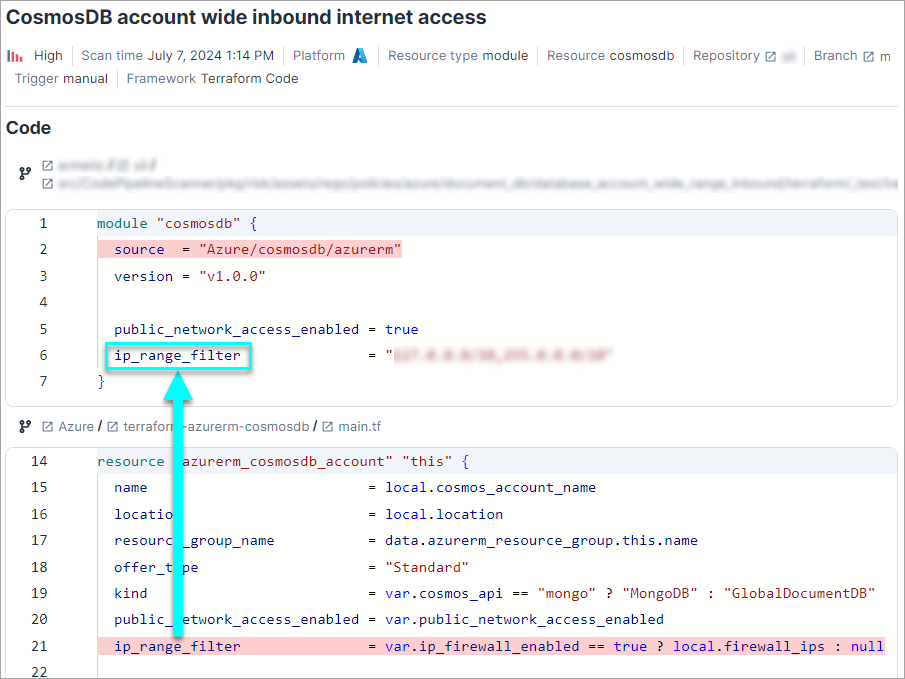
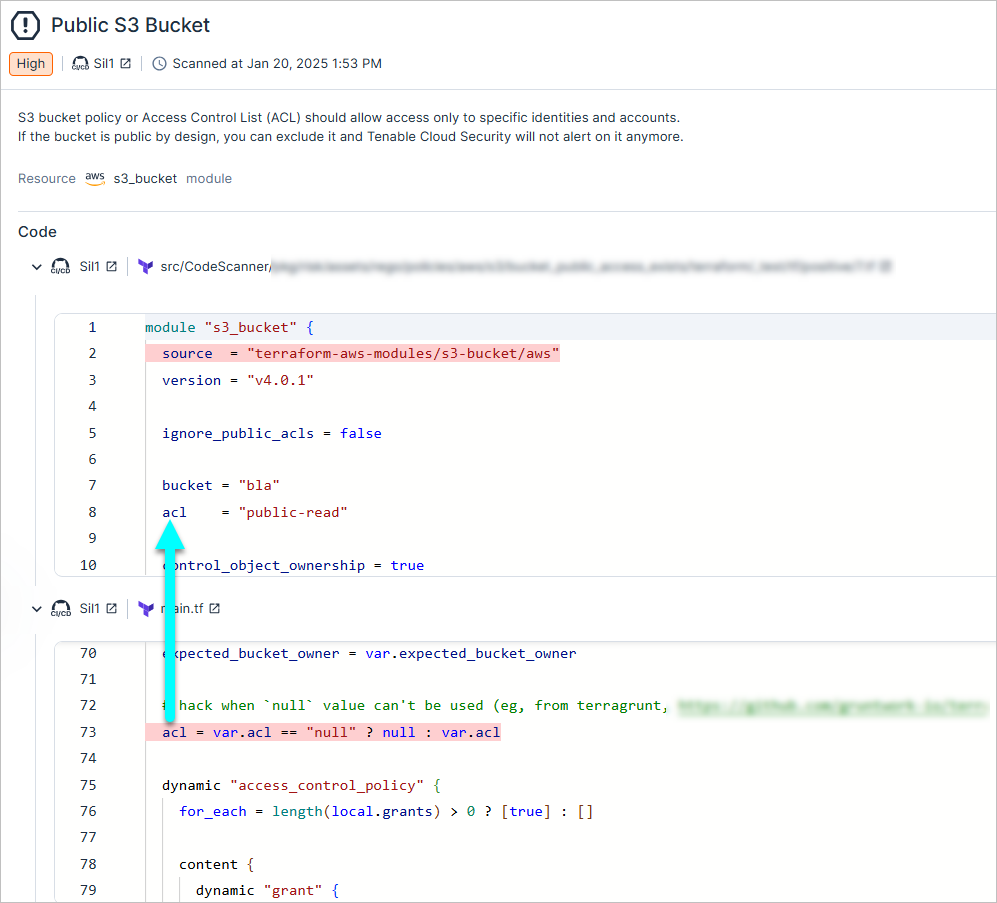
A single IaC finding can display multiple code snippets, representing modules referenced by your code that contain misconfigurations.
To see scanned modules:
-
Perform one of the following, depending on how you connected your code to :
- Code repository integrations:
- In the Cloud Exposure Console, click on Risks > IaC Findings.
- Add the Resource Type filter, and then search for and select the word module to narrow down the results to those with modules.
Click on a finding to see scan details. You will see an additional code snippet for each module referenced by the code. The highlighted portion within the module represents the identified policy misconfiguration, which you can then correlate with the relevant portion of your code.
- CI/CD integrations:
- In the Cloud Exposure Console, click on Risks > Code Scans.
- Identify and click on the relevant scan (Terraform Code).
- Click the Findings tab.
Add the Resource Type filter, and then search for and select the word module to narrow down the results to those with modules.

Click on a finding to see scan details. You will see an additional code snippet for each module referenced by the code. The highlighted portion within the module represents the identified policy misconfiguration, which you can then correlate with the relevant portion of your code.
- Code repository integrations:
Private Module Scanning within Integrated Repositories for Terraform
Tenable supports scanning of private modules from authenticated private repositories in both CI/CD and repositories.
- CI/CD scanning — When performing IaC scans in CI/CD, use the git-tokens parameter to provide the necessary access token for private repositories.
- Repository scanning — For integrated repositories, Tenable accesses private modules using existing authentication.
The following are examples of how to use the git-tokens parameter in CI/CD scanning:
-
Using a single token:
Copycode-scanner iac scan --git-tokens "https://github.com/org=ghp_token123" -
Using multiple tokens:
Copycode-scanner iac scan \
--git-tokens "https://github.com/org1=ghp_token1" \
--git-tokens "https://gitlab.com/org2=glpat_token2" - Using multiple tokens separated by commas:
Bash
code-scanner iac scan \n --git-tokens "https://github.com/org1=ghp_token1,https://gitlab.com/org2=glpat_token2"Where:
- git-tokens is the parameter used to access private Terraform modules within an integrated private repository.
- Replace the URL( <https://github.com/org1=ghp_token1> )value with the access token for the repository.
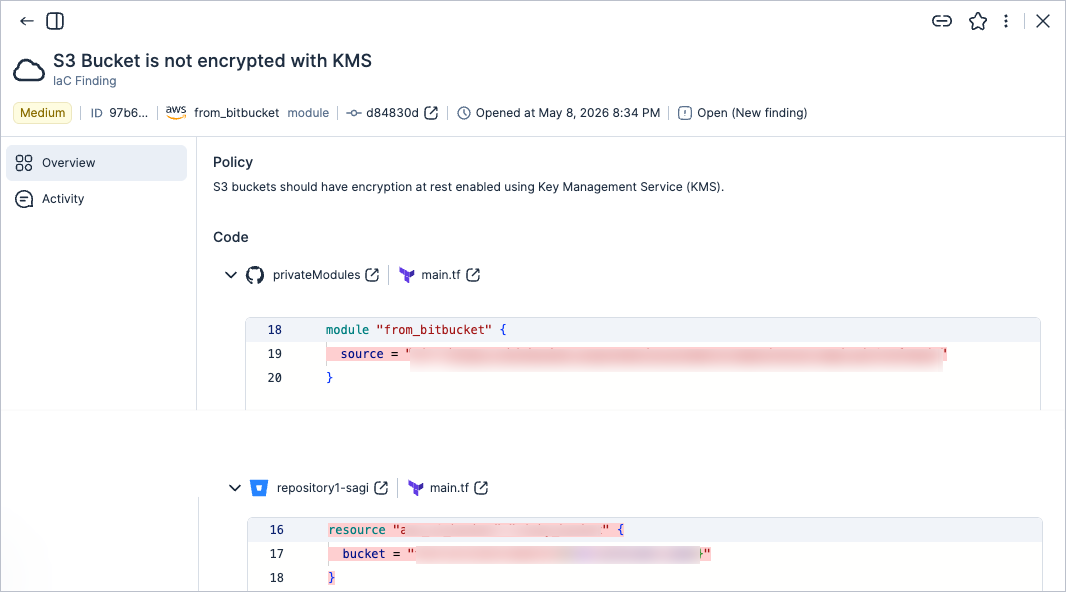
The findings in scanned private modules also appear in the code section of the finding.
The following image shows an example of a finding from a private repository linked to other private repositories.
Dynamic Configuration Scanning
Tenable supports scanning dynamic Terraform configurations. Tenable analyzes count, for_each arguments, and dynamic blocks using default values in your source code or variable files. This provides visibility into scaled resources and complex infrastructure definitions.
Limitations
Although Cloud Exposure supports variables and interpolations, functions and environment variables aren't supported. If you run the pipeline and assign a specific environment variable, Tenable assumes that the configuration found in the code is the correct one.
In the case of variables used as function parameters, it will parse as a wrapped expression, as seen in the following function call:
HCL
resource "aws_launch_configuration" "example" {
    image_id      = data.aws_ami.ubuntu.id
    instance_type = "${concat(list("${var.name}", "${var.other_name}"), var.node_tags)}"
    spot_price    = var.price
    user_data_base64 = "${var.data}=="
}
Considering var.data = "a123B" and var.price = 1.023, it would be parsed as in the following example:
HCL
resource "aws_launch_configuration" "example" {
    image_id      = data.aws_ami.ubuntu.id
    instance_type = "${concat(list("${var.name}", "${var.other_name}"), var.node_tags)}"
    spot_price    = 1.023
    user_data_base64 = "a123B=="
}
CloudFormation
Cloud Exposure supports scanning CloudFormation templates with either a .json or .yaml extension.
Limitations
Cloud Exposure doesn't currently provide support for the following:
- conditions
- scanning nested stacks
- environment variables
- macros
- using modules
- defined parameters
- intrinsic function reference
ARM
Cloud Exposure supports Azure Resource Manager (ARM) framework for scanning Azure templates as part of IaC security.
Limitations
Cloud Exposure does not currently support the following ARM functions:
- Multiple resource instances created through copy loops (Cloud Exposure scans only the first instance.)
-
Scope and deployment functions:
- resourceGroup()
- subscription()
- tenant()
- managementGroup()
- deployment()
- environment()
-
Resource functions:
- resourceId()
- pickZones()
- List functions (for example, listKeys(), listSecrets())
- The reference() function
- Linked or external templates
- User-defined functions
- Parameter files (parameters.json)
Bicep
Cloud Exposure supports Azure Bicep scanning as part of IaC security.
Limitations
Cloud Exposure does not currently support the following Bicep functions:
- Extension declarations (extensibility providers)
- Import declarations (compile-time imports)
- Module loops (Cloud Exposure scans only the first instance)
- Resources declared with the existing keyword
- Multiple resource instances created through resource loops (Cloud Exposure scans only the first instance)
- Parameter files (.bicepparam)
Helm
Limitations
Cloud Exposure does not currently support resources whose names include a template value or call a template function (for example, lookup).
Kubernetes
Limitations
Cloud Exposure does not currently support resources whose name includes a variable or is generated dynamically (for example, through generateName)
IaC Compatibility Matrix
The tables below list the platforms/tools that are supported for each Cloud Exposure IaC feature:
Repositories
| Feature | Platform | Repository | |||
|---|---|---|---|---|---|
| Azure Repos | Bitbucket | GitLab | GitHub | ||
| Scan | Terraform code | ✔ | ✔ | ✔ | ✔ |
| Terraform plan | ❌ | ❌ | ❌ | ❌ | |
| CloudFormation | ✔ | ✔ | ✔ | ✔ | |
| ARM | ✔ | ✔ | ✔ | ✔ | |
| Bicep | ✔ | ✔ | ✔ | ✔ | |
| Trace Issues Back to Code (Sync) | Terraform code | ✔ | ✔ | ✔ | ✔ |
| Remediate Findings (via pull request) | Terraform code | ✔ | ✔ | ✔ | ✔ |
Pipelines
| Feature | Platform | Pipeline | |||||
|---|---|---|---|---|---|---|---|
| GitHub Actions | Jenkins Pipeline | Terraform Cloud Run Task | GitLab Pipeline | Azure Pipelines | Generic pipeline | ||
| Scan | Terraform code | ✔ | ✔ | ❌ | ✔ | ✔ | ✔ |
| Terraform plan | ✔ | ✔ | ✔ | ✔ | ✔ | ✔ | |
| CloudFormation | ✔ | ✔ | ❌ | ✔ | ✔ | ✔ | |
| ARM | ✔ | ✔ | ❌ | ✔ | ✔ | ✔ | |
| Bicep | ✔ | ✔ | ❌ | ✔ | ✔ | ✔ | |
| Trace Issues Back to Code (Sync) | Terraform code | ✔ | ✔ | ❌ | ❌ | ✔ | ✔ |
| Remediate Findings (via pull request) | Terraform code | ❌ | ❌ | ❌ | ❌ | ❌ | ❌ |