Kubernetes
This article is a conceptual overview of Kubernetes capabilities.
- For how-to guides about connecting clusters to Tenable, see the relevant guide: Via Helm, Amazon EKS, Azure AKS, Google GKE, Oracle OKE.
- For a how-to guide about viewing and managing Kubernetes clusters, see Kubernetes Clusters.
- For frequently asked questions, see FAQ: Kubernetes.
- For security via Helm charts, see Connect a Cluster via Helm Chart.
Tenable uses Kubernetes Security Posture Management (KSPM) to help you identify and prioritize risks within your clusters. By analyzing the relationships between cloud infrastructure, user permissions, and container workloads, Tenable surfaces critical security issues that require immediate attention.
KSPM integrates data from the following areas to provide a unified view of your Kubernetes security:
- Infrastructure configuration — Scans for misconfigurations in cloud platforms, such as Amazon EKS, Azure AKS, Google GKE, and Oracle OKE.
- Runtime detection — Monitors user activity via an eBPF sensor to detect suspicious activity in near-real time.
- Admission controller — Enforces security policies to prevent high-risk deployments.
- Vulnerability management — Detects vulnerabilities in all cluster resources.
- Identities and access — Identifies over-privileged access to resources and services in your clusters.
By combining these insights with Kubernetes-specific policies, you can monitor your container resources from a single interface. Tenable correlates Kubernetes-specific resource data with platform-wide insights to help you prioritize risks and notify relevant teams to accelerate mitigation.
To begin, connect your Kubernetes clusters to Tenable to gain visibility into your resources and their associated container images.
Core Visibility and Analysis
After you connect a cluster, the platform immediately extracts and analyzes data from your environment to identify risks across your Kubernetes infrastructure. Tenable gathers Kubernetes-related data from two primary sources:
- Cloud provider APIs — Collects information about your clusters and running container images across AWS, Azure, GCP, and OCI.
- Kubernetes cluster APIs — Uses cluster APIs to retrieve architectural and configuration data from within the environment.
This integration provides full visibility into your Kubernetes resources and their associated container images. For Kubernetes resources, the platform retrieves detailed information about permissions, account usage, and security configurations.
How the Helm Chart Synchronizes Resources
When you use the Helm chart method, Tenable synchronizes cluster data based on the type of access required. This architectural approach allows for deep visibility even in restricted environments.
Network Access
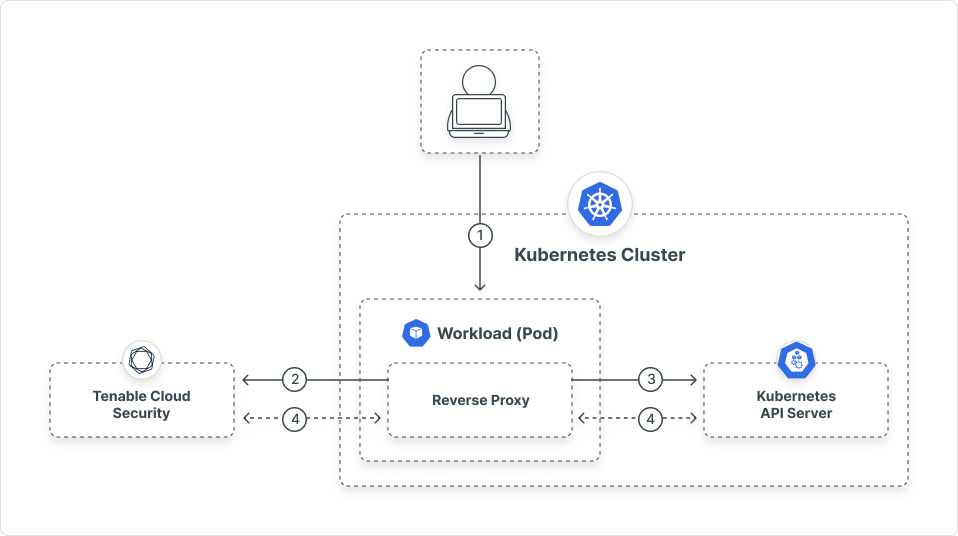
If network-based access is not publicly accessible, Tenable synchronizes data using the following process:
- When you add a Kubernetes cluster connector, Tenable creates a workload (Deployment) that runs in your cluster. This workload does not expose any ports externally and is not accessible from the internet.
- The workload initiates a secure, dedicated connection with Tenable using a reverse proxy.
- The workload routes traffic between the Kubernetes API server and Tenable's backend. This allows Tenable to synchronize resource data without exposing the API server to the internet.
Identity Access
If your assigned role does not have permission to access the cluster via cloud APIs, Tenable synchronizes data using the following process:
- When you add a Kubernetes cluster connector, Tenable creates a service account in your cluster.
- The service account uses read-only permissions to pull resource metadata. Tenable does not create or use write permissions.
- Tenable uses this service account to synchronize resource data and maintain an updated inventory.
Kubernetes Runtime Detection
Kubernetes Runtime Detection provides visibility into active containerized workloads to identify unauthorized user activity that static scans might miss. Unlike agentless monitoring, this method requires you to install a sensor directly on your Kubernetes resources using a Helm chart.
The sensor uses eBPF sensor technology to monitor user activity with minimal performance overhead.
Key Capabilities:
- Runtime detection — Identify suspicious activity within your Kubernetes environment.
- Runtime visibility — Gain granular insights into user activity within your clusters.
- MITRE mapping: Enrich every identified threat with cloud-native context and map detections to the MITRE framework to accelerate your investigations.
For more details, see How Tenable Monitors Threats in Your Environment.
Kubernetes Admission Controller
The Kubernetes Admission Controller acts as a security gatekeeper for your cluster by intercepting and evaluating API requests before the cluster creates or updates resources. This control layer allows you to enforce granular policies to ensure that every container, pod, and service remains compliant with your security and configuration standards.
Key Capabilities:
- Enforce compliance — Automatically validate resources to prevent misconfigurations. For example, you can block containers that attempt to run with root privileges.
- Policy enforcement modes — Choose how to handle violations. You can select Deny to block non-compliant resources entirely, or Alert to allow the action while recording it for audit.
- Operational visibility — Track and analyze every intercepted action through dedicated logs to maintain a secure and transparent Kubernetes environment.
For more details, see Admission Controller.
Kubernetes Vulnerability Scanning
For container-based workloads, Tenable offers a sensor that you install using a Helm chart. The sensor runs as a DaemonSet on all cluster nodes to perform vulnerability and software scanning. It scans nodes for new or updated container images within approximately 30 minutes, including short-lived images from CronJobs and other ephemeral pods. This method is supported for cloud-managed and unmanaged clusters (including on-premises), which ensures comprehensive visibility into your running workloads.
For more details, see Agent-Based Kubernetes Workload Scanning.
Licensing Requirements
| License Type | Features Included |
|---|---|
| Standard | Includes Kubernetes inventory visibility, configuration risk assessments, and cloud-provider API analysis. |
| Enterprise | Includes all Standard features plus the Kubernetes admission controller, sensor-based scanning for unmanaged clusters (including on-premises), and deep workload analysis for container images. |