Code
This section provides a conceptual overview of code scanning capabilities in Tenable One Cloud Exposure.
- To connect your code to Tenable, see Connect CI/CD or Connect Code Repositories.
- To view and analyze scan results in Tenable, see Code CI/CD.
- To view and manage IaC findings, see IaC Findings.
- To view source code in cloud findings and remediate findings via IaC, see Cloud Findings.
Use Cloud Exposure IaC Security to:
- Scan your infrastructure-as-code (IaC) and address configuration issues before your cloud resources are deployed by analyzing IaC findings detected by Cloud Exposure. Help your developers and DevOps produce secure applications by providing them with immediate feedback within their native tools. Implement shift-left security practices by ensuring that cloud misconfigurations are detected early.
- Sync the code associated with your cloud resources to trace those resources back to their origins (Cloud to Code). Identify and remediate your cloud findings more efficiently by revealing their source code. For any risky or misconfigured resources that are managed as code, you can quickly locate the relevant code snippet and also automatically remediate findings in IaC with pull requests.
- Scan pull requests to provide a security gate that prevents misconfigurations from being merged into your production code. Enforce high-fidelity policies directly within the developer workflow across all branches, not just the default branch. Tenable displays findings as inline pull request comments and uses the Scan Failure Threshold setting to block merges that do not meet your security requirements.
IaC Workflow
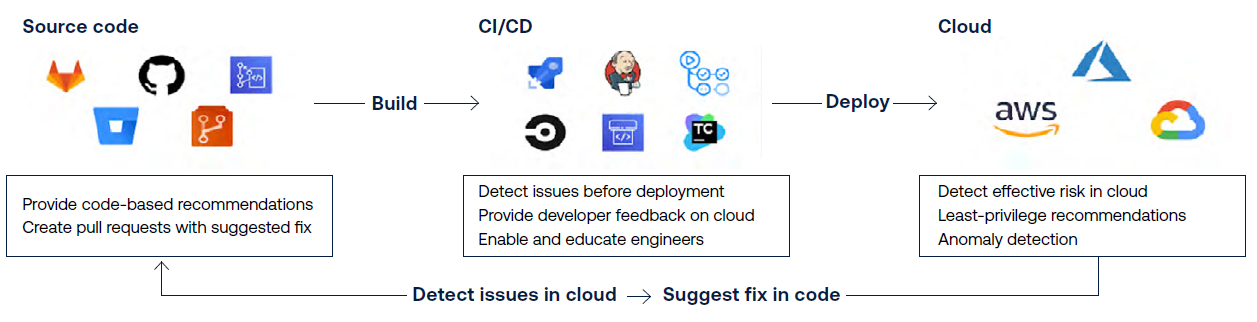
The following workflow shows how Cloud Exposure IaC Security integrates into your CI/CD workflow and facilitates code scanning before cloud deployment.
- CI/CD pipeline: Tenable detects new IaC Findings in your IaC framework by scanning your code before it's deployed.
- Cloud environment: Tenable detects existing findings in your cloud environment by identifying a broad range of risky circumstances across your accounts.
Pull Request Scanning
Pull Request (PR) scanning provides a security gate to prevent misconfigurations from reaching production. While repository scans monitor the security posture of default branches and CI/CD scans offer deep pipeline integration, PR scanning shifts security further left into the development process.
This feature ensures that all pull requests are scanned to verify they meet your security standards. By enforcing these policies, you can safely block non-compliant code from being merged without the manual effort of pipeline configuration.
Core Capabilities
- Continuous scanning — Automatically scans every new and updated PR across all branches.
- Full context analysis — Evaluates the entire content of every file in the branch, not just the modified lines.
- Developer inline feedback — Findings that meet or exceed the Scan Failure Threshold are posted as inline comments directly within the PR for immediate visibility. All other findings remain accessible in the Cloud Exposure Console.
- Centralized reporting — Detailed results for every scan are logged in the Cloud Exposure Console under Risks > CI/CD Scans with a Pull Request value in the Trigger column.
-
Policy enforcement — The scan automatically triggers a Failed status if at least one finding meets or exceeds the Scan Failure Threshold defined in the IaC Settings page. By default, a failed scan will not prevent a PR from being merged. You must mark the scan as Required in your repository settings to use it as a gate and prevent merging until issues are resolved. For more details about required setup and permissions, see Pull Request Scanning.
Note: If you have an existing CI/CD integration, the Scan Failure Threshold configured here will override the threshold setting in your CI/CD pipeline.