Architecture and Data Handling
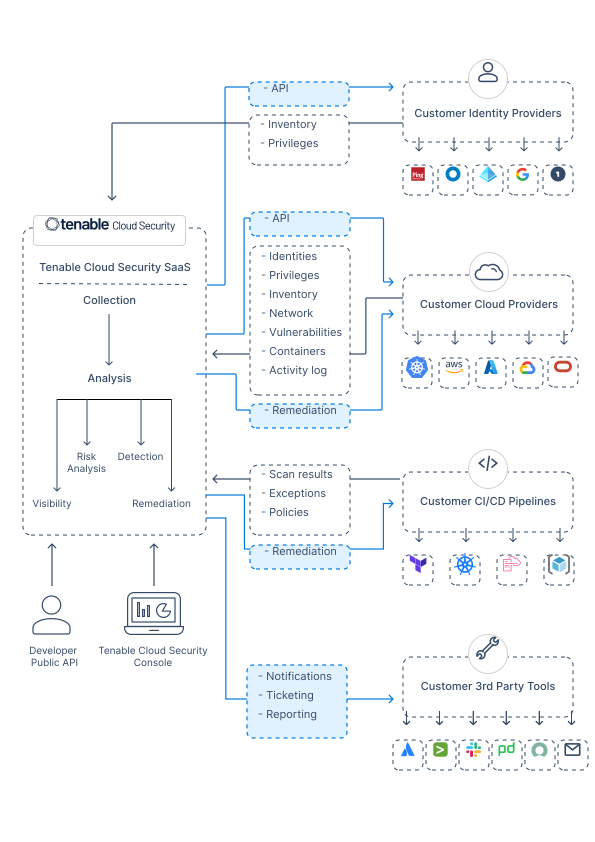
The Tenable One Cloud Exposure solution is based on a cloud-hosted platform that connects via API to the major public cloud service providers. To form a complete picture of your cloud infrastructure security, Tenable integrates with your identity and cloud providers. Tenable also integrates with third-party ticketing, notification, and SIEM tools to provide additional visibility and facilitate remediation.
The following diagram displays the flow of communication between Cloud Exposure and your integrations.
Platform Components
The Cloud Exposure platform consists of the following components:
Service
Cloud Exposure is a multi-tenant service hosted on AWS. The service integrates with your organization’s IdP and cloud infrastructure environments to continuously collect the configuration metadata of identities, entitlements, resources, network and activity logs. The data collected is processed and stored in unique, proprietary data structures to provide deep visibility into identities’ privileges and activities, allow advanced identity analytics processes, and support remediation of access-related threats and excessive privileges. Cloud Exposure generates right-sized IAM configuration recommendations to eliminate any such risks. Cloud Exposure supports both fully and semi-automated, scalable and continuous risk remediation processes. By integrating with ticketing, notification, and SIEM tools such as Jira, Slack, and Splunk, Cloud Exposure embeds risk remediation into your organization’s natural workflows.
Console
The Console is the Cloud Exposure management application that supports:
- Onboarding of your organization’s cloud infrastructure accounts.
- Easy integration with your cloud identity providers and third party workflow products.
- Identifying, monitoring, enforcing, managing, investigating, and remediating risks and threats in your cloud infrastructure environment.
Public API
The public API allows you to work programmatically with the Cloud Exposure service to onboard your cloud environment, export access permissions, risks and threats, and enrich the Cloud Exposure platform with more context.
How Your Environment Is Analyzed
To detect and resolve security issues in your environment, Cloud Exposure performs the following operations:
-
Takes a snapshot of the environment, including resources, identities, permissions, and connections.
- This process requires querying every identity, account, service, and resource in the environment via API.
- Many of the services don’t support bulk operations, and therefore require that separate API calls are triggered for every resource in the environment.
- Customer environments can contain anywhere from hundreds, to millions of deployed resources.
- All cloud service provider (CSP) APIs are subject to quotas and throttling. As a security tool, Cloud Exposure does its best to optimize API calls so that throttling doesn’t affect customer environments.
- To make sure customer-generated API calls aren’t affected by throttling, Cloud Exposure implements mechanisms that control the rate of API calls.
-
Analyzes all resources against all available policies, including those related to misconfigurations and overprivilege.
-
For example, to determine whether or not an identity is overprivileged, Cloud Exposure takes into account a wide range of contextual information, such as:
- Mechanisms/policies that grant permissions to the identity.
- All of the activity performed by the identity in the past.
- To determine which resource-based permissions are available, Cloud Exposure pulls all information about every resource in the environment.
- The evaluation process is done for every identity, service, resource, and action available in the CSP, including cross-account access.
- Without analyzing the necessary context, there is no way to determine whether or not an identity is overprivileged.
-
For example, to determine whether or not an identity is overprivileged, Cloud Exposure takes into account a wide range of contextual information, such as:
- As each type of analysis completes, the platform determines which issues have been created, fixed, partially fixed, or are unchanged, and updates the Cloud Exposure Console accordingly to reflect these changes.
How Often Is Data Synced and Updated
Cloud Exposure synchronizes data across your multi-cloud environment on an ongoing basis. For most environments, full analysis completes in several hours, depending on the size of your cloud environment and the amount of analysis required (see How Your Environment Is Analyzed for more information).
Data Retention and Learning Periods
Data Retention
Cloud Exposure retains data for a select group of data objects, as follows:
-
Findings:
- Open and ignored findings: Indefinitely
- Closed findings: 365 days
- Audit Log: Indefinitely
- Configuration snapshots (IAM resources): Indefinitely
-
Activity Log:
- Up to 30 days — CIEM or Standard license
- Up to 90 days — Enterprise license
See Licensing for more information.
Excessive Permissions
Cloud Exposure triggers an analysis period (learning period) for the following activities, during which no new findings (related to excessive permissions) are created:
- AWS:
- When a new human identity is created - 180 days
- When a new service/machine identity is created - 90 days
- Azure/GCP:
- When a new identity is created - 90 days
-
All cloud providers:
-
When the permissions of an identity are changed - 30 days
- If the identity is inactive:
- When the first permission is added, Tenable will enforce the 30 day learning period
- Upon subsequent permission changes, no additional learning periods will be enforced.
- If the identity is active:
- For any permission change, Tenable will enforce the 30 day learning period, or invoke a new learning period for an additional 30 days
- If the identity is inactive:
Note: (Azure) For permission changes, the analysis/learning period is calculated per subscription. -
When the permissions of an identity are changed - 30 days
Activity Log and Anomalous Behavior
Cloud Exposure analyzes up to 12 months of user activity. Cloud Exposure alerts about anomalous behavior after learning about identities for at least 30 days. After an anomaly finding is opened for a specific behavior, any similar anomalous behavior discovered is handled as follows:
- Within 30 days - the behavior will be added to the existing finding, and the finding will be reopened if it was previously marked as resolved.
- After 30 days - a new finding will be opened.
Tenable IP Addresses to Allow
To ensure proper functionality and network access for Cloud Exposure, you may need to allow specific IP addresses in your firewall. This section outlines the required IP addresses based on the features you utilize.
- Cloud Exposure IP Addresses for Core Services
- Additional IP Addresses for Workload and Data Protection
Cloud Exposure IP Addresses for Core Services
There are a number of situations where, in order to grant Cloud Exposure network access, you need to allow IP addresses associated with your Tenable region in your firewall. For example:
- If you use on-premises development tools, such as Jira.
- When you connect your Kubernetes clusters to Cloud Exposure. See Kubernetes for more information.
- If you use VPC Service Controls to restrict access to Google-managed services in the project/organization that you want to onboard. See Add VPC Service Control Exceptions for more information.
- To display Azure container repositories associated with container registries that have restricted network access. In the registry's Networking settings, configure the public network access to allow access from Selected networks, and add the relevant addresses, as described below. Refer to the relevant Microsoft documentation for more information.
In any of the above situations, you need to add all IP addresses associated with the region, as listed in the table below. Where relevant, follow the steps in the linked documentation mentioned above for complete details.
| IP Address | Code | Region |
|---|---|---|
| 13.55.8.134 | ap-southeast-2 | Australia |
| 13.238.234.158 | ap-southeast-2 | Australia |
| 15.229.113.7 | sa-east-1 | Brazil |
| 18.230.107.160 | sa-east-1 | Brazil |
| 15.222.42.59 | ca-central-1 | Canada |
| 3.96.102.218 | ca-central-1 | Canada |
| 18.192.163.94 | eu-central-1 | Europe |
| 3.67.105.194 | eu-central-1 | Europe |
| 3.111.211.8 | ap-south-1 | India |
| 13.233.15.138 | ap-south-1 | India |
| 13.114.192.130 | ap-northeast-1 | Japan |
| 54.249.244.19 | ap-northeast-1 | Japan |
| 13.213.26.143 | ap-southeast-1 | Singapore |
| 54.169.55.8 | ap-southeast-1 | Singapore |
| 54.180.11.78 | ap-northeast-2 | South Korea |
| 52.79.145.86 | ap-northeast-2 | South Korea |
| 3.28.116.1 | me-central-1 | United Arab Emirates |
| 51.112.62.204 | me-central-1 | United Arab Emirates |
| 18.133.145.176 | eu-west-2 | United Kingdom |
| 35.178.50.225 | eu-west-2 | United Kingdom |
| 18.118.214.30 | us-east-2 | United States |
| 18.189.244.216 | us-east-2 | United States |
| 3.142.27.15 | us-east-2 | United States |
| 3.143.179.156 | us-east-2 | United States |
| 15.205.53.205 | us-gov-west-1 | United States Gov Cloud |
| 3.30.64.189 | us-gov-west-1 | United States Gov Cloud |
You can identify your region based on the URL you use to log in to the Cloud Exposure Console.
See Product Security and Privacy for details.
Additional IP Addresses for Workload and Data Protection
If you enforce network policies to secure your environment, and want to use Workload Protection or Data Protection features, you must allow IP addresses associated with the region/s where your scanned resources are located in your network policies. Reference the relevant table below for AWS, Azure, GCP, OCI and Alibaba Cloud.
AWS: Additional IP Addresses
For AWS resources, allow the IP addresses associated with the regions where your scanned resources are located.
| IP Address | Code |
|---|---|
| 13.244.47.171, 13.247.41.46 | af-south-1 |
| 54.46.41.61, 54.46.18.102 | ap-east-1 |
| 13.158.66.42, 13.158.121.198 | ap-northeast-1 |
| 3.35.85.139, 15.164.71.91 | ap-northeast-2 |
| 56.155.20.153, 15.168.230.70 | ap-northeast-3 |
| 3.108.153.42, 65.0.200.62 | ap-south-1 |
| 40.192.75.236, 98.130.91.166 | ap-south-2 |
| 175.41.159.66, 13.250.195.115 | ap-southeast-1 |
| 13.55.43.203, 52.65.72.80 | ap-southeast-2 |
| 16.79.53.198, 16.79.53.90 | ap-southeast-3 |
| 16.26.36.30, 16.26.107.43 | ap-southeast-4 |
| 43.217.167.99, 43.217.173.190 | ap-southeast-5 |
| 52.60.245.247, 15.156.1.141 | ca-central-1 |
| 40.177.114.116, 40.177.125.207 | ca-west-1 |
| 3.73.221.188, 63.178.204.81 | eu-central-1 |
| 51.96.117.232, 51.96.13.168 | eu-central-2 |
| 13.50.63.67, 16.170.31.188 | eu-north-1 |
| 35.152.179.48, 15.161.18.202 | eu-south-1 |
| 18.101.30.42, 51.48.29.154 | eu-south-2 |
| 63.35.143.32, 18.202.10.182 | eu-west-1 |
| 18.170.252.124, 18.130.97.168 | eu-west-2 |
| 13.37.116.12, 13.38.181.150 | eu-west-3 |
| 51.84.187.199, 51.17.102.160 | il-central-1 |
| 3.29.193.243, 40.172.90.226 | me-central-1 |
| 157.175.117.169, 15.184.164.203 | me-south-1 |
| 52.67.25.160, 54.232.54.71 | sa-east-1 |
| 52.0.48.165, 44.197.60.179 | us-east-1 |
| 18.188.85.13, 18.116.179.123 | us-east-2 |
| 52.8.98.134, 54.183.70.244 | us-west-1 |
| 52.13.227.219, 44.225.61.163 | us-west-2 |
Azure: Additional IP Addresses
For Azure resources, allow the IP addresses associated with the regions where your scanned resources are located.
| IP Address | Code |
|---|---|
| 40.126.151.132 | australiacentral |
| 20.227.144.80 | australiacentral2 |
| 20.213.11.159 | australiaeast |
| 20.211.197.238 | australiasoutheast |
| 20.197.230.190 | brazilsouth |
| 20.206.42.162 | brazilsoutheast |
| 20.48.224.16 | canadacentral |
| 20.104.133.30 | canadaeast |
| 172.212.226.78 | centralus |
| 20.244.9.79 | centralindia |
| 20.42.93.227 | eastus |
| 20.62.2.243 | eastus2 |
| 20.205.137.189 | eastasia |
| 20.199.72.104 | francecentral |
| 52.136.130.122 | francesouth |
| 20.113.192.12 | germanynorth |
| 20.218.152.250 | germanywestcentral |
| 70.153.24.139 | indonesiacentral |
| 20.217.82.48 | israelcentral |
| 4.232.161.55 | italynorth |
| 4.216.184.220 | japaneast |
| 20.89.233.148 | japanwest |
| 20.39.195.131 | koreacentral |
| 20.200.168.89 | koreasouth |
| 20.17.176.43 | malaysiawest |
| 158.23.168.37 | mexicocentral |
| 20.221.222.135 | northcentralus |
| 98.71.41.54 | northeurope |
| 20.251.144.118 | norwayeast |
| 20.215.40.163 | polandcentral |
| 20.173.105.45 | qatarcentral |
| 102.37.151.13 | southafricanorth |
| 20.87.161.83 | southafricawest |
| 40.124.87.130 | southcentralus |
| 20.205.169.174 | southeastasia |
| 52.172.33.171 | southindia |
| 68.221.169.249 | spaincentral |
| 135.225.57.168 | swedencentral |
| 20.208.130.139 | switzerlandnorth |
| 40.125.29.102 | uaecentral |
| 20.174.16.21 | uaenorth |
| 20.90.146.119 | uksouth |
| 20.254.192.157 | ukwest |
| 13.88.174.166 | westus |
| 13.77.210.60 | westcentralus |
| 20.98.112.63 | westus2 |
| 20.14.91.213 | westus3 |
| 74.234.169.27 | westeurope |
GCP: Additional IP Addresses
For GCP resources, allow the IP addresses associated with the regions where your scanned resources are located.
| IP Address | Code |
|---|---|
| 34.35.9.85 | africa-south1 |
| 34.80.224.113 | asia-east1 |
| 34.96.128.207 | asia-east2 |
| 34.146.217.16 | asia-northeast1 |
| 34.97.44.199 | asia-northeast2 |
| 34.64.248.74 | asia-northeast3 |
| 34.93.208.104 | asia-south1 |
| 34.131.72.88 | asia-south2 |
| 34.143.211.157 | asia-southeast1 |
| 34.101.212.40 | asia-southeast2 |
| 34.151.121.76 | australia-southeast1 |
| 34.129.145.96 | australia-southeast2 |
| 34.118.126.246 | europe-central2 |
| 34.88.77.52 | europe-north1 |
| 34.51.163.143 | europe-north2 |
| 34.175.112.191 | europe-southwest1 |
| 104.155.64.32 | europe-west1 |
| 34.17.84.136 | europe-west12 |
| 34.147.174.110 | europe-west2 |
| 34.141.31.117 | europe-west3 |
| 34.32.158.128 | europe-west4 |
| 34.65.38.205 | europe-west6 |
| 34.154.102.105 | europe-west8 |
| 34.163.2.180 | europe-west9 |
| 34.32.35.180 | europe-west10 |
| 34.18.110.39 | me-central1 |
| 34.166.87.226 | me-central2 |
| 34.165.117.101 | me-west1 |
| 34.51.1.131 | northamerica-south1 |
| 34.47.21.190 | northamerica-northeast1 |
| 34.130.211.148 | northamerica-northeast2 |
| 34.95.251.39 | southamerica-east1 |
| 34.176.113.165 | southamerica-west1 |
| 35.194.13.48 | us-central1 |
| 35.237.237.96 | us-east1 |
| 34.86.114.209 | us-east4 |
| 34.162.52.135 | us-east5 |
| 34.174.145.164 | us-south1 |
| 34.145.53.242 | us-west1 |
| 34.94.85.48 | us-west2 |
| 34.106.221.217 | us-west3 |
| 34.16.238.165 | us-west4 |
OCI: Additional IP Addresses
For OCI resources, allow the IP addresses associated with the regions where your scanned resources are located.
| IP Address | Code |
|---|---|
| 80.225.208.77 | ap-mumbai-1 |
| 140.83.62.67 | ap-osaka-1 |
| 138.2.94.25 | ap-singapore-1 |
| 140.245.38.245 | ap-singapore-2 |
| 138.3.222.76 | ap-tokyo-1 |
| 152.70.23.162 | eu-frankfurt-1 |
| 79.72.27.154 | eu-marseille-1 |
| 79.72.19.117 | eu-stockholm-1 |
| 144.24.245.89 | eu-zurich-1 |
| 137.131.149.97 | sa-saopaulo-1 |
| 138.2.246.157 | sa-vinhedo-1 |
| 141.147.93.58 | uk-london-1 |
| 150.230.178.200 | us-ashburn-1 |
| 64.181.194.46 | us-chicago-1 |
| 129.153.74.174 | us-phoenix-1 |
| 146.235.207.179 | us-sanjose-1 |
Alibaba Cloud: Additional IP Addresses
For Alibaba Cloud resources, allow the IP addresses associated with the regions where your scanned resources are located.
| IP Address | Code |
|---|---|
| 8.211.178.205 | ap-northeast-1 |
| 43.108.104.143 | ap-northeast-2 |
| 8.219.199.56 | ap-southeast-1 |
| 8.217.136.209 | cn-hongkong |
| 47.245.162.168 | eu-central-1 |
| 47.85.91.110 | us-east-1 |
Tenable Account IDs to Allow
Cloud Exposure uses several account IDs to make API requests. Being aware of these IDs ensures that:
- You can validate any incoming API requests coming from these IDs as trustworthy. Such requests are used by Tenable to, for example, assume roles in your account/s to connect to your environment for onboarding purposes.
- If you use Workload Protection, consider excluding these ID from any alerting/blocking mechanisms, since Tenable shares snapshots with these accounts for scanning purposes.
| Account ID |
|---|
| 081802104111 |
| 631729062255 |
| 632762758154 |
| 980664881829 |