Licensing
This article provides comprehensive information on license types, feature support, and resource billing logic across the platform.
- Licensing Page — Learn about your license usage.
- License Types — Learn about all the available license types.
- Billable Resources — Learn about how and which resources are billed.
- Reclaim Licenses — Learn how to reclaim licenses and manage your license consumption.
- FAQ — See a list of frequently asked questions related to licensing.
For a comprehensive list of features and functionality supported for each license type, see Feature Comparison by License.
Licensing Page
To access the Licensing page navigate to Settings > Licensing in the Tenable One Cloud Exposure Console. Use this page to see relevant information related to your Cloud Exposure licenses:
- Your renewal date.
- Cloud security license usage — You can view usage information for individual account scopes by selecting a scope in the account tree on the left.
-
Which License Types you are subscribed to.
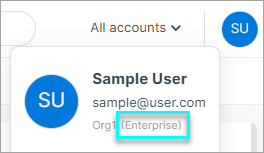
You can also see your license type in your user profile at the top right of the Cloud Exposure Console.
- General information about which features are supported by each license type. For a complete mapping of Cloud Exposure features to each license type, see Feature Comparison by License.
Cloud Exposure License Usage
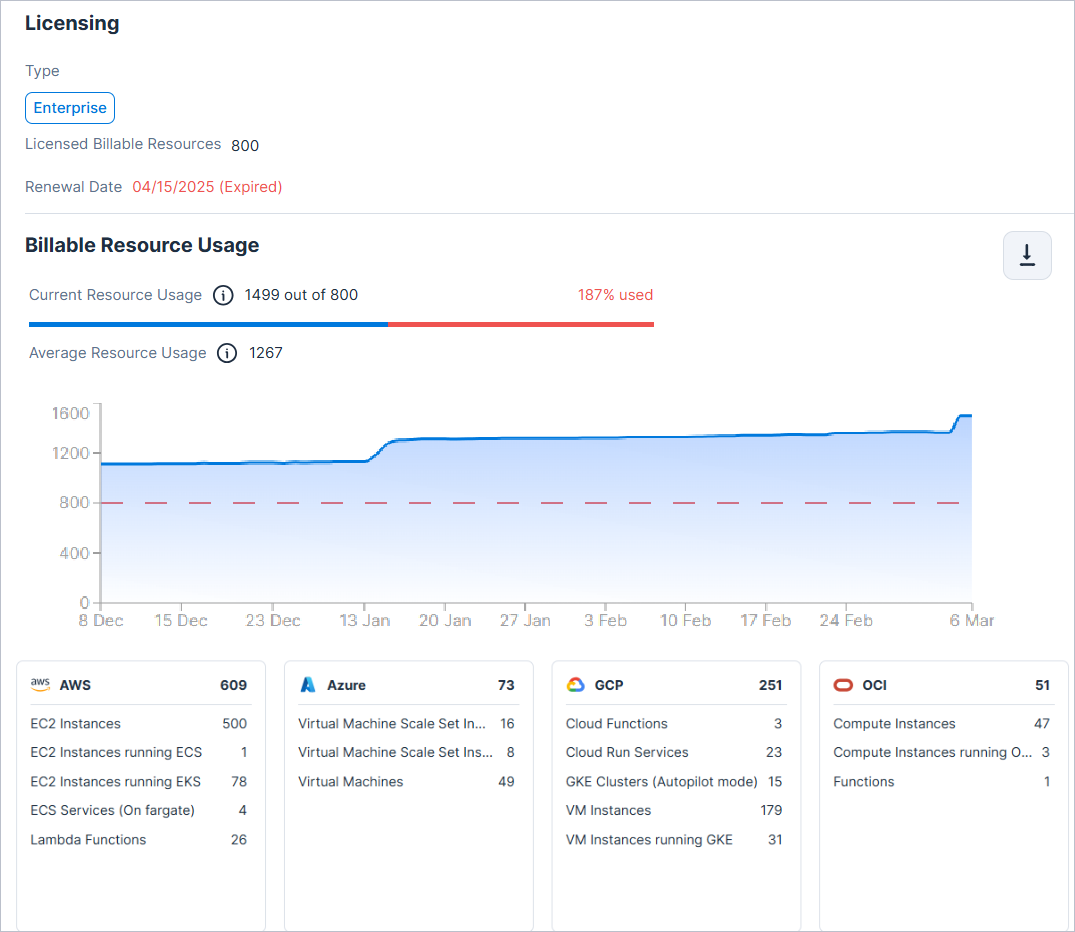
The Licensing page shows you a complete breakdown of your Cloud Exposure license usage. You can view usage information for individual account scopes by selecting a scope in the account tree on the left.
- Current Resource Usage — The number of billable resources you are using, out of the total number you have purchased, as of the last snapshot taken by Cloud Exposure. The date of the last snapshot taken is indicated in the adjacent tooltip.
- Average Resource Usage — The resource count is based on the average usage of resources in onboarded accounts, going back up to 90 days.
- Usage Trend graph — A graph displaying the number of billable resources used over time, going back up to 90 days.
- Blue line = Resources used.
- Red line = Resources purchased.
-
Breakdown of Billable Resources — See a breakdown of the Billable Resources in your environment.
Note: Be aware of the following resource billing ratios:
- On-Premises K8s worker nodes — 1 resource = 2 billable resources.
- Serverless functions — 10 resources = 1 billable resource.
The breakdown in the Console shows billable resources, and not the total number of resources.
To view billing units per resource:
- Go to Explore > Inventory and add the Billing Usage column.
- Go to Explore > Explorer and create a query that finds a resource and groups by Billing Usage.
- Go to Settings > Licensing and select a resource. When the Explore > Inventory page opens with the Billing Usage is Yes filter, add the Billing Usage column.
Export License Usage Data per Resource
Export license data to CSV to see a breakdown of usage by resource type. For each resource type, you can see both the last (current) resource count and the average resource count (90 days).
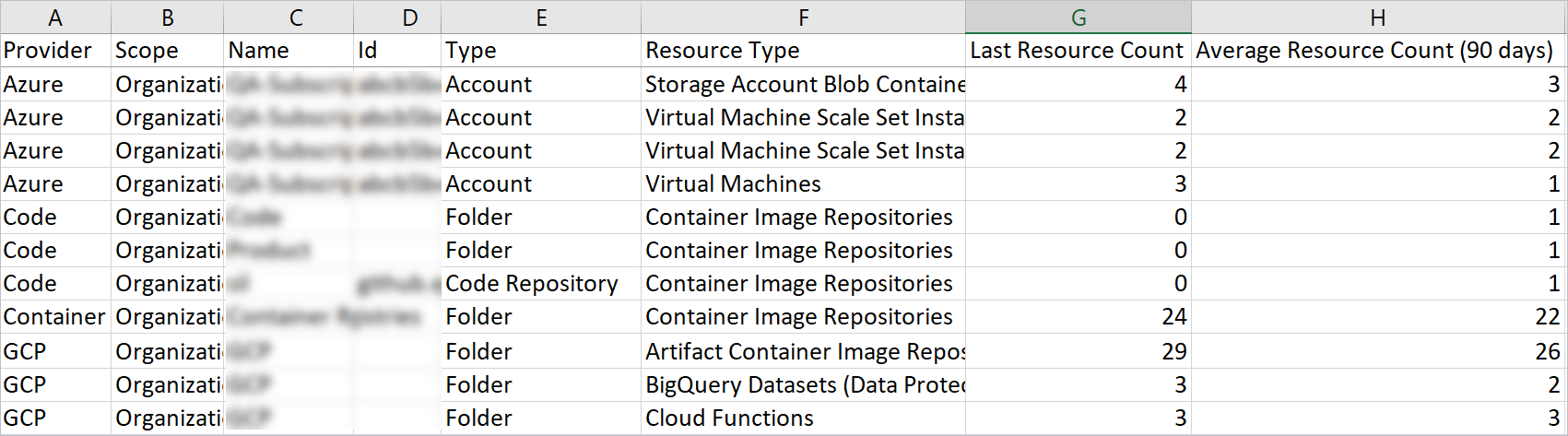
To export license usage data:
- In the Cloud Exposure Console, navigate to Settings > Licensing.
- (Optional) Select a scope in the Organization drop-down. By default, the entire Organization (all accounts) is selected.
- In the Billable Resource Usage section, click the Export button.
Tenable One Platform License Usage
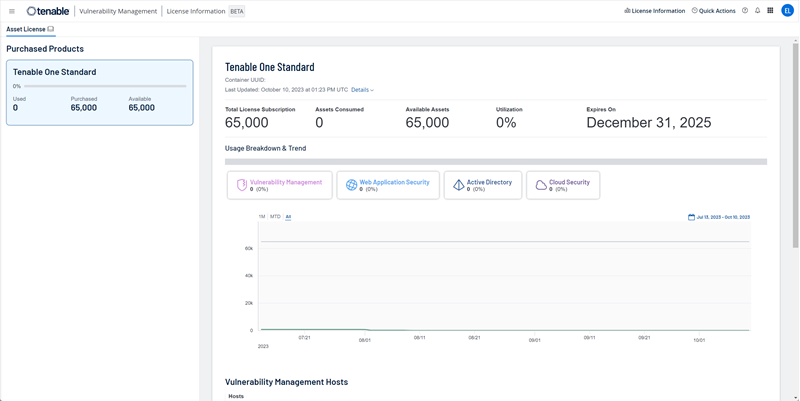
You can also view a complete breakdown of all your Tenable products and their license usage in the License Information page in Vulnerability Management. See the relevant documentation{target=_blank} for more information.
License Types
Cloud Exposure offers multiple licenses, allowing you to choose the option that best suits your business needs. The licenses offer progressively higher levels of functionality, such that at each additional level, the license includes all the functionality contained in the previous level along with additional capabilities.
For a complete mapping of Cloud Exposure features to each license type, see Feature Comparison by License.
Tenable One Licenses
Tenable One licenses offer different Cloud Exposure features along with other Tenable One features.
To learn more, see Tenable One licenses.
Tenable One Foundation
The Tenable One Foundation license provides Unified Vulnerability Management for on-premises and cloud assets. This license is ideal for organizations prioritizing vulnerability management within their organization.
Key Capabilities: Full inventory across all cloud assets, Agentless Vulnerability Management, Vulnerability Intelligence, SBOM, Compliance. Learn more.
Tenable One Advanced
The Tenable One Advanced license is built for Exposure Management teams that need to analyze and contextualize risk across network infrastructure, applications, and cloud environments. This license is ideal for organizations prioritizing proactive risk reduction by understanding how vulnerabilities and misconfigurations combine into complex attack paths, or if you want to measure and track your cloud compliance posture. A Tenable One Advanced license includes Cloud Exposure at the Advanced level.
Key Capabilities: CSPM, KSPM, CWP, AI-SPM, network exposure, and Hexa AI. Learn more.
CNAPP Complete
The CNAPP Complete license is a premium add-on for customers on Tenable One Foundation or Tenable One Advanced. Choose it if you need a cloud security solution with full coverage for cloud risks and exposures. CNAPP Complete includes all the capabilities offered in Advanced as well as additional capabilities beyond Advanced.
Key Capabilities: Access to the full, uncapped Cloud Exposure platform and all available features. Learn more.
To decide whether you need the add-on, see Choose between Advanced and CNAPP Complete.
Legacy Licenses
These licenses represent Cloud Exposure standalone cloud security offerings. They provide dedicated, cloud-native capabilities for organizations with specific modular requirements or existing legacy agreements.
To compare the features of the legacy licenses, see Feature Comparison for Legacy Licenses.
Tenable JIT
The Tenable JIT license enables time-bound, on-demand access to cloud accounts across AWS, Azure, and GCP, as well as for Identity Provider (IdP) groups including Okta, Microsoft Entra ID, and Ping Identity. It helps you minimize risk by reducing the window of privilege exposure, while simplifying access approval workflows. Automate common request approvals, audit all activity, and manage access through a self-service portal or integrated collaboration tools like Slack and Teams. See JIT Access for more information.
Target audience: Organizations that want to enhance access security with minimal friction by introducing least-privilege, just-in-time access for cloud accounts—without needing broader cloud security tooling.
CIEM
The CIEM license includes all functionality from the Tenable JIT license and extends it by enabling continuous monitoring of human and service identities, permissions, and activity. It helps you surface, visualize, and mitigate IAM risks. The CIEM license is a complete solution for securing cloud identities, from asset management, through risk assessment, anomaly detection, guided and automated remediation, and compliance.
Target audience: Organizations that already have a workload protection and CSPM solution in place, and are looking to address identity-based and entitlement risks in their environment.
Standard
The Standard license includes all functionality from the CIEM license, and extends it with:
- Hundreds of policies that detect cloud misconfigurations and enforce compliance with industry standards.
- Agentless vulnerability management, workload protection and data protection, providing a unified view of your cloud security risk and delivering the deepest, most accurate remediation capabilities.
This license also features AI-SPM, KSPM, and IaC security, as well as extended retention of activity logs.
Target audience: Organizations that want a complete, unified platform that integrates CIEM, CSPM, workload protection, data protection, and other forms of risk protection in one solution.
Enterprise
The Enterprise license includes all functionality from the Standard license, and extends it with enterprise features and enhanced protection, including:
- Cloud Threat Detection.
- Data protection for Snowflake resources.
- In-account workload scanning (which ensures that data never leaves your environment).
- Kubernetes Admission Controller.
- Sensor-based vulnerability scanning for on-premises Kubernetes clusters.
Target audience: Organizations that want a complete, unified enterprise platform that integrates CIEM, CSPM, workload protection, in-account scanning, and other forms of risk protection in one solution.
Cloud Vulnerability Management
The Cloud Vulnerability Management (VM) license is a specialized solution designed for organizations that need foundational Cloud Workload Protection without the full complexity of a broad CNAPP platform. It leverages frictionless, agentless scanning to provide deep visibility into vulnerabilities and misconfigurations across cloud providers. By unifying risk assessment for workloads with Tenable’s industry-leading research, this license allows teams to prioritize and remediate cloud exposures alongside their on-premises assets.
Target audience: Organizations that want to extend vulnerability management best practices into the cloud with dedicated workload and container scanning.
Billable Resources
There are different types of billable resources:
- Compute Billable Resources determine the size of your environment and align it to a licensing tier. While Cloud Exposure scans your entire cloud environment (beyond these specific resources), this standardized metric reflects the overall scale of your cloud footprint. Since this is a sizing model, and not a per-resource count, you can’t select individual resources to include/exclude. However, you can onboard or offboard cloud accounts as needed.
- Scan-Based Billable Resources refer to resources scanned by features that provide additional value (such as Workload and Data Protection), which must be actively enabled. Billing is based only on the resources these features scan. While you can’t choose specific resources for billing, enabling or disabling a feature directly impacts the number of scanned resources and, in turn, your billing. You can enable/disable scan-based features at specific scopes, to fine-tune which accounts Tenable scans.
- JIT Requester Billable Resources refer to unique users or identities assigned to one or more eligibilities.
Compute and Scan-Based Billable Resources
The following table lists all compute and scan-based billable resources, grouped by cloud provider and resource category.
The Billable Resources table lists all compute and scan-based billable resources. Unless otherwise noted, billing is calculated at a 1:1 ratio (one resource consumes one license).
Exceptions to the 1:1 ratio:
| Resource | Ratio | Details | Affected Licenses |
|---|---|---|---|
| Serverless functions | 10:1 | Ten resources consume one license | All |
| Container hosts | 1:2 | One resource consumes two licenses (one for the virtual machine and one for the container host) |
Legacy Licenses |
| DynamoDB | 5:1 | Five resources consume one license | Legacy Licenses |
The following tools are available on the Cloud Exposure downloads page{target=_blank}:
- Sizing guide — Instructions on running sizing scripts to inventory and detect the number of billable workloads in your environment.
- Sizing scripts — Sizing scripts for AWS, Azure, and GCP.
| Resource Type / Billable Licenses¹ | Category | AWS | Azure | GCP | Alibaba Cloud | OCI | On-Premises/Other |
|---|---|---|---|---|---|---|---|
| Compute
Foundation, Advanced, CNAPP Complete, Cloud VM, CIEM, Standard, Enterprise |
Virtual machines | EC2 Instances | Virtual machines, VM scale set instances | Virtual machine instances | ECS Instances running ACK | Compute instances | - |
| Container hosts² | EC2 instances running EKS/ECS | VM scale set instances running AKS | Virtual machine instances running GKE | ECS Instances running ACK | Compute instances running OKE | Kubernetes nodes | |
| Serverless functions³ | Lambda Functions | App Services | Cloud Functions | - | Functions | - | |
| Serverless containers³ | ECS Services | Container Instances | Cloud Run, GKE Autopilot | - | - | - | |
| Scan-Based Workload Protection Foundation, Advanced, CNAPP Complete, Cloud VM, Standard, Enterprise |
Container repositories⁴, ⁵ | ECR Repositories | Container Repositories | Artifact Container Image Repositories | Container Registry Repository | - | CI/CD³, 3rd Party Registries |
| Virtual machine images | EC2 Images | - | - | ECS Images running ACK | - | - | |
| Data disks | EC2 Instances data volumes |
|
VM Instances data disks | ECS disks | Compute Instances data volumes | ||
| Scan-Based Data Protection CNAPP Complete, Standard, Enterprise |
Buckets³ | S3 Buckets | Storage Account Blob Containers | Storage Buckets | OSS Buckets | Object Storage Buckets | - |
| Managed databases³ |
|
Azure SQL Server |
|
- | - | - | |
| Data platform databases³ | - | - | - | - | - | Snowflake databases Local, Shared, Marketplace | |
| JIT Requester JIT, CIEM, Standard, CNAPP Complete, Enterprise |
Users | AWS SSO User | Azure AD User | GCP User | - | - |
|
¹ The resources in the listed licenses are accounted in your billing usage. Resources in the licenses that are not listed are still covered but are not billable.
² This includes virtual machine (1:1) as a billable unit.
³ These resources are not relevant for the Cloud Vulnerability Management license.
⁴ These resource types are based on the container repository itself, not the images within. For example, a container repository is considered one billable resource whether it contains 15 or 150 images of the same container.
⁵ When the same container repository is monitored via both CI/CD pipelines and registry scanning, it is treated as two distinct billable resources.
JIT Requester Billable Resources
A JIT requester is a unique user (determined by email address) assigned to one or more eligibilities. These users are authorized to initiate temporary, time-bound access through JIT. If a group is selected as the Principal in an eligibility, each unique user within that group is counted as a JIT requester for billing purposes, regardless of whether they ever request access.
JIT is supported for cloud accounts in AWS, Azure, and GCP, as well as for identity provider (IdP) groups including Okta, Microsoft Entra ID, and Ping Identity. JIT isn't currently supported for OCI.
| Category | Ratio |
|---|---|
| JIT requester | 1:1 |
License Downgrade
When your license type is changed to one with fewer capabilities (for example, from CNAPP Complete to Advanced), Cloud Exposure initiates a 30-day grace period. This period prevents immediate data loss and allows you time to prepare your environment for the transition.
Prepare for the Downgrade
To avoid operational disruptions, Tenable recommends taking the following actions before the grace period begins:
- Just-in-Time (JIT) Access — If your new tier does not include JIT, perform the following:
- If you want to retain your JIT audit trail after the downgrade, export the audit trail.
- Ensure users have alternative access methods, as all eligibilities will be removed.
- Kubernetes clusters — If the new tier does not include KSPM, and you are currently using Helm charts to connect your Kubernetes clusters, perform the following:
- Uninstall the Helm chart from your clusters. Failure to do so may cause containers to restart continuously as they stop receiving responses from the Tenable backend.
- Exclusions and reports retention — Reports and exclusions assigned only to policies that do not exist post-downgrade will be automatically deleted when the grace period ends. Perform the following:
- Review your critical exclusions and custom reports. To preserve them, ensure they are cross-assigned to at least one additional policy that remains supported under your new license tier prior to the completion of the downgrade.
- Historical reports — Because the ability to generate reports for features outside your new tier will be disabled once the grace period ends, perform the following:
- Export any required historical compliance records or summaries for your audit history while the grace period is active.*before the downgrade completes
Grace Period
During these 30 days, the product maintains background operations while limiting console and API access to align with your new license level:
- Informational Grace period banner — A banner appears across all screens in the Console showing the number of days remaining in your grace period.
- Access limitations — All Console screens and API endpoints not included in your new license tier are removed or blocked. This includes the JIT portal if it is no longer licensed.
- Functional blocks — You will be unable to create reports, automations, or integrations that are not supported by the new license tier. You will be able to edit or delete.
-
Continued scanning — All previously licensed security scans continue to run during the grace period.
Note: Because scans continue, you may still incur third-party charges (such as data transfer or compute) from your cloud providers. - Policies and findings — Findings and policies related to unlicensed features remain visible in findings screens. This ensures that your dynamic severity and compliance scores remain accurate during the transition.
- Custom configurations — Widgets or sections not supported by the new license will be replaced by placeholders. Perform the following:
- Review custom dashboards and reports, remove any placeholders, and adjust the format as needed.
Post-Downgrade Completion
Once the 30-day grace period ends (or is manually terminated), Cloud Exposure completes the transition to your new license tier. The following automated actions and configuration changes occur immediately.
Automated Cleanup of Unlicensed Data
The system automatically removes data and configurations that are no longer supported by your current license:
- Findings and policies — All findings and built-in policies associated with unlicensed features are removed from compliance mappings and findings screens.
- Scanning — All security scans for unlicensed features are permanently stopped.
- Reports and exclusions — Any existing reports or exclusions uniquely assigned to policies that do not exist post-downgrade are permanently deleted.
- Integrations — Integrations not included in the new license tier are removed.
Impact on Remaining Configurations
Some items remain in the Console but will function differently without the underlying licensed data:
- Custom policies — Existing custom policies remain, but any unlicensed components within them will display placeholders. After the grace period, these policies will no longer return results for unlicensed information.
- Finding automations — Automations based on unlicensed findings will stop returning results. but are not deleted. Tenable recommends reviewing these after the downgrade to ensure they are not attempting to track data that is no longer being collected.
-
Audit automations — Automations based on unlicensed features will stop returning results, but are not deleted.
Note: Within an automation, note the following behavior related to the Actions section.- Action types related to unlicensed Platform features still appear in relevant configuration screens, but stop returning results.
- If JIT is no longer licensed, JIT Eligibilities and JIT Access Requests action types will no longer appear.
- JIT — JIT eligibilities and access requests are removed from existing automations.
- Search and query tools — You can continue to use query-based filtering and search mechanisms throughout the platform (including the Explorer, custom dashboards, etc.), but unlicensed features will no longer return data results.
Post-Downgrade Checklist for Administrators
To ensure a clean environment and prevent technical errors, Administrators should manually perform the following:
- Delete unlicensed outposts — If you have outposts deployed for features no longer covered by your license, you should manually delete them.
- Right-size cloud permissions: Tenable recommends that you update your cloud IAM roles and permissions to match your new tier. To reduce the permissions granted to Tenable within your cloud environment, review the updated onboarding script and scale back your environment authorizations based on that script, or use the product documentation to review the exact permissions required by the new license tier.
Manually End the Grace Period
The transition becomes permanent after 30 days. At this time, all data, findings, custom policies, reports, and automations associated with the unlicensed capabilities are permanently deleted.
If you wish to move to your new license immediately and stop third-party scan charges, a user with the Administrator role can manually click Terminate grace period in the Grace period banner. This action (which can take up to 24 hours) stops unlicensed scans and deletes unlicensed data.
Reclaim Licenses
If your resource usage exceeds your licensed limit, there are various methods you can employ to actively manage and reduce your license consumption in Cloud Exposure. While Tenable automatically reclaims licenses when resources are deleted from the Inventory (during the next data synchronization), the strategies outlined below provide you with direct control over your license footprint. For details on your current license consumption, see Cloud Exposure License Usage and Export License Usage Data per Resource.
For step-by-step guidance on finding what is consuming licenses and reducing consumption, see Address License Count Increases or Overages.
The following table explains how licenses are reclaimed, and other mechanisms available for reducing license count.
See Billable Resources for more information about specific resource types and billable ratios.
| Product Feature | Method to Reclaim Licenses |
|---|---|
| Monitoring | Exclude AWS, Azure, GCP, or OCI accounts. |
| Workload Protection | Enable or Disable Container Registry Scanning |
| Data Protection1 | |
| JIT Access1 | Decrease the number of eligible requesters by editing or deleting eligibilities. |
1 These resources are not relevant for the Cloud Vulnerability Management license.
2 Learn more about billing after scanning is disabled
FAQ
This section contains a list of frequently asked questions related to licensing.
Licenses
 If I have a Tenable One Advanced license, do I get the Advanced license level in every Tenable product?
Yes. A Tenable One Advanced license applies the Advanced level across the products in your license, including vulnerability management and Cloud Exposure.
What is the CNAPP Complete add-on?
CNAPP Complete offers cloud security with full coverage for cloud risks and exposures. Its capabilities are listed in the last column of Feature Comparison by License.
Without the CNAPP Complete add-on, do I still get Cloud Exposure?
Yes. You get the Cloud Exposure capabilities of your Tenable One license, either Foundation or Advanced.
How does the CNAPP Complete add-on compare to the Enterprise license?
They are the same. Enterprise is the legacy name.
Does my license include Exposure Management, OT security, or Tenable One AI Exposure?
Those capabilities belong to the Tenable One platform, not to Cloud Exposure. See Tenable One licenses{target=_blank}.
Why does the user interface show Enterprise?
Enterprise is the legacy name for the CNAPP Complete license. Some user interface elements still use the legacy name because it provides the same level of functionality as CNAPP Complete.
Vulnerability Management
How are the billable resources of production container repositories (e.g., ACR, ECR, etc.) calculated?
Billing for container repositories, whether cloud provider-managed or 3rd party, is calculated as follows:
- Billing is based on the number of repositories, not the number of images within them.
- Each day, Tenable checks which repositories were scanned in the past two days, and counts them as billable resources.
- You can disable repository scans in the workload settings, per account.
How are the billable resources of CI/CD container repositories (e.g., JFrog, GitLab, etc.) calculated?
Billing for CI/CD container repositories is calculated as follows:
- Billing is based on the number of unique repository names retained over the defined retention period.
- Tenable retains at least one month of scanning history by default and may keep up to two months, depending on scan volume.
- The number of billable resources increases with both the retention duration and the number of distinct repository names scanned.
What is the retention period for CI/CD container repository scan data and how does it affect billing?
The default retention period for CI/CD container repository scan data is 30 days but it can be extended upon request. Longer retention periods increase billing because more stored history leads to more unique repositories being counted. If a repository is scanned multiple times within the same retention window, it is only counted once. However, if repositories are renamed, they are counted as separate entities, which also increases costs.
Example: 30-Day Retention Period
- December — 10 unique repositories scanned in total.
- End of January — December's 10 repositories are retained, along with 5 new unique repositories from January (15 total).
- First day of February — December's data is removed, leaving only the 5 unique repositories from January.