Agent-Based Kubernetes Workload Scanning
Cloud workload protection can be achieved through agent-based or agentless scanning, each offering distinct benefits depending on your security needs, compliance requirements, and operational constraints. This article covers agent-based scanning. For information on agentless workload scanning, see Agentless Workload Scanning. For a comparison of the two methods, see Agentless vs Agent-Based Scanning.
This article provides details on a specific scanning method used by Tenable One Cloud Exposure. For a broader overview of all scanning and synchronization methods employed across various resource types and operational stages (including agentless, agent-based, and pipeline techniques used for different targets like code, data, and workloads), see Scanning Methods.
- During connection, Tenable generates a dedicated KMS key exclusively for its application. This key is required to create a virtual machine and attach a volume from the snapshot. The Tenable outpost uses only this key, and no customer-managed keys are shared. Access to the KMS key is restricted to the application, preventing human intervention in snapshot creation. Snapshot creation is fully automated, minimizing the risk of malicious activity.
-
During snapshot creation, Tenable automatically applies the following tags to each snapshot:
- ErmeticContext: WorkloadAnalysis
- ErmeticNamespace: Prd<Region><Deployment> e.g. PrdUse2Dep2, PrdAps1Dep1
About Agent-Based Kubernetes Workload Scanning
You can scan the following Kubernetes workloads for vulnerabilities by leveraging a Helm chart command to connect relevant clusters in your environment:
You can enable this feature by using the command to install a sensor in the cluster.
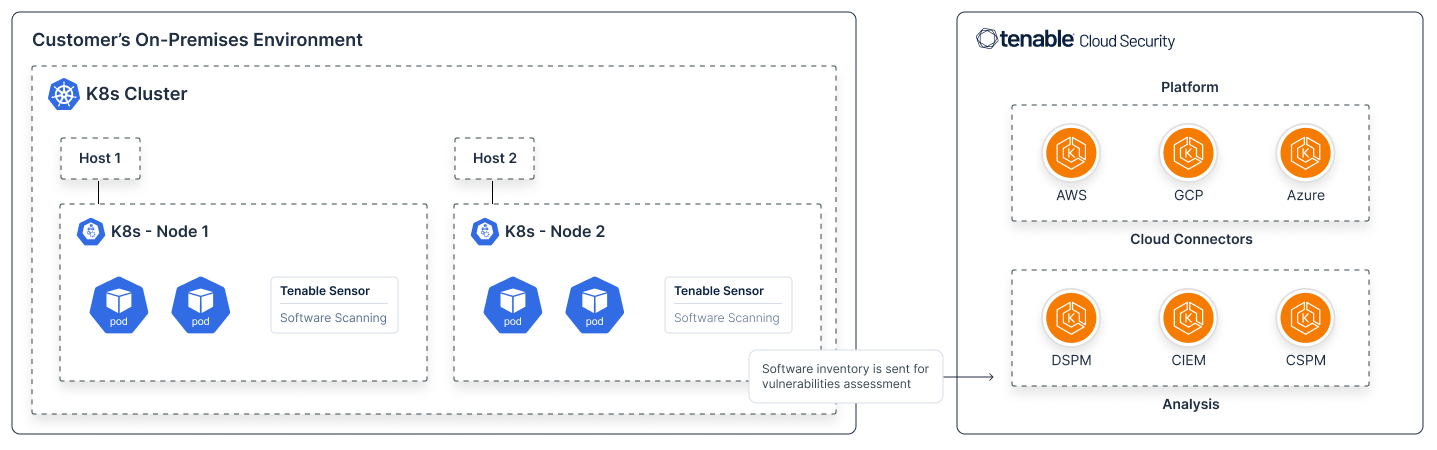
The sensor queries your package-manager and installed libraries to determine what software is installed on the host, as well as the container images running on the node. The sensor then sends this software inventory back to Tenable for further analysis.
Get started:
See Connect a Cluster via Helm Chart.
Data Outputs:
This scanning process results in the following data outputs, exposed in the Workload Protection area of the Tenable One Cloud Exposure Console:
- Software packages
- Vulnerabilities
Scanning Workflow Diagram
The following diagram shows how a Cloud Exposure sensor is installed on every Kubernetes node as a DaemonSet. These sensors scan the on-premises Kubernetes environment, including the virtual machines hosting the nodes. Once the scanning process is complete, the gathered software inventory (SBOM) is transmitted to Tenable for vulnerability assessment.
How Tenable Updates the Scanner
The sensor updates automatically with each new version of Cloud Exposure. To maintain compatibility and scanning functionality, it must be up to date with the latest version.
The update process works as follows:
- With each version release, Cloud Exposure provides an updated sensor image.
- The running sensor detects when it’s outdated, terminates its own process, and triggers a pod restart.
- On restart, the daemonset is configured to pull the latest image, pointing to the new version in the repository. It retrieves this image from Tenable’s private container registry in AWS ECR, authenticating via a token from the Tenable backend.
- The pod restarts using the new image, enabling the sensor to resume scanning and communicate results to the Tenable backend.
What Tenable Detects
Cloud Exposure currently scans the following workload components:
| Component | What Tenable Scans |
|---|---|
| Platform type |
|
| Workloads | Kubernetes nodes, including the host, and any container images running on the node. |
| Operating systems | Linux |
- Any containers found on these nodes are displayed as workloads in Tenable, with associated packages and Vulnerabilities.
- If the container is hosted on a cloud-based container registry (for example, Amazon ECR, Azure ACR) that Tenable monitors, a link to the repository is shown.
For each of these components, Tenable detects:
- General information (for example, OS type/version)
- What software is installed?
- Is the software/OS kernel vulnerable to attack?
- If so, which vulnerabilities apply?
- Is the OS out-of-date or EOL (and therefore needs to be upgraded)?
These capabilities are updated on an ongoing basis. If there are specific workloads/components that you work with and would like to see Tenable support, contact Technical Support.
Policies Used in Scans
The following built-in Cloud Exposure policies, belonging to the Workload Protection category, are used to scan your environment. For more information about how to work with policies in Cloud Exposure, see Cloud Policies.
| Platform | Category | Name |
|---|---|---|
| AWS/Azure/GCP/On-Premises | Workload Protection | Container Image has an operating system which is at or nearing End-of-Life |
| Container Image has an unpatched operating system | ||
| Container Image has vulnerabilities that should be addressed | ||
| Virtual Machine has an operating system which is at or nearing End-of-Life | ||
| Virtual Machine has an unpatched operating system | ||
| Virtual Machine has vulnerabilities that should be addressed |
How Tenable Identifies Software and Vulnerabilities
Tenable extracts known vulnerability information from a wide range of public data sources (specifically MSRC for Windows and, for example, NVD for Linux) and compiles a complete database of vulnerabilities, including:
- Vulnerable operating systems/software versions
- The KBs or upgrade versions (where possible) which address these vulnerabilities
In parallel, Tenable extracts the following information from the registry/package manager of your virtual machines (including all Windows user accounts/profiles):
- OS information (CPU architecture, version, etc.)
- List of installed KBs (Windows only)
- List of installed software (see, 1st and 3rd Party Apps on Windows Workloads)
Tenable then compares the OS version and installed software on your machines to the list of known vulnerabilities, and highlights the list of vulnerabilities relevant for the specific VM, as well as the recommended remediation.
Data Source Selection
Tenable uses the advisory database from the appropriate OS vendor. For example, for a Python package installed from yum (Amazon Linux), Tenable will only get advisories from ALAS. For packages installed from OS package managers (for example, dpkg, yum, and apk), this helps prevent false positives because OS vendors usually backport fixes from newer, upstream versions to previous versions, meaning that the fixed version can be different from the upstream fixed version.
For products installed outside of the package manager, this allows us to provide the fastest coverage possible as the advisories are typically the first place that vulnerabilities are publicly disclosed.
CVSS Severity Base Score
The severity is determined based on the CVSS score as follows:
| Base Score Range | Severity |
|---|---|
| 0.1-3.9 | Low |
| 4.0-6.9 | Medium |
| 7.0-8.9 | High |
| 9.0-10.0 | Critical |
- If the CVSS score also isn't provided, the NVD severity is used.
Linux
Linux OS Versions
Tenable identifies and detects vulnerabilities for the following versions of Linux:
| OS | Supported Versions | Package Managers |
|---|---|---|
| Alpine Linux | 2.2 - 2.7, 3.0 - 3.18, edge | apk |
| Wolfi Linux | (N/A) | apk |
| Chainguard | (N/A) | apk |
| Red Hat Enterprise Linux | 6, 7, 8, 9 | dnf/yum/rpm |
| Red Hat Enterprise Linux CoreOS | 4.x | (N/A) |
| CentOS | 6, 7, 8 | dnf/yum/rpm |
| AlmaLinux | 8, 9 | dnf/yum/rpm |
| Rocky Linux | 8, 9 | dnf/yum/rpm |
| Oracle Linux | 5, 6, 7, 8, 9 | dnf/yum/rpm |
| CBL-Mariner | 1.0, 2.0, 3.0 | dnf/yum/rpm |
| Amazon Linux | 1, 2, 2023 | dnf/yum/rpm |
| openSUSE Leap | 42, 15 | zypper/rpm |
| SUSE Enterprise Linux | 11, 12, 15 | zypper/rpm |
| Photon OS | 1.0, 2.0, 3.0, 4.0 | tndf/yum/rpm |
| Debian GNU/Linux | 7, 8, 9, 10, 11, 12, 13 | apt/dpkg |
| Ubuntu |
|
apt/dpkg |
| Bottlerocket | Note: This OS is scanned when extended disk scanning is enabled (default). Navigate to Settings > Security > Workload and toggle Extended Disk Scanning on. | (N/A) |
| Google Container-Optimized OS (COS) | Note: Support is limited to Software Inventory Visibility. While Tenable One Cloud Exposure accurately detects and reports all installed packages and components on Google COS hosts, advisory-based vulnerability scanning for this operating system is under development. Vulnerability detection results for Google COS are intentionally restricted at this time to eliminate false positives. Full vulnerability detection will be available in an upcoming release. | (N/A) |
| Echo OS | (N/A) | TBC |
| Chainguard OS | (N/A) | apk |
Linux Supported Languages
Tenable supports the following languages for software and vulnerabilities on Linux machines:
| Language | CI/CD Scanning | Registry Scanning | Workload Scanning |
|---|---|---|---|
| DotNet | ✔ | ✔ | ✔ |
| Go | ✔ | ✔ | ✔ |
| Java | ✔ | ✔ | ✔ |
| JavaScript | ✔ | ✔ | ✔ |
| Php | ✔ | ✔ | ✔ |
| Python | ✔ | ✔ | ✔ |
| Ruby | ✔ | ✔ | ✔ |
| Rust | ✔ | ✔ | ✔ |
Linux Supported File Systems
Tenable supports scanning cloud workloads using XFS and ext4 file systems, in both standard (non-LVM) and LVM configurations.
For more information, see Logical Volume Manager (Linux).