In-Account Scanning for Vulnerability Management
As an alternative to a standard deployment, where workload scanning involves extracting disk snapshots from your accounts and then mounting them to a machine hosted by Tenable One Cloud Exposure (where the scanning then occurs) Tenable also supports in-account workload scanning, where scanning is performed in your environment (using a dedicated account), and data never leaves the environment.
- During connection, Tenable generates a dedicated KMS key exclusively for its application. This key is required to create a virtual machine and attach a volume from the snapshot. The Tenable outpost uses only this key, and no customer-managed keys are shared. Access to the KMS key is restricted to the application, preventing human intervention in snapshot creation. Snapshot creation is fully automated, minimizing the risk of malicious activity.
-
During snapshot creation, Tenable automatically applies the following tags to each snapshot:
- ErmeticContext: WorkloadAnalysis
- ErmeticNamespace: Prd<Region><Deployment> e.g. PrdUse2Dep2, PrdAps1Dep1
What Tenable Detects
Tenable currently scans the following cloud workload components:
| Component | What Tenable Scans |
|---|---|
| Workloads |
|
| Operating systems | Linux, Windows |
| Cloud provider | AWS, Azure, GCP, OCI |
- Tenable scans virtual machines with a disk size up to 600 GIB. If you are interested in changing this value, contact Support.
-
Tenable also scans virtual machine instances for containers:
- Any containers found on these instances are displayed as workloads in Tenable, with associated packages and Vulnerabilities.
- If the container is hosted on a cloud-based container registry (for example, Amazon ECR, Azure ACR) that Tenable monitors, a link to the repository is shown.
Tenable doesn't currently scan containers running on serverless infrastructure (for example, AKS Virtual Nodes, GKE Autopilot, OKE Virtual Nodes, or EKS Fargate).
- Azure — If Tenable detects a resource lock in your environment, scanning will be temporarily disabled for the affected virtual machines. To restore normal operations, it is recommended to remove the lock, allowing scanning to automatically resume.
- OCI — Container registries scanning is not supported.
For each of these components, Tenable detects:
- General information (for example, OS type/version)
- What software is installed
- Is the software/OS kernel vulnerable to attack
- If so, which vulnerabilities apply
- Is the OS out-of-date or EOL (and therefore needs to be upgraded)
These capabilities are updated on an ongoing basis. If there are specific workloads/components that you work with and would like to, see Contact Support.
Tenable scans the same workload components for in-account scanning as it does for standard workload scanning. For more information, see What Tenable Detects.
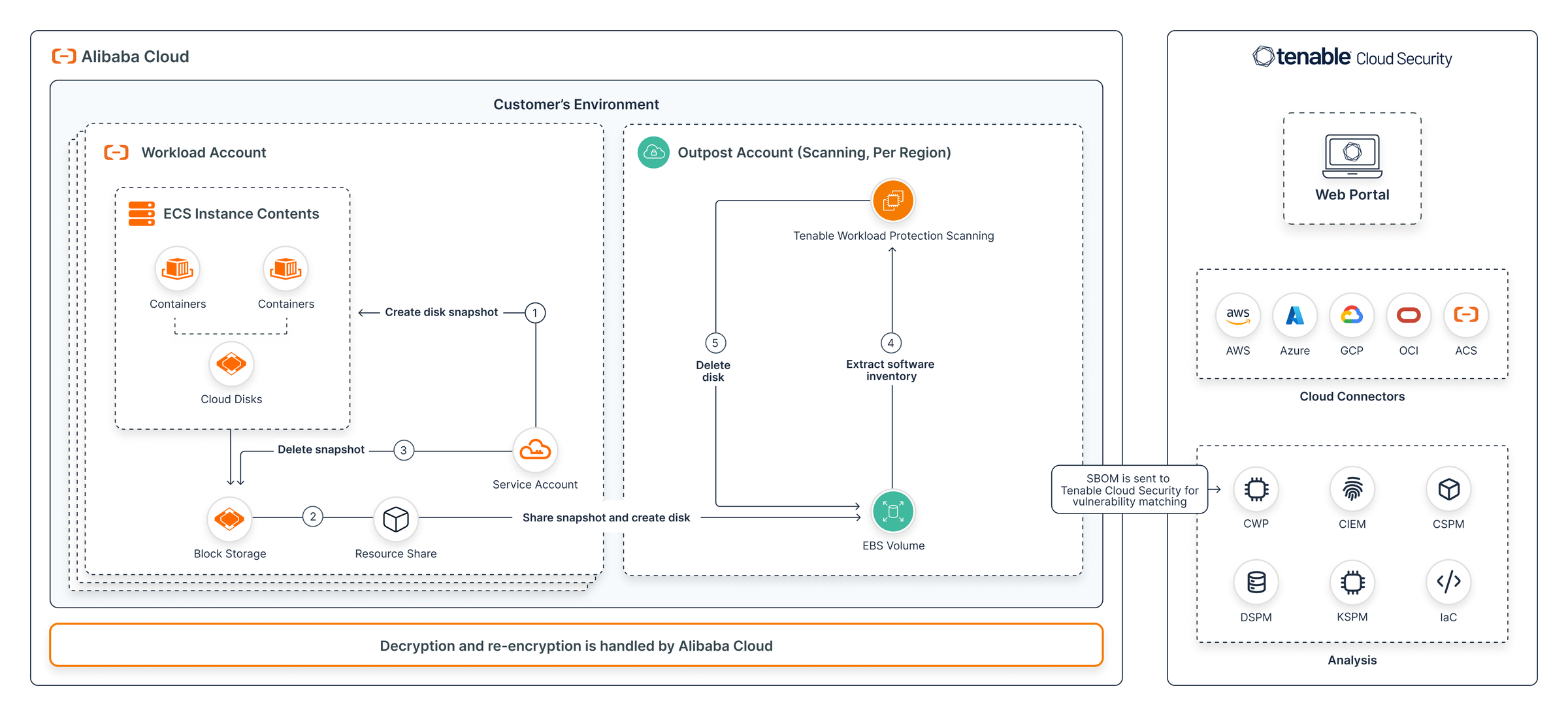
Sample Alibaba Cloud Architecture
The following diagram describes the in-account scanning workflow for Alibaba Cloud.
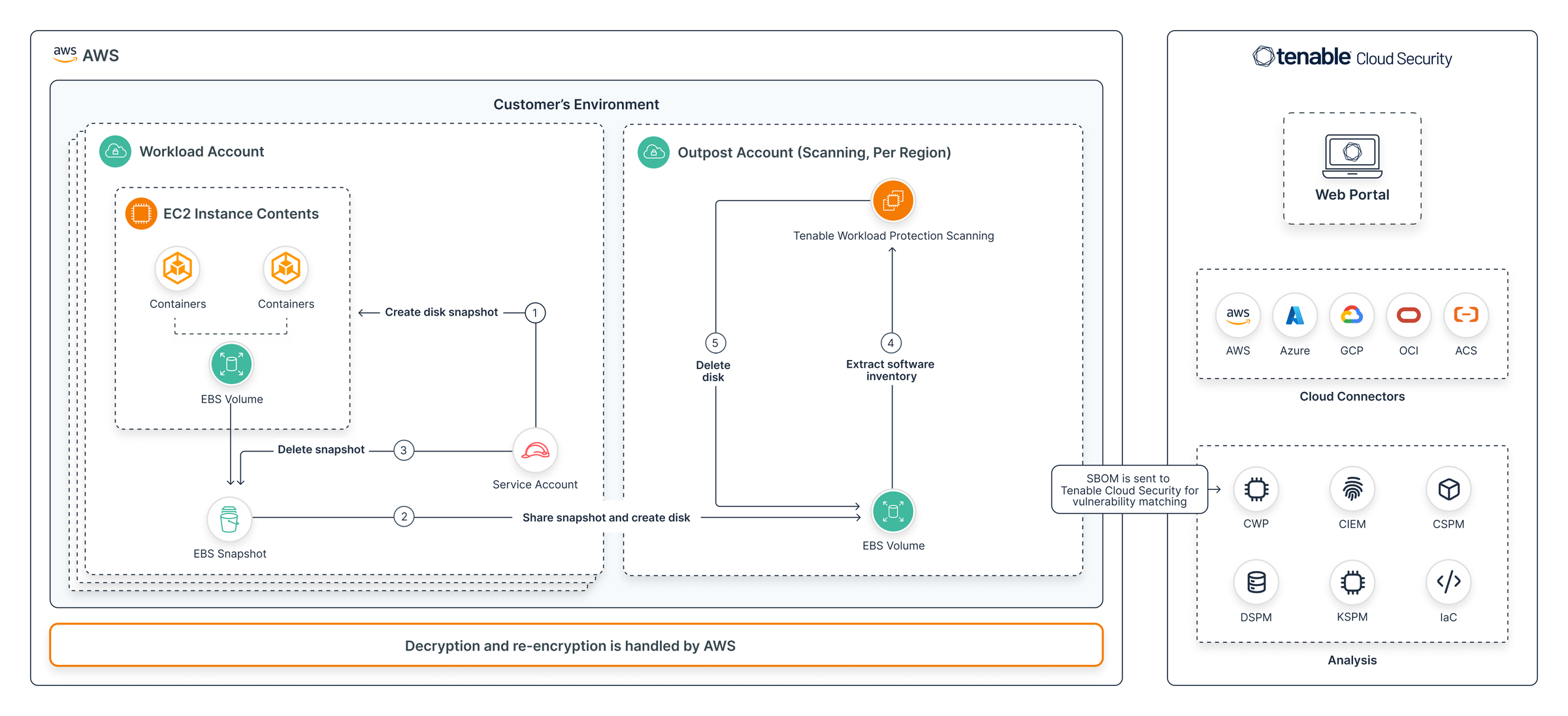
Sample AWS Architecture
The following diagram describes the in-account scanning workflow for AWS.
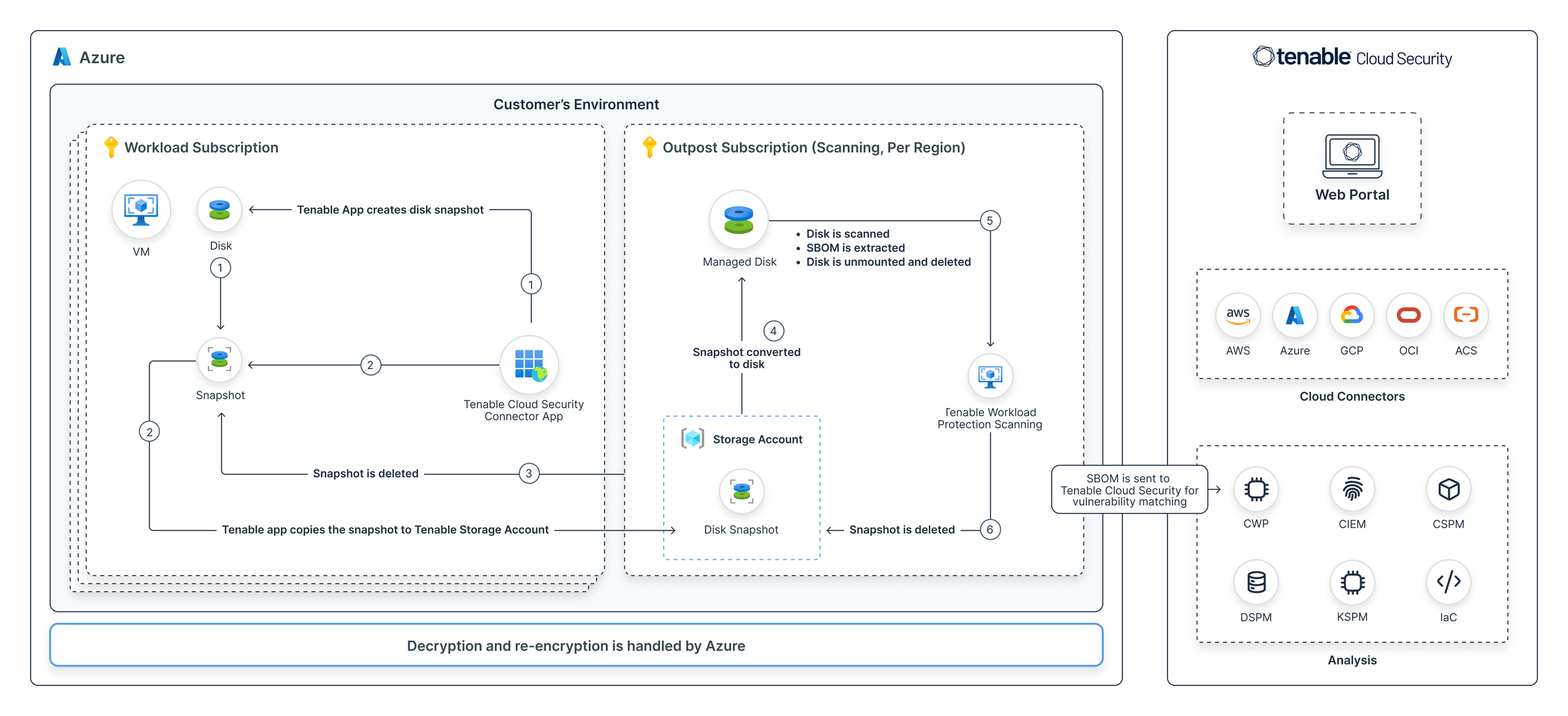
Sample Azure Architecture
The following diagram describes the in-account scanning workflow for Azure.
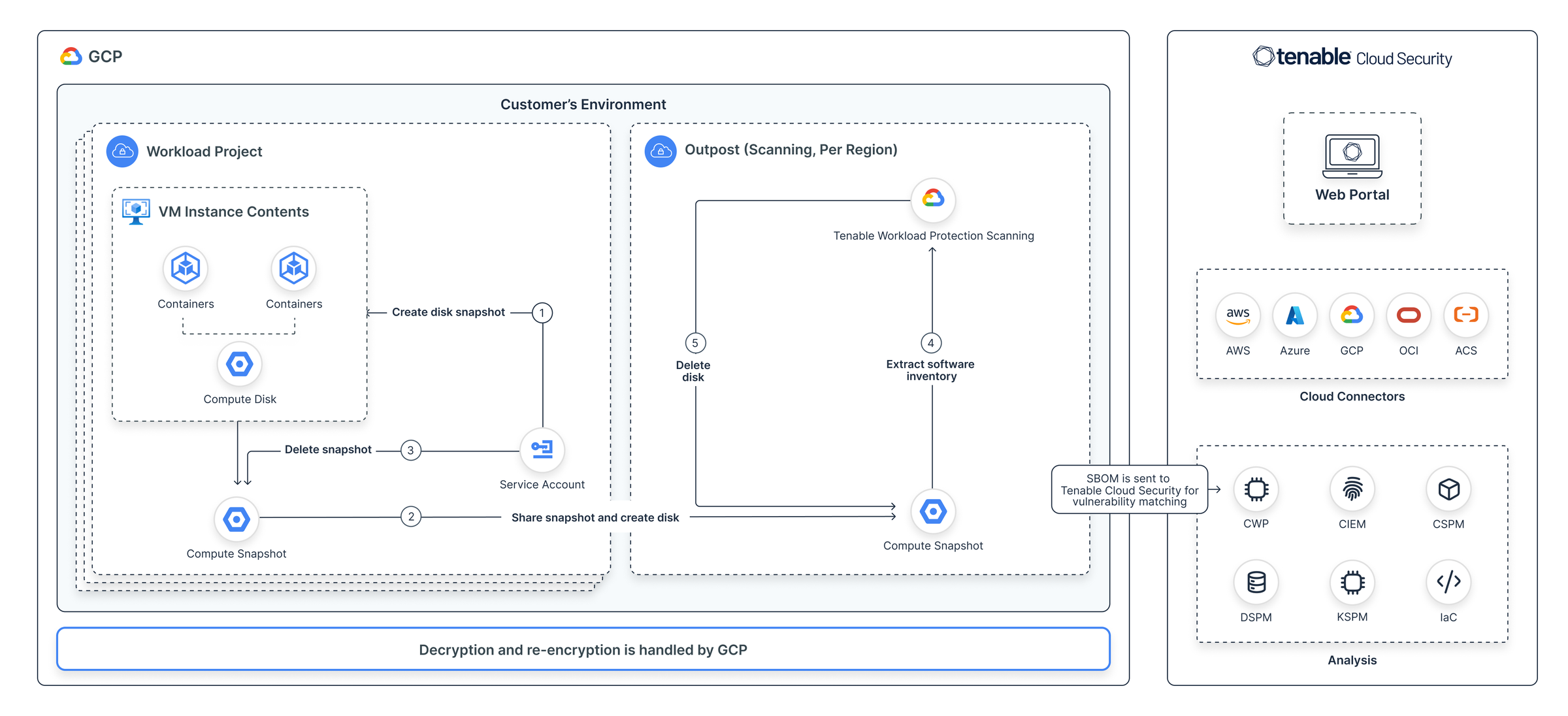
Sample GCP Architecture
The following diagram describes the in-account scanning workflow for GCP.
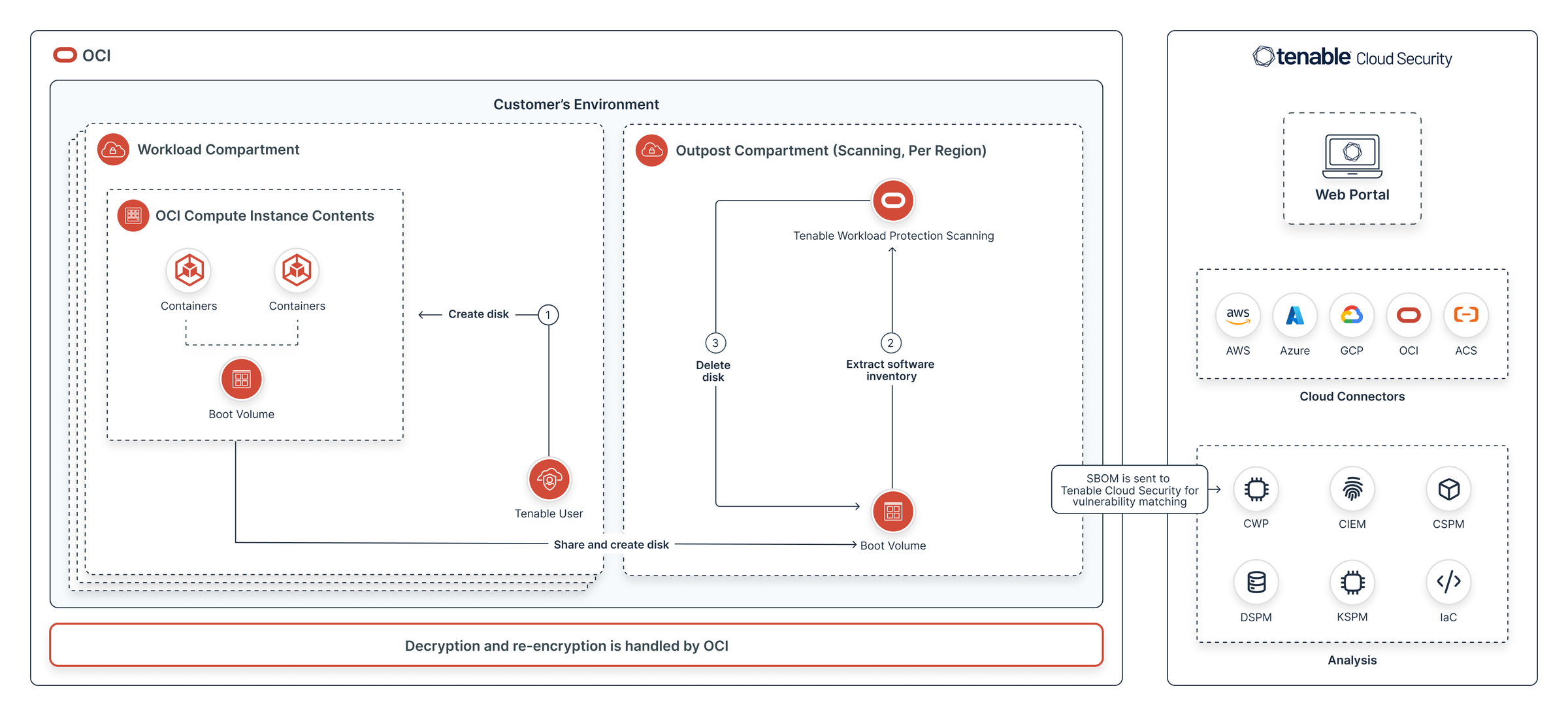
Sample OCI Architecture
The following diagram describes the in-account scanning workflow for OCI.