Vulnerabilities
Identify which of your active workloads have known software vulnerabilities that need to be patched. Understand what needs to be done to patch them, for example, by updating the relevant software or operating system.
This is a how-to guide for monitoring vulnerabilities in Cloud Exposure.
- For a conceptual overview of workload protection capabilities in Cloud Exposure, see Vulnerability Management.
- For a how-to guide about configuring workload settings, including for vulnerabilities, see Workload.
- For frequently asked questions, see FAQ: Vulnerability Management.
View All Vulnerabilities
View all vulnerabilities detected on software packages installed on workloads in your Cloud Exposure environment.
To view vulnerabilities:
- In the Cloud Exposure Console, navigate to Risk > Vulnerabilities.
-
Filter the table to narrow the scope of the visible data. See Vulnerabilities Column Data for more information.
Note: The table is automatically filtered by With Fix Only, allowing you to quickly focus on vulnerabilities that can be remediated immediately. - Click on a vulnerability to see an expanded view with more details about the vulnerability. See View Vulnerability Details for more information.
Vulnerability Page Sort Order
Entries on the Vulnerability page are sorted in the following priority:
- Severity (descending)
- Score (descending by Chosen Score - CVSS or VPR)
- ID (descending)
Vulnerabilities Column Data
The following columns appear in the table on the Vulnerabilities page, and most of them can also be used to filter data in the table.
| Column | Description |
|---|---|
| ID |
The CVE ID associated with the vulnerability (e.g. CVE-2021-3177).
|
| Name | The name of the CVE. |
| Plugin Name | Displays the name and version of the plugin. Click the plugin name link to view plugin details. |
| Plugin ID | Displays the unique identifier or build string of the package that contains the fix for the vulnerability. |
| Severity | The severity rating of the vulnerability, taken from the rating provided by the corresponding vendor, or, if not provided by the vendor, the severity provided by the National Vulnerability Database (NVD). This rating indicates the level of threat posed by the vulnerability, and contributes to the overall severity level of the finding (together with additional contextual factors). If a single CVE was found on multiple workloads, and those workloads are running operating systems from different vendors, the severity may be different for each. In such a case, Cloud Exposure displays the highest severity. |
| VPR Score |
VPR score values range from 0.1-10.0, with a higher value representing a higher likelihood of exploit. VPR scores map to VPR severity values as follows:
|
| CVSS Score | Indicates the CVSS severity score between 0.0 and 10.0. The score indicates the level of threat posed by the vulnerability, and contributes to the overall severity level of the finding. |
| Software | The name/version of the vulnerable software package. |
| Path | (Libraries only) The file path of the package. This information can be useful when trying to determine where the package came from, and how to remediate any potential issues. For example, you may be able to identify if the package was installed as part of the base image, or if it was added to it. |
| Fixed By | The version/s of the package on which the vulnerability has been fixed. |
| CVSS Severity | The severity rating of the vulnerability taken from either NVD (primary source), Tenable defined metrics (when we disagree with NVD), vendor metrics, or a backup option using an automated process leveraging machine learning to generate a CVSS vector. The CVSS vector and corresponding score indicates how bad the impact would be if a vulnerability is exploited and is frequently used as a prioritization datapoint. |
| VPR Severity |
Tenable calculates a dynamic VPR (Vulnerability Priority Rating) for most vulnerabilities. The VPR is a companion to the data provided by the vulnerability's CVSS score, since Tenable updates the VPR to reflect the current threat landscape.
|
| EPSS Score | Estimates the likelihood that a vulnerability will be exploited in the next 30 days, based on real-world threat intelligence and machine learning. A higher score indicates a greater probability of exploitation, helping prioritize risk-based remediation. |
| Description | A description of the CVE. |
| Operating System Type | The specific operating system flavor of the image. |
| Attack Vector |
Indicates the context by which vulnerability exploitation is possible, with a higher score indicating that potential attackers can be more remote (logically or physically).
|
| Known Exploit | Indicates whether the vulnerability is associated with a known exploit (based on the CISA catalog). |
| Accounts | The cloud accounts where the vulnerability was seen. For a vulnerability on a container image, this includes every account that runs the image. Images from unsynced or public registries appear under the Container Registries account. |
| Scanned Resources | The workloads on which the vulnerability was seen. |
| Software Type | The type of the vulnerable software. Possible values: Library, Operating System, Package. |
| First Scan Time | The first scan timestamp. |
View Vulnerability Details
Click on a vulnerability to view granular information about it in the vulnerability slideout panel. The page integrates and displays the full range of information from Tenable's industry-leading vulnerability database, and includes the following options:
- Overview:
- CVSS, VPR, and EPSS severity scores.
- Vulnerability description
- Vulnerability risk slideout panel — Key insights that help you prioritize vulnerabilities more effectively.
- Exploitability — Details used to measure a vulnerability's potential for attack.
- Plugins — Grouped multiple CVEs by vendor advisory to provide a consolidated remediation path, allowing users to address several vulnerabilities with a single software update.
- CVSS Severity Metrics. Detailed information about different metrics that contribute to the assessment of the vulnerability's severity.
- Sources — Review contextual intelligence such as security advisories on the external websites where they appear.
- Timeline — View the trend of the Vulnerability Priority Rating (VPR) and Exploit Prediction Scoring System (EPSS) scores over time. You can also view key events related to the vulnerability. For more information, see Timeline Events.
- Risk Impact — Lists virtual machines, virtual machine images, container images, and software affected by the vulnerability, showing how your environment is impacted by this vulnerability.
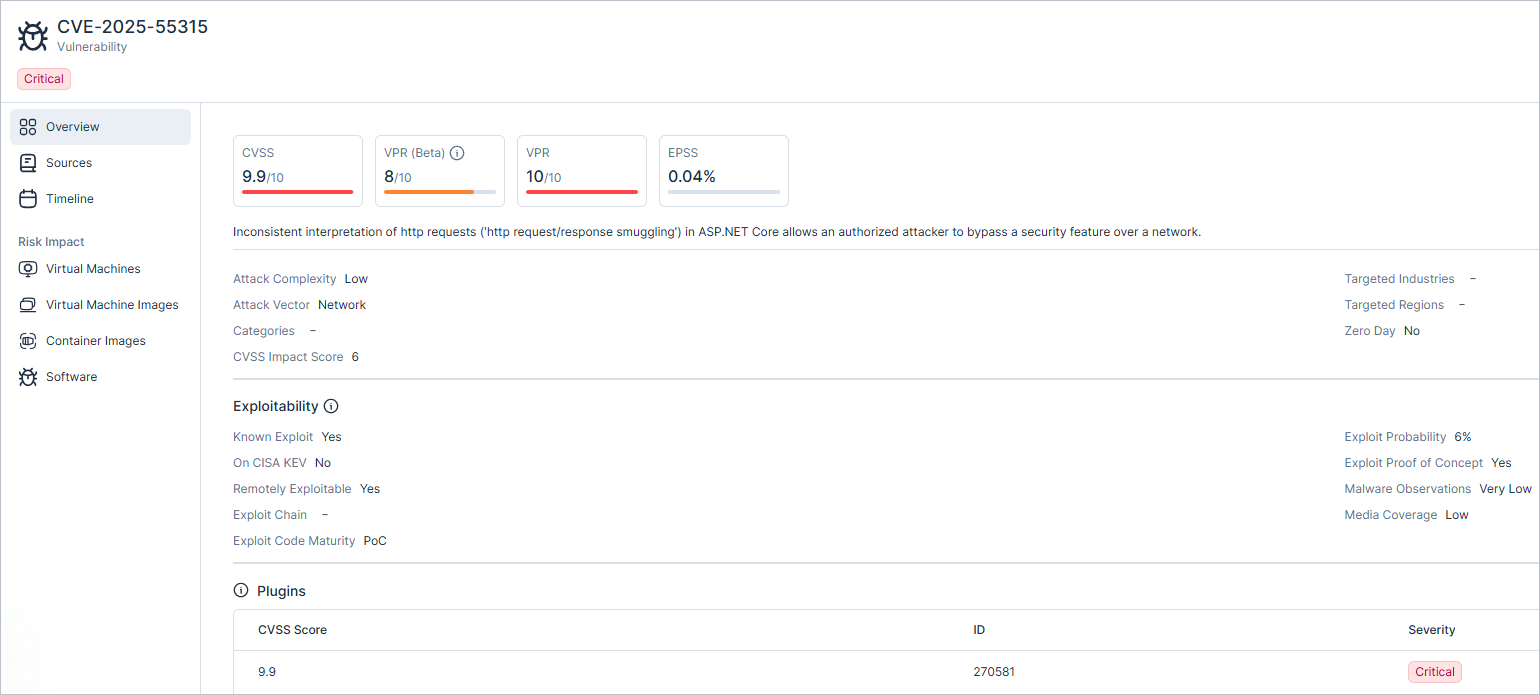
Vulnerability Slideout Panel
Vulnerability risk profile provides key insights that help you prioritize vulnerabilities more effectively.
| Factor | Description | Value |
|---|---|---|
| Attack Complexity | This metric describes the conditions beyond the attacker's control that must exist in order to exploit the vulnerability. | Possible values: Low, High |
| Attack Vector | The context by which vulnerability exploitation is possible, with a higher score indicating that potential attackers can be more remote (logically or physically). | Possible values: Adjacent, Local, Network, Physical |
| Categories | The categories defining the vulnerability. |
Possible values:
|
| CVSS Impact Score | The CVSS (Common Vulnerability Scoring System) impact score of the vulnerability, used for the enhanced VPR severity calculation. | Possible values: 0.0-10.0 |
| Discovery Time | The date and time when the vulnerability was first discovered on your assets. | |
| Targeted Industries | Whether the vulnerability is driven by evidence of targeting specific industries. | Possible values: AI generated. For example: Consulting, Energy, Engineering |
| Targeted Regions | Whether the vulnerability is part of active exploitation observed in particular geographic regions. | Possible values: AI generated. For example: Asia, Middle East, North America |
| Zero Day | A static flag that indicates a vulnerability was disclosed before a vendor patch was available. Once set, this field value remains permanent and will not change, even after an official fix or patch is released. | Possible values: Yes, No |
| Publication Time | The first time Tenable observed mention of the CVE from a trusted source, or the NVD publication date, whichever came first. |
Exploitability
The Exploitability section provides the specific details used to measure a vulnerability's potential for attack. These parameters help you identify which security flaws are most likely to be used against you so you can prioritize them.
| Factor | Description | Value |
|---|---|---|
| Known Exploit | Indicates whether the vulnerability is associated with a known exploit (based on the CISA catalog). | Possible values: Yes, No |
| On CISA KEV | CISA maintains the authoritative source of vulnerabilities that have been exploited in the wild. | Possible values: Yes, No |
| Remotely Exploitable | If the vulnerability can be exploited from a remote network. | Possible values: Yes, No |
| Exploit Chain | Indicates whether the vulnerability is present as part of an exploit chain. | Possible values: CVE ID |
| Exploit Code Maturity | The relative maturity of a possible exploit for the vulnerability based on the existence, sophistication, and prevalence of exploit intelligence from internal and external sources. | Possible values: High, Functional, PoC, Unproven |
| Exploit Probability | Findings where the VPR score is primarily influenced by the estimated probability of the vulnerability being exploited. | Possible values: 0-100% |
| Exploit Proof of Concept | If Tenable has identified a proof of concept for this vulnerability. | Possible values: Yes, No |
| Malware Observations | Findings with a higher VPR due to a significant volume of associated malware observations in the last 30 days. | Possible values: Very Low, Low, Medium, High, Very High |
| Media Coverage | Findings whose VPR is elevated due to a high volume or frequency of media mentions in the last 30 days. | Possible values: Very Low, Low, Medium, High, Very High |
Timeline Events
Timeline events represent key events related to the vulnerability.
| Event | Description |
|---|---|
| CISA Known Exploits | When the Cybersecurity and Infrastructure Security Agency (CISA) added the vulnerability to their Known Exploited Vulnerabilities catalog. |
| CISA Due-Date | When federal agencies must fix vulnerabilities on the CISA Known Exploited Vulnerabilities (KEV) list. |
| Discovery Date | When Tenable first observed the vulnerability. |
| Emerging Threats | Indicates that Tenable is actively monitoring the vulnerability since it is being publicly discussed, has a viable proof of concept, and/or is widely used. |
| Exploited in the Wild | Indicates that the vulnerability has been used in a cyberattack. |
| First Proof of Concept | When Tenable first observed a proof of concept for the vulnerability. |
| First Tenable Coverage | The first time Tenable provided coverage for the vulnerability. |
| First Functional Exploit | When the first functional exploit for the vulnerability was released. |
| Malware | When Tenable first observed malware events for the vulnerability. |
| NVD Published | When the National Vulnerability Database (NVD) disclosed the vulnerability. |
| Ransomware | When Tenable first observed ransomware events for the vulnerability. |
Plugins
A plugin is a software update designed to address vulnerabilities or bugs within a specific resource. In Tenable, plugins are grouped to provide a comprehensive fix for multiple CVEs.
Plugins (also known as Plugin IDs in Tenable Vulnerability Management) are typically released by vendors in response to a specific security advisory. Unlike individual security updates that might target a single flaw, Tenable categorizes plugins as collections of fixes that remediate several CVEs simultaneously. Tenable maps these plugins to specific resources to ensure that when you apply a plugin, you resolve all associated vulnerabilities within that vendor advisory.
- Vulnerabilities table — In the Vulnerabilities table, Tenable displays one plugin per row. Each row represents a unique combination of a CVE and a specific software instance.
- Vulnerability slideout panel — In the Vulnerability slideout panel, you can see multiple plugins. This view provides context for the CVE across the entire resource. If a single CVE affects different software packages on the same resource, the slideout lists the unique plugin required for each affected software.
View Plugin Details
You can view granular information about a plugin, including associated CVEs and vendor advisories, directly from the Vulnerabilities table within the Console.
To view plugin details:
- In the left navigation plane, click Risk > Vulnerabilities. The Vulnerabilities table appears.
- (Optional) If the Plugin column is not visible, click the Columns icon to add the column to the table.
-
In the Plugin column, click the link for the specific plugin you want to view. The plugin slideout panel appears. The panel includes the following tabs:
- Overview:
- CVSS, VPR, and EPSS severity scores.
- Plugin description.
- Plugin Metadata — provides additional information about the plugin.
- Plugin Vulnerability — Key insights that help you prioritize vulnerabilities more effectively.
- Plugin Exploitability — Details used to measure a vulnerability's potential for attack.
- Remediation. Provides the name of the security update to be installed on the affected resource.
- Plugin Vulnerability — displays a list of all CVEs that the specific plugin remediates.
- Risk Impact — Lists virtual machines, container images, and software affected by the vulnerability, showing how your environment is impacted by this vulnerability.
- Overview:
Plugin Metadata
The Plugin metadata section provides additional information about the plugin.
| Field | Description |
|---|---|
| ID | The unique identification number assigned to the plugin within the Tenable vulnerability database. |
| Family | The category or group to which the plugin belongs, typically organized by operating system or vendor. |
| References | External links to vendor documentation, support articles, or security advisories that provide additional context for the plugin. |
| Publication Time | The timestamp indicates when the plugin entry was initially added to the Tenable vulnerability database. |
| Update Time | The timestamp indicates when the plugin entry was last modified in the database to include new CVE mappings or updated remediation steps. |
| Patch Publication Time | The timestamp indicates when the vendor's patch was published. |
Plugin Vulnerability
Vulnerability risk profile provides key insights that help you prioritize vulnerabilities more effectively.
| Factor | Description | Value |
|---|---|---|
| Attack Complexity | This metric describes the conditions beyond the attacker's control that must exist in order to exploit the vulnerability. | Possible values: Low, High |
| Attack Vector | The context by which vulnerability exploitation is possible, with a higher score indicating that potential attackers can be more remote (logically or physically). | Possible values: Adjacent, Local, Network, Physical |
| Categories | The categories defining the vulnerability. |
Possible values:
|
| CVSS Impact Score | The CVSS (Common Vulnerability Scoring System) impact score of the vulnerability, used for the enhanced VPR severity calculation. | Possible values: 0.0-10.0 |
| Discovery Time | The date and time when the vulnerability was first discovered on your assets. | |
| Targeted Industries | Whether the vulnerability is driven by evidence of targeting specific industries. | Possible values: AI generated. For example: Consulting, Energy, Engineering |
| Targeted Regions | Whether the vulnerability is part of active exploitation observed in particular geographic regions. | Possible values: AI generated. For example: Asia, Middle East, North America |
| Zero Day | A static flag that indicates a vulnerability was disclosed before a vendor patch was available. Once set, this field value remains permanent and will not change, even after an official fix or patch is released. | Possible values: Yes, No |
| Publication Time | The first time Tenable observed mention of the CVE from a trusted source, or the NVD publication date, whichever came first. |
Plugin Exploitability
The Exploitability section provides the specific details used to measure a vulnerability's potential for attack. These parameters help you identify which security flaws are most likely to be used against you so you can prioritize them.
| Factor | Description | Value |
|---|---|---|
| Known Exploit | Indicates whether the vulnerability is associated with a known exploit (based on the CISA catalog). | Possible values: Yes, No |
| On CISA KEV | CISA maintains the authoritative source of vulnerabilities that have been exploited in the wild. | Possible values: Yes, No |
| Remotely Exploitable | If the vulnerability can be exploited from a remote network. | Possible values: Yes, No |
| Exploit Chain | Indicates whether the vulnerability is present as part of an exploit chain. | Possible values: CVE ID |
| Exploit Code Maturity | The relative maturity of a possible exploit for the vulnerability based on the existence, sophistication, and prevalence of exploit intelligence from internal and external sources. | Possible values: High, Functional, PoC, Unproven |
| Exploit Probability | Findings where the VPR score is primarily influenced by the estimated probability of the vulnerability being exploited. | Possible values: 0-100% |
| Exploit Proof of Concept | If Tenable has identified a proof of concept for this vulnerability. | Possible values: Yes, No |
| Malware Observations | Findings with a higher VPR due to a significant volume of associated malware observations in the last 30 days. | Possible values: Very Low, Low, Medium, High, Very High |
| Media Coverage | Findings whose VPR is elevated due to a high volume or frequency of media mentions in the last 30 days. | Possible values: Very Low, Low, Medium, High, Very High |
Plugin Vulnerabilities
The Vulnerabilities section provides a list of all CVEs that the specific plugin remediates. This allows you to see the direct impact of the plugin on your security posture. The table includes:
- Vulnerability — CVE ID. The unique identifier of the vulnerability.
- Severity — The risk rating assigned to the vulnerability.
- Name — The name of the vulnerability.
- VPR Score: Tenable's vulnerability priority rating that helps you prioritize remediation based on the probability of exploitation.
- CVSS Score — The numerical scores representing the severity of the vulnerability.
Export Vulnerability Data
Export vulnerability data to a CSV file. The data is exported according to the current filters applied to the table, and contains all relevant vulnerability data
To export vulnerability data:
- In the Cloud Exposure Console, navigate to Risk > Vulnerabilities.
-
Filter the table to narrow the scope of the visible data. See Vulnerabilities Column Data for more information.
Note: The table is automatically filtered by With Fix Only, allowing you to quickly focus on vulnerabilities that can be remediated immediately. - Click the Export button
 at the top right of the table.
View Vulnerabilities for a Specific Workload
View software packages installed on a specific workload via the Cloud Exposure Inventory view.
- Drill-down into a specific workload.
- From the workload resource page, click on the Vulnerabilities tab.
- Filter the table to narrow the scope of the visible data. See Vulnerabilities Column Data for more information about the available columns.
-
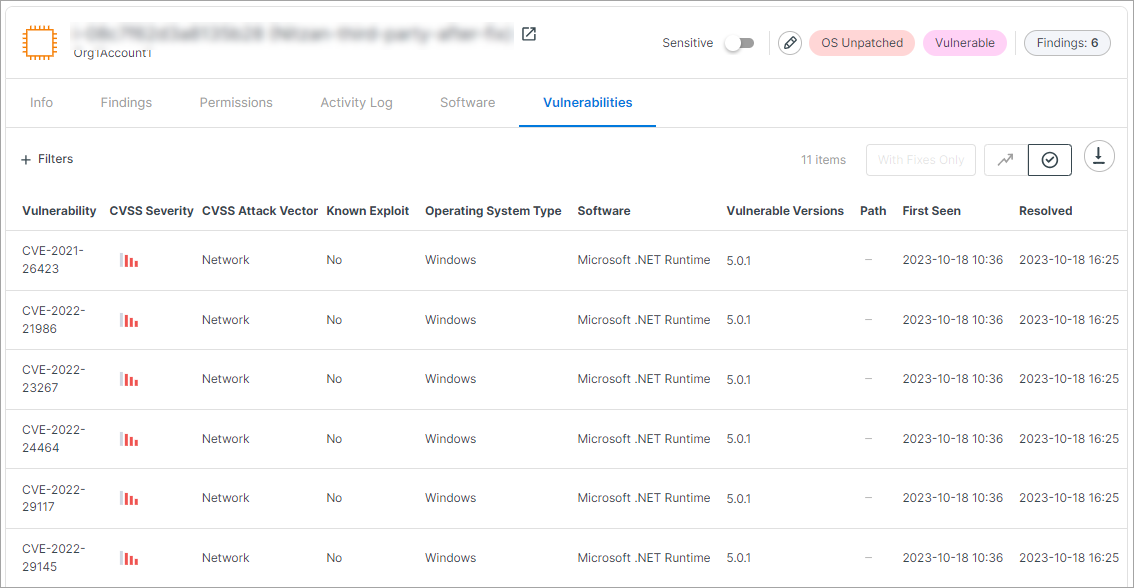
(VMs/EC2 only) Use the Resolved toggle to filter by, and view data related to, recently resolved vulnerabilities on virtual machines. You can see the date/time when such vulnerabilities were resolved, which can help you confirm the effectiveness of remediation efforts.
Vulnerability-Related Findings
A finding is created for a vulnerable workload in any of the following circumstances:
- The CVE severity level of the vulnerability is critical.
- There are more than 10 critical/high severity vulnerabilities.
- The workload has an operating system that is at or nearing (within 30 days) end-of-life.
A vulnerability-related finding created for a workload includes all vulnerabilities detected for the workload. The finding severity is a function of the severity level of the respective CVE, combined with whether the resource is marked as sensitive. If multiple vulnerabilities are found for the workload, the finding severity score will reflect that of the highest-severity vulnerability.
View and Drill Down into a Vulnerability Finding
To view vulnerability findings:
- In the Cloud Exposure Console, click on Risk > Cloud Findings.
-
Apply other relevant filters to narrow the scope of the visible findings. To view workload protection findings specifically related to vulnerabilities, select one of the following from the Label filter:
- Vulnerable
- Vulnerable Compute
For more information about prioritizing VMs that are both vulnerable and privileged, see Secure Vulnerable Privileged VMs.
Vulnerabilities Column Data for Findings
| Column | Description |
|---|---|
| Vulnerability |
The CVE ID associated with the vulnerability (e.g. CVE-2021-3177).
|
| CVSS Severity | The severity rating of the vulnerability, taken from the rating provided by the corresponding vendor, or, if not provided by the vendor, the severity provided by the National Vulnerability Database (NVD). This rating indicates the level of threat posed by the vulnerability, and contributes to the overall severity level of the finding (together with additional contextual factors). |
| CVSS Score | Indicates the CVSS severity score between 0.0 and 10.0. The score indicates the level of threat posed by the vulnerability, and contributes to the overall severity level of the finding. |
| CVSS Attack Vector | Indicates the context by which vulnerability exploitation is possible, with a higher score indicating that potential attackers can be more remote (logically or physically). Possible values: Network, Adjacent, Local, Physical |
| Known Exploit | Indicates whether the vulnerability is associated with a known exploit (based on the CISA catalog). |
| Software | The name of the vulnerable software package. |
| Installed Version | The version of the package installed on the resource. |
| Fixed Versions | The version of the package on which the vulnerability has been fixed. |
| Path | (Libraries only) The file path of the package. This information can be useful when trying to determine where the package came from, and how to remediate any potential issues. For example, you may be able to identify if the package was installed as part of the base image, or if it was added to it. |
Export Resource Inventory Data for Support Cases
This feature simplifies troubleshooting for Tenable Vulnerability Management support. You can export a resource's inventory data as a JSON file directly from its profile and attach it to your support ticket. This option is available for any successfully scanned resource and is visible to users with view permissions; it will be greyed out if the resource hasn't been scanned.
To download resource inventory data:
-
In Cloud Exposure Console, navigate to Inventory > Virtual Machines.
Note: The export option is supported for Virtual Machine Images and Container Images resources as well. - Click on any scanned resource to open its profile.
- In the profile view, click the three dots menu icon > Download Inventory Debug Data.
The debug data downloads in JSON format.
FAQ
This article contains a list of frequently asked questions related to Vulnerability Intelligence within Cloud Exposure.
Understanding Vulnerability Priority Rating (VPR)
 What is Vulnerability Priority Rating (VPR)?
Vulnerability Priority Rating, or VPR, is Tenable’s proprietary dynamic risk score that prioritizes vulnerabilities based on threat context and real-world exploitability, helping organizations improve their remediation efficiency and effectiveness.
What makes the enhanced version of VPR more effective than the original VPR?
The latest version of VPR features enhanced machine learning models, expanded data sources, better context-aware scoring, and refined severity bands to reduce noise, improve accuracy, and drive more confident decision-making:
- Even More Focused Prioritization - While static CVSS scores flag 60% of CVEs as High or Critical, original VPR narrowed focus to 3%. Now, enhancements to VPR push efficiency further, leveraging more real-time data to focus teams on just 1.6% of vulnerabilities that truly matter (source).
- Data Sources - In addition to data inputs already used for VPR, such as the National Vulnerability Database (NVD), CVSS, exploit databases, and threat intelligence partners, the enhanced version of VPR uses data supplied by the Tenable Research Special Operations team, Tenable Vulnerability Intelligence, cybersecurity web articles and AI news features, CISA, Github, and Mastodon. These new data sources provide greater visibility into which vulnerabilities are actively exploited in the wild.
- AI integration - Generative AI is used to process curated web articles at scale and tag CVEs as targeted by ransomware, exploited in the wild or zero day, among others. This data is used by the new model to predict near-term likelihood of exploitation.
- Updated CVE Threat Factors - The enhanced VPR introduces new key drivers and information about the vulnerability, offering greater explainability behind the calculated CVE severity
How VPR Works?
How is the VPR score calculated?
VPR uses a machine learning model that analyzes multiple dynamic factors, including threat actor activity, exploit code maturity, and vulnerability age to generate a predicted likelihood of exploitation. This is combined with the CVSS impact score to arrive at the final VPR. For example, a low score (0.1-3.9) suggests there is little to no known exploitation. However, a high score (9.0-10.0) indicates that weaponized exploits are observed, with active campaigns targeting the vulnerability.
What data sources are used in the enhanced version of VPR?
The model leverages threat intelligence feeds, public and private exploit databases, open-source data, and proprietary research. To be more specific, data sources include NVD, CVSS, Tenable Vulnerability Intelligence, Tenable Research Special Operations (RSO), web articles, AI news features, AI domain classification, Mastodon, CISA, and GitHub.
Which vulnerabilities receive a VPR score?
All vulnerabilities with a valid CVE ID (including those not yet published to the NVD) are assigned a VPR score.
How often do VPR scores update?
VPR scores are updated daily to reflect the latest threat intelligence and real-world changes in exploitability.
How should security teams interpret a high vs. low VPR score?
A high VPR score (e.g. 7.0–10.0) indicates urgent action is needed due to high risk of exploitation. Low scores suggest limited or no current threat activity and may be deprioritized.
How do the enhancements to VPR help reduce false positives and alert fatigue?
The enhancements to VPR refine the scoring algorithm to better distinguish high-priority vulnerabilities from low-risk ones, decreasing unnecessary alerts and streamlining remediation workflows. CVSS flags 60% of CVEs as High or Critical, which is a massive number and makes it impossible to prioritize what to fix first effectively. Our original VPR narrowed the focus from 60% of CVEs flagged as High or Critical by CVSS to just 3%, significantly helping teams focus their remediation efforts. With the enhancements to VPR, we’re now pushing efficiency even further, focusing teams on just 1.6% of vulnerabilities that represent actual risk to the business. Read our technical white paper for more details.
VPR vs Other Risk Scoring Methods
How does VPR differ from CVSS and EPSS?
CVSS measures inherent technical severity. EPSS estimates the likelihood of exploitation. VPR combines threat intelligence and exploit prediction using machine learning with business impact to offer more operational, real-time prioritization. Read our technical white paper for more details.
Do VPR scores replace CVSS or EPSS?
VPR complements CVSS and EPSS by incorporating real-world threat data and asset context, providing a more comprehensive and actionable view of risk.
How does VPR work alongside CVSS and EPSS?
CVSS is used to understand technical severity, EPSS is used for statistical exploit likelihood, and VPR is for operational prioritization based on real-world threat likelihood and business impact.
What’s the difference between VPR severity bands and CVSS severity bands?
VPR severity bands are tuned to reflect real-world risk, not just technical attributes (they help reducing alert fatigue by focusing attention on genuinely high-risk issues).