Emerging Threats
Emerging Threats has a page for each newly reported critical vulnerability. Each page gives you a one-click view of every detection of that vulnerability in your environment.
When a critical vulnerability is reported, use its page to find your affected resources and start remediation without searching through all of your findings.
In the Tenable One Cloud Exposure Console, navigate to Risk > Emerging Threats and select the emerging vulnerability you want to investigate.
Emerging Threats Overview
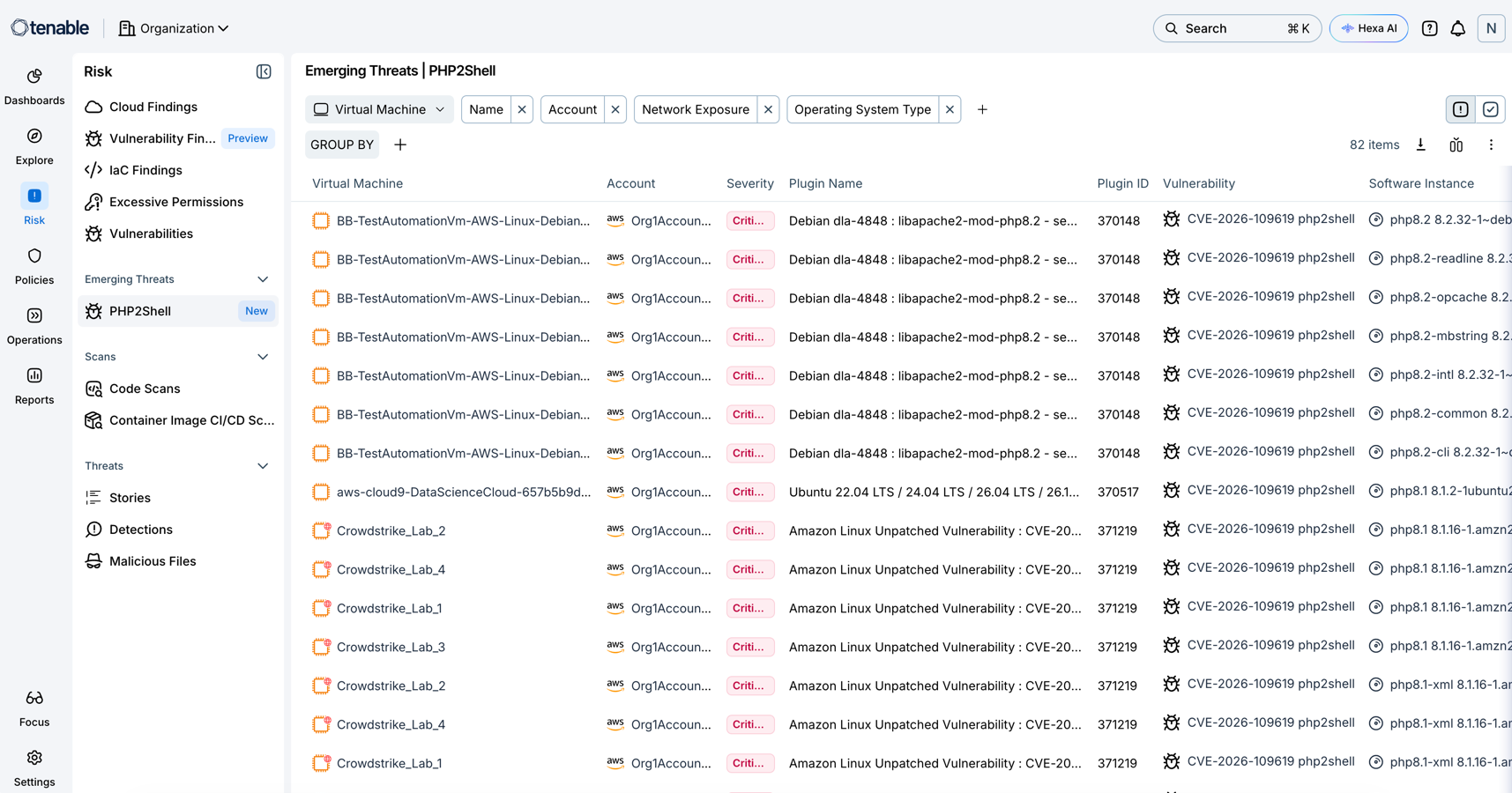
The Emerging Threats page includes these areas:
| Area | Description |
|---|---|
| Filters |
Narrows and organizes the table view:
|
| Findings table | Lists all resources where the vulnerability was detected. |
Findings Table
The findings table lists one row for each affected software instance on a resource, so a single resource can appear in multiple rows.
The table displays these columns:
| Column | Description |
|---|---|
| Selected resource | The resource type you selected. Select the resource to open its slide-out and view its details. See View Resource Details. |
| Account | The cloud account that contains the resource. Select the account to open its slide-out and view its details. |
| Severity | The severity of the vulnerability, for example Critical. |
| Plugin Name | The name of the plugin that detected the finding. |
| Plugin ID | The unique ID of the plugin. |
| Vulnerability | The CVE that the finding maps to, for example CVE-2026-109618. Select the CVE ID to open the vulnerability's slide-out and view its details. See View Vulnerability Details. |
| Software Instance | The affected package and its installed version, for example php7.4 7.4.3-4ubuntu2.4. Select to open the software's slide-out and view its details. See View Software Packages for a Specific Workload. |
| Software Fix Version | The package version that resolves the finding. Displays a dash when no fix version is available. |