Permission Analysis and Risk Levels
Cloud identities are granted varying levels of permissions that allow them to access certain resources, and not others. Tenable One Cloud Exposure analyzes every identity in your environment, determining which permissions it has for any given resource. As part of this permission evaluation process, Tenable:
-
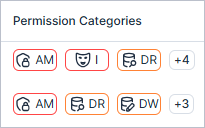
Maps each permission to an activity type (Permission Category). These Permission Categories reflect the broad range of behavior patterns common to cloud identities. Every category icon is colored according to its severity level.
Note: Clicking a permission category icon opens a side panel with the access graph filtered by category and severity. -
Assigns a color-coded severity level (Permission Category) to each permission category. See Permission Category Risk Level for more information.
-
Assigns an overall risk level to the identity, taking into account both the risk level of the specific permission categories and the overall context of the identity in your environment.
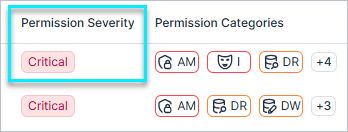
See Identity Intelligence for more information. See Excessive Permissions for how this calculation is made within the context of excessive permissions.
Permission Categories
| Categories | Description |
|---|---|
| Data Read (DR) | Allows viewing of data stored in databases, buckets, secrets, encrypting, etc. |
| Data Write (DW) | Grants ability to add or modify data in cloud services or applications. |
| Infrastructure Write (IW) | Allows creation, modification, or deletion of infrastructure resources. |
| Access Management (AM) | Allows modification of user, role, or resource permissions/policies (e.g., IAM). |
| Impersonation (I) | Allows assuming other roles or identities. |
| Infrastructure Read (IR) | Allows viewing configuration and metadata of infrastructure resources (e.g., VMs, networks, services). |
| Infrastructure Invocation (II) | Includes invocation of functions, running containers, or triggering jobs/workflows. |
Permission Category Risk Level
In the tables on both the Identity Intelligence and Excessive Permissions pages, these categories are assigned a color-coded severity level, reflecting the potential risk detected from permissions assigned to specific identities.
- Critical severity — Identities with admin privileges, or that can escalate their privileges to admin.
- High severity — Identities with permissions to perform the following actions on sensitive resources or on a wide range of resources: 1) read data, 2) destroy resources, 3) grant permissions.
- Medium severity — Identities with permissions that have a limited effect on a wide range of resources.
- Low severity — Identities with permissions that have a limited effect on a limited number of non-sensitive resources.
In the example screenshot below, you can see an identity that has been assigned varying risk levels for each of the following categories:
- Impersonation (I) — Critical
- Data Read (DR) — High
-
Infrastructure Write (IW) — Medium