Identity Intelligence
Investigate and assess any risk that identities pose to your cloud environment. Tenable One Cloud Exposure Identity Intelligence lets you view a breakdown of identities by severity level to map identities and their associated permissions to potential risks in your environment. Identities include users, roles, service identities, third-party identities, and federated identities.
View Identities in Your Environment
You can use the Identity Intelligence page to learn important information about identities in your environment. For example, you can:
- See all privileged third party identities.
- See admin users that have access keys enabled, but that do not have multi-factor authentication (MFA) enabled.
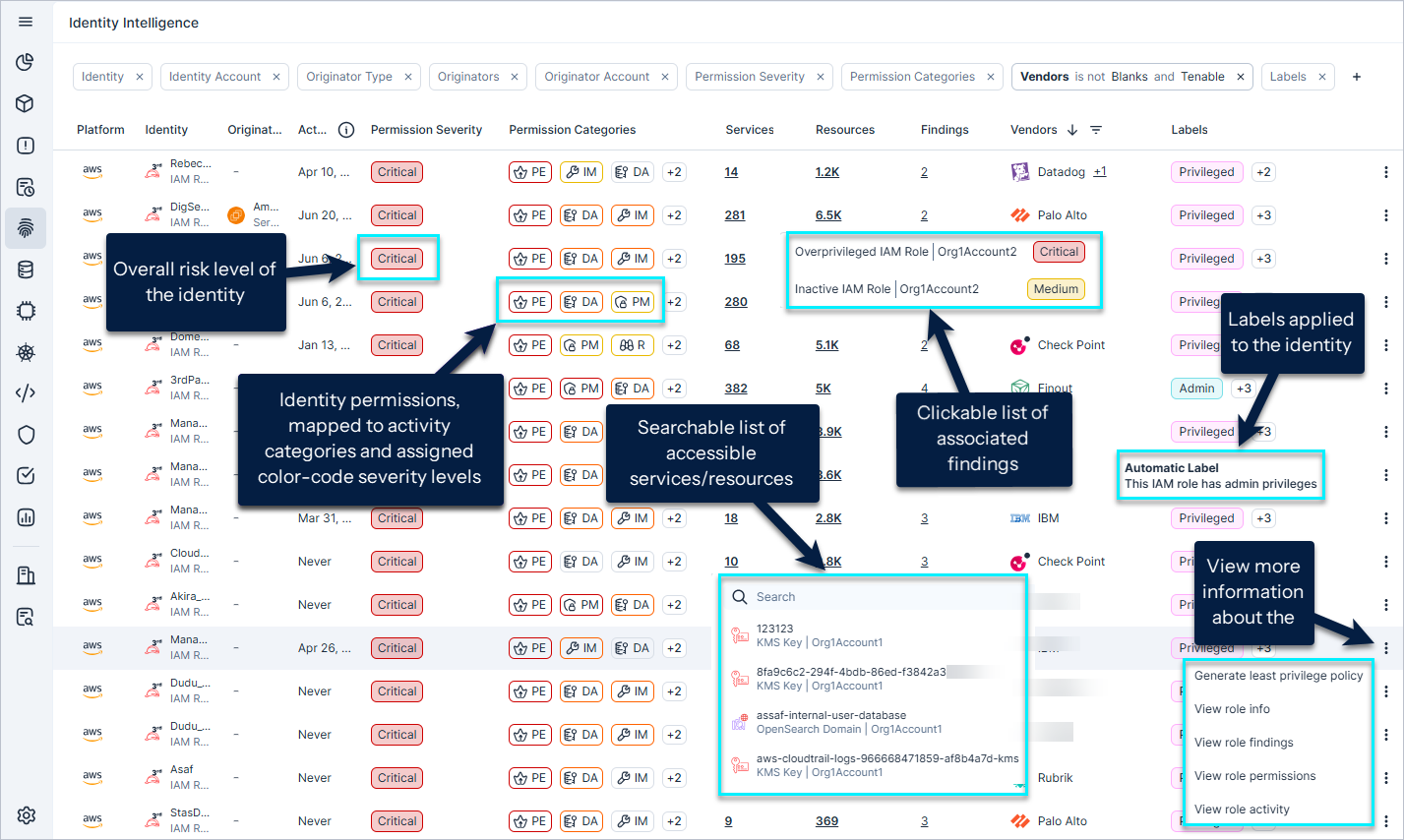
To view identities:
- In the Cloud Exposure console, click Explore > IAM > Identity Intelligence.
- Scan the identity widgets at the top of the page to see the distribution of risk severity levels across all identities, and across specific types of identities (users, service identities, federated identities, and 3rd party identities).
- Filter Data in the table to modify the scope of the visible data. For example, under Labels, you can select 3rd Party to filter for third party identities. See Identity Column Data for information about the data available in the table.
- Analyze the risk that the identity poses to your environment. See Permission Analysis and Risk Levels.
- Drill down into an identity to view granular information about it.
Identity Column Data
The following columns appear in the table on the Identity Intelligence page.
| Column | Description |
|---|---|
| Platform | The cloud service provider that the identity belongs to. |
| Identity | The name of the identity. Underneath the name is the resource type and the account name. |
| Originators | The cloud identities (IAM user/role, IdP user, or compute resource) which, as opposed to being granted permissions directly, can assume the identity in question, and act using the assumed identity’s permissions. For example, an Azure Virtual Machine that uses a managed identity to perform activities. Or an Azure AD user that assumes an IAM role in AWS to perform an action. |
| Activity Time | The last activity performed by the identity. See FAQ: IAM Governance for more information. |
| Permission Severity | The risk severity level of the highest severity permission assigned to the identity. See Permission Analysis and Risk Levels for more information. |
| Permission Categories | A color-coded breakdown of the risk severity level for each permission category. See Permission Analysis and Risk Levels for more information. |
| Services | The number of services that the identity has access to. Click on the number to view a searchable list of the services. |
| Resources | The number of resources that the identity has access to. Click on the number to view a searchable list of the resources. |
| Vendors | 3rd party identity per vendor. |
| Findings | The number of findings associated with the identity. Click on the number to view a searchable list of the findings. |
| Labels | Displays all labels applied to the identity, whether applied manually, automatically based on tags, or by the system. Hover over a label tag for more information. If a resource has more than one label, click on the icon to see any additional labels. See Apply Labels to Resources for more information. |
Settings  |
|