Access Level
Understanding who can reach your cloud resources and from where is a fundamental part of assessing security posture. Access Level provides a unified way to classify the scope of access granted to a resource, regardless of the cloud provider or identity type involved. It helps you quickly determine whether a resource is exposed publicly, accessible externally, shared across accounts, or limited to internal identities. By standardizing these access scopes, Access Level enables consistent analysis, clearer visibility, and easier identification of potentially risky access paths across your environments.
Access Level defines the scope of identities that can reach a resource, ranging from public exposure to external, cross-account, trusted, or internal access. The list below provides general definitions for each value. The exact definition for each value differs between cloud providers. See the relevant section for definitions of access levels for AWS, Azure, and GCP.
- Public. Access is open to any identity, authenticated or unauthenticated, without restrictions.
- External. Access is granted to identities outside the organization, including partner accounts, third-party vendors, unsynchronized accounts, or external identity providers (IDP).
- Cross Account. Access is granted to identities from other accounts or subscriptions within the same organization (connected to a Tenable One Cloud Exposure account).
- Trusted External. Access is granted to external vendors that have been explicitly marked as trusted, helping you distinguish between known and unknown external access.
- Internal. Access is restricted to identities within the same account or subscription.
AWS Access Level
The following is a list of possible values for the Access Level filter, with an AWS-specific definition for each value.
| Access Level | Definition |
|---|---|
| Public | Resources with a resource-based policy granting access to the wildcard principal *, and without conditions. |
| External | Resources with a resource-based policy granting access to a principal from an account not connected to Cloud Exposure. All third-party vendors (except AWS) fall into this category. |
| Cross Account | Resources in Account A can be accessed by users, roles, and groups in Account B, provided both accounts are connected to Cloud Exposure. |
| Trusted External | Resources with a resource-based policy granting access to a principal from a 3rd party vendor that has been explicitly marked as trusted. |
| Internal | Resources can be accessed by users, roles, and groups within the same AWS account. |
Azure Access Level
The following is a list of possible values for the Access Level filter, with an Azure-specific definition for each value.
| Access Level | Definition |
|---|---|
| Public | Applicable only for Blob storage. |
| External | Resources can be accessed by Enterprise Applications (excluding Microsoft), unsynchronized principals, or Microsoft Entra ID guest users. |
| Cross Account | Resources in Subscription A can be accessed by a Managed Identity (MI) in Subscription B if both subscriptions are connected to Cloud Exposure. Additionally, resources can be accessed by Microsoft Entra ID principals when the Azure subscription and Microsoft Entra ID tenant are not linked. |
| Trusted External | Resources that can be accessed by enterprise applications (excluding Microsoft) and have been explicitly marked as trusted. |
| Internal | Resources can be accessed by Microsoft Entra ID principals (users, applications, etc.) when the Azure subscription and Microsoft Entra ID tenant are linked. This also includes resources accessible by a managed identity within the same subscription or Microsoft-managed applications. |
GCP Access Level
The following is a list of possible values for the Access Level filter, with a GCP-specific definition for each value.
| Access Level | Definition |
|---|---|
| Public | Resources can be accessed by AllUsers or AllAuthenticatedUsers. |
| External | Resources can be accessed by external service accounts, users, or groups (excluding Google principals). |
| Cross Account | Resources in Project A can be accessed by service account identities, workpool identities, or Google Workspace principals from Project B when both projects are connected to Cloud Exposure. Additionally, GCP resources can be accessed by Google Workspace principals when the GCP project and Google Workspace tenant are not linked. |
| Internal | Resources can be accessed by Google Workspace principals (users, groups, etc.) when the GCP project and Google Workspace are linked. This also includes resources accessible by service account identities or workpool identities within the same project. |
Access Level Features
Tenable provides three complementary Access Level features to help you understand and analyze access scope across cloud environments.
| Feature | Purpose | Location in Console |
|---|---|---|
| Access Level Filter | Maps principal-to-resource relationships individually |
|
| Access Level per permission category columns | Map the highest access level across all principals for each permission category to a specific resource |
|
| Access Level Column | Map the highest access level across all principals for all permission categories to a specific resource |
|
Access Level Filter
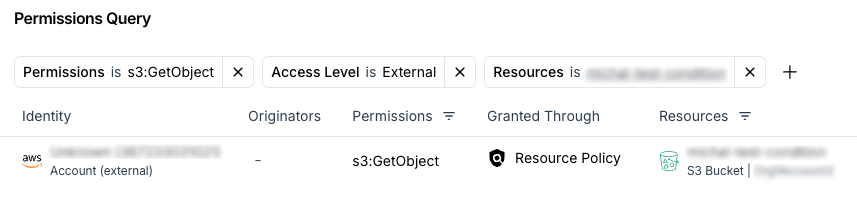
The Access Level filter in the Inventory and the Permission Mapping views focuses on principal-to-resource relationships, visualizing them for specific permissions. You can use filters to narrow the graph view or explore a specific use case of interest, such as external access to a particular monitored resource.
For example:
- Permissions: S3:GetObject ; Access Level: External ; Resources: [your monitored resource]
Access Level per Permission Category
The Access Level per permission category represents the highest level of access granted to a resource within a specific permission category. Access level indicates the scope of access a principal has to a resource, and the permission categories enhance this insight by showing not only how broadly a resource can be accessed but also what type of access is possible (such as data read, data write, etc.).
For each monitored resource, Tenable evaluates the highest access level across all principals for each category to a specific resource. This provides clear visibility into both the scope and type of access, helping identify potential risks. It also enables a more efficient investigation process when using features such as Permissions Query, Permission Mapping (access graph), Identity Intelligence, and Excessive Permissions, especially when combined with custom policies.
For example, you can evaluate Lambda function's access level per each category from the Explorer view:

Access Level Column
The Access Level column shows the highest access relationship between all principals and a specific resource across all Permission Categories by evaluating the highest level of access granted.
This functionality allows you to determine the access level granted in a specific principal-to-resource relationship (Internal, Trusted External, Cross Account, External, or Public), and to investigate the broadest access scope granted to that resource. If a resource has multiple access paths, the Access Level column reflects the highest access level among them.
For example, different access levels may exist for S3 buckets across various categories, but only the highest access level is displayed in the Access Level column.
