Get Started with Tenable One AI Exposure
Tenable One AI Exposure extends attack surface protection into the AI landscape, enhancing Tenable's ability to provide timely threat detection and response. It ensures alignment with security standards and regulatory requirements across the entire attack surface by continuously monitoring and governing an organization's AI environment.
Tenable One AI Exposure tracks AI tool usage and detects unmanaged shadow AI and monitors user activity for anomalies, including on platforms like ChatGPT Enterprise and Microsoft Copilot 365. The solution provides visibility into sensitive data within AI prompts, responses, and files, enabling policy enforcement to manage data flow and prevent leakage. It also identifies misconfigurations in AI models and applications, and detects malicious behaviors or vulnerabilities in real-time.
Tenable recommends following these steps to get started with Tenable One AI Exposure data and functionality.
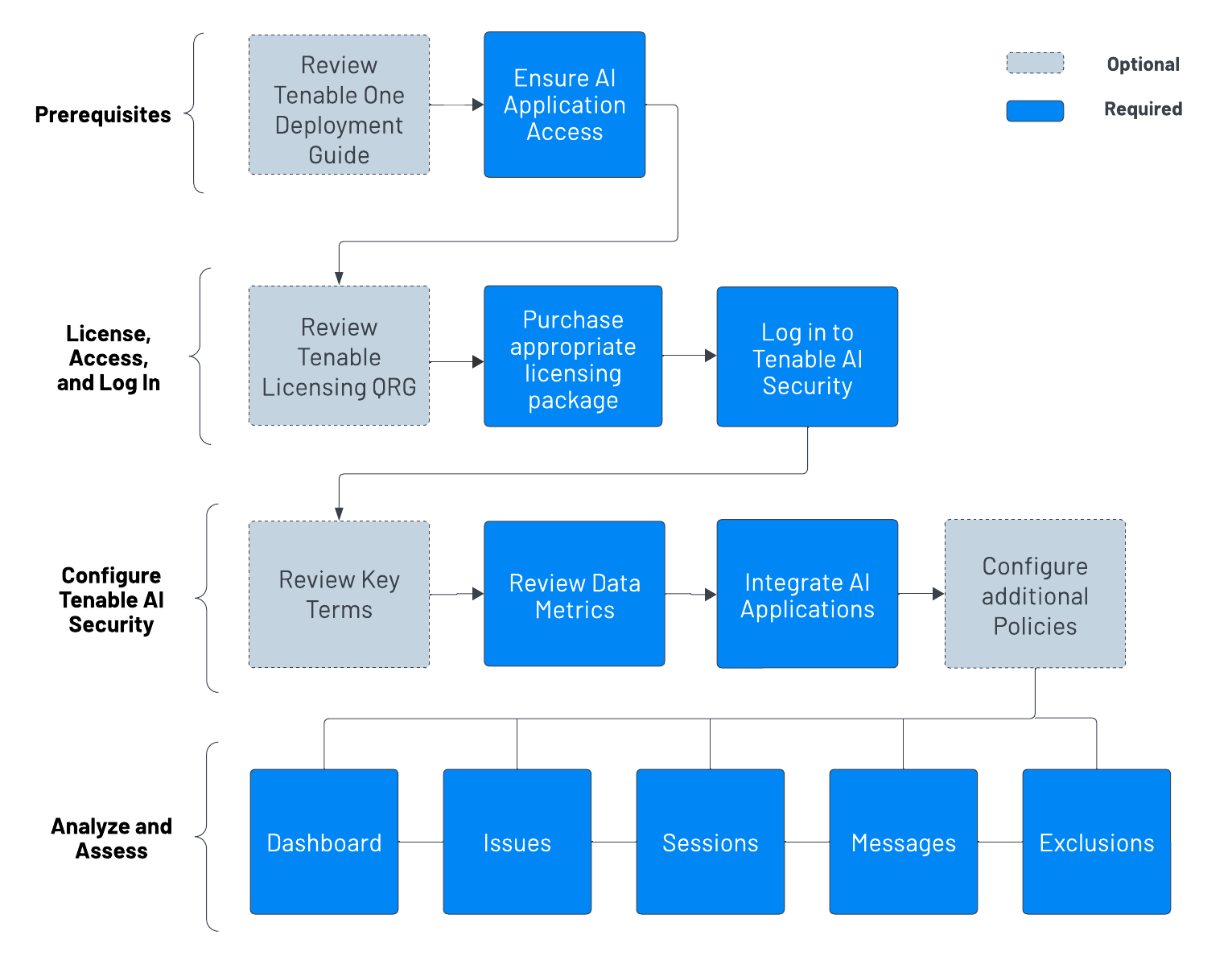
Prerequisites
Before you begin configuring and using Tenable One AI Exposure:
-
Review the Tenable One Deployment Guide.
-
Ensure you've got access to at least one supported AI application, for example, ChatGPT Enterprise or Microsoft Copilot 365.
Tip: For more information, see Integrations.
License, Access, and Log In
To use Tenable One AI Exposure, you purchase licenses for assets: resources identified by — or managed in — your Tenable products. Each product has a different asset type. For more information, see the Tenable One Licensing Quick-Reference Guide.
-
Contact your Tenable representative to purchase the appropriate package.
To access and log in to Tenable One AI Exposure:
-
Review the Tenable One AI Exposure System Requirements.
-
Follow the steps to Log in to Tenable One AI Exposure.
Configure Tenable One AI Exposure for Use
-
Familiarize yourself with the Tenable One AI Exposure key terms.
-
Familiarize yourself with the data metrics within Tenable One AI Exposure.
-
Integrate AI applications with Tenable One AI Exposure.
-
(Optional) Review and configure additional Tenable One AI Exposure policy settings.
Analyze and Assess
Perform analysis on your data within Tenable One AI Exposure:
-
Access the Dashboard page, where you can gain a comprehensive understanding of your AI usage and associated risks. The goal is to position you to take proactive measures by surfacing the most relevant Key Performance Indicators (KPIs) in a unified, holistic view.
-
Review and resolve your active Findings, or AI violations triggered by your users.
-
Review your users' AI application Sessions and individual Messages to enforce AI security. These processes help to keep your AI attack surface safe from risks, and ensures your organization is using AI according to business values.
-
(Optional) Create Exclusions to focus in on alerts and violations that matter to you, while ignoring the ones that don't.