Monitor Duplicate Role Assignments or Bindings
Duplicate role assignments or bindings refer to cases where a principal - such as a user, group, or service identity - receives the same role multiple times, often through different paths (e.g., directly and via a group). In such cases, the role assignment or binding may be "covered" by other role assignments or bindings, which may come from a higher scope level or group membership. These duplicates can sometimes originate from group memberships that cover broader scopes, such as a group with organization-level access and a separate assignment at the root level.
To view duplicate role assignments or bindings:
-
Navigate to cloud provider-specific role assignments:
- For Azure, go to Explore > Inventory > IAM > Azure Role Assignment.
- For GCP, go to Explore > Inventory > IAM > GCP Role Binding.
-
Utilize the Covered By filter: Apply the Covered By filter to view all role assignments in a flattened format. This allows for easy filtering based on:
- Role — Identify instances where the same role is assigned multiple times.
- Scope — Narrow down your search to specific scopes where duplicates might exist.
- Principal — Find if a specific user, group, or service identity has been granted the same permissions through different assignments.
-
Enhanced tracking and automation: This method enables better tracking of permissions. You can also schedule reports or query the data via API for automated monitoring and management of duplicate role assignments.
For example: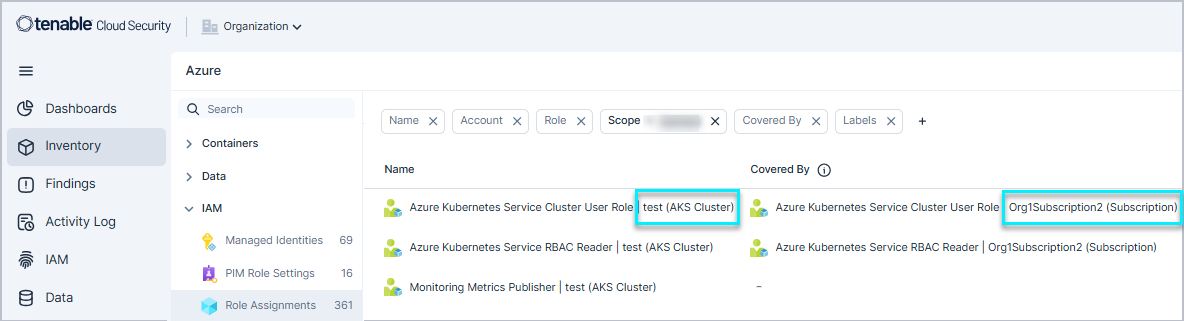
Alternatively, you can navigate to Explore > Inventory > Google Workspace/Microsoft Entra ID Users and add a column for Covered GCP Role Bindings / Covered Azure Role Assignments to display all the "covered" permissions for that identity. However, this requires manual mapping due to potential duplication, making it less effective for tracking "covered role assignments" accurately.