How Tenable Scans Your Data
Depending on the type of resource, Tenable One Cloud Exposure leverages different scanning approaches, including direct or indirect scanning. The following section shows which resources are supported, the scanning method used for each, and whether in-account scanning is available.
This article provides details on a specific scanning method used by Tenable One Cloud Exposure. For a broader overview of all scanning and synchronization methods employed across various resource types and operational stages (including agentless, agent-based, and pipeline techniques used for different targets like code, data, and workloads), see Scanning Methods.
Supported Resources and Scanning Approach
Tenable scans all file types, while prioritizing the scanning of the following, commonly used file formats:
| Category | Resource Type | Scanning Approach | Supports In-Account Scanning |
|---|---|---|---|
| Managed database resources | AWS RDS clusters | Indirect | ✔ |
| AWS RDS instances | Indirect | ✔ | |
| AWS DynamoDB tables | Direct | ✔ | |
| Azure SQL | Indirect | ✔ | |
| GCP BigQuery datasets | Direct | ✔ | |
| GCP SQL instances | Indirect | ✔ | |
| Buckets (public and private) | AWS S3 buckets | Direct | ✔ |
| Azure storage account blob container | Direct | ✔ | |
| GCP storage buckets | Direct | ✔ | |
| OCI object storage buckets | Direct | ✔ | |
| Alibaba Cloud Object Storage Service | Direct | ✗ | |
| Data platform scanning | Local Database | Direct | ✗ |
| Shared Database | Direct | ✗ | |
| Marketplace Database | Direct | ✗ | |
| Workloads1 | Virtual machines | Indirect (via Workload Protection) | ✔ |
| Virtual machine images | Indirect (via Workload Protection) | ✔ |
1 Scanning is limited to data types with a Restricted sensitivity level.
Supported AWS RDS Cluster (Aurora) Database Engine Versions
For AWS RDS clusters, the following database engines are supported for scanning:
- MySQL:
- 5.7, 8.0, 8.1
- PostgreSQL:
- 9, 10, 11, 12, 13, 14, 15, 16, 17
Supported AWS RDS Instance Database Engine Versions
For AWS RDS instances, the following database engine versions are supported for scanning:
- MySQL:
- 5.7, 8.0, 8.1
- PostgreSQL:
- 9, 10, 11, 12, 13, 14, 15, 16, 17
- SQL Server:
- 12 (2014), 13 (2016), 14 (2017), 15 (2019), 16 (2022)
- Oracle Standard Edition 2 and Enterprise Edition:
- 19c
Supported AWS S3 Bucket Storage Classes
The following Amazon S3 storage classes are supported for scanning:
- S3 Express One Zone
- S3 One Zone-IA
- S3 Standard
- S3 Standard-IA
Supported Azure SQL Tiers
All Azure SQL tiers are supported except:
- Azure SQL Serverless
- Business Critical
- DataWarehouse
- Hyperscale
- Premium
Supported GCP BigQuery Datasets
Only native BigQuery datasets stored in GCP are supported. Datasets accessed or managed through BigQuery Omni (such as residing in AWS S3 or Azure Blob Storage) are not supported
Supported GCP SQL Instance Database Engine Versions
For GCP SQL instances, the following database engine versions are supported for scanning:
- MySQL:
- 5.7, 8.0
- PostgreSQL:
- 9.6, 10, 11, 12, 13, 14, 15, 16, 17
- SQL Server:
- 14 (2017), 15 (2019), 16 (2022)
GCP SQL special considerations:
- GCP SQL read replica instances are not supported.
Supported OCI Object Storage Buckets
The following limitations apply when scanning OCI Object Storage buckets:
- Only the Standard tier is supported for scanning.
- Global scans only support the OC1 realm (Oracle's commercial realm). To scan resources in other realms (such as OC2 and OC3), use in-account deployments.
Supported Snowflake Tables
The following Snowflake table types are supported for scanning:
Supported Alibaba Cloud OSS Bucket Storage Classes
The following Alibaba Cloud OSS bucket storage classes are supported for scanning:
- Standard
- Infrequent Access (IA)
Scanning Approaches
Cloud Exposure uses two distinct approaches to scan cloud resources for sensitive data: direct scanning and indirect scanning. Both approaches ensure that your sensitive data remains secure and is never stored at rest outside your environment. The approach used depends on the type of cloud resource being scanned.
Direct Scanning
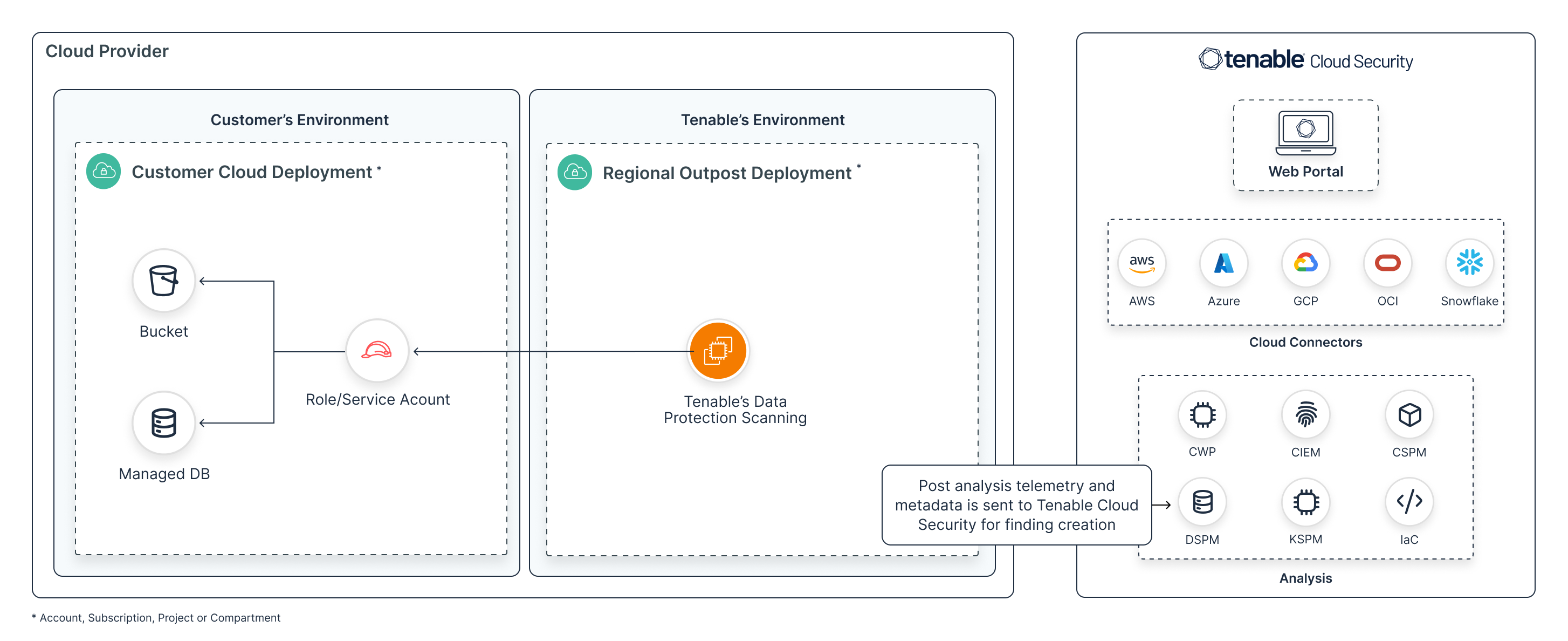
Cloud Exposure leverages APIs to connect to your cloud resources for scanning purposes:
- Leveraging the granted role/service account, Tenable's regional outpost scans objects (in buckets) and tables (in managed databases) to classify data into sensitive data types.
- While telemetry and metadata (the existence and location of specific data types) is collected in the outpost and transmitted to the global Cloud Exposure platform, your sensitive data is never stored at rest anywhere else.
- The existence of sensitive data in objects and tables affects the severity of Findings associated with the resources where those objects/tables were detected.
The following diagram describes the direct scanning workflow for all supported cloud providers.
Indirect Scanning
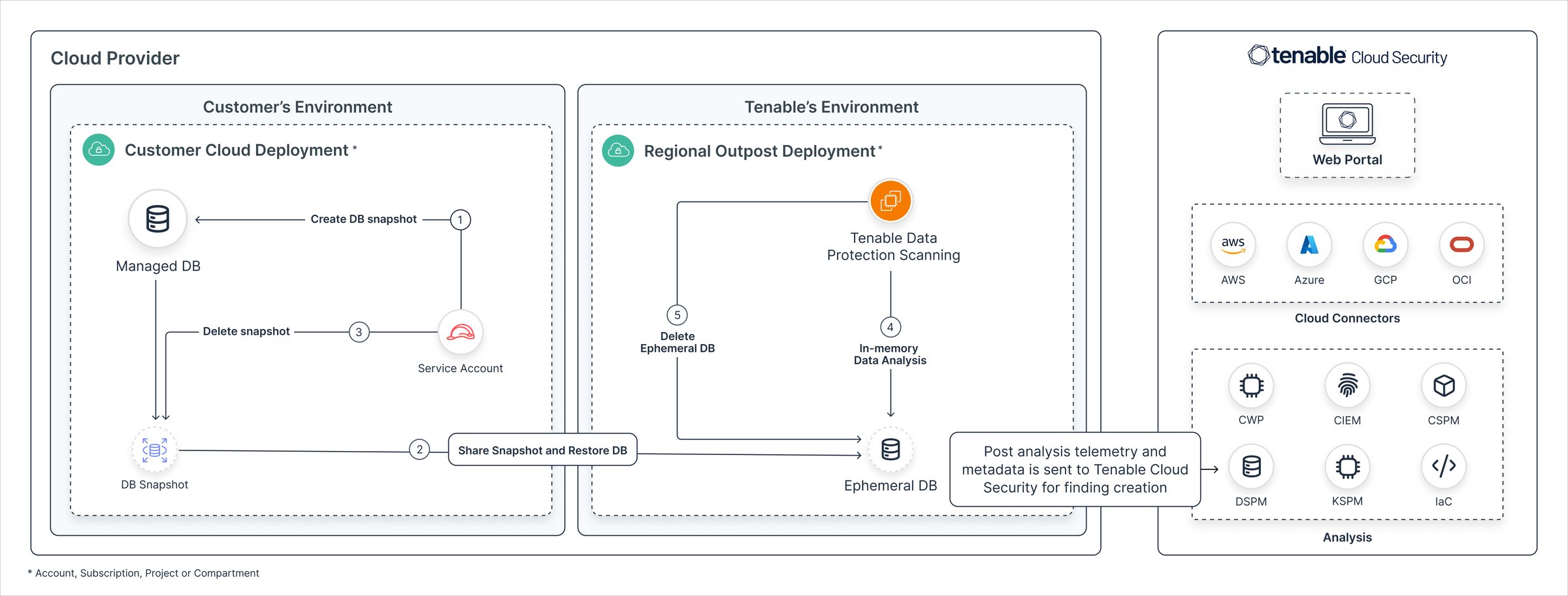
Cloud Exposure leverages snapshots/backups of cloud resources for scanning purposes:
- Leveraging the granted role/service account, a snapshot/backup of your managed databases is shared with Cloud Exposure's regional outpost to scan the DB tables and classify data into sensitive data types.
- While telemetry and metadata (the existence and location of specific data types) is collected in the outpost and transmitted to the global Cloud Exposure platform, your sensitive data is never stored at rest anywhere else.
- The existence of sensitive data in tables affects the severity of Findings associated with the resources where those tables were detected.
The following diagram describes the indirect scanning workflow for all supported cloud providers.
Data Scanning of Virtual Machines and Virtual Machine Images
Tenable scans virtual machines and virtual machine images for sensitive data. These scans specifically target data types with a Restricted sensitivity level.
- When sensitive data is detected on a workload:
- The severity level of the relevant finding is raised by one level (for example, from Medium to High) but is capped at High. The severity level for findings already at High or Critical remains as is and will not escalate further.
- A new finding is created if the detected data triggers a Custom Policy using a Monitor Sensitive Data template.
- Supported platforms:
- AWS — EC2 instances and images
- Azure — Virtual machines
- GCP — VM instances and compute images
- OCI — Compute instances and images
- Operating systems — Linux and Windows
Security and Privacy
The following section outlines the security and privacy practices implemented to protect customer data and ensure compliance within the Tenable Data Protection solution:
- While telemetry and metadata (the existence and location of specific data types) is collected in the outpost and transmitted to the global Cloud Exposure platform, your sensitive data is never stored at rest anywhere else.
- By default, Tenable performs data analysis scans on relevant resources in any account where you grant data permissions. However, you can fine-tune this by creating data scan exclusions to skip specific resources, regions, or environments based on custom logic. See Data for more information.
- All data in transit across open networks is encrypted using TLS 1.2 or equivalent.
- Cloud Exposure uses the minimum permissions necessary to operate on scanned customer data, with a strong emphasis on read-only access to data wherever feasible.
- Any snippets of customer data displayed in the Cloud Exposure Console are truncated to show only partial, non-sensitive portions of strings, strictly adhering to compliance and regulatory requirements. This approach ensures that sensitive data remains protected while providing necessary insights.
-
Cloud Provider Region Name Region Identifier AWS China (Beijing) cn-north-1 AWS China (Ningxia) cn-northwest-1 Azure Disaster Recovery (DR) All regions Azure West India westindia Azure Jio India West jioindiawest Azure Sweden South swedensouth Azure Taiwan North taiwannorth GCP US Central2 us-central2 OCI EU Dedicated Cloud (DCC) regions eu-dcc-* OCI Crissier, Switzerland eu-crissier-1 OCI EU Sovereign South (Madrid) eu-madrid-2 OCI EU Sovereign Central (Frankfurt) eu-frankfurt-2 OCI US Gov East (Ashburn) us-langley-1 OCI US Gov West (Phoenix) us-luke-1