Tenable One Cloud Exposure 2024 Completed Changes
Tip: You can subscribe to receive these release notes by email or RSS.
This page describes major changes completed in 2024 in Cloud Exposure that affect how you work with the platform, including changes with potential backward compatibility issues.
| Change | Description | Date |
|---|---|---|
| Configure Minimum Severity for Vulnerability Findings | You will be able to configure the minimum severity that triggers the creation of vulnerability findings. | December 22, 2024 |
| Custom Property Changes (API / SIEM Integration) | Changes to several properties, which may affect your workflow. | December 8, 2024 |
| Inventory Fields Changes (API / SIEM Integration) | You will be able to query the assigned principal value in a more detailed way. Because of this, the AssignedPrincipals value will be removed. | December 1, 2024 |
| Enhancements to Role Binding and Role Assignment Management | Dedicated pages for GCP Role Bindings and Azure Role Assignments will replace existing profile tables, offering advanced features such as identifying unused bindings. | November 24, 2024 |
| AWS Organization Policies property changes (API / SIEM integration) | Changes to several properties to support visibility into resource control policies (RCP). | November 10, 2024 |
| CI/CD Image Repo Deprecated | The CI/CD image repo used by Cloud Exposure has changed. | November 1, 2024 |
| New Logic for Windows EOL Findings (AWS/GCP ) | Tenable updated the logic for Windows machines in AWS and GCP to use the standard end-of-support date. | October 13, 2024 |
| Permission Changes for Data Protection | Additional permissions needed for future support of data scanning for data storage resources. | October 13, 2024 |
| Inactive Findings Property Changes (API / SIEM Integration) | As a result of the New Logic for Inactive Identities (August 12, 2024), GraphQL API and SIEM integration properties are also changing. | September 29, 2024 |
| New Logic for Inactive Identities | Changes to how findings for inactive identities are handled. | August 12, 2024 |
| Container Image CI/CD Scanning JSON Output | Changes to the JSON output format generated by the container image scanner within CI/CD pipelines. | August 5, 2024 |
| Permission Changes for Onsite Workload Scanning | Additional permissions needed to encrypt KMS keys for AWS onsite workload scanning. | August 5, 2024 |
| GraphQL API / SIEM Integration Finding Property Changes | Changes to several finding properties, which may affect your workflow. | July 28, 2024 |
| Workload Protection GraphQL API Property Change | Changes to a query property, which may affect your workflow. | July 21, 2024 |
| Finding Lifecycle | Changes to how security findings are managed in Cloud Exposure. | July 7, 2024 |
 Configure Minimum Severity for Vulnerability Findings (December 22, 2024)
What’s Changing?
Policy Name Changes
The policy name for Vulnerabilities-related policies is changing, as follows.
| Old Policy Name | New Policy Name | Resources |
|---|---|---|
| {Resource_name} has critical vulnerabilities | {Resource_name} has vulnerabilities that should be addressed |
|
Motivation and Value
Grant users control over how vulnerability findings are created, by allowing you to configure the minimum severity when findings are created.
Backward Compatibility
N/A
Custom Property Changes (API / SIEM Integration) (December 8, 2024)
What’s Changing?
GraphQL API Changes
The following changes related to Custom Properties are being made in the GraphQL API:
Deprecated Fields
| Query | Field |
|---|---|
| Findings | ResourceOwner |
| Findings | ResourceEnvironment |
New Fields
| Query | Field |
|---|---|
| CustomProperties | PrincipalCustomPropertyValue (see Custom Property Changes (API / SIEM Integration) (December 8, 2024) for details) |
| Findings | AccountName |
New Sample Query and Response
The following example query shows the new PrincipalCustomPropertyValue field being used in the Findings query.
GraphQL
query  {
  Findings(filter:{}) {
    nodes {
      Resources {
        CustomProperties {
          Name
          Values {
            ... on PrincipalCustomPropertyValue {
              Principal {
                Name,
                Mail
              }
            }
          }
        }
      }
    }
  }
}JSON
{
  "data": {
    "Findings": {
      "nodes": [
        {
          "Resources": [
            {
              "CustomProperties": [
                {
                  "Name": "Environment",
                  "Values": [
                    {}
                  ]
                },
                {
                  "Name": "Owner",
                  "Values": [
                    {
                      "Principal": {
                        "Name": "John Doe",
                        "Mail": "[email protected]"
                      }
                    },
                    {
                      "Principal": {
                        "Name": "Jane Doe",
                        "Mail": "[email protected]"
                      }
                    }
                  ]
                }
              ]
            }
          ]
        },
        {
SIEM Integrations Changes
The following SIEM integration property related to Custom Properties has been added:
| Property | Description |
|---|---|
| ResourceOwnerPrincipals | The email address and name of the resource owner. |
Motivation and Value
Ensure consistency and alignment across Cloud Exposure properties.
Backward Compatibility (Requires Action)
If you use the Cloud Exposure GraphQL API to send data to business intelligence tools, your workflow may be affected by the following changes.
Inventory Fields Changes (API / SIEM Integration) (December 1, 2024)
What’s Changing?
The following GraphQL API and SIEM integration inventory field will deleted:
| Fields (OLD) | Description | |
|---|---|---|
| GraphQL API | AssignedPrincipals | Assigned principals to PIM Role Elgebility |
| SIEM integrations | AssignedPrincipals | Assigned principals to PIM Role Elgebility |
GraphQL
{

  AzureAuthorizationRoleAssignmentResources {


    edges {
      node {
        Name
        Pim

        PrincipalReference {
          Principal {
            Name
          }
        }
      }
    }
  }
  }
Motivation and Value
Query this value in a more detailed way via the Azure Role Assignment Page or via the API per specific Role Assignment.
Backward Compatibility (Requires Action)
If you use the Cloud Exposure GraphQL API or use SIEM integrations to send data to business intelligence tools, your workflow may be affected by these following changes.
- GraphQL API:
Request (query): The old field, AssignedPrincipals will be deprecated in one month. After this time, you will need to ensure that you delete the relevant queries. - SIEM integrations:
Make sure to configure your SIEM tool in advance to expect the new type names.
Enhancements to Role Binding and Role Assignment Management (November 24, 2024)
What’s Changing?
The Bindings table will be removed from GCP Role profiles in Role Bindings, and the Assignments table will be removed from Azure Role profiles in Role Assignments.
Motivation and Value
The full capability of Role Binding and Role Assignment for each GCP and Azure Role will be supported on a dedicated page. This page will include advanced features such as identifying unused bindings and locating assignments that are redundant due to being covered by higher-scope assignments.
Backward Compatibility
No action requires
AWS Organization Policies property changes (API / SIEM integration) (November 10, 2024)
What’s Changing?
Cloud Exposure currently provides visibility into one type of AWS organization policy via the Inventory:
- Service control policies (SCP)
On November 10, 2024, another type of organization policy will also be supported:
- Resource control policies (RCP)
Both policy types will be visible within a new Organization Policies resource (IAM category). As a result, the following GraphQL API and SIEM integration inventory types are changing:
| Property (OLD) | Property (NEW) | Description | |
|---|---|---|---|
| GraphQL API | AwsOrganizationsServiceControlPolicy | AwsOrganizationsPolicy | AWS Organizations policy |
| SIEM integrations | AwsOrganizationsServiceControlPolicy | AwsOrganizationsPolicy | AWS Organizations policy |
Motivation and Value
Ensure support for visibility into AWS resource control policies (RCP) via the Cloud Exposure Inventory page.
Backward Compatibility (Requires Action)
If you use the Cloud Exposure GraphQL API or use SIEM integrations to send data to business intelligence tools, your workflow may be affected by these following changes.
- GraphQL API:
- Request (query): The old type, AwsOrganizationsServiceControlPolicy will be deprecated in one month. After this time, you will need to ensure that you change relevant queries to use the new type name - AwsOrganizationsPolicy.
- SIEM integrations:
- Make sure to configure your SIEM tool in advance to expect the new type names.
- Best practice — Add configuration for the new types before deleting the old types. After the feature is released and you have verified that data in your workflow is still ingested successfully, you can remove the old/legacy types.
CI/CD Image Repo Deprecated (November 1, 2024)
What’s Changing?
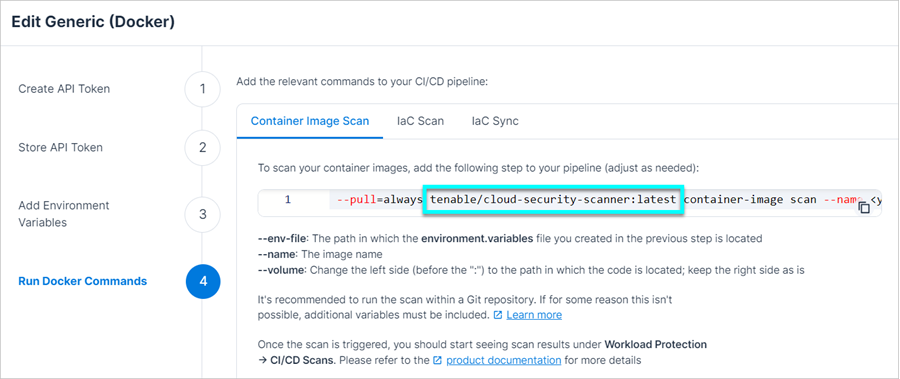
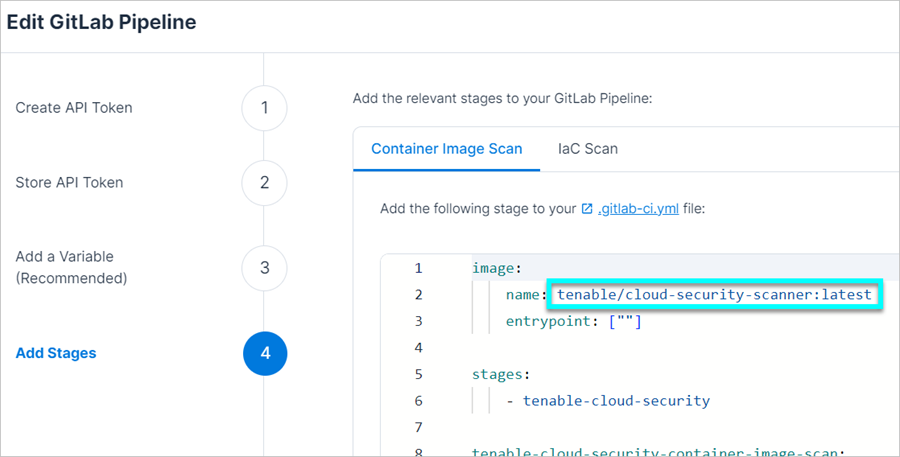
The previous CI/CD image repo used by Cloud Exposure is being deprecated. Tenable has already transitioned to use the new image repo, but will continue to support the old repo until the Deprecation Date of November 1, 2024. This means that if you connected your pipeline to Tenable and used the old repo name in the relevant step, scanning will still be supported until this time. See CI/CD Image Repo Deprecated (November 1, 2024) for more information about required action.
| Deprecated Repo | New Repo |
|---|---|
| ghcr.io/ermetic/scanner:latest | tenable/cloud-security-scanner:latest |
This repo is used for the following features:
This change impacts customers using any of the following pipelines:
- Jenkins
- GitLab
- Generic (Docker)
Motivation and Value
To ensure stability and reliability for Cloud Exposure customers, and to use consist naming conventions across the platform.
Backward Compatibility (Requires Action)
If you currently reference the deprecated repo name in your pipeline:
To ensure the uninterrupted continuity of the CI/CD Image Repo Deprecated (November 1, 2024), you need to update the relevant step in your pipeline/s to use the new repo name before November 1, 2024.
-
You can copy the relevant step with the new name from the Cloud Exposure Console by editing the relevant pipeline integration via Settings > Integrations > CI/CD, and then use it to replace the step with the old name. For example, here you can see the updated repo name reflected in the step, both for Generic (Docker) and for GitLab.
- If you appended/altered content within the step, you can simply replace the old repo path with the new one, without copying the entire step from the Console.
New Logic for Windows EOL Findings (AWS/GCP ) (October 13, 2024)
What’s Changing?
Cloud Exposure alerts on operating systems that are at or nearing end of life. For Windows OS, this was previously based on the latest date for which extended security updates were available. However, because Microsoft charges extra for extended support, Tenable is updating the logic for Windows machines in AWS and GCP to use the standard end-of-support date.
As a result, you may see new findings opened for the following policies, which were previously evaluated based on the extended support date:
- EC2 instance has an operating system which is at or nearing End-of-Life
- VM instance has an operating system which is at or nearing End-of-Life
For Azure resources running Windows Server, the extended support date will continue to be used, as the cost is included in Azure pricing.
Motivation and Value
Since most customers don't pay for extended support, Tenable considers the standard end-of-support date more relevant.
Backward Compatibility (Requires Action)
N/A
Permission Changes for Data Protection (October 13, 2024)
What’s Changing?
The following additional permissions need to be added, depending on your cloud provider. See the documentation for more information.
| Cloud | Permission |
|---|---|
| AWS | See the AWS Data Protection Policy |
| GCP | BigQuery Data Viewer |
Motivation and Value
Lay the groundwork for future support of data scanning for data storage resources.
Backward Compatibility (Requires Action)
To ensure the uninterrupted continuity of data scanning across all resource types, add the additional permissions mentioned in Permission Changes for Data Protection (October 13, 2024) as soon as possible before October 13, 2024.
Inactive Findings Property Changes (API / SIEM Integration) (September 29, 2024)
What’s Changing?
As a result of the New Logic for Inactive Identities (August 12, 2024), GraphQL API and SIEM integration properties are also changing. The following sections list the relevant changes for each cloud provider / identity provider.
AWS
| Old | FindingType - Old API | New | FindingType - New API |
|---|---|---|---|
| Inactive IAM role (deprecated) | AwsInactiveRoleFinding | For an inactive role with overprivileged permissions: Overprivileged IAM role |
AwsExcessivePermissionRoleFinding |
| For an inactive role without overprivileged permissions: Inactive IAM role | AwsIamRoleInactiveFinding | ||
| Inactive IAM user (deprecated) | AwsInactiveUserFinding | For an inactive user with overprivileged permissions: Overprivileged IAM user |
AwsExcessivePermissionUserFinding |
| For an inactive user without overprivileged permissions: Inactive IAM user |
AwsIamUserInactiveFinding | ||
| Unused SSO permission set (deprecated) | AwsUnusedPermissionSetFinding | For an unused SSO permission set with overprivileged permissions: Overprivileged SSO permission set |
AwsExcessivePermissionPermissionSetFinding |
| For an unused SSO permission set without overprivileged permissions: Unused SSO permission set |
AwsSsoPermissionSetUnusedFinding |
Azure
| Old | FindingType - Old API | New | FindingType - New API |
|---|---|---|---|
| Inactive managed identity in subscription (deprecated) | AzureInactiveManagedIdentityServicePrincipalFinding | For an inactive managed identity with overprivileged permissions: Overprivileged managed identity in subscription |
AzureExcessivePermissionManagedIdentityServicePrincipalFinding |
| For an inactive managed identity without overprivileged permissions: Inactive managed identity |
AzureManagedIdentityManagedIdentityInactiveFinding | ||
| Inactive Microsoft Entra ID application in subscription (deprecated) | AzureInactiveApplicationServicePrincipalFinding | For an application identity with overprivileged permissions: Overprivileged Microsoft Entra ID Application in subscription |
AzureExcessivePermissionApplicationServicePrincipalFinding |
| For an inactive application without overprivileged permissions: See Microsoft Entra ID |
------ | ||
| Inactive Microsoft Entra ID user in subscription (deprecated) | AzureInactiveUserFinding | For an inactive user with overprivileged permissions: Overprivileged Microsoft Entra ID user in subscription |
AzureExcessivePermissionUserFinding |
| For an inactive user without overprivileged permissions: See Microsoft Entra ID |
------ |
GCP
| Old | FindingType - Old API | New | FindingType - New API |
|---|---|---|---|
| Inactive service account in project (deprecated) | GcpInactiveServiceAccountFinding | For an inactive service account with overprivileged permissions: Overprivileged service account in project |
GcpExcessivePermissionServiceAccountFinding |
| For an inactive service account without overprivileged permissions: Inactive service account |
GcpIamServiceAccountInactiveFinding | ||
| Inactive user in project (deprecated) | GcpInactiveUserFinding | For an inactive user with overprivileged permissions: Overprivileged user in project |
GcpExcessivePermissionUserFinding |
| For an inactive user without overprivileged permissions: See Google Workspace |
-------- |
Google Workspace
| Old | FindingType - Old API | New | FindingType - New API |
|---|---|---|---|
| N/A | Inactive Google Workspace user | GciDirectoryUserInactiveFinding |
Microsoft Entra ID
| Old | FindingType - Old API | New | FindingType - New API |
|---|---|---|---|
| N/A | Inactive Microsoft Entra ID application | AadDirectoryApplicationServicePrincipalInactiveFinding | |
| N/A | Inactive Microsoft Entra ID user | AadDirectoryUserInactiveFinding |
Motivation and Value
Ensure consistency and alignment across Cloud Exposure finding properties.
Backward Compatibility (Requires Action)
If you use the Cloud Exposure GraphQL API or use SIEM integrations to send data to business intelligence tools, your workflow may be affected by these following changes.
New Logic for Inactive Identities (August 12, 2024)
What’s Changing?
How Cloud Exposure handles findings for inactive identities.
| Feature/Behavior | Old Behavior | New Behavior |
|---|---|---|
| Finding(s) opened on inactive identities | If identity has permissions on cloud resources, an Inactive finding is opened per identity (AWS) or per identity in the subscription/project (Azure/GCP). Remediation steps focus on permission removal (Azure/GCP) and identity removal (AWS). |
|
| Least Privilege Trends Graph (IAM Dashboard) | Separate trend graphs for inactive and over-privileged identities |
|
| Permissions granted to inactive identities via IDP group membership | Recommend removing the identity from the group | Recommend removing the identity from the group (no change), but the option can now be disabled if IDP groups are used for more than just cloud permissions. |
| Disabled identities | None | For the new finding type (inactive identity) a new option to alert on disabled identities. If enabled, remediation steps recommend deletion. |
Updated IAM Policies
Inactive IAM policies have been updated with new logic, as described in New Logic for Inactive Identities (August 12, 2024). Some of these policies have new names. Deprecated policies which use the old logic will continue to exist in the Console (with an indication that they are deprecated) until a week after the release date, at which point they will be removed.
| Cloud / IdP | Old | New |
|---|---|---|
| AWS | Inactive IAM role (deprecated) | Inactive IAM role |
| Inactive IAM user (deprecated) | Inactive IAM user | |
| Azure | Inactive managed identity in subscription (deprecated) | (replaced by overprivileged findings) |
| Inactive Microsoft Entra ID application in subscription (deprecated) | (replaced by overprivileged findings) | |
| Inactive Microsoft Entra ID user in subscription (deprecated) | (replaced by overprivileged findings) | |
| GCP | N/A | Inactive service account |
| Inactive service account in project (deprecated) | (replaced by overprivileged findings) | |
| Inactive user in project (deprecated) | (replaced by overprivileged findings) | |
| Google Workspace | N/A | Inactive Google Workspace user |
| Microsoft Entra ID | N/A | Inactive Microsoft Entra ID application |
| N/A | Inactive Microsoft Entra ID user |
Updated IAM Dashboard
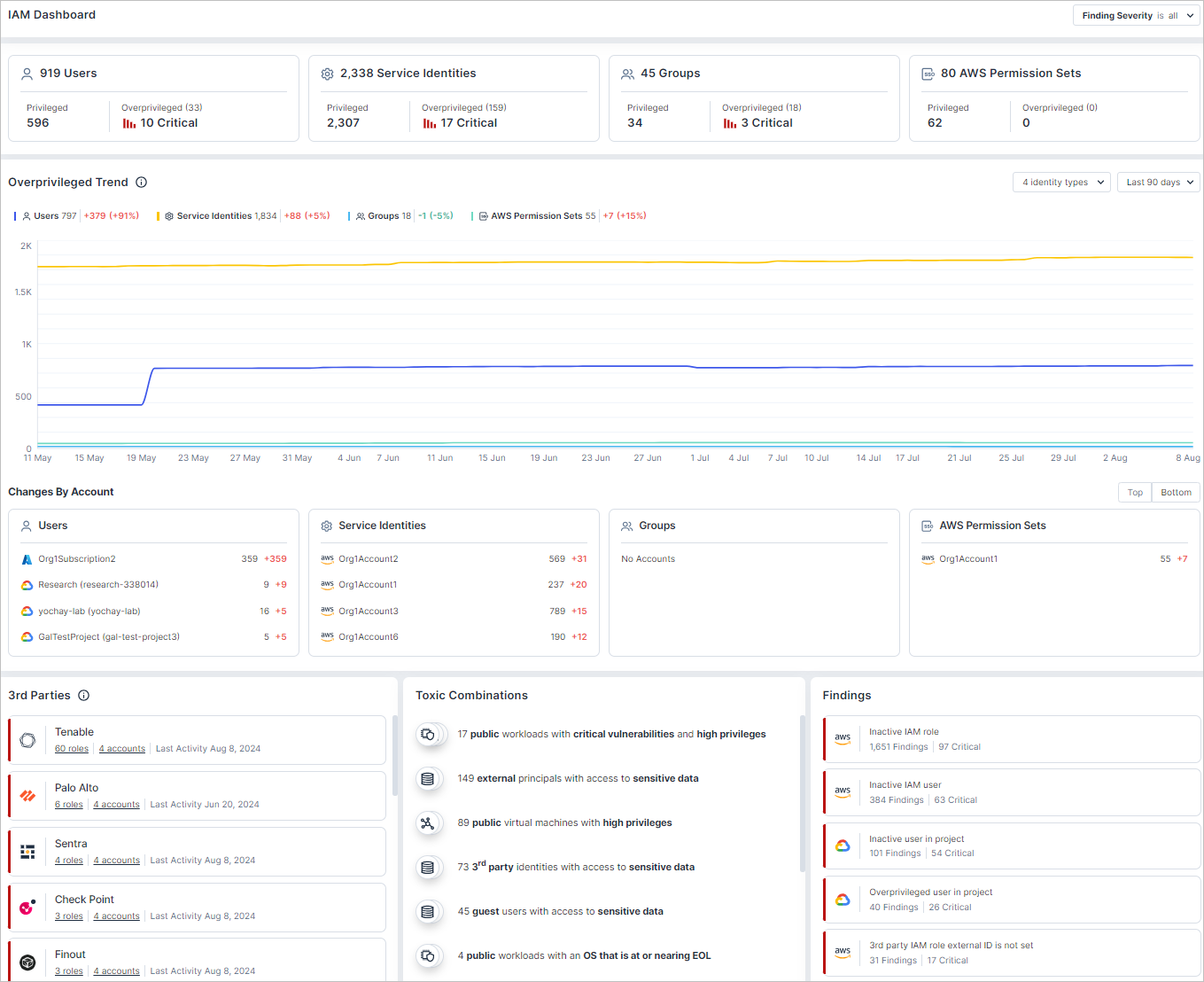
The IAM Dashboard has been improved and updated. Some of the highlights include:
- Overprivileged Trend — Single trend graph for overprivileged identities (including inactive identities with permissions). Added groups and permission sets.
- Changes By Account — Unifies all data into one widget, with a breakdown by users, service identities, groups, and AWS permission sets.
- 3rd Parties — New widget, showing a summary of roles per vendor. Currently only AWS 3rd party roles are displayed.
- Toxic Combinations — New widget showing toxic combinations (resources with multiple risks that, when combined, are both hard-to-spot and pose a greater threat to your organization) related to IAM.
Motivation and Value
Cloud Exposure’s IAM functionality is focused on providing visibility into cloud permissions risk, and helping remove unneeded permissions. Tenable is now making a clearer separation between issues related to inactive identities (and how they're managed) and the cloud permissions associated with those identities.
IAM risk is a combination of:
- Risk associated with the permissions assigned to identities that operate in the cloud.
- Risk associated with the identities themselves (and the groups they may or may not belong to).
Previously, Tenable addresses these two components in the following way:
- Permissions: Overprivileged findings opened on active identities focus on cloud permissions that can be removed.
- Identities: Inactive findings opened on inactive identities with unneeded permissions, which can also recommend measures such as removing these identities altogether, or removing them from relevant groups.
This can be somewhat confusing, as the teams responsible for managing cloud identities as well as the related processes and KPIs, are often very different and separate from those that relate to managing cloud permissions assigned to those identities.
See New Logic for Inactive Identities (August 12, 2024) for details.
Backward Compatibility (Requires Action)
- If you rely on Trends graphs in the IAM Dashboard for tracking progress related to inactive identities, you will need to adapt your processes to leverage the Overprivileged Trend graph, filtered on inactive identities.
- If you track progress based on the number of findings per type, you will need to adjust your metrics, since findings for inactive identities with unused permissions will now appear under the corresponding overprivileged findings.
-
IAM policy configuration:
- Depending on whether or not you use IdP groups dedicated to cloud permissions, consider whether you want to keep the option for recommending removal of identities from IdP groups (in the configuration for overprivileged policies). See Remove inactive principals from groups.
- Similarly, consider whether you want alerts on disabled identities. Create findings for disabled identities.
Container Image CI/CD Scanning JSON Output (August 5, 2024)
What’s Changing?
The JSON output format generated by the Cloud Exposure container image scanner within CI/CD pipelines.
Tenable recommends reviewing and updating your workflows/integrations to accommodate the new format to avoid any disruptions. See Container Image CI/CD Scanning JSON Output (August 5, 2024) for more information.
See Example JSON Output for an updated example, using the new format.
| Old | New |
|---|---|
| image_id | ImageId |
| repository_digest | Digest |
| operating_system | OperatingSystem |
| repository | Repository |
| end_time | EndTime |
| start_time | ScanTime |
| vulnerabilities_by_severity | VulnerabilitySeverities |
| success | Success |
| repository_tag | Tag |
| version | Version |
| vulnerabilities | Vulnerabilities |
| attack_vector | AttackVector |
| cvss_score | CvssScore |
| cvss_version | CvssVersion |
| description | Description |
| exploitable | Exploitable |
| packages | Software |
| - | Path |
| name | Name |
| type | Type |
| version | Version |
| id | Id |
| reference_url | Link |
| remediation | Remediation |
| - | SoftwareResolutionVersions |
| resolvable | Resolvable |
| severity | Severity |
Motivation and Value
- Align JSON naming conventions with the Workload Protection API.
Backward Compatibility (Requires Action)
This change affects any processes or scripts that consume this JSON output. Immediately after the change occurs, all JSON responses will by default include the Container Image CI/CD Scanning JSON Output (August 5, 2024), meaning that any workflows that leverage these values will stop working. You can still retrieve the previous output for 30 days from the release date by passing the --json-version-legacy parameter via the Tenable Docker image CLI.
Best practice: To avoid disruptions, add the --json-version-legacy parameter to your existing workflow. After the feature is released, and you have verified that your workflow is aligned with the new field names, you can remove the old/legacy field names.
Permission Changes for Onsite Workload Scanning (August 5, 2024)
What’s Changing?
The following additional permissions need to be added, depending on your cloud provider. See the documentation for more information.
| Cloud | Permission |
|---|---|
| AWS |
|
| Azure | Key Vault Crypto Officer |
| GCP | Cloud KMS Admin |
Impact and Value
- Tenable now encrypts KMS secrets, as per best practices.
- If you are using Marketplace images (AMI), Tenable highly recommends that you add the license-manager:ListReceivedLicenses permission. This allows Tenable to see which licenses are associated with the dedicated scanning account, in order to scan any licensed images.
Backward Compatibility (Requires Action)
To ensure the uninterrupted continuity of onsite scanning, Tenable highly recommends adding the Permission Changes for Onsite Workload Scanning (August 5, 2024) before August 4, 2024.
GraphQL API / SIEM Integration Finding Property Changes (July 28, 2024)
What’s Changing?
The following GraphQL API and SIEM integration finding properties are changing:
| Property (OLD) | Property (NEW) | Description | |
|---|---|---|---|
| GraphQL API | title | PolicyName | The name of the policy. |
| SIEM integrations | title | policyName | The name of the policy. |
| jiraIssueLinks | ticketLinks | All ticket links have been combined into one property. | |
| serviceNowIncidentLinks | ticketLinks | All ticket links have been combined into one property. |
Motivation and Value
Ensure consistency and alignment across Cloud Exposure finding properties.
Backward Compatibility (Requires Action)
If you use the Cloud Exposure GraphQL API or use SIEM integrations to send data to business intelligence tools, your workflow may be affected by these following changes.
Workload Protection GraphQL API Property Change (July 21, 2024)
What’s Changing?
The following GraphQL API property is changing:
| Property (OLD) | Property (NEW) | Description | |
|---|---|---|---|
| GraphQL API | Path | Paths | The file paths of the scanned software package. Relevant for the following API queries: ContainerImages, VirtualMachines, Entities |
GraphQL
query {
  VirtualMachines {
    edges {
      node {
        Name
        Id
        Software {
          Name
          Version
          Paths
        }
      }
    }
  }
}
Motivation and Value
Support querying for multiple paths for a given software package.
Backward Compatibility (Requires Action)
If you use the Cloud Exposure GraphQL API to send data to business intelligence tools, your workflow may be affected by these changes:
- Request (query) / Response (JSON): The old field, path will be deprecated on July 21, 2024. After this time, you will need to ensure that you change relevant queries to use the new field name - paths.
Finding Lifecycle (July 7, 2024)
What’s Changing?
Significant changes to how security Findings are managed in Cloud Exposure.
These changes affect the finding lifecycle in the system, and make it much easier to understand the flow and progress of issues detected in your environment as they are opened and closed (Learn more about the Finding Lifecycle (July 7, 2024)).
Updated Statuses and Sub-Statuses
This table shows a mapping of the new sub-statuses to their parent status. Descriptions of each sub-status will be available in the documentation after the feature is released.
| Status | Open | Snoozed -> Ignored1 | Resolved -> Closed2 |
|---|---|---|---|
| Sub-status: |
|
|
|
1 Ignored findings:
- Findings will now be opened on excluded resources as well, unlike today where such findings are closed. These findings will be assigned a status of Ignored. This change ensures continued visibility into all excluded resources, in one centralized location, preventing potential blind spots.
2 Closed findings:
- Resources recommended for deletion will be assigned the sub-status Fixed rather than Resource deleted. For example, an Unused Security Group which is recommended to be deleted. This change provides visibility into the actual work that has been done.
Impact and Value
- Increased visibility into your cloud security posture, by allowing you to better track the work you do and the progress you make resolving and closing findings.
- Clearly understand why findings were open/resolved, and see a clear breakdown of findings based on these reasons.
- Learn about finding trends that help you answer questions such as, "How many findings have been reopened in the last month?"
Backward Compatibility (Requires Action)
If you use the Cloud Exposure GraphQL API or use SIEM integrations to send data to business intelligence tools, your workflow may be affected by the following changes.
-
GraphQL API:
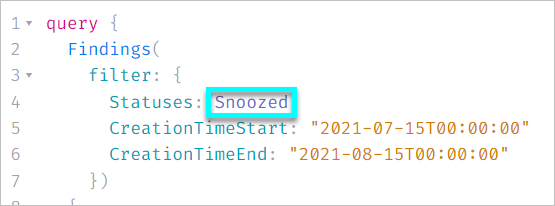
- Request (query): Filtering findings by status via the Statuses filter using the old values of Snoozed or Resolved will be deprecated. After the change occurs, the old values will continue to be supported for a period of one month, after which you will need to ensure that you change relevant queries to use the new values.
- Old value: Snoozed. New value: Ignored
- Old value: Resolved. New value: Closed
- Response (payload): Immediately after the change occurs, all API responses will include the new status values, meaning that any workflows that leverage these values will stop working. Best practice: Add configuration for the new value/s before deleting the old value/s. After the feature is released and you have verified that data in your workflow is still ingested successfully, you can remove the old/legacy value.
- Request (query): Filtering findings by status via the Statuses filter using the old values of Snoozed or Resolved will be deprecated. After the change occurs, the old values will continue to be supported for a period of one month, after which you will need to ensure that you change relevant queries to use the new values.
-
SIEM integrations:
Make sure to configure your SIEM tool in advance to expect the following new payload values:- Old value: Snoozed. New value: Ignored
- Old value: Resolved. New value: Closed
Immediately after the change occurs, all payloads will include the new status values, meaning that any workflows that leverage these values will stop working. Best practice: Add configuration for the new value/s before deleting the old value/s. After the feature is released and you have verified that data in your workflow is still ingested successfully, you can remove the old/legacy value.