Tenable One Cloud Exposure 2025 Completed Changes
Tip: You can subscribe to receive these release notes by email or RSS.
This page describes major changes completed in 2025 in Cloud Exposure that affect how you work with the platform, including changes with potential backward compatibility issues.
| Change | Description | Date |
|---|---|---|
| Deprecate Select All Policies Option in Custom Compliance | The Select all (existing and future policies) option will be deprecated as part of the Custom Compliance Upgrade (January 26, 2025), enabling precise control and accurate compliance scores. | December 15, 2025 |
| Network Scanner | A new capability that validates internet exposure and records confirmed results as Network Endpoints. | December 7, 2025 |
| Permission Category Changes | Changes to Permission Categories, including two new categories. | November 30, 2025 |
| Support for Scanning Public AMIs | A new capability that expands AWS AMI scanning to include Public AMIs (cloud-managed AMIs). | November 23, 2025 |
| Cloud Resource Querying Updates (Breaking Change) | The Inventory API is being updated to use standardized, generic Kubernetes resource names, requiring casting to KubernetesResource and filtering by Provider, thus removing the need for cloud-prefixed resource types and query roots for all Kubernetes resources. | November 2, 2025 |
| Snowflake Data Scanning | Introducing support for scanning sensitive data resources in Snowflake accounts. | October 26, 2025 |
| Inventory API Container Image Field Restructuring (GraphQL Breaking Change) | The change involves using a GraphQL inline fragment on the ContainerImages field to correctly project type-specific data. The original query is changed by moving fields exclusive to the ContainerImage type (for example, Digest, ScanTime, RepositoryUri) from the root of the ContainerImages selection set into the ... on ContainerImage {} block. This fragment is essential for querying fields on a concrete type when the parent field returns an abstract type. | October 19, 2025 |
| Deprecated API Fields/Filters | Deprecation of various GraphQL API fields/filters. | Mid-October, 2025 |
| Deletion of Scan Data Older Than 30 Days | Vulnerabilities, software inventory, and malicious file data from scans older than 30 days will be automatically deleted to reduce clutter and ensure data relevance. | Q4, 2025 |
| Failed Status for Unscanned VMs and AMIs | Assets that haven't been scanned for 14 days will automatically show a "Failed" scan status to reflect scanning gaps. | Q4, 2025 |
| Continued Display of Last Scan Time | The Scan Time column will continue showing the last successful scan timestamp for each asset. | Q4, 2025 |
| Improved Accuracy and Coverage in Vulnerability Detection | Added support for scoped NPM packages. Improved accuracy for Linux kernel packages. | September 28-30, 2025 |
| Console URL Changes | The structure of many Console URLs will be updated. This includes, but is not limited to, URLs for Findings. | July 20, 2025 - End of January, 2026 |
| Retention Changes of Closed Findings and Deleted Resources | Retention periods for findings and deleted resources are changing to improve performance. | July 20, 2025 |
| Deprecation of Legacy Helm Chart Versions 1.0 and 1.4 | Support for older versions of the Helm chart is ending. Tenable will officially deprecate support for Helm chart versions 1.0 and 1.4. | June 30, 2025 |
| OCI Object Storage Buckets | Data protection scanning for OCI Object Storage resources. | May 2025 |
| Configure Vulnerability Severity Metric | Configure the metric (VPR or CVSS) used to calculate the severity of vulnerability-related findings. | May 2025 |
| Azure SQL server scanning | Data protection scanning for Azure SQL database resources. | May 2025 |
| Custom Compliance Upgrade | Create hierarchical standards, customize templates, and ensure a more accurate compliance score. | January 26, 2025 |
| Dedicated Folders for Organizations | Tenable will automatically create a dedicated root folder for the organization under the relevant cloud folder. | January 5, 2025 |
| Region Property Changes (API) | The Region field, which was previously only used for AWS resources, will now also be used for Azure and GCP resources, instead of the Location field. | January 5, 2025 |
| RDS and SQL Database Scanning | Data protection scanning for RDS clusters/instances and SQL instances. | January 2025 |
 Deprecate Select All Policies Option in Custom Compliance (December 15, 2025)
What's Changing?
As part of the Custom Compliance Upgrade (January 26, 2025), the Select all (existing and future policies) option in creating a new custom compliance standard won't be available after December 15.
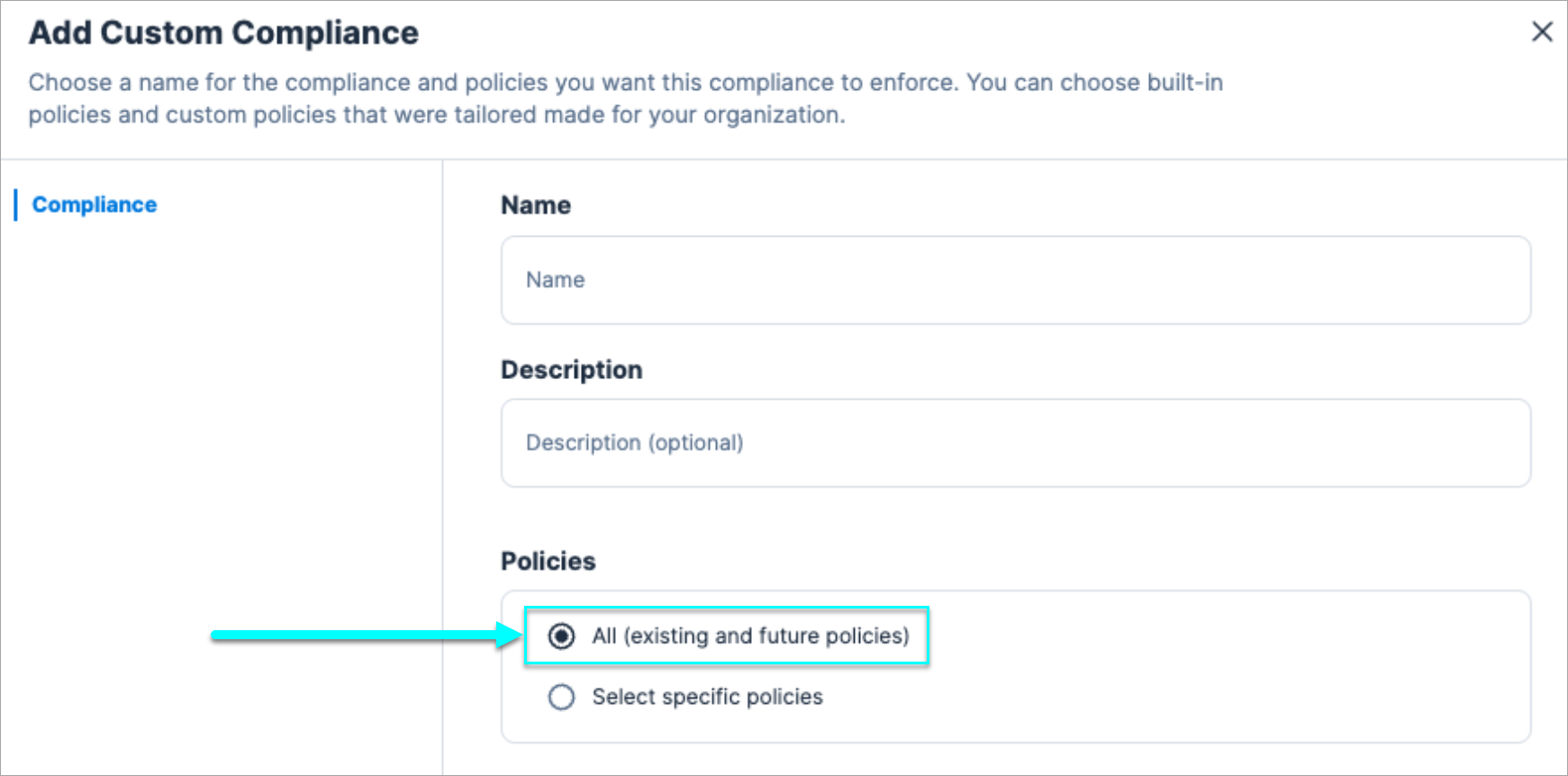
This change affects only custom compliance standards with the Select all (existing and future policies) option already selected.
Motivation and Value
Users are encouraged to shift from using the Select all (existing and future policies) option to using the more accurate hierarchical compliance structure. This means that new policies won't be added automatically for these reasons:
- You will have more control over your custom compliance standards.
- The compliance score won't be affected by new policies. That way, the score is more accurate and less venerable to changes.
Backward Compatibility
N/A
Network Scanner (December 7, 2025)
What's Changing?
Dynamic validation for internet-facing resources across your cloud environments.
Tenable is introducing Network Scanner, a new capability that dynamically validates potential network exposures detected by Network Evaluation. The Network Scanner attempts direct connections to flagged resources to verify whether they are truly reachable from the internet. Confirmed exposures are recorded as Network Endpoints.
Once enabled, the scanner will begin testing internet reachability for supported resources. You can disable the Network Scanner in Settings > Cloud Exposure > Network.
Impact and Value
- Expand coverage beyond static configuration analysis with active, real-time exposure validation.
- Gain stronger assurance of external reachability across supported resources such as EC2, RDS, Redshift, Azure VMs, and GCP instances.
- Reduce false positives and focus remediation on confirmed exposures.
- Automatically generate Network Endpoints for verified internet-facing resources.
Permission Category Changes (November 30, 2025)
What's Changing?
This table outlines the upcoming changes to Permission Categories in Cloud Exposure. The existing five categories will be expanded to seven, providing more granular control and clarity.
| Existing Permission Category | New Permission Category | Description |
|---|---|---|
| Reconnaissance | Infrastructure Read | Allows viewing configuration and metadata of infrastructure resources (e.g., VMs, networks, services). |
| Infrastructure Modifications | Infrastructure Write | Allows creation, modification, or deletion of infrastructure resources. |
| Permissions Management | Access Management | Allows modification of user, role, or resource permissions/policies (e.g., IAM). |
| Privilege Escalation | Impersonation | Allows assuming other roles or identities. |
| Data Access | Data Read | Allows viewing of data stored in databases, buckets, secrets, encrypting, etc. |
| Data Access | Data Write | Grants ability to add or modify data in cloud services or applications. |
| N/A | Infrastructure Invocation | Includes invocation of functions, running containers, or triggering jobs/workflows. |
Impact and Value
As part of this change, custom policy categories will be migrated to match the new permission categories. As a result, some new findings may be opened, and existing findings may be closed.
- Provide customers with a clearer breakdown of permission types across multi-cloud environments.
- Enhance the analysis performed by Access level features in the Console.
Support for Scanning Public AMIs (November 23, 2025)
What's Changing?
Tenable is expanding AWS AMI scanning to include Public AMIs (cloud-managed AMIs). This update builds on the existing support for internal (Private) AMIs. Use the Management filter to quickly identify scanned Public AMIs in your environment.
Impact and Value
Scanning AMIs strengthens your security by ensuring the images used to launch servers are safe before they run. With support for scanning public AMIs, you gain broader visibility into potential risks and improve your overall security posture.
Cloud Resource Querying Updates (Breaking Change) (November 2, 2025)
What's Changing?
Tenable implementing several breaking changes to the Entities query API to standardize and simplify how Kubernetes resources are referenced and queried across different cloud platforms. These changes primarily affect GraphQL API users.
This change shall be applicable for all current Kubernetes resources:
- KubernetesClusterRole
- KubernetesClusterRoleBinding
- KubernetesConfigMap
- KubernetesCronJob
- KubernetesDaemonSet
- KubernetesDeployment
- KubernetesGroup
- KubernetesIngress
- KubernetesJob
- KubernetesNamespace
- KubernetesNamespaceRole
- KubernetesNamespaceRoleBinding
- KubernetesNetworkPolicy
- KubernetesNode
- KubernetesPersistentVolume
- KubernetesReplicaSet
- KubernetesService
- KubernetesServiceAccount
- KubernetesStatefulSet
- KubernetesUser
Action Required
You must update all affected queries. Instead of using the provider-specific resource queries (for example, AwsResources), you must use the Entities based query, filtering on the Provider argument to achieve the same result.
For example, to retrieve AWS Kubernetes cluster roles:
Change the top-level query from:
AwsResources (filter: {Types: [AwsKubernetesClusterRole]}){...}
To the required structure:
Entities (filter: {Types: [KubernetesClusterRole], Provider: [AWS]}){...}
Standardized Kubernetes Resource Names and Filtering
To ensure consistency, the explicit cloud provider prefix will be removed from all Kubernetes resource types when used in the Entities query.
Resource Name Standardization
You must now filter for the generic resource type in the Types argument and, if needed, specify the cloud provider using the Provider argument.
- Instead of — Filtering by provider-specific types (for example, Types: [AwsKubernetesClusterRole]).
- Use — Filtering by the generic type (for example, Types: [KubernetesClusterRole]) and optionally adding Provider: [AWS].
Change Details:
| Current Resource Name (in Types Array) | New Standardized Resource Name (in Types Array) |
|---|---|
| AwsKubernetesClusterRole | KubernetesClusterRole |
| AzureKubernetesClusterRole | KubernetesClusterRole |
| GcpKubernetesClusterRole | KubernetesClusterRole |
| OciKubernetesClusterRole | KubernetesClusterRole |
| OpKubernetesClusterRole | KubernetesClusterRole |
Direct Casting
Casting to a cloud-specific Kubernetes resource type is no longer supported. You must now cast to the generic Kubernetes resource types, which includes all Kubernetes-specific fields.
- KubernetesResource — Includes fields such as KubernetesLabels, KubernetesAnnotations, and Cluster.
- Inventory API Container Image Field Restructuring (GraphQL Breaking Change) (October 19, 2025) — includes the ContainerImages field.
- KubernetesNamespaceResource — includes the Namespace field.
Casting examples:
For KubernetesResource:
- Old approach — Cast to a specific type (for example, AwsKubernetesClusterRole).
- New approach — Cast to the generic type: KubernetesResource.
For Inventory API Container Image Field Restructuring (GraphQL Breaking Change) (October 19, 2025):
- Old approach — Cast to a specific type (for example, AwsKubernetesDeployment).
- New approach — Cast to the generic type: KubernetesWorkloadResource.
Deprecation of Resources for Kubernetes Listings
Kubernetes resources will no longer be listed under the provider-specific resource queries, and their resource filter types will be removed from these specific queries.
Impacted Queries:
- AwsResources
- AzureResources
- GcpResources
- OciResources
- OpResources
API Query Example Comparison
GraphQL
query {
  Entities(
    filter: {Types: [AwsKubernetesDeployment]}
  ) {
    nodes {
      AccountId
      Region
      Name
      SyncTime
      ... on AwsKubernetesDeployment {
        ContainerImages {
          Labels
          Provider
          Findings {
            AccountPath
          }
          Region
          SyncTime
          Tags {
            Key
            Value
          }
          AccountId
          AccountName
          Id
          ... on ContainerImage {
            Digest
            ImageTags
            OperatingSystem
            OperatingSystemType
            Repository {
              Id
            }
            RepositoryUri
            ScanTime
            Used
          }
        }
        Namespace {
          Name
        }
      }
    }
  }
}
Proposed Query Example (Required Format)
GraphQL
query {
  Entities(
    filter: {
      Types: [KubernetesDeployment],
      Provider: [AWS]
    }
  ) {
    nodes {
      AccountId
      Region
      Name
      SyncTime
      ... on KubernetesWorkloadResource {
        ContainerImages {
          Labels
          Provider
          Findings {
            AccountPath
          }
          Region
          SyncTime
          Tags {
            Key
            Value
          }
          AccountId
          AccountName
          Id
          ... on ContainerImage {
            Digest
            ImageTags
            OperatingSystem
            OperatingSystemType
            Repository {
              Id
            }
            RepositoryUri
            ScanTime
            Used
          }
        }
        Namespace {
          Name
        }
      }
    }
  }
}
Impact and Value
This is a breaking change that mandates the update of all existing Kubernetes resource queries within the Entities API. You must adopt the new standardized generic type names (KubernetesClusterRole), use generic casting (... on KubernetesResource), and transition Kubernetes queries away from the deprecated <cloud>Resources roots to the Entities query with a Provider filter. This required migration introduces significant simplification and multi-cloud consistency by eliminating provider-specific prefixes in resource type names, making security posture queries easier to write, maintain, and scale across diverse cloud environments.
Snowflake Data Scanning (October 26, 2025)
What's Changing?
We're introducing support for scanning sensitive data resources in Snowflake accounts.
To get started:
- Onboard Snowflake accounts via Integrations
- Configure Data Platform scanning settings
- View Snowflake resources (local, shared, and marketplace databases) in the Asset Inventory
- Review Snowflake FAQ or contact Support to learn more
Impact and Value
This update expands Cloud Exposure's data protection coverage to include Snowflake, one of the most widely used cloud data platforms. With this support, Cloud Exposure can classify and discover sensitive data in Snowflake, helping you maintain visibility and reduce risk exposure across your cloud data environments.
Inventory API Container Image Field Restructuring (GraphQL Breaking Change) (October 19, 2025)
What's Changing?
Tenable is implementing a breaking change to the GraphQL schema that affects how fields nested within the ContainerImages collection are projected. This update standardizes how fields are cast in the API, ensuring fields unique to the ContainerImage entity are correctly separated from generic entity fields.
Action Required
You must update any queries that return Inventory API Container Image Field Restructuring (GraphQL Breaking Change) (October 19, 2025) types and use the ContainerImages field within. You are required to enclose all fields specific to the ContainerImage type within an explicit inline fragment: ... on ContainerImage {}. Queries that fail to implement this type-specific wrapping will break.
For example, to retrieve container image details:
Change the projection from:
ContainerImages {Labels Id Digest ImageTags}
To the required structure:
ContainerImages {Labels Id ... on ContainerImage {Digest ImageTags}}
Container Image Field Restructuring
When projecting the ContainerImages field from a parent entity (for example, KubernetesDeployment), fields that are specific to the ContainerImage type must now be explicitly requested inside a GraphQL ... on ContainerImage {} block.
KubernetesWorkloadResource Types
- KubernetesJob
- KubernetesCronJob
- KubernetesDaemonSet
- KubernetesDeployment
- KubernetesReplicaSet
- KubernetesStatefulSet
- OpenShiftDeploymentConfig
Change Details:
The following image-specific fields will no longer be returned directly under ContainerImages and must be wrapped inside the casting block:
- Digest
- ImageTags
- OperatingSystem
- OperatingSystemType
- Repository (and its nested fields)
- RepositoryUri
- ScanTime
- Used
API Query Example Comparison
Current Query Example (no longer supported)
GraphQL
{
  Entities(
    filter: {Types: [KubernetesDeployment]}
  ) {
    nodes {
      AccountId
      Region
      Name
      SyncTime
      ... on KubernetesWorkloadResource {
        ContainerImages {
          Digest
          ImageTags
          OperatingSystem
          OperatingSystemType
          Repository {
            Id
          }
          RepositoryUri
          ScanTime
          Used
          Findings {
            AccountPath
          }
          Labels
          Provider
          Region
          SyncTime
          Tags {
            Key
            Value
          }
          AccountId
          AccountName
          Id
        }
        Namespace {
          Name
        }
      }
    }
  }
}
Proposed Query Example (required format)
GraphQL
{
  Entities(
    filter: {Types: [KubernetesDeployment]}
  ) {
    nodes {
      AccountId
      Region
      Name
      SyncTime
      ... on KubernetesWorkloadResource {
        ContainerImages {
          Labels
          Provider
          Findings {
            AccountPath
          }
          Region
          SyncTime
          Tags {
            Key
            Value
          }
          AccountId
          AccountName
          Id
          ... on ContainerImage {
            Digest
            ImageTags
            OperatingSystem
            OperatingSystemType
            Repository {
              Id
            }
            RepositoryUri
            ScanTime
            Used
          }
        }
        Namespace {
          Name
        }
      }
    }
  }
}
Impact and Value
This change is a breaking change for all GraphQL API users querying the ContainerImages field nested within KubernetesWorkloadResource types, as queries not updated will fail to return the image-specific data. You must modify all affected queries by wrapping the image-specific fields (like Digest, ScanTime, and RepositoryUri) inside a ... on ContainerImage {} block. This schema update introduces greater accuracy and consistency to the GraphQL API by aligning the data structure with best practices for polymorphic fields, ensuring image-specific data is reliably separated from generic entity fields, which results in a more predictable API structure.
Deprecated API Fields/Filters (Mid-October, 2025)
What’s Changing?
The following GraphQL API elements are being deprecated:
Fields
| API Category | Object | Deprecated Field | New Field |
|---|---|---|---|
| Findings | AwsExcessivePermissionFindingRemediation | AwsCloudFormationPolicyDocuments | CloudFormationPolicyDocuments |
| Findings | Finding | CloudProvider | Provider |
| Findings | Finding | Category | Policy.Category1 |
| Findings | Finding | PolicyName | Policy.Name1 |
| Findings | Finding | Title | Policy.Name1 |
| Inventory | AadDirectoryGroup | OnPremisesLastSyncDate | OnPremisesSyncTime |
| Inventory | AadDirectoryIdentity | LastAzureActivityTime | AzureActivityTime |
| Inventory | AadDirectoryIdentity | LastSignInTime | SignInTime |
| Inventory | AadDirectoryUser | OnPremisesLastSyncDate | OnPremisesSyncTime |
| Inventory | AwsAccount | RolePermissions | - |
| Inventory | AwsEc2Image | Platform | OperatingSystemDescription |
| Inventory | AwsEc2Instance | Isolated | EnclaveEnabled |
| Inventory | AwsEc2Instance | NetworkInterface | NetworkInterfaces |
| Inventory | AwsEc2Instance | Platform | OperatingSystemDescription |
| Inventory | AwsIamManagedPolicy | AwsManaged | Management |
| Inventory | AwsIamPrincipal | LastActivityTime | ActivityTime |
| Inventory | AwsIamUserCredentials | LastUsageTime | UsageTime |
| Inventory | AzureAuthorizationRoleAssignmentResource | Role | RoleDefinition |
| Inventory | AzureAuthorizationRoleAssignmentResource | Scope | ScopeReference |
| Inventory | AzureAuthorizationRoleDefinition | RoleAssignments | - |
| Inventory | AzureComputeVirtualMachine | PublicIpAddresses | PublicIpAddressResources |
| Inventory | AzureManagedIdentityManagedIdentity | LastActivityTime | ActivityTime |
| Inventory | AzureManagedIdentityManagedIdentity | LastSignInTime | SignInTime |
| Inventory | AzureResource | Location | Region |
| Inventory | GcpIamRole | RoleBindings | - |
| Inventory | GcpIamServiceAccountKey | LastUsageTime | UsageTime |
| Inventory | GcpResource | Location | Region |
| Inventory | OciIamUser | LastSignInTime | SignInTime |
| Inventory | OktaDirectoryUser | AwsLastActivity | AwsActivityTime |
| Inventory | OneLoginDirectoryUser | AwsLastActivity | AwsActivityTime |
| Inventory | Resource | CloudProvider | Provider |
| JIT | JitPrincipal | CloudProvider | Provider |
| Licensing | License | AddOnTypes | - |
| Licensing | License | RenewalDate | RenewalTime |
| Licensing | LicensingData | TotalResourceCount | LastResourceCount |
| Permissions | AwsFederationPermissions | LastAssumed | AssumeTime |
| Permissions | AwsFederationUserRole | LastActivityTime | ActivityTime |
| Workload Protection | AwsEcrRepositoryContainerImageVulnerability | Link | Links |
| Workload Protection | Vulnerabilities | totalCount | - |
| Workload Protection | WorkloadResourceResolvedVulnerability | ResolvedTime | ResolutionTime |
| Workload Protection | WorkloadResourceSoftware | ResolvedTime | ResolutionTime |
| Workload Protection | WorkloadResourceVulnerability | ResolvedTime | - |
1 Policy.Category / Policy.Name means that you must query the Category / Name field nested under Policy.
Filters
| API Category | Object | Deprecated Filter | New Filter |
|---|---|---|---|
| Account Management | Account (Add/Update) | ParentGroupId | ParentFolderId |
| Audit Log | Audit Event | CreationTimeStart | CreationTimes |
| Audit Log | Audit Event | CreationTimeEnd | CreationTimes |
| Findings | Finding | Cloud providers | Providers |
| Findings | Finding | OpenTimeStart | OpenTimes |
| Findings | Finding | OpenTimeEnd | OpenTimes |
| Findings | Finding | StatusUpdateTimeStart | StatusUpdateTimes |
| Findings | Finding | StatusUpdateTimeEnd | StatusUpdateTimes |
| Findings | Finding | CreationTimeStart | CreationTimes |
| Findings | Finding | CreationTimeEnd | CreationTimes |
| Inventory | AzureAuthorizationRoleAssignment | EndTimeStart | EndTimes |
| Inventory | AzureAuthorizationRoleAssignment | EndTimeEnd | EndTimes |
| Inventory | AzureAuthorizationRoleAssignment | ScopeTypes | RoleAssignmentScopeTypes |
| Inventory | Entity | Cloud providers | Providers |
| Inventory | GcpIamRoleBinding | ScopeTypes | RoleBindingScopeTypes |
| Inventory | Resource | CreationTimeStart | CreationTimes |
| Inventory | Resource | CreationTimeEnd | CreationTimes |
| Permissions | AwsFederationPermissions | LastAssumedStart | AssumeTimes |
| Permissions | AwsFederationPermissions | LastAssumedEnd | AssumeTimes |
| Permissions | AwsFederationPermissions | FirstSeenTimeStart | FirstSeenTimes |
| Permissions | AwsFederationPermissions | FirstSeenTimeEnd | FirstSeenTimes |
Motivation and Value
Ensure consistency and alignment across Cloud Exposure API fields and filters.
Backward Compatibility (Requires Action)
If you use the Cloud Exposure GraphQL API, your workflow may be affected by these changes.
Deletion of Scan Data Older Than 30 Days (Q4, 2025)
What's Changing?
Tenable is updating scan data retention and status reporting for unresponsive assets in Cloud Exposure to improve clarity and ensure findings reflect your current cloud environment.
| Change | Details |
|---|---|
| Data Retention for Scans | Vulnerabilities, software, and malicious files from scans older than 30 days will be automatically deleted. |
| Updated Scan Status Logic | Virtual machines and AMIs that have not been successfully scanned for 14 days will have their Scan Status updated to "Failed." |
| Scan Timestamp Visibility | The Scan Time column will continue to display the timestamp of the last completed scan for each asset |
Impact and Value
How this impacts you:
- Scan data older than 30 days will be permanently deleted.
- Assets unscanned for over then 14 days will be marked as "Failed".
- Last successful scan time will remain visible for transparency.
These updates are designed to:
- Eliminate outdated or misleading findings.
- Provide clearer visibility into scanning gaps.
- Support data hygiene and reduce operational noise.
- Encourage timely resolution and closure of findings.
If your organization needs to retain historical data beyond 30 days for compliance or audit purposes, we recommend exporting that data ahead of the release date.
Failed Status for Unscanned VMs and AMIs (Q4, 2025)
What's Changing?
Tenable is updating scan data retention and status reporting for unresponsive assets in Cloud Exposure to improve clarity and ensure findings reflect your current cloud environment.
| Change | Details |
|---|---|
| Data Retention for Scans | Vulnerabilities, software, and malicious files from scans older than 30 days will be automatically deleted. |
| Updated Scan Status Logic | Virtual machines and AMIs that have not been successfully scanned for 14 days will have their Scan Status updated to "Failed." |
| Scan Timestamp Visibility | The Scan Time column will continue to display the timestamp of the last completed scan for each asset |
Impact and Value
How this impacts you:
- Scan data older than 30 days will be permanently deleted.
- Assets unscanned for over then 14 days will be marked as "Failed".
- Last successful scan time will remain visible for transparency.
These updates are designed to:
- Eliminate outdated or misleading findings.
- Provide clearer visibility into scanning gaps.
- Support data hygiene and reduce operational noise.
- Encourage timely resolution and closure of findings.
If your organization needs to retain historical data beyond 30 days for compliance or audit purposes, we recommend exporting that data ahead of the release date.
Continued Display of Last Scan Time (Q4, 2025)
What's Changing?
Tenable is updating scan data retention and status reporting for unresponsive assets in Cloud Exposure to improve clarity and ensure findings reflect your current cloud environment.
| Change | Details |
|---|---|
| Data Retention for Scans | Vulnerabilities, software, and malicious files from scans older than 30 days will be automatically deleted. |
| Updated Scan Status Logic | Virtual machines and AMIs that have not been successfully scanned for 14 days will have their Scan Status updated to "Failed." |
| Scan Timestamp Visibility | The Scan Time column will continue to display the timestamp of the last completed scan for each asset |
Impact and Value
How this impacts you:
- Scan data older than 30 days will be permanently deleted.
- Assets unscanned for over then 14 days will be marked as "Failed".
- Last successful scan time will remain visible for transparency.
These updates are designed to:
- Eliminate outdated or misleading findings.
- Provide clearer visibility into scanning gaps.
- Support data hygiene and reduce operational noise.
- Encourage timely resolution and closure of findings.
If your organization needs to retain historical data beyond 30 days for compliance or audit purposes, we recommend exporting that data ahead of the release date.
Improved Accuracy and Coverage in Vulnerability Detection (September 28-30, 2025)
What's Changing?
Tenable is improving vulnerability detection with two upcoming updates:
- Added support for scoped NPM packages, providing better visibility into Node.js workloads. (Planned: Oct 22)
- Improved accuracy for Linux kernel packages by no longer flagging vulnerabilities in unused kernel versions that remain after upgrades. (Planned: Oct 22)
Impact and Value
- Scoped NPM packages — You may see an increase in detected vulnerabilities, as Tenable now provides complete visibility into scoped NPM packages.
- Linux workloads — You may see a decrease in detected vulnerabilities, as Tenable will no longer flag unnecessary findings in unused kernel versions.
Console URL Changes (July 20, 2025 - End of January, 2026)
What’s Changing?
The structure of many Console URLs will be updated, effective July 20. This includes, but is not limited to, URLs for Findings.
Motivation and Value
These URL changes are essential groundwork for upcoming major improvements to the Console's navigation. Our goal is to provide a more streamlined and efficient experience, making it easier and faster to find and manage your resources.
Backward Compatibility
To ensure a smooth transition, there are redirects in place for the next several months. This means your existing saved or bookmarked Finding URLs will continue to function during this grace period.
However, after this transition period, older URLs may no longer work. Tenable strongly recommends that you update any saved links, bookmarks, or scripts that rely on specific Console URLs as soon as possible to avoid any disruption.
Retention Changes of Closed Findings and Deleted Resources (July 20, 2025)
What's Changing?
We’re updating how long we retain certain types of data in Cloud Exposure to improve system performance and reduce synchronization times.
The following changes will go into effect on July 20:
| Data Type | New Retention |
|---|---|
| Closed Findings | 1 year |
| Deleted Resources* | 1 month |
* Some ephemeral resources (e.g., temporary compute instances) will continue to be deleted immediately.
Impact and Value
How this impacts you:
- Closed findings older than one year will be permanently deleted and no longer accessible in the Console or via API.
- Deleted resources (e.g., VMs or buckets no longer detected in your cloud environment) will be removed after 30 days. This has no operational impact, as these resources are already inaccessible. They will also no longer appear in the Console or be available via API.
- While old data will not be retained, it will be aggregated and used in trend visualizations in the dashboard.
- If your team relies on long-term data for compliance, investigations, or trend reporting, we recommend exporting the necessary data in advance.
These updates are designed to:
- Improve performance and reduce synchronization times
- Align with standard compliance practices by focusing on recent, actionable data
Deprecation of Legacy Helm Chart Versions 1.0 and 1.4 (June 30, 2025)
What's Changing?
Support for older versions of the Helm chart is ending.
The only supported Helm chart version will be 1.1 (after the deprecation of the older versions). Starting June 30, Tenable will officially deprecate support for Helm chart versions 1.0 and 1.4.
All users must upgrade to version 1.1, the only supported version, to ensure continuity of service.
Why Upgrade?
You must upgrade to the latest version, as older version will stop working.
The benefits of upgrading to the new version are:
- Continued platform compatibility – versions 1.0 and 1.4 will stop working completely after June 30.
- Access to new and upcoming features
- Improved performance and stability
- Important bug fixes
How to Upgrade
Upgrade instructions are available here: Upgrade a Cluster with Additional Features.
Make sure to update the Helm chart version in any CI/CD pipeline or automation script that deploys it to your clusters.
What You Should Do
- Visit the Clusters page in the platform to identify clusters using versions the will be deprecated soon (Legacy or 1.0).
- Upgrade to version 1.1 using the documented steps and make sure to update the Helm chart version in any CI/CD pipeline or automation script that deploys it to your clusters.
OCI Object Storage Buckets (May 2025)
What's Changing?
Cloud Exposure will be introducing data protection scanning for OCI Object Storage resources.
If you granted Tenable the required permissions required permissions for these resources, and enabled object storage scanning, scanning will start automatically during this time.
Motivation and Value
Add data scanning support for additional object storage resources.
Backward Compatibility
N/A
Configure Vulnerability Severity Metric (May 2025)
What's Changing?
You will now be able to configure the metric that determines vulnerability prioritization. Previously, this metric was not configurable.
In addition, the default metric used across the Workload > Vulnerabilities page is changing, as described in the table below.
| Previous Default | New Default | Tenable Recommendation | |
|---|---|---|---|
| Vulnerabilities page (Severity column) | CVSS | CVSS | VPR |
| CVE Profile Page | VPR | CVSS | VPR |
Although CVSS is the new default metric used across the Vulnerabilities page, Tenable recommends using VPR:
- Tenable calculates a dynamic VPR for most vulnerabilities. The VPR is a dynamic companion to the data provided by the vulnerability's CVSS score.
- Tenable considers the VPR score more relevant in determining the severity of findings, since the VPR is based on Tenable's industry-leading Predictive Prioritization and is regularly updated to reflect the current threat landscape. The Tenable research team works around the clock to ensure that the vulnerability database and VPR scoring are responsive to the the latest exploits.
- Many of our customers already use VPR as the default metric.
See Configure Vulnerability Severity Metric (May 2025) for more information.
This change will be reflected throughout the platform. For example:
- Workload > Vulnerabilities page:
- The Vulnerabilities table will display only one Severity column, and the value will reflect the metric that you configure.
- Regardless of the selected metric, both the CVSS and VPR scores will continue to be displayed.
- Tenable will base the CVSS severity score on values retrieved from the National Vulnerability Database (NVD), instead of prioritizing the vendor severity rating. This aligns with how Tenable Vulnerability Management handles severity. This change may impact some findings in your environment, causing them to either open or close.
- Findings:
- The severity of vulnerability findings will be based on the metric that you configure. By default, this is CVSS.
- API:
- Filtering vulnerabilities by severity via the API will now return vulnerabilities based on the severity metric that you configure.
- Container image CI/CD scans:
- Will support VPR scoring alongside CVSS.
- With the new architecture of Tenable-based CVE detection, we have deprecated support in this parameter --skip-send-results, and parameters that were previously optional are now mandatory: --api-token string and --api-url string. It is required to provide these parameters in order to send the scan results to Cloud Exposure for CVE assessment. The scan results assessed with CVEs will be reported back by Tenable and will be visible in the CLI output, the same behavior as before. In addition, the scan results will be visible in the UI.
Motivation and Value
- Align the severity calculation across different Tenable products.
- Tenable considers the VPR score more relevant in determining the severity of findings, since the VPR is based on Tenable's industry-leading Predictive Prioritization and is regularly updated to reflect the current threat landscape.
- Update Cloud Exposure vulnerability assessment to work with Tenable’s proprietary Vulnerability Detection mechanism.
Backward Compatibility
As described above, we have deprecated support in this parameter --skip-send-results,and parameters that were previously optional are now mandatory: --api-token string and --api-url string.
Azure SQL server scanning (May 2025)
What's Changing?
Cloud Exposure will be introducing data protection scanning for Azure SQL database resources.
If you granted Tenable the required permissions for these resources, and enabled managed database scanning, scanning will start automatically during this time.
Motivation and Value
Add data scanning support for additional managed database resources.
Backward Compatibility
N/A
Custom Compliance Upgrade (January 26, 2025)
What's Changing?
Currently, users can create custom compliance standards by mapping policies from a static list. With the custom compliance upgrade, users will be able to:
- Create custom compliance standards with a hierarchical structure, allowing to organize policies into sections and sub-sections.
- Duplicate an existing built-in compliance, such as CIS, and use it as a template, which you can then modify by adding or removing sections and policies.
As part of the upgrade, you won't be able to use the Select all (existing and future policies) option when creating a new custom compliance standard. This means that:
- New policies won't be added automatically to existing custom compliance standards with this option selected.
- The compliance score won't be affected by new policies. That way, the score is more accurate and less venerable to changes.
- You will have more control over your custom compliance standards.
Motivation and Value
The upgrade introduces a more structured way to manage policies within custom compliance standards, allowing for better organization and hierarchy. It moves away from a flat list approach, enabling users to create nested sections and subsections for more precise compliance tracking.
This will support creating a more accurate hierarchical compliance structure.
Backward Compatibility
N/A
Dedicated Folders for Organizations (January 5, 2025)
What's Changing?
(AWS/Azure/GCP) As of January 5, 2024, when you onboard an entire cloud organization, Tenable will automatically create a dedicated root folder for the organization under the relevant cloud folder (for example, Azure).
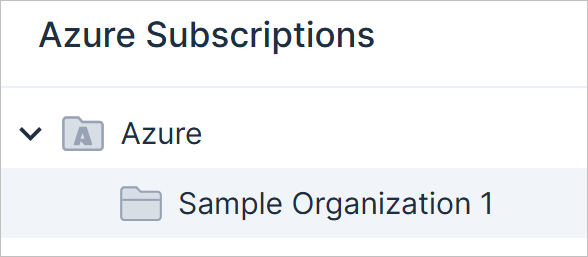
-
The option to disable the creation of this folder will be removed from the onboarding configuration for all relevant clouds.
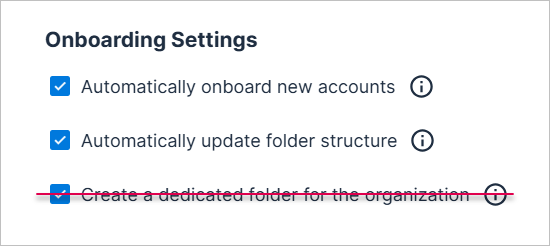
- If you previously disabled this option and chose to not create such a folder, a folder will automatically be added to your organizational structure on January 5, 2024.
Motivation and Value
Streamline account organization and align all customer organizational structures.
Backward Compatibility
N/A
Region Property Changes (API) (January 5, 2025)
What’s Changing?
GraphQL API Changes
The Region field, which was previously only used for AWS resources, will now also be used for Azure and GCP resources, instead of the Location field, which will be deprecated. The following changes are being made in the GraphQL API:
Deprecated Field
| Query | Field |
|---|---|
| AzureResource | Location |
| GcpResource | Location |
| Entities | Location |
New Field
| Query | Field |
|---|---|
| AzureResource | Region |
| GcpResource | Region |
| Entities | Region |
New Sample Query and Response
The following example query shows the new Region field being used in the Entities query.
GraphQL
query {
  Entities(
    filter: {
      CloudProviders: [
        AWS,
        Azure
      ]
    })
  {
    nodes {
      Name
      CloudProvider
      AccountId
      Region
      __typename
    }
  }
}JSON
{
  "data": {
    "Entities": {
      "nodes": [
        {
          "Name": "$web",
          "CloudProvider": "Azure",
          "AccountId": "****b91f-642d-****-961c-482524db****",
          "Region": "eastus",
          "__typename": "AzureStorageStorageAccountBlobContainer"
        },
        {
          "Name": " (SupportedImages) - Ubuntu 14.04 LTS x86_64 LATEST - ****0610-88b63861-****-4d27-8367-fb8856db****",
          "CloudProvider": "AWS",
          "AccountId": "aws",
          "Region": "us-west-2",
          "__typename": "AwsEc2Image"
        },
        ...
Motivation and Value
Tenable updated how regional information is retrieved for resources in GraphQL queries, improving simplicity and efficiency, and streamlining how this information is retrieved across all cloud providers.
Backward Compatibility (Requires Action)
If you use the Cloud Exposure GraphQL API to send data to business intelligence tools, your workflow may be affected by the following changes.
RDS and SQL Database Scanning (January 2025)
What's Changing?
During the first 2 weeks of January 2024, Cloud Exposure is introducing data protection scanning for the following managed database resources:
-
AWS:
- RDS clusters
- RDS instances
-
GCP:
- SQL instances
If you granted Tenable the required permissions for these resources, and enabled managed database scanning, scanning will start automatically during this time.
Motivation and Value
Add data scanning support for additional managed database resources.
Backward Compatibility
N/A