Tenable Exposure Management 2026 Release Notes
Tip: You can subscribe to receive alerts for Tenable documentation updates.
These release notes are listed in reverse chronological order.
October 26, 2026
 Prioritize Checkmarx One Application Risk Across Your Software Supply Chain
Tenable is excited to announce the addition of the Checkmarx One third-party connector within Tenable Exposure Management. Checkmarx One is a cloud application security platform that scans proprietary source code, open-source dependencies, container images, infrastructure-as-code templates, and application programming interfaces (APIs) from a single project model. The connector pulls asset and findings data from your Checkmarx One tenant, so application-layer risk from across the software supply chain lands in your unified exposure view.
The Checkmarx One connector supports the following Checkmarx products:
-
Static Application Security Testing (SAST) — Identifies security vulnerabilities in proprietary source code.
-
Software Composition Analysis (SCA) — Detects vulnerabilities in open-source dependencies.
-
Infrastructure as Code (IaC) Security — Flags misconfigurations in infrastructure-as-code templates.
-
Container Security — Surfaces vulnerable packages in container images.
-
Supply Chain Security (SCS) — Highlights risk in the components and packages your projects depend on.
-
API Security — Identifies exposed and undocumented APIs discovered in your projects.
Once configured, the connector ingests Checkmarx One projects as Code Repository assets and correlates their findings — including CWEs, CVEs, CVSS v3 base scores, file path, line number, and affected package name and version — with your broader asset inventory in Tenable Exposure Management, where they appear under the Source Code finding type. Security teams can then prioritize application risk alongside traditional infrastructure exposures.
The connector supports the Checkmarx One Application Security Platform (cloud); Checkmarx One Private Cloud deployments are not supported. Configuration allows users to limit the sync to specific branches and applications, choose which finding types to pull, exclude Info severity findings, and set findings that are triaged as Not Exploitable in Checkmarx One to the Fixed state. Users can configure this connector directly within the Connectors section of Tenable Exposure Management.
For more information, see Checkmarx One Connector in the Tenable Exposure Management User Guide.
Bring Veracode Static Analysis Flaws into Your Unified Exposure View
Tenable is excited to announce the addition of the Veracode SAST third-party connector within Tenable Exposure Management. Veracode is an application security testing platform, and Veracode Static Analysis (SAST) scans application binaries for security flaws without requiring access to source code, mapping each flaw to a Common Weakness Enumeration (CWE) and a severity level. The connector pulls asset and findings data from the Veracode Platform.
Once configured, the connector ingests Veracode applications as Code Repository assets and correlates their static analysis flaws — including CWEs, file path, line number, description, and remediation guidance — with your broader asset inventory in Tenable Exposure Management, where they appear under the Source Code finding type. Security teams can then prioritize code-level risk alongside traditional infrastructure exposures.
The connector supports the latest Veracode SaaS release in the US, EU, and US Federal regions, and requires HMAC API credentials — an API Key ID and API Key Secret — for a user who can view application and finding data. Finding state stays in step with Veracode, so a flaw that is closed, fixed, or covered by an approved mitigation such as a false positive or accepted risk moves to Fixed. Because Veracode maps static analysis flaws to a CWE rather than a CVE, the connector does not populate the CVEs field. Users can configure this connector directly within the Connectors section of Tenable Exposure Management.
For more information, see Veracode SAST Connector in the Tenable Exposure Management User Guide.
Surface Vulnerable Open-Source Components with the Veracode SCA Connector
Tenable is excited to announce the addition of the Veracode SCA third-party connector within Tenable Exposure Management. Veracode Software Composition Analysis (SCA) identifies the open-source and third-party components in your applications and flags the components with known Common Vulnerabilities and Exposures (CVEs). The connector pulls asset and findings data from the Veracode Platform.
Once configured, the connector ingests Veracode applications as Code Repository assets and correlates their component vulnerabilities — including CVEs, CWEs, CVSS v3 base score, vector, and severity, EPSS score and percentile, and the affected package name and version — with your broader asset inventory in Tenable Exposure Management, where they appear under the Source Code finding type. Exploitability data travels with each finding, so a vulnerable dependency can be prioritized on evidence rather than on severity alone.
The connector supports the latest Veracode SaaS release in the US, EU, and US Federal regions, and requires HMAC API credentials — an API Key ID and API Key Secret — for a user who can view application and finding data. Finding state stays in step with Veracode, so a component vulnerability that is closed, fixed, or covered by an approved mitigation such as a false positive or accepted risk moves to Fixed. Users can configure this connector directly within the Connectors section of Tenable Exposure Management.
For more information, see Veracode SCA Connector in the Tenable Exposure Management User Guide.
October 15, 2026
Adversary View Is Now Generally Available
Adversary View, a Tenable Hexa AI capability, is now generally available. It lets you look at your assets from an attacker's viewpoint. Point it at a set of assets you already scan, and ask how an attacker could move through your environment. Tenable Hexa AI builds an on-demand graph from your existing scan and finding data, with no new deployment required. It returns ranked attack paths, each hop backed by the scan evidence behind it, along with a prioritized list of what to fix.
What's New
- Ranked attack paths, powered by frontier AI: Start an Adversary View from the Adversary View tile in the Hexa AI panel, or ask Tenable Hexa AI for one by tag, network, operating system, IP range, or a mix. Review the scope summary, confirm it, and Tenable Hexa AI returns attack paths with the scan evidence behind each hop.
- Background processing: Analysis can take several minutes. You can close the Hexa AI panel, go to a different page, or switch workspaces while it runs, and the results are waiting when you return.
- Follow-up questions: Ask follow-up questions in the same conversation. Tenable Hexa AI reuses the graph it already built, so follow-ups return faster than the initial analysis.
- Administrator controls: An administrator must enable the Enable Frontier AI Model Access toggle on the Tenable Hexa AI Settings page. Users also need the Use permission for Adversary View in their custom role (also supported in the Scan Manager role and above).
- Downloadable Reports: Use Tenable Hexa AI to generate a PDF summary report that you can download from any chat.
For more information, see Adversary View in the Tenable Exposure Management User Guide.
October 9, 2026
Tenable Hexa AI Now Supports Asynchronous Chatting
What's New
Tenable Hexa AI now continues to process your chats while you do other things. You can close the Hexa AI panel, go to a different page, switch workspaces, or refresh your browser, and Tenable Hexa AI keeps working. When you return to the conversation, the response is waiting for you. You can also run multiple chats at the same time.
For more information, see Work While Hexa Processes Your Chat in the Tenable Exposure Management User Guide.
September 30, 2026
Close the ChromeOS Blind Spot in Your Asset Inventory
Tenable is excited to announce the addition of the Chrome OS third-party connector within Tenable Exposure Management. Google Chrome Enterprise manages ChromeOS devices centrally through the Google Admin console, and the connector pulls asset data for every enrolled device through the Google Admin SDK Directory API.
Once configured, the connector ingests your managed ChromeOS devices as Device assets, with hardware identity, operating system version, network identifiers, organizational unit, enrollment lifecycle, and security hardware details, so a fleet that traditional scanning leaves out is counted alongside the rest of your estate. Any Google Workspace plan from Business Starter up is supported, as is Chrome Enterprise Core, and no Chrome Enterprise Premium license is required. Users can configure this connector directly within the Connectors section of Tenable Exposure Management.
For more information, see Chrome OS Connector in the Tenable Exposure Management User Guide.
September 23, 2026
Skip the Export: Ingest Data Straight from Your Database
The Tenable One Open Connector now pulls asset and finding data directly from a relational database. Select Automated Pull from Database, choose BigQuery (GCP) or Oracle, and then provide the connection details and a SQL query that returns a single flat table. Tenable Exposure Management runs that query on every scheduled sync, so no export, file, or staging step stands between your database and your exposure view.
Each sync replaces the connector data with the fresh result, archives the assets that the result omits, and marks their missing findings as Fixed. A query result is exempt from the 2 GB limit that applies to uploaded files.
For more information, see Automated Pull from Database in Tenable One Open Connector in the Tenable Exposure Management User Guide.
Prioritize Web Application Risk with the Invicti Connector
Tenable is excited to announce the addition of the Invicti third-party connector within Tenable Exposure Management. Invicti is a dynamic application security testing (DAST) platform that scans websites, web applications, and APIs. The connector pulls asset and findings data from the Invicti Platform Inventory API.
Once configured, the connector ingests the Invicti inventory as Web Application assets and correlates their vulnerabilities with your broader asset inventory in Tenable Exposure Management, so runtime web risk is scored alongside the rest of your attack surface. The connector supports the Invicti Application Security Platform (Enterprise) in the US, EU, and CA cloud regions, as well as on-premises instances through a custom platform URL. Users can configure this connector directly within the Connectors section of Tenable Exposure Management.
For more information, see Invicti Connector in the Tenable Exposure Management User Guide.
September 17, 2026
Updates for Tenable Hexa AI
What's New
-
Scans: Troubleshoot Scan Failures and Plugin Misfires: Tenable Hexa AI can now diagnose scan issues on demand. Ask why a scan failed or why a specific plugin did not fire on an asset, and Tenable Hexa AI reviews the scan run and its results, checks plugin applicability for the asset, and returns an explanation of the failure or non-firing condition.
For more information, see Use Tenable Hexa AI via User Interface in the Tenable Exposure Management User Guide.
September 8, 2026
A Redesigned Attack Path Experience
Tenable has refreshed the user interface for Attack Path in Tenable Exposure Management. The update clears up screen space and reworks the Attack Paths and Attack Techniques tables to align more closely with Inventory, making it faster to find and act on the paths and techniques that matter most.
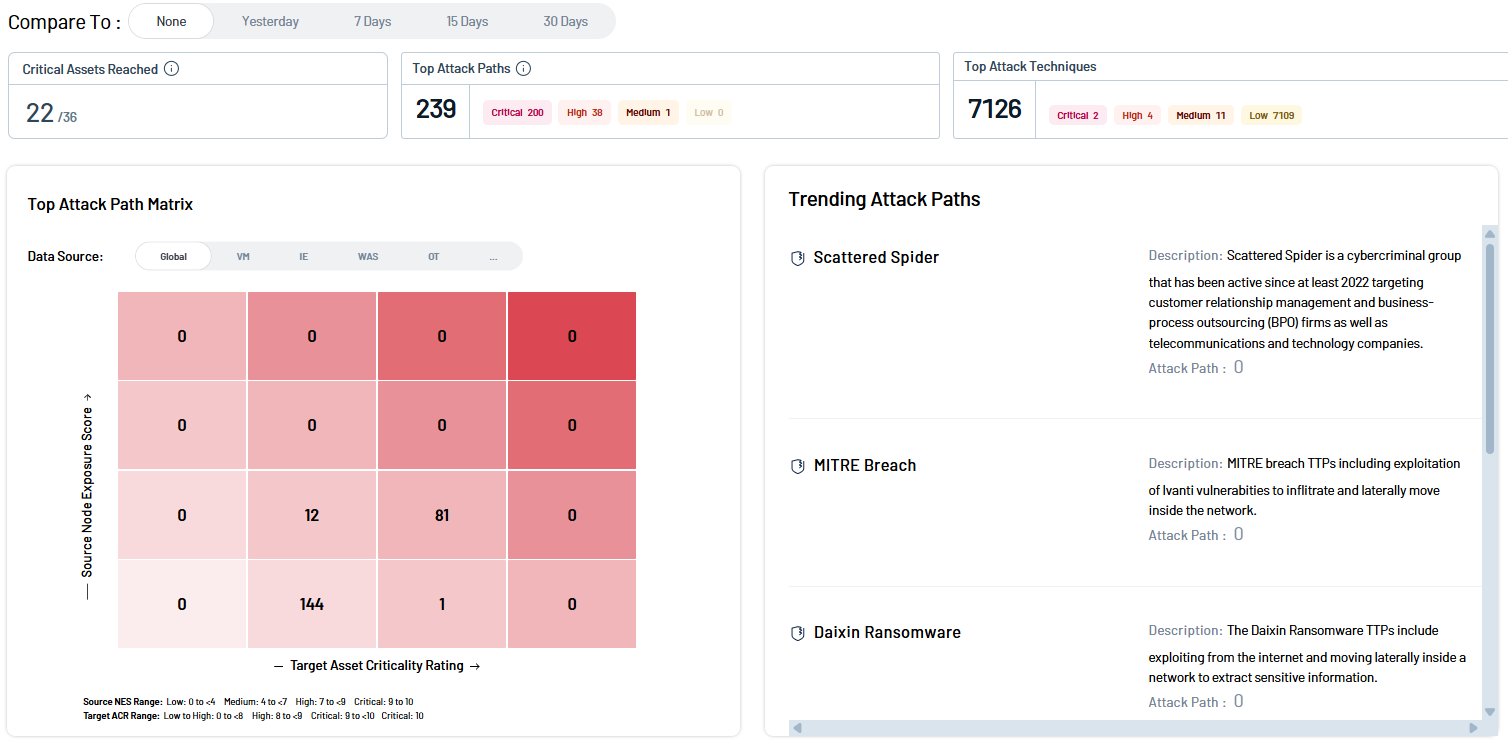
This release includes the following improvements:
-
Redesigned dashboard widgets — The Attack Paths and Attack Techniques widgets have been rebuilt to match the Tenable design system.
-
One-click quick filters — Quick-filter pills now sit above the Attack Paths and Attack Techniques tables, so you can jump to common views without building a query.
-
Simplified navigation — The Attack Techniques sidebar and redundant page titles have been removed, giving the graph and tables more room on screen.
-
Reworked tables — Attack Paths, Attack Techniques, and Inventory now share a consistent grid appearance. Columns are draggable for resizing, and tables no longer flicker or shift layout when you sort.
-
Unified status colors — State, status, and priority colors in Attack Path now match the rest of Exposure Management, so a Critical severity looks the same everywhere.
-
Editable Lifecycle Management filters — Default filters in Attack Path Lifecycle Management are now editable.
For more information, see Attack Path in the Tenable Exposure Management User Guide.
September 2, 2026
Automate Data Ingestion from Azure Blob Storage and Google Cloud Storage
The Tenable One Open Connector now pulls data from additional cloud storage providers. Alongside Amazon S3, you can schedule automated pulls from Azure Blob Storage and Google Cloud Storage (GCS), so asset and findings data from custom tools and third-party sources stays current wherever your organization already keeps its exports — without building a new pipeline to move files first.
When you select Automated Pull from Cloud Storage in the Data pulling configuration section, you choose your provider and then supply that provider's credentials and file location:
-
Amazon S3 — Authenticate with an ARN & External ID or an Access Key & Secret Key.
-
Azure Blob Storage — Authenticate with a Microsoft Entra ID service principal, using the tenant ID, client ID, and client secret of an application that holds the Storage Blob Data Reader role.
-
Google Cloud Storage — Authenticate with a service account key in JSON format that has read-only access to the target bucket.
The discovery, change detection, and synchronization logic are the same for all three providers, so scheduled syncs, Full Fetch and Incremental Fetch modes, field mapping, and uniqueness criteria behave exactly as they do for Amazon S3. Azure Blob Storage and Google Cloud Storage do not require a region, and the connector searches for your file only in the folder that the File Path points to, not in nested folders.
For more information, see Automated Pull from Cloud Storage in Tenable One Open Connector in the Tenable Exposure Management User Guide.
Bring Black Duck SCA Data into Your Unified View with Tenable One Open Connector
You can now use the Tenable One Open Connector to ingest Black Duck SCA findings into Tenable Exposure Management, without waiting for a native connector. A new, purpose-built guide walks you through the integration step by step, including a recommended field mapping so your Black Duck data lands in the right Tenable Exposure Management fields the first time.
Black Duck Software Composition Analysis (SCA) scans the open-source and third-party code used in your applications and containers to identify security, quality, and license-compliance risk in the software supply chain. Ingesting these findings normalizes your open-source component risk alongside the rest of your attack surface, so you can prioritize, track remediation, and score exposure consistently.
After you export your project, version, component, and vulnerability data from Black Duck, you bring it into Tenable Exposure Management as Code Repository assets, either by uploading the file manually or by pulling it automatically from a supported cloud storage. The guide's recommended mapping aligns Black Duck fields such as vulnerability name, overall score, CWE identifier, and solution to their Tenable Exposure Management equivalents, and its asset naming guidance keeps each scanned project version as its own appropriately sized asset. The connector supports both Full Fetch and Incremental Fetch synchronization modes.
For more information, see Black Duck SCA in Tenable One Open Connector in the Tenable Exposure Management User Guide.
August 26, 2026
See GitLab SAST, Secret, and Dependency Risk in One Prioritized View
Tenable is excited to announce the addition of the GitLab third-party connector within Tenable Exposure Management. GitLab is a DevSecOps platform that delivers source code management, CI/CD, and application security testing. The connector pulls asset and findings data from GitLab groups and their projects, bringing application-layer risk from source code into your unified exposure view.
The GitLab connector supports the following GitLab security scanners:
-
SAST — Identifies security vulnerabilities in proprietary source code.
-
Secret detection — Surfaces credentials and tokens committed to a repository.
-
Dependency scanning (SCA) — Detects vulnerabilities in open-source dependencies.
Once configured, the connector ingests Code Repository assets and correlates their findings — including CWEs, CVEs, severity, file path, line number, and remediation guidance — with your broader asset inventory in Tenable Exposure Management, where they appear under the Source Code finding type. Security teams can then prioritize source code risk alongside traditional infrastructure exposures.
The connector supports both GitLab SaaS and GitLab self-managed instances, and requires a GitLab Ultimate license on the synchronized group and an access token with the read_api scope. Users can configure this connector directly within the Connectors section of Tenable Exposure Management.
For more information, see GitLab Connector in the Tenable Exposure Management User Guide.
Turn GitHub Dependabot Alerts into Prioritized, Trackable Exposure
Tenable is excited to announce the addition of the GitHub Dependabot third-party connector within Tenable Exposure Management. GitHub Dependabot is a software composition analysis (SCA) connector that pulls asset and findings data from GitHub organizations and personal repositories, surfacing insecure open-source dependencies across the software supply chain.
Once configured, the connector ingests Code Repository assets and their Dependabot alerts — including the affected package and version, CVEs, CWEs, GitHub Security Advisory identifiers, CVSS v3 and v4 scores, and the upgrade that resolves the alert — and correlates them with your broader asset inventory in Tenable Exposure Management. Findings appear under the Source Code finding type with a subcategory of SCA, and their state stays in step with GitHub as alerts are fixed or dismissed, so a vulnerable package becomes a scored finding that security teams can track through to remediation.
The connector supports both GitHub.com and GitHub Enterprise Server. Configuration allows users to select which organizations to synchronize, whether to include personal repositories, and whether to map GitHub release tags and custom properties to asset tags. Users can configure this connector directly within the Connectors section of Tenable Exposure Management.
For more information, see GitHub Dependabot Connector in the Tenable Exposure Management User Guide.
Catch Code and Secret Exposure Early with GitHub Code Scanning
Tenable is excited to announce the addition of the GitHub Code Scanning third-party connector within Tenable Exposure Management. GitHub Code Scanning is a static application security testing (SAST) connector that pulls asset and findings data from GitHub organizations and personal repositories, bringing code-level and secret exposure into your unified exposure view.
The GitHub Code Scanning connector supports the following GitHub features:
-
Code scanning (SAST) — Identifies security vulnerabilities and coding errors detected by CodeQL and other static analysis tools.
-
Secret scanning — Surfaces credentials and tokens exposed in a repository.
Once configured, the connector ingests Code Repository assets and correlates their alerts with your broader asset inventory in Tenable Exposure Management, where findings appear under the Source Code finding type with a subcategory of SAST and link back to the originating alert in GitHub. Code scanning findings include the rule description, file path, line number, branch, CWEs, CVEs, CVSS v3 and v4 scores where available, and the remediation guidance from the rule. Secret scanning findings are always mapped as critical severity, so an exposed credential rises to the top of the remediation queue.
The connector supports both GitHub.com and GitHub Enterprise Server. Code scanning requires GitHub Advanced Security on the synchronized repositories, and secret scanning requires a token that belongs to an organization owner or to a user with the security manager role. Configuration allows users to choose which alert types to pull, whether to include personal repositories, whether to include warning and note severity findings, and whether to map GitHub custom properties to asset tags. Users can configure this connector directly within the Connectors section of Tenable Exposure Management.
For more information, see GitHub Code Scanning Connector in the Tenable Exposure Management User Guide.
Act Faster on Third-Party Findings with Vendor Remediation Guidance
Tenable Exposure Management now retrieves solution data from additional third-party connectors and displays it in the Solution column on the Weaknesses and Findings pages, and in the details panel of each weakness and finding. Vendors provide the solution at the detection level, so Tenable Exposure Management populates the weakness and the finding with the same solution suggestion from the vendor.
The following connectors now retrieve solution data:
Acunetix360, Acunetix Premium, Armis, AWS Inspector, BitSight, BlackDuck, Bright, CrowdStrike, Cycognito, Microsoft TVM, Orca, Outpost 24, PrismaCloud CSPM, PrismaCloud CWPP, Qualys, Qualys WAS, Rapid7 Insight AppSec, Rapid7 Insight VM, Rapid7 Insight VM Cloud, Red Hat Insights, RiskRecon, SecurityScorecard, Tanium, Tenable One Vulnerability Management, Veracode, Wiz Configurations, Wiz Issues, and Wiz Vulnerabilities.
To see how each vendor field maps to the Solution field, see the data mapping tables in the relevant connector topic.
August 24, 2026
Updates for Tenable Hexa AI
What's New
-
Scans: Paranoid Mode and Thorough Tests Accuracy Settings: Scan creation and configuration with Tenable Hexa AI now support the paranoid mode and thorough tests accuracy settings.
Bug Fixes
-
Conversations: Reliable Turn Cancellation: Tenable Hexa AI now blocks you from starting a second turn while one is still running, and canceling a turn now works reliably.
-
Conversations: Faster Deletion for Large Histories: Deleting all conversations no longer times out on accounts with a large conversation history.
For more information, see Use Tenable Hexa AI via User Interface in the Tenable Exposure Management User Guide.
August 19, 2026
Updates for Tenable Hexa AI
Bug Fixes
-
Scans: Vulnerability Lookup No Longer Requires an Unusable Reference: Vulnerability lookups no longer ask for a scan history reference that Tenable Hexa AI cannot use.
For more information, see Use Tenable Hexa AI via User Interface in the Tenable Exposure Management User Guide.
August 18, 2026
Updates for Tenable Hexa AI
Improvements
-
Answer Quality: Consolidated Product Links: Links into the product now appear once at the end of an answer instead of repeating throughout.
-
Answer Quality: Consistent Refusals on Unanswerable Requests: Tenable Hexa AI no longer substitutes data from another product area when it cannot answer a question, and it now holds firm with a refusal when pressed.
-
File Uploads: Clearer Workflow Guidance: Uploading a file now states which workflows can use it, so Tenable Hexa AI stops offering workflows that cannot use the file.
For more information, see Use Tenable Hexa AI via User Interface in the Tenable Exposure Management User Guide.
August 17, 2026
Bring Google Security Command Center Data into Your Unified View with Tenable One Open Connector
Tenable has made it easier to bring Google Security Command Center (SCC) findings into Tenable Exposure Management through the Tenable One Open Connector. A new, purpose-built guide walks you through the integration step by step, including a recommended field mapping so your Google SCC data lands in the right Tenable Exposure Management fields the first time — without waiting for a native connector.
Google SCC is the built-in security and risk service in Google Cloud that aggregates vulnerability, misconfiguration, and threat findings across your cloud environment. Ingesting these findings normalizes your Google Cloud exposure alongside the rest of your attack surface, so you can prioritize, track remediation, and score exposure consistently.
After you export your assets and findings from Google SCC — using the Google SCC REST API or the Export option in the Google SCC user interface — you bring them into Tenable Exposure Management as Devices, Containers, or Resources (Cloud) assets, either by uploading the file manually or by pulling it automatically from a supported cloud storage. The guide’s recommended mapping aligns Google SCC fields such as resource name, CVE, and finding description to their Tenable Exposure Management equivalents, and the connector supports both Full Fetch and Incremental Fetch synchronization modes.
For more information, see Google Security Command Center in Tenable One Open Connector in the Tenable Exposure Management User Guide.
August 10, 2026
Updates for Tenable Hexa AI
Improvements
-
Identity: Unified Inventory Search: Identity searches now run through the same inventory search that Tenable Hexa AI uses for other assets.
-
Token Usage: Improved Caching Efficiency: Tenable Hexa AI significantly improves token caching read utilization, resulting in lower overall token utilization when you prompt it.
Bug Fixes
-
Vulnerability Management: VPR v2 Repairs VM Explore Links: Vulnerability priority filters now use VPR v2, which repairs broken links into VM Explore.
For more information, see Use Tenable Hexa AI via User Interface in the Tenable Exposure Management User Guide.
August 6, 2026
Updates for Tenable Hexa AI
Improvements
-
Jamf: Activity Log Visibility: Tenable Hexa AI's Jamf reads and writes now correctly appear in the Tenable One Vulnerability Management Activity Log.
-
Routines: Upfront Tool-Licensing Checks: Creating a routine now checks tool licensing upfront instead of failing when the routine runs.
For more information, see Use Tenable Hexa AI via User Interface in the Tenable Exposure Management User Guide.
August 4, 2026
Agent Center: Manage Routines at Scale
As teams scale Tenable Hexa AI routines across their environment, keeping track of what's running, what needs attention, and what already happened becomes its own job. Agent Center solves this with a single, dedicated page that gives you oversight of every routine in your instance, so you can spend less time hunting for status and more time acting on what matters.
Routines are now easier to manage day-to-day too: paused routines that need your input are called out clearly, you can force-relaunch a routine without waiting for its schedule, and every run keeps a conversation log so you can see exactly what a routine did — or pick up right where it left off if it's waiting on you.
As your routine count grows, Agent Center scales with you: once you pass 200 routines, a direct link to it appears right in the Routines panel, so managing at scale never requires digging through navigation.
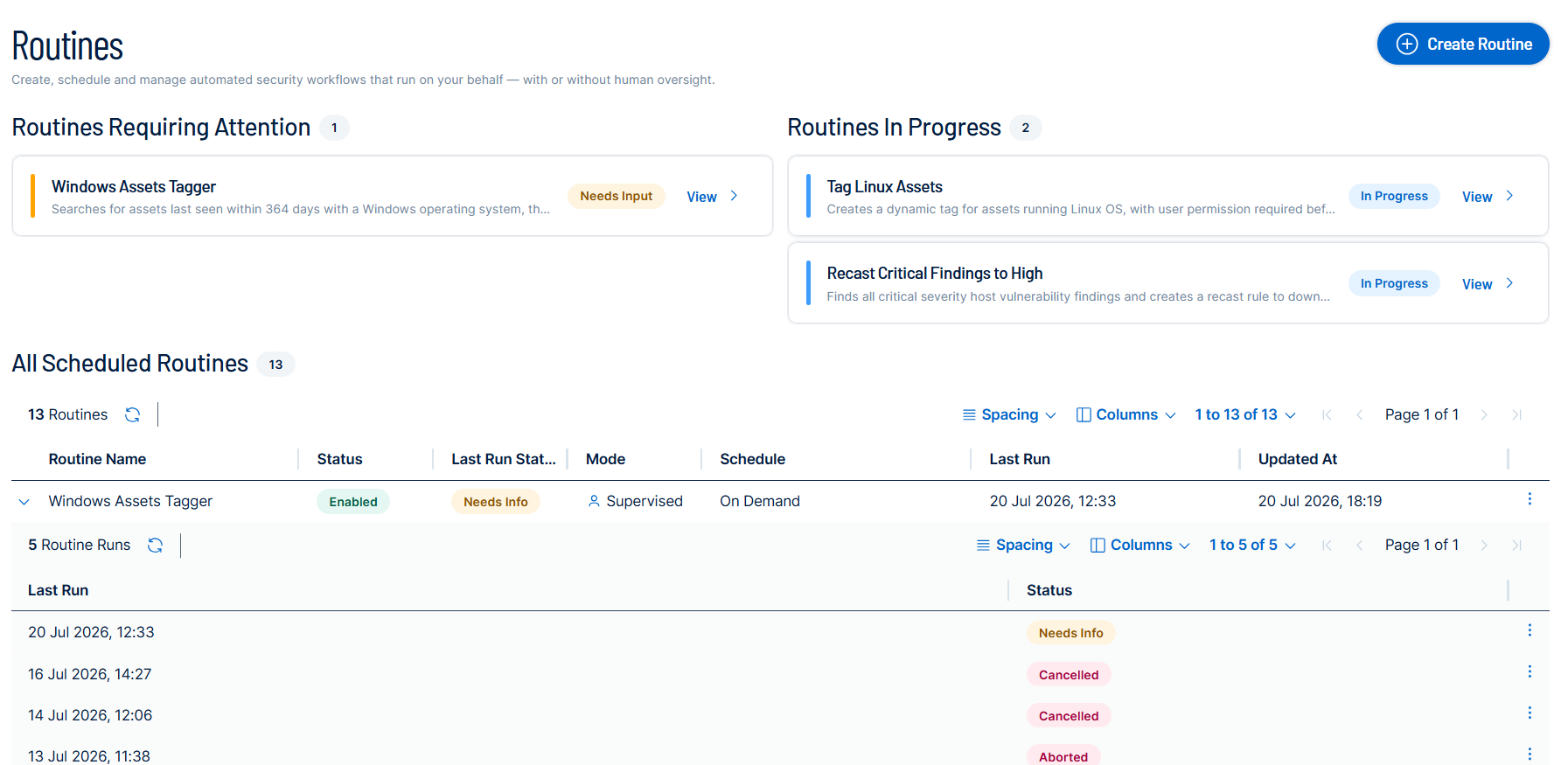
For more information, see Agent Center in the Tenable Exposure Management User Guide.
Jamf Pro Integration for Tenable Hexa AI
Managing Apple devices usually means bouncing between two consoles: Tenable for the vulnerability picture, Jamf Pro for actually doing something about it. Tenable Hexa AI closes that gap. Once you connect a Jamf Pro account, you can ask Tenable Hexa AI to look up device inventory, patch status, and group membership, correlate the results to your Tenable assets, and act on what it finds by creating Jamf groups, patch policies, and software update plans.
Every action that changes something in Jamf Pro goes through your approval first: Tenable Hexa AI proposes the action in a card describing exactly what it's about to do, and nothing happens until you confirm it.
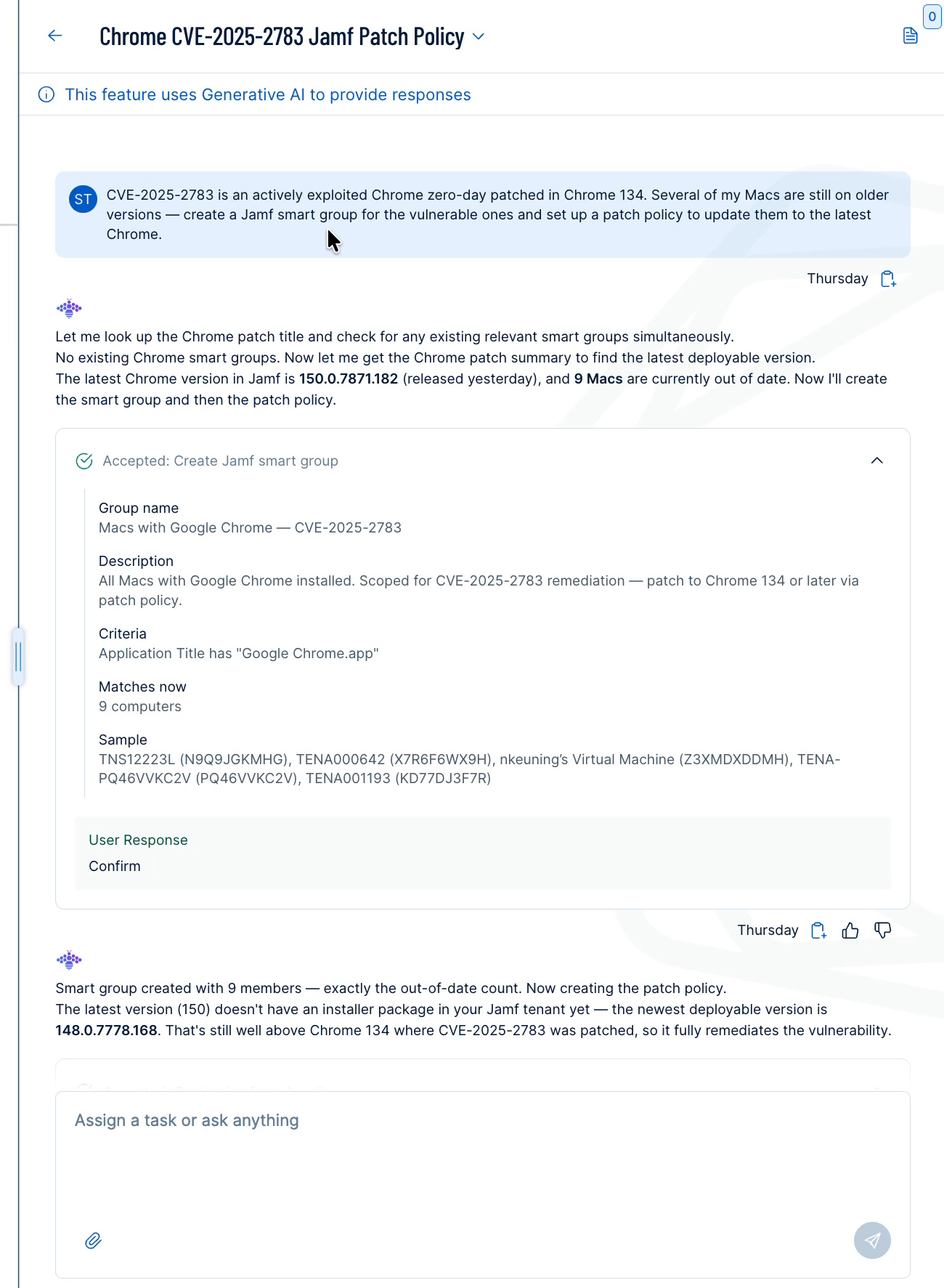
For more information, see Use Jamf Pro with Tenable Hexa AI in the Tenable Exposure Management User Guide.
Updates for Tenable Hexa AI
Bug Fixes
-
Scans: False-Positive Diagnosis Routing: Questions about a plugin firing on the wrong component now route to false-positive diagnosis.
-
Scans: Scan Configuration and Debugging Requests: Tenable Hexa AI no longer declines requests to configure or debug a scan.
For more information, see Use Tenable Hexa AI via User Interface in the Tenable Exposure Management User Guide.
August 3, 2026
Bring Veracode SAST Data into Your Unified View with Tenable One Open Connector
Tenable has made it easier to bring Veracode Static Application Security Testing (SAST) findings into Tenable Exposure Management through the Tenable One Open Connector. A new, purpose-built guide walks you through the integration step by step, including a recommended field mapping so your Veracode data lands in the right Tenable Exposure Management fields the first time — without waiting for a native connector.
Veracode SAST analyzes application source code to identify security flaws, such as injection, insecure data handling, and misconfigurations. Ingesting these findings normalizes your application-layer code risk alongside the rest of your attack surface, so you can prioritize, track remediation, and score exposure consistently.
After you export your findings from the Veracode Platform or REST API, you bring them into Tenable Exposure Management as Code Repository assets, either by uploading the file manually or by pulling it automatically from a supported cloud storage. The guide's recommended mapping aligns Veracode fields such as severity, CWE, and status to their Tenable Exposure Management equivalents, and the connector supports both Full Fetch and Incremental Fetch synchronization modes.
For more information, see Veracode SAST in Tenable One Open Connector in the Tenable Exposure Management User Guide.
Updates for Tenable Hexa AI
Improvements
-
Routines: Clearer Stop Reasons: A stopped routine now shows why it stopped, such as an exceeded quota or a failed sign-in.
-
Answer Quality: Accurate Task-Completion Guidance: Tenable Hexa AI no longer points you to a related feature that cannot finish your task.
Bug Fixes
-
Routines: Skill Access Restored: Routines can now use skills such as Identity search, which were in some cases blocked without warning.
-
Routines: Scheduled Routines Run in Local Time: Scheduled routines now run at the local time you set, fixing an issue that shifted the run time to UTC.
-
Vulnerability Management: In the News Filter Correction: Tenable corrected the operators on the In the News, Last 30 Days filter so that it matches what the platform accepts.
For more information, see Use Tenable Hexa AI via User Interface in the Tenable Exposure Management User Guide.
July 30, 2026
Updates for Tenable Hexa AI
What's New
-
Vulnerability Management: 34 Additional Filter Fields: Tenable Hexa AI adds 34 vulnerability filter fields, covering CVSSv3 and CVSSv4 metrics, VPR key drivers, exploit dates, and EPSS percentile.
For more information, see Use Tenable Hexa AI via User Interface in the Tenable Exposure Management User Guide.
July 29, 2026
Updates for Tenable Hexa AI
Improvements
-
Answer Quality: No Internal Reasoning in Answers: Tenable Hexa AI no longer shows its internal reasoning in an answer.
-
Scans: Clearer Troubleshooting Answers: Scan troubleshooting answers are now clearer about what they do and do not know.
Bug Fixes
-
Scans: Asset UUID Support in Troubleshooting: Scan troubleshooting now accepts an asset UUID, not just a numeric ID.
For more information, see Use Tenable Hexa AI via User Interface in the Tenable Exposure Management User Guide.
July 27, 2026
Updates for Tenable Hexa AI
Bug Fixes
-
Reliability: Idle Request Connection Errors Resolved: Tenable fixed intermittent connection errors on idle requests.
-
Feedback: Feedback on Error Responses: You can now give feedback on a response that ended in an error.
For more information, see Use Tenable Hexa AI via User Interface in the Tenable Exposure Management User Guide.
July 20, 2026
Bring Claude Code Security Data into Your Unified View with Tenable One Open Connector
You can now use the Tenable One Open Connector to ingest Claude Code Security findings into Tenable Exposure Management, without waiting for a native connector. This purpose-built path normalizes AI-driven code risk alongside the rest of your attack surface, so you can prioritize, track remediation, and score exposure consistently.
After you run a scan in Claude Code Security, you export the findings to a file and bring them into Tenable Exposure Management as Code Repository assets, either by uploading the file manually or by pulling it automatically from a supported cloud storage. The connector maps Claude Code Security fields such as severity, CWE, and status to their Tenable Exposure Management equivalents, and supports both Full Fetch and Incremental Fetch synchronization modes.
Deduplicating on Code Repository name consolidates the same root-cause weakness across multiple files into a single finding, so your team can focus on the underlying issue rather than triaging hundreds of identical alerts.
For more information, see Claude Code Security in Tenable One Open Connector in the Tenable Exposure Management User Guide.
New! Tenable Security Center Computer Support in Attack Path
Tenable is excited to announce that Attack Path in Tenable Exposure Management now treats computer assets from Tenable Security Center as full, first-class nodes in the attack path graph - identical to assets from Tenable One Vulnerability Management. Customers running Tenable Security Center synced to Tenable One can now see complete attack paths across their entire environment, enabling richer choke-point analysis and eliminating blind spots between Tenable Security Center-managed and Tenable One Vulnerability Management-managed estates.
The following lateral movement and credential access techniques are now detected on Tenable Security Center assets:
-
Distributed Component Object Model
-
Exploitation of Remote Services
-
LSASS Memory
-
Local Accounts
-
Network Sniffing
-
Remote Desktop Protocol
-
SMB/Windows Admin Shares
-
Security Account Manager
-
Steal or Forge Authentication Certificates
-
Windows Management Instrumentation
-
Windows Remote Management
-
External Remote Services
For more information, see Attack Path in the Tenable Exposure Management User Guide.
July 14, 2026
Tenable Hexa AI– Ticket and Initiative Creation
You can now ask Hexa to create Jira or ServiceNow tickets and Exposure Response initiatives directly from findings data. Describe what you need — for example, "Create a SNOW ticket for active findings with CVE-XXXX-XXXX and assign it to [user]" — and Hexa handles the rest, prompting you for any missing details. Created tickets are reflected in the Finding details ticket log, and new initiatives are added to the Exposure Response initiative library.
For more information, see Use Tenable Hexa AI via User Interface in the Tenable Exposure Management User Guide.
Plugin Output in Tickets
Tenable now automatically attaches plugin output as a .txt file when you create a Jira or ServiceNow ticket from Tenable Vulnerability Management or Exposure Management. Previously, users had to return to Explore Findings to locate plugin output after a ticket was created — now it travels with the ticket. For more information, see Create a Ticket from a Finding in the Tenable Vulnerability Management User Guide.
For more information, see Create a ServiceNow Ticket or Create a Jira Ticket in the Tenable Exposure Management User Guide.
Extend Cloud Risk Visibility with the Microsoft Defender for Cloud Connector
Tenable is excited to announce the addition of the Microsoft Defender for Cloud third-party connector within Tenable Exposure Management. Microsoft Defender for Cloud is a cloud security connector that pulls asset and findings data from the Microsoft Defender for Cloud platform, bringing your cloud security posture and vulnerability findings into a unified exposure view.
Once configured, the connector correlates cloud assets and security findings from Microsoft Defender for Cloud with your broader asset inventory in Tenable Exposure Management, allowing security teams to assess and prioritize cloud-native risk alongside traditional infrastructure exposures. You can configure this connector directly within the Connectors section of Tenable Exposure Management.
For more information, see Microsoft Defender for Cloud Connector in the Tenable Exposure Management User Guide.
Tenable One Open Connector: Bring Source Code Risk into Your Unified Exposure View
The Tenable One Open Connector now supports Code Repository as an additional asset class, extending your unified exposure view to application-layer risk from source code. Code repository findings appear in Tenable Exposure Management under a new finding type, Source Code.
Using the same flexible file upload and mapping workflow already available in the Open Connector, you can now ingest asset and findings data for source code repositories.
For more information, see Tenable Open Connector in the Tenable Exposure Management User Guide.
July 13, 2026
Updates for Tenable Hexa AI
What's New
For Tenable One Web App Scanning scans, you can now launch scans using saved credentials you've already stored in the platform with Tenable Hexa AI Just tell Hexa the credential name — no need to look up IDs manually.
Bug Fixes
-
Tenable One Web App Scanning: Scan schedules now validate frequency before submitting: If you ask Tenable Hexa AI to schedule a scan more frequently than once per hour, it will provide guidance upfront and prevent downstream failures.
-
Tenable One Web App Scanning: Scan credential lookup fixed: In some cases, attaching a credential to a scan by name wasn't resolving correctly. This is now fixed.
-
Jira: Ticket reporter and assignee resolved correctly: In some projects, Tenable Hexa AI was failing to assign a reporter or assignee when creating Jira tickets. It now looks up valid assignees for the specific project and falls back gracefully if the preferred user isn't available.
-
Hexa responses improved when hitting complexity limits: When Hexa reached its internal step limit on a complex task, the final summary sometimes included raw formatting artifacts. The response is now clean.
-
"High-risk ACR-10 remediation" One-click action moved to the correct category: This precanned prompt was appearing under Combinations in theTenable Hexa AI user interface. It's now correctly listed under Assets.
For more information, see Use Tenable Hexa AI via User Interface in the Tenable Exposure Management User Guide.
July 8, 2026
Exposure Management Export Privilege in Custom Roles
Tenable One Vulnerability Management now includes Export as a generally available privilege option forTenable Exposure Management when creating or editing a custom role. This privilege allows administrators to grant or restrict the ability to export data from Tenable Exposure Management as part of a role's granular permission set.
Key Highlights
-
Granular export control: Administrators can independently enable or disable the ability to export Tenable Exposure Management data per custom role, without affecting other permissions.
-
Consistent permissions model: The Export privilege follows the same No Access / Can Use permission pattern used across other Tenable One Vulnerability Management role capabilities.
-
No user action required: Existing custom roles are not affected. Administrators can add the Export privilege to new or existing custom roles at any time.
For more information, see Custom Roles in the Tenable One Vulnerability Management User Guide.
July 01, 2026
Updated Filtering Experience in Exposure Management Dashboards
Tenable is excited to announce a refreshed filtering experience across Tenable Exposure Management dashboards. The filter UI now aligns with the filter chip workflow already familiar from the Inventory page, creating a cohesive and consistent experience for navigating your environment.
This update includes the following improvements:
-
Unified filter UI — Dashboard filters now use the same filter chip design as the Inventory page within Tenable Exposure Management for a consistent experience across the platform.
-
Simplified filter structure — The previous separation between "basic," "advanced," and "relative" filter modes has been replaced with a single, flattened structure.
-
Clearer filter scope — The UI now clearly distinguishes between filters applied at the widget level and those applied at the dashboard level.
-
"Older than" filter — A new filter option lets you surface findings or patches that have exceeded a specified age threshold, so long-standing risks don't go unnoticed.
In addition, this release resolves the following issues:
-
Fixed an issue that prevented users from filtering findings by CVE or CWE.
-
Fixed an issue where users could unintentionally remove filters from their view.
For more information, see Apply Filters to a Dashboard in the Tenable Exposure Management User Guide.
Unified Risk Scoring (formerly VPR v2)
Tenable has consolidated its risk scoring models into a single, high-fidelity risk prioritization standard. As part of this transition, your Cyber Exposure Score (CES) and Asset Exposure Score (AES) may change to reflect a more precise understanding of your attack surface. Any internal SLA tracking and statistics tied to these scores will automatically shift to the updated model.
Action required for some users: If you have any combinations that use VPR v1 as a filter, you will need to manually update those combinations to resolve errors.
For all other users, no action is required. These updates occur automatically within your Tenable console. Depending on the size of your environment, score recalculation may take some time to be fully reflected.
For more information, see the Tenable Connect post on standardizing Tenable risk scoring.
June 15, 2026
Integration Updates
Snyk Third-Party Connector Availability
Tenable is excited to announce the addition of the Snyk connector within Tenable Exposure Management — the first connector in the platform to ingest Code Repository data from a third-party source. This marks a significant expansion of the (Undefined variable: Tenable.ExposureManagementShort) data fabric beyond infrastructure and cloud, bringing application-layer risk — including vulnerabilities in source code, open-source dependencies, containers, and infrastructure-as-code — into your unified exposure view for the first time.
The Snyk connector supports the following Snyk products:
-
Snyk Code (SAST) — Identifies security vulnerabilities in proprietary source code.
-
Snyk Open Source (SCA) — Detects vulnerabilities in open-source dependencies.
-
Snyk Container — Surfaces vulnerabilities in container images.
-
Snyk Infrastructure as Code (IaC) — Identifies misconfigurations in cloud infrastructure templates.
Once configured, the connector correlates developer-led security findings with your broader asset inventory in Tenable Exposure Management, enabling security teams to prioritize high-risk vulnerabilities within the software supply chain alongside traditional infrastructure exposures. Users can configure this connector directly within the Connectors section of Tenable Exposure Management.
For more information, see Snyk Connector in the Tenable Exposure Management User Guide.
June 11, 2026
New Features in Attack Path
Tenable is excited to announce the following new features, aimed towards helping deepen practitioner context and unlock Attack Path data for use outside the platform.
MITRE ATT&CK Heatmap Export
Tenable Exposure Management now allows users to export data from the MITRE ATT&CK Heatmap tab in Attack Path. Users can export in two formats:
-
JSON (MITRE Navigator layer): Generates a .json file compliant with the MITRE Navigator schema, with techniques colored by Tenable severity. The file imports directly into the MITRE Navigator tool and can be overlaid with EDR coverage maps from tools such as CrowdStrike and SentinelOne.
-
CSV: Generates a tabular file containing technique names, priorities, asset counts, and deep links — suitable for use in ticketing workflows or pivot table analysis.
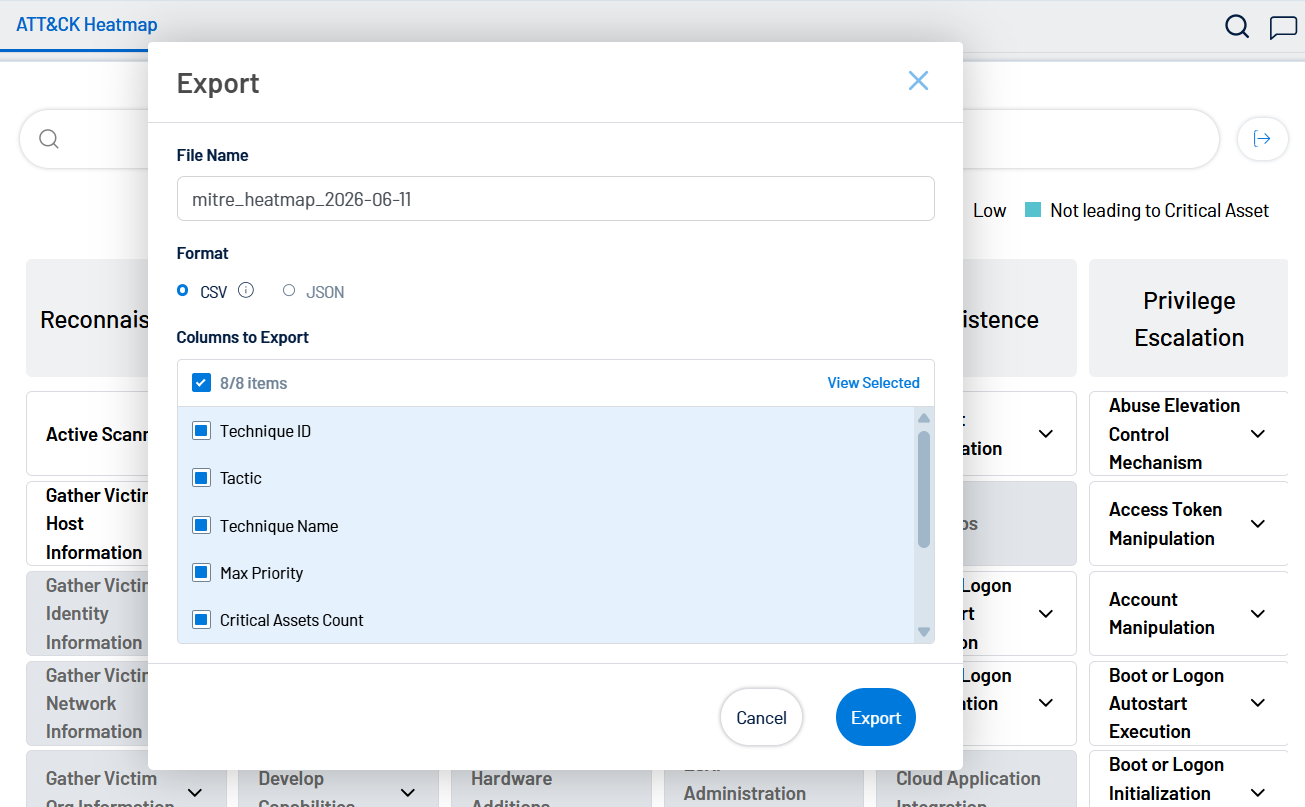
All exports respect active filters, including priority, category, free text, and the Show All Techniques toggle, ensuring exported data reflects exactly what is visible in the interface. For more information, see MITRE ATT&CK Heatmap in the Tenable Exposure Management User Guide.
Security Control Annotation for Attack Paths
Tenable Exposure Managementnow surfaces security controls data — including EDR and firewall tools detected by Tenable Exposure Management — within Attack Path. Security controls information is visible across the Top Attack Techniques table, Top Attack Paths table, and the Attack Path Graph, allowing practitioners to assess existing coverage at a glance.
Clicking any asset in the Attack Path Graph opens the asset detail panel, which includes a dedicated Security Controls tab listing all controls detected on that asset. A new Security Controls filter allows teams to scope their investigation to paths and techniques with or without active coverage, helping distinguish genuinely exploitable paths from those that are already mitigated.
For more information, see Attack Technique Details in the Tenable Vulnerability Management User Guide.
June 4, 2026
Integration Updates
Tenable Open Connector - Phase 3 (Sync Logic Enhancements: Full vs. Delta)
Building on the automated S3 ingestion capabilities introduced in Integration Updates, phase 3 of the Tenable One Open Connector introduces flexible data synchronization modes, giving you full control over how the platform reconciles incoming data with existing records. This update eliminates stale data and enables a predictable lifecycle for assets and findings across both manual uploads and automated S3 pulls.
Full Fetch vs. Incremental Fetch
The Tenable One Open Connector now supports two Data Update Modes:
-
Full Fetch (Override): Every new file fully overrides all data ingested from the previous file, providing a clean, authoritative baseline on every sync.
-
Incremental Fetch: After an initial full baseline sync, subsequent uploads process only new and updated records. This mode is bandwidth-efficient and designed for high-frequency pipelines where re-sending the entire dataset is not practical.
Incremental Delta Modes
When using Incremental Fetch with files that contain both assets and findings, you select one of three delta modes to define how Tenable Exposure Management handles records absent from the incoming file:
-
Additive Only: All existing assets and findings remain active. Only new or updated records from the file are processed. No data is removed or archived.
-
Strict Inventory: Assets missing from the file are immediately archived to keep your inventory clean. Existing findings for those assets are retained until the asset is fully decommissioned.
-
Dynamic Remediation: Findings missing from the file are automatically marked as Fixed. Assets not present in the file remain active to preserve historical context.
Remap Columns
The new Remap Columns option on the connector setup page lets you revise field mappings and uniqueness criteria without uploading a new file. Once saved, Tenable Exposure Management re-syncs the existing data using the updated configuration.
Connector Logs
The Connector Logs section now indicates whether each synchronization ran as a Full Fetch or an Incremental Sync. Hovering over an entry in the Activity column displays the active delta mode — Additive Only, Strict Inventory, or Dynamic Remediation — and a short description of how Tenable Exposure Management handled records missing from that sync file.
For more information, see Tenable Open Connector in the Tenable Exposure Management User Guide.
May 20, 2026
Integration Updates
Recorded Future Threat Intelligence Connector
Tenable Exposure Management introduces the Recorded Future connector. This is the first integration in a new threat intelligence category that lets you ingest third-party threat intelligence directly into your (Undefined variable: Tenable.ExposureManagementShort) workflow.
Use this integration to gain intelligence-driven context to set accurate remediation priorities. While a scanner might rate a vulnerability as High, Recorded Future risk scores reflect the true urgency of vulnerabilities actively exploited in the wild. This reduces the noise of theoretical CVSS-driven prioritization.
For more information, see Recorded Future Connector in the Tenable Exposure Management User Guide.
Microsoft TVM Connector License Support
The Microsoft TVM connector now supports specific license types. When you configure the connector, you must select the Cloud Environment and AuthentServer that matches your Microsoft licensing to ensure successful data ingestion.
If you are unsure which environment your organization uses, check your Microsoft 365 admin portal or contact your Azure AD administrator.
For more information, see Microsoft TVM Connector in the Tenable Exposure Management User Guide.
May 19, 2026
Tenable Hexa AI
Tenable Hexa AI — the agentic engine of the Tenable One Exposure Management Platform — is now generally available. Tenable Hexa AI moves cybersecurity beyond the chatbot: instead of answering questions about your exposure data, it executes the complex, multi-step actions that allow security teams to begin operating at machine speed.
This GA release introduces two surfaces for the same agentic engine
- Hexa UI: Embedded directly into the Tenable One platform, with Tenable's out-of-the-box agents ready to act on day one.
- Hexa MCP: A Tenable-hosted Model Context Protocol (MCP) server that lets power users and AI-savvy teams bring their own LLM and orchestrate custom agents on top of the Tenable Exposure Data Fabric.
Both formats share the same foundation: Tenable's Exposure Data Fabric, the industry’s most comprehensive repository of contextualized exposure data.
Tenable Hexa AI Pre-Built Agents
Pre-built agents in the Tenable UI provide the agentic experience for the security practitioner who wants the outcome, not the plumbing. Tenable Hexa AI is embedded in the Tenable One platform and grounded in your live exposure data, so every recommendation reflects your environment and not a generic playbook.
The first generation of Tenable-built agents covers the areas where customers reported the highest administrative load:
-
Contextual Asset Management: Organize and search your attack surface at machine scale instead of by spreadsheet.
-
Dynamic Visualization: Turn raw exposure data into dashboards from existing Tenable templates and in-chat reports on request.
-
Assessment Configuration: Take the mystery out of failed scans and risk adjustments so your data stays trustworthy.
-
Risk Adjustment: Recast findings and their severity according to your internal guidelines.
-
Remediation Workflows: Mobilize findings and create Exposure Initiatives, Combinations, and Jira tickets.
-
Attack Path: Identify and investigate your top attack paths and other toxic combinations based on your entire attack surface.
Tenable will continue to expand this collection of capabilities. Customers should expect new agents to appear in-product without requiring action from administrators, as long as Tenable Hexa AI is enabled for that user.
Trust and Governance
-
Tenable Hexa AI respects existing role-based access control (RBAC). It never operates with elevated privileges.
-
Container administrators can enable or disable Tenable Hexa AI for the entire environment.
-
Every Tenable Hexa AI action resulting in a state change is captured in the standard Tenable audit log.
-
Human-in-the-loop confirmation is required before any state-changing operation.
For more information, see Use Tenable Hexa AI via User Interface in the Tenable Exposure Management User Guide.
Tenable Hexa AI Custom Agents via MCP
With Tenable Hexa AI, you can build custom agents via the MCP server to achieve unique security workflows. It exposes Tenable's Exposure Data Fabric as a set of structured, governed tools to any MCP-compatible AI client. It lets your team bring its own LLM and orchestrate bespoke agents that reflect your unique workflows, vocabulary, and priorities.
This is how Tenable customers can implement a tailored maturity model: your model, your prompts, Tenable ground truth. This includes:
-
Universal AI adapter: A single, Tenable-hosted HTTPS endpoint at cloud.tenable.com/mcp/, compatible with Claude Desktop, Claude Code, Cursor, and any client that supports MCP over HTTP. No local install, no proxy, no infrastructure to maintain.
-
Agentic command of your Tenable environment: Tools spanning scan management, asset and finding search across your Tenable One inventory, dashboards and widgets, tagging, reporting, policy, and agent operations.
-
Bring your own LLM, keep our ground truth: Whichever model your organization standardizes on; your data is reasoned over by your model of choice, while every action is executed against the same governed Tenable MCP.
-
Cross-platform orchestration: Combine Tenable Hexa AI via MCP with other MCP servers (ITSM, IdP, ticketing, patching) to compose end-to-end workflows that span Tenable and the rest of your stack.
Tenable Hexa AI is included at no additional cost with Tenable One Foundation and Tenable One Advanced licensing packages. Token-based limits apply per tier. You can view your consumption on the Account Details and Tenable Hexa AI Settings pages within your Tenable One workspace.
Trust and Governance
-
Authentication uses standard Tenable One Vulnerability Management API keys via the X-ApiKeys header. No new identity model to manage.
-
The MCP server has no elevated privileges. Every call is executed under the authenticated user's existing Tenable role and permissions.
-
All actions are written to the standard Tenable audit log.
-
The MCP server does not run autonomously, does not store conversation state, and does not make decisions on your behalf; every action originates from a user request through their AI client.
-
Because Tenable Hexa AI via MCP is a Bring Your Own LLM model, customers select an LLM provider whose data-handling practices meet their compliance requirements.
For more information, see Use Tenable Hexa AI via MCP Server in the Tenable Exposure Management User Guide.
May 18, 2026
Attack Path Lifecycle Management
Tenable is thrilled to announce that we are shifting APA from a list of techniques to an actionable traceable list. This update enhances collaboration and empowers an "Inbox Zero" workflow. This update includes:
-
Technique Statuses: Track real progress with To Do, In Progress, In Review, Done, and Accepted.
-
Intelligent Path Logic: Introduce Attack Path statuses that are automatically calculated. Marking one technique as Done sets the entire path to Chain Prevented, helping you prioritize "breaking the chain" with minimal effort.
-
Risk Acceptance: You can now Accept a risk with mandatory reason (e.g., False Positive, Compensating Control) the action will be recorded in a permanent Audit History Log and prevent duplicate investigation effort.
This means that default views now hide mitigated or accepted items, focusing you only on active exposure, which also helps enhance collaboration between team members.
Better Collaboration: No more investigating paths already blocked by team members.
For more information, see Attack Path and Technique Statuses in the Tenable Exposure Management User Guide.
April 15, 2026
Integration Updates
Tenable Open Connector - Phase 2 (Automated Pull from Cloud Storage S3)
Building on the manual file upload capabilities introduced in Tenable Open Connector - Phase 1 (Upload Static File), phase 2 of the Tenable One Open Connector introduces automated data ingestion directly from AWS S3 buckets. This update allows you to establish continuous, scheduled data pipelines, ensuring that asset and vulnerability data from custom tools or third-party storage remains current without manual intervention.
This automation is critical for maintaining a comprehensive risk view in dynamic environments where manual uploads are not scalable. Once configured, the platform automatically correlates the Cloud Storage data with existing enterprise metadata, ensuring a unified security perspective across the entire attack surface.
For more information, see Tenable Open Connector in the Tenable Exposure Management User Guide.
PrismaCloud CSPM Third-Party Connector Availability
Tenable is excited to announce the addition of the PrismaCloud CSPM connector for use with Tenable Exposure Management. This integration allows you to automatically ingest cloud resources and security findings from PrismaCloud directly into Tenable Exposure Management for a unified view of your cloud security risk.
For more information, see PrismaCloud CSPM Connector in the Tenable Exposure Management User Guide.
March 26, 2026
Attack Path Full Export and AI Service Support
Tenable is thrilled to introduce the following highly requested features to the Attack Path section of Tenable Exposure Management.
Attack Path Top Paths/Techniques Export
Full export capabilities for Attack Path are now generally available! This feature is designed to bridge the gap between high-level visualization and actionable offline intelligence.
So far, Attack Path data export was limited to selected rows or a single page to CSV through manual UI export only. This new feature allows to move beyond these limitations and extract full datasets for Top Attack Paths and Top Attack Techniques directly into CSV or JSON formats.
Flexibly Managed, Integrated by Design
Whether you prefer a hands-on approach or automated workflows, this feature is engineered to fit modern security operations:
-
Manual UI Control: A high-visibility global export button at the top-right of tables allows you to trigger background jobs for massive datasets without interrupting your current workflow.
-
Granular Scope & Customization: Users can select between Selected Rows, the Current Page, or Entire Results matching their filters, while picking specific columns for the final export file.
-
Asynchronous Performance: To prevent browser timeouts, the system performs a direct high-speed fetch from the database and uses "Toasty" notifications to alert you when your file is ready for automatic download.
-
API-First Integration: Achieve full API Parity by using the Tenable Public API to programmatically extract path data directly into your SIEM, SOAR, or custom reporting tools.
-
Audit Ready: To meet enterprise standards, every action is logged in the Tenable platform Activity Log, recording the user, timestamp, applied filters, and export scope.
This initiative aligns Attack Path with the Tenable Exposure Management platform standard, moving us closer to our vision of a unified, world-class leading product on the Tenable One platform.
For more information, see Top Attack Paths and Manage Techniques in the Tenable Exposure Management User Guide.
Support for AWS and Azure AI Services
As organizations increasingly integrate Generative AI and Machine Learning into their cloud infrastructure, the attack surface expands. This update introduces comprehensive support for AWS AI services and Azure AI services, specifically focusing on:
-
Amazon Bedrock
-
SageMaker
- Azure Cognitive Services
-
Azure Machine Learning
By mapping these entities and their complex relationships with cloud storage and IAM, security teams can now visualize how an attacker might pivot from a standard identity to poisoning a custom model or exfiltrating sensitive training data.
For more information, see Attack Path in the Tenable Exposure Management User Guide.
February 17, 2026
Hybrid GCP Paths & High-Fidelity Precision in Attack Path
Tenable has streamlined the Attack Path section of Tenable Exposure Management to reduce noise and bridge the hybrid gap. These updates include:
-
Hybrid Lateral Movement (On-Prem > GCP) — Attack Path now links on-prem JSON credential files to GCP Service Accounts, exposing real-world paths to cloud takeover.
-
Exploitable CVEs Only — Using upgraded TVDB V3 intelligence, we now only map paths for verified exploitable CVEs.
Note: You should expect a drop in path counts as we purge non-exploitable noise. -
Performance Boost — We've removed the "service" node to significantly speed up calculation times without impacting the risk coverage (this node was not used for technique or path calculations).
These updates ensure your team focuses on Choke Points that represent real, executable risk. For more information, see Attack Path in the Tenable Exposure Management User Guide.
February 2, 2026
Unified Asset Classification Naming
Tenable has standardized the naming conventions for asset classification across Tenable Exposure Management (EM) and Tenable One Vulnerability Management (VM). Previously referred to as Device Profiling, this feature is now universally titled Asset Classification. This alignment ensures that risk drivers and asset properties are labeled identically regardless of which platform or view you are using, providing a seamless experience for cross-platform analysis.
Key Terminology Updates:
-
Asset Category: Replaces Device Class (VM) and Device Profile (EM).
-
Asset Function: Replaces Device Subclasses (VM) and Device Functionality (EM).
-
Categorization Confidence/Drivers: Replaces all Profile Confidence/Drivers labels.
-
Unified Value Display: Data values are now standardized across the platform. For example, inconsistent labels like "Workload device" vs. "VM or Workload" have been unified into a single, clear naming convention based on the Tenable standard.
For more information, see the Asset Categorization Quick Reference Guide.
January 28, 2026
January Updates
Tenable is excited to announce the following highly requested additions and updates to the Tenable Exposure Management application.
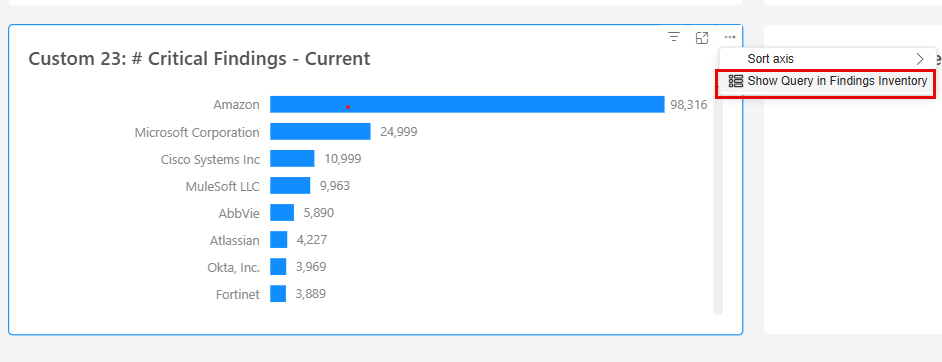
Widget to Inventory Drill Down
Gain deeper insights with the new Widget Drill Down capability. Users can now click directly on the dashboard’s widgets to view the underlying data in the Assets or Findings Inventory pages.
-
Contextual Navigation: Redirection is intelligently mapped based on the widget’s specific measures.
-
Persistent Filtering: Any filters currently applied to your dashboard will automatically carry over to the inventory view, ensuring you never lose your place during an investigation.
For more information, see Drill Down to Inventory Data in the Tenable Exposure Management User Guide.
Dashboard Grid Mode & Snap to Grid
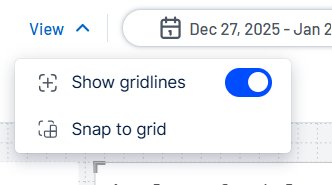
Introducing a new Grid View to the dashboard creator and editor, providing a visual guide for precise widget placement.
-
Toggleable Gridlines: Use the View menu to toggle gridlines on or off (off by default) to suit your design preference.
-
Snap-to-Grid: Perfect your layout instantly. By selecting a widget and clicking Snap to Grid, the widget automatically aligns with the nearest grid lines for a clean, organized look.
For more information, see Create a Dashboard in the Tenable Exposure Management User Guide.
Orca Security Third-Party Connector Availability
Tenable is excited to announce the addition of the Orca Security connector for use with Tenable Exposure Management. This new integration allows you to automatically ingest assets and security findings from Orca’s agentless platform directly into Tenable.
By unifying Orca’s multi-cloud visibility with Tenable’s exposure analytics, you can now assess and prioritize cloud-native risks alongside your traditional infrastructure, ensuring comprehensive coverage of your entire attack surface.
For more information, see Orca Connector in the Tenable Exposure Management User Guide.
Multi-Instance Support for Tenable One Vulnerability Management
Tenable Exposure Management now supports the ability to connect multiple, distinct Tenable One Vulnerability Management accounts into a single workspace.
This "connector" approach is designed for large enterprises managing segmented environments, acquisitions, or regional instances. It allows you to aggregate asset and vulnerability data from separate Tenable One Vulnerability Management tenants into one centralized view, ensuring a unified global risk assessment without needing to merge accounts manually.
For more information, see Tenable One Vulnerability Management Connector in the Tenable Exposure Management User Guide.
Tenable Open Connector - Phase 1 (Upload Static File)
We are excited to introduce the Tenable Open Connector, a flexible new method to bring data from any source into theTenable platform.
This feature enables the manual ingestion of asset and vulnerability data via static file upload (e.g., CSV, JSON). This is critical for organizations that need to track assets from custom internal tools, manual pen-test reports, or air-gapped systems. Once uploaded, this "offline" data is fully correlated with your existing platform metadata, ensuring a comprehensive risk view that leaves no gaps.
For more information, see Tenable Open Connector in the Tenable Exposure Management User Guide.
January 22, 2026
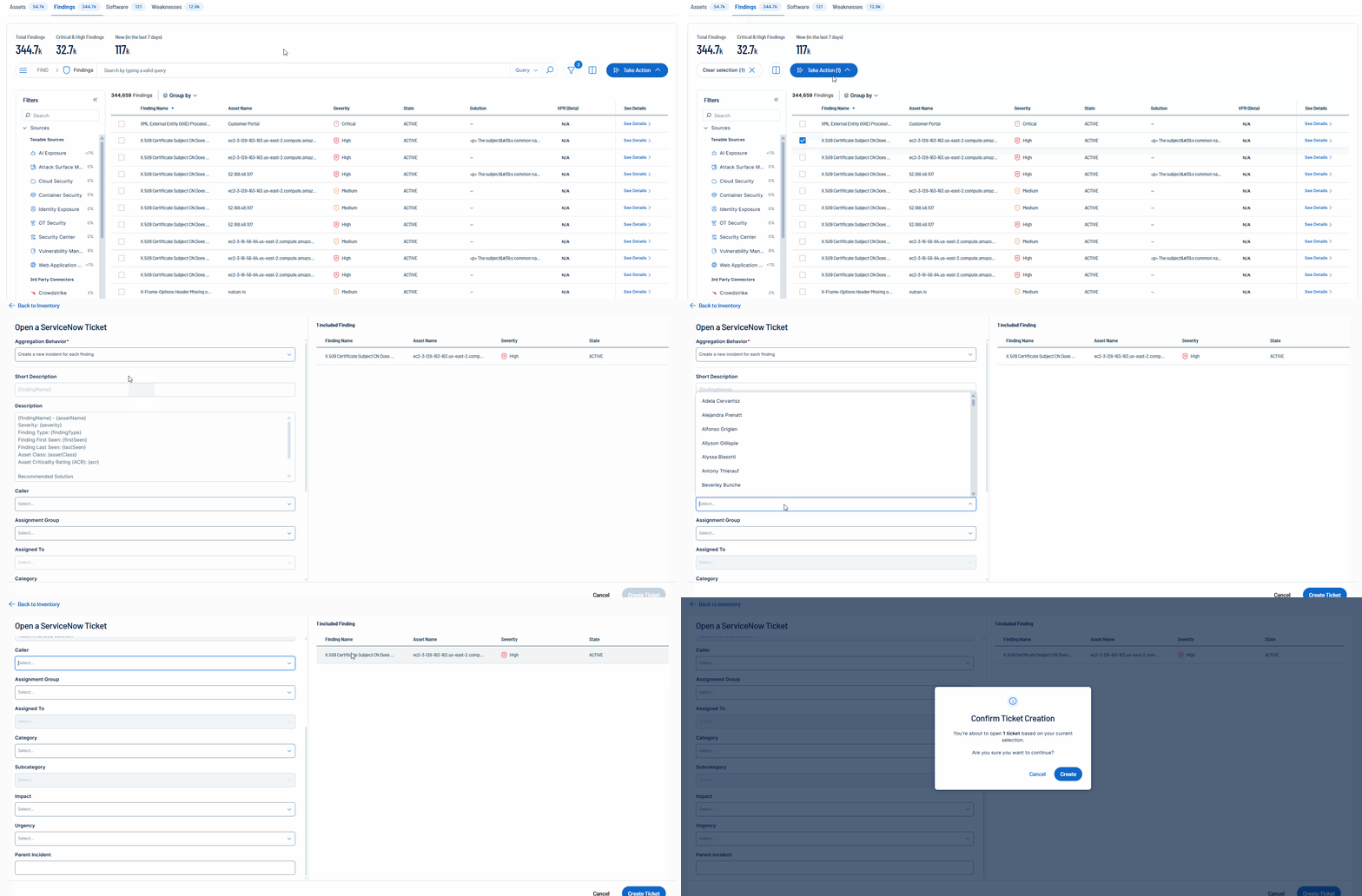
FedRAMP Availability: Automatic Ticket Creation for Data Mobilization
Tenable is excited to announce the Tenable FedRAMP Moderate availability of mobilization services in Tenable Exposure Management. Unify teams and streamline remediation workflows by generating tickets from findings. Expose and close critical risks from a single platform across multiple domains, including third-party data.
For more information, see:
-
Storylane demo for Tenable Mobilization
-
Create a ServiceNow Ticket and Create a Jira Ticket in the Tenable Exposure Management User Guide
-
Mobilization Quick Reference Guide
January 8, 2026
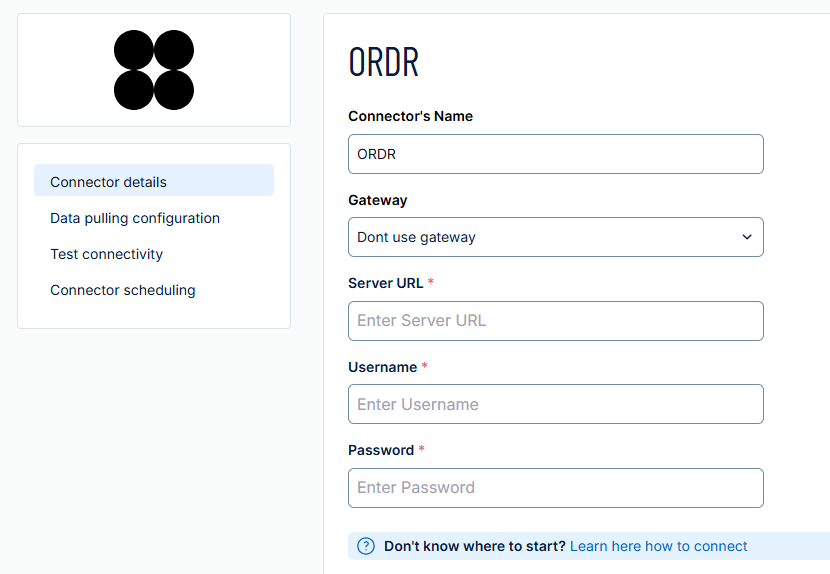
ORDR Third-Party Connector Availability
Tenable is excited to announce the addition of the ORDR third-party connector within Tenable Exposure Management. ORDR is an OT connector that pulls asset and findings data from the ORDR platform. Users can configure this connector directly within the Connectors section of Tenable Exposure Management.
For more information, see ORDR Connector in the Tenable Exposure Management User Guide.