Tenable One Cloud Exposure 2026 Q2 Release Notes
Tip: You can subscribe to receive these release notes by email or RSS.
These release notes are listed in reverse chronological order.
June 28, 2026 (Release 1.212)
New Features
 OCI: Redesigned OCI Tenancy Integration
Tenable redesigned the OCI tenancy integration to reduce setup time and simplify configuration.
Key improvements:
- Streamlined setup — The onboarding wizard is reduced from 4 steps to 2. Integration name, capabilities, and OCI credentials are now configured together in a single Configuration step, followed by Scopes.
- Permission validation — OCI credentials are validated at submission, with specific error messages identifying what is missing or misconfigured.
Custom Policies: Explorer-Based Templates
A select group of custom policy templates now use Explorer filters to define which resources a policy applies to. Previously, template configuration required selecting resources from a static list.
With Explorer-based templates, you define scope using resource attributes and conditions. The policy applies to any resource that matches the query, not just the ones you manually picked. This gives you more precise control and the flexibility to combine multiple filters. When you configure this template, the Explorer query editor appears in the right panel with a pre-built query that you can refine.
The following templates have been updated:
| Template | Cloud Support | GraphQL API: __typename |
|---|---|---|
| Only these resources should be encrypted using these keys |
|
|
| These resources should have these tags |
|
|
Compliance: Support for CIS Azure 6.0.0
Cloud Exposure now supports CIS Azure 6.0.0 as a compliance standard. This framework serves as an objective, consensus-driven security guideline for the Microsoft Azure cloud provider.
New Resources
 API Support
The following resources were added in this release:
| Platform | Category | Resource |
|---|---|---|
| Alibaba | Data | OSS Bucket |
| AWS | AI | Bedrock Action Group |
| GCP | Data | Storage HMAC Key |
New Policies
API Support
The following policies were added in this release:
| Provider | Category | Name |
|---|---|---|
| Azure | Compute | Container Registry retention policy is not enabled |
| Azure | Compute | Virtual Machine agent is not installed |
| Azure | Compute | Windows Virtual Machine automatic updates are not enabled |
| Azure | Data | Batch Account is not encrypted with a Key Vault key |
| Azure | Data | Event Hub Namespace private link is not configured |
| Azure | Data | Event Hub Namespace SKU does not support customer-managed key encryption |
| Azure | Data | Event Hub Namespace zone redundancy is not enabled |
| Azure | Data | Service Bus Namespace is not encrypted with a customer-managed key |
| Azure | Data | SQL Server private endpoint is not configured |
| Azure | IAM | Batch Account local authentication is enabled |
| Azure | IAM | Batch Account managed identity is not set |
| Azure | IAM | Event Hub Namespace local authentication is enabled |
| Azure | Kubernetes | AKS Cluster is using Free tier |
| Azure | Logging | Virtual Machine Boot Diagnostics is not enabled |
| Azure | Network | Front Door WAF Policy has disabled managed rules |
| Azure | Network | Front Door WAF Policy is not enabled |
June 21, 2026 (Release 1.211)
New Features
Hexa AI: Generally Available (GA) for Tenable One Foundation and Advanced Customers
Hexa AI is now generally available in Cloud Exposure. Hexa AI is an AI assistant built directly into the Console. You can ask it questions about your cloud environment in plain language and get answers drawn from your live data without writing queries, building filters, or switching between tools.
With Hexa AI, you can:
- Investigate cloud resources and IAM permissions by describing what you are looking for.
- Analyze compliance posture against frameworks and generate structured summaries.
- Correlate data across assets, identities, and vulnerabilities to surface high-risk combinations.
- Get answers to product how-to questions without leaving the Console.
A note on access:
- To access Hexa AI, click the Hexa AI icon in the upper-right corner of the Console.
- Hexa AI is enabled by default for Foundation and Advanced licenses. Not on Foundation or Advanced? Tenable One customers can request a free 90-day evaluation. Contact your representative to get started.
- To disable or configure Hexa AI, go to Exposure Management > Vulnerability Management settings > Hexa AI (admins only).
- Hexa AI is not available in Gov Cloud environments.

Access management: Custom Roles
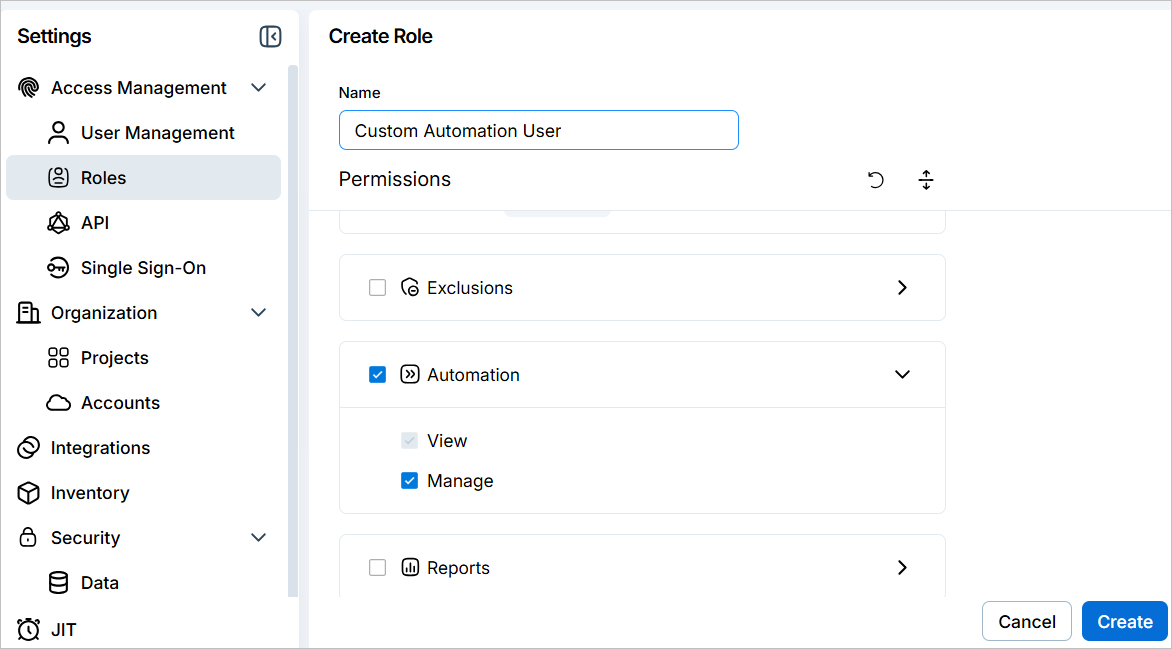
Create custom roles that give users and groups exactly the access they need, without over-provisioning via a built-in role. Choose from over 20 permissions categories, and set to View or Manage access for each independently. You can create and manage custom roles in Settings > Access Management > Roles.
For example, you can create a read-only role scoped to compliance data, or a role that allows a team member to manage automation rules without granting full Administrator access.
For more information, see the documentation.
Cloud providers: Alibaba Cloud Support
Cloud Exposure now supports Alibaba Cloud. Connect an Alibaba Cloud organization or individual account to monitor cloud resources and security posture across Aliyun and international environments.
Key capabilities:
- Monitoring (read-only) — Gain visibility into cloud assets, IAM permissions, account activity, and security configurations. Available now for both Alibaba Cloud organizations and individual accounts.
- Two deployment options — Run the generated Resource Orchestration Service (ROS) stack via the Aliyun CLI, or deploy manually in the Alibaba Cloud RAM console.
- Aliyun and international support — Connect accounts in Alibaba Cloud China regions (Aliyun) or international regions.
- Data Resources Scanning (Data Protection) and Workload Protection are coming soon. Both appear in the connection wizard. Tenable recommends selecting them during initial setup. The deployment script grants permissions for all selected capabilities at the time of deployment. Enabling a capability after initial setup requires redeployment.
For setup instructions, see Alibaba Cloud.
Findings automations: Send Findings to Resource Owners in Jira and ServiceNow
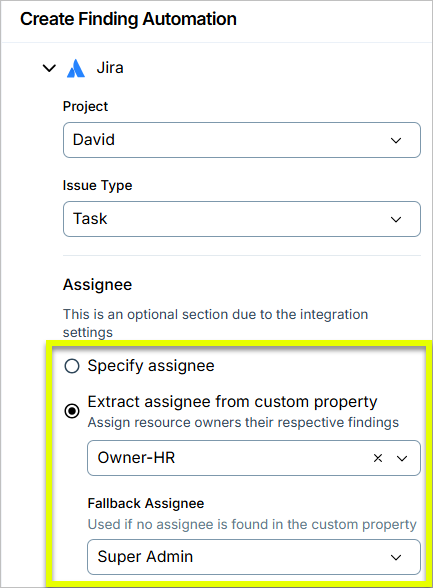
You can now assign findings directly to resource owners in Jira and ServiceNow. You configure a custom property that maps resources to their owners, and Cloud Exposure routes each finding to the right person automatically. Each owner receives only the findings associated with their resources, not everything in the automation scope.
Owner-based delivery for email, Slack, and Teams has been updated to use the same model.
- The previous Static and Dynamic by Owner options are replaced across all three with options to specify recipients manually or extract them from a custom property.
- For Slack and Teams, delivery is now also scoped to a single workspace or organization. Previously, channels from multiple workspaces could be selected at once.
- Across all integrations, owner-based delivery resolves recipients from a resource owner custom property. A fallback option is available when no valid recipient is found.
- The new Extract recipients/assignee from custom property option is single-select per delivery method. To cover multiple owner properties, add additional delivery methods of the same type.
These changes apply in finding automations, when manually triggering actions based on findings, and in the delivery settings for Cloud Findings reports.
Compliance: Support for CIS Azure 5.0.0
Cloud Exposure now supports CIS Azure 5.0.0 as a compliance standard. This framework serves as an objective, consensus-driven security guideline for the Microsoft Azure cloud provider.
See the documentation to learn more about how to monitor compliance in your cloud accounts.
New Resources in 211
API Support
The following resources were added in this release:
| Platform | Category | Resource |
|---|---|---|
| Azure | AI | Microsoft Foundry Connection |
| Azure | AI | Microsoft Foundry File |
| Azure | AI | Microsoft Foundry Model Deployment |
| Azure | AI | Microsoft Foundry Vector Store |
June 14, 2026 (Release 1.210)
New Features
Threat Detection: Threat Detection and Response Is Generally Available
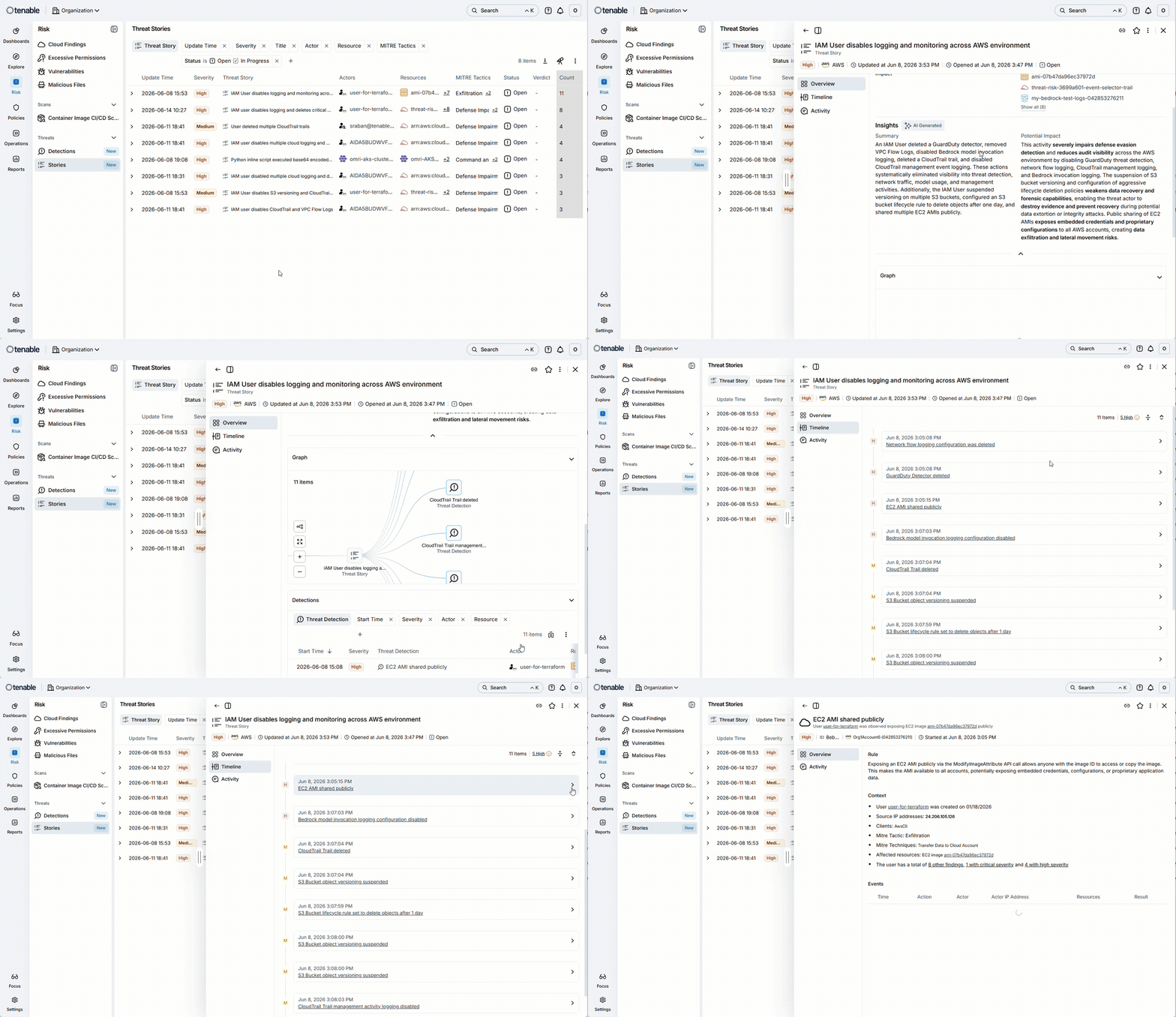
Threat detection and response is now live in Cloud Exposure. Near real-time monitoring of suspicious activity and behavioral anomalies across cloud providers (agentless) and Kubernetes clusters (runtime sensor).
What's included:
- Threat Stories — Builds a single attack narrative from related detections and aggregated cloud context, with an AI-generated summary, impact analysis, and event timeline.
- Agentless monitoring — Analyzes your cloud provider logs (for example, CloudTrail, Azure Monitor, GCP Audit Logs) with no software to install.
- Runtime sensor (eBPF) for Kubernetes — Kernel-level visibility into process execution and file access events on your clusters.
- MITRE ATT&CK mapping — Every threat detection ties to a specific tactic and technique, so you know exactly what stage of a potential attack you're looking at.
- Anomaly detection — Builds a behavioral baseline per identity over 30+ days and flags deviations like unusual data access and unexpected permission changes.
Required License: Available with the CNAPP Complete/Enterprise licenses. Enabling threat detection doesn't change your billable resource count.
Learn more:
EASM: Application Layer Scanning for HTTP and HTTPS
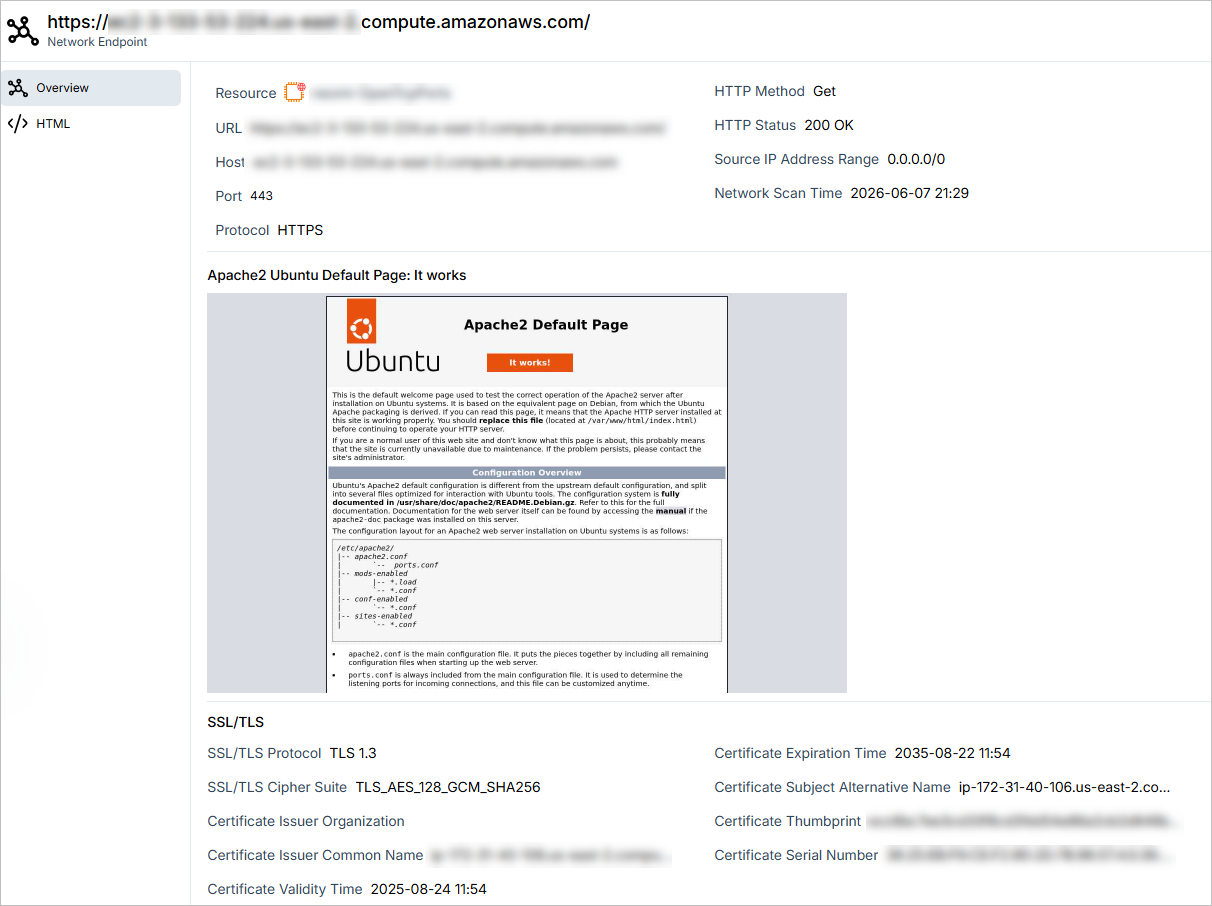
The Network Scanner now performs application-layer scanning for confirmed HTTP and HTTPS endpoints on compute resources, so you can see what is running on each exposed endpoint. In addition to TCP connection verification, the scanner sends a GET request and captures the response: HTTP status code, SSL/TLS protocol version, a screenshot of the landing page, and the HTML response.
This data is available in two places:
- Network Endpoints page — Key fields such as HTTP method, HTTP status, and HTML response appear as new columns on the Network Endpoints table.
- Endpoint profile page — Clicking an endpoint opens a detail page with two tabs:
- Overview, which includes the landing page screenshot and full SSL/TLS certificate details.
- HTML, which displays the raw HTML source.
This page also includes additional new columns. Most are hidden by default (as are some previously visible columns), but all can be added to your view.
Application layer scanning is currently available for virtual machines and compute instances across AWS, Azure, GCP, and OCI. Support for additional resource types is expected in the near future.
Dashboards: Configure SLA Thresholds for Findings MTTR Widgets
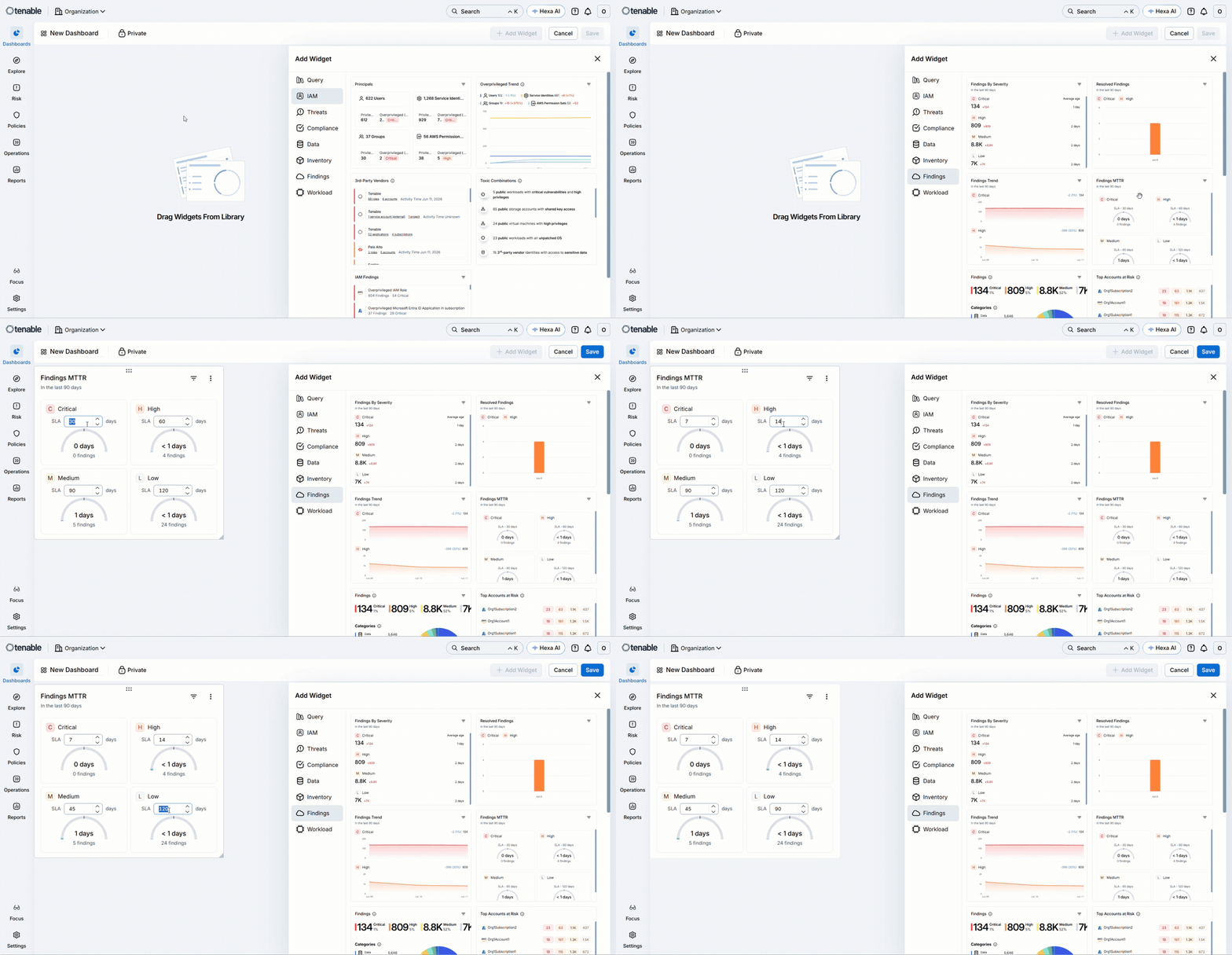
The Findings MTTR widget now supports configurable SLA thresholds per severity level. When you add or edit a Findings MTTR widget in a custom dashboard, you can set a custom SLA value for Critical, High, Medium, and Low findings, up to a maximum of 365 days.
This applies to all Findings MTTR widgets:
- The built-in Findings MTTR widget.
- Widgets based on monitored Cloud/IaC Findings queries.
For example, you can monitor a query scoped to EC2 findings for a specific account, add its Findings MTTR widget to a custom dashboard, and set SLA thresholds appropriate to that account.
For more information, see [Custom Dashboards] and [Explorer: Query-Based Widgets].
Data Protection: Expanded File Type Coverage for Data Scanning
Cloud Exposure now scans all file types for sensitive data. Previously, the product scanned a defined set of file formats. Now, any file type can be scanned, with prioritized coverage for commonly used formats.
For a full list of prioritized file formats, see Scanned File Formats.
Redesigned GCP Organization and Project Integrations
Tenable redesigned the GCP organization and project onboarding experience to reduce setup time and make configuration changes more predictable.
Key improvements:
- Single-page setup — Organization and project integrations are consolidated into a single page each, replacing the multi-page wizard. Google Workspace is no longer a required prerequisite for connecting a GCP project.
- Field inheritance indicators — Icons and tooltips in the create and edit flows identify which fields are enforced at the organization level and cannot be overridden at the project level.
- Permission validation — GCP permissions are validated at submission, with specific error messages identifying what is missing or misconfigured.
Console Design Refresh
The Cloud Exposure Console has a new visual design. All pages reflect the updated design system, including a darker dark mode.
JIT: Find Individual Users within Group-Based Eligibilities
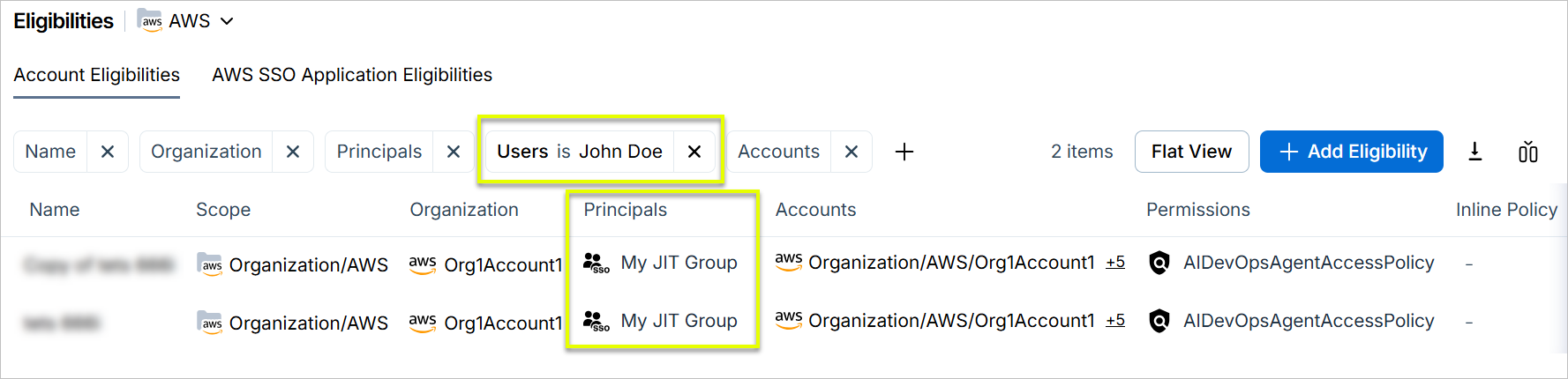
Use the new Users column to filter the Eligibilities table by a specific user to see all eligibilities that apply to them, including those where the user is a member of a group. In those cases, the group name appears in the Principals column.
New Resources in 210
API Support
The following resources were added in this release:
| Platform | Category | Resource |
|---|---|---|
| Azure | AI | Microsoft Foundry Dataset |
| Azure | AI | Microsoft Foundry Project |
New Policies in 210
API Support
The following policies were added in this release:
| Provider | Category | Name |
|---|---|---|
| Azure | Compute | Compute Disk data disk is not encrypted |
| Azure | IAM | AKS Cluster local authentication methods are enabled |
| Azure | Kubernetes | AKS Cluster agent pools are not using Virtual Machine Scale Sets |
| Azure | Kubernetes | AKS Cluster Azure CNI networking is not enabled |
| Azure | Kubernetes | AKS Cluster Azure Policy add-on is not enabled |
| Azure | Kubernetes | AKS Cluster host encryption is not enabled |
| Azure | Kubernetes | AKS Cluster HTTP application routing add-on is enabled |
| Azure | Kubernetes | AKS Cluster node pool has fewer than 3 nodes |
| Azure | Kubernetes | AKS Cluster system nodes run non-critical workloads |
| Azure | Kubernetes | AKS Cluster upgrade channel is not configured |
| Azure | Logging | AKS Cluster Azure Monitor logging is not enabled |
| Azure | Secrets | AKS Cluster secrets auto-rotation is not enabled |
June 7, 2026 (Release 1.209)
New Features
Explorer: Generally Available (GA)
After several months in public preview, the Explorer is now generally available.
The Explorer lets you query, correlate, and act on any resource or finding across your cloud environment. Use it to turn ad-hoc investigations into reusable queries, automated policies, scheduled reports, and finding automations.
What's new since public preview:
| Category | Features |
|---|---|
| Query-driven workflows |
|
| New query capabilities |
|
| Saved queries |
|
| Data organization |
|
To learn more, see Explorer.
Explorer: Query-Based Widgets
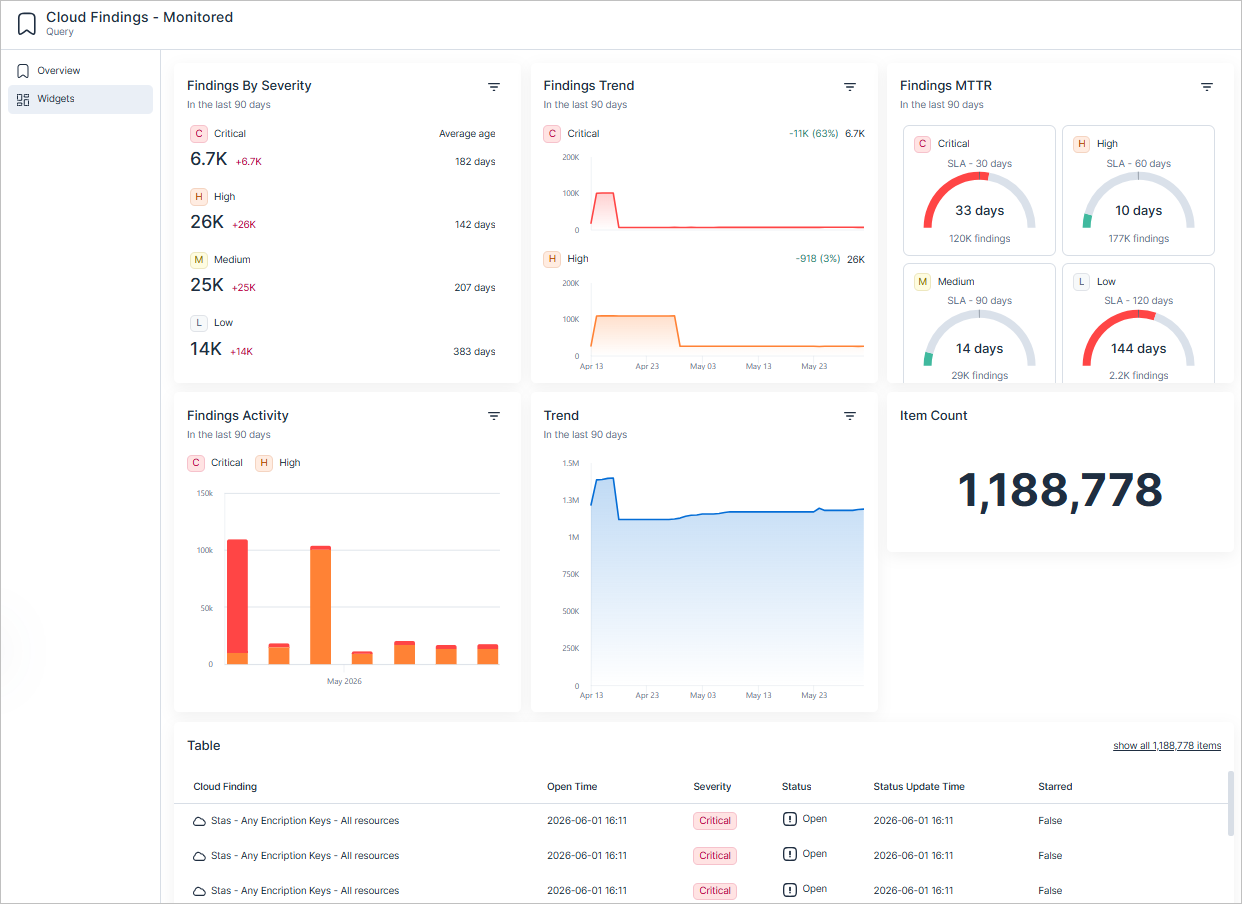
The Explorer now supports query-based widgets, viewable on the query profile and available to add to custom dashboards.
All queries include Item Count and Table widgets by default. Monitoring a query also captures daily result snapshots for historical trend analysis and unlocks additional widgets for certain query types:
| Query Type | Widgets |
|---|---|
| All queries | Item Count, Table |
| Cloud/IaC Findings (monitored) | Findings by Severity, Findings Trend, Findings MTTR, Findings Activity, Trend |
| Cloud resources (monitored) | Trend |
Note:
-
To monitor a query, it must:
- Be Public
- Not have joins or group by
- This release introduces a new underlying widget framework. To support this framework, some existing widgets may be deprecated or consolidated over the coming months.
Explorer: Use Custom Properties in Queries
You can now use custom properties you've defined in Cloud Exposure as filter criteria in the Explorer.
- Custom-type properties appear under Filter > Properties. Select a property, choose an operator, and enter a value to narrow results by any custom attribute you have defined. For example, filter Virtual Machines where Environment equals production.
- Owner-type properties appear under Filter > Relations*. You can filter in both directions:
To find resources by their owner, select the relation in the forward direction (for example, with Application Owner — Principal).

To find the principals associated with a resource, select the reverse direction (for example, Application Owner of — Resource).

You must define custom properties in Settings > Inventory > Custom Properties before they appear in the Explorer.
Vulnerability Management: Layer Information for Container Image Vulnerabilities
API Support
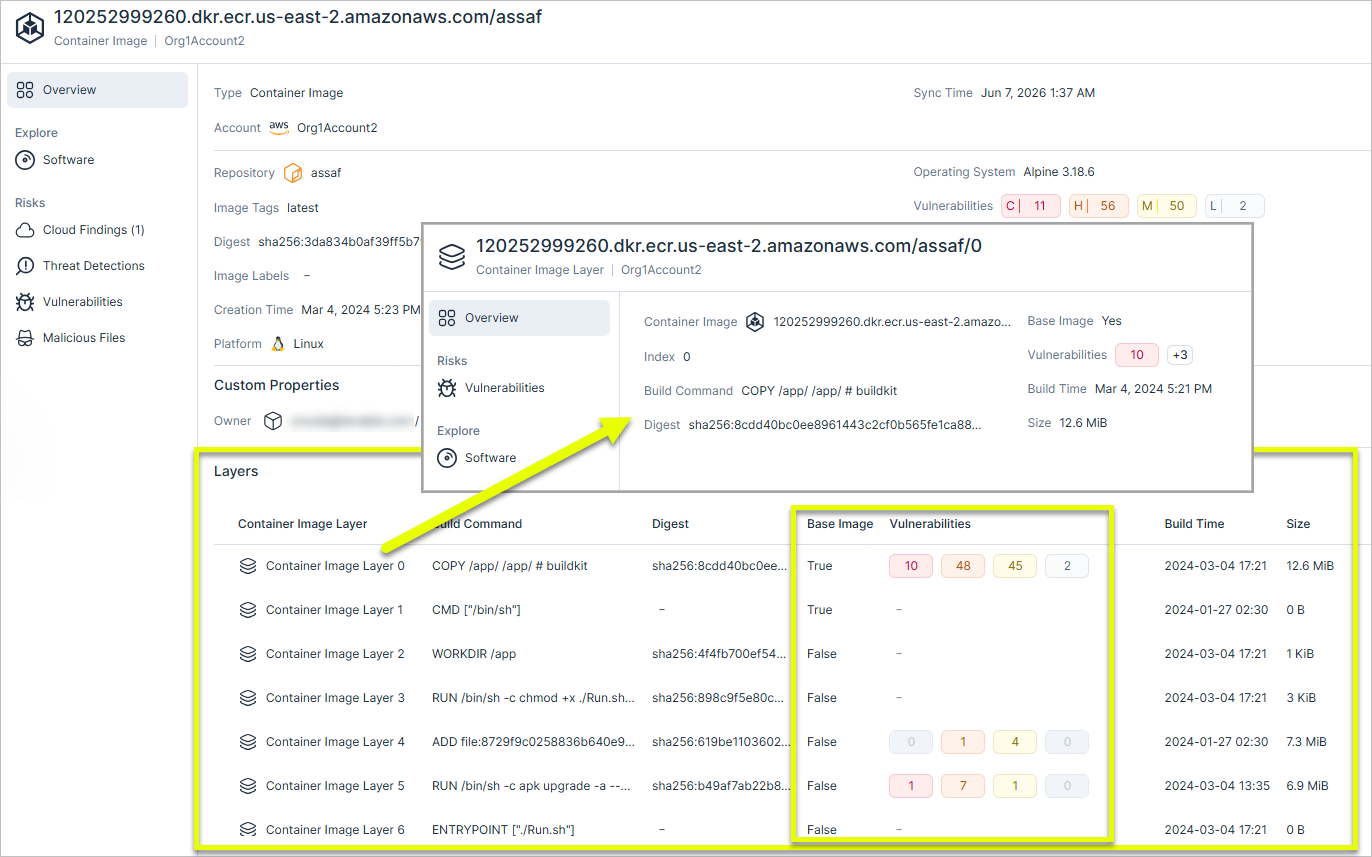
Each layer in the image is shown with its build command, severity breakdown, and a base image indicator. Vulnerability findings, OS findings, and malicious file detections all carry this layer context.
Where to find it:
- Container image profile > Overview: All layers in the image, with build command, base image indicator, and vulnerability count per layer.
- CI/CD scan profile: The same layer breakdown is available for pipeline scans, including CLI output with layers and vulnerabilities per layer.
- GraphQL API — New Layers field in Container image (ContainerImages) and Container image CI/CD (PipelineContainerImageScans) endpoints.
Limitations: Layer information is not available in the following cases:
- Agentless scanning of images on virtual machines. Layer data is only available for images scanned from a container registry.
- Agent-based scanning in some Kubernetes configurations. Layer data may not be available when the K8s cluster has limited disk quota.
When layer data is unavailable, the container image profile displays the scan source (Container Registry, Virtual Machine, or Agent) so you can identify why layer information is missing.
AWS and Azure: Connect Multiple Cloud-Managed Kubernetes Clusters
Tenable now supports a new Cloud Managed connection workflow for Kubernetes clusters, significantly simplifying how you onboard and manage your Kubernetes clusters.
Previously, connecting Kubernetes clusters to Tenable required running an individual Helm-based chart script inside every single cluster control plane. With this update, you can now connect multiple discovered AWS EKS and Azure AKS clusters simultaneously at the cloud account level.
Key Benefits:
- Account-level automation — Instead of running a script for every cluster, Tenable now automatically aggregates your selected clusters by their respective cloud accounts and generates a single, unified bash script per account.
- Streamlined onboarding — Reduces the time and operational overhead required to establish secure resource synchronization across large-scale, multi-cluster cloud environments.
- Agentless visibility — Quickly resolve clusters with Missing permissions or Connection failed statuses using cloud-native API authorization workflows, without deploying extra sensors.
For more information, see the documentation.
GraphQL: Query Raw JSON for Cloud Resources via API
API Support
The Cloud Exposure GraphQL API now includes a Json field on cloud entity types. The field returns the full resource payload retrieved directly from the cloud provider, giving you access to properties not otherwise surfaced in the API. For example, use this field to generate a report of all EC2 instances grouped by instance type.
For a sample query, see the documentation.
GraphQL: Query Integration Status via API
API Support
You can now use the Cloud Exposure GraphQL API to query and monitor the integrations connected to your organization. The new Integrations query returns the current connection status and provider-specific configuration details for each integration.
Use this query to monitor integration health programmatically, build alerting on failed connections, or audit which accounts are in scope for a given integration.
For a sample query, see the documentation.
JIT: Improved Table Layouts and Column Visibility
The eligibilities, request, and audit tables in the JIT Portal have been updated with new columns, clearer column names, and improved column ordering. New columns include Accounts, Scope, Groups, Azure Resource Groups, and Schedule Time. Several columns have been renamed for clarity, and less frequently used columns are now hidden by default but can be shown using the column selector.
Mobilization: Microsoft Apps and Integration Naming Standardization
Tenable standardized and updated the names of our Microsoft integration apps within the marketplace, Console, and documentation. These updates ensure alignment with recent Microsoft rebranding and establish a consistent naming convention across our connector ecosystem.
Integration Name Changes - Console
| Legacy Integration Name | New Integration Name |
|---|---|
| Azure DevOps | Azure Repos |
App Name Changes - Microsoft Marketplace
| Legacy App Name | New App Name |
|---|---|
| Cloud Exposure Azure DevOps | Cloud Exposure Azure Repos Connector |
| Cloud Exposure Connector | Cloud Exposure Entra ID Connector |
| Cloud Exposure JIT Connector | Cloud Exposure JIT Entra ID Connector |
| Cloud Exposure Teams | Cloud Exposure Teams Connector |
Key actions required:
- Documentation Reviews — Update any internal setup guides that point to legacy marketplace listings.
- Connection Verification — Existing functional connections remain unaffected by these cosmetic and catalog name updates; however, future searches in the Microsoft app ecosystem should use the new standardized names.
New Resources in 209
API Support
The following resource was added in this release:
| Platform | Category | Resource |
|---|---|---|
| GCP | Security | GCP Service Account User Managed Key |
New Policies in 209
API Support
The following policies were added in this release:
| Provider | Category | Name |
|---|---|---|
| Azure | AI | Machine Learning Workspace is not encrypted with a customer-managed key |
| Azure | Compute | Compute Disk is not double encrypted |
| Azure | Data | Service Bus Namespace infrastructure-level encryption is not enabled |
| Azure | Data | Service Bus Namespace minimum TLS version is below 1.2 |
| Azure | Data | Service Bus Namespace private link is not configured |
| Azure | Data | Service Bus Namespace zone redundancy is not enabled |
| Azure | Data | SQL Database Ledger is not enabled |
| Azure | Data | SQL Managed Instance does not have a private endpoint |
| Azure | Data | Storage Account access key is not rotated |
| Azure | IAM | Service Bus Namespace has non-root authorization rules |
| Azure | IAM | Service Bus Namespace local authentication is enabled |
| Azure | Kubernetes | AKS Cluster Azure RBAC for Kubernetes authorization is not enabled |
| Azure | Management | Compute Disk is unattached |
| Azure | Network | Application Gateway HTTP/2 is not enabled |
| Azure | Network | Application Gateway WAF Policy Request Body Inspection is not enabled |
| Microsoft Entra ID | IAM | Ensure that multifactor authentication is required for risky sign-ins |
| Microsoft Entra ID | IAM | Multi-factor Authentication Conditional Access policy exists for all users and applications policy |
| Microsoft Entra ID | IAM | Tenant missing 'Block Legacy Authentication' conditional access policy |
Azure Policy Update: Fix False Positives for App Service Public Network Access Policy
The policy logic for the following Azure policy has been updated to fix an issue that generated false-positive findings. As a result, previously opened findings may now be automatically closed with the sub-status False positive.
- App Service public network access is enabled
The fix: updated the policy to analyze the specific network rules. App Service instances using "Enabled from select virtual networks and IP addresses" will now only be flagged if their firewall rules allow access to all IP addresses, preventing false positives for properly restricted environments.
May 24, 2026 (Release 1.208)
New Features
Licensing: License Downgrade Grace Period
To ensure a smoother transition during license changes, Cloud Exposure now includes a 30-day grace period for downgraded licenses. This period prevents immediate data loss, maintains background scanning, and provides a window to export critical data before unlicensed features and data are permanently removed.
For more information, see the documentation.
Network: Network Scan Tracking and Enhanced Field Alignment
You can now track the status and time of network scans to gain specific visibility into your network security posture, independent of other scan types.
- New Network Scan fields/columns — Available via Inventory and Explorer.
- Network Scan Status
- Network Scan Time
- Global Scan column name alignment — The generic Scan Status/Scan Time fields (previously used for Vulnerability Management) have been renamed to ensure they are not confused with Data or Network scans. The parallel GraphQL API fields Deleted Scan Status API Fields (November 2, 2026).
| Domain | Previous Field Name | New Field Name | Change |
|---|---|---|---|
| Network | N/A |
|
New |
| Vulnerability |
|
|
Renamed |
| Data |
|
|
No Change |
New Policies in 208
API Support
The following policies were added in this release:
| Provider | Category | Name |
|---|---|---|
| Azure | Compute | App Service has only a single worker instance |
| Azure | Compute | App Service Always On is not enabled |
| Azure | Compute | App Service health check is not configured |
| Azure | Compute | App Service public network access is enabled |
| Azure | Compute | Compute Disk OS disk is not encrypted |
| Azure | Data | Event Hub Namespace minimum TLS version is below 1.2 |
| Azure | Data | Storage Account access key has no expiration policy |
| Azure | Data | Storage Account access key is not rotated |
| Azure | Data | Storage Account access key is not rotated before expiration |
| Azure | Data | Storage Account blob versioning is not enabled |
| Azure | Data | Storage Account geo-redundant storage is not enabled |
| Azure | Data | Storage Account immutability policy is not enabled and locked |
| Azure | Data | Storage Account SFTP is enabled |
| Azure | Data | Storage Account static website hosting is enabled |
| Azure | IAM | Storage Account local user authentication is enabled |
| Azure | Logging | App Service detailed error messages are not enabled |
| Azure | Logging | App Service Web App failed request tracing is not enabled |
| Azure | Secrets | Key Vault Certificate validity period is longer than 12 months |
| Azure | Secrets | Key Vault Secret content type is not set |
| Azure | Secrets | Key Vault SKU does not support HSM-protected keys |
May 10, 2026 (Release 1.207)
New Features
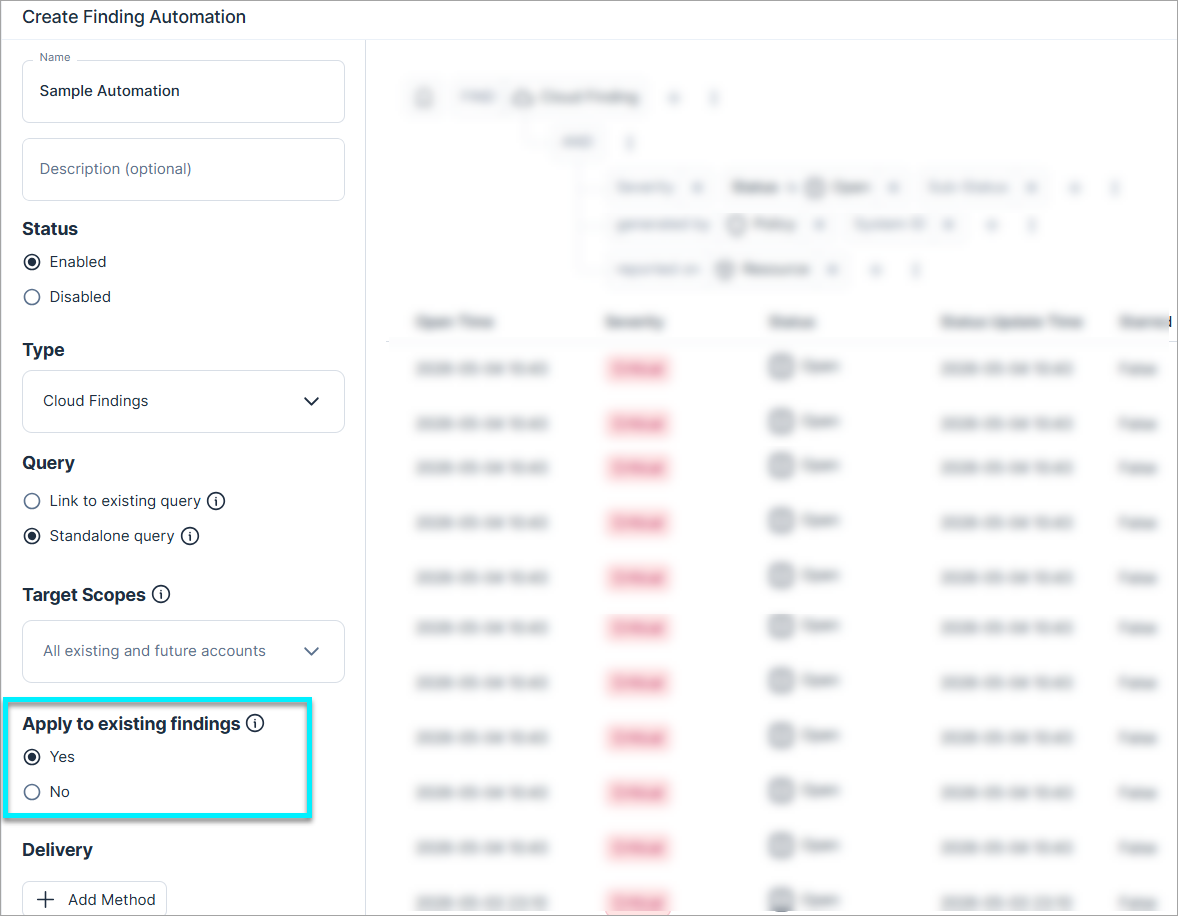
Automations: Apply Automations to Existing Findings
You can now choose to apply an automation to all current findings in the system (in addition to any new findings detected moving forward). This option is available when creating a new finding automation, or if the automation was previously disabled.
Streamlined Azure Subscription Integration
Tenable redesigned the Azure subscription integration experience to simplify how you connect.
Key improvements:
- Streamlined, script-based deployment — The wizard now prioritizes a simplified, automated flow, dynamically generating a PowerShell script. Send this script to your Azure Admin for quick execution.
- Documentation-led manual setup — For environments where scripts aren't preferred, manual configuration steps are available via our technical documentation.
Data Protection: Enhanced Secret Data Type Scanning
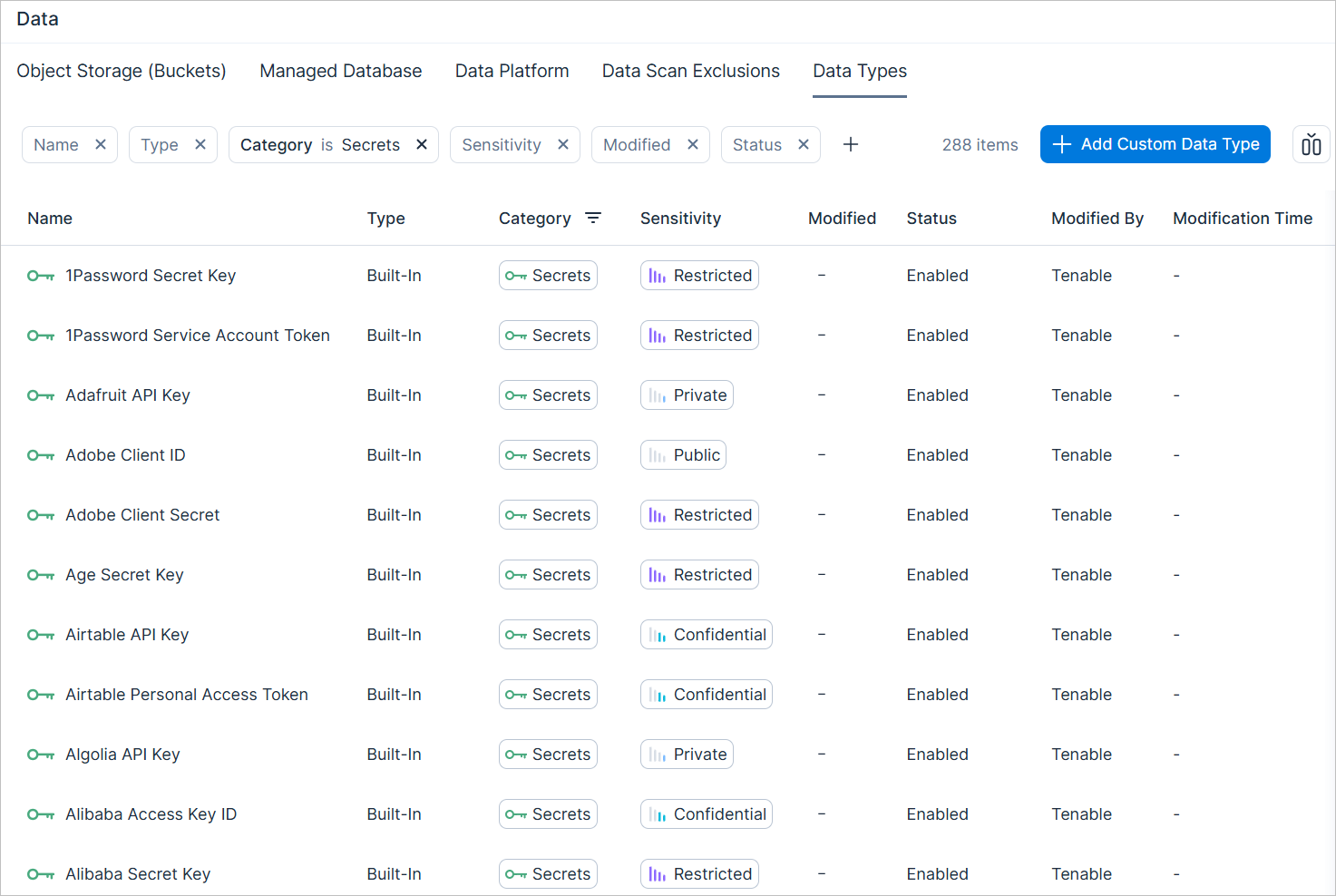
Tenable enhanced secret data type scanning by separating the original five Secrets data types into around 280 distinct, independent data types. This granular approach ensures better alignment with your security workflows and compliance requirements.
Key improvements:
- Granular customization — Manage each secret type independently within the Data Types tab (Settings > Security > Data). For example, whereas previously you could only edit a single, generic Token data type to change its sensitivity or status, you can now granularly edit specific token types, such as a GitHub App Token.
- Expanded policy monitoring — Apply the Monitor Sensitive Data custom policy template to monitor newly added data types and ensure they reside within authorized boundaries.
IaC Security: Terraform Private Module Scanning within Integrated Repositories
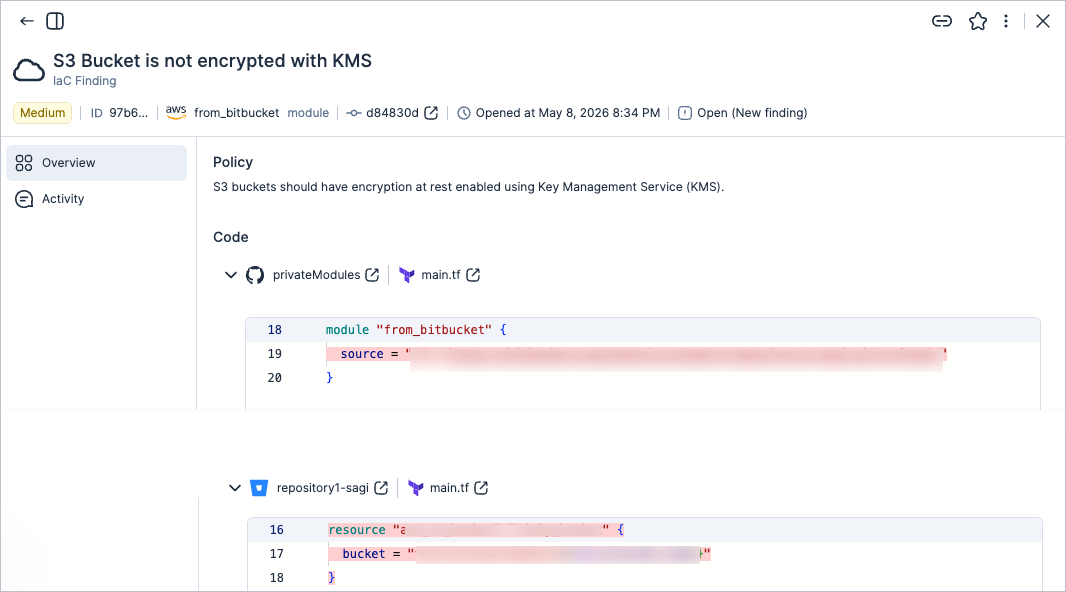
Tenable supports scanning of private modules from authenticated private repositories in both CI/CD and repositories.
This feature expands on the existing support for scanning private modules within the same repository.
- CI/CD scanning — When performing IaC scans in CI/CD, use the git-tokens parameter to provide the necessary access token for private repositories.
- Repository scanning — For integrated repositories, Tenable accesses private modules using existing authentication.
The following image shows an example of a finding from a private repository linked to other private repositories.
For more information, see the documentation.
Vulnerability Management: Windows Container Image Scanning for CI/CD Pipelines
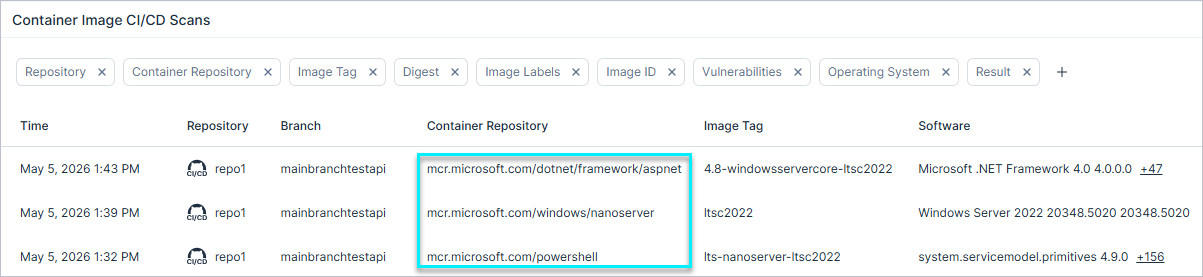
Tenable now supports vulnerability scanning for Windows-based container images within your CI/CD pipelines. This allows you to identify vulnerabilities during the build process and extends scanning capabilities beyond Linux-based resources.
Vulnerability Management: Improved Consistency for Container Repository Findings
To ensure data consistency across the platform, Tenable now automatically uses its own vulnerability information instead of default cloud provider data, when Container Registry Scanning is enabled. This change specifically affects findings related to the Container Image Repository has vulnerabilities policy.
This update prevents inconsistencies caused by misaligned scanning logic between cloud providers and Tenable.
New Resources in 207
API Support
The following resources were added in this release:
| Platform | Category | Resource |
|---|---|---|
| AWS | Network | Customer Gateway |
| AWS | Network | Direct Connect Gateway |
| AWS | Network | Site-to-Site VPN Connections |
| AWS | Network | Site-to-Site VPN Concentrators |
| AWS | Network | Transit Gateways |
| AWS | Network | Transit Gateway Attachments |
| AWS | Network | Transit Gateway Route Tables |
| AWS | Network | Virtual Private Gateways |
| Azure | Compute | Hybrid Compute Machine |
| Azure | Data | SQL Managed Instances |
May 3, 2026 (Release 1.206)
New Features
Network: Standardized Policy Naming for Network Exposure
Tenable unified the naming convention for policies identifying network-based public and wide-inbound internet exposure. This change standardizes policy naming for consistency, and streamlines how risk is communicated by focusing on potential exposure.
Relevant policies have been standardized to the following format:
- {resource_name} is exposed to the internet
For more information, including a full list of affected policies, see the Standardized Policy Naming for Network Exposure (May 3, 2026).
Streamlined Google Workspace Integration
Tenable redesigned the Google Workspace integration experience to simplify how you connect.
Key improvements:
- Streamlined, script-based deployment — The wizard now prioritizes a simplified, automated flow, dynamically generating a Cloud Shell script. Send this script to your GCP Admin for quick execution.
- Documentation-led manual setup — For environments where scripts aren't preferred, manual configuration steps are available via our technical documentation.
Vulnerability Management: On-Demand Scanning for Container Images and Repositories
You can now initiate on-demand scans for:
- Container images — Scanning an image triggers a scan for that specific image, the 10 most recent images in the parent repository, and all active images.
- Container repositories — Scanning a repository includes the 10 most recent images and all active images within that repo.
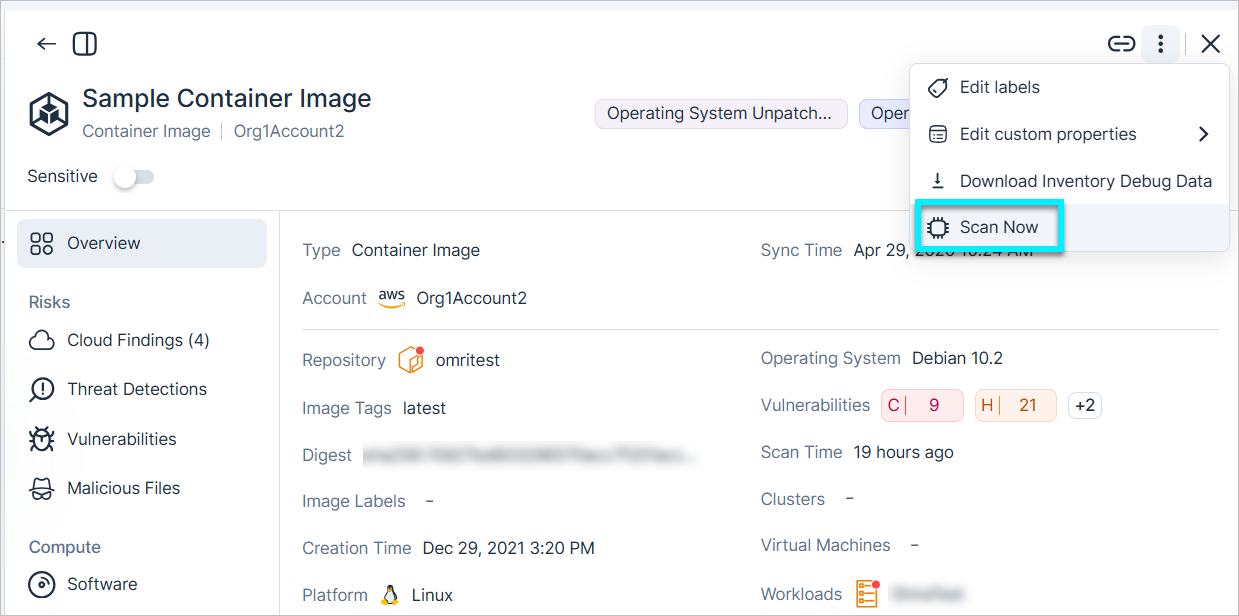
Vulnerability Management: Updated Scan Status for Unsupported Cloud Regions
Be aware of the following changes related to scanning virtual machines and virtual machine images in regions where cloud provider API limitations prevent scanning
- For workloads located in these regions, the Scan Status now displays as Not supported (previously, these workloads were listed as Pending).
- Additional regions were added to the list of locations where cloud provider API limitations prevent scanning. See About Agentless Workload Scanning for the complete list of regions.
Exclusions: GraphQL API Support
You can now manage exclusions via the GraphQL API by using the following new API endpoints. For query/mutation examples, see API: Exclusions.
| Action | GraphQL Endpoint | Description |
|---|---|---|
| List / Query | RiskExclusions | Retrieve a list of existing exclusion rules. You can query specific details such as the exclusion name, action (Ignore or Change Severity), finding type, and current status. |
| Delete | DeleteRiskExclusion | Remove exclusions that are no longer required |
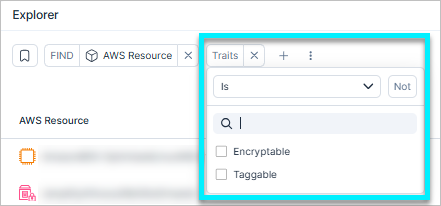
Explorer: Filter by Traits
Use the new Traits filter in the Explorer to target entities based on capabilities like Encryptable or Taggable. This allows you to easily include or exclude resources with shared characteristics, simplifying query building and risk policy management at scale.
IAM: Visibility for Microsoft Entra ID Conditional Access
API Support
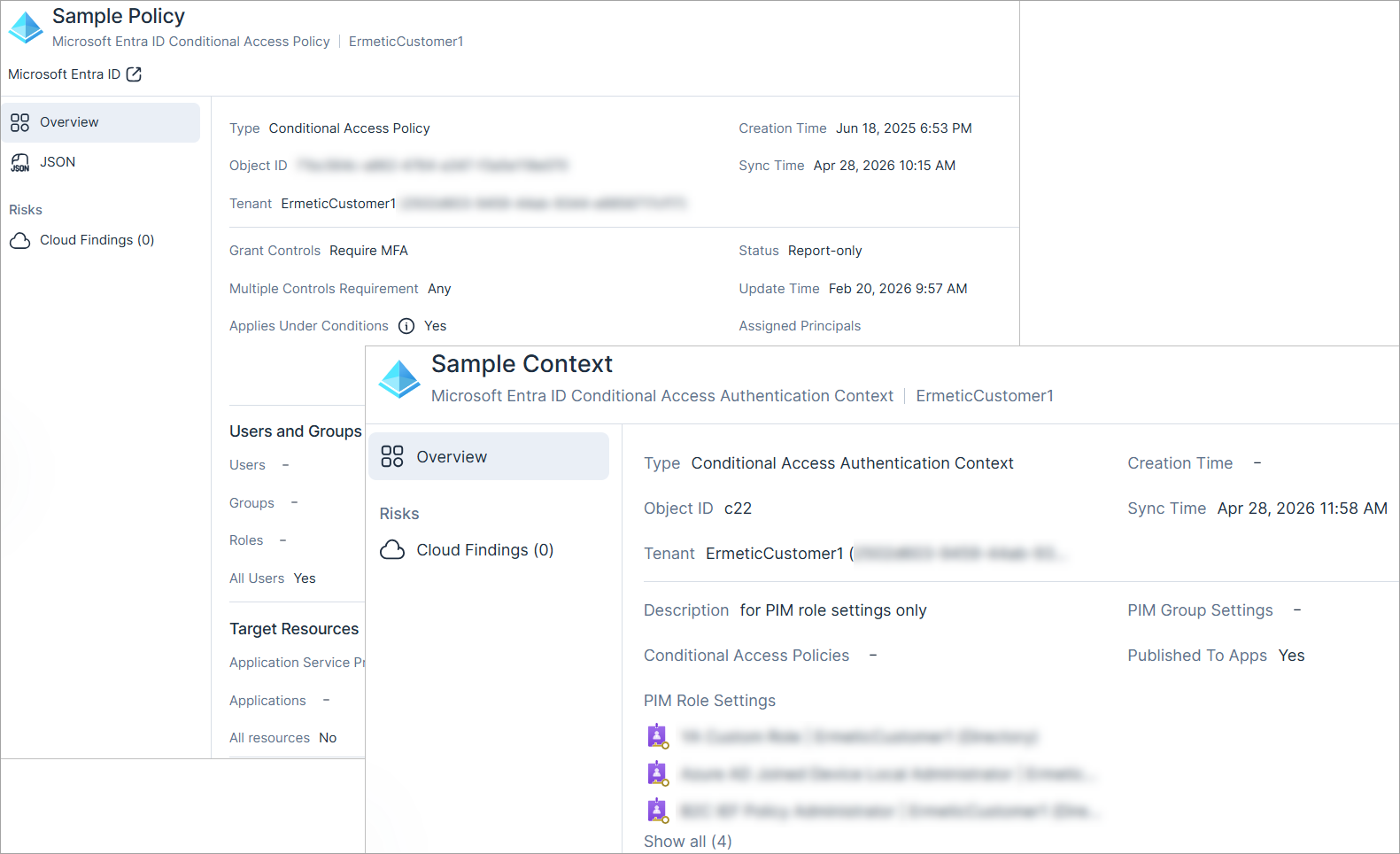
Tenable now provides visibility into Microsoft Entra ID Conditional Access policies in the Inventory view (IAM), allowing you to audit, evaluate, and identify potential gaps and misconfigurations in the policies.
New supported resources:
- Conditional Access Policy — For example, see if a policy Applies Under Conditions and identify included or exempted users and groups. Also, use the JSON view to see raw policy content.
- Authentication Context — For example, monitor PIM Role and Group settings to see which assignments require a context upon activation, and verify if a context is Published to Apps.
IAM: Visibility for Azure Offers and Delegations
API Support
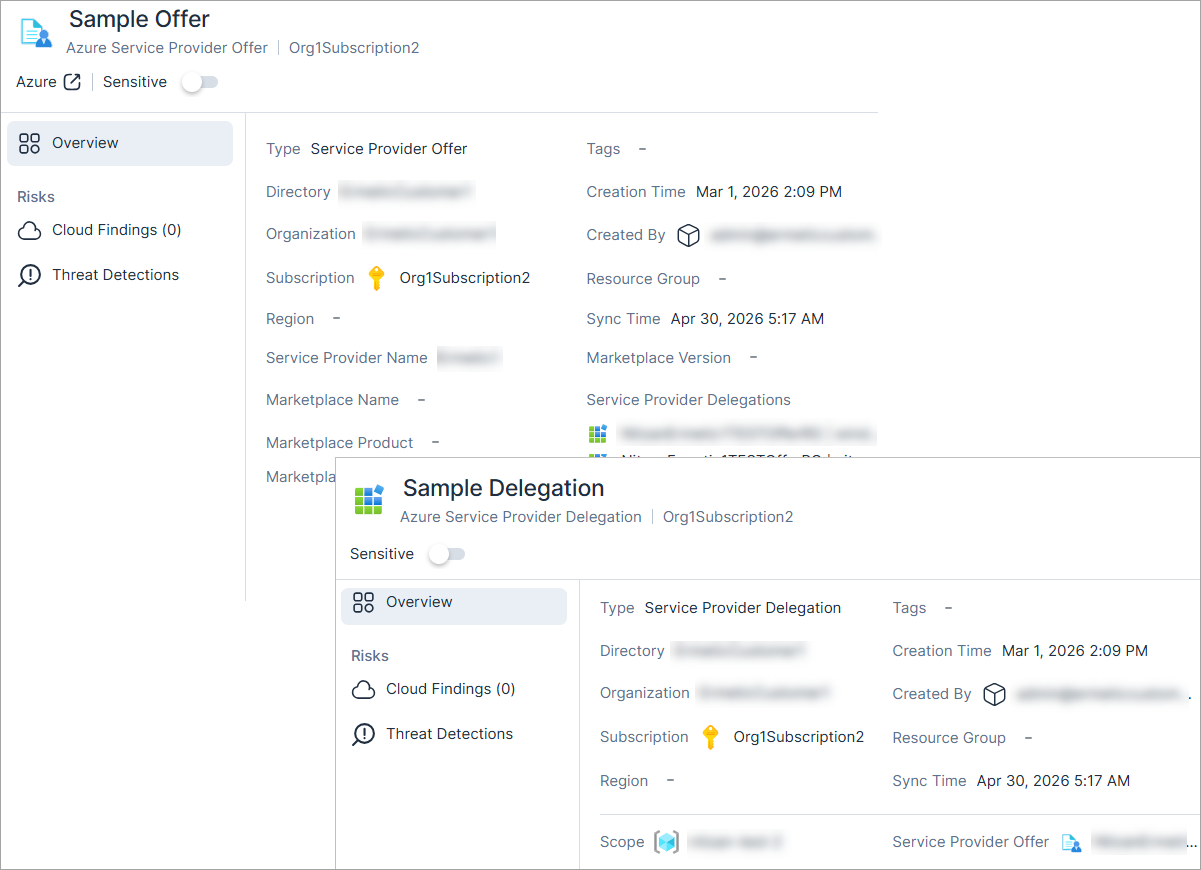
Tenable now provides visibility into Azure Lighthouse offers and delegations in the Inventory view (IAM), allowing you to see the offers you’ve accepted, the included delegations, roles, and the associated Azure subscriptions and resource groups.
New supported resources:
- Azure Service Provider Offer — See all offers you’ve accepted. When you open the side view panel for a specific offer, you can see all offer details, including provided delegations.
- Azure Service Provider Delegation — See all delegations and the associated service provider. When you open the side view panel for a specific delegation, you can see all delegation properties.
New Resources in 206
API Support
The following resources were added in this release:
| Platform | Category | Resource |
|---|---|---|
| AWS | AI | SageMaker Domain |
| AWS | Data | SSM Managed Node |
| Azure | IAM | Service Provider Offer |
| Azure | IAM | Service Provider Delegation |
| Microsoft Entra ID | IAM | Conditional Access Policy |
| Microsoft Entra ID | IAM | Authentication Context |
New Policies in 206
API Support
The following policy was added in this release:
| Provider | Category | Name |
|---|---|---|
| AWS | AI | SageMaker Domain is not encrypted with CMK |
April 19, 2026 (Release 1.205)
New Features
Console: Streamlined Profile Navigation
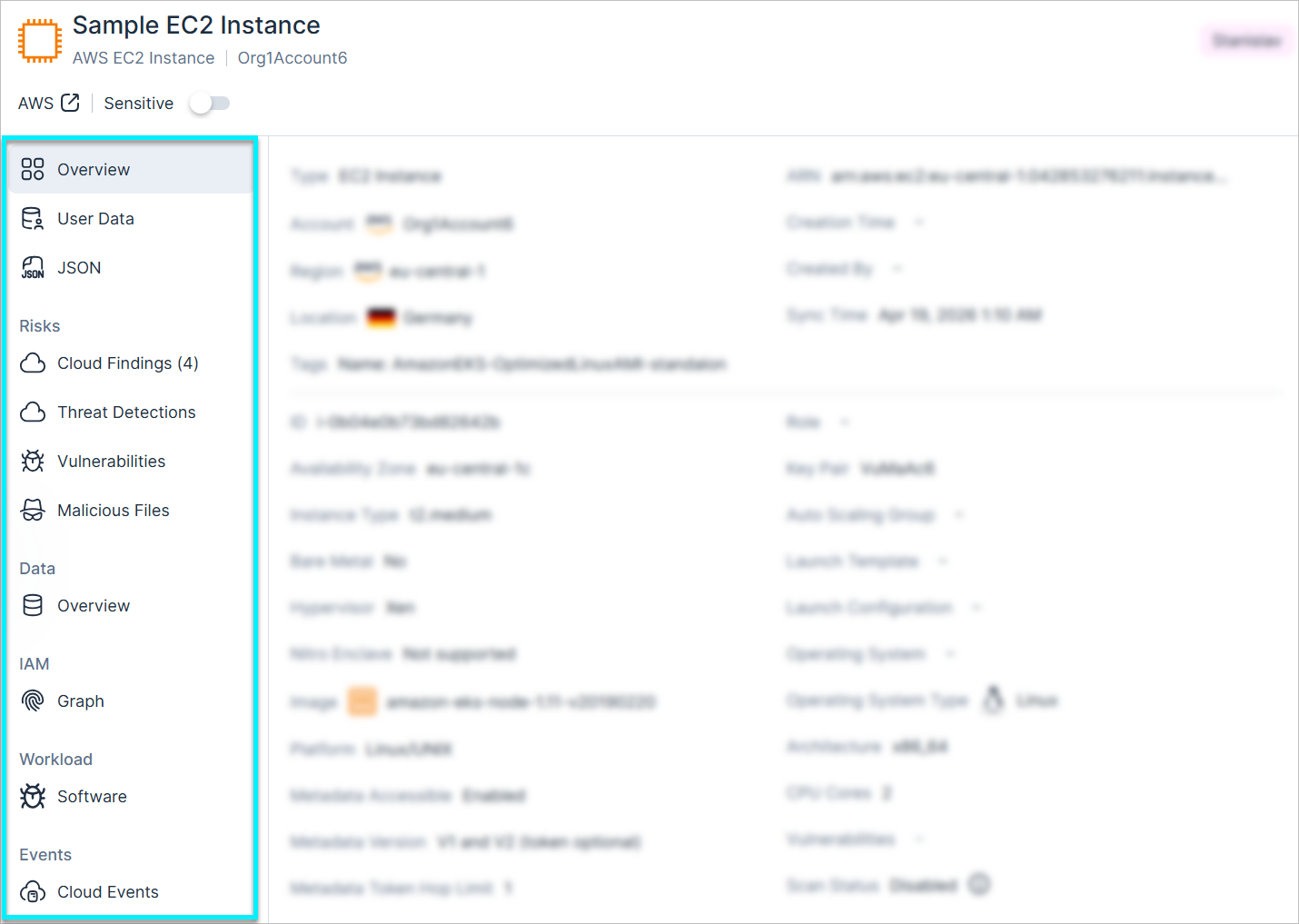
Tenable updated the layout of all profile views in the Cloud Exposure console to simplify navigation and improve data accessibility:
- Consolidated sidebar — Internal tabs are now in the left-hand menu instead of the main view.
- Categorized menu — All items are organized by functional categories for more direct access.
Vulnerability Management: Container Image CI/CD Pipeline Parameter Updates
Tenable added the following parameters to all supported container image CI/CD pipelines:
- minVprScore
- failOnMinVprScore
These parameters allow you to filter results and fail scans based on VPR scores.
For more details, see the documentation.
Vulnerability Management: Malware Detection Logic Updates
Tenable updated the malware detection logic to provide more accurate identification of threats in cloud workloads. This enhancement improves detection precision. You do not need to perform any configuration changes to receive these updates.
For more details, see the Malware Detection Logic Updates (April 19, 2026) article.
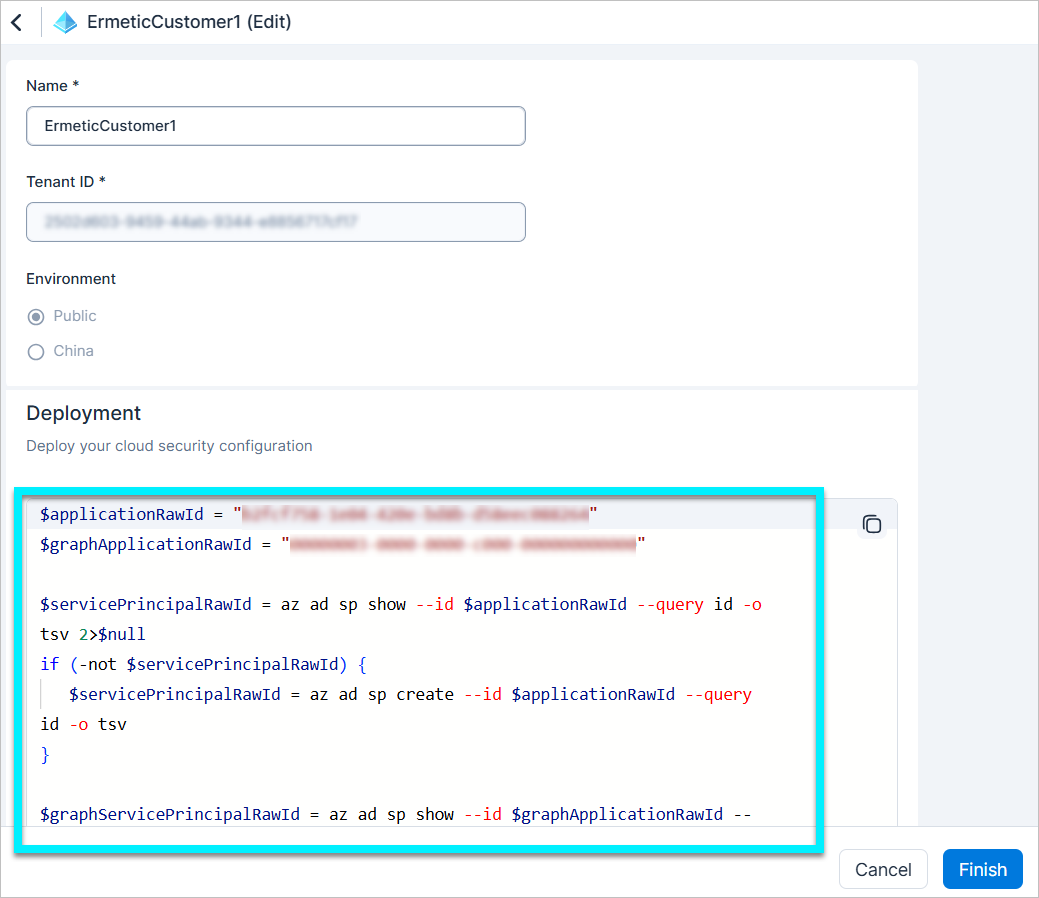
Microsoft Entra ID: Deployment Script Updated to PowerShell
Updated the integration process to use a PowerShell deployment script (instead of Bash) for connecting Microsoft Entra ID tenants to Cloud Exposure. This change ensures the script type is consistent with the Azure organization deployment, providing a more unified experience across the Microsoft ecosystem.
For more details, see the documentation.
IaC Security: Native Pull Request Scanning for Code Repositories
Enable automatic pull request (PR) scanning for GitHub and Azure DevOps to prevent security risks from reaching production. You can enable automated security scans within your existing workflow without any additional CI/CD configuration.
- Simplified gating — Block merges based on your failure thresholds. Configuration is simpler than the CI/CD pipeline integrations.
- Native developer experience — Review findings that appear as native checks directly on the relevant lines of code. You can fix issues directly within the existing PR workflow without switching between applications.
- Flexible integration — Integrate native scanning with both new and existing repository integrations.
For more details, see the documentation.
New Resource in 205
API Support
The following resource was added in this release:
| Platform | Category | Resource |
|---|---|---|
| GCP | Compute | Dataproc Cluster |
New Policies in 205
API Support
The following policies were added in this release:
| Provider | Category | Name |
|---|---|---|
| AWS | Management | GuardDuty Lambda Protection is not enabled for all regions |
| AWS | Management | GuardDuty Runtime Monitoring is not enabled for all regions |
| AWS | Management | GuardDuty EC2 Runtime Monitoring is not enabled for all regions |
| AWS | Management | GuardDuty ECS Runtime Monitoring is not enabled for all regions |
| AWS | Management | GuardDuty EKS Protection is not enabled for all regions |
| AWS | Management | GuardDuty EKS Runtime Monitoring is not enabled for all regions |
| AWS | Management | GuardDuty Malware Protection for EC2 is not enabled for all regions |
| AWS | Management | GuardDuty RDS Protection is not enabled for all regions |
| AWS | Management | GuardDuty S3 Protection is not enabled for all regions |
| AWS | Network | EFS Mount Target is associated with public IP address |
April 12, 2026 (Release 1.204)
New Features
Network: Verified Internet Exposure
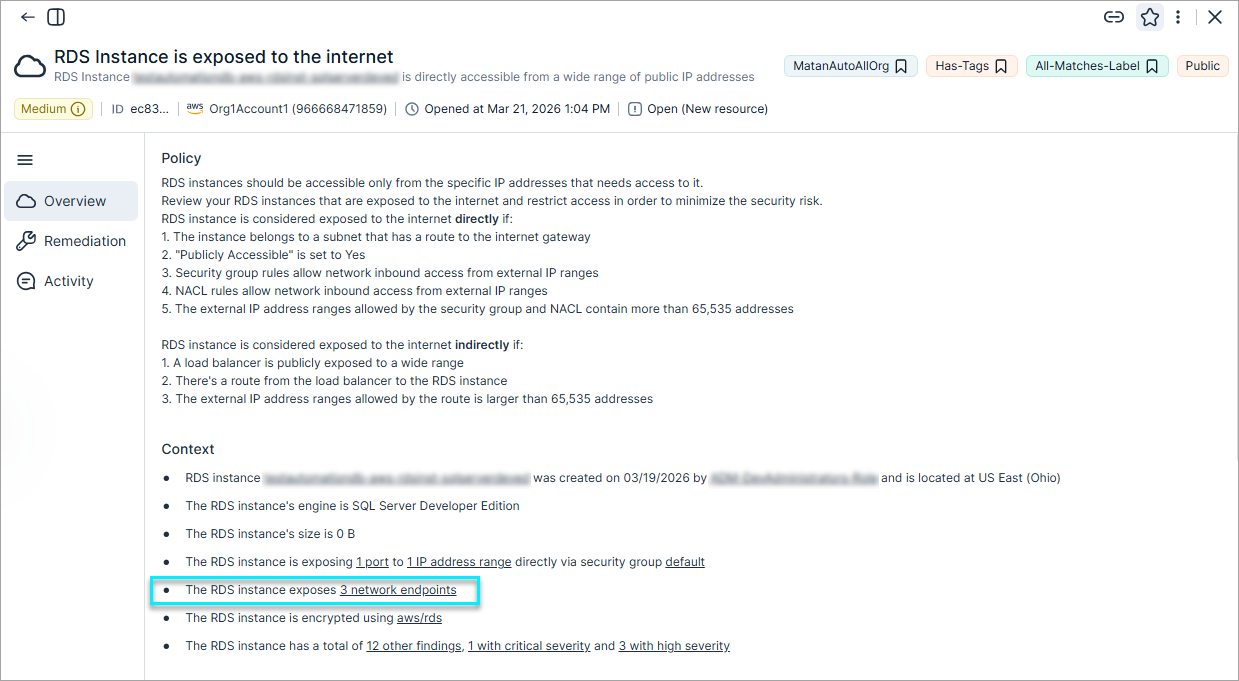
Internet exposure analysis has been upgraded by integrating Network Scanner results directly into core risk evaluation. Moving beyond static configuration analysis, this update uses dynamic validation to confirm actual reachability for direct resources like EC2, RDS, and Redshift.
This shift from theoretical risk to deterministic proof allows your team to prioritize toxic combinations, such as critical vulnerabilities on truly exposed assets, while reducing noise for resources protected by external controls. Consequently, finding severities may fluctuate as they align with verified real-world reachability data.
- Verified Internet Network Exposure (April 12, 2026)
- Verified Internet Network Exposure (April 12, 2026)
Automations: Query Based Finding Automations
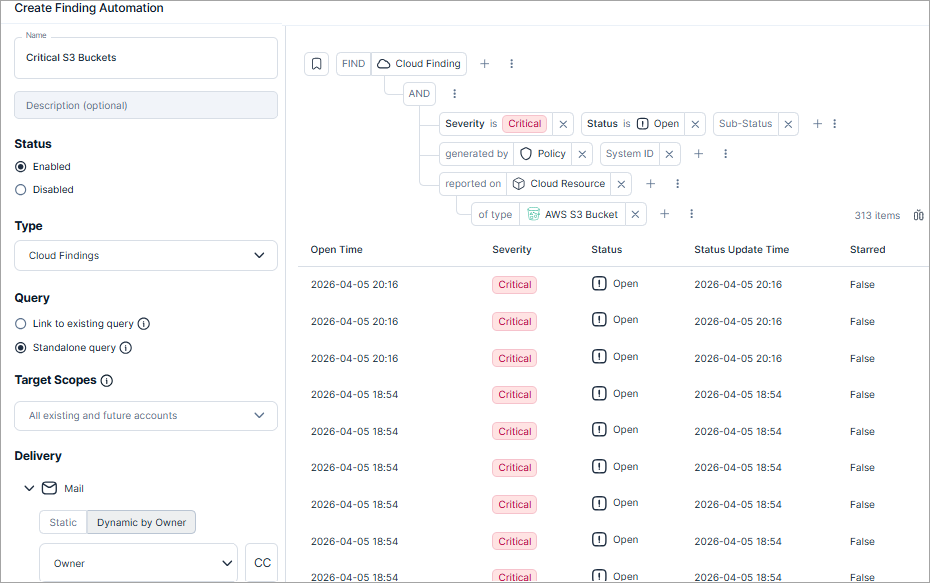
Tenable updated the finding automation workflow to use a query-based engine powered by the Explorer.
Key improvements:
- Advanced query builder — A new full-page interface replaces static drop-down menus with dynamic custom queries and a real-time results preview.
- Intelligent templates — The system populates a basic query template to assist with your configuration.
- Explorer integration — Convert any finding-based query into a permanent rule by creating an automation directly from the Explorer page.
Streamlined Azure Organization Integration
Tenable redesigned the Azure integration experience to simplify how you connect your entire organization.
Key improvements:
- Streamlined, script-based deployment — The wizard now prioritizes an automated flow, dynamically generating a PowerShell script based on the capabilities you select. Send this script to your Azure Admin for quick execution.
- Microsoft Entra ID linking — Seamlessly pair your tenants during the flow to unlock identity-related risk analysis and other features.
- Documentation-led manual setup — For environments where scripts aren't preferred, manual configuration steps are available via our technical documentation.