Tenable One Cloud Exposure 2026 Q4 Release Notes
Tip: You can subscribe to receive these release notes by email or RSS.
These release notes are listed in reverse chronological order.
November 8, 2026 (Release 1.229)
 New Features
The following features were added in this release:
| Area | Feature | Details |
|---|---|---|
| Vulnerability Management | Automatic cleanup of inactive virtual machine scan data | Cloud Exposure now automatically deletes scan data for virtual machines and virtual machine images that Tenable has not scanned for more than 30 days, and closes their related vulnerability findings. If Tenable scans your resources regularly, your scan data and open findings stay the same. For more information, see Automatic Cleanup of Inactive Virtual Machine Scan Data (November 8, 2026). |
| Console | Flat View button removed from tables | The Flat View button is removed from tables across the Console, including Integrations, Policies, Risk Automations, and Compliance reports. These tables now always show items defined in child scopes, so you see everything under the selected scope without an extra click. The Flat View button remains on the Accounts and Projects pages. |
| Mobilization | Exclude assignment groups in the ServiceNow integration | With the ServiceNow integration, you can now exclude Assignment Groups. Control which ServiceNow assignment groups Cloud Exposure can assign incidents to. Use this to make sure Cloud Exposure never assigns incidents to a groups that are not relevant. Automations that already use an excluded group keep running as before. |
| Hexa AI | Suggest custom compliance frameworks | Hexa AI can now suggest a custom compliance framework based on your conversation. Describe the framework you want, or ask Hexa AI to base it on an existing built-in or custom framework. Hexa AI returns a suggestion with a name, description, sections, and policies. Click Create Compliance to open the Create Custom Compliance page with these values filled in, review the framework, and click Create to save it. For example, ask Hexa AI to create a custom compliance framework with sections for IAM, networking, and storage. Hexa AI does not create or save the framework for you. For more information, see Add a Custom Standard. |
New Threat Rules
The following threat rules were added in this release:
| Provider | MITRE Tactic | Name |
|---|---|---|
| AWS | Defense Impairment | AWS Bedrock guardrail deleted |
| AWS | Defense Impairment | AWS Bedrock model invocation logging data delivery disabled |
| Runtime | Impact | Cryptominer systemd service created |
| AWS | Initial Access | AWS Bedrock knowledge base connected to external S3 bucket |
| AWS | Impact | AWS CloudFormation stack with cryptominer indicators created |
| AWS | Defense Impairment | AWS DMS replication instance created with public access enabled |
| AWS | Impact | AWS EC2 launch template with cryptominer indicators created |
| AWS | Defense Impairment | AWS EC2 network ACL inbound rule allowing all traffic from any IP address created |
| AWS | Impact | AWS ECS cluster with cryptominer indicators created |
| AWS | Persistence | AWS IAM Roles Anywhere trust anchor created |
| AWS | Impact | AWS Lambda function with cryptominer indicators created |
| AWS | Defense Impairment | AWS SageMaker domain public internet access enabled |
| AWS | Persistence | AWS SageMaker notebook instance lifecycle configuration attached |
| AWS | Persistence | AWS SageMaker notebook instance lifecycle configuration script modified |
| AWS | Exfiltration | AWS Lambda function URL created with unauthenticated public access |
| AWS | Persistence | AWS Lightsail key pair created |
Policy Updates
The following policies were updated in this release:
| Name | Update |
|---|---|
|
The logic has been updated to evaluate only core operating system components on Linux, such as the kernel, the C library, OpenSSL, systemd, and the package manager. Other packages are no longer counted, even if they ship with the distribution or were installed through the system package manager. Findings open when several core components have a high or critical vulnerability with an available fix. As a result, most Linux workloads will show these findings less often, and some may no longer show them. Workloads with several outdated core components may now show them. |
|
These policies now list vulnerabilities from the same core operating system components used by the unpatched operating system policies. |
November 1, 2026 (Release 1.228)
Upcoming Changes
| Upcoming Change | Description | Planned Change Date |
|---|---|---|
| Indirect Exposure Scanning and Network Exposure Graph | In an upcoming release, the Cloud Exposure Network Scanner will show which backend resources are reachable from the internet through your load balancers in AWS, Azure, GCP, and OCI. A new Network Exposure Graph will show each exposure path from the entry point to the backend resource. Network endpoint counts can change as a result. For more information, see Indirect Exposure Scanning and Network Exposure Graph (Q4, 2026). |
Q4, 2026 |
| Automatic Cleanup of Inactive Virtual Machine Scan Data | This change was first announced in release October 25, 2026 (Release 1.227) and is coming soon. On November 8, Cloud Exposure will automatically delete scan data for virtual machines and virtual machine images and their vulnerability findings that have not been scanned for more than 30 days. If Tenable scans your resources regularly, your scan data and open findings stay the same. For more information, see Automatic Cleanup of Inactive Virtual Machine Scan Data (November 8, 2026). |
November 8, 2026 |
New Features
The following features were added in this release:
| Area | Feature | Details |
|---|---|---|
| Compliance | Support for CIS Alibaba 2.0.1 | Cloud Exposure now supports the CIS Alibaba 2.0.1 compliance standard. This framework serves as an objective, consensus-driven security guideline for Alibaba Cloud. |
| Vulnerability Management | Deleted scan status API fields | The ScanTime, ScanStatus, and ScanStatusDescription GraphQL API fields will be deleted on November 2 and replaced by VulnerabilityScanTime, VulnerabilityScanStatus, and VulnerabilityScanStatusDescription, respectively. For more information, see Deleted Scan Status API Fields (November 2, 2026). |
| Vulnerability Management | JFrog federated repositories scanning | You can now scan container images in JFrog Artifactory federated repositories for vulnerabilities. If you already scan JFrog registries, this capability works automatically with no additional permissions required. |
| Vulnerability Management | Emerging Threats page for Brotli2Shell | The Emerging Threats section now includes Brotli2Shell (CVE-2026-111497), a critical vulnerability in the Google Brotli decoder. It is actively exploited and listed in the CISA Known Exploited Vulnerabilities (KEV) catalog. Use this page to identify which of your virtual machines, virtual machine images, and container images are affected. Go to Risk > Emerging Threats > Brotli2Shell. |
| Vulnerability Management | Vulnerability detection for Echo OS and Chainguard OS | Cloud Exposure now extends vulnerability detection to Echo OS and Chainguard OS, so you can secure workloads built on these minimal, container-optimized operating systems with the same confidence as the rest of your environment. Findings appear directly in your existing vulnerability views, with the affected resource, severity, and clear remediation steps, so your team can prioritize and fix issues quickly without switching tools. |
| Vulnerability Management | Support for Alibaba Cloud virtual machines and container images | Cloud Exposure now officially supports scanning virtual machines and container images in Alibaba Cloud. This includes disks encrypted using Alibaba Cloud Key Management Service (KMS), or using Alibaba-managed keys Customer-managed keys (CMK). See Alibaba Cloud. Action required for encrypted disks: To scan encrypted disks, update your Alibaba Cloud integration by following the steps in Alibaba Cloud Required Permissions. Until you do, Cloud Exposure does not scan encrypted disks, and the account shows a missing permissions issue. For Alibaba Cloud in-account deployments, contact Tenable Support. |
| Console | Account moves no longer blocked by custom policies or exclusions |
Who is affected: If you enabled Automatically update folder structure, you have custom policies or exclusions on parent folders, and you move subfolders or accounts in your cloud environment. Before: When an account or subfolder moved to a different parent folder in your cloud environment, and there was a custom policy or exclusion on the previous parent, the move was not synced in the Cloud Exposure Console. This kept the findings from being deleted, but the account stayed in its old folder, and your folder structure in Cloud Exposure no longer matched your cloud environment. Now: The account or subfolder moves to match your cloud structure, and custom policies and exclusions on the old parent folder stop applying to it:
Moves that would break something the account relies on, such as an automation that uses an integration on the old parent folder, are still blocked. |
New Policies
The following policies were added in this release:
| Provider | Category | Name |
|---|---|---|
| Azure | Access | Microsoft Entra ID privileged group has AD-synced users |
| Azure | Access | Microsoft Entra ID privileged user AD-sync is enabled |
| Azure | AI | AI Service is not encrypted with a customer-managed key |
| Azure | AI | Azure AI Search public network access is enabled |
| Azure | AI | Bot Service is not encrypted with a customer-managed key |
| Azure | AI | Bot Service private link is not configured |
| Azure | AI | Machine Learning Workspace High Business Impact is not enabled |
| Azure | Compute | Virtual Desktop Workspace private link is not configured |
| Azure | Compute | Virtual Desktop Workspace public network access is enabled |
| Azure | Compute | VM Image Definition does not use Gen 2 VM Generation |
| Azure | Data | Databricks Workspace DBFS root double encryption is not enabled |
| Azure | Data | Databricks Workspace managed disks encryption is not using a customer-managed key |
| Azure | Data | Databricks Workspace managed services encryption is not using a customer-managed key |
| Azure | Data | Databricks Workspace private link endpoints are not approved |
| Azure | Data | Databricks Workspace public IPs for clusters are enabled |
| Azure | Data | Databricks Workspace public network access is enabled |
| Azure | Data | Databricks Workspace SKU is not Premium |
| Azure | Data | MySQL Flexible Server is not encrypted with a customer-managed key |
| Azure | Data | PostgreSQL Flexible Server is not encrypted with a customer-managed key |
| Azure | Data | SQL Virtual Machine allows public connectivity |
| Azure | Management | Compute Gallery sharing method is not RBAC |
| Azure | Management | Compute Gallery soft delete policy is not enabled |
| Azure | Monitoring | Azure Arc Machine Azure Monitor Agent auto-upgrade is not enabled |
| Azure | Network | Application Gateway backend HTTP traffic is not encrypted |
| Azure | Network | Application Gateway WAF Policy is not set to Prevention mode |
| Azure | Network | Network Interface has a public IP address assigned |
| Azure | Network | Network Interface IP forwarding is enabled |
| Azure | Secrets | Disk Encryption Set auto key rotation is not enabled |
October 25, 2026 (Release 1.227)
Upcoming Changes
| Upcoming Change | Description |
|---|---|
| Automatic Cleanup of Inactive Virtual Machine Scan Data | On November 8, Cloud Exposure will automatically delete scan data for virtual machines and virtual machine images and their vulnerability findings that have not been scanned for more than 30 days. If Tenable scans your resources regularly, your scan data and open findings stay the same. For more information, see Automatic Cleanup of Inactive Virtual Machine Scan Data (November 8, 2026). |
New Features
The following features were added in this release:
| Area | Feature | Details |
|---|---|---|
| Vulnerability Management | Emerging Threats pages for new vulnerabilities | You can now identify which of your resources are affected by the newly reported PHP remote code execution vulnerabilities known as PHP2Shell. The ability to create custom views of your most critical vulnerabilities is coming soon. Go to Risk > Emerging Threats > PHP2Shell. |
| Access Management | Manage secrets for CI/CD and endpoint connector integrations |
You can now create, delete, enable, and disable the secrets of CI/CD pipeline and endpoint connector integrations without deleting and recreating the integration.
|
| GraphQL | Manage service accounts and integration secrets via API |
You can now manage service accounts through the GraphQL API.
For more information, see API: Service Accounts. |
| Explorer | Severity Update Time for findings | Findings now include a Severity Update Time property that shows the last time the severity of a finding changed. You can filter by it in the Explorer and in the filters on the Cloud Findings, IaC Findings, and AI Posture Findings pages. The Severity Update Time column is hidden by default. Add it with the column picker. If the severity of a finding has not changed, the value is the time the finding was created. For more information, see Cloud Findings. |
| Compliance | Support for NCSC Cyber standards | Cloud Exposure now supports the NCSC CAF 4.0 and NCSC Cyber Essentials 3.3 standards. Cyber Essentials defines a baseline of five technical controls (firewalls, secure configuration, security update management, user access control, and malware protection) to protect against common cyber attacks. The Cyber Assessment Framework (CAF) assesses how effectively an organization manages cyber risk across four objectives: managing security risk, protecting against cyber attack, detecting cyber security events, and minimizing the impact of cyber security incidents. |
| Vulnerability Management | Scan Exclusions is now generally available | Scan Exclusions is now generally available. Use it to exclude resources from workload scans with the query builder. Virtual Machine Exclusion Tags and Virtual Machine Image Exclusion Tags are removed, and Tenable migrates your existing exclusions automatically. For more information, see Scan Exclusions. |
| Integrations | New Microsoft Entra ID access review policies |
Cloud Exposure now checks whether your Microsoft Entra ID tenants run access reviews for guest users and privileged roles. Without regular reviews, guest accounts and privileged role assignments tend to pile up, which leaves standing access open to attackers. Two new policies flag tenants where these reviews are missing, so you can close those governance gaps and back up your access-certification controls in compliance audits:
To turn on these policies, Microsoft Entra ID tenants now need the AccessReview.Read.All permission. If you onboarded a tenant before this release, add the permission so the policies can evaluate the tenant. |
New Policies
The following policies were added in this release:
| Provider | Category | Name |
|---|---|---|
| Azure | Monitoring | Subscription Defender for Cloud attack path notifications are not enabled |
| Azure | Monitoring | Subscription Defender for Cloud email notifications to subscription owners are not enabled |
| Azure | Monitoring | Subscription Defender for Cloud File Integrity Monitoring is not enabled |
| Azure | Monitoring | Subscription Defender for Cloud MCAS integration is not enabled |
| Azure | Monitoring | Subscription Defender for Cloud security contact email is not configured |
| Azure | Monitoring | Subscription Defender for Cloud security contact phone is not configured |
| Azure | Workload Protection | Subscription Windows Defender ATP integration is not enabled |
Policy Updates
Custom policies
Cloud Exposure no longer offers the following templates when you create a custom policy. To monitor a condition that you would have used a template for, create a custom policy from an Explorer query instead. Explorer queries give you more precise control over the resources a policy evaluates.
| Provider | Name |
|---|---|
| AWS | Monitor these IAM Identity Center principals of these types that are created |
| AWS, GCP | This sensitive data should reside only in these resources |
| Azure | These data types should reside only in these resources |
| Azure | These managed identities should not have these permissions on these resources |
| GCP | Only these Google principals should have these permissions on these resources |
| GCP | This sensitive data should not reside in these resources |
October 18, 2026 (Release 1.226)
New Features
The following features were added in this release:
| Area | Feature | Details |
|---|---|---|
| Mobilization | Link external tickets to findings | You can now link an existing ticket from any ticketing system to a finding, using only the ticket ID and URL. Use this when you cannot set up a native ticketing integration, or when Cloud Exposure does not support your ticketing system. Linked tickets appear in the Tickets column of the Findings table and Explorer, and you can find them with the Ticket Type filter. Cloud Exposure does not sync linked tickets, so closing the ticket in the external system does not close the finding. |
| Explorer | Filter by multiple values | You can now filter on multiple values at once when you use the Equals operator in the Explorer. Type or paste one value per line, and Cloud Exposure returns the resources that match any of the values. This is useful when you already have a list of items in a file, such as hostnames in a text file. Copy the list and paste it into the value box. For example, to find specific virtual machines, select Virtual Machine, filter by Name, select Equals, and paste one hostname per line. For more information, see Filter by Multiple Values. 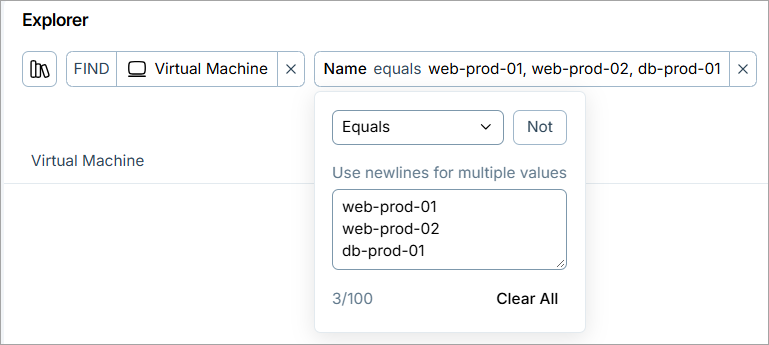 |
| Explorer | Filter by raw cloud provider data | The name of the Provider Raw Response property was changed to Source Data. |
| Compliance | Support for CIS Microsoft, AWS, and Azure standards | Cloud Exposure now supports CIS Microsoft 365 7.0.0, CIS AWS 7.0.0, CIS Azure Storage Services 2.0.0, CIS Azure Compute Services 2.0.0, and CIS Azure Database Services 2.0.0 as compliance standards. These frameworks serve as objective, consensus-driven security guidelines for Microsoft 365, Microsoft Entra ID, AWS, and Azure. |
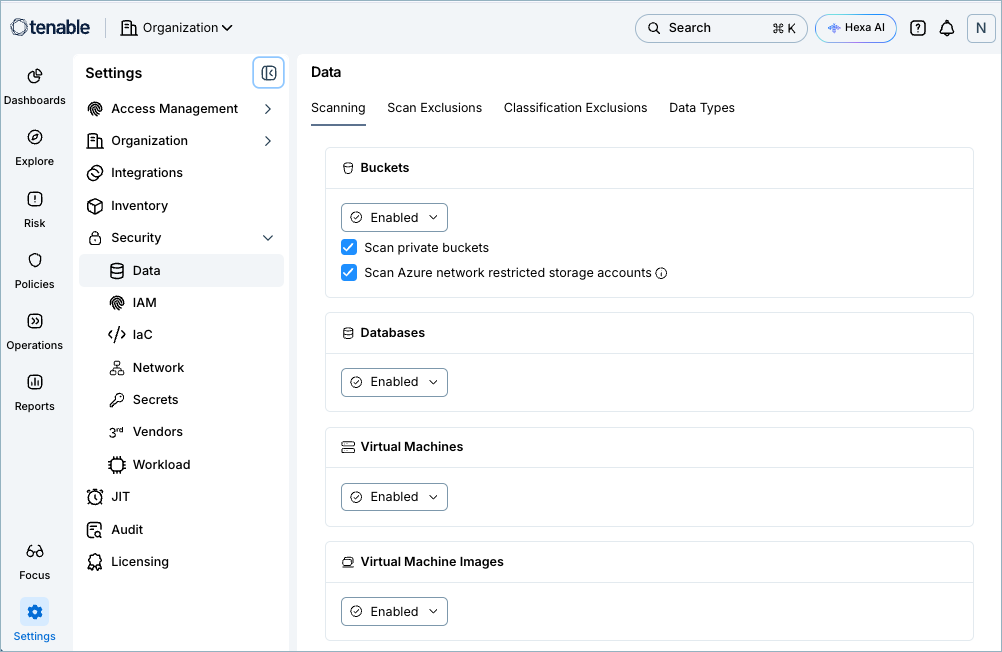
| Data Protection | Virtual machine data scanning settings moved |
Data scanning for virtual machines and virtual machine images is now configured in Data settings instead of Workload settings. All data scanning configuration now lives in a single Scanning tab. Why we made this change: Data Protection scanning for virtual machines now works independently from Workload vulnerability scanning, so you can choose whether to scan a machine for sensitive data regardless of your vulnerability scanning settings. Moving these settings to Data puts everything you need to manage data scanning in one place.
What changed:
For more information, see Configure Data Scanning Settings. |
| Vulnerability Management | Self-managed cluster retention |
Cloud Exposure now automatically removes stale self-managed clusters after a configurable retention period. A self-managed cluster (connected via Helm chart without an agentless connection) goes through the following retention lifecycle:
This prevents decommissioned clusters from cluttering your inventory while giving temporarily offline clusters enough time to reconnect. To adjust retention settings across scopes, go to Settings > Security > Workload > Kubernetes Cluster. Note:
For more information, see Configure Self-Managed Kubernetes Cluster Retention and Cluster Lifecycle. |
| Vulnerability Management | In-account scanning for Alibaba Cloud |
Cloud Exposure now supports in-account scanning for Alibaba Cloud. To use in-account scanning, create a dedicated scanning account in your Alibaba Cloud environment and grant Tenable the permissions required to provision the scanning infrastructure in that account. Tenable then orchestrates scanning on a regular basis. You are responsible for the compute costs associated with the scanning account. For more information, see Configure In-Account Scanning. Note: This feature is currently in Public Preview. To learn more about the intent behind preview releases and what to expect during this phase, see Public Preview Overview.
|
 Policy Updates
Cloud Policies
The following policies were updated in this release:
| Provider | Category | Existing Name | New Name |
|---|---|---|---|
| AWS | Compute | Public Lambda Function | Lambda Function allows public access |
| AWS | Data | Public DocumentDB Cluster Snapshot | DocumentDB Cluster Snapshot allows public access |
| AWS | Data | Public EBS Snapshot | EBS Snapshot allows public access |
| AWS | Data | Public EC2 Image | EC2 Image allows public access |
| AWS | Data | Public ECR Repository | ECR Repository allows public access |
| AWS | Data | Public KMS Key | KMS Key allows public access |
| AWS | Data | Public Neptune Cluster Snapshot | Neptune Cluster Snapshot allows public access |
| AWS | Data | Public OpenSearch Domain | OpenSearch Domain allows public access |
| AWS | Data | Public RDS Snapshot | RDS Snapshot allows public access |
| AWS | Data | Public S3 Bucket | S3 Bucket allows public access |
| AWS | Data | Public SNS Topic | SNS Topic allows public access |
| AWS | Data | Public SQS Queue | SQS Queue allows public access |
| AWS | Data | S3 Bucket block public access is not enabled | S3 Bucket block public access is not enabled |
| AWS | IAM | Public IAM Role | IAM Role trust policy allows public access |
| AWS | Logging | Public CloudTrail S3 Bucket | CloudTrail S3 Bucket allows public access |
| AWS | Secrets | Public Secrets Manager Secret | Secrets Manager Secret allows public access |
| Azure | Data | Public Storage Account Blob Container | Storage Account Blob Container allows public access |
| Azure | Logging | Public activity log Blob Container | Activity log Blob Container allows public access |
| GCP | Compute | Public Cloud Function | Cloud Function allows public access |
| GCP | Compute | Public Cloud Run Service | Cloud Run Service allows public access |
| GCP | Compute | Public Compute Engine Image | Compute Engine Image allows public access |
| GCP | Data | Public Artifact Registry | Artifact Registry allows public access |
| GCP | Data | Public BigQuery Dataset | BigQuery Dataset allows public access |
| GCP | Data | Public Cloud KMS Key | Cloud KMS Key allows public access |
| GCP | Data | Public Cloud KMS Key ring | Cloud KMS Key Ring allows public access |
| GCP | Data | Public Cloud Storage Bucket | Cloud Storage Bucket allows public access |
| GCP | Data | Public Pub/Sub Subscription | Pub/Sub Subscription allows public access |
| GCP | Data | Public Pub/Sub Topic | Pub/Sub Topic allows public access |
| OCI | Data | Public Object Storage Bucket | Object Storage Bucket allows public access |
Custom policies
Cloud Exposure no longer offers the following templates when you create a custom policy. Tenable converted these templates to Explorer-based templates in Custom Policies: Explorer-Based Templates and Custom Policies: Explorer-Based Templates.
| Provider | Name |
|---|---|
| All clouds | These resources should have these tags |
| All clouds | These resources should be encrypted using these encryption keys |
| AWS, Azure, GCP | These resources should be managed as code |
| AWS | These VPCs should not have an internet gateway attached |
| AWS | These subnets should not allow inbound internet connection |
To monitor the same conditions, create a custom policy from an Explorer query. For more information, see Cloud Policies: Custom.
October 11, 2026 (Release 1.225)
New Features
The following features were added in this release:
| Area | Feature | Details |
|---|---|---|
| Code | Support for GitHub Enterprise Cloud with EU data residency | Cloud Exposure now supports the onboarding of GitHub Enterprise Cloud environments with data residency in the EU and the scanning of repositories for IaC-related risks. |
| Vulnerability Management | Alibaba Cloud Container Registry (ACR) scanning |
You can now scan container images in the managed repositories in your Alibaba Cloud accounts for vulnerabilities. If you have enabled Alibaba Cloud scanning, this capability works automatically with no additional permissions required. If needed, you can disable it in the workload settings. Note: This feature is currently in Public Preview. To learn more about the intent behind preview releases and what to expect during this phase, see Public Preview Overview.
|
| Vulnerability Management | Helm v4 support | The onboarding flow of the agent for Kubernetes cluster nodes now supports Helm v4. With Helm v4 support, you can deploy the agent on clusters that cannot or do not run Helm v2. |
| Kubernetes | New agent version for Kubernetes cluster nodes | A new version of the agent for Kubernetes cluster nodes is available with bug fixes and additional CVE coverage. |
New Policies
The following policies were added in this release:
| Provider | Category | Name |
|---|---|---|
| Microsoft Entra ID | IAM | Microsoft Entra ID tenant missing trusted Conditional Access named locations |
Policy Updates
The following policies were updated in this release:
| Provider | Name | Update |
|---|---|---|
| Azure |
|
The logic for the policy has been updated to fix an issue that generated false-positive findings. As a result, previously opened findings may now be automatically closed with the sub-status False positive. Findings will no longer be opened on Storage Accounts where shared key access is disabled. |
October 4, 2026 (Release 1.224)
New Features
The following features were added in this release:
| Area | Feature | Details |
|---|---|---|
| Hexa AI | Suggest automations | Hexa AI can now suggest automations based on your conversation. Describe the findings you want to send to your teams, and Hexa AI returns a suggestion with a name, description, query, and target scopes. Click Create Automation to open the Create Risk Automation page with these values filled in, review the configuration, and save it to activate the automation. For example, ask Hexa AI to create an automation for unencrypted RDS instances in your production AWS accounts. Hexa AI does not create or save the automation for you. For more information, see Automations. |
| Compliance | Expanded support for CIS Red Hat OpenShift Container Platform 1.5.0 | We've expanded and improved compliance support for CIS Red Hat OpenShift Container Platform Benchmark v1.5. This update adds previously missing requirements and policies, providing more complete coverage and a more accurate view of your OpenShift compliance posture. |
| Compliance | Support for CIS Red Hat OpenShift Container Platform 1.9.0 and 2.0.0 | Cloud Exposure now supports CIS Red Hat OpenShift Container Platform 1.9.0 and CIS Red Hat OpenShift Container Platform 2.0.0 as compliance standards. These frameworks serve as objective, consensus-driven security guidelines for Red Hat OpenShift Container Platform. |
| Console | Update to AI focus view | The AI Focus view now shows cloud security data related to AI and will not point to Tenable One AI Exposure. Access to AI Exposure is only available through the Tenable One Workspace screen. |
| Explorer | Filter by raw cloud provider data | You can now query resource attributes that Cloud Exposure does not display as properties, and use those queries in custom policies. The new Provider Raw Response property contains the JSON representation that Tenable received from the cloud provider for each relevant resource. To filter on a specific value, use the Matches JSON Path operator with a case-sensitive path. For example, to return AWS EC2 instances that don't have detailed CloudWatch monitoring turned on, enter $.monitoring.state with a value of disabled. For more information, see Filter by Raw Cloud Provider Data. 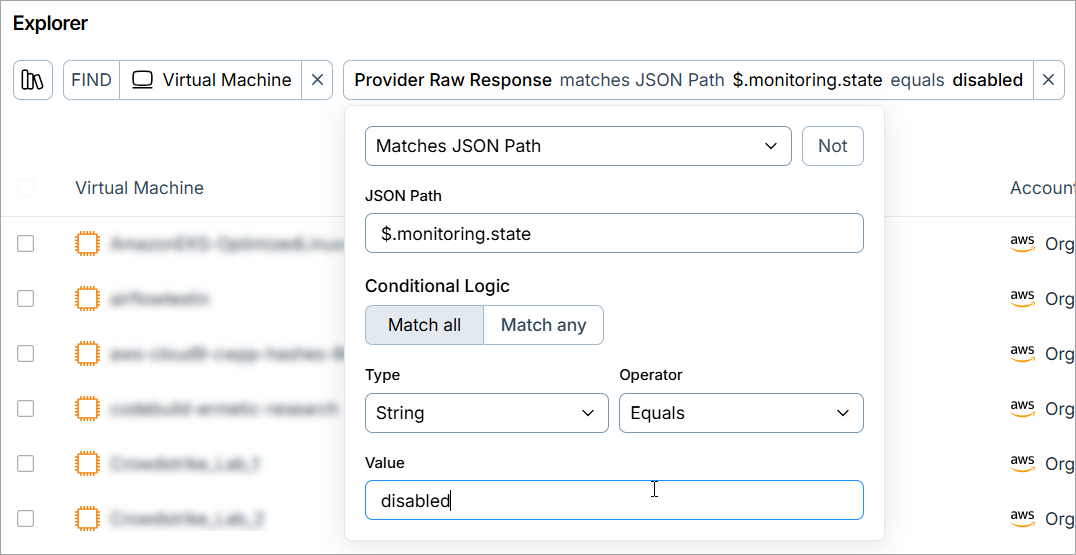 |
| Explorer | Query findings by linked tickets |
You can now build queries in the Explorer based on the tickets linked to your findings. Select a ticketing type (Jira Work Item, ServiceNow Incident, or Azure Boards Work Item), and then filter by ticket properties such as the assignee, the creation time, or the automation rule that created the ticket. Each ticketing type also includes its own properties:
|
| Integrations | Malicious file details added to SIEM exports | Malicious file findings that Cloud Exposure sends to a connected SIEM tool (Datadog, QRadar, or Splunk) now include a maliciousFiles field. The field lists each malicious file detected on the resource, with its sha256 hash and the paths where Tenable found it. Each finding includes up to 50 files, listed with the oldest detection first, and up to 10 paths per file. |
| IAM | Support for Microsoft Entra Agent ID | Cloud Exposure now offers visibility into Microsoft Entra Agentic AI identities in addition to standard non-human identities. It automatically discovers and tags agent identity blueprints, blueprint principals, agent identities, and agent users, then lists each type in your inventory. You can inspect specific object properties to audit configurations and permissions. Additionally, advanced Explorer query capabilities enable you to analyze top-down or bottom-up entity hierarchies and identify potential supply-chain attack risks across tenants. |
| Threat Detection | GraphQL API support |
You can now retrieve threat data via the GraphQL API by using the following new API endpoints. For example queries, see API: Threats. New GraphQL endpoints:
|
New Resources
The following resources were added in this release:
| Platform | Category | Resource |
|---|---|---|
| AWS | Network | Route53 Registered Domain |
New Policies
The following policies were added in this release:
| Provider | Category | Name |
|---|---|---|
| Azure | Compute | Service Fabric Cluster is not upgraded |
| Kubernetes | Admission Controller | Pod Security Standards - Forbidden sysctls |
| Kubernetes | Admission Controller | Pod Security Standards - Volume types |
Policy Updates
The following policies were updated in this release:
| Provider | Name | Update |
|---|---|---|
| Azure | App Service Web App detailed error messages are not enabled | The logic for the policy (previously called App Service detailed error messages are not enabled) has been updated to fix an issue that generated false-positive findings. As a result, previously opened findings may now be automatically closed with the sub-status False positive. The policy now evaluates only App Service Web Apps running on Windows, since detailed error logging isn't available for other App Service kinds or operating systems. Previously, the policy flagged all App Service types regardless of kind or operating system. |
| Azure | App Service Web App HTTP logging is not enabled | The logic for the policy (previously called App Service HTTP logging is not enabled) has been updated to fix an issue that generated false-positive findings. As a result, previously opened findings may now be automatically closed with the sub-status False positive. The policy now evaluates only App Service Web Apps running on Windows, since HTTP logging isn't available for other App Service kinds or operating systems. Previously, the policy flagged all App Service types regardless of kind or operating system. |
| Azure | App Service is exposed to the internet | The logic has been updated to remove a redundant authentication check. Previously, the policy only flagged internet-exposed App Service function, web, and API applications that also lacked a custom authentication mechanism. The policy now flags any App Service function, web, or API application that's exposed to the internet, regardless of authentication configuration, so each exposure is evaluated as its own atomic finding. As a result, new findings may open for resources that previously passed this check due to having authentication configured. This change applies to both Cloud risk and Infrastructure as Code (IaC) risk findings. |