Tenable One Cloud Exposure 2026 Q3 Release Notes
Tip: You can subscribe to receive these release notes by email or RSS.
These release notes are listed in reverse chronological order.
September 27, 2026 (Release 1.223)
New Features
 Ticketing Integrations: Azure Boards
Tenable now supports Azure Boards as a ticketing integration. Security teams using Microsoft's Azure Boards for engineering work can now route findings directly to the tool their engineers already work in.
With the Azure Boards integration, you can:
- Connect an Azure DevOps organization and project to Tenable through a dedicated Microsoft Entra ID application.
- Create Azure Boards work items from findings manually, in bulk, or through automation rules.
- Map finding severity and status to Azure Boards priority and state, for any built-in or custom work item type.
- Keep linked work items in sync: status and severity update from Tenable to Azure Boards, and assignee syncs in both directions.
- View linked work item details, including project, type, ID, and a direct link, from the Findings table.
Tenable supports all built-in and custom Azure Boards work item types, and standard fields including Title, Description, Iteration, Area, Priority, Assignee, Effort, and Tags. Work item links, comments, and revision history aren't supported.
For setup steps, see Azure Boards.
Hexa AI Suggests Policy Exclusions
Hexa AI can now suggest policy exclusions based on the context of your conversation, including a fully scoped name, action, reason, target policies and resources, and expiration. Click Create Exclusion, review the suggested configuration, and save it to apply the exclusion.
For example, ask Hexa AI to find non-actionable findings clustered in non-production resources, and it returns a ready-to-create exclusion scoped to the matching policies and resources.
For more information, see Exclusions.
Console: Scope Icons for Organizations, Accounts, and Folders
The Scope dropdown and the Settings page now show a distinct icon for each scope type: Organization, Folder, and Account. Previously, all three appeared identically, with no visual way to tell them apart.
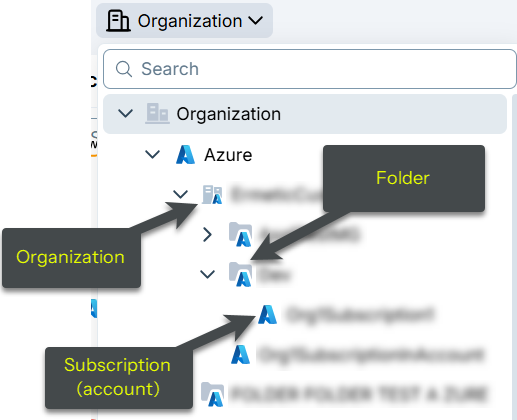
Azure Policy Update: Fix False Positives for Storage Account Access Key Expiration Policy
The Azure policy logic for Storage Account access key has no expiration policy has been updated to fix an issue that generated false-positive findings. As a result, previously opened findings may now be automatically closed with the sub-status False positive.
- The policy now skips Storage Accounts where shared key access is disabled, since access keys can't be used for authentication in that case and an expiration policy serves no purpose. Previously, the policy flagged these accounts regardless of whether shared key access was enabled.
Azure Policy Update: Fix False Positives for Storage Account Table Service Logging Policy
The Azure policy logic for Storage Account table service logging is not enabled has been updated to fix an issue that generated false-positive findings. As a result, previously opened findings may now be automatically closed with the sub-status False positive.
- The policy now skips Storage Accounts that don't have any tables, since there is no table service activity to log. Previously, the policy flagged these accounts regardless of whether they contained any tables.
Azure Policy Update: Fix False Positives for Storage Account Queue Service Logging Policy
The Azure policy logic for Storage Account queue service logging is not enabled has been updated to fix an issue that generated false-positive findings. As a result, previously opened findings may now be automatically closed with the sub-status False positive.
- The policy now skips Storage Accounts that don't have any queues, since there is no queue service activity to log. Previously, the policy flagged these accounts regardless of whether they contained any queues.
Azure Policy Update: Fix False Positives for Storage Account Blob Service Logging Policy
The Azure policy logic for Storage Account blob service logging is not enabled has been updated to fix an issue that generated false-positive findings. As a result, previously opened findings may now be automatically closed with the sub-status False positive.
- The policy now skips Storage Accounts that don't have any blobs, since there is no blob service activity to log. Previously, the policy flagged these accounts regardless of whether they contained any blobs.
September 6, 2026 (Release 1.222)
New Features
Data Protection: Secret Detection Engine Updates
Cloud Exposure expanded its secret detection engine with over 150 additional secret data types that cover secret keys, tokens, and sensitive URLs.
The detection logic updates automatically. No configuration changes are required.
Workload Protection: New Watermark Key UDM Attribute
Added the Watermark Key field to the Virtual Machine Images UDM object.
Network: Network Scanner in United States Gov Cloud Environments
Cloud Exposure now provides support for the Network Scanner and its impact in Network Scanner (December 7, 2025).
Mobilization: Threat Story Automations Merged into Risk Automations
Threat Story automation rules have moved into the Risk Automations page (within Operations). Instead of a separate Threat Automations page, select Threat Stories as the Type when creating or editing a risk automation. The standalone Threat Automations page is gone.
August 30, 2026 (Release 1.221)
New Features
Workload Protection: Enhanced Coverage for Unpatched SCA Vulnerabilities
Cloud Exposure improved its detection capabilities to better identify unpatched and zero-day vulnerabilities across open-source components and third-party dependencies. The software ecosystems most impacted by this update are Java (Maven), PHP (Composer), and Node.js (npm), which represent the vast majority of newly reported findings.
The detection logic updates automatically. No configuration changes are required.
SIEM Integration Finding Property Changes
Cloud Exposure changed the property names and structure of the Cloud and Code finding data delivered through your SIEM integration. If you consume this feed to build detections, dashboards, or reports, confirm your property mappings have been updated.
Network: New PQC Query
To help you gain visibility into resources that aren't yet post-quantum cryptography (PQC) ready, Cloud Exposure added a new built-in query, Cloud Resources with Internet Exposure that are not PQC (Post Quantum Cryptography) ready.
Kubernetes: Block Workloads with Vulnerable Container Images
The Vulnerable Container Images admission controller policy is now generally available. It blocks or alerts on Kubernetes workloads running container images with known vulnerabilities, and uses Tenable CWP scan data at the admission layer, with configurable severity thresholds and image/CVE exclusions. The policy is disabled by default, but can be enabled on the Policies > Admission Controller Policies page.
For more information, see Vulnerable Container Images.
Kubernetes: Inheritance Configuration for Admission Controller Policies
When Inherit policy configuration is selected, a child policy below the Organization level now uses its parent's configuration. To edit the child policy, disable inheritance.
Kubernetes: New Admission Controller Policies
| Category | Name |
|---|---|
| Admission Controller | Vulnerable images |
| Admission Controller | Host networking ports |
| Admission Controller | Flex volumes |
For more information, see Admission Controller Policies.
New Policies in 221
 API Support
The following policies were added in this release:
| Provider | Category | Name |
|---|---|---|
| Azure | AI | AI Service private link is not configured |
| Azure | AI | Azure AI Search private link is not configured |
| Azure | AI | Machine Learning Workspace user-assigned managed identity is not set |
| Azure | Compute | Container Registry content trust is not enabled |
| Azure | Compute | Container Registry dedicated data endpoints are not enabled |
| Azure | Compute | Container Registry quarantine policy is not enabled |
| Azure | Compute | Container Registry Repository allows write and delete permissions |
| Azure | Data | Container Registry export policy is enabled |
| Azure | Data | Cosmos DB Account is not encrypted with a customer-managed key |
| Azure | Data | Cosmos DB Account virtual network service endpoint is not configured |
| Azure | Data | Data Factory is not encrypted with a customer-managed key |
| Azure | Data | Event Hub Namespace infrastructure-level encryption is not enabled |
| Azure | Data | Event Hub Namespace is not encrypted with a customer-managed key |
| Azure | IAM | Automation Account local authentication is enabled |
| Azure | IAM | Azure AI Search access key authentication is enabled |
| Azure | IAM | Azure Cache for Redis access key authentication is enabled |
| Azure | IAM | Azure Cache for Redis Entra ID authentication is not enabled |
| Azure | IAM | Azure Cache for Redis system-assigned managed identity is not enabled |
| Azure | IAM | Container Registry ARM audience token authentication is enabled |
| Azure | IAM | Service Bus Namespace managed identity is not enabled |
| Azure | Management | Automation Account managed identity is not set |
| Azure | Network | Application Gateway backend HTTP traffic is not encrypted |
| Azure | Network | Application Gateway WAF Policy bot protection is not enabled |
| Azure | Network | Virtual Network DDoS Protection is not enabled |
AWS Policy Update: Enhanced VPC Endpoint Default IAM Policy in Use
The AWS policy logic for the policy VPC Endpoint is using the default IAM policy (previously Overpermissive VPC Endpoint) has been updated to fix an issue that generated false-positive findings. As a result, previously opened findings may now be automatically closed with the sub-status False positive.
- The policy now triggers only when a VPC endpoint IAM policy is unmodified (using the AWS default full-access statement), with no conditions and no additional deny statements. Previously, the policy evaluated the endpoint policy's IAM conditions more broadly and flagged endpoints that were already scoped, because organization-boundary conditions can be expressed in many valid ways. Findings that no longer meet the new definition will be closed automatically in the next assessment cycle.
August 23, 2026 (Release 1.220)
Upcoming Changes
Workload Protection: Enhanced Coverage for Unpatched SCA Vulnerabilities
Cloud Exposure is improving its detection capabilities to better identify unpatched and zero-day vulnerabilities across open-source components and third-party dependencies.
The detection logic will update automatically on the release date. No configuration changes are required.
For more information, see Enhanced Coverage for Unpatched SCA Vulnerabilities (August 31, 2026).
Data Protection: Secret Detection Engine Updates
Cloud Exposure is expanding its secret detection engine with over 150 additional secret data types that cover secret keys, tokens, and sensitive URLs.
For more information, see Secret Detection Engine Updates (September 6, 2026).
New Features
Workload Protection: Simplified Windows Vulnerability Reporting
Cloud Exposure streamlined Windows vulnerability detection to report findings at the application level rather than for individual .exe and .dll component files within an installed application's directory.
This change eliminates duplicate alerts while maintaining complete vulnerability coverage.
Add Files to Hexa Conversations
Hexa can now work with files you upload or drag-and-drop directly into a conversation, so you don't need to manually reformat data or describe a document you already have.
Attach a spreadsheet, report, or diagram, such as a company network topology, and ask Hexa to analyze, summarize, or extract information from it.
New Resources
API Support
The following resource was added in this release:
| Platform | Category | Resource |
|---|---|---|
| Azure | AI | Microsoft Foundry Tool |
August 16, 2026 (Release 1.219)
New Features
Console: Dashboard Trend Widget Changes
As announced in Dashboard Trend Widget Changes (August 16, 2026), four trend widgets on the Overview dashboard are moving to a query-based model, which is the same approach used in Explorer.
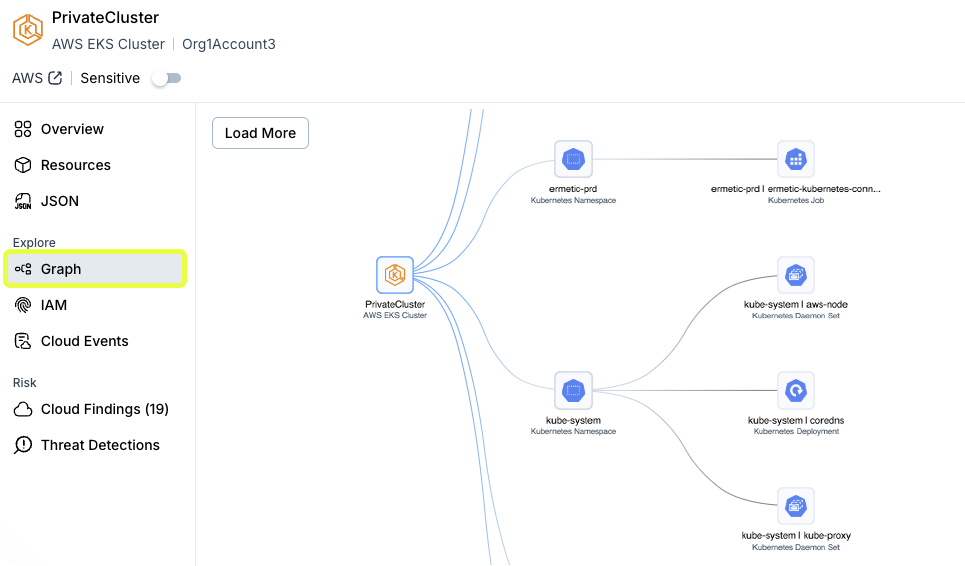
Console: Explore Kubernetes Resource Relationships in the Graph Tab
See how any Kubernetes resource connects to the rest of your cloud, directly from its profile in Explore > Inventory. The graph opens with a default hierarchy already mapped, showing how a workload, role, or namespace connects to its namespace and cluster.
Console: Patch and CVE Publication Dates Now Available
Cloud Exposure now tracks patch and CVE release dates directly in the console.
- Patch Publication Time — When a vendor released a patch for a vulnerability. You can find it on the Risk > Vulnerabilities page by opening the plugin profile and selecting the Overview tab.
- Publication Time — When a CVE was originally published. You can find it on the Risk > Vulnerabilities page by opening the vulnerability profile and selecting the Overview tab.
Workload Protection: Updated Alibaba Cloud RAM Monitoring Policy
The Alibaba onboarding policy for both accounts and organizations now includes the required Container Service read permissions: cs:Describe* and cs:GetClusters.
Make sure to update the policy for previously onboarded environments to allow Kubernetes cluster data to be collected.
Kubernetes: Retrieve Agent Version
You can now retrieve the agent version in the agent logs by running a kubectl command on the cluster. For more information, see FAQ: Kubernetes.
IaC: Resolved Issue with IaC Policy Evaluation
As mentioned in Resolving Issue with IaC Policy Evaluation (August 16, 2026), Tenable resolved an issue that caused a subset of Infrastructure as Code (IaC) policies to stop evaluating certain IaC resources. While affected, these policies did not open new findings or close existing findings.
The fix enables accurate findings and is applied automatically by Cloud Exposure. No configuration changes to policies, exclusions, or workflows are required.
New Resources in 219
API Support
The following resource was added in this release:
| Platform | Category | Resource |
|---|---|---|
| Azure | AI | Microsoft Foundry Memory |
New Policies in 219
API Support
The following policies were added in this release:
| Provider | Category | Name |
|---|---|---|
| Alibaba | Data | ECS Disk automatic snapshot policy is not enabled |
| Alibaba | Data | ECS Disk delete automatic snapshots feature is enabled |
| Alibaba | Data | ECS Disk is not encrypted with CMK |
| Alibaba | Data | ECS Disk is not encrypted with KMS |
| Alibaba | Data | ECS Disk 'release disk with instance' feature is enabled |
| Alibaba | Data | OSS Bucket ACL allows public access |
| Alibaba | Data | OSS Bucket is not encrypted with KMS |
| Alibaba | Data | OSS Bucket versioning is not enabled |
| Alibaba | Data | Unattached ECS Disk is not encrypted with KMS |
| Alibaba | IAM | ECS Instance is not associated with a RAM role |
| Alibaba | IAM | RAM Policy with full administrative privileges ":" is attached |
| Alibaba | IAM | RAM User access keys are not rotated within 90 days |
| Alibaba | IAM | RAM User has more than one active access key |
| Alibaba | IAM | RAM User is inactive for more than 90 days |
| Alibaba | Logging | OSS Bucket logging is not enabled |
| Alibaba | Management | ECS Instance release protection is not enabled |
| Alibaba | Network | ECS Instance has a public IP address |
| Alibaba | Network | ECS Instance is not associated with a VPC network |
August 9, 2026 (Release 1.218)
Upcoming Changes
Workload Protection: Simplified Windows Vulnerability Reporting
Cloud Exposure is streamlining Windows vulnerability detection to report findings at the application level rather than for individual .exe and .dll component files within an installed application's directory.
This change will eliminate duplicate alerts while maintaining complete vulnerability coverage.
For more information, see Simplified Windows Vulnerability Reporting (August 23, 2026).
IaC: Resolving Issue with IaC Policy Evaluation
Tenable is resolving an issue that causes a subset of Infrastructure as Code (IaC) policies to stop evaluating certain IaC resources. While affected, these policies do not open new findings or close existing findings.
The fix will enable accurate findings and will be applied automatically by Cloud Exposure. No configuration changes to policies, exclusions, or workflows are required.
For more information, see Resolving Issue with IaC Policy Evaluation (August 16, 2026).
New Features
Reports: Compact Dashboard Reports
Dashboard reports now generate in a compact layout, combining multiple widgets per page instead of one widget per page. This produces a shorter, more scannable report.
You can also choose the report's page Layout: Portrait or Landscape.
For more information, see Create a Report.
Network: New PQC and Cipher Network Endpoint Properties
Cloud Exposure now supports PQC compliance to mitigate future Harvest-Now-Decrypt-Later (HNDL) risk. Four new properties were added to the Network Endpoint profile of HTTPS-supported endpoints:
- SSL/TLS Versions
- SSL/TLS Cipher Suites
- SSL/TLS PQC Support
- SSL/TLS Key Exchange Groups
The Network Endpoint profile now lists all the ciphers that the server supports, providing additional visibility into outdated and vulnerable ciphers.
Workload Protection: Visibility into Vulnerabilities Excluded from Container Image Scans
When you run a container image CI/CD scan with an exclusion parameter such as --output-include-ignored-vulnerabilities, Cloud Exposure now retains the ignored CVEs and reports them with your scan results. Previously, ignored CVEs were dropped from the output, so you could not tell whether a passing scan found no vulnerabilities or found vulnerabilities and filtered them out. The ignored vulnerabilities are also visible in the CLI output.
Additionally, the Container Image CI/CD Scan profile now shows the scan configuration parameters to provide scan context.
For more information, see Container Image CI/CD.
New Resources in 218
API Support
The following resources were added in this release:
| Platform | Category | Resource |
|---|---|---|
| AWS | Security | User Access Key |
| Azure | AI | Microsoft Foundry Agent |
August 2, 2026 (Release 1.217)
Upcoming Changes
SIEM Integration Finding Property Changes
Tenable is changing the property names and structure of the Cloud and Code finding data delivered through your SIEM integration. If you consume this feed to build detections, dashboards, or reports, review the changes and update your property mappings before the release date.
For more information, see SIEM Integration Finding Property Changes (August 30, 2026).
Console: Dashboard Trend Widget Changes
Four trend widgets on the Overview dashboard are moving to a query-based model, the same approach used in Explorer.
For more information, see Dashboard Trend Widget Changes (August 16, 2026).
New Features
Threat Detection: Azure Storage Account Deleted Threat Rule Severity Update
Cloud Exposure changed the severity of the Azure Storage Account Deleted threat rule from High to Medium, to better align with security operations and risk management priorities.
Scan GitLab Merge Requests for IaC Risks and View Results in SAST Format
Cloud Exposure now supports scanning GitLab merge requests and displays CI/CD scan results in Static application security testing (SAST) format natively in the GitLab Security tab and the Security dashboard, rather than as a separate report.
You can configure CI/CD scans to display scan results in the required GitLab format, allowing you to view findings within the merge request workflow.
For more information, see Set Up IaC Scanning and View SAST-Formatted Results in GitLab.
July 26, 2026 (Release 1.216)
New Features
Vulnerability Management: New Agent Version for Kubernetes Cluster Nodes
This release includes a new agent version for your cluster nodes, which performs vulnerability detection and runtime security monitoring. The agent updates automatically, and no action is needed.
This version delivers the following capability:
Vulnerability Management: Faster Scan Coverage for New Container Images on Kubernetes Nodes
The Kubernetes workload sensor now scans cluster nodes for new or updated container images more frequently, detecting and scanning them within approximately 30 minutes. This includes short-lived images, such as those created by CronJobs and other ephemeral pods.
Previously, the sensor listed running containers on a periodic cycle. Containers that started and finished between cycles could be missed, leaving their images unscanned for vulnerabilities.
For more information, see Agent-Based Kubernetes Workload Scanning.
Vulnerability Management: Container Image Account Assignment Changes
Cloud Exposure now assigns container images to every cloud account that runs them, not only the account that owns them. Two changes take effect:
- Public and unsynced images (for example, from docker.io or quay.io) now consolidate under a single account owner named Container Registries, a new high-level scope you can select in the account and scope filters.
- When multiple cloud accounts run the same image, each account now sees that image in its own inventory and vulnerability views, with its vulnerabilities, packages, and risks tied to that account's workloads.
Vulnerability counts on account dashboards may increase as a result. These counts reflect exposure that was always present but was previously invisible to the consuming account, not newly detected vulnerabilities. No action is required.
For more information, see Container Image Account Assignment Changes (July 26, 2026).
Vulnerability Management: Plugin Data for Vulnerabilities in the GraphQL API
The Vulnerability Management GraphQL API now returns plugin data for vulnerabilities. Every vulnerability includes a new Plugins list, and each plugin exposes:
- Id — the Nessus plugin ID
- Name — the plugin name
A new PluginIds filter lets you query Vulnerabilities, VulnerabilityInstances, and PipelineContainerImageScans (CI/CD) by plugin.
For more information, see API query examples and Plugins.
Enhanced Secret Detection
Cloud Exposure improved the secret-detection mechanism to reduce false positives and increase detection coverage by surfacing more secrets. The logic was updated automatically. No configuration changes are required. Existing workflows such as policy management, exclusions management, and the findings lifecycle remain unchanged.
The enhancement impacts the following policies:
- AWS resource tags are exposing secrets
- AWS EC2 Instance is exposing secrets
- AWS CloudFormation Stack is exposing secrets
- AWS ECS Task Definition is exposing secrets
- AWS Lambda Function is exposing secrets
- GCP resource labels are exposing secrets
- GCP VM Instance is exposing secrets
- GCP App Engine Service is exposing secrets
- GCP Cloud Function is exposing secrets
- GCP Cloud Run Service is exposing secrets
- Azure resource tags are exposing secrets
- Azure Logic App is exposing secrets
To learn how to manage your secret-detection findings, see Exclusions.
IAM: AWS Centralized Root Access Management Visibility
Cloud Exposure now shows how your AWS Organizations use AWS Centralized Root Access Management, so you can see which accounts still have root credentials and confirm the feature is enabled where you expect it.
On the AWS account profile, you can now see:
- Management Account — For member accounts, a link to the management account that governs it.
- Centralized Root Access Management status — For a management account, which of the following capabilities are active:
- Root Credentials Management
- Privileged Root Actions In Member Accounts
On the AWS Root User profile, the Credentials tab shows whether the root user's Password is enabled or disabled, so you can find member accounts where root sign-in credentials still exist.
These properties are also available in the Explorer, where you can query and filter on them. A new relationship between an account and its management account lets you build queries such as finding every account whose root user password is still enabled and that is managed by an account where Root Credentials Management is active.
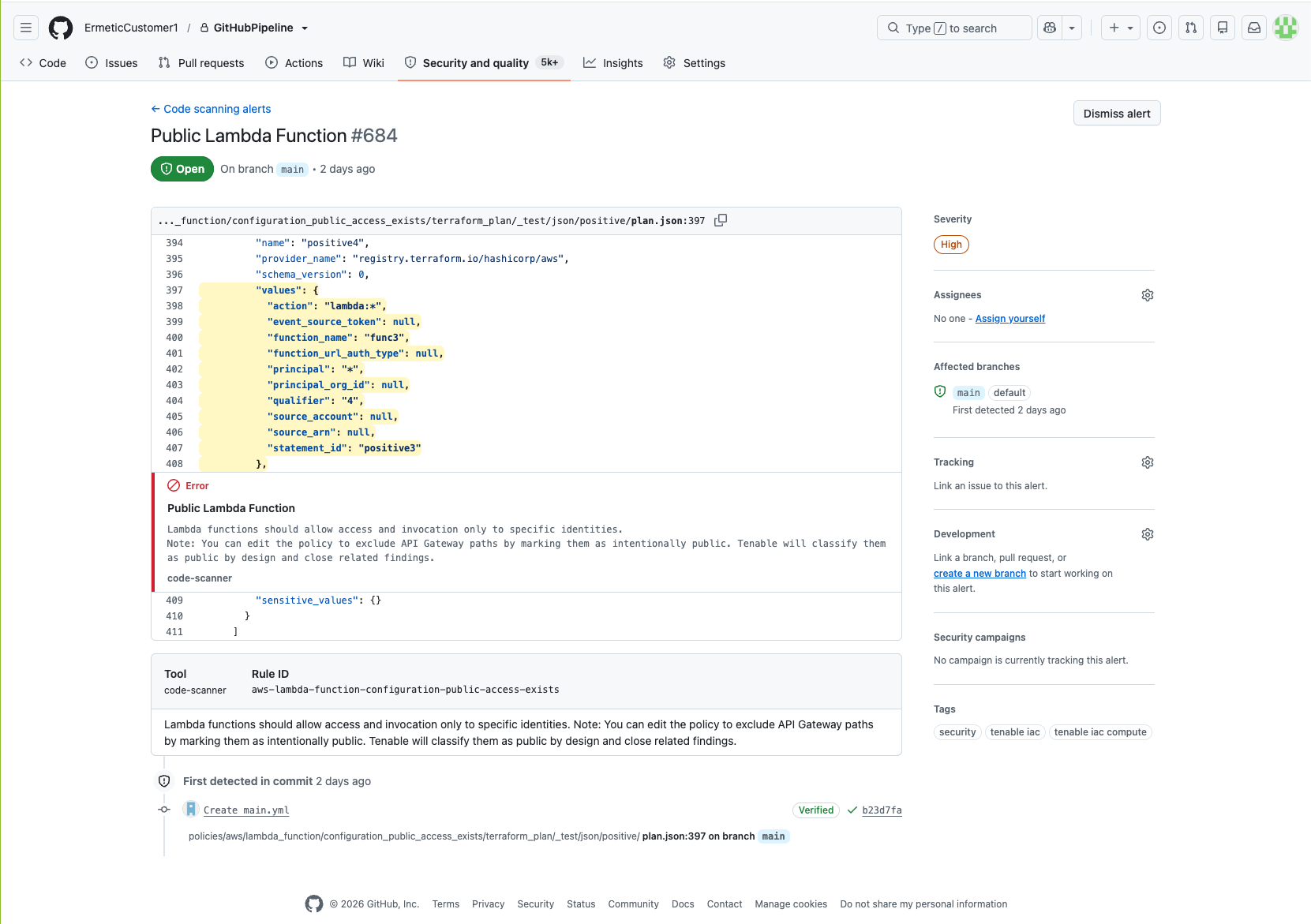
IaC: SARIF Output Compatibility with GitHub Advanced Security and GitLab
Cloud Exposure generates SARIF output for IaC and container image scans that is fully compatible with GitHub Advanced Security (GHAS) and the GitLab Security tab and Security Dashboard.
Code scanning results from CI/CD pipeline scans display in the Code scanning section in GitHub. Results include severity categorizations, relative file paths, rich text descriptions, and related tags for each finding.
Scan findings include the following tags:
- security
- tenable iac
- Scan category tags (for example, tenable iac IAM or tenable iac compute)
New Resources in 216
API Support
The following resources were added in this release:
| Platform | Category | Resource |
|---|---|---|
| AWS | AI | AWS Bedrock AgentCore Gateway |
| AWS | AI | AWS Bedrock AgentCore Harness |
| AWS | AI | AWS Bedrock AgentCore Memory |
| AWS | AI | AWS Bedrock AgentCore Outbound Auth API Key |
| AWS | AI | AWS Bedrock AgentCore Outbound Auth OAuth |
| AWS | AI | AWS Bedrock AgentCore Outbound Auth Payment |
| AWS | AI | AWS Bedrock AgentCore Policy Engine |
| AWS | AI | AWS Bedrock AgentCore Runtime |
| AWS | AI | AWS Bedrock AgentCore Workload Identity |
| AWS | AI | AI Search |
| Azure | AI | Microsoft Foundry Knowledge Base |
| Azure | AI | Microsoft Foundry Knowledge Source |
- bedrock-agentcore:GetAgentRuntime
- bedrock-agentcore:GetAgentRuntimeEndpoint
- bedrock-agentcore:GetApiKeyCredentialProvider
- bedrock-agentcore:GetGateway
- bedrock-agentcore:GetGatewayTarget
- bedrock-agentcore:GetHarness
- bedrock-agentcore:GetMemory
- bedrock-agentcore:GetOauth2CredentialProvider
- bedrock-agentcore:GetPaymentCredentialProvider
- bedrock-agentcore:GetWorkloadIdentity
- bedrock-agentcore:List*
July 19, 2026 (Release 1.215)
Upcoming Changes
Vulnerability Management: Container Image Account Assignment Changes
Tenable is changing how container images are assigned to cloud accounts in Cloud Exposure to make vulnerability visibility more accurate and predictable. For more information, see Container Image Account Assignment Changes (July 26, 2026).
New Features
Mobilization: OAuth 2.0 Authentication for Jira
You can now authenticate the Jira ticketing integration with OAuth 2.0, in addition to basic authentication. OAuth lets organizations whose security policies require token-based authentication, or prohibit basic authentication, connect Jira to Cloud Exposure. The integration connects through an OAuth 2.0 credential that you create for a Jira service account.
When you activate a Jira instance, select OAuth (recommended) and enter the Client ID and Client secret from the OAuth 2.0 credential you created in Jira. Basic authentication remains available.
For more information, see Integrate with Jira.
Cloud deployments: Terraform Deployments for GCP, OCI, and Alibaba Cloud
You can now connect cloud environments in a version-controlled, repeatable, and pipeline-friendly way via code. Terraform is available in the onboarding wizard for Google Workspace, GCP organizations, Alibaba Cloud organizations, Alibaba Cloud accounts, and OCI tenancies.
Improved Visibility into Alibaba Cloud Resources
Cloud Exposure improved visibility into existing resources in Alibaba Cloud organizations and accounts. For previously onboarded environments, either run the onboarding script or manually verify that you have the required permissions.
Explorer: Aggregations for Grouped Data
When you group Explorer query results in a table, each group now shows an aggregated summary for every column, with the aggregation method matched to the column's data type. You can read the makeup of a large result set at a glance, without expanding every group or exporting to a spreadsheet.
For example, group open findings by account to see how many each account carries and how they break down by severity, then drill into the account with the most criticals first.
New Network Scanner Resource: GCP App Engine
Cloud Exposure expanded cloud resource coverage for transport-layer scanning by adding support for GCP App Engine.
Kubernetes: New Admission Controller Policies in 215
| Category | Name |
|---|---|
| Admission Controller | Pod Security Standards - AppArmor |
| Admission Controller | Pod Security Standards - Seccomp |
For more information, see Admission Controller Policies.
New Threat Rules in 215
The following threat rules were added in this release:
| Provider | Severity | MITRE Tactic | Name |
|---|---|---|---|
| AWS | Critical | Exfiltration | AWS Glue Data Catalog publicly exposed |
| AWS | Critical | Impact | AWS KMS key policy lockout safety check bypassed |
| AWS | Critical | Lateral Movement | AWS SSM association created targeting all instances with command-execution document |
| AWS | High | Defense Impairment | AWS CloudTrail trail settings modified to reduce logging visibility |
| AWS | High | Defense Impairment | AWS Config recorder or delivery channel disrupted |
| AWS | High | Defense Impairment | AWS Security Hub disabled or finding aggregator deleted |
| Azure | Medium | Impact | Azure Compute Disk Snapshot deleted |
| Azure | Medium | Impact | Azure Compute Restore Point deleted |
| Azure | Medium | Stealth | Storage Account blob container immutability policy deleted |
| GCP | High | Defense Impairment | GCP logging bucket deleted |
| GCP | High | Defense Impairment | GCP logging sink deleted |
| GCP | High | Defense Impairment | GCP VPC network deleted |
| GCP | Medium | Defense Impairment | GCP logging sink modified |
| GCP | Medium | Impact | GCP storage bucket deleted |
New Resources in 215
API Support
The following resources were added in this release:
| Platform | Category | Resource |
|---|---|---|
| AWS | AI | Bedrock Guardrail |
July 12, 2026 (Release 1.214)
Upcoming Changes
Data Protection: Enhanced Secret Detection
Tenable is improving the secret-detection mechanism to reduce false positives and surface more secrets. The release is scheduled for July 19, 2026. For more information, see Enhanced Secret Detection (July 26, 2026).
New Features
Access Management: Service Accounts for API Access
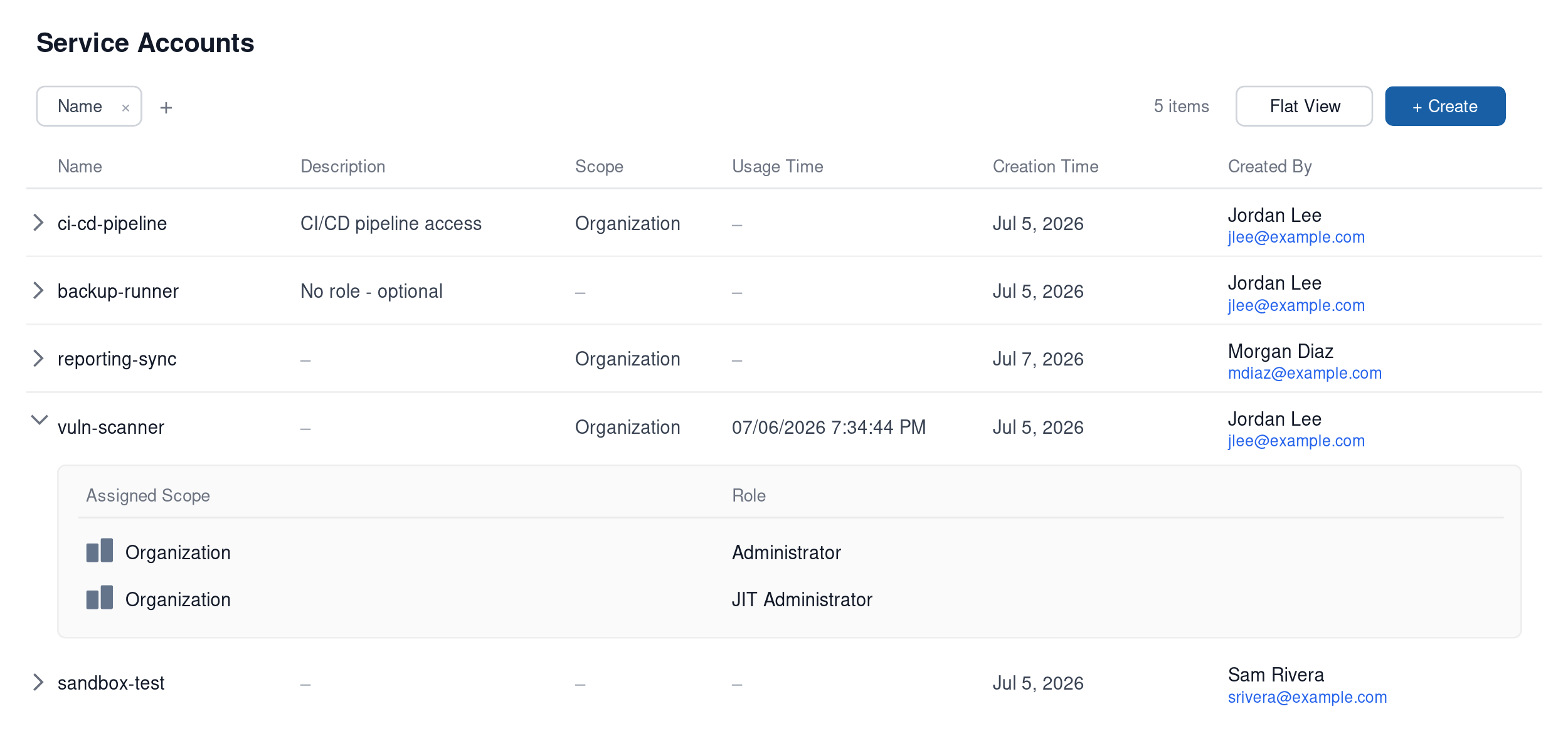
Cloud Exposure now uses Service Accounts to manage programmatic access to the API. A service account is a non-human identity with its own roles and its own secrets (previously called API tokens), created on the new Service Accounts page under Settings > Access Management.
Each service account holds up to two active secrets, so you can rotate credentials without downtime: create a new secret, switch your application to it, confirm it works, then delete the old secret. Before this release, a single token per identity meant deleting the active credential before creating its replacement, which left the application unable to authenticate during the switchover.
What changed:
- The API page moved to Settings > Access Management > Service Accounts.
- The term token is now secret. The value shown once at creation is the secret.
- Roles are assigned per service account, each tied to a scope. A single account can hold multiple roles across scopes.
- Create and delete actions on a service account are recorded in the system audit.
- Existing API access is unchanged: pass the secret in the Authorization: Bearer <secret> header.
Vulnerability Management: Expanded Remediation Support for Microsoft Windows
Tenable now supports Microsoft Windows plugins. You can manage remediation for Windows vulnerabilities directly in the Console.
Alibaba Cloud: Data Scanning for Cloud OSS Buckets
Tenable now supports data scanning for Alibaba Cloud OSS buckets.
To enable this scanning, ensure you have:
- Enabled Data Resources Scanning (Data Protection) permissions for your Alibaba cloud integration (either using the onboarding wizard or manually)
- Enable object storage scanning in Settings > Security > Data.
These resources will be counted as scan-based billable resources once scanning occurs.
Threat Detection: Detection Logic Improvements
As of July 12, 2026, Tenable has improved detection logic to reduce false positives and deliver higher-fidelity detections. For more information, see:
Kubernetes: New Admission Controller Policies in 214
| Category | Name |
|---|---|
| Admission Controller | Pod security standards - Host filesystem |
| Admission Controller | Pod Security Standards - Read only root filesystem |
| Admission Controller | General - Automount service account token for pod |
| Admission Controller | General - Block endpoint edit default role |
| Admission Controller | General - Block updating service account |
For more information, see Admission Controller Policies.
JIT: Eligibility Account Selection Changes
You can now select account scopes when adding or editing eligibilities in Cloud Exposure.
-
 Only some child scopes are selected
-
 All child scopes are selected, but the parent folder is not. You can either select all the children or double-click the parent.
-
 The parent folder is selected. All current and future child scopes are automatically selected via inheritance.
Custom Policies: Explorer-Based Templates
Additional custom policy templates now use Explorer filters for resource scoping, continuing the conversion started in the Custom Policies: Explorer-Based Templates.
The following templates have been updated:
| Template | Cloud | GraphQL API: __typename |
|---|---|---|
| These resources should be managed as code | AWS |
|
| These resources should be managed as code | Azure |
|
| These resources should be managed as code | GCP |
|
| These VPCs should not have an internet gateway attached | AWS |
|
| These subnets should not allow inbound internet connection | AWS |
|
New Resources in 214
API Support
The following resource was added in this release:
| Platform | Category | Resource |
|---|---|---|
| Azure | AI | Microsoft Foundry Index |
July 5, 2026 (Release 1.213)
New Features
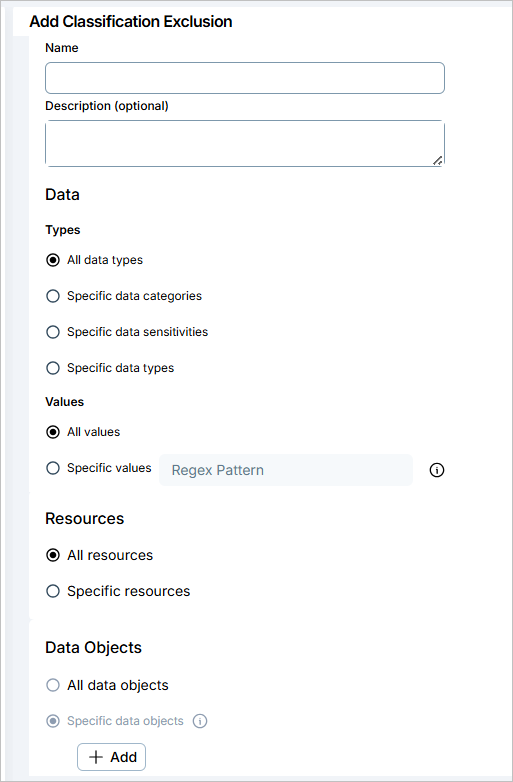
Data Protection: Classification Exclusions
You can now create classification exclusions to control which sensitive data the Tenable classification engine should ignore. Use classification exclusions to fine-tune data scans and cut the noise from data that matches a sensitive data type but is not a real risk in your environment, such as internal email domains or test data.
A classification exclusion suppresses classification only for the data and locations you define. The scan still runs on the resource, so billing is unaffected and other sensitive data is still classified.
Key capabilities:
- Ignore sensitive data by resource scope — Exclude data by choosing either all or specific data types, then narrow the exclusion to specific resources using an Explorer-based query.
- Ignore specific values — Exclude known values or patterns (RE2 regex) from specific data types, for example a corporate email domain that matches the email data type.
- Precise location targeting — Combine location conditions (database name, database schema, database table, file extension, object path) with OR logic to pinpoint exactly where data is ignored.
Manage classification exclusions in Settings > Data > Classification Exclusions, where you can create, edit, enable, disable, and delete them within your scope.
For more information, see the documentation.
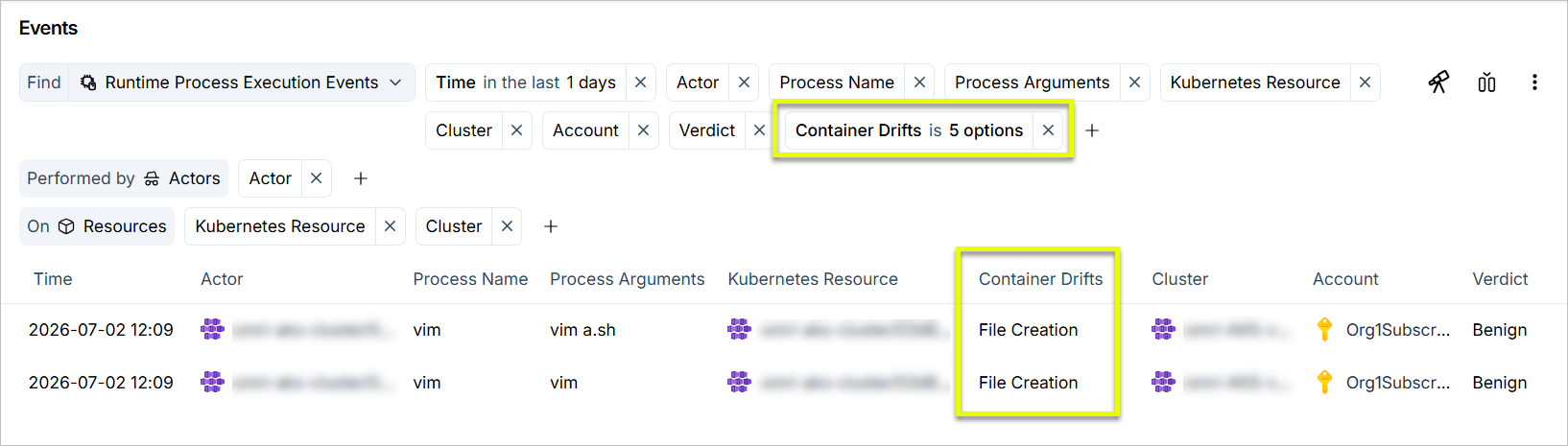
Threat Detection: Container Drift Detection
Cloud Exposure now detects container drift on executed processes. Using the runtime sensor, Tenable compares each executed process against the deployed container image and flags files that were created, modified, deleted, or had their ownership or permissions changed after deployment. These are strong indicators of tampering in an immutable workload. Drift appears in the new Container Drifts column on runtime process execution events.
For more information, see What Threats Tenable Detects.
Threat Detection: Detection Logic Improvements
Tenable is improving detection logic to reduce false positives and deliver higher-fidelity detections. For more information, see:
Mobilization: OAuth 2.0 Authentication for ServiceNow
You can now authenticate the ServiceNow ticketing integration with OAuth 2.0, in addition to basic authentication. OAuth lets organizations whose security policies require token-based authentication, or prohibit basic authentication, connect ServiceNow to Cloud Exposure. The integration connects through a scoped service-account application that you register in ServiceNow.
When you activate a ServiceNow instance, select OAuth (recommended) and enter the Client ID and Client Secret from the OAuth application you register in ServiceNow. Basic authentication remains available.
For more information, see Integrate with ServiceNow.
Workload Protection: Enhanced Vulnerability Priority Rating (VPR) Score
As of July 1, 2026, Tenable has updated its scoring engine to provide a more accurate, unified view of your risk. The current VPR is now the primary VPR across the Tenable platform, including Cloud Exposure. This update is only relevant if you use VPR as your vulnerability severity metric.
- VPR consolidation — The legacy VPR model has been retired. The high-fidelity model previously labeled "Beta" is now the standard VPR.
- Now in effect — With the Beta phase over, the VPR score is now the official score and affects vulnerability severity calculations, finding creation, and configured workflows. Enhanced Vulnerability Priority Rating (VPR) (July 1, 2026).
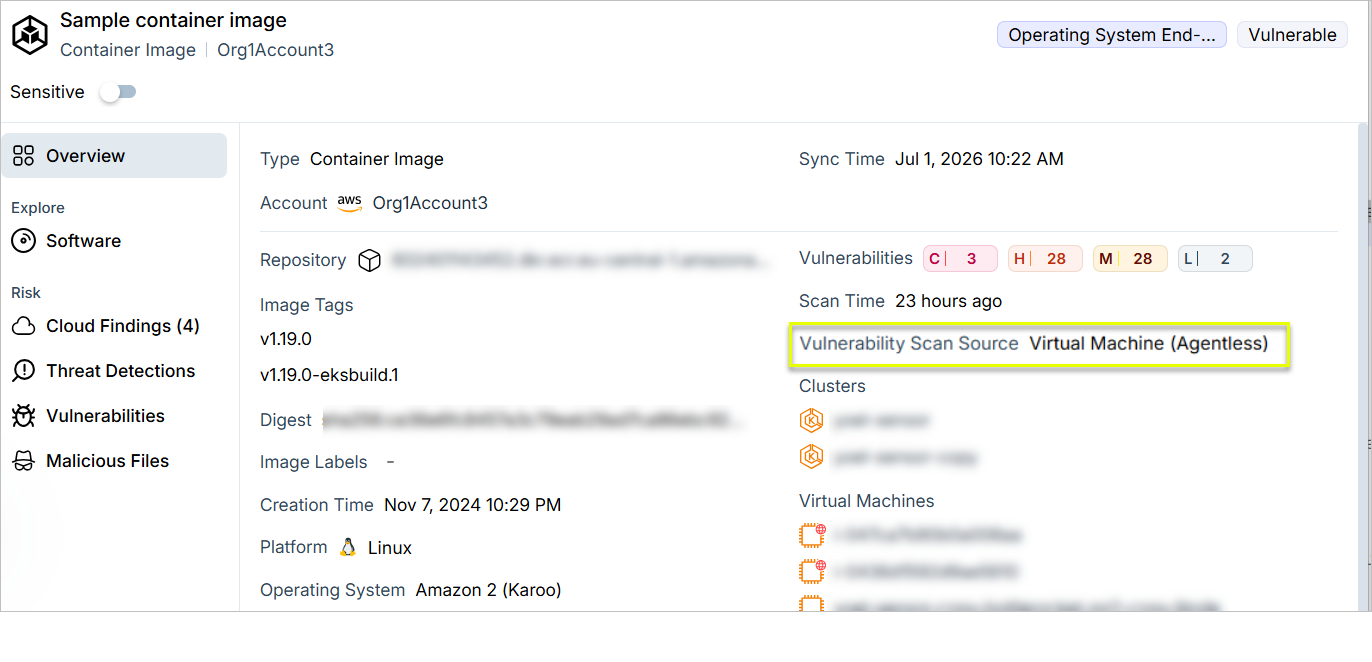
Workload Protection: Vulnerability Scan Source for Container Images
The container image profile now shows how Cloud Exposure collected vulnerability data for each image. On the Overview tab, the Vulnerability Scan Source identifies which of the following methods were used:
- Container Registry (Agentless)
- Virtual Machine (Agentless)
- Agent
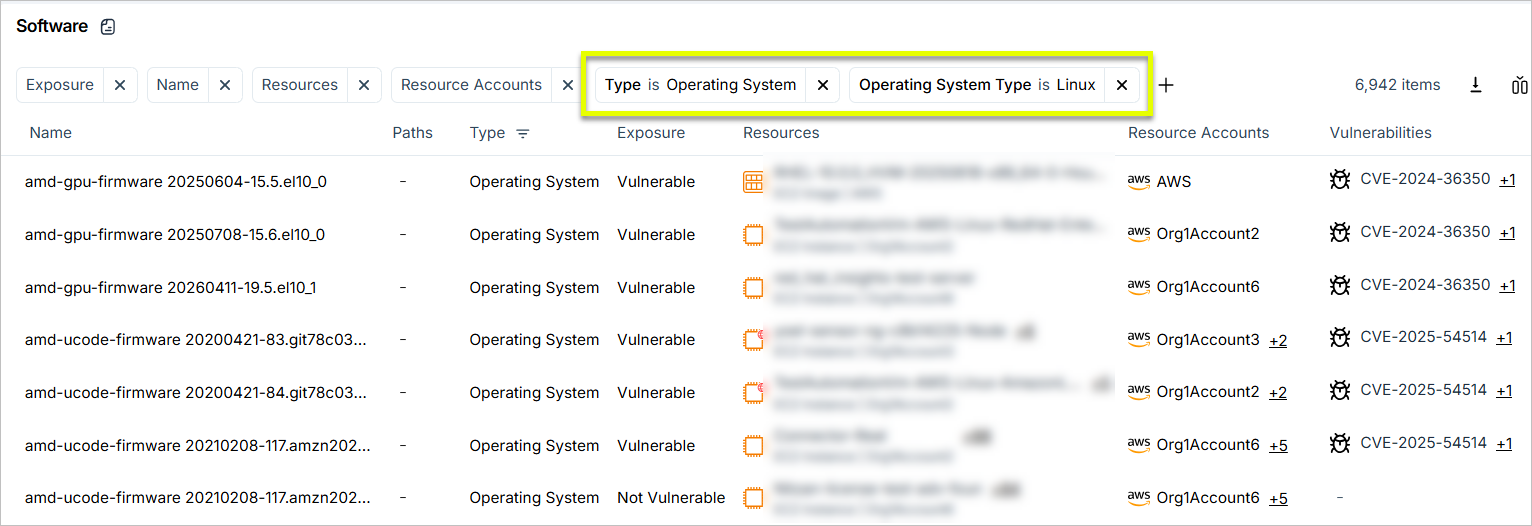
Workload Protection: OS Package Tagging for Linux
Cloud Exposure now tags Linux operating system packages, such as the kernel, glibc, openssl, systemd, and apt, as Operating System in the Software inventory. Filter the Software page by Type > Operating System to separate operating system packages from application libraries when you plan vulnerability remediation.
Workload Protection: Expanded Malware Scan File Type Coverage
Cloud Exposure malware scanning now covers a broader set of script and code files, including dependencies inside node_modules, site-packages, and vendor/bundle, browser extension scripts, and all files under /tmp on Linux. This improves detection of supply-chain and script-based threats.
For more information, see Malicious Files.
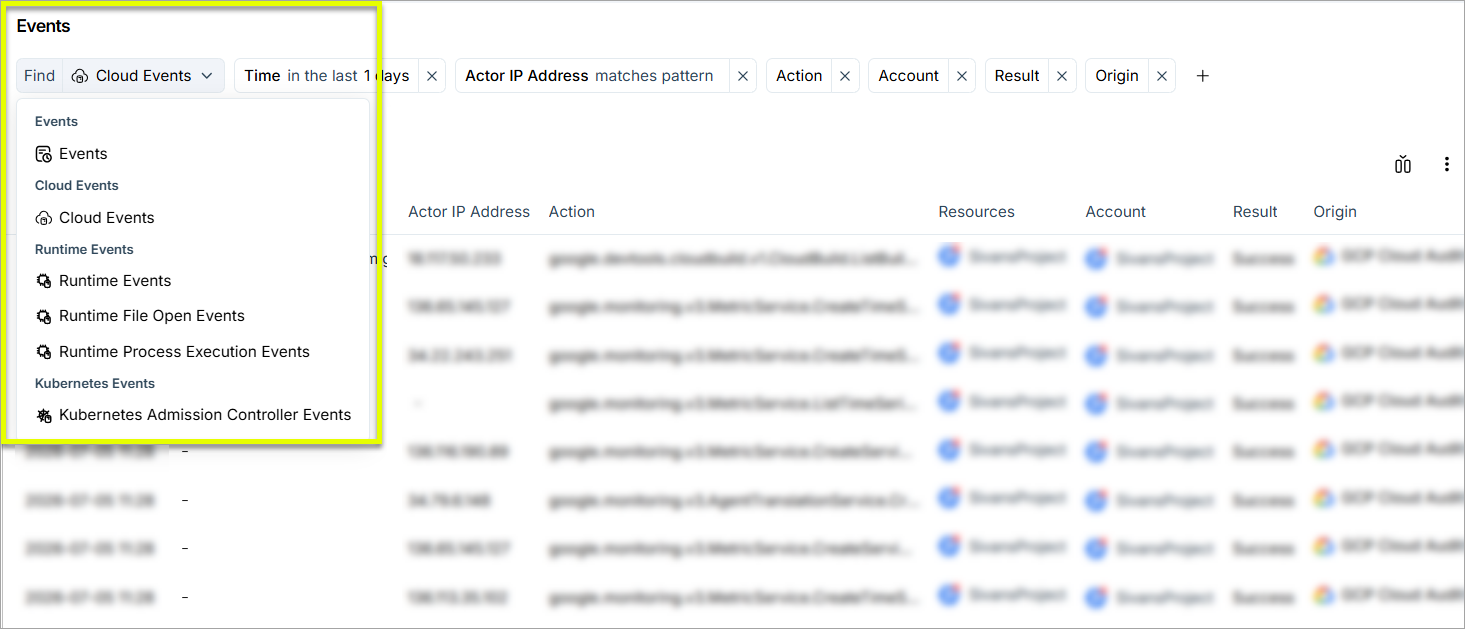
Console: Unified Events Page
The Events screen now consolidates cloud, runtime, and Kubernetes admission controller events into a single activity log. The screen is purpose-built to query high volumes of event data quickly. Use the event type selector to view all events at once, or focus on a specific type:
- Cloud Events
- Runtime Events (including Runtime File Open Events and Runtime Process Execution Events)
- Kubernetes Admission Controller Events.
For more information, see Events.
Console: Submit Feedback via Console
You can now submit feedback to the Cloud Exposure product team directly from the Console. In the top navigation bar, click  > Feedback to submit a comment or a feature request.
New Tenable Kubernetes Helm Chart Version
Tenable Kubernetes Helm chart version 1.1.6 is now available, with admission controller secrets access, custom CA certificate support, and a new agent version.
What's new:
- Admission controller secrets access — The admission controller can now optionally read your image pull secrets to identify the images being deployed. This is required to enable the new Vulnerable Container Images policy, which alerts on or blocks workloads that use images with known vulnerabilities. Secrets access is off by default. Set --set admissionController.readSecrets=true to turn it on. See Vulnerable Container Images.
- Custom CA certificate — For environments behind an inspection proxy or an internal certificate authority, you can now provide a CA certificate to all Cloud Exposure workloads through the chart . Set it in the new containerCaCertificate section of values.yaml, either inline with pem or by referencing an existing cluster secret with secretName. You can also set it from the command line: --set for secretName, or --set-file for the pem. See Connect a Cluster via Helm Chart.
- New agent version — This version includes a new agent for your cluster nodes, which performs vulnerability detection and runtime security monitoring. It also delivers container drift detection, new in this release. See Threat Detection: Container Drift Detection.
Upgrade:
- Private registries — Pull the new Tenable container images into a private registry, then run helm repo update and helm upgrade. The helm repo update command updates the chart to the latest version. See Clusters with a Private Registry.
- GitOps workflow (Argo CD or Flux) — Pin the new chart version in your configuration. See Helm Chart Deployment via GitOps Tools.
Network: New Network Scanner Resources
Cloud Exposure expanded cloud resource coverage for transport- and application-layer scanning.
Compliance: Support for CIS Kubernetes 2.0.1
Cloud Exposure now supports CIS Kubernetes 2.0.1 as a compliance standard. This framework serves as an objective, consensus-driven security guideline for Kubernetes.
New Resources in 213
API Support
The following resources were added in this release:
| Platform | Category | Resource |
|---|---|---|
| AWS | AI | Bedrock Data Source |
| AWS | AI | Bedrock Knowledge Base |
| Azure | AI | Microsoft Foundry Guardrail |