Tenable One Cloud Exposure 2026 Q1 Release Notes
Tip: You can subscribe to receive these release notes by email or RSS.
These release notes are listed in reverse chronological order.
March 29, 2026 (Release 1.203)
Upcoming Changes
 Data Retention for Disabled Resources
Classification scan results for disabled resources will be automatically cleared from the console.
For more information, see Data Retention for Disabled Resources (April 12, 2026).
Account Manager API Consolidation
Legacy cloud-specific account queries (AWS, Azure, and GCP) are being replaced by a consolidated Accounts query to provide a consistent cross-cloud experience. This change requires updates to existing API scripts before May 1, 2026.
For more information, see Account Management API Consolidation (May 1, 2026).
New Features
Licensing: New Tenable Licensing Model
The licensing model has been updated to provide customers with predictable, transparent pricing and a simplified purchasing model across the Tenable One platform. The new licensing model includes two tiers and an add-on:
- Foundation — Licensing tier for Unified Vulnerability Management (on-premises and cloud)
- Advanced — Licensing tier for full Exposure Management
- CNAPP Complete — Add-on to these two tiers for full CNAPP capabilities
To learn more, see:
Console: Unified Accounts Page
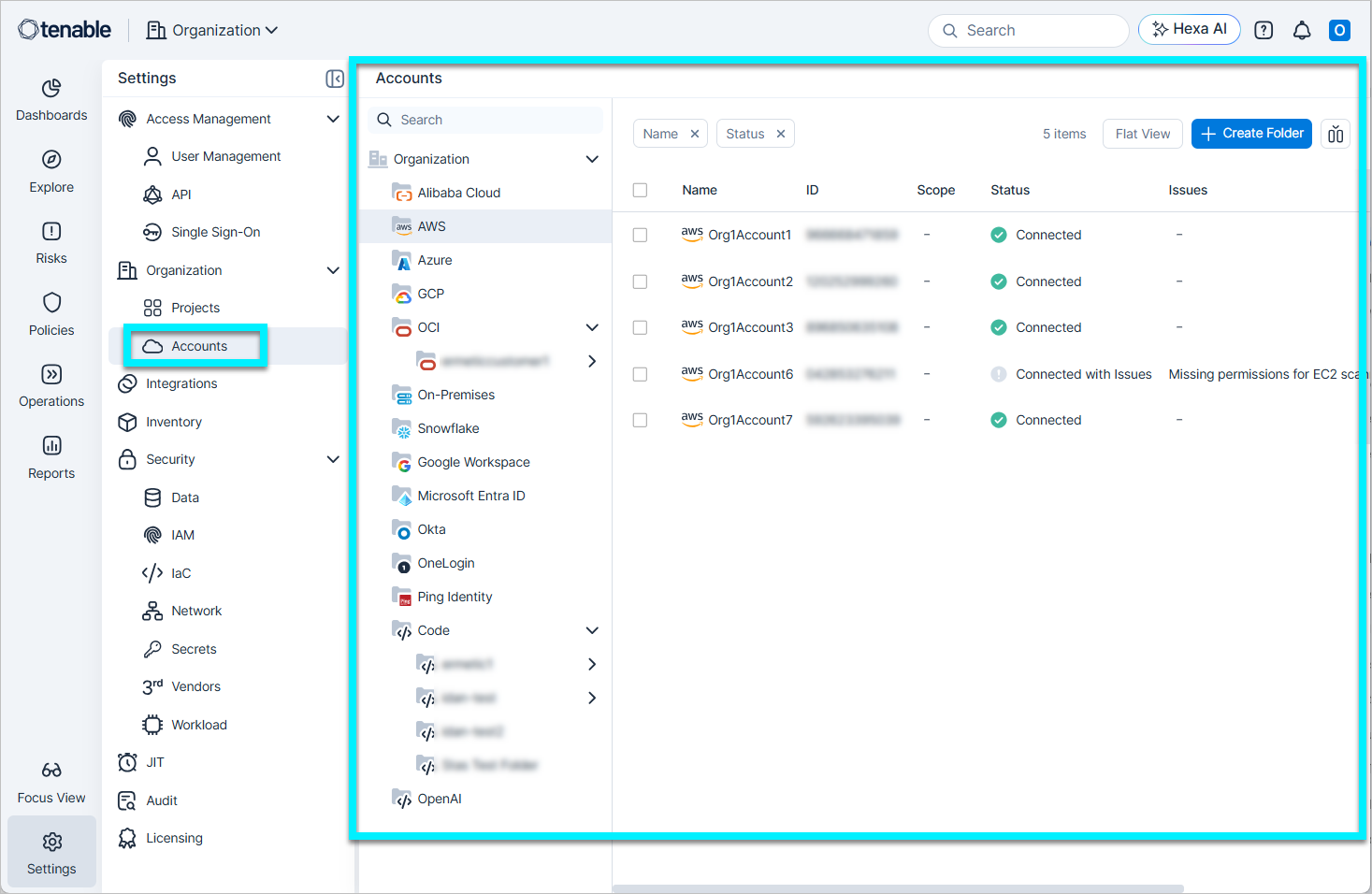
The Accounts page consolidates account management into a single view. This page replaces the previous structure under Settings > Accounts, where you managed accounts across separate, provider-specific pages.
Functional changes:
- Centralized Accounts table — All root accounts now appear in one unified table. To support this consolidation, a new Organization sidebar navigation category shows two primary items: Projects and Accounts.
- Provider-type filtering — A navigation tree on the left allows you to filter the table by a specific platform category (for example, AWS or Google Workspace). The view automatically hides categories that do not have configured accounts.
- Standardized status display — Connection statuses are now unified across all account types.
- Account actions:
- Project Creation — You can select one or more accounts directly from the table to start creating a project.
- Move — You can move accounts of the same tenant type. This action is not available for Identity Provider (IdP) accounts.
Console: Audit Enhancements
Cloud Exposure now includes comprehensive audit metadata across nearly 20 system tables, including Dashboards, Risk Policies, and Integrations. This metadata includes Created By, Creation Time, Modified By, and Modification Time.
- Audit fields — Audit fields are available in table views and profile panels. You can use the column picker and filtering options to track data.
- Default view — By default, tables display modification details. You can toggle creation data on as needed.
- System rename — Tenable renamed all instances of the System identity to Tenable across the platform.
- Improved user display — The Created By and Modified By fields use a two-line layout that displays the user name and the user email address.
Vulnerability Management: Standardize Tenable Risk Scoring
To provide the most accurate and actionable view of your risk, Tenable is standardizing our core scoring intelligence. As part of this update, you may see changes to your risk scores, depending on the Tenable product(s) you own.
For the past several months, many of you have utilized VPR (Beta) to gain deeper insights into exploitability. On July 1, 2026, we will officially promote the current VPR (Beta) to be the primary Vulnerability Priority Rating (VPR) across the Tenable platform.
What is changing?
- VPR consolidation — Tenable is retiring the legacy VPR model to ensure all customers benefit from our most advanced threat intelligence. The high-fidelity model currently labeled as “Beta” will become the standard VPR.
- Risk prioritization — With this update, you can focus your efforts on the 1.6% of critical vulnerabilities that represent actual business risk.
No action is required from your team. These updates will occur automatically within your Tenable console.
For additional details and FAQs, please visit our Tenable Connect Community Post.
Vulnerability Management: Improved Visibility for Java Vulnerabilities
Tenable updated the scanning engine to provide deeper visibility into Java Archive (JAR) files. This update enables more granular detection of vulnerabilities within nested dependencies. The updated detection identifies existing Java vulnerabilities that were previously undetected.
Vulnerability Management: Enhanced Azure BitLocker Scanning with Data Access Authentication
Tenable now supports vulnerability scanning for Azure BitLocker-encrypted virtual machines that have data access authentication enabled. This enhancement ensures comprehensive scan coverage for Azure environments that use this specific disk encryption and authentication configuration.
If you use the Azure policy Protect your data with authentication requirements when exporting or uploading to a disk or snapshot, snapshot creation fails because the policy prevents setting the DataAccessAuthMode to None. To ensure successful vulnerability scanning, you must configure a dedicated Disk Snapshot Resource Group and exclude that group from the policy.
For more details, see the documentation.
Kubernetes: Update to the Kubernetes Cluster Helm Connection Command
As part of the Tenable Console URL Changes (July 20, 2025 - End of January, 2026), the Helm command for connecting to clusters now uses the following URL: https://app.tenable.com. Tenable now configures all new images exclusively for this domain.
- Action required — Add the new domain (https://*.tenable.com) to your allowlist to enable network communication between the domain and your clusters.
- Previous version support — The previous domain remains active for a few months. If you want to continue using the previous domain, you must manually modify the command line. Change the value of the apiUrl parameter to https://<your_region>.app.ermetic.com.
- Private registries support — If you pull Tenable images from a private registry, you must retrieve the latest images from containers.tenable.com and push them to your private registry before you use the new Helm command.
IaC Security: Enhanced Bicep Support
Tenable updated IaC security to include expanded support for Bicep syntax. This update improves the detection of security misconfigurations in Bicep files.
Licensing: Enhanced Visibility for Billable Resources
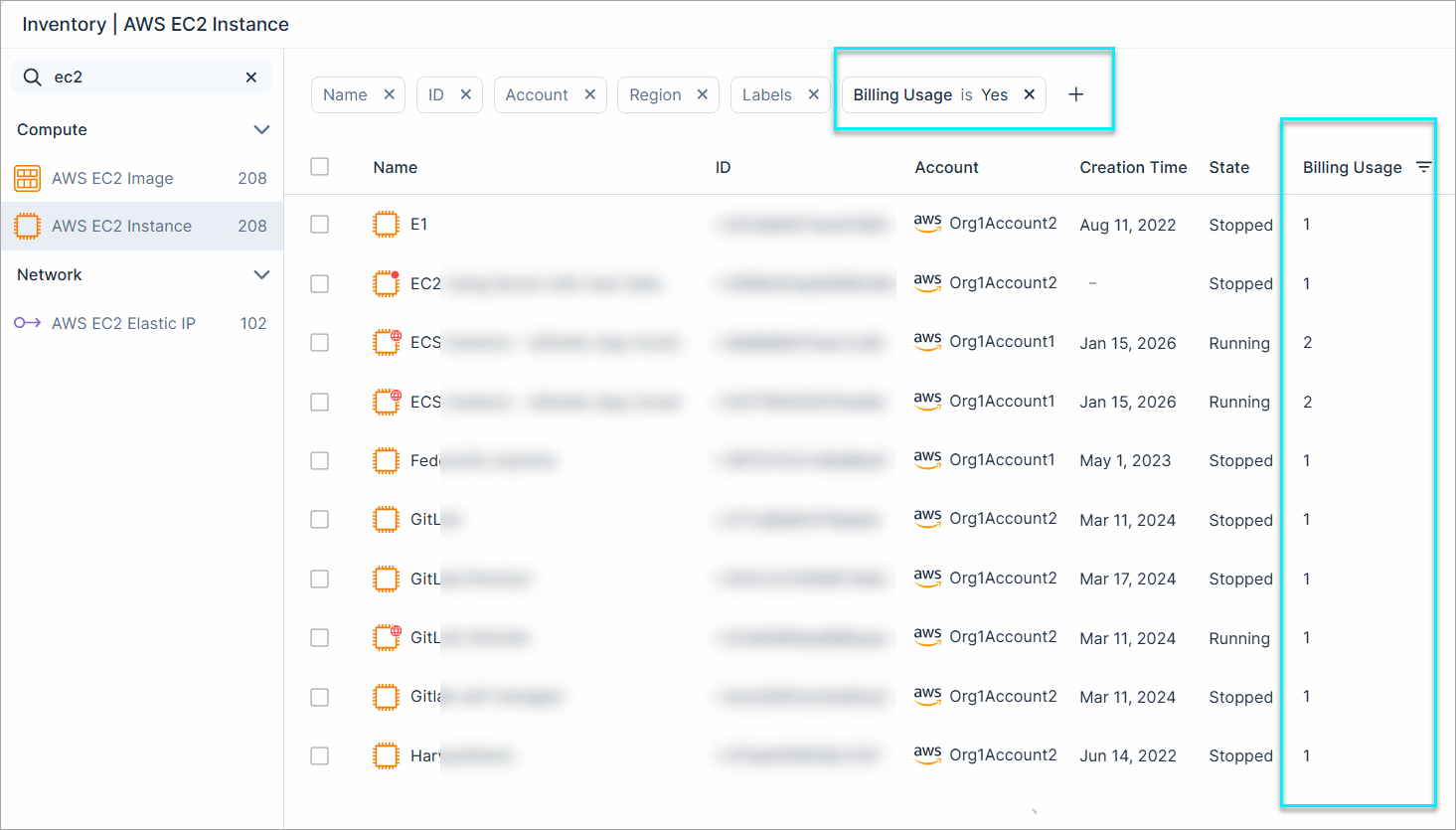
Cloud Exposure introduces a new Billing Usage property for resources, allowing you to identify how many billable units they are consuming. This property is available in the resource profile and within the Inventory and Explorer pages.
Selecting a resource type from the Licensing page now redirects you to the Inventory page with the Billing Usage: Yes filter applied. This filter shows only billable assets. For example, if only 34 repositories are being billed out of a total of 50.
Account Management API: Consolidated Cloud Account Querying
 API Support
Tenable has updated the Account Management API, introducing a consolidated Accounts query that replaces the need to call separate, siloed endpoints for different cloud providers.
Key changes:
- Consolidated Accounts query — You can now retrieve common metadata, such as Name, Status, SyncTime, and CreationTime, for all cloud accounts through a single entry point.
- Cloud-specific filtering — By applying the TenantTypes filter (e.g., TenantTypes: AWS), you can now retrieve accounts for a specific provider, including their unique attributes.
- Deprecation of legacy queries — The provider-specific queries AwsAccounts, AzureSubscriptions, and GcpProjects are now deprecated. While these remain functional for backward compatibility, we recommend migrating to the consolidated Accounts query for all new integrations.
For more information and examples, see the Account Management API documentation.
March 22, 2026 (Release 1.202)
New Features
IAM: Generate Least Privilege Custom Roles for Microsoft Entra ID Groups
You can now generate least-privilege custom roles for groups directly from findings. Based on actual usage, you can create these roles for Microsoft Entra ID groups to remediate overprivileged IAM permissions at the group, subscription, or resource group. This allows you to reduce excessive access by granting only the permissions required for groups to perform tasks.
| Cloud Provider | Resource Type | Policy Name |
|---|---|---|
| Azure | Microsoft Entra ID Group | Overprivileged Microsoft Entra ID Group in subscription |
For more details, see the documentation
Inventory: Focused AWS ECS Task Definition Sync
We’ve updated the synchronization logic for AWS ECS Task Definitions to provide a faster, more relevant Asset Inventory. We now only sync Active task definitions and Inactive definitions that are currently referenced by an active ECS service or task.
Impact on your account:
- Inventory and Findings pages — Inactive, unused task definitions will no longer appear in your inventory. Any security findings associated with these excluded resources will be automatically closed.
- Dashboard metrics — You may notice a decrease in total ECS resource counts and a shift in dashboard statistics.
Integrations: View Child Accounts for Connected Organizations
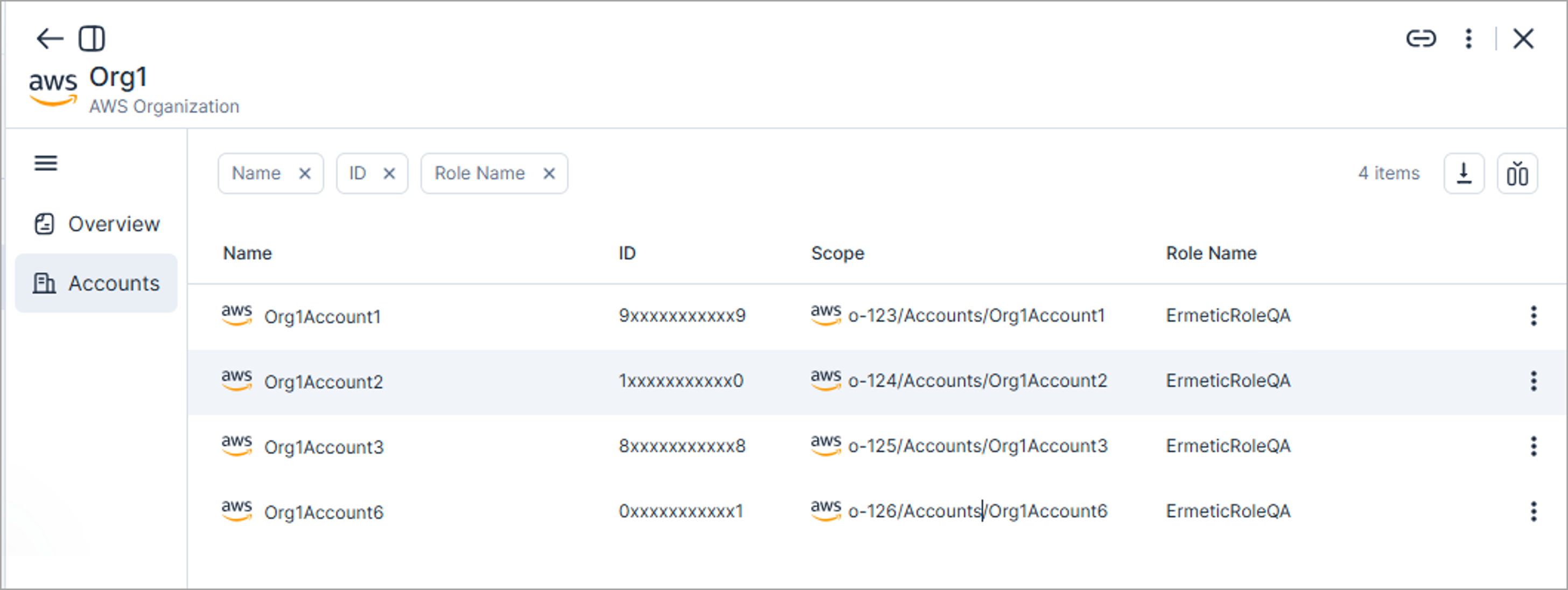
In the profile view of connected organizations, you can now access a dedicated Accounts tab to view all associated accounts. This update centralizes visibility and allows you to view and manage all accounts in a single list. You can view the new tab on the Settings > Integrations page for the following organization categories:
- Cloud providers
- Container registries
- Code repositories
To learn more, see the documentation
March 15, 2026 (Release 1.201)
New Features
Explorer: Global Search for Saved Queries
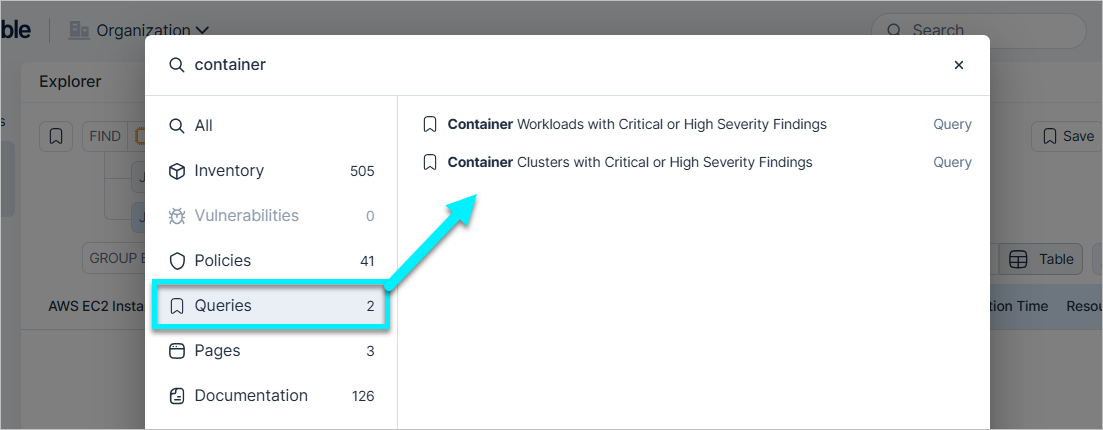
You can now search for and open any saved query directly from the global search bar at the top of the Console. Simply type the name or a keyword of your query to see it surfaced under the new Queries category.
Explorer: Group by for Data Aggregation
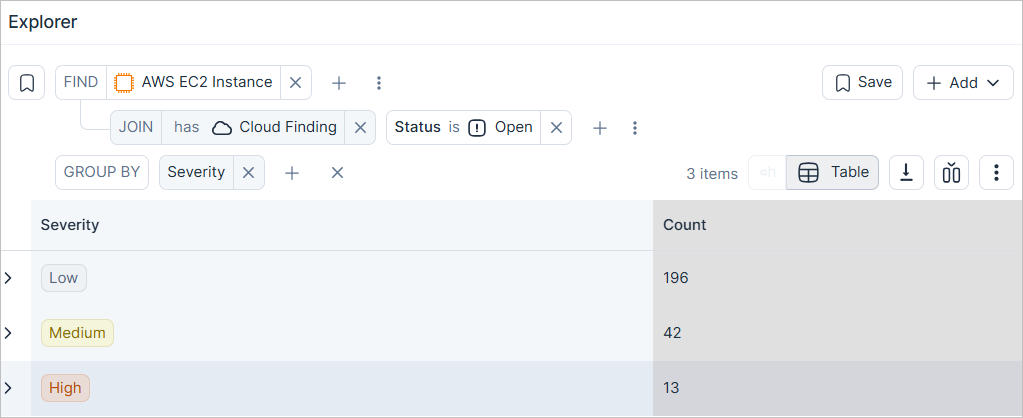
You can now aggregate your Explorer results to gain high-level insights instantly. The new Group By feature lets you summarize query data by specific properties, displaying results as counts in a simplified table view. For example, you can group a finding-related query by Severity to see a breakdown of results by severity level.
Explorer: Parallel Joins and Streamlined Relations Interface
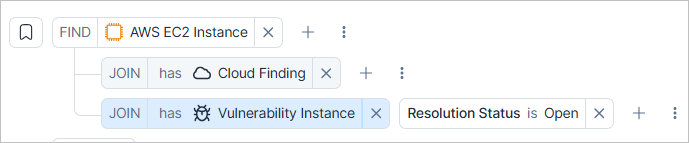
You can now add multiple parallel Joins to a single object. Previously, Joins were limited to a linear path. Now, you can branch out from a primary resource to see related data from several different objects simultaneously in one consolidated table.
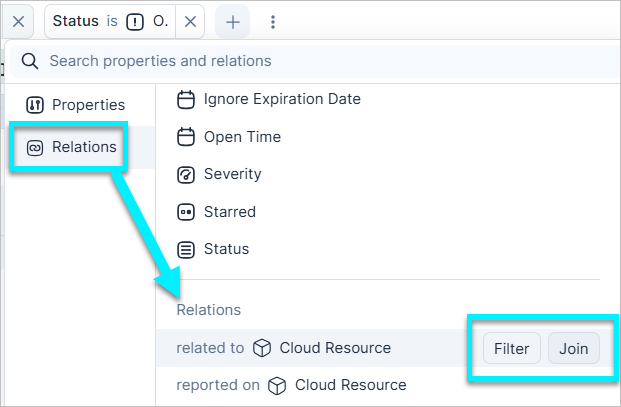
To make building complex queries faster and cleaner, we’ve streamlined the relationship selector:
- Unified Relations category — All relationship types are now grouped under a single Relations tab in the selector menu, replacing the category-based list.
- Inline action buttons — Every relation now features inline Filter and Join buttons. This allows you to immediately decide whether to narrow your current results or expand your data set with new columns, directly from the selection menu.
Workload Protection: AMI Scanning Transitions to a Paid Service
The complimentary interim period for Amazon Machine Image (AMI) scanning has ended. As of March 15, 2026, Tenable is starting to charge for scans of all private and public AMIs. The billable resource name is EC2 Images.
Impact on your account:
- Continuous coverage — Tenable continues to scan your AMIs without interruption. You do not need to take action.
- Monitor usage — You can monitor the number of scanned EC2 Images at any time on the Licensing page.
- Manage AMI scanning settings — To change your settings, navigate to Settings > Cloud Exposure > Workload > Virtual Machine Image.
For more details, see AMI Scanning Transitions to a Paid Service (March 15, 2026).
IAM: Generate Least Privilege Custom Roles for GCP Groups
You can now generate least-privilege custom roles for groups directly from findings. Based on actual usage, you can create these roles for GCP groups to remediate overprivileged IAM permissions at the folder, project, or organization level. This allows you to reduce excessive access by granting only the permissions required for groups to perform tasks.
| Cloud Provider | Resource Type | Policy Name |
|---|---|---|
| GCP | Google Workspace Group | Overprivileged Google Workspace Group in project |
| GCP | Google Workspace Group (external) | Overprivileged Google Workspace Group in project |
For more details, see the documentation.
Network Scanner: Expanded Coverage for Supported Resources
The Network Scanner's coverage has been extended to include a wider range of services across Azure and OCI. The scanner performs dynamic validation by attempting direct connections to resources flagged as internet-facing, confirming actual reachability and recording high-confidence results on the Network Endpoints page.
The following table lists the new supported resources added to the Network Scanner:
| Provider | Resource Name |
|---|---|
| Azure | AI Service |
| AKS Cluster | |
| App Service | |
| Application Gateway | |
| Container Registry | |
| CosmosDB Account | |
| Databricks Workspace | |
| Event Hubs Namespace | |
| Key Vault | |
| MySQL Database Server | |
| Network Load Balancer | |
| PostgreSQL Database Server | |
| SQL Server | |
| OCI | Compute Instance |
| OKE Cluster |
To learn more, see Supported Resources
Data Protection: Data Scan Exclusions
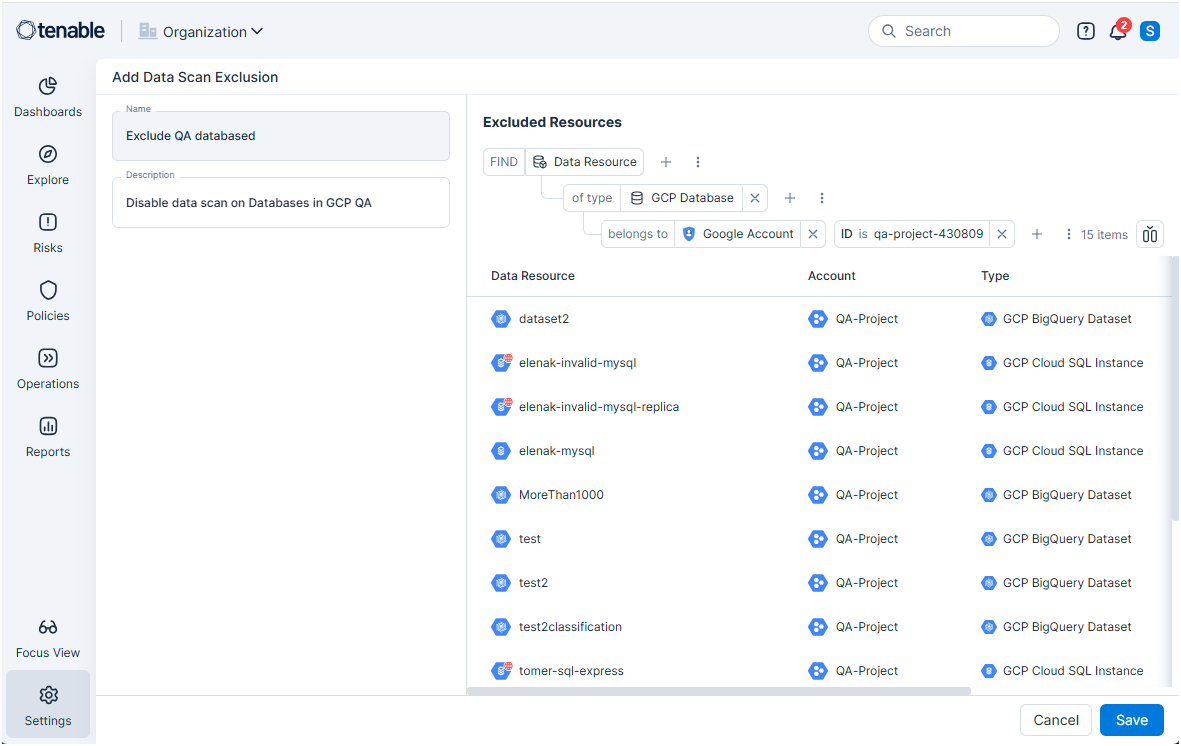
You can now use Data Scan Exclusions to define which resources are excluded from data scans.
Key enhancements:
- Granular rules — Use the Explorer query builder to select resources by any property such as region, account ID, resource type, or tags.
- Resource preview — View a real-time list of targeted resources while building your query to ensure your exclusion logic is accurate before saving.
- Dynamic logic — Any new resources matching the exclusion scope are automatically removed from future scans.
All existing exclusion tags have been automatically converted into data scan exclusions to ensure a seamless transition.
To learn more, see Data Scan Exclusions.
New Resource
API Support
The following resource was added in this release:
| Platform | Category | Resource |
|---|---|---|
| AWS | Data | EFS Mount Target |
New Policies
API Support
The following policies were added in this release:
| Provider | Category | Name |
|---|---|---|
| AWS | Data | RDS Cluster is exposed to a local file read vulnerability |
| AWS | IAM | Cognito Identity Pool unauthenticated guest access is enabled |
| AWS | Logging | EKS Cluster control plane logging is not enabled |
| AWS | Logging | WAF Web ACL logging is not enabled |
| AWS | Network | EFS Access Point user identity is not set |
| Azure | Compute | Service Fabric Cluster protection level security is not set |
| Azure | Data | Automation Account variables are not encrypted |
| Azure | Data | Data Explorer disk encryption is not enabled |
| Azure | Data | Redis Cache encryption in transit is not enabled |
| Azure | Kubernetes | Container Registry is using a deprecated SKU |
| Azure | Network | Automation Account unrestricted inbound internet access |
| Azure | Network | Batch Account has overpermissive network access |
| Azure | Network | Data Factory has overpermissive network access |
| Azure | Network | Service Bus Namespace has overpermissive network access |
March 8, 2026 (Release 1.200)
New Features
Queries: Linked Queries for Policies and Reports
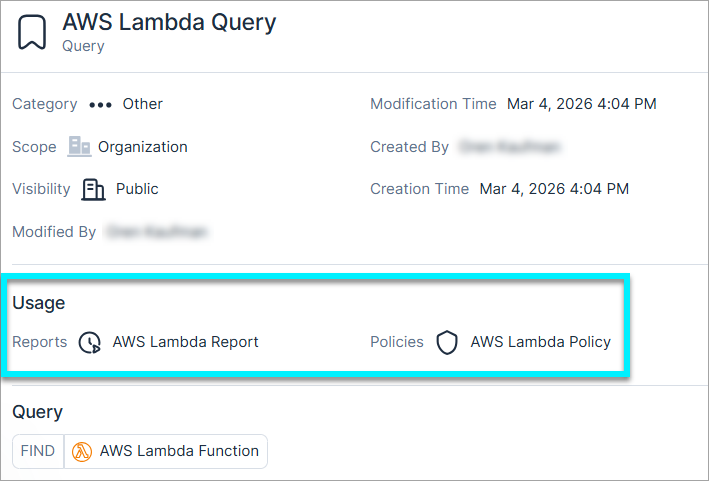
You can now link saved queries directly to custom policies and reports. This ensures your policies stay synchronized with any future updates to the source query.
- Link vs. ad-hoc — Choose to link a policy/report to a source query for automatic syncing, or create an independent copy for full editing flexibility.
- Usage tracking — Query profiles now shows exactly which policies/reports are in use by a specific query.
- Edit protection — To prevent breaking linked policies, certain changes are restricted. Use "Save as" to create a new version instead.
- Deletion safety — Queries currently in use cannot be deleted or made private until they are unlinked.
Network: Endpoints Displayed in Inventory
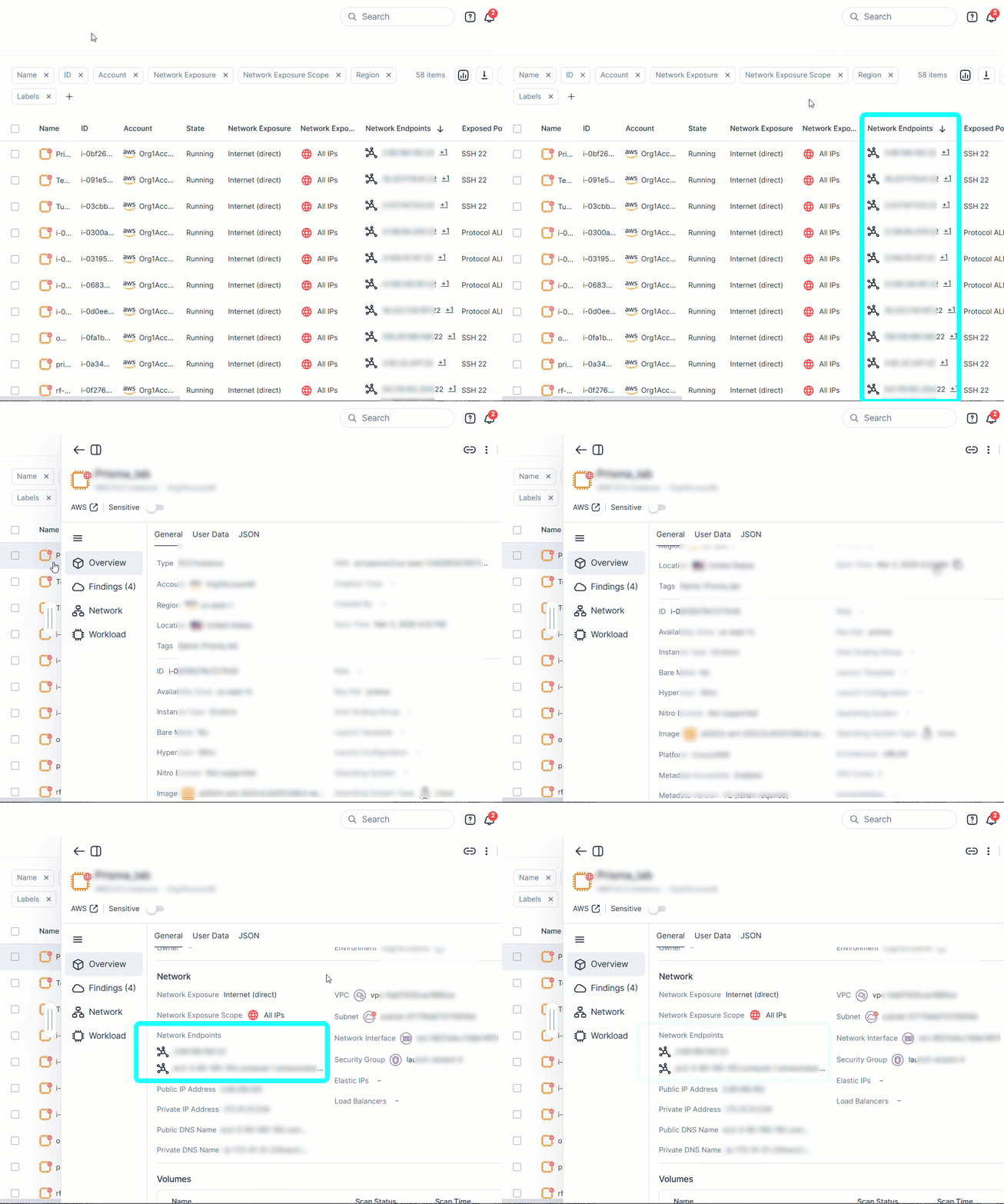
You can now identify and review confirmed network endpoints directly within the Inventory page. This new resource detail bridges the gap between theoretical configuration-based exposure and confirmed live reachability by surfacing the actual, validated entry points for your resources.
This update includes:
- New Inventory column — View these endpoints at a glance in asset inventory lists (e.g., AWS EC2, Azure VM) via the new Network Endpoints column.
- Resource details — Access a consolidated list of validated endpoints within the Overview section of the resource detail slideout.
To learn more about how Network Endpoints are created, see Network Exposure.
Network Scanner: Expanded Coverage for Supported Resources in 200
The Network Scanner's coverage has been extended to include a wider range of services across AWS and GCP. The scanner performs dynamic validation by attempting direct connections to resources flagged as internet-facing, confirming actual reachability and recording high-confidence results on the Network Endpoints page.
The following table lists the new supported resources added to the Network Scanner:
| Provider | Resource Name |
|---|---|
| AWS | API Gateway API |
| DocumentDB Instance | |
| EKS Cluster | |
| ElastiCache Redis OSS Cache | |
| Elastic Beanstalk Environment | |
| Load Balancer | |
| Neptune Instance | |
| OpenSearch Domain | |
| GCP | App Engine Service |
| Cloud Run Service | |
| Cloud SQL Instance | |
| GKE Cluster | |
| Load Balancer |
To learn more, see Supported Resources
Data Protection: Standardized Severity for Sensitive Data Findings from VM Scanning
Cloud Exposure now caps the maximum severity for sensitive data findings in virtual machine and image scans at High. This ensures that findings already reaching the High threshold do not escalate to Critical, standardizing data risk prioritization within the broader workload context to streamline remediation focus.
IAM: Enhanced GCP Service Account Visibility (HMAC Keys)
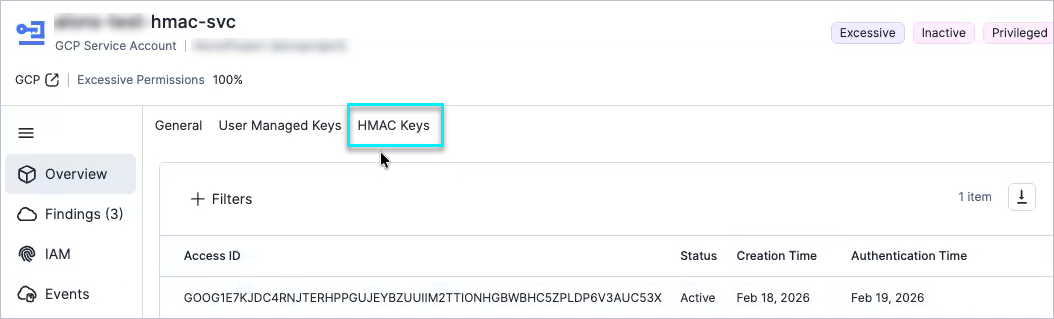
Tenable now supports Hash-based Message Authentication Code (HMAC) keys for GCP service accounts. This update provides visibility into additional authentication methods, improves activity reporting, and identifies the service account as Active.
Key enhancements:
- HMAC key details — You can view HMAC key details in the GCP service account side panel. On the Overview tab, you can view the following:
- Access ID — The unique identifier for the HMAC key.
- Status — The real-time status of the key (for example, Active or Inactive).
- Creation time — The timestamp for when the key was created.
- Last authentication time — The timestamp for the most recent authentication event using the key.
- Activity detection — The GCP service account learning period logic now monitors HMAC key authentication events. When Tenable detects these events, it automatically identifies the service account as Active.
Workload Protection: Exclude Unresolvable Vulnerabilities in Container Image CI/CD Pipelines
 Workload Protection
Tenable now supports the exclude-unresolvable parameter for container image CI/CD pipelines in GitHub, GitLab, and Docker Image CLI scan configurations. Use this parameter to exclude vulnerabilities for which no remediation or patch is currently available. This change helps you focus on actionable findings in your container image CI/CD pipelines.
For more details on the supported parameters, see the documentation.
Kubernetes: Unmanaged Kubernetes Cluster Query Refactoring (Breaking Change)
API Support
Tenable has updated the GraphQL schema for unmanaged Kubernetes clusters. As part of this change, provider-specific prefixes were removed from filter types and inline fragments and consolidated into a single generic entity.
To isolate results for a specific cloud provider, you must now use the Providers argument within your filter instead of the entity name. Queries that continue to use legacy provider-prefixed types will return empty results.
For more information, see the Kubernetes Cluster Query Refactoring (March 3, 2026).
IaC Security: Terraform Dynamic Configuration Scanning
Tenable now scans dynamic Terraform configurations. Tenable analyzes count, for_each arguments, and dynamic blocks using default values in your source code or variable files. This provides visibility into scaled resources and complex infrastructure definitions.
ServiceNow: Support for Fields Governed by UI Policies
Tenable now supports fields governed by ServiceNow UI policies. If your ServiceNow instance uses UI policies to hide or restrict fields conditionally, you can now choose to show these fields in your automation rules. This ensures that even hidden mandatory fields can be populated, preventing ticket creation failures.
JIT Access: Refined Eligibility Error Handling
Error handling for JIT eligibilities has been improved to provide clearer feedback during configuration. This update simplifies troubleshooting for administrators.
New Resources in 200
API Support
The following resources were added in this release:
| Platform | Category | Resource |
|---|---|---|
| Azure | Compute | App Service Environment |
| Azure | Compute | Step Functions state machine |
| Azure | Data | AppSync GraphQL API |
| Azure | IAM | Azure Service Provider Delegation |
| Azure | IAM | Azure Service Provider Offer |
| Azure | Network | Front Door |
| Azure | Network | Front Door WAF Policy |
| Azure | Network | CDN Front Door Profile |
| Azure | Network | CDN Front Door Profile Custom Domain |
| Azure | Network | CDN Front Door Profile Endpoint |
| Azure | Network | CDN Profile Endpoint |
| Azure | Network | CDN Profile Endpoint Custom Domain |
See the documentation for a list of all supported resources.
Policy Update: Managed Disk Does Not Block Public Access
The logic for evaluating the Managed Disk does not block public access policy has been updated to improve accuracy and reduce false positives.
As a result, affected findings are automatically closed with the sub-status false positive.
March 1, 2026 (Release 1.199)
New Features
Automations: Enable and Disable Automation Rules
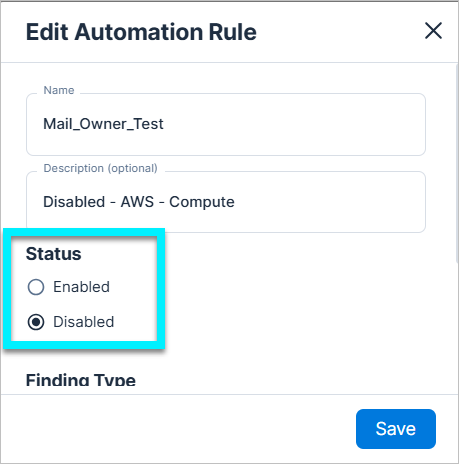
You can now enable and disable automation rules to pause automated workflows without deleting your configurations. When you're ready to resume sending data or notifications, you can toggle the rule back on.
Previously, automation rules remained active until you permanently deleted them.
Data Protection: Support for Scanning Additional Secret Data Type
Tenable now supports scanning the following additional data type:
| Data Type | Category | Sensitivity | Description |
|---|---|---|---|
| Sensitive URL | Secret | Restricted | Detects URLs that contain sensitive paths, authentication parameters, or embedded tokens. |
Data Protection: Improved Secret Data Type Scanning
Secret data type scanning has been enhanced by expanding the underlying detection patterns used to identify exposed secrets. This update improves the identification of various third-party API keys, OAuth credentials, and infrastructure tokens.
Key benefits:
- Broader detection scope — Identifies exposed credentials across multiple services within your existing secret data types.
- Enhanced accuracy — Standardizes the classification of previously unmapped secrets to reduce visibility gaps and prevent potential classification failures.
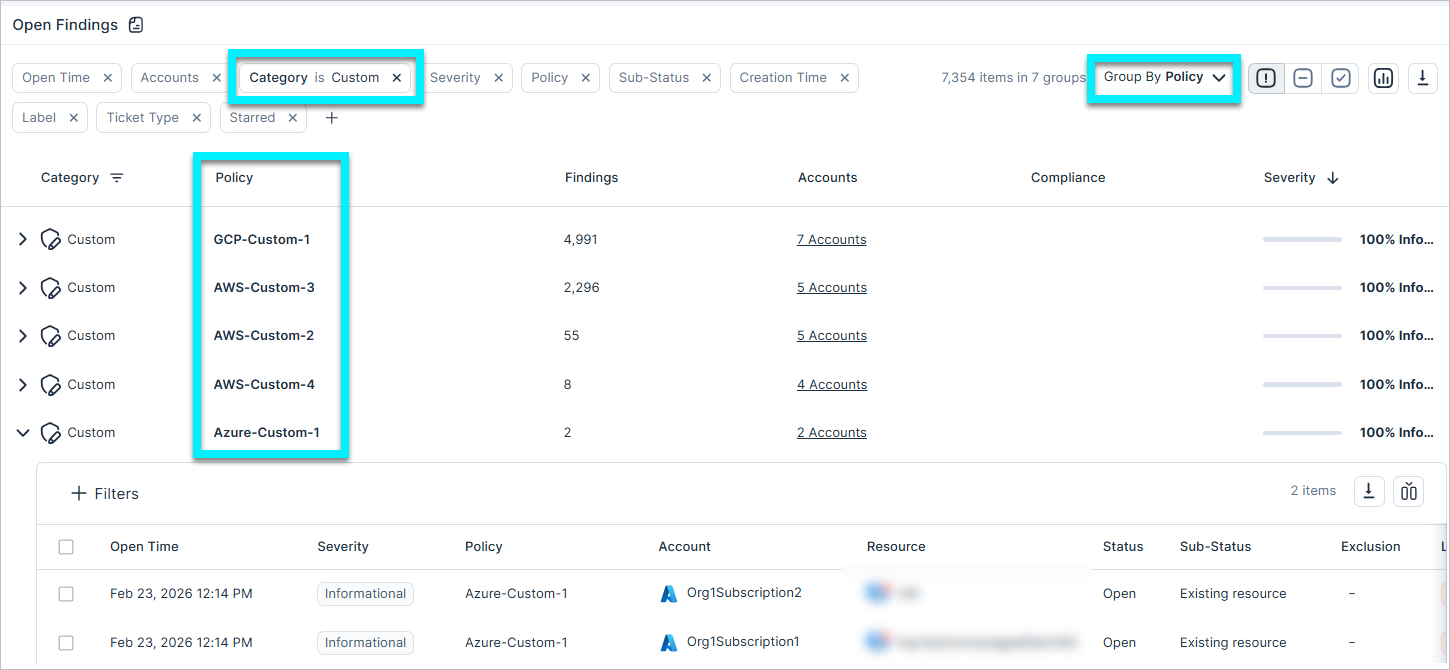
Findings: Enhanced Grouping for Custom Policies
When grouping by policy, findings triggered by custom policies are now grouped by their individual policy name, rather than the generic template type. This allows you to drill down into specific policy violations more efficiently.
Network API: Removal of Deprecated Fields
API Support
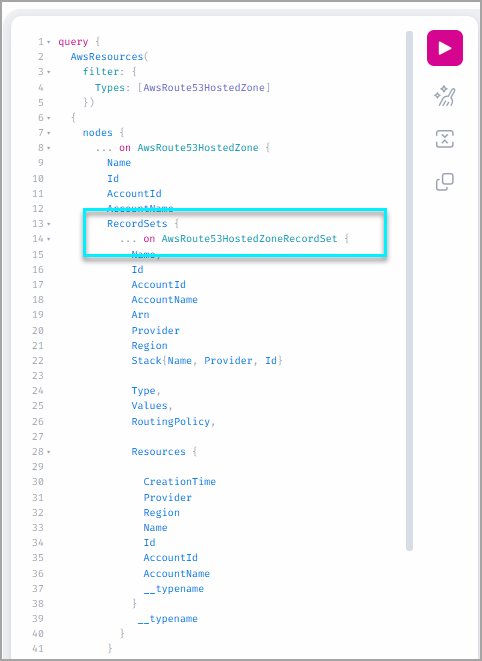
The Records and CloudProvider fields have been officially removed from the AwsRoute53HostedZone API endpoint. Removing these redundant and legacy data structures standardizes the AWS networking schema across Cloud Exposure and improves API response performance.
Any remaining integrations or scripts querying these fields must be updated to use the supported alternatives visible in the API Explorer to prevent request failures.
Compliance: Support Added for New Frameworks
Cloud Exposure now supports the following compliance standards:
- CIS AWS 6.0.0, 5.0.0, and 4.0.0 — Objective, consensus-driven security benchmarks for the Amazon Web Services cloud provider that provide prescriptive guidance for configuring security options for a subset of AWS services.
- NIS2 Directive — A framework designed to enhance cybersecurity across the European Union by establishing a high common level of security. It expands the scope of covered entities to include a broader range of essential and important industries.
See the documentation to learn more about how to monitor compliance in your cloud accounts.
New Resources in 199
API Support
The following resources were added in this release:
| Platform | Category | Resource |
|---|---|---|
| AWS | Data | DAX Cluster |
| AWS | Data | DMS Certificate |
| AWS | Network | API Glue Connection |
| Azure | Compute | SQL Virtual Machine |
| Azure | Data | Service Bus |
See the documentation for a list of all supported resources.
New Policies in 199
API Support
The following policies were added in this release:
| Provider | Category | Name |
|---|---|---|
| AWS | Access | ACM Certificate domain name contains wildcard |
| AWS | Access | ACM Certificate is in invalid or failed state |
| AWS | Data | AppSync GraphQL API authentication with API key is set |
| AWS | Data | CodeBuild Project is exposing secrets |
| AWS | Data | DAX Cluster is not encrypted with KMS |
| AWS | Data | DMS Certificate is expired |
| AWS | Data | DMS Database Migration Task target database logging does not meet minimum requirements |
| AWS | Data | ElastiCache Redis OSS Cluster Cache AUTH is not enabled |
| AWS | Data | EMR Studio is using a shadow resource S3 bucket |
| AWS | Data | Glue Job is using a shadow resource S3 bucket |
| AWS | Data | MSK Cluster encryption in transit is not enabled |
| AWS | Data | OpenSearch Domain fine-grained access control is not enabled |
| AWS | Logging | AppSync GraphQL API field-level logging is not enabled |
| AWS | Logging | CodeBuild Project logging is not enabled |
| AWS | Logging | DMS Database Migration Task source database logging does not meet minimum requirements |
| AWS | Network | ACM Certificate transparency logging is not enabled |
| AWS | Network | AppSync GraphQL API is not associated with WAF web ACL |
| AWS | Network | Glue Connection encryption in transit is not enabled |
| AWS | Network | KMS Key is expiring in 30 days or less |
| AWS | Network | OpenSearch Domain encryption in transit is not enabled |
| AWS | Network | Public MQ Broker |
| AWS | Network | S3 Bucket global view ACL permissions is enabled |
| Azure | Access | Storage Account SAS expiration policy is not set |
| Azure | AI | Machine Learning Workspace Managed Virtual Network Isolation is not enabled |
| Azure | Compute | App Service .NET Core version does not meet minimum requirements |
| Azure | Compute | App Service client certificate is disabled |
| Azure | Compute | App Service Java version does not meet minimum requirements |
| Azure | Compute | App Service PHP version does not meet minimum requirements |
| Azure | Compute | Virtual Machine Linux SSH key authentication is not enabled |
| Azure | Data | Event Hub Instance authorization rules are not set |
| Azure | Data | SQL Server TLS version does not meet minimum requirements |
| Azure | Kubernetes | AKS Cluster disk encryption set is not configured |
| Azure | Logging | App Service HTTP logging is not enabled |
| Azure | Network | Application Gateway listener encryption in transit is not enabled |
| Azure | Network | Application Gateway listener SSL profile is not set |
| Azure | Network | Application Gateway TLS version does not meet minimum requirements |
| GCP | Access | Cloud Run Service is using default service account |
| GCP | AI | Vertex AI Workbench Instance is using the default service account |
| GCP | Kubernetes | GKE Cluster Alias IP is not enabled |
| GCP | Kubernetes | GKE Cluster Alpha cluster is not enabled |
| GCP | Kubernetes | GKE Cluster binary authorization is not enabled |
| GCP | Kubernetes | GKE Cluster client certificate is not enabled |
| GCP | Kubernetes | GKE Cluster master node version does not meet minimum requirements |
| GCP | Kubernetes | GKE Cluster node version does not meet minimum requirements |
| GCP | Kubernetes | GKE Cluster secure boot is not enabled |
| GCP | Kubernetes | GKE Cluster Shielded GKE Nodes is not enabled |
| GCP | Logging | Cloud Storage Bucket access and storage logging are not enabled |
| GCP | Network | Cloud Function HTTP trigger require HTTPS is not enabled |
| GCP | Network | GKE Cluster HTTP load balancing is not enabled |
| GCP | Network | GKE Cluster network policy is not enabled |
February 22, 2026 (Release 1.198)
New Features
New Application Domain: Action Required
The Console URL has transitioned from app.ermetic.com to app.tenable.com.
What changed?
- Console URL
- API URL
- Documentation portal. Moving from docs.ermetic.com to docs.app.tenable.com.
Existing domains will remain active and, where applicable, will automatically redirect to the new URLs. There is no immediate retention date planned for the old domains.
What you need to do:
- Update bookmarks, scripts, or integrations to use the new URL.
-
Firewall/Proxy Update — If your organization uses a proxy or firewall, please allow the following additional domains immediately:
- app.tenable.com
- *.app.tenable.com
Important: Allowing these domains alongside your existing ones ensures a smooth transition. Please do not remove existing Ermetic domains until the migration is fully complete.
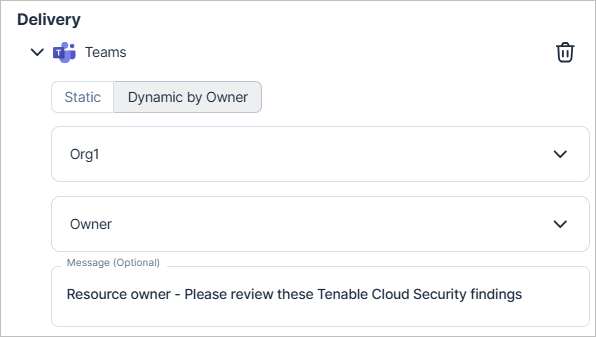
Operations: Send Finding Data to Resource Owners for Slack and Teams
When setting up automation rules for Slack or Microsoft Teams, you can now choose to dynamically send findings to resource Owners.
The system uses owner tags from your cloud providers to identify the primary user or group for a given resource. Tenable then searches across your integrated identity providers to match those tags and deliver the notification directly to the responsible party, ensuring faster triage and remediation.
For more information, see the documentation.
Explorer: Relative Time Filters
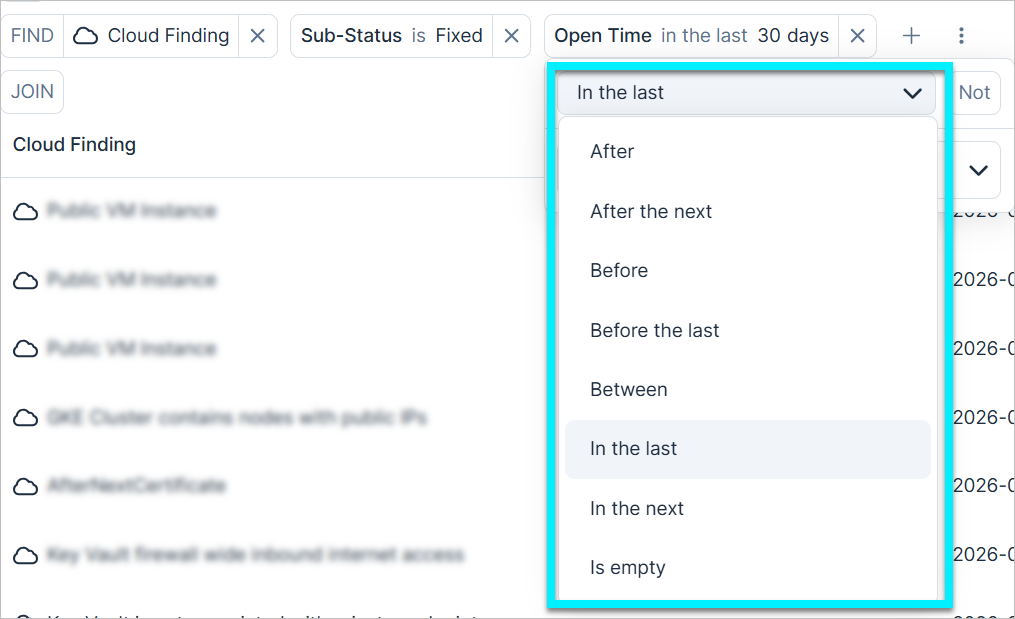
You can now use relative time operators for all date-based filters within the Explorer page. This update expands the available filtering logic to include additional options, enabling dynamic date ranges that automatically update relative to the current date.
For example, apply an "In the last 30 days" filter to the "Open Time" field to maintain a rolling view of newly detected cloud vulnerabilities.
Explorer: Edit Saved Queries Directly in Explorer
You can now update the name, category, or visibility (public/private) of a custom query directly from the Explorer page, allowing faster management of your cloud investigations within your active workspace.
Data Protection: Support for Scanning Additional Secret Data Types
Tenable now supports scanning the following additional data type:
| Data Type | Category | Sensitivity | Description |
|---|---|---|---|
| Generic Password | Secret | Restricted | Unified password detection logic that includes entropy validation to improve accuracy and reduce false positives. |
Data Protection: Support for Scanning New File Formats
Tenable has expanded file scanning coverage to include the following file types:
- .cshtml
- .html
- .ps1
- .py
- .sh
These formats are commonly used to store encryption keys, SSH credentials, and application secrets. Scanning them improves your ability to detect sensitive data in unstructured files across your environments.
For a full list of scanned file formats, see the documentation.
Data Protection: Sensitive Data Scanning for Virtual Machines
You can now scan virtual machines and virtual machine images for Restricted sensitive data, including secrets and credentials, such as passwords, API keys, and tokens.
This capability is automatically enabled for customers who have Virtual Machine and Virtual Machine Image scanning enabled, and it does not add a new billable scan resource.
Learn more in the documentation.
Workload Protection: Plugin Support for Container Image CI/CD Scans
Workload Protection
Tenable added Plugin support for container image CI/CD scans. You can now identify specific vendor-provided fixes directly within CI/CD scan results, allowing you to resolve security gaps before deployment.
For more information, see the documentation.
In Account Scanning: Azure Vnet Integration
Tenable now supports virtual network (Vnet) integration for Azure in-account scanning. This enhancement allows you to scan your Azure resources securely within your existing virtual network architecture, without the need for public-facing configurations.
To use this integration, you must meet additional configuration requirements. For more information, see the documentation.
February 15, 2026 (Release 1.197)
Upcoming Changes
New Application Domain: Action Required
On February 22, we are transitioning our Console URL from app.ermetic.com to app.tenable.com.
What is changing?
- Console URL
- API URL
- Documentation portal. Moving from docs.ermetic.com to docs.app.tenable.com.
Existing domains will remain active and, where applicable, will automatically redirect to the new URLs. There is no immediate retention date planned for the old domains.
What you need to do:
- Update bookmarks, scripts, or integrations to use the new URL.
-
Firewall/Proxy Update — If your organization uses a proxy or firewall, please allow the following additional domains immediately:
- app.tenable.com
- *.app.tenable.com
Important: Allowing these domains alongside your existing ones ensures a smooth transition. Please do not remove existing Ermetic domains until the migration is fully complete.
New Features
Workload Protection: AMI Scanning Transitions to a Paid Service
Vulnerability Management Workload Protection
The complimentary interim period for Amazon Machine Image (AMI) scanning ends soon. Starting March 8, scanning for all private and public AMIs is a billable service. The billable resource name is EC2 Images.
Impact on your account:
- Continuous coverage — Tenable continues scanning your AMIs without interruption. You do not need to take action.
- Monitor usage — You can monitor the current number of scanned EC2 Images at any time on the Licensing page.
- Manage AMI scanning settings — To change your settings, navigate to Settings > Cloud Exposure > Workload > Virtual Machine Image.
To learn more, see the documentation.
Licensing: Updated Billable Resources Display
The Licensing page has been updated to adjust how certain billable resources are displayed. This change does not impact billing logic, ratios, or license consumption.
The following improvements apply:
-
Container hosts are now displayed under the virtual machine resource: Previously, virtual machines that function as container hosts were displayed as separate resources. For example, in AWS, the virtual machine resource EC2 Instances and container host resource EC2 Instances running EKS appeared independently. Now, both billable units are displayed under EC2 Instances.
Billing remains unchanged: each qualifying virtual machine continues to generate two billable units (1:1 as a virtual machine and 1:1 as a container host).
The following table lists the resources affected by this update and shows how they now appear on the Licensing page:
Provider Previously Displayed Now Displayed AWS EC2 Instances (1:1)
EC2 Instances running ECS (1:1)EC2 Instances (2 total units) AWS EC2 Instances (1:1)
EC2 Instances running EKS (1:1)EC2 Instances (2 total units) Azure Virtual Machine Scale Set Instances (1:1)
Virtual Machine Scale Set Instances running AKS (1:1)Virtual Machine Scale Set Instances (2 total units) GCP VM Instances (1:1)
VM Instances running GKE (1:1)VM Instances (2 total units) OCI Compute Instances (1:1)
Compute Instances running OKE (1:1)Compute Instances (2 total units) - CI/CD container image repositories are now consistently displayed under cloud resources: Container images are billed based on the repository to which images are pushed, whether scanned through container registry scanning or CI/CD scanning.
Previously, repositories scanned through CI/CD were displayed separately under Code. They are now reported under cloud resources, consistent with other container image repositories.
Billing remains unchanged and is calculated based on the container image repository.
Learn more in the documentation.
Workload Protection: Plugins and Enhanced Vulnerability Mapping
Vulnerability Management Workload Protection
Tenable introduced a new Plugin feature (also known as Plugin IDs in Tenable Vulnerability Management) to streamline remediation workflows. By using enhanced vulnerability mapping to group multiple Common Vulnerabilities and Exposures (CVEs) under a single vendor-provided fix, you can identify and resolve security gaps more efficiently.
This update includes the following enhancements:
- Identify required fixes quickly — Use the new Plugin Name and Plugin ID columns in the Vulnerabilities table to determine exactly which software package versions resolve specific security gaps across your environment.
- View plugin data across all resources — Track remediation requirements directly from the Virtual Machines, Virtual Machine Images, Container Images, and Software resource tables, which now include dedicated plugin data columns.
- Access granular resource details — View plugin-related columns within the Vulnerabilities and Software tabs of the resource slideout panel for a consolidated view of an resource's risk.
- Analyze plugin impact — Use the new Plugin slideout panel to view aggregated metadata, including Vulnerability Priority Rating (VPR), remediation steps, and discovery timestamps.
For more information, see the documentation.
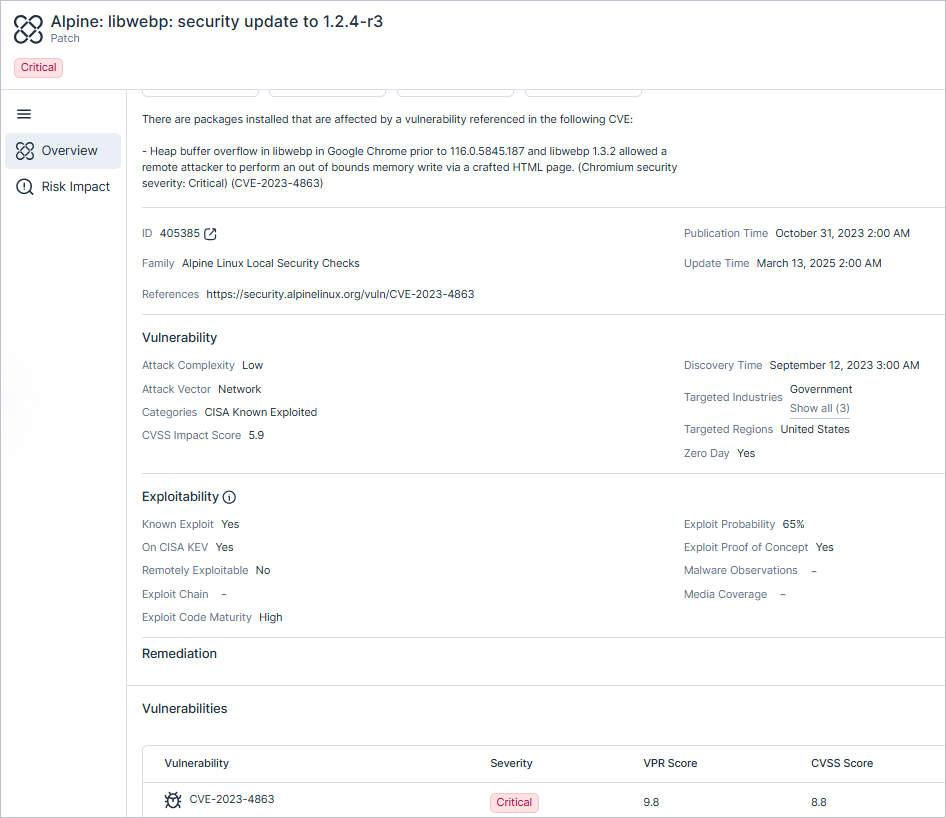
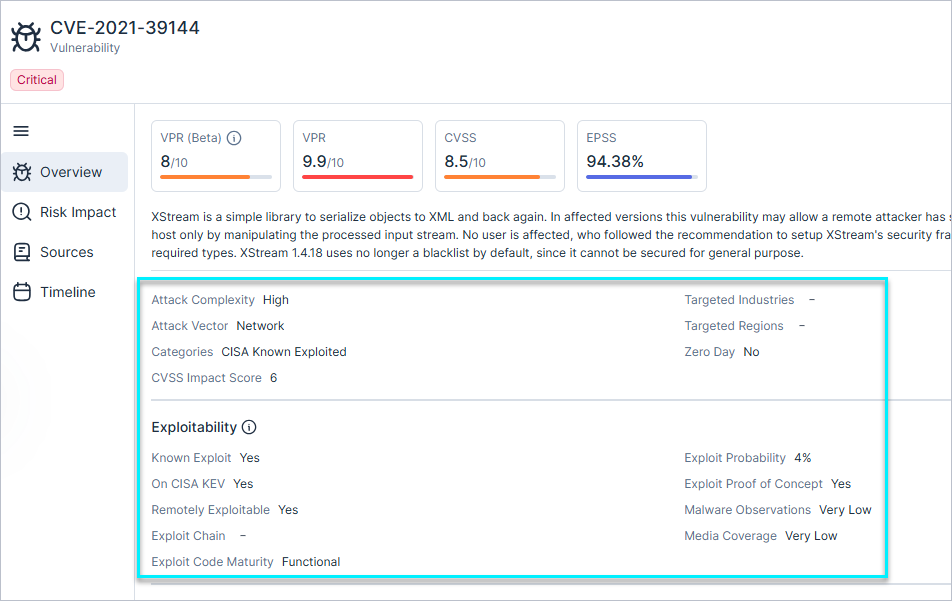
Workload Protection: Improved Structure for Vulnerability Insights
Vulnerability Management Workload Protection
Tenable reorganized the vulnerability slideout panel to provide a more logical layout and improve data organization:
- Threat Factors - This section is now divided into two distinct categories:
- Vulnerability risk profile — Groups insights to help you prioritize vulnerabilities effectively.
- Exploitability — Details specific information regarding a vulnerability’s attack potential for quicker analysis.
- Timeline graph - This graph now appears under the Timeline tab.
Workload Protection: Support for Bottlerocket (Agentless)
Vulnerability Management Workload Protection
Tenable added support for Bottlerocket agentless scanning to provide visibility into container images and security vulnerabilities. This enhancement allows you to identify risks in Bottlerocket environments and improve the security of your containerized workloads.
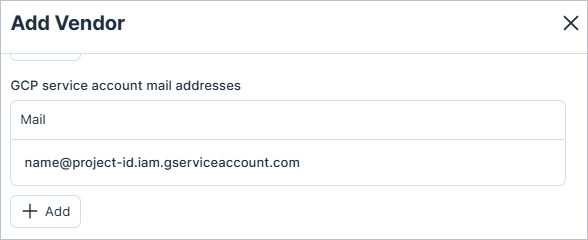
IAM: GCP Service Account Support for 3rd Party Vendors
You can now configure GCP service account email addresses as 3rd party vendors in Tenable. This extends Tenable's 3rd party vendor auditing to GCP, in addition to existing support for AWS and Microsoft Azure.
From the Vendors settings page, you can map GCP service account email addresses to vendors from the Tenable built-in list or add custom vendors. Tenable displays this vendor data across several identity and inventory pages.
For more information, see the documentation.
New Policy
API Support
The following policy was added in this release:
| Provider | Category | Name |
|---|---|---|
| Azure | Network | Key Vault Certificate is expired |
February 8, 2026 (Release 1.196)
New Features
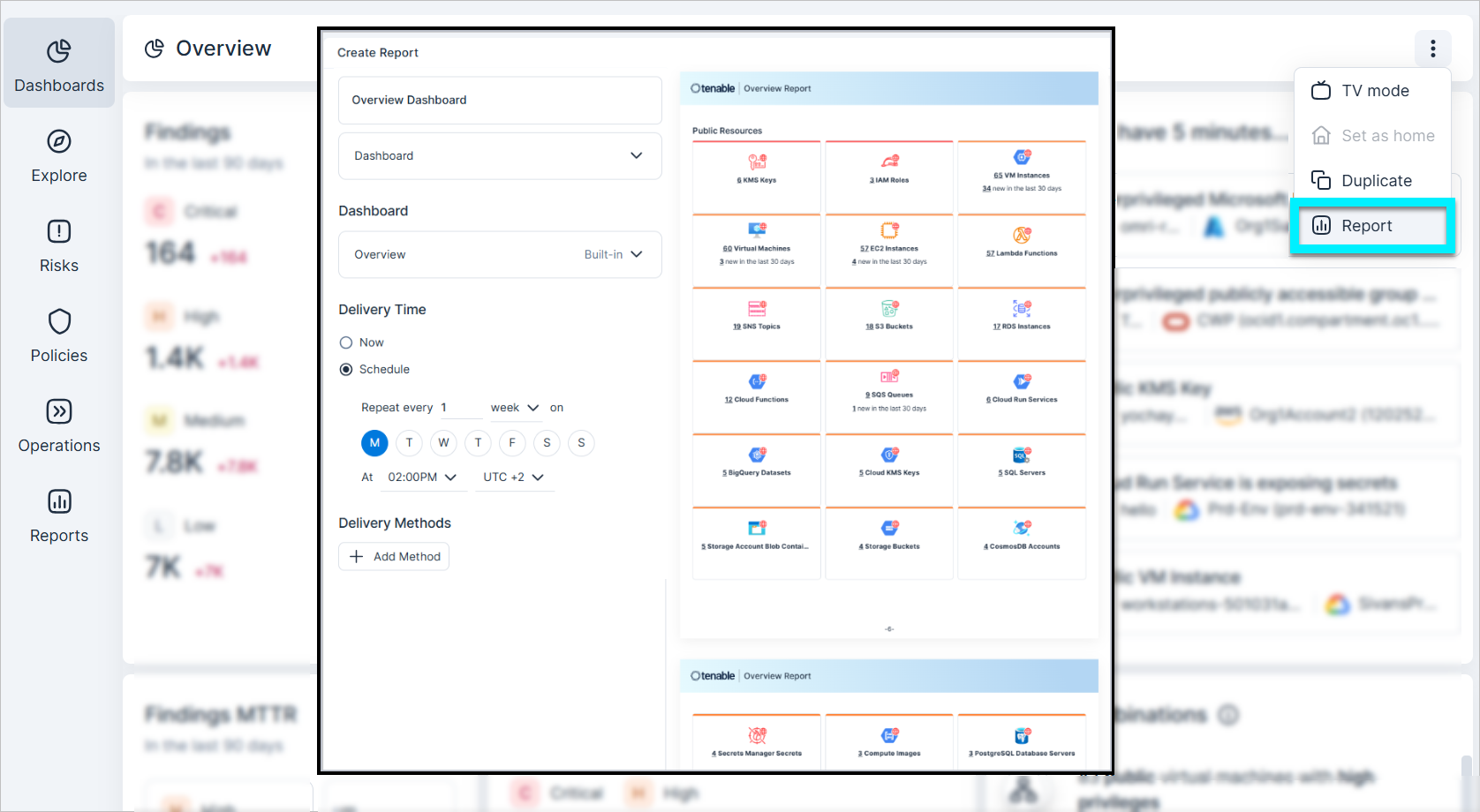
Dashboards: Create Reports from Dashboards
You can now create scheduled or on-demand reports based on public dashboards to simplify how you share insights with stakeholders. For example, create reports for executive overviews or finding trends.
Create such reports from either:
- Dashboards — Click the three dots menu in the top-right corner of any public dashboard to create a Report.
- Reports — When creating a new report, select Dashboard as the report type to build a report from any of your existing public dashboards.
This feature leverages the newly released Reports: Custom Interval Scheduling, giving you full control over when your data arrives.
Workload Protection: Azure Linux 3.0 Support
Vulnerability Management Workload Protection
Tenable added support for Azure Linux 3.0 (CBL-Mariner). This update ensures seamless vulnerability management for the latest Microsoft-optimized Linux distributions used in Azure Kubernetes Service (AKS) and cloud-native workloads.
Workload Protection: Java Archive Vulnerability Detection Enhancement
Vulnerability Management Workload Protection
Tenable expanded its Java Archive (JAR) vulnerability detection across virtual machines, virtual machine images, and container images to identify a wider range of security risks within Java applications. This enhancement provides more accurate results by reducing false positives and false negatives, ensuring comprehensive security coverage for your Java-based environments.
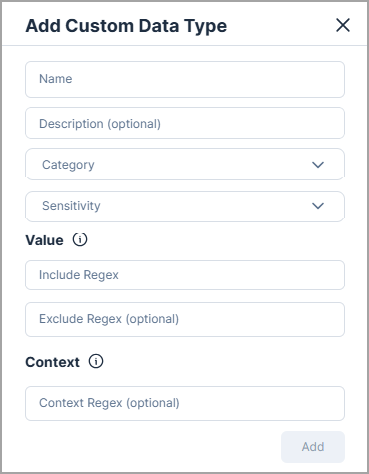
Data Protection: Custom Data Type Support
You can now create custom data types to classify sensitive data that is specific to your organization, such as internal identifiers, membership IDs, or transaction codes.
Custom data types let you define your own detection patterns and map them to a Category and Sensitivity, while continuing to use and manage built-in data types as before.
To learn more, see the documentation.
Data Protection: New Supported File Formats (PDF, Images, and Office Files)
You can now scan the following file formats for sensitive data:
- PDF files (pdf).
- Excel (xls) and Word (doc) files.
- Image files (bmp, gif, jpeg, jpg, png, tiff).
In addition, Image scanning includes text extraction within pdf, doc, docx, xls, and xlsx files allowing detection of sensitive data embedded in images within those files.
For a complete list of supported file formats, see the documentation.
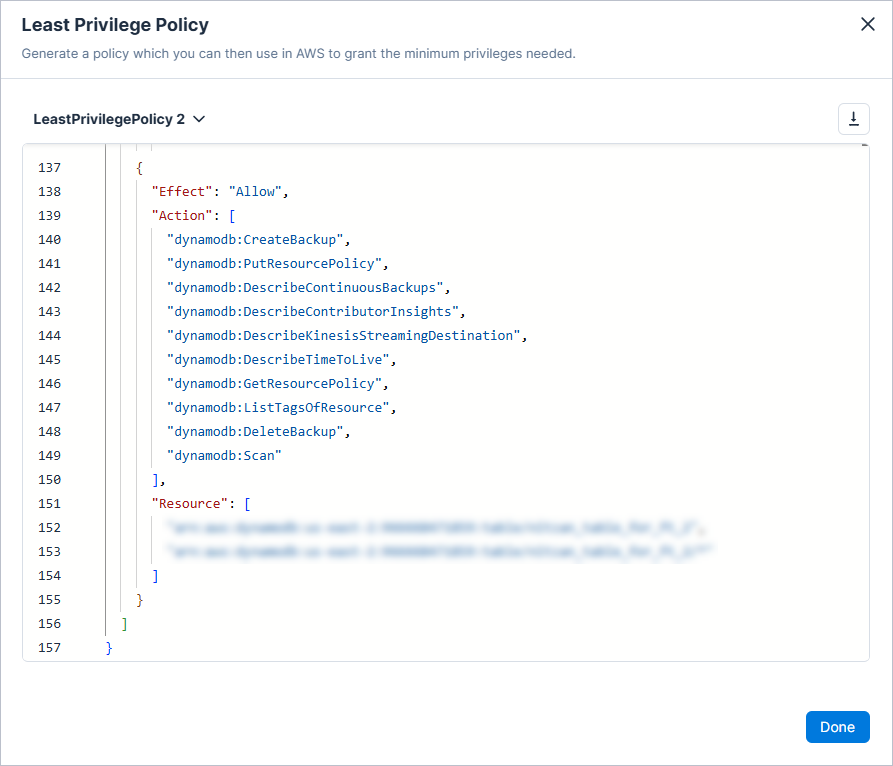
IAM: AWS DynamoDB Resource Granularity for Least Privilege Policies
Tenable now supports resource-level granularity for DynamoDB actions when generating AWS least-privilege policies. This improvement provides more precise policy generation by automatically associating DynamoDB actions with specific resources.
You can generate least-privilege policies to enforce security best practices by creating fine-grained, on-demand policies for cloud identities and resources.
February 1, 2026 (Release 1.195)
New Features
Azure: Independent Azure and Microsoft Entra ID Integrations
You can now connect Azure organizations/subscriptions independently from Microsoft Entra ID.
Azure integrations provide visibility into cloud resources and configurations. Microsoft Entra ID can be connected separately to enable identity-related visibility and access insights.
For the most comprehensive coverage across cloud resources and identities, connecting both Azure and Microsoft Entra ID is recommended.
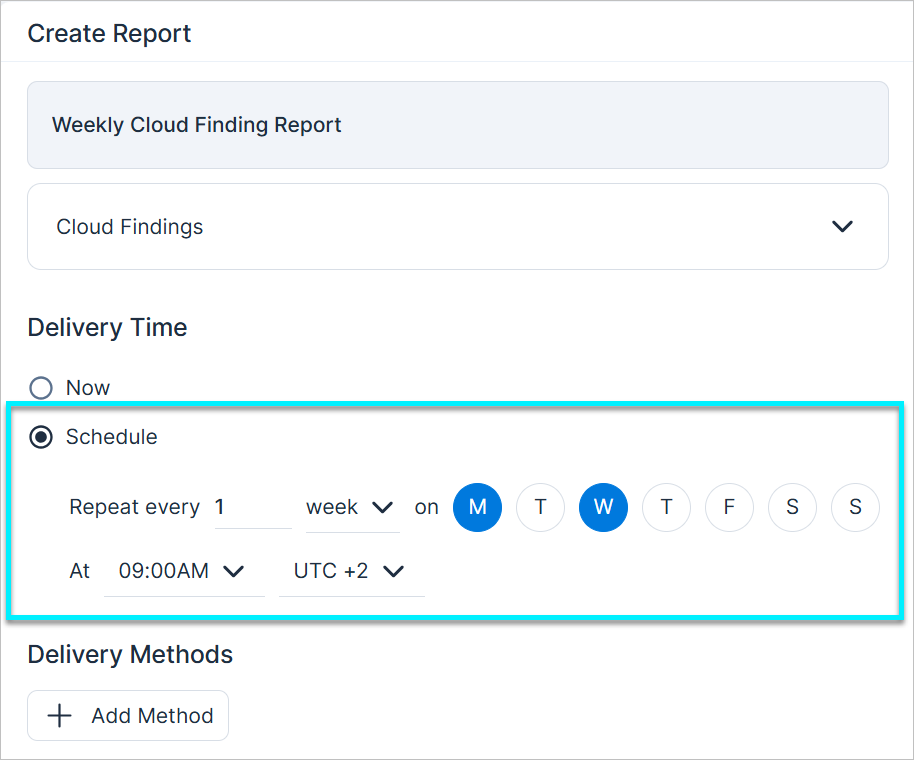
Reports: Custom Interval Scheduling
You can now customize report delivery by scheduling specific day/week/month intervals, giving you greater control over when your data arrives. For example, you can schedule a Cloud Findings report to repeat every 1 week on Mondays and Wednesdays at 09:00 AM, rather than being limited to a single weekly delivery.
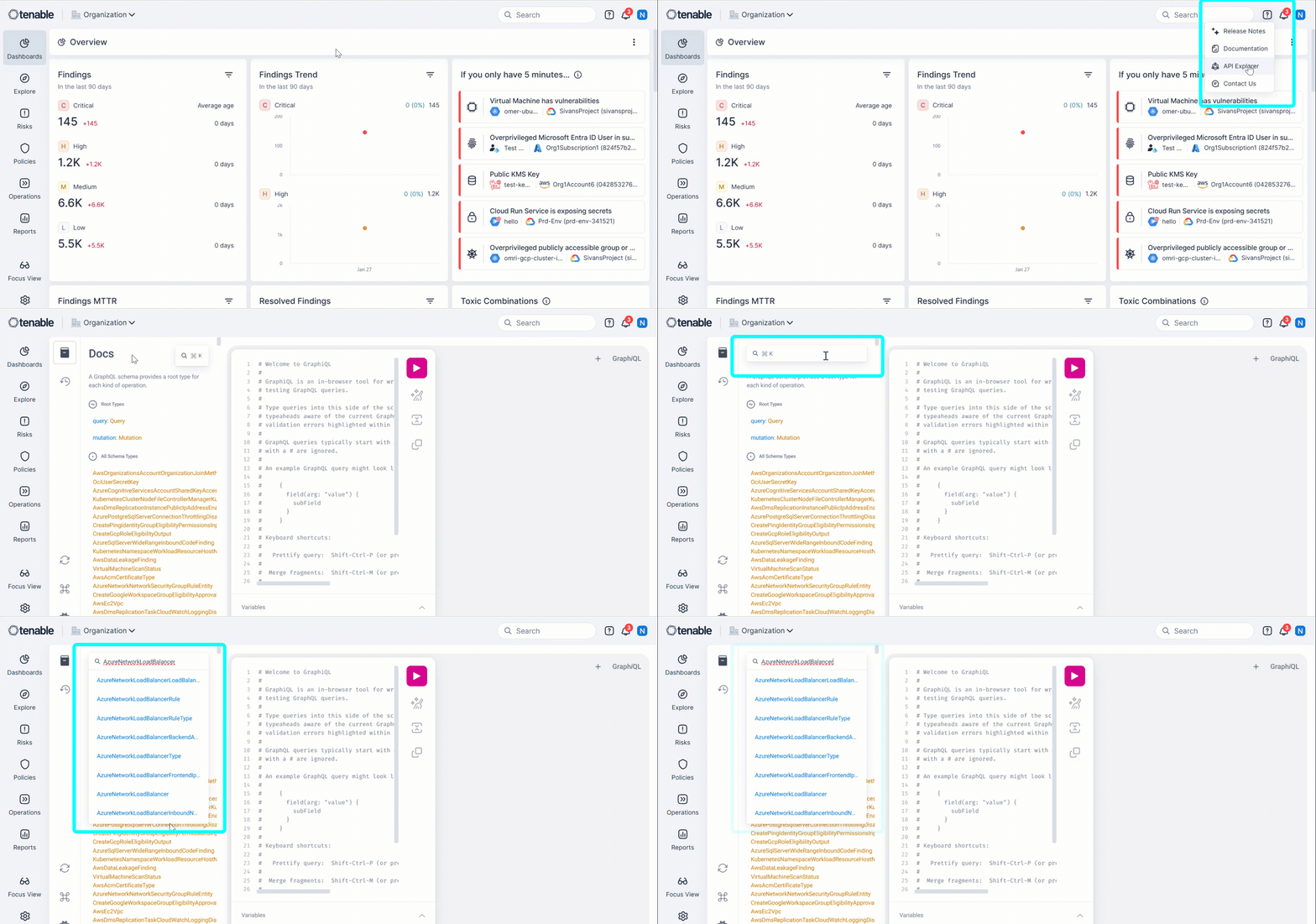
Network API Update: Extended Support for Azure Network Load Balancer
The Azure Network Load Balancer API has been extended with new and updated endpoints. You can explore the updated API structure and available fields in the API Explorer by searching for AzureNetworkLoadBalancer.
January 25, 2026 (Release 1.194)
New Features
Workload Protection: AMI Scanning Enabled by Default
Vulnerability Management Workload Protection
To ensure that all preconfigured image templates are evaluated for vulnerabilities before they are used to launch new instances, Tenable now enables Amazon Machine Image (AMI) scanning by default for all AWS Cloud Workload Protection (CWP) users.
For more information, see AMI Scanning Enabled by Default (January 25, 2026).
Projects: Define Projects Using Azure Resource Group Tag Patterns
API Support
You can now define project scopes by Azure resource group tag patterns, giving you greater flexibility to align Projects with your cloud structure. This builds on our existing support for resource group name patterns and resource tags.
- Target organizational metadata — Align projects with business functions or specific applications by targeting tags on the Azure resource group itself. This is ideal for teams using resource groups as their primary administrative boundary.
- Automatic dependency mapping — Like name-based patterns, tag-based scopes automatically include related resources (such as secrets tied to a key vault) to ensure your project view remains complete.
For more information, see the documentation.
Explorer: Query Compliance Data
You can now query Compliance standards in the Explorer page. This allows you to investigate adherence to regulatory frameworks (built-in or custom) using the powerful query-building tools in Explorer. For example, you can identify all open cloud findings with critical severity that violate a specific compliance standard (such as SOC2 Type II).
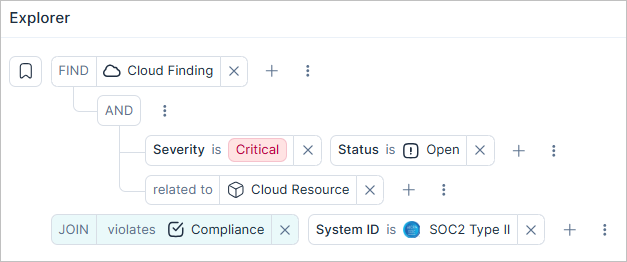
For more information, see the documentation.
New Policy in 194
API Support
The following policy was added in this release:
| Provider | Category | Name |
|---|---|---|
| AWS | S3 Bucket | S3 Bucket versioning is not enabled |
January 18, 2026 (Release 1.193)
New Features
Custom Policies: Create Custom Policies from Explorer Queries
You can now convert Explorer queries into custom policies, allowing you to transform ad-hoc searches into automated security monitoring. For example, create a policy for tracking publicly exposed EC2 instances with Sensitive tags. You can create policies from either the Explorer or Policies page.
Query-based policies let you:
- Assign names, descriptions, and custom remediation steps (including external links) to provide clear guidance for security teams.
- Improve remediation workflows by defining your unique environment constraints and avoiding the need for manual report sharing to resolve issues.
Custom Policies: Redesigned Custom Policy Workflow
The custom policy workflow was redesigned into a single, consistent workflow to support both the new Custom Policies: Create Custom Policies from Explorer Queries, and existing template-based policies. This redesign also introduces a full-screen experience, and the ability to add remediation steps (to ensure that findings are accompanied by actionable guidance).
Custom Properties: Manually Override Custom Properties
API Support
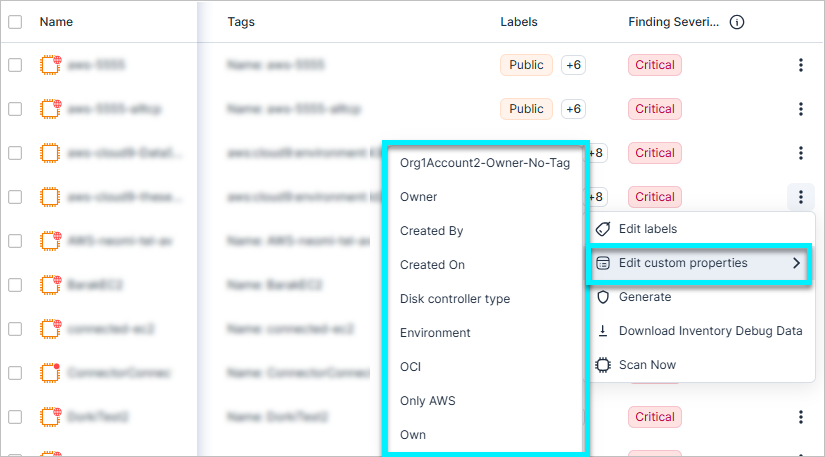
You can now manually edit and bulk-edit custom property values directly in the Cloud Exposure Inventory, independent of cloud tags. For example, instantly assign an owner to a critical, untagged S3 bucket. This ensures accurate security context and routing, even when cloud metadata is missing or incorrect, without requiring DevOps to update tags in the cloud provider.
Key capabilities:
- Flexible input — Add multiple manual entries (if a single resource has multiple stakeholders) or define an Empty value to clear specific data.
- API support & CMDB Integration — Programmatically populate custom properties directly from your CMDB (Configuration Management Database) using new GraphQL mutations. This allows you to keep security context in sync with your internal records without altering cloud infrastructure.
Custom Properties: Support for Multiple Resource Owners
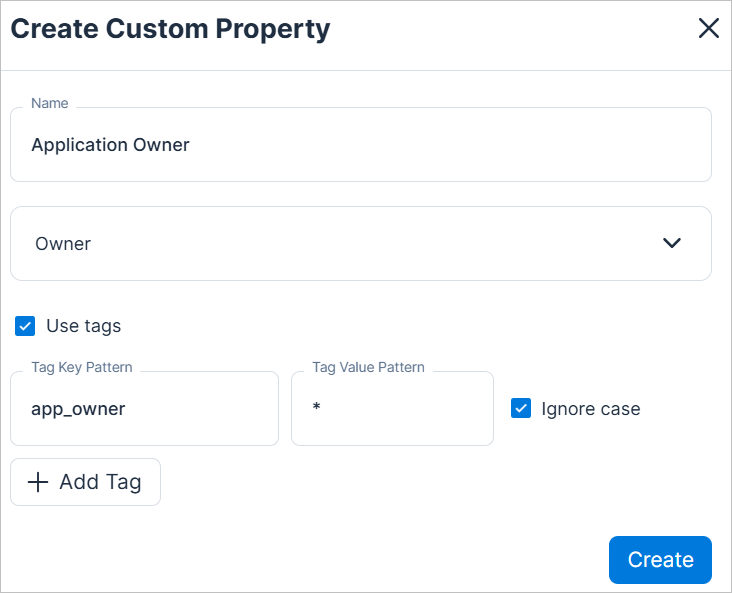
You can now assign multiple distinct owners to a single resource to reflect complex shared-responsibility models. This ensures the right person is contacted for the right issue, reducing alert fatigue. For example, you can define both an Application Owner and a Platform Engineer.
Key capabilities:
- Multiple owner properties: Owner is now a property type instead of a single, hardcoded property. You can create multiple properties of this type with your own names.
- Automations — When sending emails per resource owner, you can now select specific owners.
Data Protection: View and Filter Data Scan Status Reasons
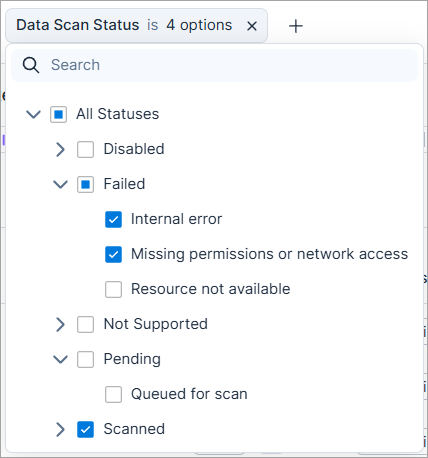
Data Scan Status now provides additional visibility into why data resources are not scanned, with the following enhancements:
- Sub-status filtering — Refine high-level scan statuses (such as Failed or Not Supported) by the specific reason behind them. For example, you can now filter Failed resources by Missing permissions or Internal error.
- Data Scan Sub-Status column — View the scan reason directly in the table using the new Data Scan Sub-Status column. The column is hidden by default and can be enabled from the column selector.
Policy Update: Network Security Group Alarm Evaluation
The logic for evaluating the following policies has been updated to improve accuracy and reduce false positives:
- Missing subscription alarm – delete network security group
- Missing subscription alarm – create or update network security group
A risk is now opened only if both alarm types are missing. As a result, affected findings are automatically closed with the sub-status False Positive.
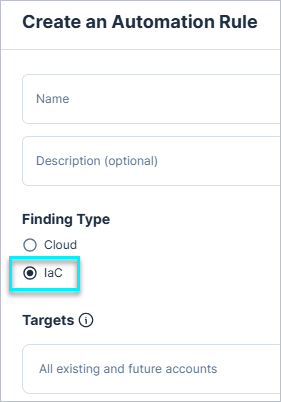
IaC: Create Automation Rules for Findings
You can now create automation rules for Infrastructure as Code (IaC) findings to accelerate remediation.
These rules automatically create and assign tickets to stakeholders, allowing them to resolve issues without logging into Tenable. Additionally, the Operations > Finding Automations table now includes a Finding Type column to distinguish between Cloud and IaC rules.
For more information, see the documentation.
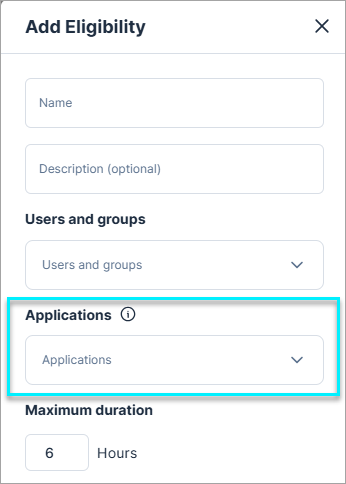
JIT Access for AWS SSO Applications
In AWS environments, Cloud Exposure now supports JIT access to applications managed by AWS Identity Center.
Administrators can create application eligibilities that let users and groups request temporary access to specific applications. When a request is approved, Tenable assigns the user to the application for the approved duration and automatically revokes access when it ends.
When viewing AWS in JIT, the Eligibilities page now includes two tabs:
- Account Permissions — Displays eligibilities that grant access to cloud accounts and roles.
- SSO Applications — Displays eligibilities that grant access to applications managed by AWS Identity Center.
To start using application access, you must:
- Enable the Just-in-time Access for Application Assignments option in your AWS onboarding account or organization settings.
- Update your JIT IAM policies to include the new application-assignment permissions for the relevant AWS administrator account.
JIT Access API: AWS SSO Application Access
API Support
The JIT Access API now supports AWS SSO application access, allowing you to manage application-level JIT workflows programmatically.
You can now:
- Create application eligibilities — Create and update JIT eligibilities scoped to AWS SSO applications.
- Submit application access requests — Request time-bound access to AWS SSO applications through the API.
New Resource in 193
API Support
The following resource was added in this release:
| Platform | Category | Resource |
|---|---|---|
| AWS | IAM | SSO Application |
See the documentation for a list of all supported resources.
January 11, 2026 (Release 1.192)
New Features
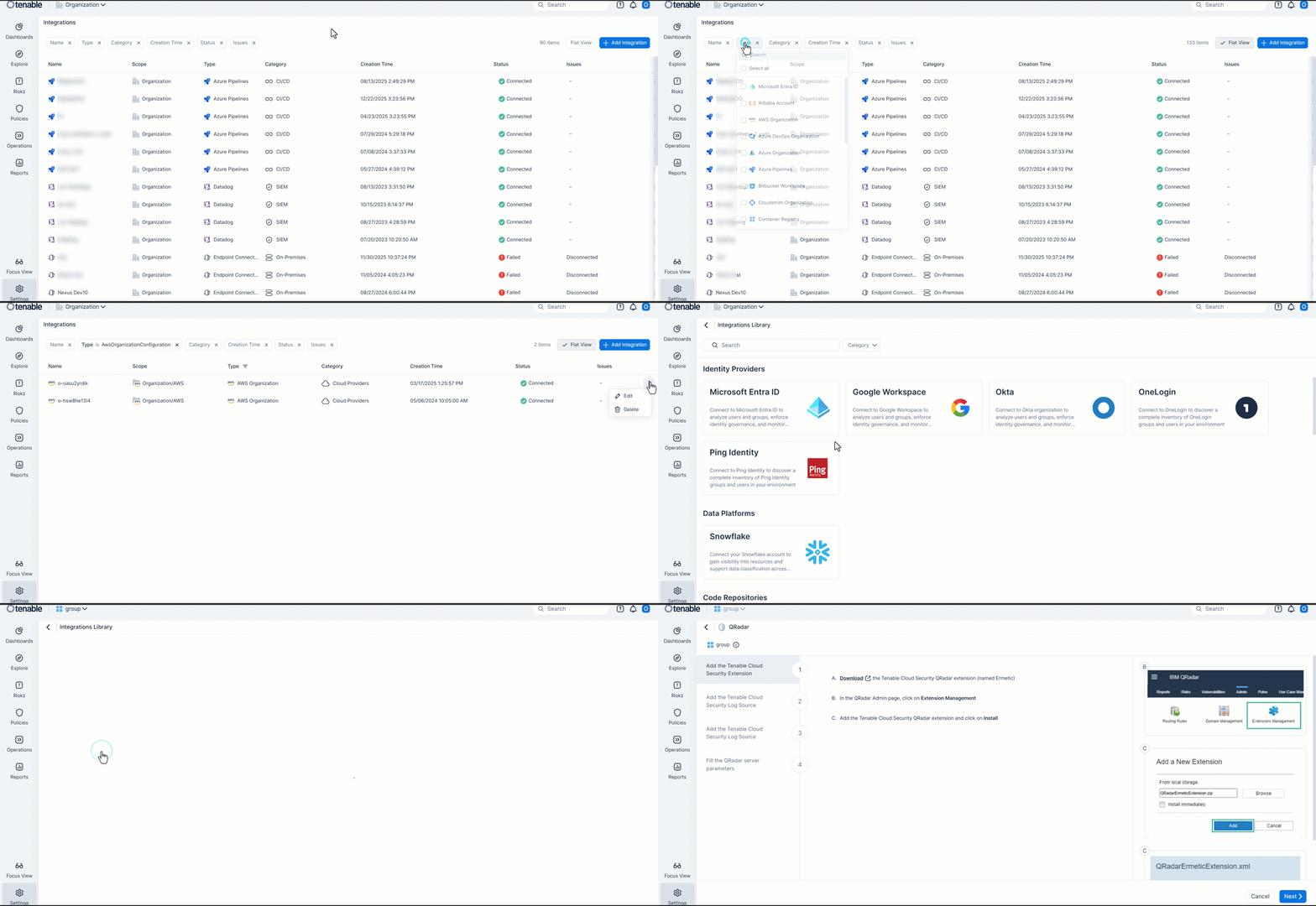
Integrations: Redesigned Integration Management and Configuration
The Integrations page was updated to a unified, table-based view. This view displays all configured instances across all providers in a single list, replacing the tile-based home page for better visibility into active connections.
This redesign includes:
- The ability to see the status of all integrations in one place, for easier troubleshooting.
- Full-screen experience when configuring integrations.
- A new category filter within the Integrations Library to simplify discovery.
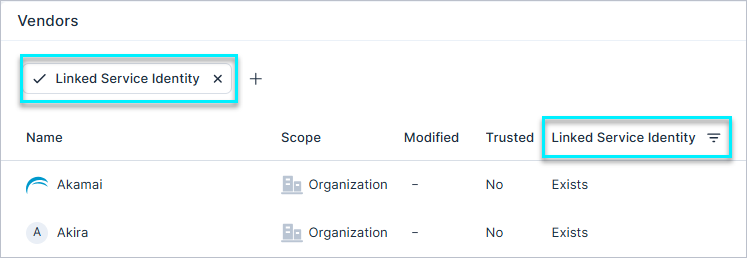
IAM: Improved Visibility into 3rd Party Vendors
A new Linked Service Identities filter is now available in the Settings > Cloud Exposure > Vendors page, giving IAM administrators the option to quickly identify all 3rd party vendors within their cloud environment. This update allows faster configuration and improved visibility into external access.
Workload Protection: Prioritize Vulnerabilities Using Policy Context
Vulnerability Management Workload Protection
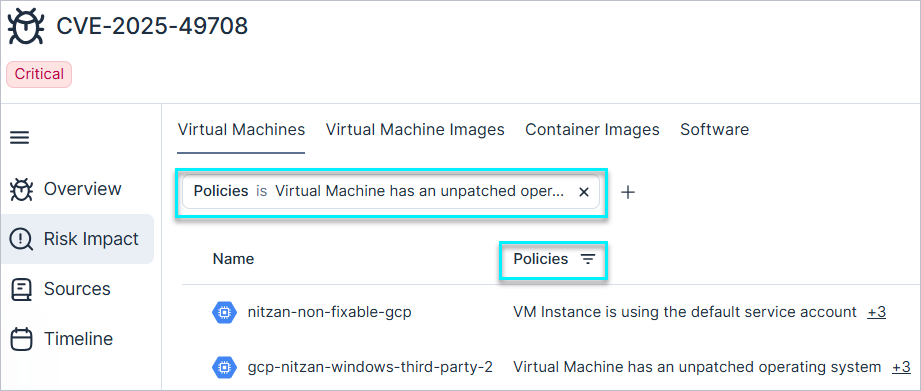
You can now identify which workloads are missing required policy controls for a selected vulnerability, allowing you to quickly remediate those that violate internal or regulatory requirements.
A new Policies column/filter was added to the Vulnerability profile > Risk Impact tab for virtual machines, virtual machine images, and container images. This data helps you prioritize remediation based on policy impact in addition to traditional risk scores.
Resource Enhancement: New AWS API Fields Added
API Support
Additional fields are now available via the API for select AWS resources:
- Elastic Beanstalk — Added the DNS Zones field.
- Lambda Functions — Added the Triggers field.
These enhancements improve API visibility into resource configuration and behavior.
Resource Enhancement: Runtime Fields for GCP Cloud Functions
API Support
Cloud Functions resources in GCP now expose additional runtime details.
The Runtime and Runtime Deprecated fields are available across the resource profile, resource tables, and API, providing clearer visibility into function environments and helping identify deprecated runtimes more easily.
New Resource in 192
API Support
The following resource was added in this release:
| Platform | Category | Resource |
|---|---|---|
| Azure | Data | Databricks Workspace |
See the documentation for a list of all supported resources.
January 4, 2026 (Release 1.191)
New Features
Exclusions: Ignore and Adjust Finding Severity
You can now streamline exception management with Exclusions, a centralized framework for managing accepted risks across your cloud environment.
Identify findings that are valid but non-actionable, define them as clear business scenarios, and create exclusions that keep your risk picture focused on what truly needs attention. Exclusions can ignore matching findings or adjust their severity.
Using flexible conditions such as accounts, tags, policies, and resource attributes, exclusions enable you to target exactly the findings you want to exclude, apply those rules automatically to new findings, and maintain an auditable record of every exception.
All ignored findings and resource-based exceptions are now managed with exclusions. Excluding individual resources directly from a policy is no longer supported, and all previous exceptions have been converted into exclusions so they can be managed in one place.
To learn more, see the documentation.
Explorer: Create Reports from Queries
You can now create scheduled or on-demand reports based on queries to automate the delivery of your query results. Instead of manually re-running complex queries, you can transform any new or saved query into a report. For example, you can create reports for public-facing virtual machines or resources missing tags to ensure that stakeholders receive actionable security data automatically.
You can create such reports from either:
- Explorer — Click the Report icon in the results area to instantly turn your active investigation into a report.
- Reports — When creating a new report, select Query as the report type to build a report from a new investigation or a saved query.
This feature leverages our Reports: Redesigned Reporting Experience, which now includes live data previews and local timezone support.
Projects: GraphQL API Support for Projects
Tenable introduced GraphQL API support for Projects. This allows you to automate project management and role assignments in high-volume environments. If you manage hundreds or thousands of projects, you can use these programmatic features to create, modify, and delete projects to streamline your workflows.
| Operation | Description |
|---|---|
| Projects (Query) | Retrieve detailed project information, such as creation time, parent folders, and active rules. |
| CreateProject (Mutation) | Create projects with defined descriptions, parent folders, and initial rule sets. |
| UpdateProject (Mutation) | Modify existing project metadata or update rule conditions. |
| DeleteProject (Mutation) | Remove projects by using the unique Document ID. |
To learn more, see query/mutation examples for each operation.
Reports: Redesigned Reporting Experience
The report creation process was redesigned into a full-screen experience to provide better usability and control. This new workflow is being rolled out across the platform to replace legacy report pop-ups and includes the following enhancements:
- Live results preview — You can now preview the report content directly within the screen before finalizing.
- Advanced timezone support — Reports are no longer limited to UTC. You can now specify a local timezone for scheduled deliveries to ensure global teams receive data at the appropriate time.
Data Types: Value Exclude Regex Support
You can now configure a Value exclude regex for built-in data types to exclude specific values from being classified. This lets you filter out known or irrelevant values, while all other values continue to be scanned as usual.
To learn more, see the documentation.
IAM: AWS Attribute Based Access Control Support
Tenable now supports AWS attribute-based access control (ABAC) within its permission evaluation. This update ensures that the least privileged recommendation will be accurate.
- Overprivileged findings — Finding statuses may change. New findings may be generated or existing ones resolved based on the new permissions evaluation.
- Permissions query — Access results and visual maps now incorporate ABAC logic.
IAM: Enhanced Access Level Granularity
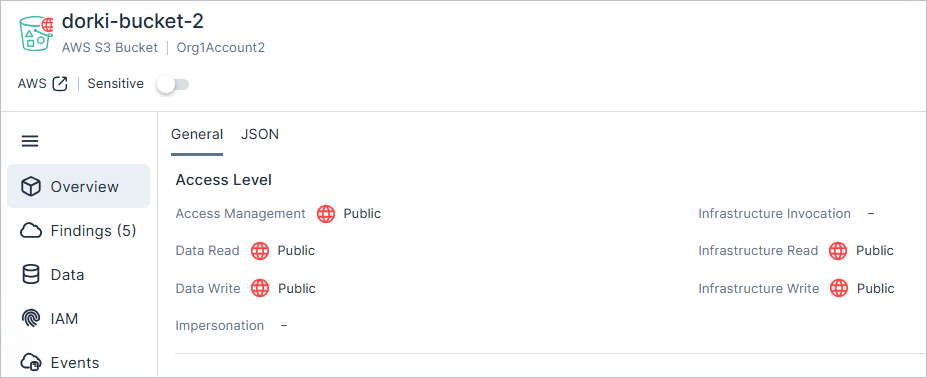
Tenable has replaced the generic Access Level field within resource profiles with a new, dedicated Access Level section. This update provides a granular breakdown of all permission categories, offering deeper visibility into resource-specific permissions at a glance.
Key Improvements:
- Granular Category Breakdown — Replaces the single-field summary with a detailed view of all permission categories.
- At-a-Glance Visibility — Features a new, structured layout within the resource profile to help you quickly identify specific permission types.
IAM: Improved AWS S3 Evaluation Accuracy for Organization Level Public Access
Tenable now supports the latest AWS capability for Amazon S3 Block Public Access (BPA) at the organization level. This enhancement improves S3 bucket evaluation accuracy by recognizing when a bucket is secured by centralized policies set at the AWS Organizations level. The updated results are reflected across all permission categories.
Affected policies and evaluation changes:
| Policy Name | Affect |
|---|---|
| Public S3 Bucket | Findings may be automatically Closed. |
JIT Access: Improved Request Creation and Eligibility Selection
The Eligibility dropdown in JIT Access now includes Browse All Eligibilities, which opens a searchable table showing only eligibilities the requester can access, with contextual details to help quickly select the correct one.
New IaC Policies in 191
The following IaC policies were added in this release:
| Provider | Category | Name |
|---|---|---|
| AWS | Logging | API Gateway access logging is not enabled |
| AWS | Logging | API Gateway X-Ray tracing is not enabled |
New Resources in 191
API Support
The following resources were added in this release:
| Platform | Category | Resource |
|---|---|---|
| AWS | Data | EFS Access Point |
| AWS | Data | MSK Cluster |
| AWS | Data | AWS MQ Broker |
| AWS | Data | SNS Subscription |
| AWS | Management | GuardDuty Detector |
See the documentation for a list of all supported resources.
New Policies in 191
API Support
The following policies were added in this release:
| Provider | Category | Name |
|---|---|---|
| AWS | Management | AWS GuardDuty is not enabled for all regions |
| AWS | Network | ACM Certificate is expired |
| Azure | Network | Application Gateway is not associated with Policy |