Finding Lifecycle
Findings progress through a lifecycle with distinct statuses and sub-statuses, which help you understand the overall state of risk and why a finding has its current status.
This is a conceptual overview of finding statuses and the finding lifecycle.
- For a how-to guide about viewing and managing findings, see Cloud Findings or IaC Findings.
- For a conceptual overview of how finding severity works, see Finding Severity.
- To configure how findings are created (via policies), see Cloud Policies and/or IaC Policies.
Finding Lifecycle Example
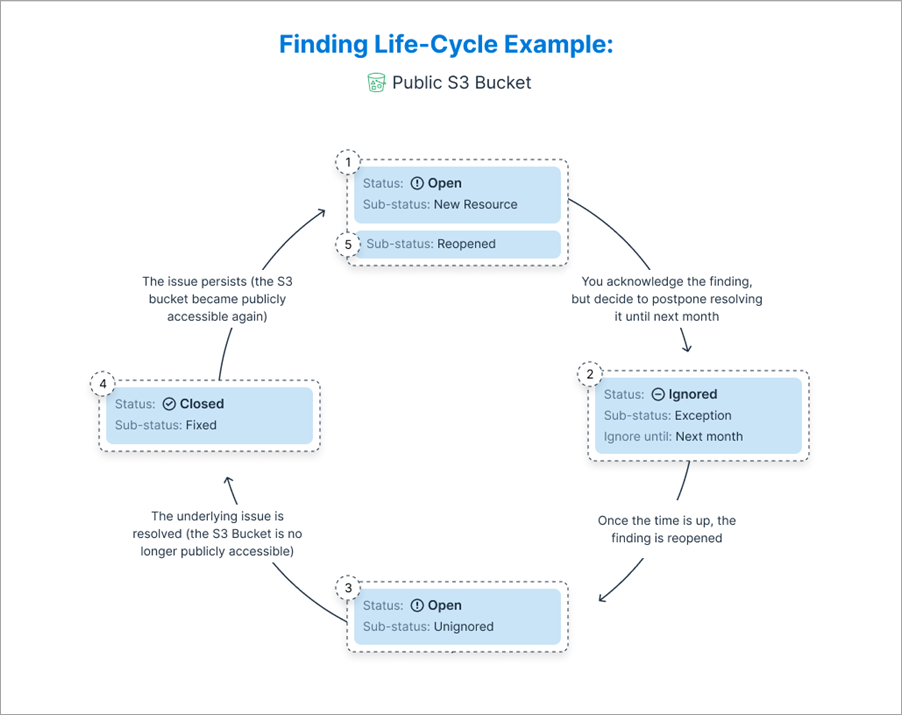
This image shows an example of the flow and progress of a finding (Public S3 Bucket) detected in your environment. See Finding Status for more information about specific statuses and sub-statuses.
Finding Status
Finding statuses help you understand both:
- The overall state of risk in your organization (for example, via the Trends widget in the Dashboard).
- Why specific findings were open/closed, helping you track the work you do and the progress you make resolving and closing findings.
The status consists of the main Status (Open/Ignored/Closed), and a Sub-Status, which provides added granularity, and describes the reason why the finding has the current status. In this example, the Status is Open, and the Sub-Status is Reopened.

Open Findings
Open findings represent the active issues detected in your environment. This includes at-risk identities and resources, and hard-to-spot toxic combinations.
This table lists possible sub-statuses for Open findings. A sub-status provides added granularity, and describes the reason why the finding has the current status.
| Sub-Status | Definition |
|---|---|
| New resource | The resource was created in the past week and matched the policy rules. If the creation time is not available, and the resource was seen in the most recent scan (within the last week), but not in previous scans before that, it's considered a new resource. |
| Existing resource | Tenable scanned this resource before, but this is the first time it matched with the policy rules. If it's the first scan after the account was onboarded, and the resource creation time is not available, the resource is also considered an existing resource. |
| Reopened |
The finding transitioned from Closed to Open:
|
| Unignored | The finding transitioned from Ignored to Open when the exclusion ignoring it was updated, disabled, deleted, or expired. |
| Anomaly | Tenable detected an anomaly based on the identity or resource activity. All anomaly policies are assigned this sub-status. |
Ignored Findings
Ignored findings represent issues that you may not want to handle right away. The associated resources are being excluded, either permanently, or for a set period of time.
This table lists possible sub-statuses for Ignored findings. A sub-status provides added granularity, and describes the reason why the finding has the current status.
| Sub-Status | Definition |
|---|---|
| Exception | The finding is accepted temporarily until remediation is completed. |
| False positive | The finding was verified as incorrect or irrelevant. |
| By design | The configuration is intentional and required for functionality. |
Ignored findings are managed through exclusions, which let you ignore findings or adjust severity based on business needs. Learn how to create pattern-based exclusions from ignored findings and audit and manage your exclusions.
Closed Findings
Closed findings represent issues that have been closed, either manually by a user, or automatically by Tenable.
This table lists possible sub-statuses for Closed findings. A sub-status provides added granularity, and describes the reason why the finding has the current status.
| Sub-Status | Definition |
|---|---|
| Fixed |
The finding was resolved:
|
| False positive | Finding was marked as a false positive by Tenable. |
| Manually closed | A user manually marked the finding as Closed. |
| Resource deleted | The resource was deleted, and Tenable's policy doesn't recommend deletion. |
| Self resolved |
The state of the resource or its permissions have changed, and Tenable needs to perform another evaluation cycle to determine whether the issue persists. For example:
|