Software Details Panel
Required User Role: Read-Only, Basic User, Scan Operator, Standard User, Scan Manager, or Administrator
In Group By None view on the Software page, click a row to open the software details panel.
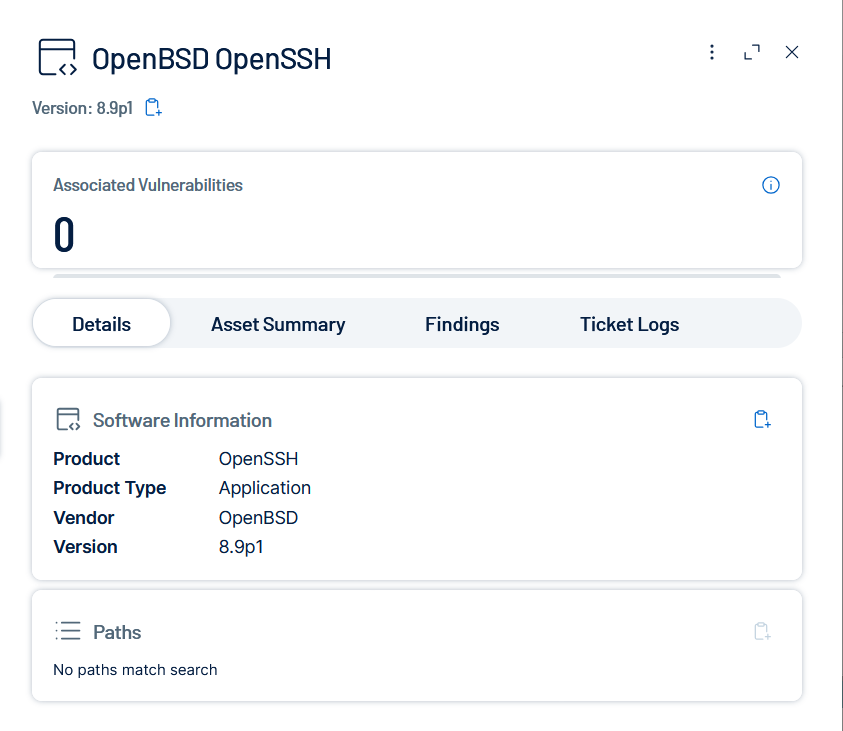
The upper part of the Software Details pane contains the following information.
| Attribute | Description |
|---|---|
| [Vendor] [Product] | The vendor and product name of the selected software, displayed as the panel title. |
| Version | The detected version of the software, displayed as the panel subtitle. |
| Associated Vulnerabilities | The count of vulnerabilities associated with the selected software item. |
The lower part of the Software Details pane is divided into tabs.
Details
The Details tab breaks down information about the selected software item. Sections appear only when the software contains the relevant data.
| Section | Description |
|---|---|
| Software Information | Displays the product, product type, vendor, and version of the software. |
| Paths | Displays the file system paths where the software was detected on the asset. |
| CVEs | [TBD: pending confirmation of which panels include CVE data based on backend availability.] |
Asset Summary
The Asset Summary tab lists the assets on which this software is installed.
Findings
The Findings tab lists vulnerability findings associated with this software.
Ticket Logs
The Ticket Logs tab displays tickets associated with findings on the assets where this software is installed. Assets can have multiple findings, some of which may have associated tickets.