Export Software Data
You can export installed software data to CSV or JSON format from the Software page.
To export software data from the Software page:
-
In the left navigation, click
 Explore > Software.
 -
Select one or more software items to export by doing one of the following:
-
In the row for the items you want to select, click the check boxes.
-
To select all items, click the check box in the action bar, then click Select all [number] software.
-
-
In the action bar, click Export.
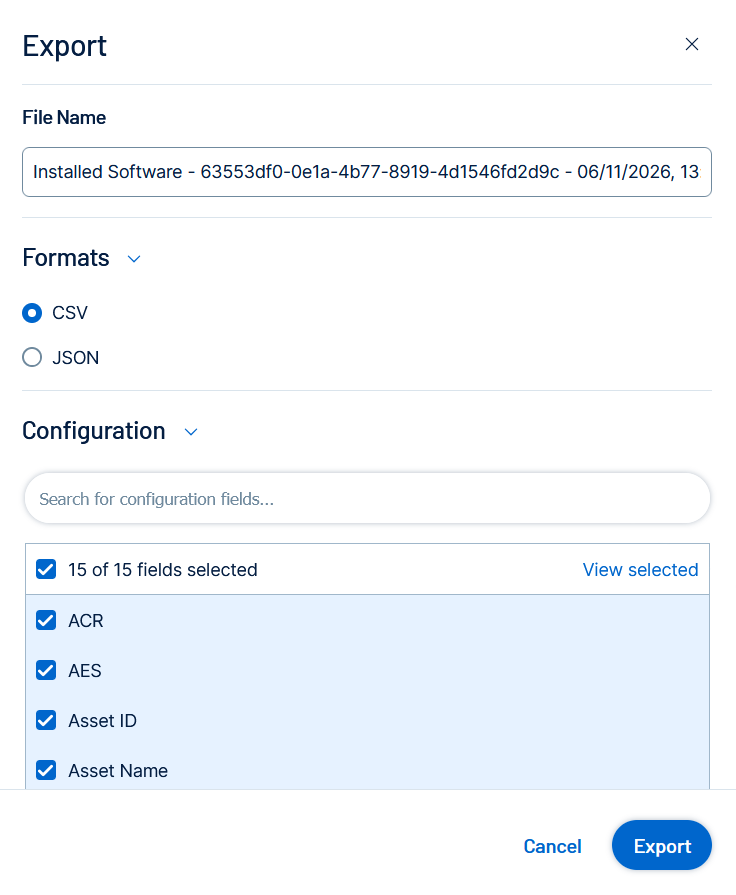
The Export window appears.
-
Configure the following export options:
Option Description File Name Type a name for the export. A default name is auto-populated based on the software item and export date. Formats Select an export format:
- CSV — A CSV file you can open in a spreadsheet application such as Microsoft Excel.
- JSON — A JSON file containing a nested list of software properties. Use JSON for ingestion into third-party tools or automation pipelines.
Configuration Search for and select the fields to include. By default, all 14 available fields are selected. The Identifier field is mandatory and cannot be deselected. The ACR and AES fields are available to customers with a Tenable Vulnerability Management Advanced license. For a full list of available fields and their CSV keys, see Software Export Fields and Associated CSV Keys.
Expiration Number of days the generated export file will be retained and displayed in the Export Activities list. Default is 30 days. A custom default value can be set in General Settings.
Schedule Configure a recurring schedule for the export. Select a frequency and start time to automatically generate the export on a repeating basis. Email Notifications Enter one or more email addresses to receive a notification when the export is complete. -
Click Export.
The system processes the export and the file downloads to your computer. Processing may take several minutes.
Tip: If you close the Export window before the download completes, you can access the export file in
 Settings >
  Exports.