Tenable One Cloud Exposure 2025 Q4 Release Notes
Tip: You can subscribe to receive these release notes by email or RSS.
These release notes are listed in reverse chronological order.
December 28, 2025 (Release 1.190)
New Features
 Workload Protection: Expanded Coverage for All Container Images within a Repository
 Vulnerability Management Workload Protection
Tenable now provides continuous vulnerability assessment for all container images in active use. While repository scanning is typically focused on the 10 latest images, any image identified as in-use is now included by default to ensure comprehensive security coverage.
For more information see the FAQ.
IAM: Enhanced Visibility and Granular Filtering for AWS Federated Permissions
The AWS Federated Permissions page now leverages our advanced Explorer-based query engine. Moving beyond simple filters, this update lets you build complex searches using logical operators (AND, OR, NOT) and object relationships to pinpoint federated access risks with greater precision and speed.
Integrations: Add Optional Fields to ServiceNow Incidents
You can now include optional fields when sending Tenable findings to ServiceNow (via automation rules or manual actions). These fields are dynamically retrieved from your ServiceNow instance, allowing you to populate non-mandatory data such as assignment groups or categories to improve flexibility and control over incident creation.
Queries: Bulk Delete Custom Queries
You can now select and delete multiple custom queries on the Queries page. This allows you to remove saved searches in bulk, simplifying the management of the query list.
Policies: New Custom Policy
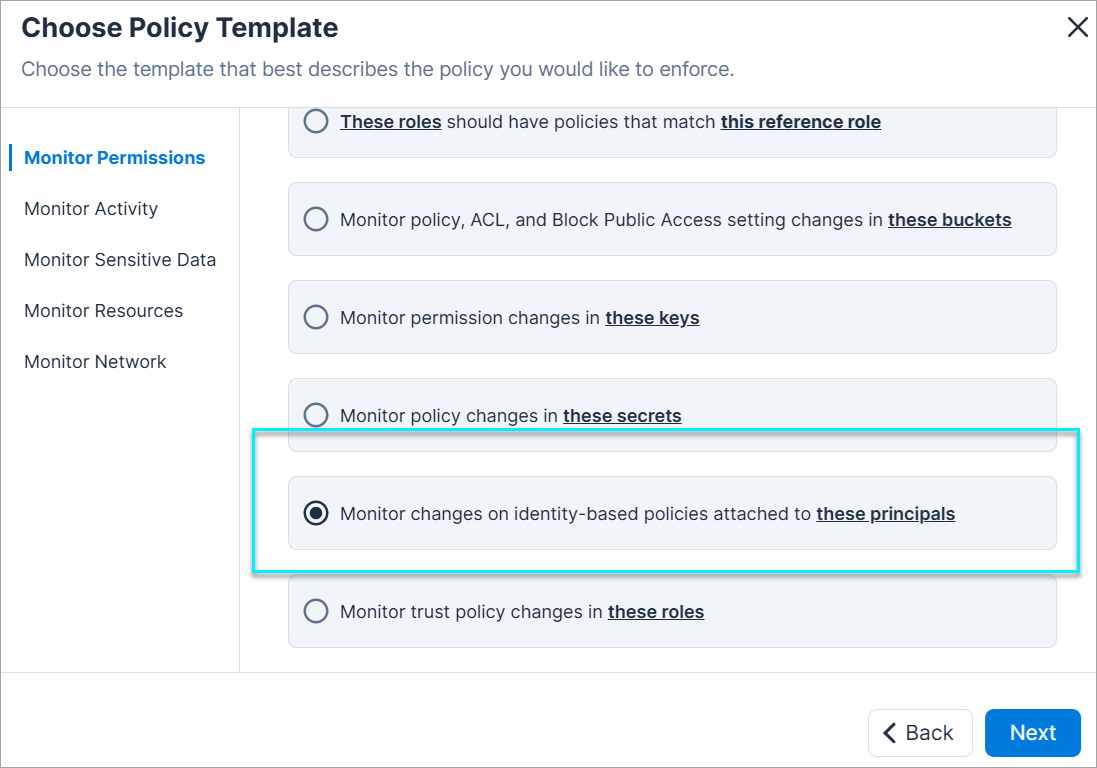
You can now create a custom policy that generates findings when identity-based policies are attached to or detached from selected AWS principals.
| Cloud | Category | Template |
|---|---|---|
| AWS | Monitor Permissions | Monitor changes on identity-based policies attached to these principals |
December 14, 2025 (Release 1.189)
New Features
Workload Protection: Enhanced CI/CD Compatibility for Azure Pipelines
Workload Protection
Azure CI/CD pipeline has been updated with the new optional parameter: serverCertificateValidationEnabled. This parameter controls whether the pipeline agent validates the SSL/TLS certificate when connecting to Tenable.
To see all the Azure CI/CD pipeline parameters, see the documentation.
Compliance: Support Added for New Frameworks in 189
Cloud Exposure now supports the following compliance standards:
- CIS AKS 1.8.0 — Prescriptive guidance for running Azure Kubernetes Services following recommended security controls.
- CIS EKS 1.8.0 — Prescriptive guidance for running Elastic Kubernetes Service following recommended security controls.
- CIS GKE 1.8.0 — Prescriptive guidance for running Google Kubernetes Engine following recommended security controls.
See the documentation to learn more about how to monitor compliance in your cloud accounts.
New Resource in 189
 API Support
The following resource was added in this release:
| Platform | Category | Resource |
|---|---|---|
| AWS | Network | API Gateway Custom Domain Name |
See the documentation for a list of all supported resources.
Resource Enhancement: New Fields for GCP SSL Certificates
API Support
The SSL Certificates resource table (Inventory > GCP > Network) now includes the following columns:
- Status
- Expiration
- Management
- Load Balancers
These fields provide additional context for identifying expired or misconfigured certificates and are also used in related policies.
New Policies in 189
API Support
The following policies were added in this release:
| Provider | Category | Name |
|---|---|---|
| AWS | Networking | API Gateway insecure communication |
| AWS, Azure, GCP, OCI, On-Premises | Kubernetes | OpenShift Cluster administrator kubeconfig file ownership is not restrictive |
| AWS, Azure, GCP, OCI, On-Premises | Kubernetes | OpenShift Cluster administrator kubeconfig file permissions are not restrictive |
| AWS, Azure, GCP, OCI, On-Premises | Kubernetes | OpenShift Cluster API server pod specification file ownership is not restrictive |
| AWS, Azure, GCP, OCI, On-Premises | Kubernetes | OpenShift Cluster API server pod specification file permissions are not restrictive |
| AWS, Azure, GCP, OCI, On-Premises | Kubernetes | OpenShift Cluster controller manager kubeconfig file ownership is not restrictive |
| AWS, Azure, GCP, OCI, On-Premises | Kubernetes | OpenShift Cluster controller manager kubeconfig file permissions are not restrictive |
| AWS, Azure, GCP, OCI, On-Premises | Kubernetes | OpenShift Cluster controller manager pod specification file ownership is not restrictive |
| AWS, Azure, GCP, OCI, On-Premises | Kubernetes | OpenShift Cluster controller manager pod specification file permissions are not restrictive |
| AWS, Azure, GCP, OCI, On-Premises | Kubernetes | OpenShift Cluster etcd member file ownership is not restrictive |
| AWS, Azure, GCP, OCI, On-Premises | Kubernetes | OpenShift Cluster etcd member file permissions are not restrictive |
| AWS, Azure, GCP, OCI, On-Premises | Kubernetes | OpenShift Cluster etcd pod specification file ownership is not restrictive |
| AWS, Azure, GCP, OCI, On-Premises | Kubernetes | OpenShift Cluster etcd pod specification file permissions are not restrictive |
| AWS, Azure, GCP, OCI, On-Premises | Kubernetes | OpenShift Cluster kubelet configuration file ownership is not restrictive |
| AWS, Azure, GCP, OCI, On-Premises | Kubernetes | OpenShift Cluster kubelet configuration file permissions are not restrictive |
| AWS, Azure, GCP, OCI, On-Premises | Kubernetes | OpenShift Cluster kubelet kubeconfig file ownership is not restrictive |
| AWS, Azure, GCP, OCI, On-Premises | Kubernetes | OpenShift Cluster kubelet kubeconfig file permissions are not restrictive |
| AWS, Azure, GCP, OCI, On-Premises | Kubernetes | OpenShift Cluster kubelet service file ownership is not restrictive |
| AWS, Azure, GCP, OCI, On-Premises | Kubernetes | OpenShift Cluster kubelet service file permissions are not restrictive |
| AWS, Azure, GCP, OCI, On-Premises | Kubernetes | OpenShift Cluster scheduler kubeconfig file ownership is not restrictive |
| AWS, Azure, GCP, OCI, On-Premises | Kubernetes | OpenShift Cluster scheduler kubeconfig file permissions are not restrictive |
| AWS, Azure, GCP, OCI, On-Premises | Kubernetes | OpenShift Cluster scheduler pod specification file ownership is not restrictive |
| AWS, Azure, GCP, OCI, On-Premises | Kubernetes | OpenShift Cluster scheduler pod specification file permissions are not restrictive |
December 7, 2025 (Release 1.188)
New Features
Network: Validate Real External Exposure with the Network Scanner
See which cloud resources are actually reachable from the internet.
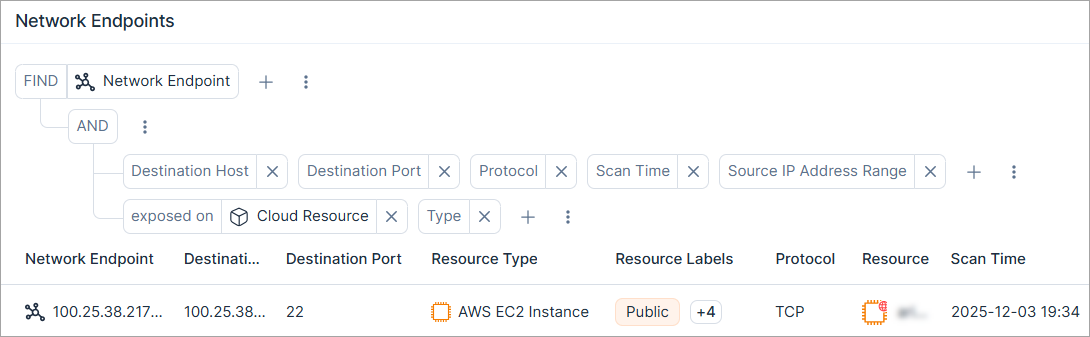
With the Network Scanner, you can test your cloud environments to confirm real external exposure, not just configuration-based risks. You can view confirmed results on the Network Endpoints page.
This helps you distinguish between resources that only appear open and those that truly are, so your teams can prioritize what matters, close real gaps faster, and strengthen your cloud security posture.
To learn more, see Network Scanner.
Workload Protection: Refined Aggregation Priority for Virtual Machine Findings
Vulnerability Management Workload Protection
Tenable has updated the virtual machine finding aggregation logic to minimize unnecessary closing and reopening of findings between scans, resulting in a more stable and consistent experience. Going forward, findings will be opened and grouped based on the prioritized primary aggregated entity as follows:
- Cluster (EKS) (New aggregation starting from this version)
- Launch Template
- Launch Configuration
- Auto Scaling Group
The system will look for the first available identifier in this list, falling back to the next option when the previous one is unavailable.
Workload Protection: Container Image Finding Attribution to a Workload Resource
Vulnerability Management Workload Protection
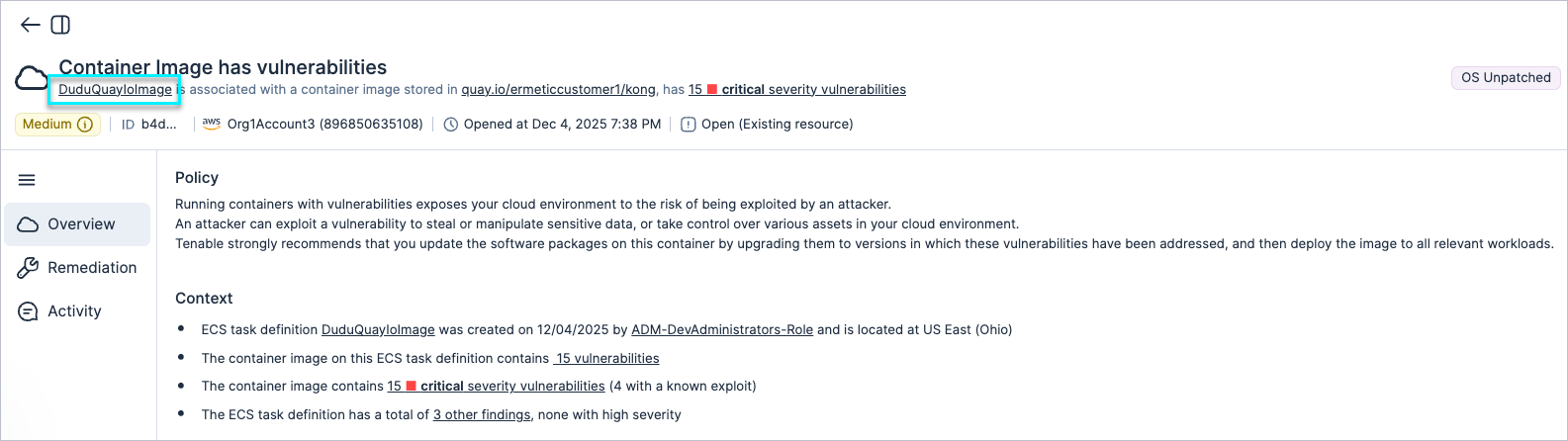
Tenable has updated how container image findings are attributed to a risk entity. When a relevant workload resource is available, findings are now linked to that specific resource, for example, the ECS Task Definition in AWS or Cloud Run in GCP.
An ECS Task Definition is the static blueprint for your containerized application. It defines the image, CPU/memory settings, networking, IAM roles, and other runtime parameters. An ECS Service is the dynamic orchestrator that uses that blueprint to keep the desired number of tasks running, healthy, and reachable over time.
By attributing image findings to the Task Definition, you get clearer and more actionable risk context, including for workloads running on Fargate.
Example:
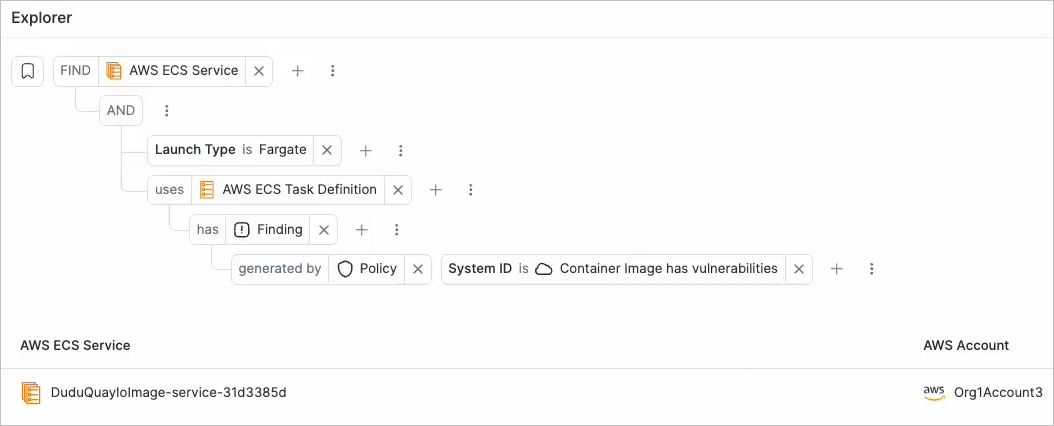
For this finding, the vulnerable container image is linked to the Task Definition (risk entity), which is the deployable blueprint referenced by the ECS Service running on Fargate:
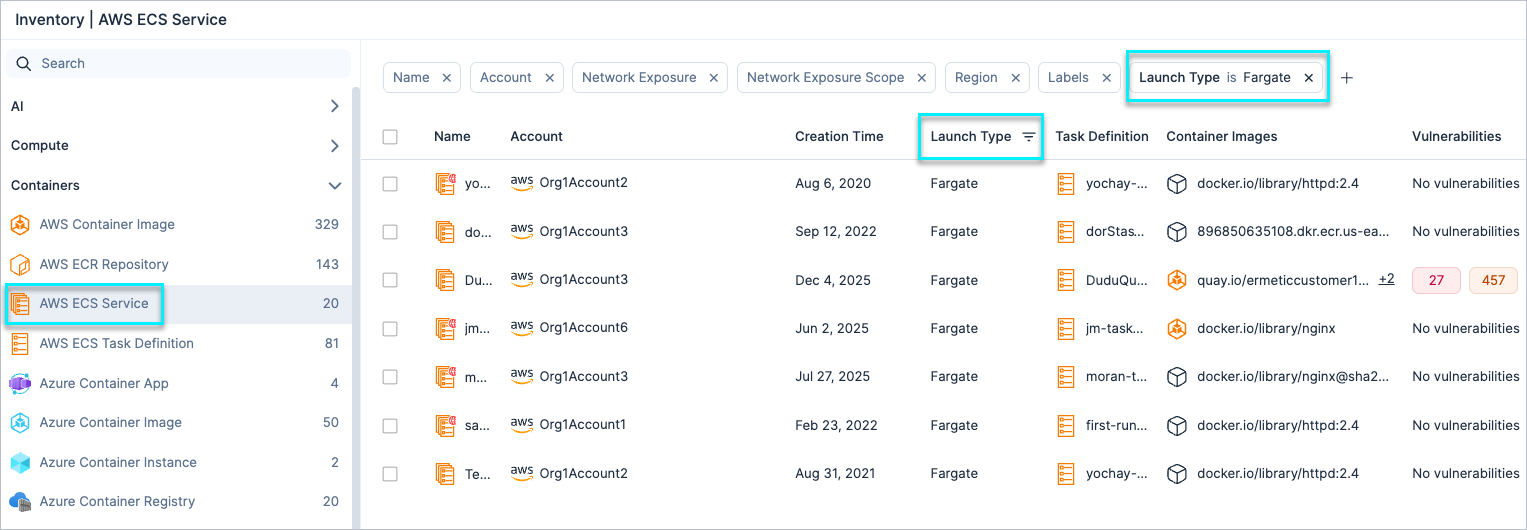
The correlation between AWS ECS Task Definitions, AWS ECS Services, and the Fargate launch type can be easily performed from the Inventory view or through the Explorer view, as follows:
IAM: Expanded Entitlement Visibility across Clouds and Identity Providers (IdPs)
The Inventory view now provides visibility across the supported role and policy categories for the following providers:
- It displays all roles for GCP, Azure, Microsoft Entra ID, and Google Workspace across their supported role categories, whether used or not.
- It also displays all AWS identity-based policies, whether used or not.
You can create custom policies for any role in the supported role categories, even if it does not currently exist in your organization, using the below policy:
| Cloud Provider | Policy Name |
|---|---|
| Azure | These principals should not have these roles on these resources |
| GCP | These Google principals should not have these roles on these resources |
Key Benefits:
- Full visibility into all entitlement, whether currently used or not
- Ability to create policies for any role, existing or future
Explorer: Query Properties for Blank Values
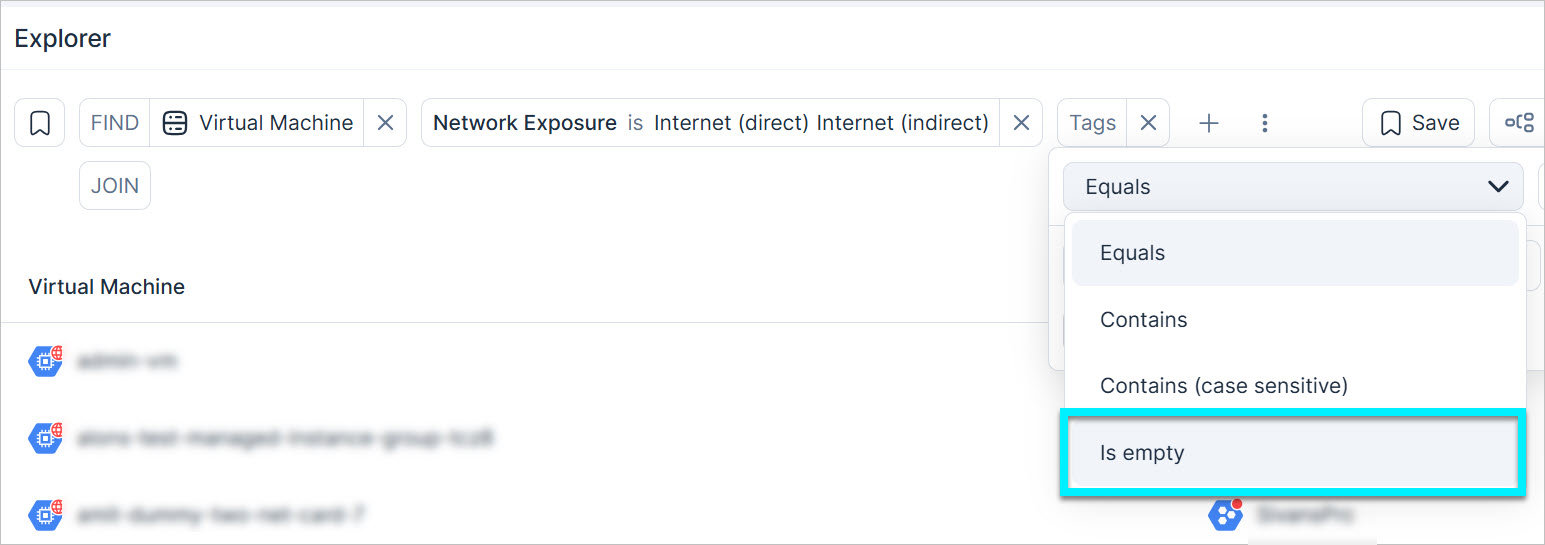
Use the new is empty operator in the Explorer to search for resources/findings where a specific property has no defined value. For example, use this operator to find all public-facing virtual machines across all cloud environments that are missing any tags.
New Resources in 188
API Support
The following resources were added in this release:
| Platform | Category | Resource |
|---|---|---|
| AWS | Data | Amazon MQ Broker |
| Azure | Compute | Azure Static Web App |
See the documentation for a list of all supported resources.
Policy Update: CloudWatch Root Account Usage Alarm Evaluation
The logic for evaluating the Missing CloudWatch alarm – root account usage policy has been updated to improve accuracy and reduce false positives.
As a result, affected findings are automatically closed with the sub-status false positive.
New Policy in 188
API Support
The following policy was added in this release:
| Provider | Category | Name |
|---|---|---|
| AWS | Data | SNS Subscription encryption in transit is not enabled |
November 30, 2025 (Release 1.187)
New Features
IAM: Clearer Access Insights with Expanded Permission Categories
Tenable now provides clearer access insights via a more granular and transparent view of access levels across your environment.
Key changes:
- See the type of access granted to each resource (and not just the scope)
- New Infrastructure Invocation category
- Existing categories have been renamed
-
Data Access category split into two categories: Data Read and Data Write.

These new categories are displayed as columns in Explore > Data Resources. They show the highest data access level for each resource, making it easier to see the access type and scope and quickly identify broadly scoped permissions. For example, you can now view the level of access granted to S3 buckets for each data type
-
Permission categories are visible across the Console, including Permissions Query, Access Graph, Identity Intelligence, and Excessive Permissions, and also as columns on the Explorer page, supporting more efficient investigations when used with custom policies.

For more information, see the Access Level.
IAM: Enhanced Coverage for Trusted Vendors
Tenable has expanded the Trusted Vendors feature with additional supported vendors. This update expends visibility into external access to your environment, helping you better identify and investigate access from trusted 3rd parties.
For more information about trusted vendors, see the documentation.
Security Advisory: Critical React Next.Js RSC Vulnerability CVE-2025-55182
To help you stay ahead of emerging threats, we're sharing an important security update regarding CVE-2025-55182, a critical (CVSS 10.0) vulnerability in React Server Components (RSC). This issue allows unauthenticated remote code execution if affected packages are used and may impact applications built on Next.js App Router.
Who's Affected:
- Customers running React 19 RSC packages or Next.js App Router versions in the vulnerable ranges.
We've flagged these packages as advisory vulnerabilities, and they will appear in your environment within the next few hours. We strongly recommend that all customers take the following actions immediately:
- Upgrade immediately to patched versions of React RSC packages (19.0.1 / 19.1.2 / 19.2.1) or Next.js patched releases (15.0.5+ / 16.0.7+ per your track).
- If an upgrade isn’t possible right away, limit exposure to RSC/Server Function endpoints and review external access, but patching is the required fix.
Workload Protection: Enhanced Context in Vulnerability Profiles
Vulnerability Management Workload Protection
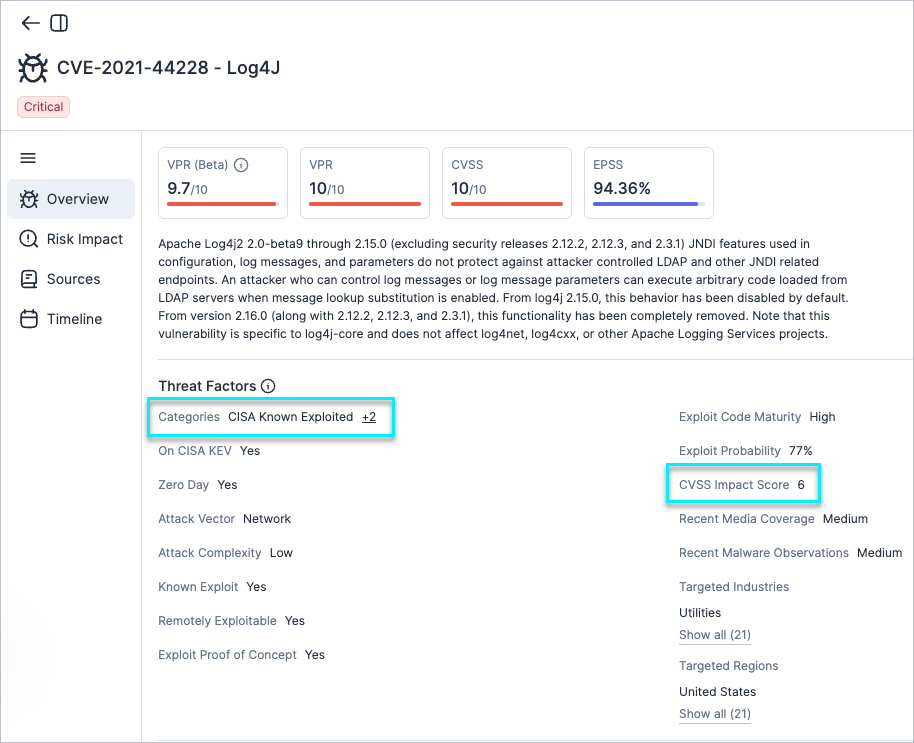
Vulnerability profiles have been enhanced with two additional fields: CVSS Impact Score and Categories, giving you clearer insight into each vulnerability’s severity, impact, and risk factors.
- CVSS Impact Score — Appears in the vulnerability profile under the Threat Factors section. This score reflects the potential impact of a vulnerability and continues to be used as part of the enhanced VPR severity calculation.
- Categories — Highlights notable classifications that increase a vulnerability’s risk, such as CISA Known Exploitable, Ransomware, etc.
For more information, see the documentation.
Workload Protection: Enhanced Java Runtime CVE Detection
Vulnerability Management Workload Protection
Enhanced detection of CVEs affecting Java runtimes on Windows, allowing customers to identify vulnerable Java installations in their Windows workloads and remediate risky versions.
To see all the supported 3rd party applications on Windows, see the documentation.
Data Protection: Modify Data Type Classification
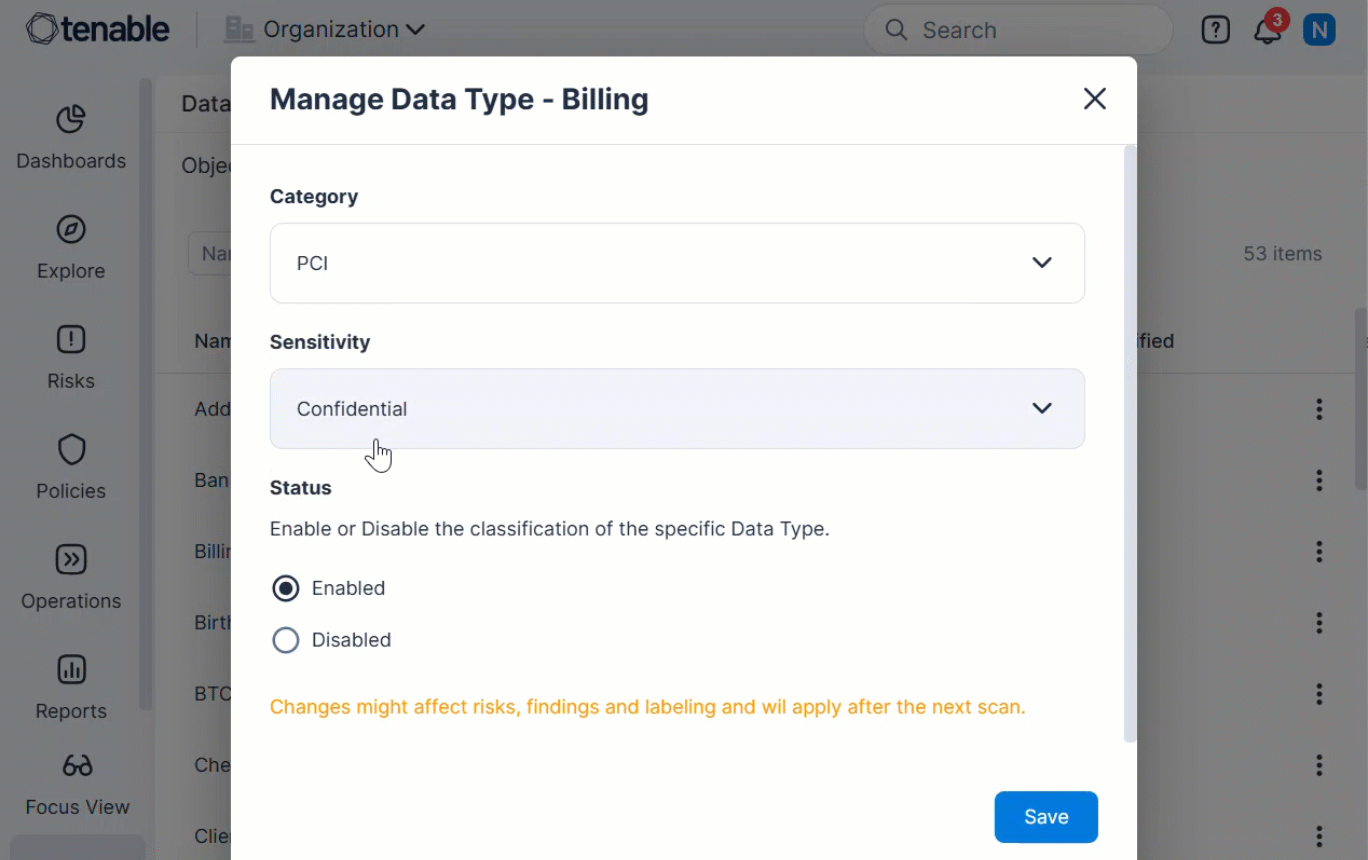
Cloud Exposure now supports modifying the default classification of any scanned data type. You can adjust the Category, Sensitivity, or Status of any data type from the new Data Types section.
This update gives organizations greater control over how detected data is labeled and organized across findings and dashboards.
To learn more, see the documentation.
Data Protection: Support for Scanning New Format Files
Tenable has expanded file scanning coverage to include the following file types:
- .asc, .jks, .keystore, .ppk, .secret, .secrets
These formats are commonly used to store encryption keys, SSH credentials, and application secrets. Scanning them improves your ability to detect sensitive data in unstructured files across your environments.
For a full list of scanned file formats, see the documentation.
Compliance: Support Added for New Frameworks in 187
Cloud Exposure now supports the following compliance standards:
- CIS GCP 4.0.0 — Objective, consensus-driven security guidelines for Google Cloud Platform.
- CIS Kubernetes 1.12.0 — Prescriptive guidance for establishing a secure configuration posture for Kubernetes.
See the documentation to learn more about how to monitor compliance in your cloud accounts.
November 23, 2025 (Release 1.186)
Upcoming Changes
Permission Category Changes
On November 30, 2025, changes will be made to Permission Categories, including the introduction of two new categories. The existing five categories will be expanded to seven, providing more granular control and clarity. As part of this change, custom policy categories will be migrated to match the new permission categories. As a result, some new findings may be opened, and existing findings may be closed.
For more information, see Permission Category Changes (November 30, 2025).
New Features
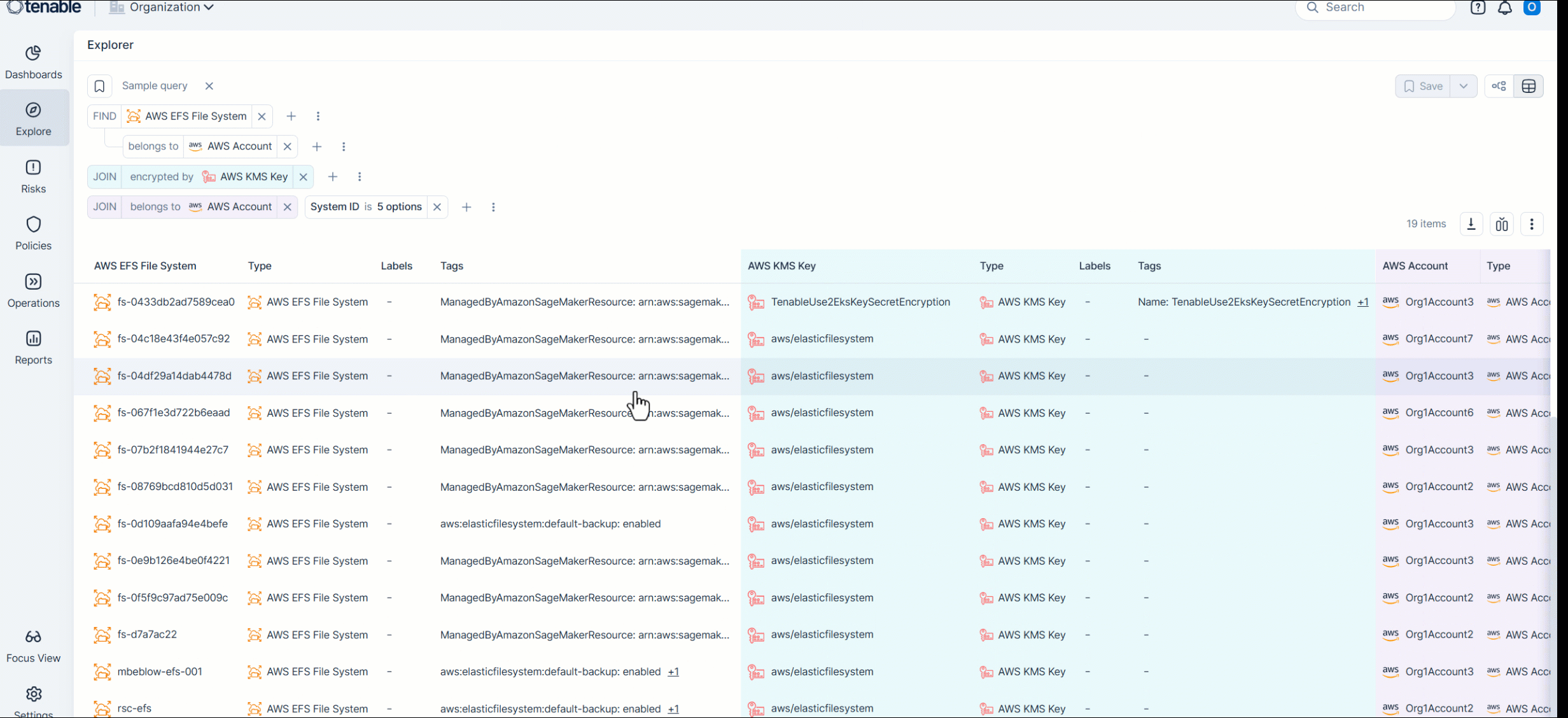
Explorer: Centralized Querying across All Resources and Findings
Introducing the Explorer, a new unified page for querying and analyzing data across all resources and findings using a consistent, object-based structure.
The Explorer gives you a complete, cross-cloud view of your environment by letting you query resources and findings in one place to precisely identify, prioritize, and remediate risks.
With the Explorer, you can:
- Query across one or multiple objects using filters, logical operators, and relationships (including joins that show cross-object connections, such as findings related to identities).
- Use saved queries (including built-in and custom queries) to reuse a specific query configuration without rebuilding it each time.
- Customize table columns and export results for reporting or offline analysis.
- Visualize relationships using the Graph view to understand how objects connect.
The Explorer also surfaces your recently used saved queries, along with recommended built-in queries to help you get started quickly.
To learn more, see Explorer.
GCP Integration No Longer Requires Google Workspace
You can now connect GCP projects or organizations without first connecting Google Workspace. Integration is fully independent, allowing you to add GCP resources without requiring Workspace during setup.
Support for integrating Azure without Microsoft Entra ID is planned. You will soon be able to add Azure resources without requiring Microsoft Entra ID as part of the setup.
Data Protection: Support for Scanning New Format Files in 186
Tenable has expanded file scanning coverage to include cryptographic key stores and Java configuration files, improving visibility into unmanaged secrets and sensitive credentials.
Cryptographic and key files:
- .p12, .pfx, .pem, .key, .keys, .rsa
Commonly used to store private keys or SSH credentials—these formats are high-priority targets for attackers seeking access or decryption capabilities.
Configuration files:
- .properties
Frequently used in Java-based applications and CI/CD pipelines, these files often contain hardcoded database credentials, service tokens, or plaintext passwords.
For a full list of scanned file formats, see the documentation.
Support for Scanning Public AMIs
Vulnerability Management Workload Protection
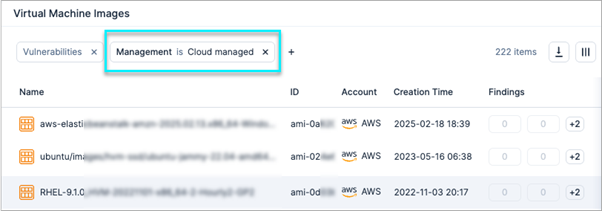
Tenable now supports the scanning of Public AMIs (cloud-managed AMIs), extending coverage beyond the existing support for internal (Private) AMIs. This enhancement allows you to gain a more comprehensive and complete assessment of the security posture of all images used in your AWS workloads, including those that are AWS-managed.
Use the Management filter, located in Explore > Virtual Machine Images, to easily distinguish between Cloud managed (Public) and Customer managed (Private) AMIs.
Improve Visibility for Container Image Context Using Container Labels
Vulnerability Management Workload Protection API Support
Tenable now imports container labels for all scanned container images, making it easier to correlate images with products, applications, and engineering teams, and helping you quickly identify which team should handle remediation or other container-related issues.
The labels are available in the following ways:
- Console — In a new Image Labels column and in the container image resource profile page, available in the following locations:
- Explore:
- Inventory > Containers > {cloud provider} > Container Image
- Compute > Container Images table
- Risks:
- Vulnerability profile > Risk Impact > Container Images table
- Container Image CI/CD Scans
- Explore:
- Via the GraphQL API — Using the new ImageLabels field. See an example query.
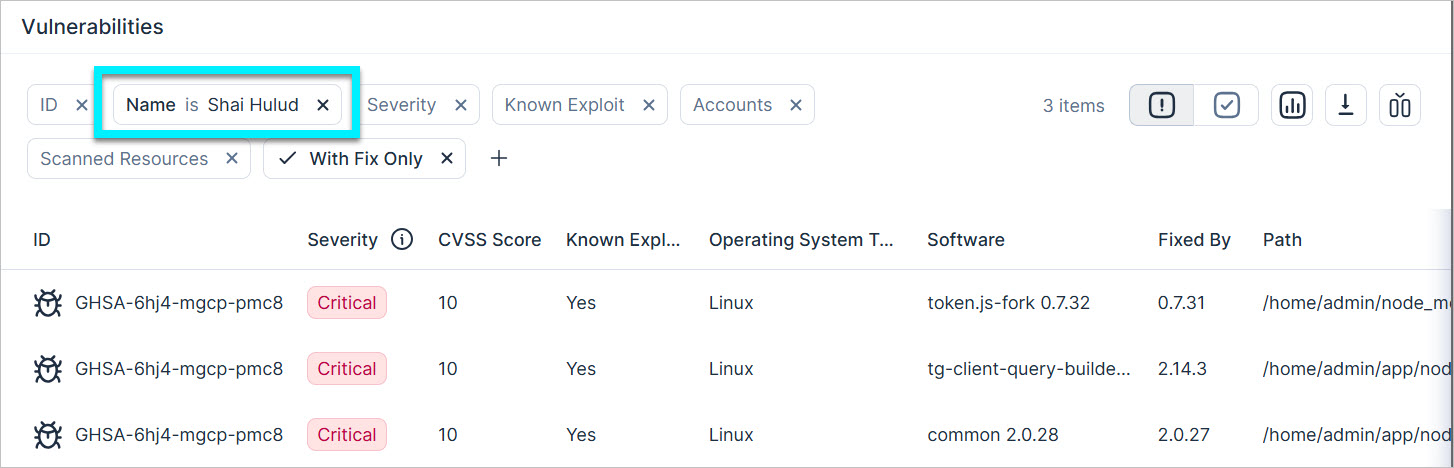
Security Advisory: Sha1 Hulud the Second Coming NPM Attack Escalation
To help you stay ahead of emerging threats, we are providing this advisory about the Sha1-Hulud, The Second Coming attack (a major resurgence of the Shai-Hulud threat). This new wave includes over 800 packages trojanized with a self-replicating worm. If the malware fails to steal secrets, it has a punitive fallback that may delete writable home directory files.
These compromised packages may still be in your environment. We’ve flagged them as malicious. Any such packages will appear in your Tenable Console environment the next time data is synced.
We strongly recommend taking the following actions immediately:
- Update or roll back the affected packages to a safe version.
- Rotate any secrets that may have been exposed.
New Resource in 186
API Support
The following resource was added in this release:
| Platform | Category | Resource |
|---|---|---|
| AWS | Data | SNS Subscription |
See the documentation for a list of all supported resources.
November 16, 2025 (Release 1.185)
New Features
Console: Resolved Findings Widgets Filter Adjustments
The default filters for the Resolved Findings and Mean Time to Resolve widgets have been updated to include:
- Closed findings with sub-status: Fixed and Manually closed
- Ignored findings with all sub-statuses
This update ensures the widgets better reflect findings that have been resolved.
All other filters remain available for on-demand use or when creating custom dashboards.
Data Protection: Support for Scanning YAML Files
Cloud Exposure now scans yaml files for sensitive data, enabling you to detect sensitive data in documents stored across your environments.
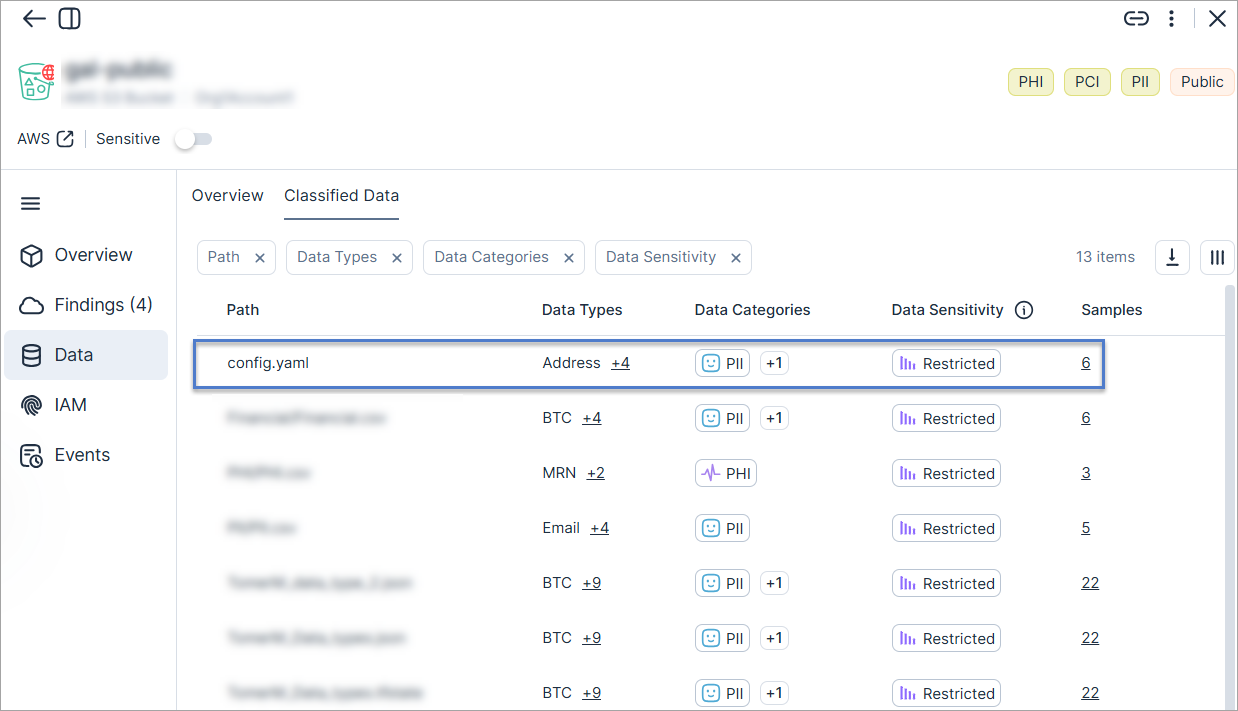
For a full list of scanned file types, see the documentation.
Compliance: Support for NIST CSF 2.0
Cloud Exposure now supports NIST CSF 2.0 as a compliance standard. The Cyber Security Framework (CSF) is a voluntary guidance, based on existing standards, guidelines, and practices for organizations to better manage and reduce cyber security risk.
See the documentation to learn more about how to monitor compliance in your cloud accounts.
IAM: Improved Visibility into Privileged Access
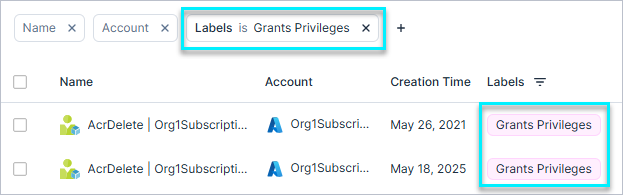
Tenable now adds Grants Privileges and Grants Admin labels to the Azure Role Assignments and GCP Role Bindings. With this update, role assignments in Azure and role bindings in GCP are also labeled, allowing you to filter the tables to quickly identify which entries grant privileged or administrative permissions and improve visibility and control over access across your environments.
JIT API: New Access Requests and Eligibility Scope Queries
You can now submit permission requests and query eligibility scope through the API:
- List eligibility scopes — Retrieve the scopes you can request for a given eligibility in AWS, Azure, and GCP.
- Create JIT access requests — Submit access requests programmatically for AWS, Azure, GCP, Microsoft Entra ID, Okta, OneLogin, Google Workspace, and Ping Identity.
November 9, 2025 (Release 1.184)
New Features
Kubernetes: Kubernetes 'Entities' Query Update (Breaking Change)
This release introduces a breaking change to how Kubernetes entities are queried. Resource names are now standardized, and all Kubernetes resource queries must use the generic Entities query. This update ensures multi-cloud consistency and simplifies querying across providers.
Change summary:
- Standardized Resource Names — All Kubernetes resources now use generic names (for example, KubernetesClusterRole) instead of cloud-specific prefixes (for example, AwsKubernetesClusterRole).
- Direct Casting Removed — Casting to cloud-specific Kubernetes types is no longer supported. Use generic types such as KubernetesResource, KubernetesWorkloadResource.
- Provider-Specific Queries Deprecated — Kubernetes resources are removed from Resources queries (for example, AwsResources).
Action Required:
- Update all existing Kubernetes queries to use the Entities query.
- Use the Types argument for generic resource types and optionally filter by Provider.
Old Query Example:
AwsResources(filter: {Types: [AwsKubernetesClusterRole]}) { ... }
New Query Example:
Entities(filter: {Types: [KubernetesClusterRole], Provider: [AWS]}) { ... }
For more information, see the Cloud Resource Querying Updates (Breaking Change) (November 2, 2025).
IAM: Retrieve Group Memberships via API
The Inventory API has been enhanced to improve visibility into users, service identities and groups across your cloud and identity provider environments. The API now supports querying a user, service identity or group to retrieve all the groups they belong to, adding the ability to perform lookups from the member perspective. This complements the existing functionality that allows querying a group to list its members. The new capability is supported across all integrated cloud providers and Identity Providers (IdPs).
Unified Inventory: All Assets in One Place
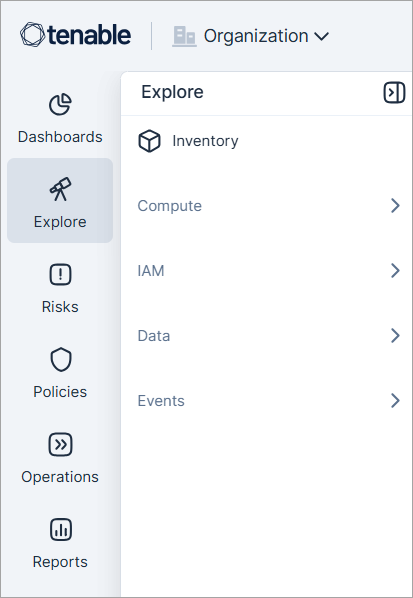
The Inventory and Explore sections are now merged to create a single section for complete asset visibility. This update centralizes all related pages and tools in one place.
What’s new:
- Inventory is now located under Explore.
- Resource categories are unified across all cloud providers.
- To focus on a specific provider, use the organization selector at the top of the Console.
Compliance: Support Added for New Frameworks
Cloud Exposure now supports the following compliance standards:
- CIS GCP 3.0.0 — Objective, consensus-driven security guidelines for Google Cloud Platform.
- CIS Red Hat OpenShift Container Platform Benchmark v1.8.0 — Prescriptive guidance for establishing a secure configuration posture for OpenShift.
See the documentation to learn more about how to monitor compliance in your cloud accounts.
Resource Enhancement: New Fields for GCP SSL Certificates
The SSL Certificates resource table (Inventory > GCP > Network) now includes the following columns:
- Status
- Expiration
- Certificate Type
These fields provide additional context for identifying expired or misconfigured certificates and are also used in related policies.
New Resource in 184
API Support
The following resource was added in this release:
| Platform | Category | Resource |
|---|---|---|
| Azure | Containers | Container App |
See the documentation for a list of all supported resources.
November 2, 2025 (Release 1.183)
New Features
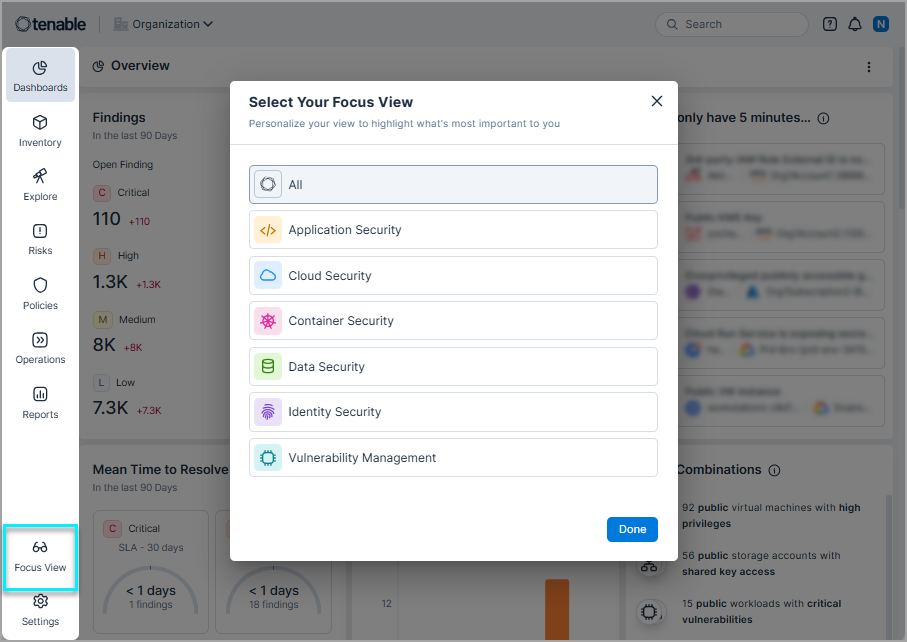
Console: Focus View
You can now tailor the Console with Focus View to show only the security domains most relevant to your role.
Focus View adjusts dashboards, menus, and reports to display information from your selected domain, helping you stay focused on specific areas such as Vulnerability Management or Application Security.
To learn more, see Select Your Console Focus View
Data: Custom Policies for Monitoring Data Sprawl
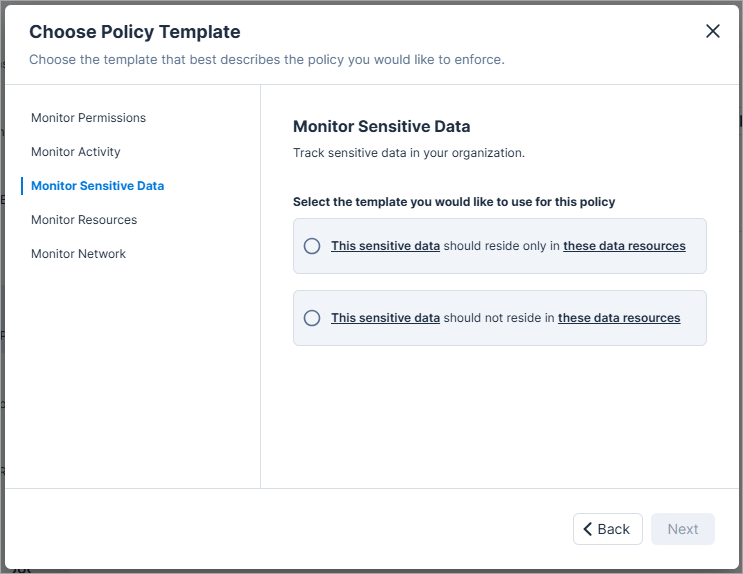
Cloud Exposure now introduces custom policies that help detect when sensitive data is stored in locations where it should not reside, either outside defined boundaries or within restricted boundaries. These policies allow you to monitor and control data sprawl across your cloud environments.
Under the Monitor Sensitive Data category, you can now create policies using two new templates:
- This sensitive data should reside only in these resources: Detects sensitive data that is stored outside the boundaries where data is allowed to reside. Use it to ensure sensitive data remains within approved environments or storage locations.
- This sensitive data should not reside in these resources: Detects sensitive data that is stored within restricted boundaries where it should not reside. Use it to monitor data sprawl and enforce data boundary compliance.
Both templates are available for AWS, Azure, and GCP, allowing you to define and enforce data boundaries across multiple cloud environments.
To learn more, see Data Boundaries and Monitoring Data Sprawl.
Reports: Customize Columns for Findings Reports
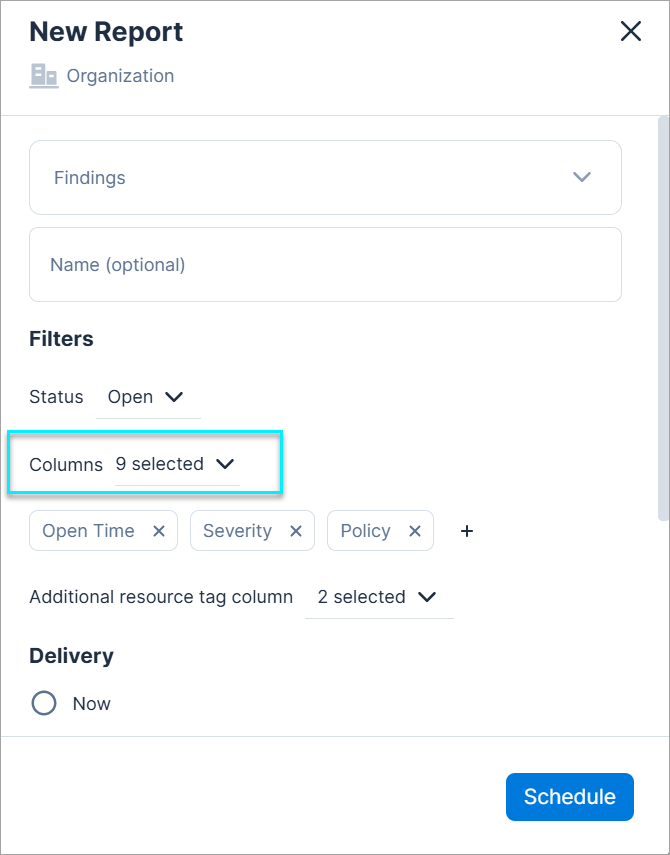
You can now select specific columns to include when you generate Findings reports. This gives you greater control over your data, allowing you to create more focused and efficient reports with only the information you need.
Policy Update: Load Balancer Insecure Communication
The Load Balancer insecure communication policy has been updated to provide more comprehensive protection by also evaluating internal Load Balancers that do not enforce HTTPS.
This enhancement improves visibility into insecure communication paths within your AWS environment, not just those exposed externally.
With this update:
- New findings may be created for internal Load Balancers without encryption.
-
Severity levels are now adjusted for both new and existing findings based on exposure:
- High for sensitive resources
- Medium for wide or public access
- Low for internal-only access
Policy Update: Improved Detection of Excessive Data Access
When a Microsoft principal is inactive, overprivileged policy evaluation now includes excessive Data Access actions. These actions appear in the remediation steps, ensuring that principals with only Data Access actions are correctly flagged.
As a result, additional findings may be generated for inactive principals with excessive data access.
Affected policies:
| Provider | Policy Name |
|---|---|
| Azure | Overprivileged Managed Identity in subscription |
| Microsoft Entra ID | Overprivileged Microsoft Entra ID Application in subscription |
| Microsoft Entra ID | Overprivileged Microsoft Entra ID Group in subscription |
| Microsoft Entra ID | Overprivileged Microsoft Entra ID User in subscription |
October 26, 2025 (Release 1.182)
Upcoming Changes
Network Scanner
Cloud Exposure is introducing Network Scanner, a new capability that validates internet exposure and records confirmed results as Network Endpoints.
For more information, see Network Scanner (December 7, 2025).
New Features
Overview Dashboard: New Finding Widgets
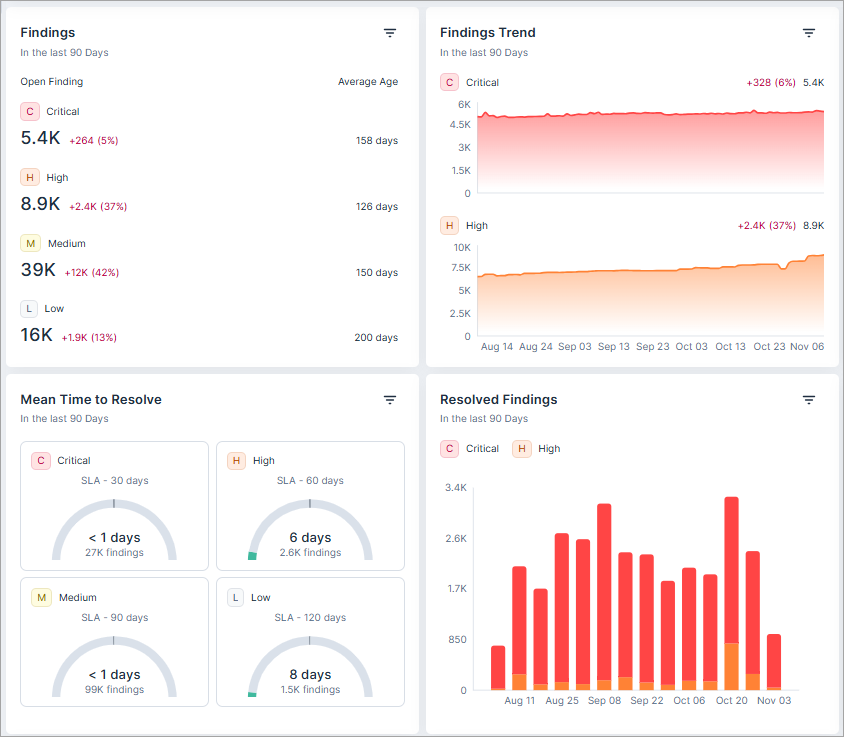
The following new widgets in the Overview dashboard provide you with even more actionable insights into your security posture:
- Findings — A consolidated view of your findings, broken down by severity, along with their average age. This helps you quickly understand the distribution and aging of your security issues.
- Findings Trend — Visualize the trend of your findings over a defined time period. This allows you to track the effectiveness of your security initiatives and identify any emerging patterns.
- Mean Time to Resolve — Gain a clear understanding of how quickly your team is addressing findings based on their severity and associated Service Level Agreements (SLAs). This helps you monitor and improve your remediation efficiency.
- Resolved Findings — See the number of findings that have been addressed (either closed or ignored) over time, segmented by severity. It provides a historical perspective on your team's workload and resolution rates.
-
The new widgets display data in your environment starting from the following dates. Data is never deleted.
- Cloud findings — Mid-July, 2025.
- Code findings — Mid-October, 2025.
- Most of the data in the new widgets represents a daily snapshot (UTC) of your data. In contrast, the Findings page always displays live data. As a result, you may see a difference between the counts found in these two locations. The clickable finding totals in the Findings and Findings Trend widgets represent live data, and match the data in the Findings page.
- These new widgets replace the previous Accounts, Resources, Open Findings, and Trends widgets in the built-in Overview Dashboard. The older widgets are still available for use when creating custom dashboards.
Dashboards: Enhanced Filtering
You can now apply powerful filters to your dashboard widgets, allowing you to narrow down the data to exactly what you need. This new functionality provides a more tailored and efficient way to monitor and analyze your security posture.
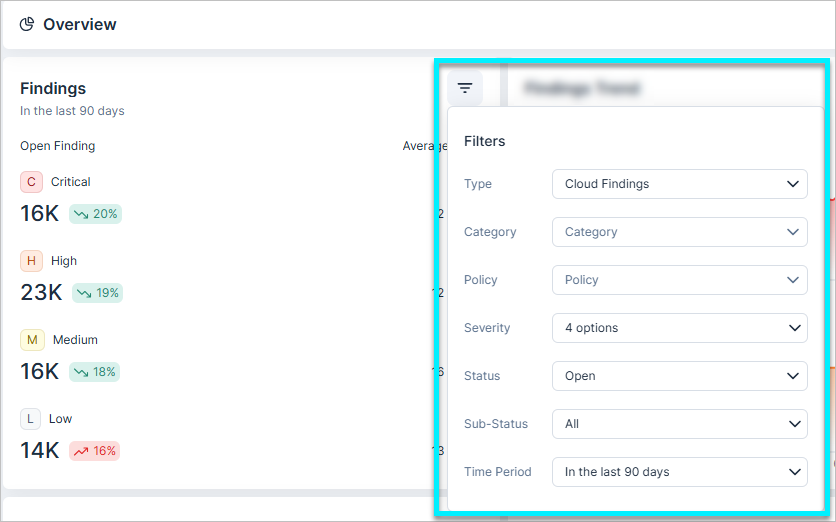
- The new filtering options are available on the Overview Dashboard: New Finding Widgets within the Overview dashboard.
- Use these, and other filters, to Custom Dashboards: Create Focused Views with Filtered Widgets
Snowflake Data Scanning
Cloud Exposure now supports scanning Snowflake accounts to identify and classify sensitive data.
You can onboard accounts, configure scan settings, and view Snowflake resources – including local, shared, and marketplace databases. This expands Tenable’s data protection coverage to one of the most widely used cloud data platforms.
To learn more, see Connect Snowflake and Snowflake FAQ.
Data: Custom Policy for Sensitive Data outside of Boundaries
You can now create custom policies in Cloud Exposure to detect when sensitive data is stored in locations where it should not reside.
The new template This sensitive data should not reside in these resources appears under the Monitor Sensitive Data category.
Use this template to define boundaries for sensitive data across your AWS environment. When the configured conditions are violated, the policy generates a finding, helping you monitor and control data sprawl across unauthorized or non-compliant resources.
To learn more, see Monitoring Data Boundaries and Data Sprawl
New Resources in 182
API Support
The following resources were added in this release:
| Platform | Category | Resource |
|---|---|---|
| Azure | Management | Root |
| Azure | Management | Subscriptions |
| Azure | Management | Management Groups |
| GCP | Management | Organizations |
| GCP | Management | Folders |
See the documentation for a list of all supported resources.
Policy Update: Public Resource Exposure Evaluation
The logic for evaluating public IAM access in network-based policies has been updated.
Resources with network-related conditions, such as SourceIp, SourceVpc, SourceVpce, or VpcSourceIp, are no longer classified as public. Public access is only assumed when no network restriction is defined.
As a result, affected findings are automatically closed with the sub-status false positive.
October 19, 2025 (Release 1.181)
New Features
Custom Dashboards: Create Focused Views with Filtered Widgets
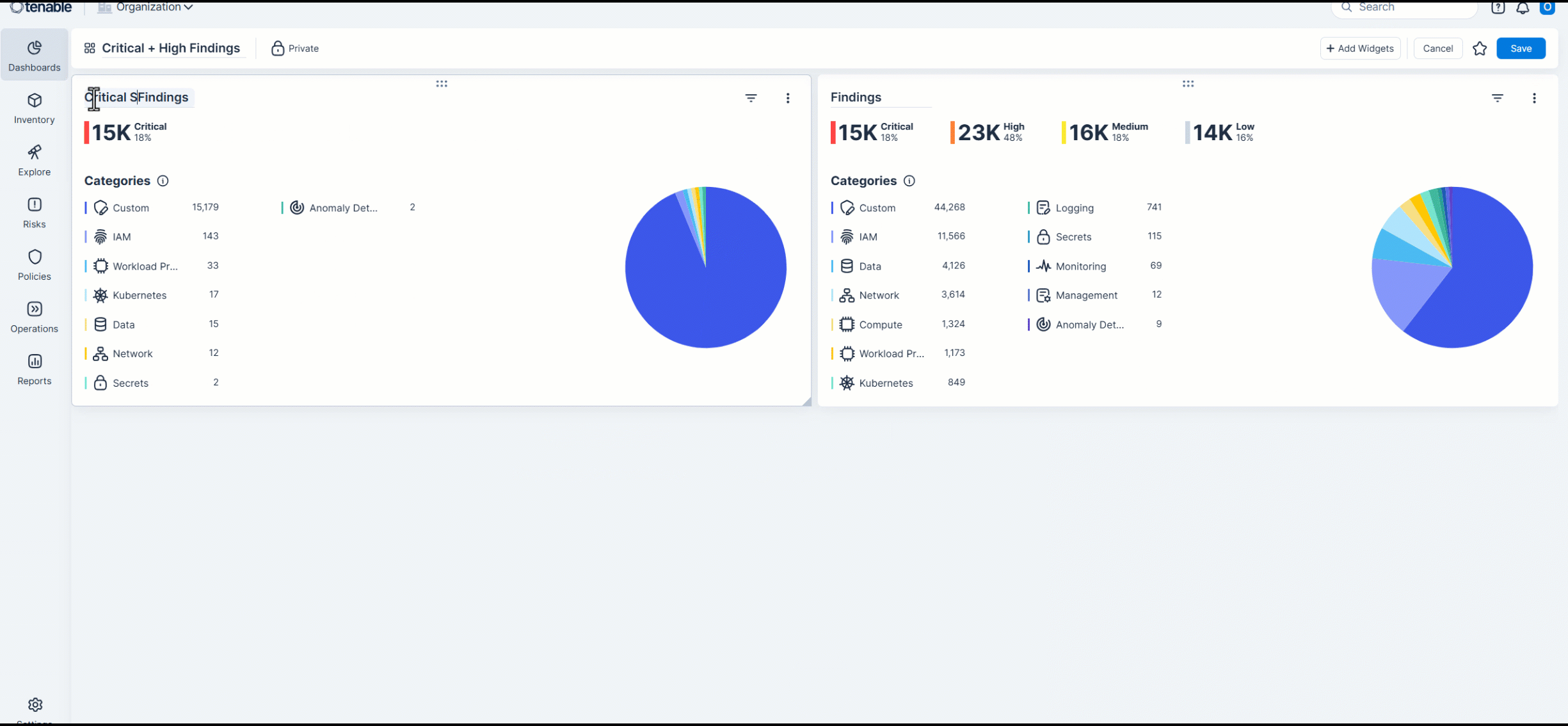
See side-by-side comparisons of specific data subsets by adding the same widget multiple times and applying different filters to each.
Custom dashboards allow you to create highly specific and comparative views of your security data. A powerful technique is to add the same widget multiple times to a single dashboard, applying different filters to each instance. This enables side-by-side comparisons of specific data subsets, offering immediate insights without navigating away from your dashboard.
For example, you can:
- Add multiple Open Findings widgets and filter each to show findings of different severity levels.
- Add multiple Compliance widgets and filter each to show data for a different time period.
Inventory: Bulk Labeling of Resources
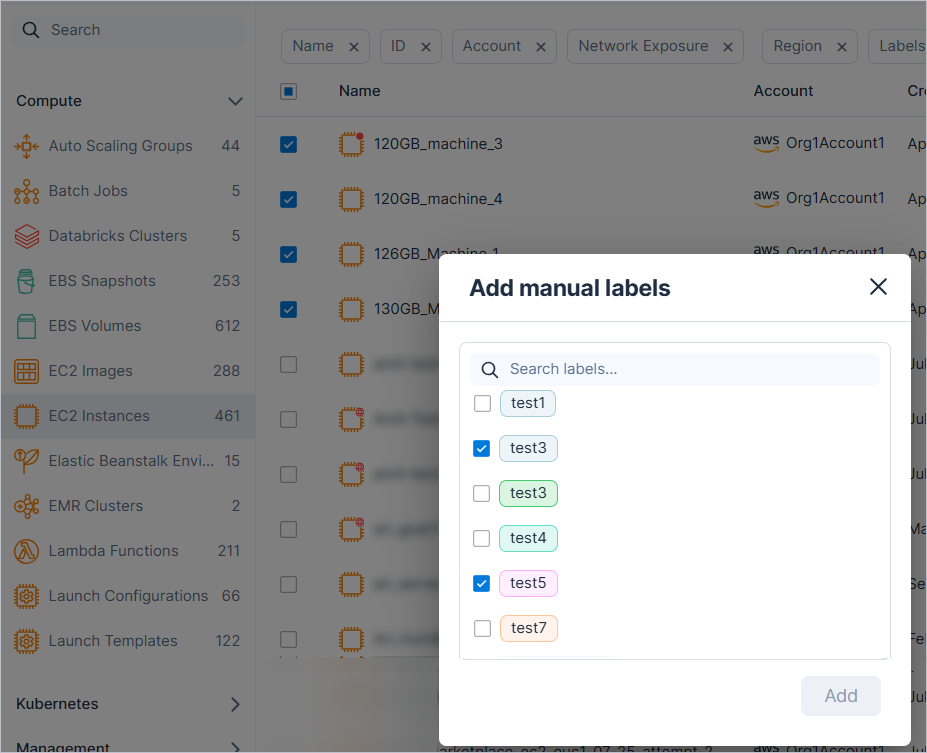
You can now apply one or more predefined custom labels to multiple resources at once, making it easier to organize and enrich your inventory. For example, bulk-apply a Production label to multiple EC2 instances.
IAM: Monitor Maximum Access Level for Azure and AWS Resources
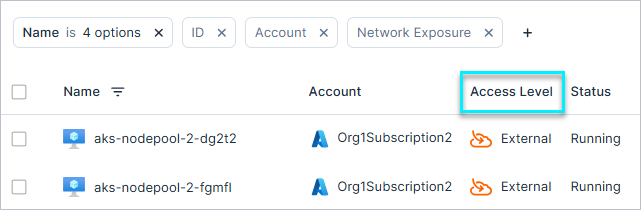
Tenable has expanded the IAM Access Level column functionality within Inventory to support both Azure and AWS resources. You can use this column to quickly identify resources that are publicly or externally exposed. This column displays the highest access level relationship between any principal and a specific resource across your multi-cloud environment, helping you easily monitor resources that may be at higher risk.
The update also improves the evaluation logic to more accurately detect publicly accessible resources. As a result, new findings may be generated or existing ones closed in Azure and AWS environments where access levels have been re-evaluated.
Policy Update: Microsoft Defender Plan Evaluation
The logic for policies related to Microsoft Defender has been updated to improve accuracy and reduce false positives.
As a result, findings that were incorrectly triggered due to inaccurate plan evaluation are automatically closed with the sub-status false positive.
Affected policies:
| Provider | Category | Name |
|---|---|---|
| Azure | Kubernetes | AKS Cluster is running images that are not scanned for vulnerabilities |
| Azure | Monitoring | Microsoft Defender for AI Services is not enabled |
| Azure | Monitoring | Microsoft Defender for APIs is not enabled |
| Azure | Monitoring | Microsoft Defender for App Services is not enabled |
| Azure | Monitoring | Microsoft Defender for Azure Cosmos DB is not enabled |
| Azure | Monitoring | Microsoft Defender for Azure SQL Databases is not enabled |
| Azure | Monitoring | Microsoft Defender for Containers is not enabled |
| Azure | Monitoring | Microsoft Defender for Defender CSPM is not enabled |
| Azure | Monitoring | Microsoft Defender for Key Vault is not enabled |
| Azure | Monitoring | Microsoft Defender for Open-Source Relational Databases is not enabled |
| Azure | Monitoring | Microsoft Defender for Resource Manager is not enabled |
| Azure | Monitoring | Microsoft Defender for Servers is not enabled |
| Azure | Monitoring | Microsoft Defender for SQL Servers on Machines is not enabled |
| Azure | Monitoring | Microsoft Defender for Storage is not enabled |
Policy Update: Public Resource Exposure Evaluation
The logic for evaluating public IAM access in network-based policies has been updated.
Resources with network-related conditions, such as SourceIp, SourceVpc, SourceVpce, or VpcSourceIp, are no longer classified as public. Public access is only assumed when no network restriction is defined.
As a result, affected findings are automatically closed with the sub-status false positive.
New Policy in 181
API Support
The following policy was added in this release:
| Provider | Category | Name |
|---|---|---|
| AWS | IAM | External IAM Role |