Tenable One Cloud Exposure 2025 Q3 Release Notes
Tip: You can subscribe to receive these release notes by email or RSS.
These release notes are listed in reverse chronological order.
September 28, 2025 (Release 1.180)
New Features
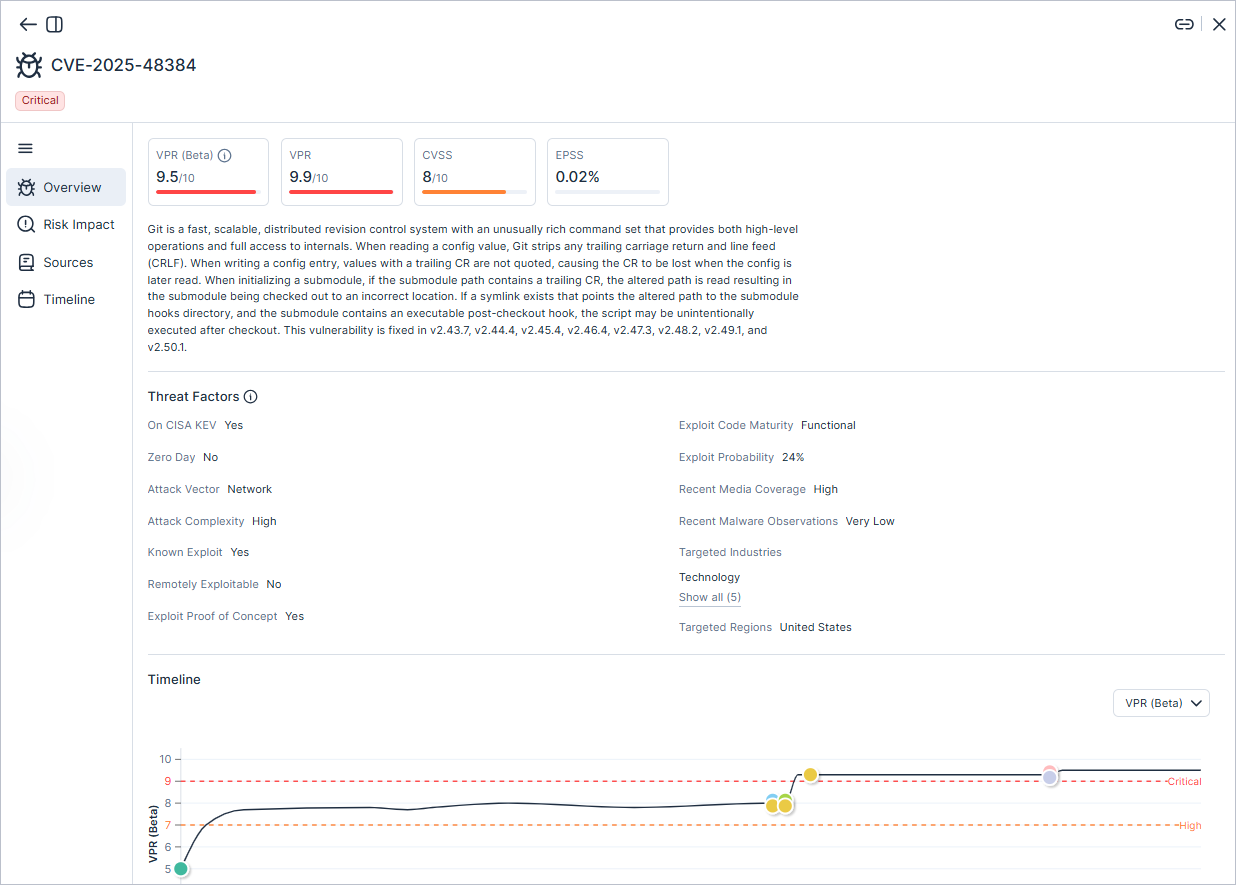
 Workload Protection: Enhanced Vulnerability Priority Rating (VPR)
Tenable has released significant enhancements to the patented Vulnerability Priority Rating (VPR). The updated VPR is now twice as efficient as the original version at identifying the CVEs that are either actively being exploited in the wild or are predicted to be exploited in the near term. This new score is available immediately in Beta mode and is displayed alongside the original VPR in the vulnerability tables and profile. During the beta phase, the new score provides visibility only and does not affect vulnerability severity calculations or finding creation.
The new VPR score enables you to:
- Sharpen precision to focus on what matters most — While traditional CVSS scores classify 60% of CVEs as High or Critical, our original VPR reduced this to 3%. The enhanced VPR further refines this, helping your teams focus on just 1.6% of vulnerabilities that represent actual risk to your business by leveraging an even broader spectrum of threat intelligence and real-time data input used to predict near-term exploitation in the wild.
- Prioritize with industry and regional context — New metadata provides crucial context, helping you understand if a vulnerability is being targeted in your specific industry or geographic region. Explore the changes made in the Threat Factors area under the vulnerability profile.
For a transition period, both the original VPR and the enhanced VPR (Beta) will coexist in Tenable Vulnerability Management. This allows you to compare the two versions and gradually adapt your internal processes. We will communicate the future deprecation of the original VPR well in advance. Transition is currently planned for January 2026.
For more information, see the FAQ.
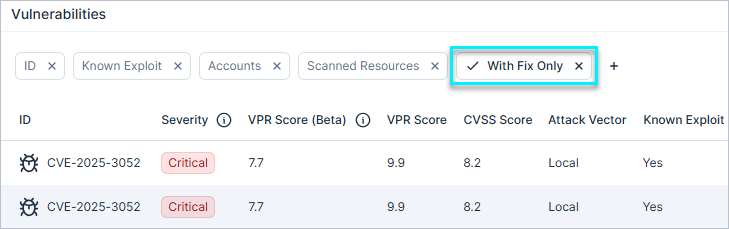
Workload Protection: Default Vulnerability Filter for Remediation Focus
The default filter on all vulnerability tables is now set to With Fix Only. This enhancement automatically hides unpatched CVEs, helping you quickly focus on vulnerabilities that can be remediated immediately.
Workload Protection: Improved Accuracy and Coverage in Vulnerability Detection
Tenable has improved vulnerability detection with two updates:
- Added support for scoped NPM packages, providing better visibility into Node.js workloads. As a result, you may see an increase in detected vulnerabilities, as Tenable now provides complete visibility into scoped NPM packages.
- Improved accuracy for Linux kernel packages by no longer flagging vulnerabilities in unused kernel versions that remain after upgrade. As a result, you may see a decrease in detected vulnerabilities, as Tenable will no longer flag unnecessary findings in unused kernel versions.
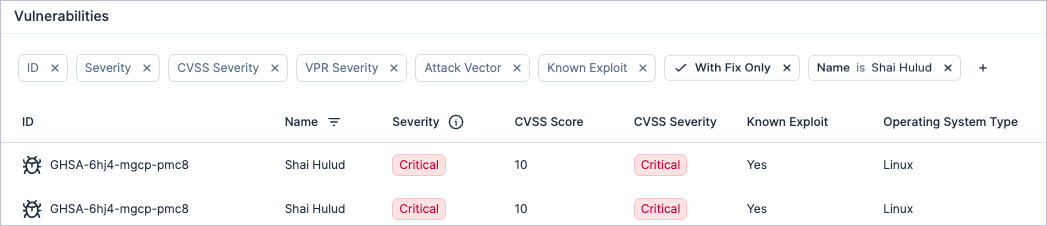
Security Advisory: "Shai-Hulud" NPM Supply Chain Attack
To help you stay ahead of emerging threats, we are providing this advisory about the "Shai-Hulud" NPM supply chain attack. This industry-wide attack involves compromised packages that contain malicious code used to steal secrets and self-propagate to other packages. These compromised packages may still be in your environment.
We’ve flagged them as advisory vulnerabilities. Any such packages will appear in your Tenable Console environment the next time data is synced.
We strongly recommend taking the following actions immediately:
- Update or roll back the affected packages to a safe version.
- Rotate any secrets that may have been exposed.
Compliance: Support for CIS Azure 3.0.0 and 4.0.0
Cloud Exposure now supports CIS Azure 3.0.0 and CIS Azure 4.0.0 as compliance standards. These standards provides prescriptive guidance for establishing a secure baseline configuration for Microsoft Azure.
See the documentation to learn more about how to monitor compliance in your cloud accounts.
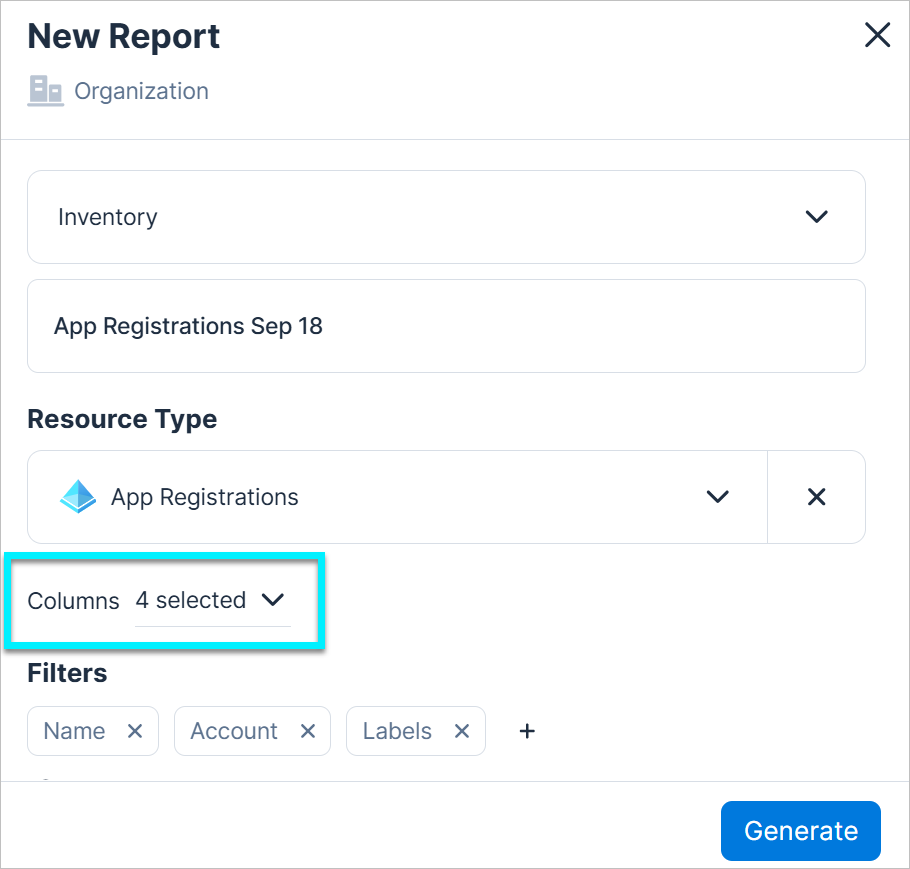
Reports: Customize Columns for Inventory Reports
You can now select specific columns to include when you generate Inventory reports. This gives you greater control over your data, allowing you to create more focused and efficient reports with only the information you need.
Console: Refined CSV Export Columns
Columns that weren't visible in the Console have been removed from CSV exports, so your downloaded data now directly reflects what you see in the table. You can generate a report to get the full dataset, including these columns.
Dashboards: TV Mode
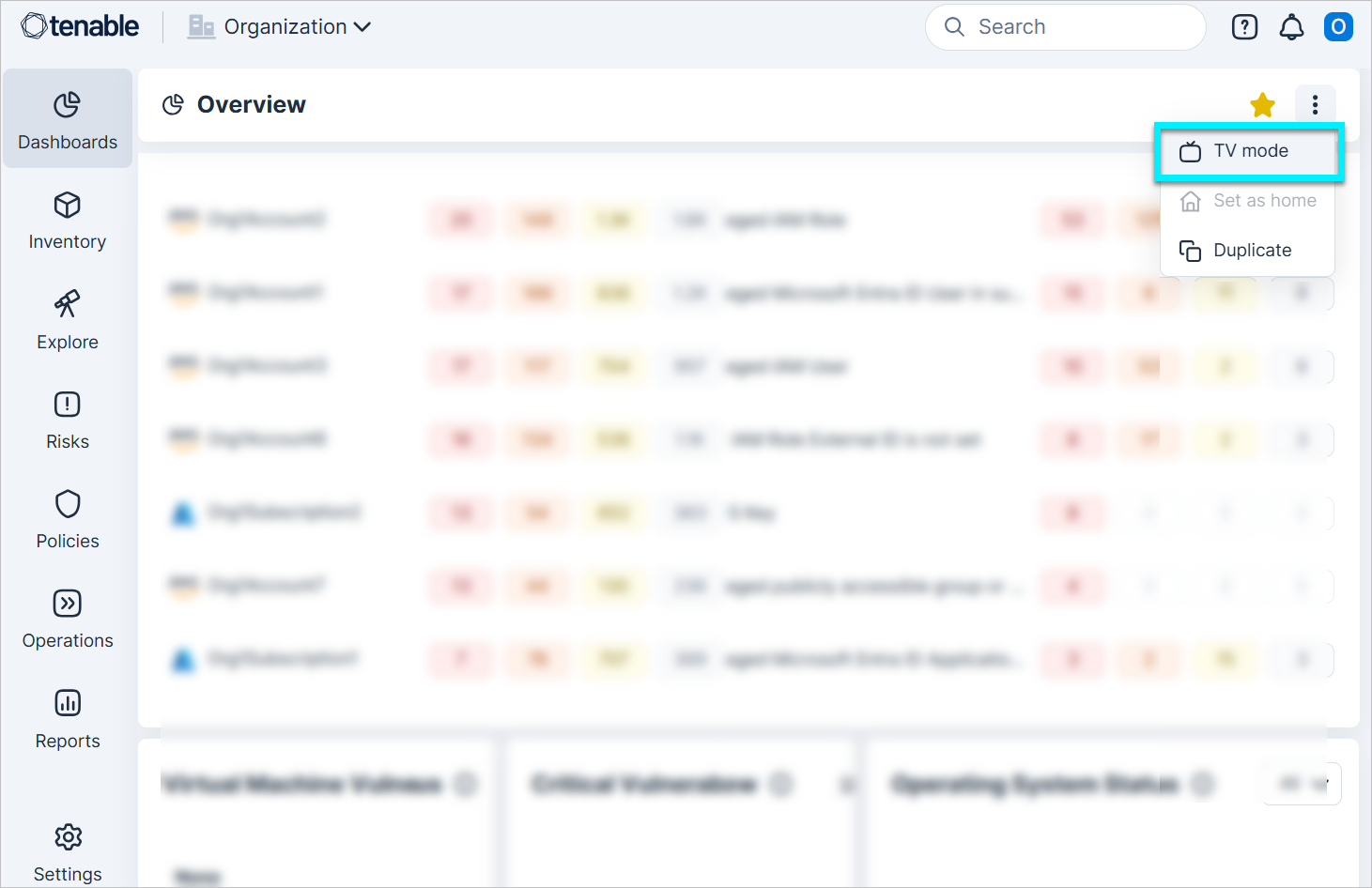
You can now view any dashboard in TV mode, which displays the dashboard in full-screen. To activate it, click the three-dot menu on any dashboard and select TV mode.
IAM: More Granular Activity Time for Identities
 API Support
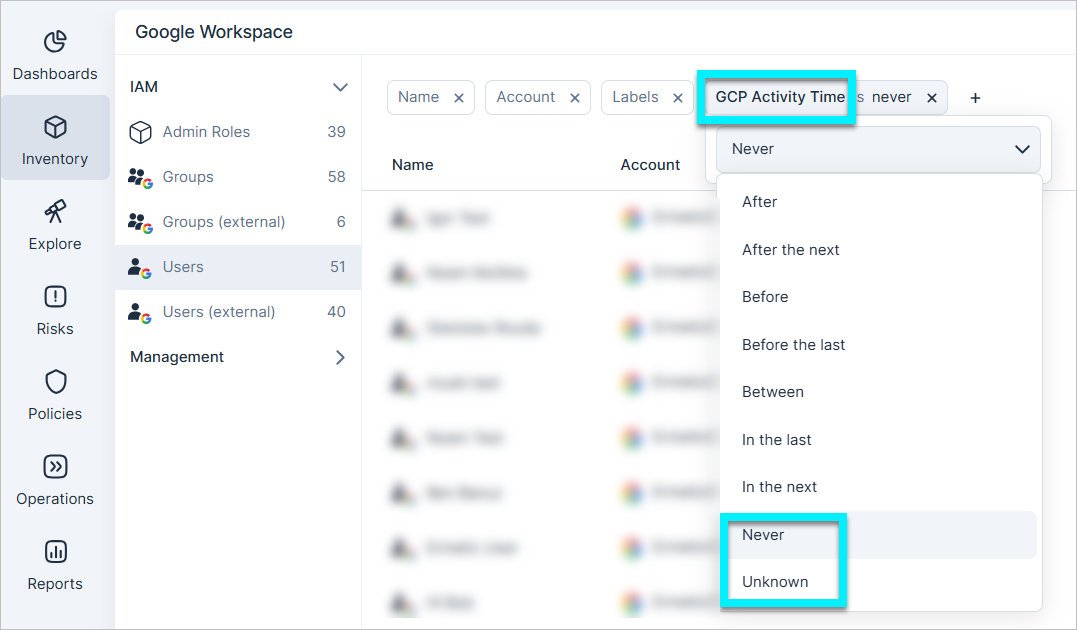
The Activity Time and Sign-in Time columns on Identity Provider (IdP) inventory pages (for IAM principals) were updated to help you better monitor your environment and provide a clearer understanding of your cloud identities' activity status.
The Not set value has been replaced with two new, more specific values:
- Never — The identity has never been active.
- Unknown — There is no data regarding the identity's activity.
API Changes:
The related GraphQL API has also been updated to align with these changes. The ActivityTime/SignInTime field, which previously returned either a date or a null value, now work in conjunction with a new ActivityTimeType/SignInTimeType field. The following describes the changes for the ActivityTime field, but the same applies for SignInTime.
- When ActivityTime is a date value, the ActivityTimeType field will be either OlderThan or Exact.
- When ActivityTime is a null value, the ActivityTimeType field will be either Never/Unknown.
Integrations: Add Optional Fields to Jira Issues
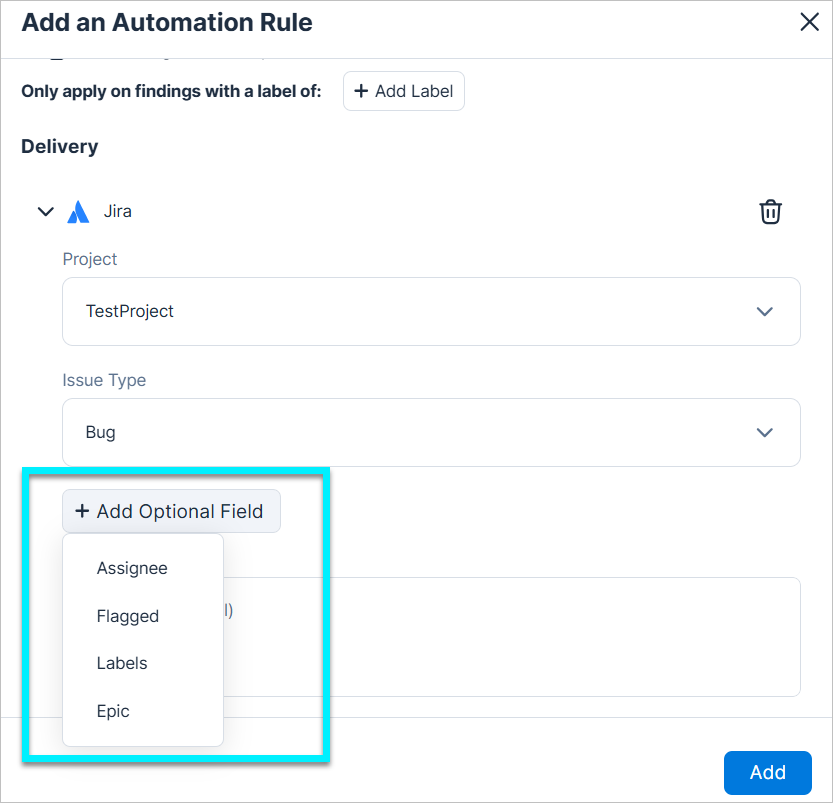
You can now include optional fields when you send Tenable findings to Jira (via automation rule or manually). These fields are dynamically pulled from your selected Jira project, allowing you to include non-mandatory data like labels, assignees, or epics. This gives you greater flexibility and control over the Jira issues created from Tenable findings.
JIT Access: Expanded Slack Features
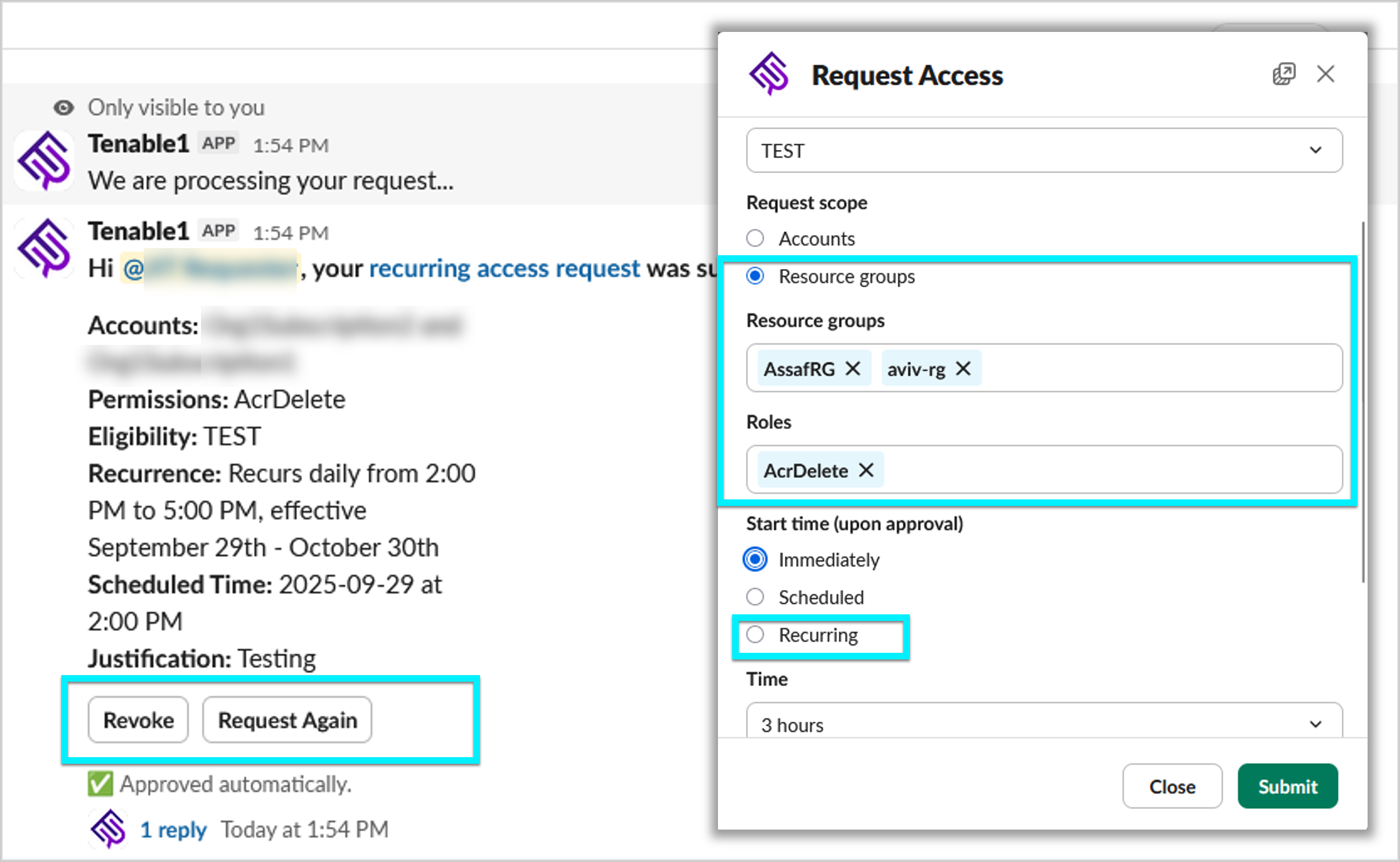
Slack functionality has been expanded to match key actions available in the JIT Portal. All users can use the new Slack Home tab to view an overview of requests and actions in one place.
Requesters can now:
- Revoke their own active access sessions.
- Request access to roles (Azure and GCP) and resource groups (Azure).
- Submit recurring access requests.
- Use Request Again to resubmit a new request with the same parameters as a previous one.
Approvers can now:
- Revoke access that was previously approved.
Policy Update: Automatic Remediation
You can now automatically remediate findings for the following policies:
| Provider | Category | Policy |
|---|---|---|
| AWS | IAM | SSO Group with unused permission set assignment |
| AWS | IAM | SSO User with unused permission set assignment |
When you open a finding, click the Remediate  button to trigger the process, saving time and reducing effort.
To learn more, see Automatically Remediate Findings.
Policy Update: Overprivileged Publicly Accessible Group or User in Kubernetes Cluster
The logic for the Overprivileged publicly accessible group or user in Kubernetes cluster policy has been updated to improve accuracy and reduce false positives.
As a result, findings involving default, non-exploitable identities are automatically closed as false positives.
Policy Update: Microsoft Defender Plan Evaluation
The logic for policies related to Microsoft Defender has been updated to improve accuracy and reduce false positives.
As a result, findings that were incorrectly triggered due to inaccurate plan evaluation are automatically closed with the sub-status false positive.
Affected policies:
| Provider | Category | Name |
|---|---|---|
| Azure | Kubernetes | AKS Cluster is running images that are not scanned for vulnerabilities |
| Azure | Monitoring | Microsoft Defender for AI Services is not enabled |
| Azure | Monitoring | Microsoft Defender for APIs is not enabled |
| Azure | Monitoring | Microsoft Defender for App Services is not enabled |
| Azure | Monitoring | Microsoft Defender for Azure Cosmos DB is not enabled |
| Azure | Monitoring | Microsoft Defender for Azure SQL Databases is not enabled |
| Azure | Monitoring | Microsoft Defender for Containers is not enabled |
| Azure | Monitoring | Microsoft Defender for Defender CSPM is not enabled |
| Azure | Monitoring | Microsoft Defender for Key Vault is not enabled |
| Azure | Monitoring | Microsoft Defender for Open-Source Relational Databases is not enabled |
| Azure | Monitoring | Microsoft Defender for Resource Manager is not enabled |
| Azure | Monitoring | Microsoft Defender for Servers is not enabled |
| Azure | Monitoring | Microsoft Defender for SQL Servers on Machines is not enabled |
| Azure | Monitoring | Microsoft Defender for Storage is not enabled |
New Policies in 180
API Support
The following policies were added in this release:
| Provider | Category | Name |
|---|---|---|
| AWS | Logging | API Gateway data tracing is not enabled |
| AWS | Network | API Gateway REST API request validation is not set |
| Azure | Monitoring | Microsoft Defender for AI Services is not enabled |
| Azure | Monitoring | Microsoft Defender for APIs is not enabled |
| Azure | Monitoring | Microsoft Defender for App Services is not enabled |
| Azure | Monitoring | Microsoft Defender for Azure Cosmos DB is not enabled |
| Azure | Monitoring | Microsoft Defender for Azure SQL Databases is not enabled |
| Azure | Monitoring | Microsoft Defender for Containers is not enabled |
| Azure | Monitoring | Microsoft Defender for Defender CSPM is not enabled |
| Azure | Monitoring | Microsoft Defender for Key Vault is not enabled |
| Azure | Monitoring | Microsoft Defender for Open-Source Relational Databases is not enabled |
| Azure | Monitoring | Microsoft Defender for Resource Manager is not enabled |
| Azure | Monitoring | Microsoft Defender for Servers is not enabled |
| Azure | Monitoring | Microsoft Defender for SQL Servers on Machines is not enabled |
| Azure | Monitoring | Microsoft Defender for Storage is not enabled |
September 14, 2025 (Release 1.179)
New Features
IAM: Configuring Trusted Vendors
You can now configure trusted vendors in Cloud Exposure. This allows you to explicitly mark external vendors as trusted, helping to differentiate between unknown, known (mapped by Tenable), and trusted external access. By default, no vendors are marked as trusted. You can manually assign this status in Settings > Cloud Exposure > Vendors.
Once you have configured the vendor as trusted, it will:
- Reduce the severity of findings related to trusted vendors.
- Automatically close toxic combinations associated with trusted vendors.
- Improve monitoring of external access across the product (for example, IAM dashboard, Inventory, IAM pages).
For more information see the documentation.
Workload Protection: Granular Kubernetes Workload Vulnerability Management
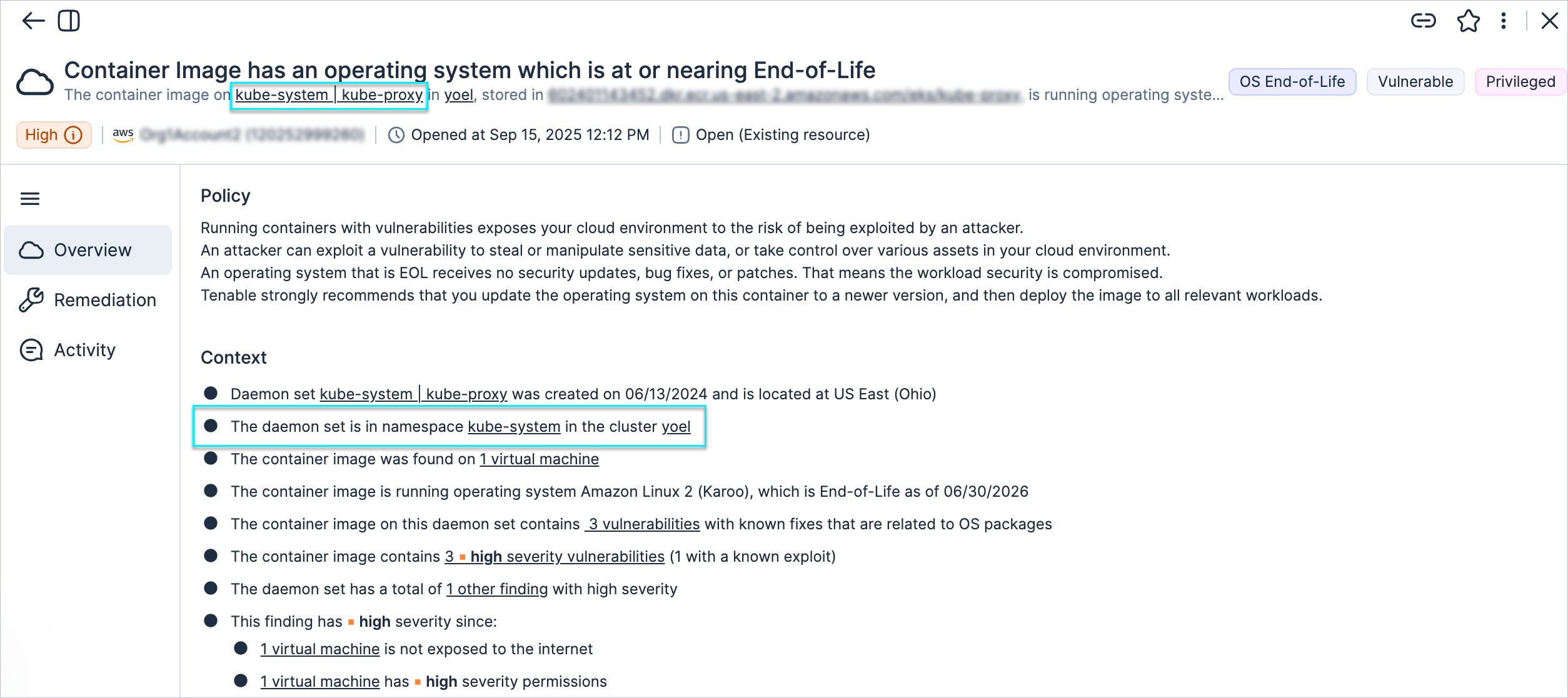
We've enhanced how container image vulnerability findings are linked within Kubernetes environments. For example, findings on an EKS cluster (or any other managed or unmanaged Kubernetes cluster) are now attributed directly to specific workload resources (for example, Kubernetes Deployments), rather than the entire cluster. This helps security teams to assign and manage risk more accurately per application or team. Additionally, we added the resource namespace to the finding context.
Workload Protection: Export Resource Inventory Data for Support Cases
This feature simplifies troubleshooting for Tenable Vulnerability Management support. You can now export CI/CD container image scan inventory data as a JSON file directly from the image profile and attach it to your support ticket. The option is available for any successfully scanned CI/CD container image resource and is visible to users with view permissions. It will appear greyed out if the resource has not been scanned.
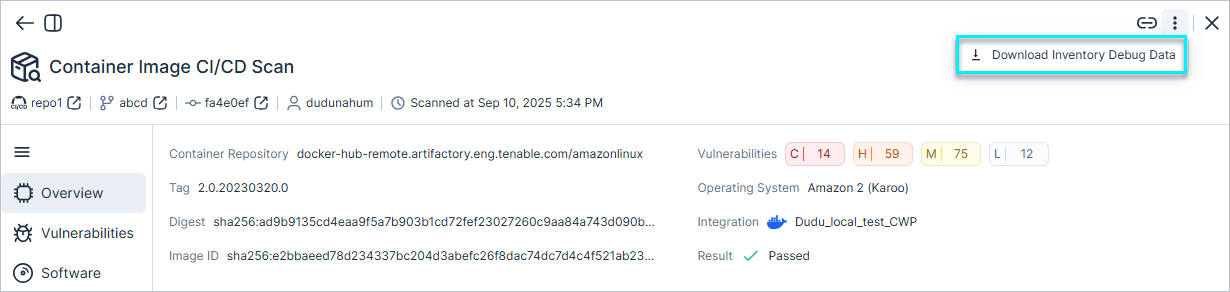
For more information, see the documentation.
Workload Protection: Vulnerability Published Date Field in Container Image CI/CD Scan Output
The CI/CD scan output now includes a vulnerability Published Date field, giving you a new data point to use when assessing and prioritizing vulnerabilities.
ServiceNow: Support for Additional Mandatory Field Types
The ServiceNow integration now supports the List and Reference mandatory field types, giving you greater flexibility in customizing incidents, and helping you align with internal workflows.
New Policy in 179
API Support
The following policy was added in this release:
| Provider | Category | Name |
|---|---|---|
| AWS | IAM | SSO User with unused permission set assignment |
September 7, 2025 (Release 1.178)
New Features
Console: New Streamlined Navigation
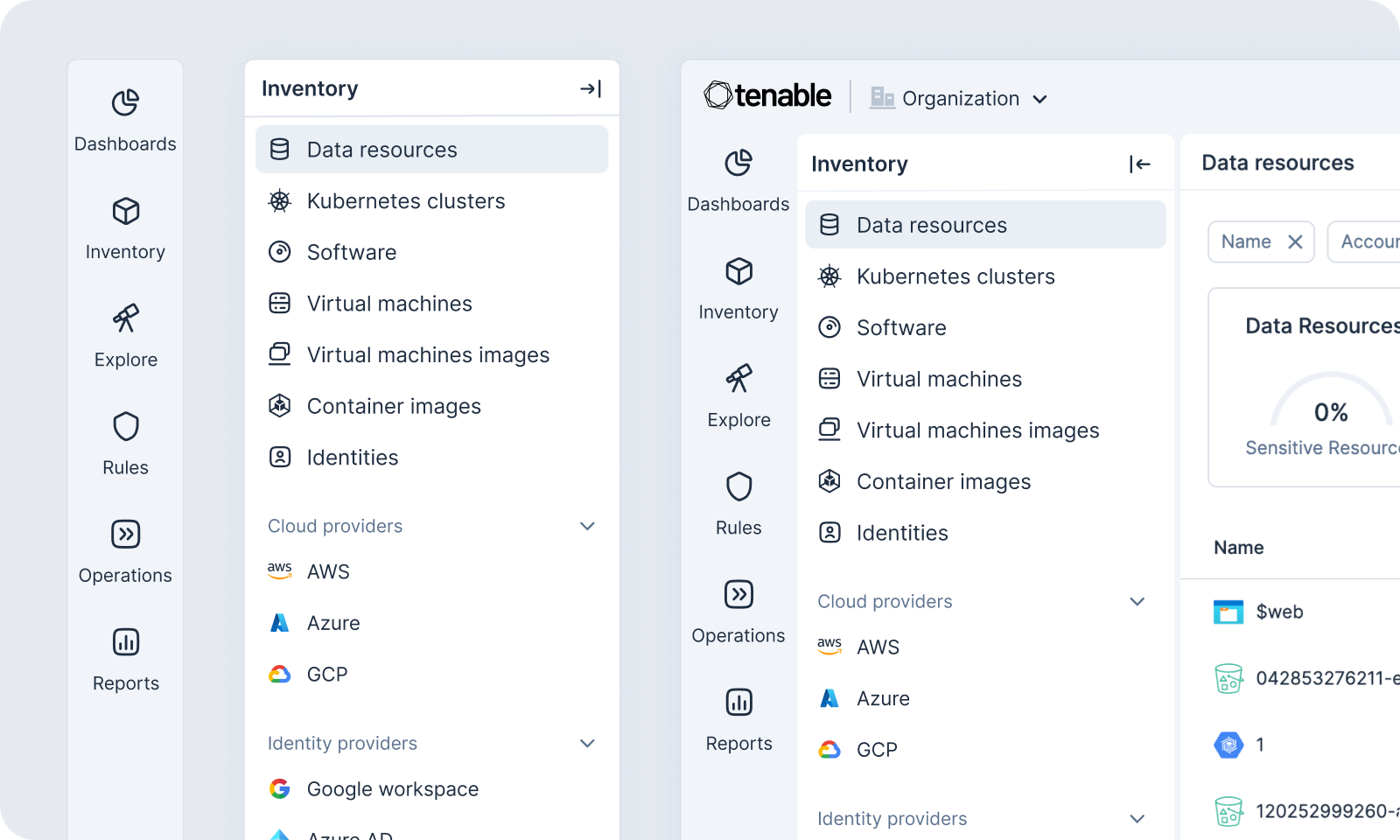
We've completely redesigned the Console navigation for a more intuitive, consolidated, and efficient experience. The goal is to help you find the insights and tools you need faster, so you can focus on securing your cloud environment. This update introduces a simplified main navigation menu, grouping related features under fewer, more logical categories.
Can't find what you're looking for anymore? Just search for it! (Ctrl+K)
Projects: Create Custom Policies per Project Scope
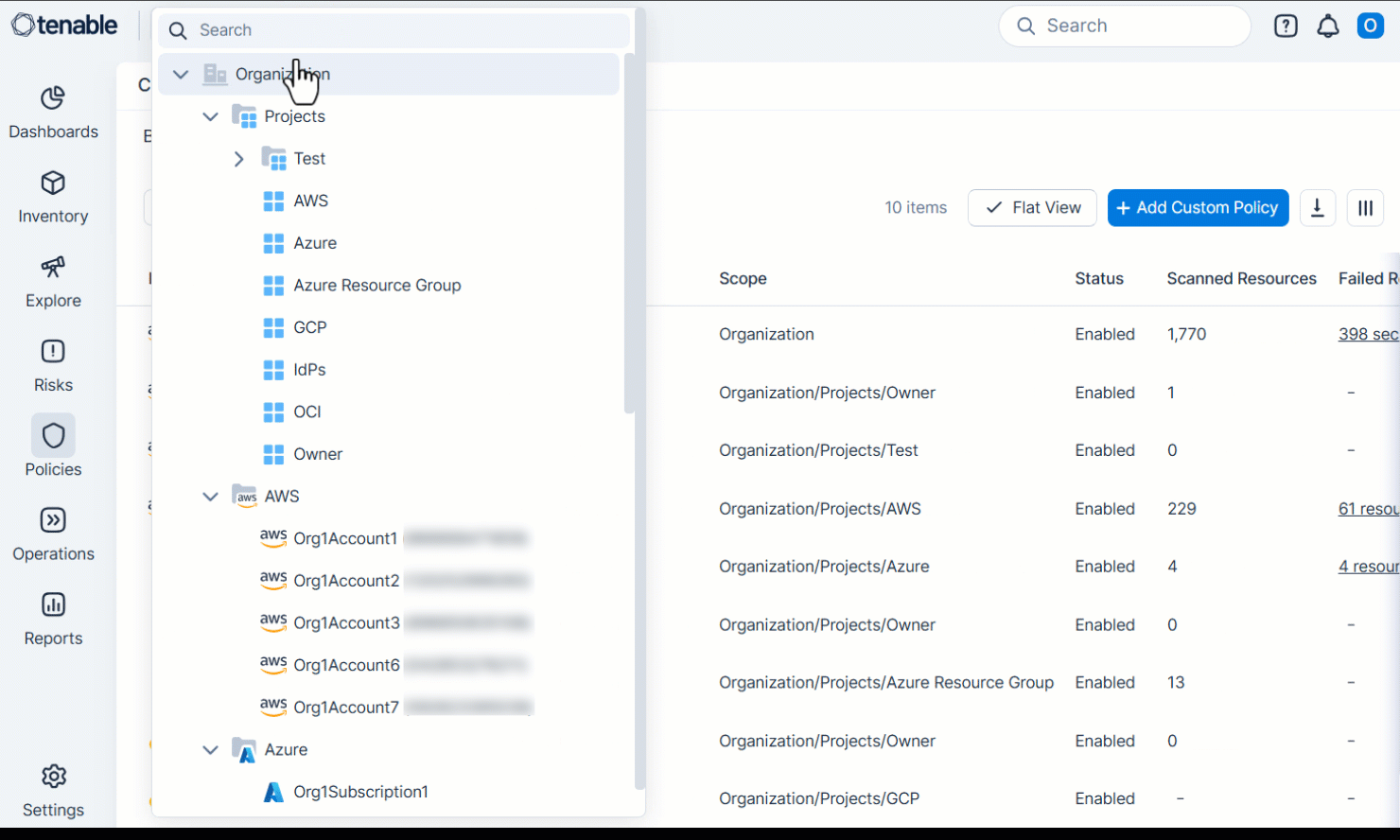
You can now create custom policies per project scope, giving you more granular control over policy management and enforcement. This means that the specific accounts or resources grouped within a project can have their own unique custom policies configured, providing greater flexibility and alignment with your organizational structure.
For more information, see the documentation.
Workload Protection: New Resolved Filter in the Vulnerabilities Table
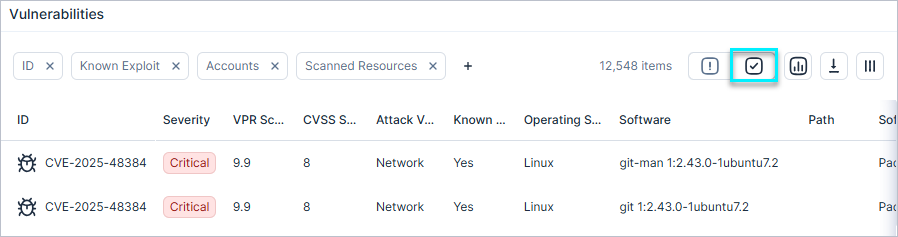
A new Resolved filter is now available in the Workload > Vulnerabilities table. The filter displays only vulnerabilities that have been marked as resolved, improving clarity when reviewing vulnerability status and distinguishing between open and closed issues.
New IaC Policies in 178
The following IaC policies were added in this release:
| Platform | Category | Name |
|---|---|---|
| Azure | Compute | App Service HTTP version does not meet minimum requirements |
| Azure | Compute | App Service remote debugging is enabled |
New Policies in 178
API Support
The following policies were added in this release:
| Category | Name |
|---|---|
| Kubernetes | Kubernetes Cluster API server audit policy does not meet minimum requirements |
| Kubernetes | Kubernetes Cluster API server audit policy is not enabled |
| Kubernetes | Kubernetes Cluster image controller configuration is not set |
August 31, 2025 (Release 1.177)
New Features
Security Alert: Nx Build System Package Compromise
Tenable identified a supply chain attack affecting certain versions of the Nx build system package. Malicious code was used to steal secrets by exfiltrating them to public GitHub repositories. Although GitHub has disabled the affected repositories, these compromised packages may still be in your environment.
We’ve flagged them as advisory vulnerabilities, and any such packages will appear in your Tenable Console environment the next time data is synced.
- Vulnerability ID: GHSA-cxm3-wv7p-598c
We strongly recommend taking the following actions immediately:
- Update or roll back the affected packages to a safe version.
- Rotate any secrets that may have been exposed.
IAM: Improved Visibility into Public and External IAM Access to AWS Resources
The analysis and evaluation of advanced scenarios has been improved to better identify public and external IAM access to AWS resources, including services such as AWS Lambda functions and SNS topics. Results are available in both the Permission Query and the IAM Graph, providing clearer insights into potential exposure and helping you better secure your AWS environment.
New IaC Policy in 177
The following IaC policy was added in this release:
| Category | Name |
|---|---|
| Kubernetes | Kubernetes Pod has containers running as the root user |
New Policies in 177
API Support
The following policies were added in this release:
| Platform | Category | Name |
|---|---|---|
| AWS | Data | Data Firehose Stream does not publish logs to CloudWatch |
| AWS | Data | Data Firehose Stream source record backup is not enabled |
| AWS | Data | Redshift Cluster is using the default master username |
| AWS | Logging | Redshift Cluster user activity logging is not enabled |
| AWS | Network | Redshift Cluster encryption in transit is not enabled |
| Azure | Network | Missing subscription alarm – create or update SQL Server firewall rule |
| Azure | Network | Missing subscription alarm – create or update network security group |
| Azure | Network | Missing subscription alarm – create or update public IP address rule |
| Azure | Network | Missing subscription alarm – create or update security solution |
| Azure | Network | Missing subscription alarm – create policy assignment |
| Azure | Network | Missing subscription alarm – delete SQL Server firewall rule |
| Azure | Network | Missing subscription alarm – delete network security group |
| Azure | Network | Missing subscription alarm – delete policy assignment |
| Azure | Network | Missing subscription alarm – delete public IP address rule |
| Azure | Network | Missing subscription alarm – delete security solution |
Policy Name Update in 177
The following policy name has been updated for improved clarity and consistency:
| Category | Previous Name | Updated Name |
|---|---|---|
| Kubernetes | Kubernetes Namespace has containers running as the root user | Kubernetes Pod has containers running as the root user |
Policy Update: S3 Bucket Encryption in Transit Is Not Enabled
The logic for the S3 Bucket encryption in transit is not enabled policy has been updated to reduce false positives.
The policy now evaluates resource control policies (RCP) in addition to the bucket policy. A finding triggers only if the bucket policy does not enforce HTTPS and RCP evaluation confirms the bucket can be accessed without encryption.
Existing findings that RCP evaluation confirms are not exploitable are automatically closed as false positives.
August 24, 2025 (Release 1.176)
New Features
IAM: OCI Dynamic Group Memberships Mapping and Visibility
This feature provides a capability not available in the OCI console: clear visibility into dynamic group memberships based on defined rules, enabling stronger oversight and control over group membership. Tenable’s inventory table now includes a new Members column that lists all resources matching the group’s rule, and membership details are also displayed in the profile view. You can view relationships from both sides: in the resource view, you can see which groups a resource belongs to, and in the group view, you can see all members associated with that group.
IAM: IAM Roles Trusted Entity Types via API
API Support
You can now access the TrustedEntityTypes field for IAM roles through the API. This field provides information about which types of entities are allowed to assume the role.
Workload Protection: New Clusters Filter and Column in Vulnerabilities Table
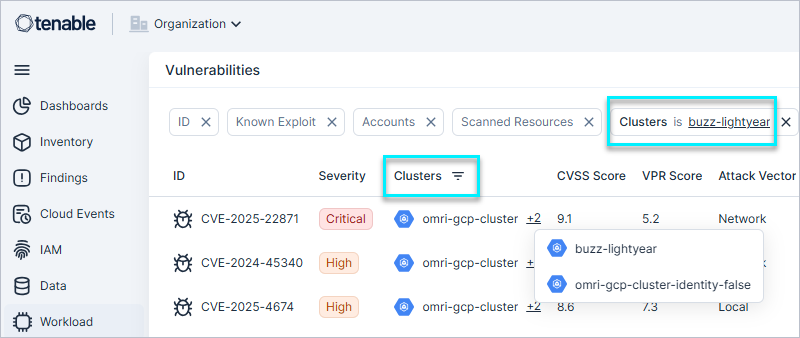
A new Clusters filter and column are now available in the Workload > Vulnerabilities table. The column is hidden by default and displays vulnerable clusters, along with all vulnerabilities associated with each cluster. Use the filter or column to view cluster-related vulnerabilities, improving overall visibility.
Workload Protection: New Filtering Options in Vulnerabilities API
API Support
The following APIs now support additional filters to improve querying for Vulnerabilities:
- Vulnerabilities:
- CvssSeverities
- VprSeverities
- VulnerabilityInstances:
- CvssSeverities
- VprSeverities
- SoftwareNames
- SoftwareVersions
New API Compliances Query
You can now retrieve compliance frameworks and their scores through the new Compliances API query. Use filters to return specific compliance IDs or limit results to a particular scope (for example, your production account). To learn more, see API: Compliance.
Data Protection: Scanning for AWS RDS Instances (Oracle)
Cloud Exposure now supports data protection scanning for AWS RDS instances running Oracle. To learn more, see supported versions.
New IaC Policies in 176
The following IaC policies were added in this release:
-
Kubernetes
Name Kubernetes Cluster contains overprivileged Roles and ClusterRoles Kubernetes Namespace has containers with capabilities assigned Kubernetes Pod has containers allowing privilege escalation Kubernetes Pod has containers sharing the host IPC namespace Kubernetes Pod has containers sharing the host network namespace Kubernetes Pod has containers sharing the host process ID namespace Kubernetes Pod has containers that use HostPath volumes Kubernetes Pod has containers that use hostPorts Kubernetes Pod has containers with writable root filesystems Kubernetes Pod has containers with sensitive host file system mount
New Policies in 176
API Support
The following policy was added in this release:
| Platform | Category | Name |
|---|---|---|
| AWS, Azure, GCP, OCI, On-Premises | Kubernetes | Kubernetes Cluster contains overprivileged Roles and ClusterRoles |
| AWS | IAM | SSO group with unused permission set assignment |
| AWS | Network | API Gateway authorization is not set |
Policy Name Updates in 176
The following policy names have been updated for improved clarity and consistency:
| Category | Previous Name | Updated Name |
|---|---|---|
| Kubernetes | Kubernetes Namespace has containers allowing privilege escalation | Kubernetes Pod has containers allowing privilege escalation |
| Kubernetes | Kubernetes Namespace has containers sharing the host IPC namespace | Kubernetes Pod has containers sharing the host IPC namespace |
| Kubernetes | Kubernetes Namespace has containers sharing the host network namespace | Kubernetes Pod has containers sharing the host network namespace |
| Kubernetes | Kubernetes Namespace has containers sharing the host process ID namespace | Kubernetes Pod has containers sharing the host process ID namespace |
August 17, 2025 (Release 1.175)
New Features
Localization: Japanese Language Support
Cloud Exposure is excited to announce Japanese language support. This support includes:
-
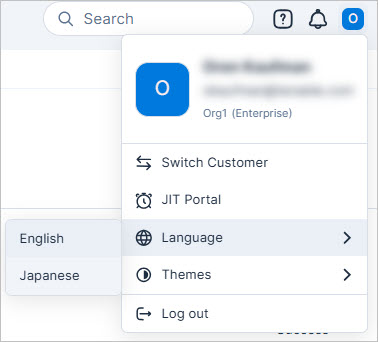
Cloud Exposure Console — You can now navigate and utilize the full functionality of the Cloud Exposure Console in Japanese. Switch languages via the user profile menu.
-
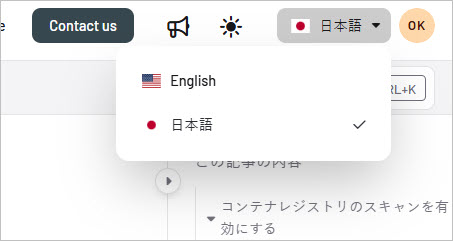
Documentation Portal — Our comprehensive documentation portal is also available in Japanese, providing clear and accessible resources to help you get the most out of the product.
Workload Protection: Expanded Windows Software Support Coverage
We’ve expanded Windows application support, offering a more comprehensive view of vulnerabilities affecting Windows environments as follows:
- Library package scanning - e.g., Go, Java, .NET, etc.
- PE (Portable Executable) file scanning - e.g., DLL, EXE.
Workload Protection: Improved Scan Resource Status Visibility
Workload tables now display all VMs, VM images, and container images, regardless of scan status, enabling easier tracking of resources and their scan states in one view.
Workload Protection: Software Exposure
A new column, Exposure, has been added to the software tables to indicate whether software is vulnerable. By default, the filter is set to ‘Vulnerable’ to highlight risky software. This column is available in:
- Workload > Software table
- Workload > Resource profile (VM/Container Image/VM Image) > Workload > Software tab
IaC Security: Support for Kubernetes Scanning (Helm-Based)
Tenable now supports scanning Kubernetes deployments via Helm as part of our IaC security offering.
New IaC Policies in 175
The following IaC policies were added in this release:
-
Azure
Category Name Compute Virtual Machine trusted launch is not enabled -
Kubernetes
Name Cluster is using the default namespace Namespace default service account is actively used Namespace does not have a Restricted policy configured Secrets are used as environment variables Overprivileged publicly accessible group or user in Kubernetes cluster
New Resources in 175
API Support
The following resources were added in this release:
| Platform | Category | Resource |
|---|---|---|
| AWS | Data | Redshift Parameter Group |
| Azure | Data | Activity Log Alert |
New Policy in 175
API Support
The following policy was added in this release:
| Platform | Category | Name |
|---|---|---|
| AWS | Logging | Redshift Cluster audit logging is not enabled |
August 10, 2025 (Release 1.174)
New Features
Dashboards: Home Dashboard and Favorites
The following features were added to the Dashboards page:
-
 Home dashboard: You can now set a default dashboard that will be displayed every time you click on the Dashboards menu item. This allows you to have your most important security information front and center.
-
 Favorites: You can now mark your most-used dashboards as Favorites. This gives you easier access and visibility to the dashboards you need most often.
IAM: New Microsoft Entra ID 3rd Party Vendor Settings
You can now configure Microsoft Entra ID application IDs as a 3rd party vendor in Tenable.
From the Vendors settings page, you can map Microsoft Entra ID account IDs to vendors from Tenable’s pre-identified list or add custom vendors. Once mapped, you can more precisely monitor external vendor access to your environment. Vendor data is displayed across the IAM Dashboard, Inventory, Identity Intelligence, and Permission Query pages.
For more information, see the documentation.
IAM: New Column - Maximum Session Duration for AWS IAM Roles
A new Maximum Session Duration column is now available in Inventory > AWS > IAM Roles table. The column is hidden by default and can be added to the table view. Sorting session duration values makes it easier to identify IAM roles with unusual or incorrect configurations.
Workload Protection: Faster Scan Results
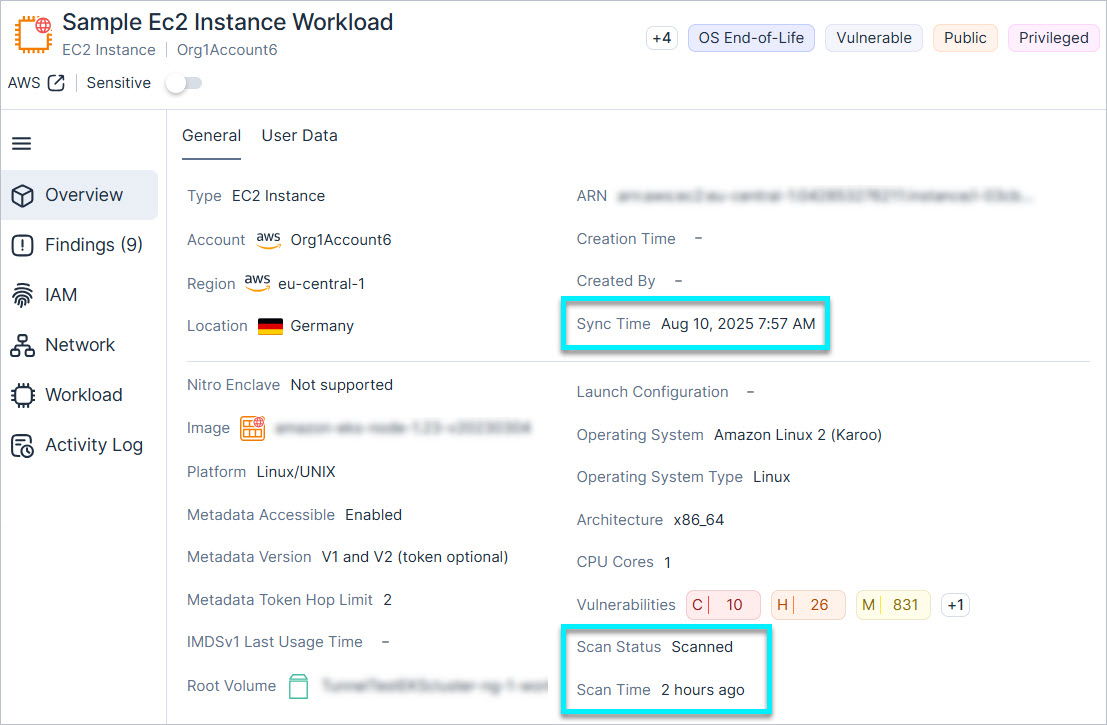
The scan status for workloads is now updated immediately after a scan finishes, giving you faster access to vulnerability, malware, and software detection results. Tenable decoupled the workload scan status from the main resource syncing process, so you no longer have to wait for the entire system to sync before seeing your results. You can see both the scan status/time and sync time in the resource profile page.
What is the benefit of the independent workload protection scan?
It allows the system to surface technical data - like newly discovered vulnerabilities - more quickly and independently of the data synchronization's completion.
Does this affect when risk findings are created or closed?
Yes. Findings are still created or closed after the data synchronization process finishes, even if the underlying vulnerabilities were already detected or resolved in the scan data.
Could this cause temporary discrepancies?
Potentially. You might see vulnerabilities in the scan data before the associated findings are reflected in the risk view, as they depend on data synchronization completion.
Is any action required from users?
No action is needed. This change aims to improve performance and visibility without impacting user workflows.
JIT Access: API Support for Updating Eligibilities
API Support
Administrators and JIT Administrators can update JIT eligibilities via the API. This enhancement streamlines eligibility management and enables actions such as:
- Replacing the requester of a pre-approved eligibility to match the on-call assignee
- Modifying duration, scope, or permissions without recreating the eligibility
To learn more or see query examples, visit the JIT API documentation.
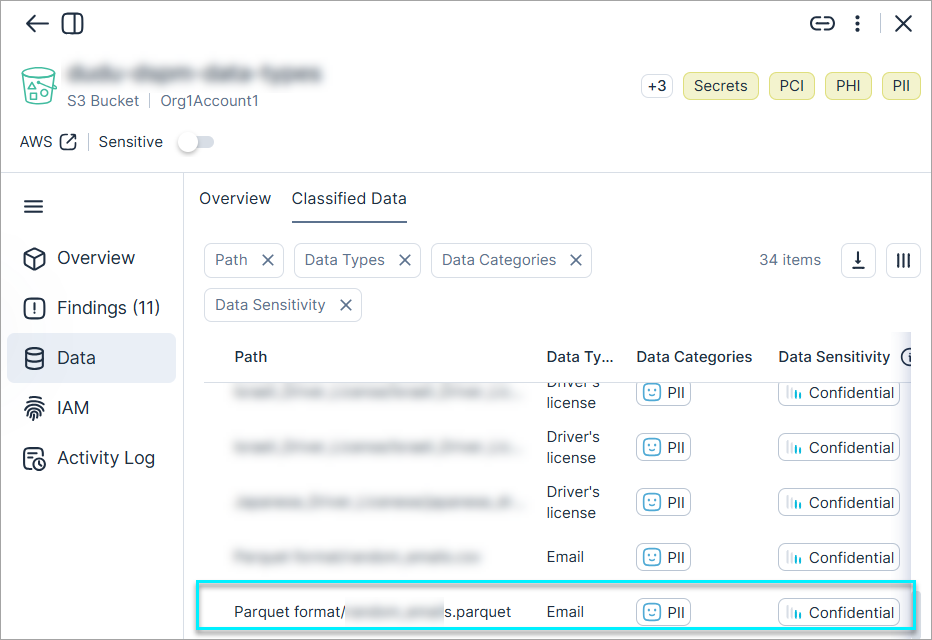
Data Protection: Support for Scanning PARQUET File Format
Cloud Exposure now scans the parquet file format for sensitive data, helping detect and protect sensitive information stored in this columnar format across your environments.
See the full list of scanned file formats for details.
New IaC Policies in 174
The following IaC policies were added in this release:
| Platform | Category | Name |
|---|---|---|
| - | Kubernetes | Kubernetes Cluster contains role bindings assigning the cluster-admin role |
New Policies in 174
API Support
The following policies were added in this release:
| Platform | Category | Name |
|---|---|---|
| AWS | Data | DMS Database Migration Task data validation is not enabled |
| AWS | Logging | API Gateway access logging is not enabled |
| AWS | Logging | API Gateway execution logging is not enabled |
| AWS | Network | API Gateway API key authorization is not enabled |
| AWS | Network | API Gateway client certificate is not set |
| AWS | Network | Load Balancer access log is not enabled |
August 3, 2025 (Release 1.173)
Upcoming Changes
Deprecated API Fields/Filters
Cloud Exposure will be deprecating various GraphQL API fields/filters in early September. If you use the API, your workflow may be affected by these changes.
For more information, see Deprecated API Fields/Filters (Mid-October, 2025).
Snowflake Data Scanning
Introducing support for scanning sensitive data resources in Snowflake accounts.
For more information, see Snowflake Data Scanning (October 26, 2025) and Onboard Snowflake accounts.
New Features
New Policies in 173
API Support
The following policies were added in this release:
| Platform | Category | Name |
|---|---|---|
| AWS | Data | DMS Database Migration Task does not publish logs to CloudWatch |
| AWS | Logging | API Gateway X-Ray tracing is not enabled |
| Azure | Compute | App Service authentication is not enabled |
July 27, 2025 (Release 1.172)
New Features
Console: Exported CSVs Now Match Column Selections
Previously, exporting data from most Console pages would include all available columns in the CSV, even if you used the Column Picker  to narrow down your view. Now, when you export data, the generated CSV will accurately reflect your column selections, displaying only the columns you've chosen to view. This enhancement provides a more streamlined and relevant data export experience.
Workload Protection: On-Demand Scan Support for AMIs
You can now perform on-demand scans for Amazon Machine Images (AMIs) directly from the AMI resource view.
For more information, see the documentation.
IAM: New Fields for Azure Role Assignments
API Support
Tenable added new metadata to the Azure Role Assignments table and profile:
- Created By — Added as a visible column in the table and displayed in the profile.
- Creation Time — Added as a hidden column in the table and displayed in the profile.
- Update Time and Updated By: Displayed in the profile.
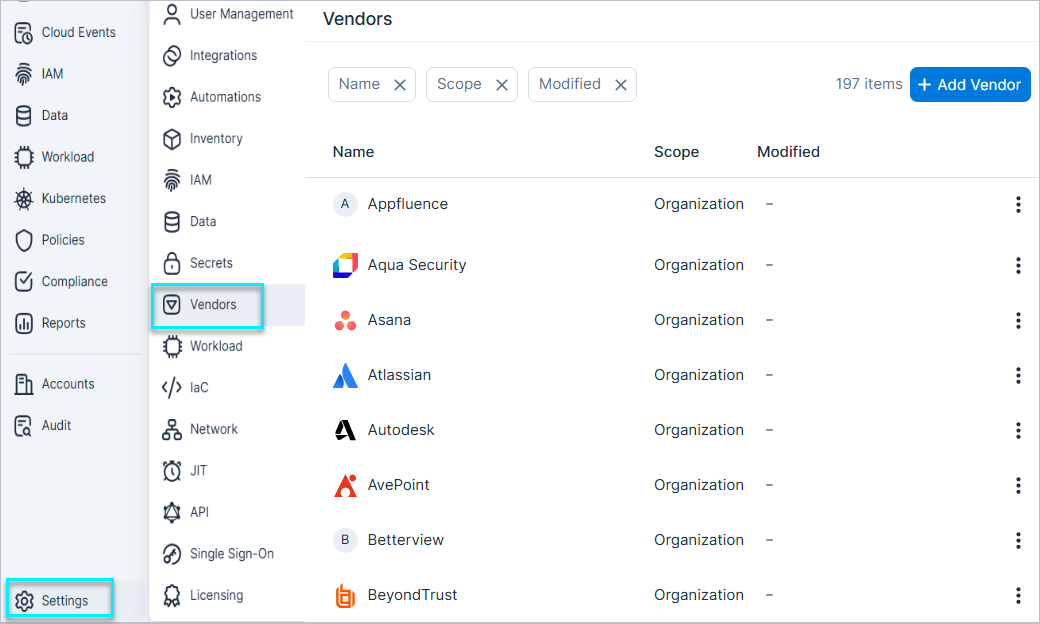
IAM: New AWS 3rd Party Vendor Settings
You can now configure 3rd party vendor settings for AWS in Tenable.
From the Vendors settings page, you can map AWS account IDs to vendors from Tenable’s pre-identified list or add new custom vendors. Once mapped, you can more precisely monitor external vendor access to your environment. Vendor data is displayed across the IAM Dashboard, Inventory, Identity Intelligence, and Permission Query pages.
For more information, see the documentation.
IaC Security: IaC Policy Supported Framework Update
The following IaC policies have been extended and now support Azure Resource Manager (ARM) and Bicep:
| Platform | Category | Name |
|---|---|---|
| Azure | Network | Public App Service |
| Azure | Network | Storage Account Azure trusted services access is not enabled |
| Azure | Secrets | App Service is exposing secrets |
| Azure | Secrets | Logic App is exposing secrets |
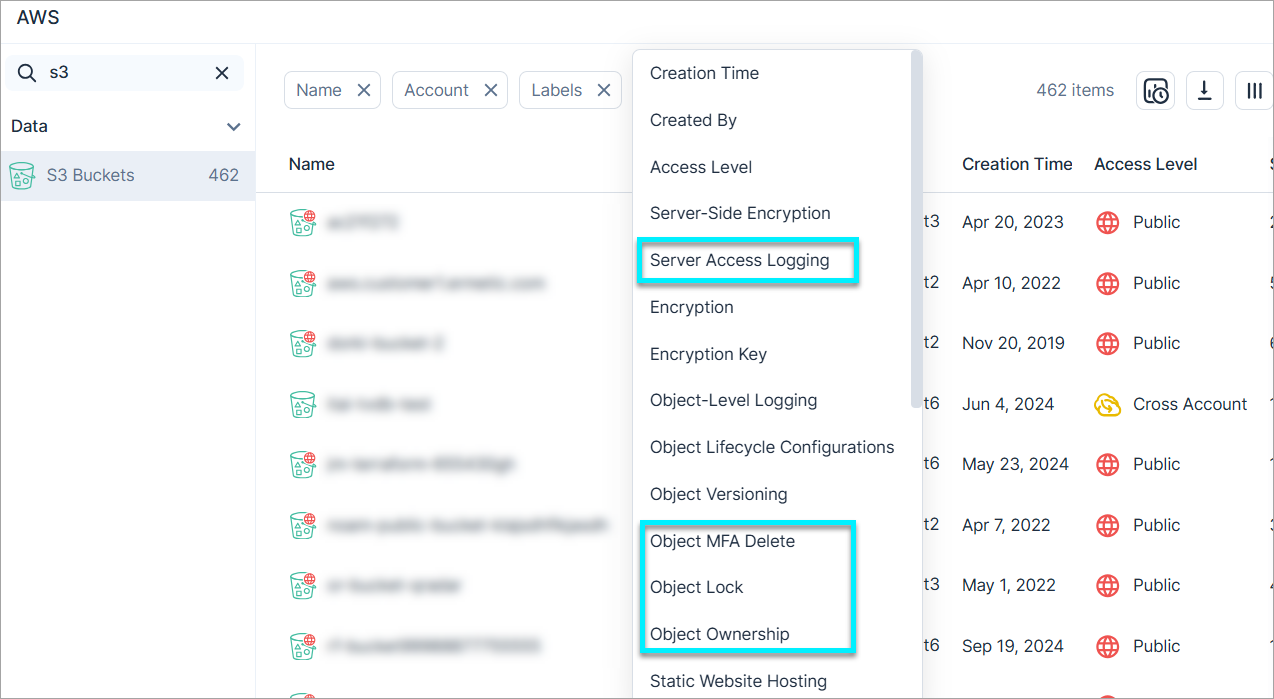
Resource Enhancement: New Fields for S3 Buckets
The S3 Buckets table (Inventory > AWS > Data) now includes additional filterable columns:
- Server Access Logging
- Object MFA Delete
- Object Lock
- Object Ownership
These fields appear in the resource profile and support filtering for more precise data analysis.
New Policies in 172
API Support
The following policies were added in this release:
| Platform | Category | Name |
|---|---|---|
| AWS | Kubernetes | EKS Cluster is running images that are not scanned for vulnerabilities |
| Azure | Compute | Virtual Machine trusted launch is not enabled |
| Azure | Kubernetes | AKS Cluster is running images that are not scanned for vulnerabilities |
| GCP | Kubernetes | GKE Cluster is running images that are not scanned for vulnerabilities |
July 20, 2025 (Release 1.171)
New Features
JIT Access: Home Tab in Slack
In the Cloud Exposure Slack app, requesters and approvers can now track and manage JIT access requests directly from the Home tab.
The Home tab shows the status of recent requests and lets you connect to approved cloud accounts or revoke access—all without leaving Slack.
JIT Access: Filter Eligibilities by Account
You can now filter the Eligibilities table by account name, account ID, or folder name. This makes it easier for administrators to quickly find and manage eligibilities related to specific accounts.
Console: Enhanced Resource Context in Filters
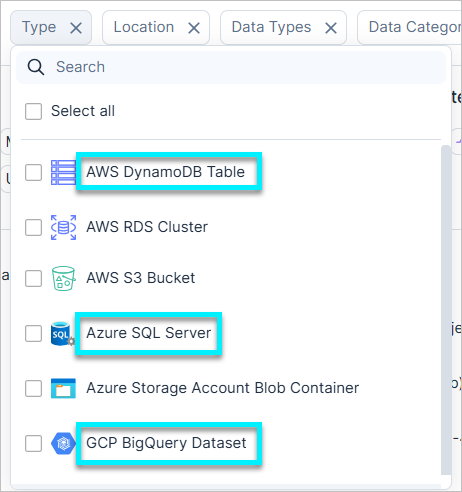
In various Console pages, including Data resources and Permission Query, the cloud provider or vendor name will now preface the resource name in certain filters. For example, instead of just S3 Bucket, you will now see AWS S3 Bucket. Similarly, you'll see Azure SQL Server, GCP BigQuery Dataset, and other cloud-prefixed resource types.
This change primarily applies to values within various Type filters throughout the Console, such as Identity Type/Resource Type (Permission Query), or Type (Data resources).
Onboarding: Excluded OUs, Folders, and Accounts Now Auto-Deleted in Tenable
When you exclude a specific OU/folder or account from an organization that you already onboarded, it's now automatically removed from the Console the next time Tenable syncs data in your environment. For example, you can exclude a Dev account to prevent it from being onboarded and scanned, allowing your teams more flexibility for experimentation.
- AWS — Exclude OUs or accounts. Learn more.
- Azure — Exclude folders or subscriptions. Learn more.
- GCP — Exclude folders or projects. Learn more.
- OCI — Exclude folders or compartments. Learn more.
Projects: Targets Field Now Available for Automations in Project Folder Scopes
The Targets field is now available when creating automations in a project folder scope. This provides even more granular control, allowing you to specify the accounts or resources within the folder that an automation applies to.
IaC Security: Scoped Integration Support for CI/CD Pipelines
Tenable now supports CI/CD pipelines integrations at levels below the root “organization” scope. This enhancement enables teams to manage CI/CD scanning independently within their defined scope, such as specific folders or business units, without impacting the broader environment.
Scoped integrations promote secure, decentralized DevSecOps practices, reduce overhead for central teams, and support scalable, team-specific workflows.
For more information, see the documentation.
New IaC Policy in 171
The following IaC policy was added in this release:
| Platform | Category | Name |
|---|---|---|
| Azure | Compute | App Service Microsoft Entra ID registration is not set |
IAM: PIM Enhancements for Microsoft Entra ID and Azure
API Support
Tenable has improved visibility into Privileged Identity Management (PIM) settings across Microsoft Entra ID and Azure by introducing two new fields: “Updated By” and “Update Time”.
- “Update Time” has been added to both the inventory table and profile views.
- “Updated By” appears in the profile view only.
- Only “Update Time” is available via API.
These fields are now available in the following locations via Cloud Exposure Console:
- Microsoft Entra ID > PIM Role Settings
- Microsoft Entra ID > PIM Group Settings
- Azure > PIM Role Settings
These enhancements provide clearer visibility into changes made to PIM settings, allowing you to quickly identify who made updates and when. This level of detail supports stronger audit readiness, improves investigation workflows, and enhances the value of scheduled reports.
Kubernetes: Support for Connecting OCI Kubernetes Clusters
You can now connect your Oracle Cloud Infrastructure (OCI) OKE clusters to Cloud Exposure for monitoring - without the need to install a Helm chart. This new capability requires granting cluster permissions using both the CLI and your OCI policy.
- Cluster-role-based permission — Creates a ClusterRole and ClusterRoleBinding on a specific cluster via CLI.
- OCI policy-based permission — Granted once at the tenancy level to enable cluster discovery and connection.
For detailed steps, see the documentation.
Resource Enhancement: New "Stages" Tab in AWS API Gateway API
We've added a new Stages tab to the AWS API Gateway API resource profile. Existing data is now organized under the General tab, while stage-specific details are available under the new Stages tab.
Data Protection: Support for Scanning Additional Secret Data Types
Cloud Exposure now supports scanning the following additional data types
| Data Type | Category | Sensitivity | Description |
|---|---|---|---|
| Runtime Secret | Secret | Restricted | Detect secrets in bash history (i.e., execution commands) |
New Resources in 171
API Support
The following resources were added in this release:
| Platform | Category | Resource |
|---|---|---|
| OCI | Data | Autonomous Database |
| Exadata Infrastructure | ||
| NoSQL Database Table | ||
| Oracle Database DB System | ||
| PostgreSQL Database |
New Policies in 171
API Support
The following policies were added in this release:
| Platform | Category | Name |
|---|---|---|
| AWS, Azure, GCP, OCI, On-Premises | Kubernetes | Kubernetes Cluster API server request-timeout argument is not set |
| AWS | Logging | Network Firewall logging is not enabled |
| AWS | Network | API Gateway REST API cache encryption is not enabled |
| AWS | Network | Network Firewall Policy is not associated with a rule group |
| Azure | Compute | App Service HTTP version does not meet minimum requirements |
July 13, 2025 (Release 1.170)
New Features
Workload Protection: Export Resource Inventory Data for Support Cases
This feature simplifies troubleshooting for Tenable Vulnerability Management support. You can now export a resource's inventory data as a JSON file directly from its profile and attach it to your support ticket. This option is available for any successfully scanned resource and is visible to users with view permissions; it will be greyed out if the resource hasn't been scanned.
For more information see the documentation.
IAM: Visibility into Microsoft Entra ID App Registration API Permissions
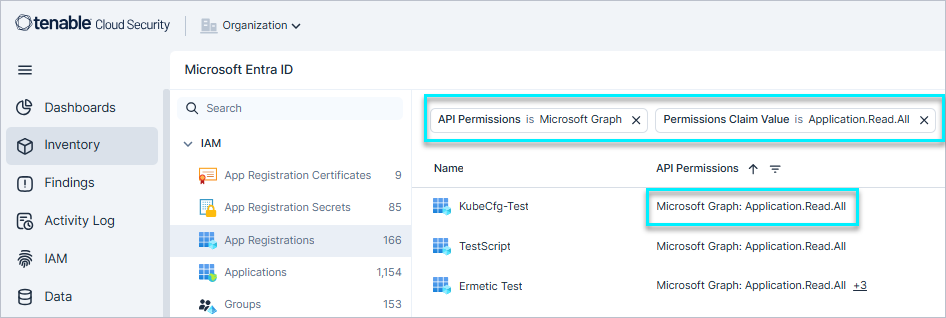
Tenable now provides detailed monitoring of all Microsoft Entra ID app registration API permissions. Assigned permissions are visible both in the app registration profile and in the inventory.
Additionally, filtering capabilities have been added to the API Permissions and API Delegated Permissions columns:
- Filter by API name (e.g., Microsoft Graph)
- Filter by claim value (e.g., Directory.Read.All)
These enhancements provide a holistic view of app registration-level permissions across your tenant, making it easier to identify app registrations with specific permissions - such as Directory.Read.All in Microsoft Graph.
IAM: New Filters for Azure and GCP Role Assignments and Bindings
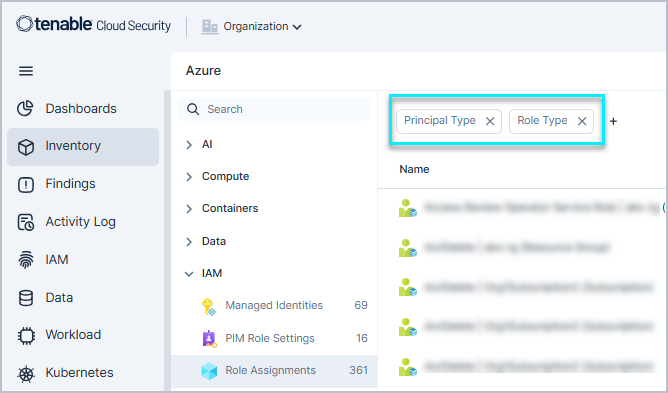
Tenable added new Role Type and Principal Type filters to the Inventory pages for Azure Role Assignments and GCP Role Bindings.
These filters enable IAM administrators to easily identify direct role assignments to users.
For example, they are useful in environments where internal policies require permissions to be granted only through groups. This allows IAM admins to effectively sanitize the environment and ensure permissions comply with organizational standards.
Data Protection: Extended Support for PostgreSQL
Support for PostgreSQL version 17 is now available.
Applies to:
- AWS RDS instances
- AWS RDS clusters (Aurora)
- GCP SQL instances
JIT Access: Revoke Recurring Access Options
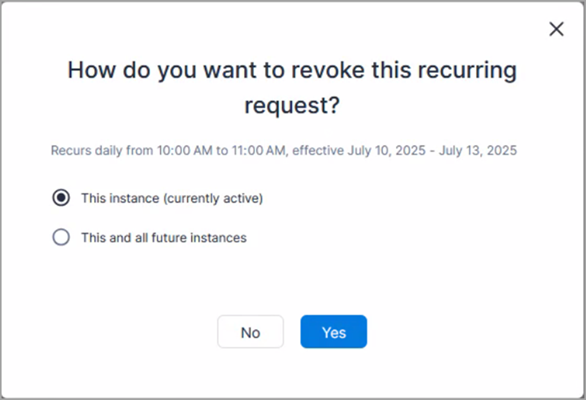
Requesters and approvers can now choose how to revoke recurring JIT access. When revoking recurring access, they can choose to revoke:
- Just the current instance (if active) or the upcoming instance (if pending)
- All future instances
This gives requesters and approvers more control over how recurring access is managed.
New IaC Policy in 170
The following IaC policy was added in this release:
| Platform | Category | Name |
|---|---|---|
| AWS, Azure, GCP, OCI, On-Premises | Kubernetes | Kubernetes Cluster contains role bindings assigning the cluster-admin role |
July 6, 2025 (Release 1.169)
New Features
New AWS Resource Type: Network Firewall
API Support
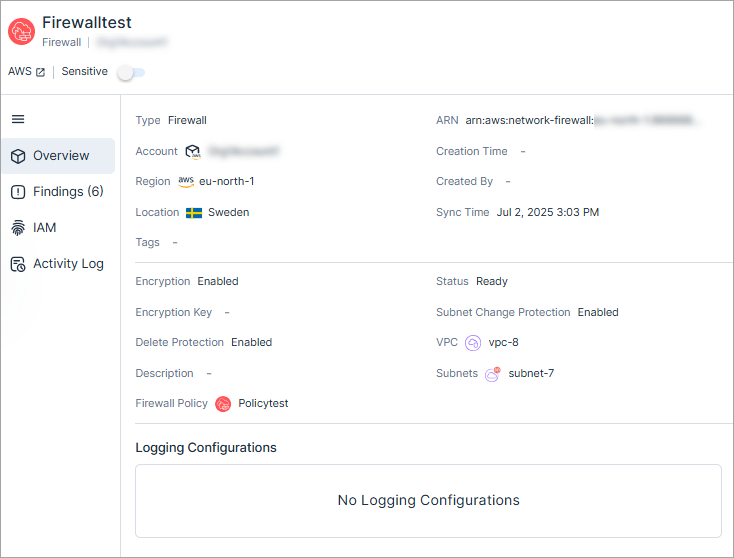
Cloud Exposure now provides visibility into Network Firewall via the Inventory view (AWS > Network), and displays relevant information to that resource.
See the documentation for a list of all supported resources.
New AWS Resource Type: Network Firewall Policy
API Support
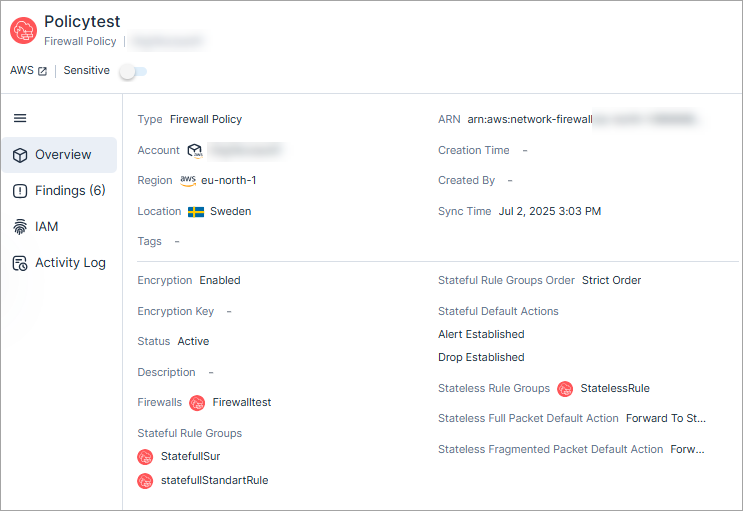
Cloud Exposure now provides visibility into Network Firewall Policy via the Inventory view (AWS > Network), and displays relevant information to that resource.
See the documentation for a list of all supported resources.
New AWS Resource Type: Network Firewall Rule Group
API Support
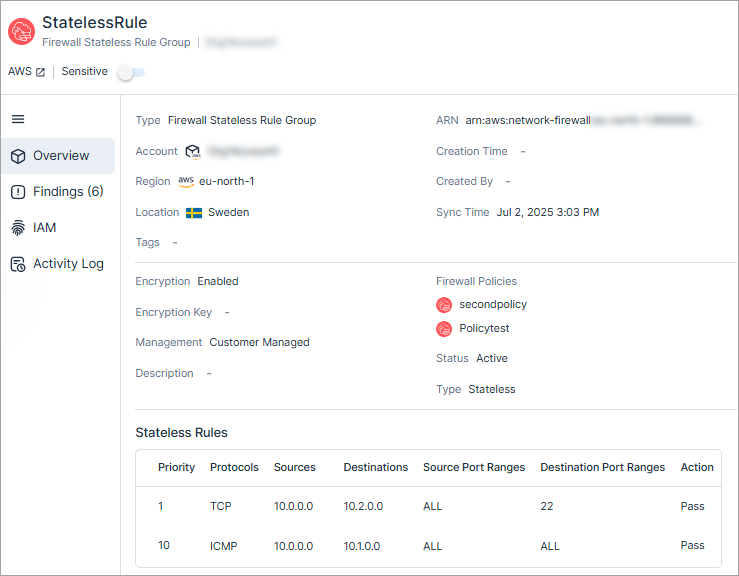
Cloud Exposure now provides visibility into Network Firewall Rule Group via the Inventory view (AWS > Network), and displays relevant information to that resource.
See the documentation for a list of all supported resources.
Projects: Streamlined User Access with Project Scope Propagation
You can now extend the effective permissions of project users to include access to the scopes in the project, in addition to the project itself. This means, for example, that a user assigned as an Admin to Project A (which includes Scope B) is now also assigned as an Admin to Scope B, granting them additional permissions.
When defining or editing a project, you can choose to enable this automatic assignment for users assigned to the project.
To provide a comprehensive view of user permissions, the User Management page now displays a new Effective Scopes column. This column displays a user's directly assigned scope along with any additional scopes they receive through project propagation.
Kubernetes: Expanded Export of Clusters Page and Admission Controller Logs
You can now export unlimited results on the following pages, removing the previous limits.
- Clusters
- Admission Controller Logs
This enhancement allows for more comprehensive reporting and analysis of large data sets.
Kubernetes: Legacy Helm Chart Deprecation Completed
As Kubernetes: Deprecation Notice - Legacy Helm Chart Versions Support Ends at June 30, support for legacy Helm charts versions 1.4 and 1.0 has officially ended as of July 6th. Clusters using these deprecated charts are no longer supported by Cloud Exposure.
As a result:
- Resource sync and sensor-based workload protection are disabled for these clusters.
- All findings related to resources from these clusters will be automatically closed within 48 hours of the deprecation date.
To avoid loss of coverage, visit the Kubernetes → Clusters page to identify any clusters still running legacy Helm charts and upgrade them to the latest version.
Once upgraded, closed findings will be automatically reopened with full preservation of historical data and context.
Kubernetes: Unified Tagging and Visibility Enhancements
API Support
Tenable has improved how metadata - Kubernetes labels, annotations, and cloud provider tags - is displayed and used across the platform. These updates provide consistent visibility, naming, and filtering across the console (Inventory and slide-out panel) and the API.
This enhancement includes:
- Labels and Annotations — Kubernetes labels and Kubernetes annotations are now avaliable in the inventory, including filtering capabilities.
- Consistent Naming — All cloud provider tags are now referred to simply as “tags” across the console.
- Improved Inheritance — Kubernetes resources now inherit cloud provider tags from their parent cluster, enabling more effective filtering and contextual insights.
- Expanded Filtering Support — All metadata types are available for filtering in Inventory, visible in resource details, and accessible via the API.
Integrations: Display ID for Tickets Triggered by Findings
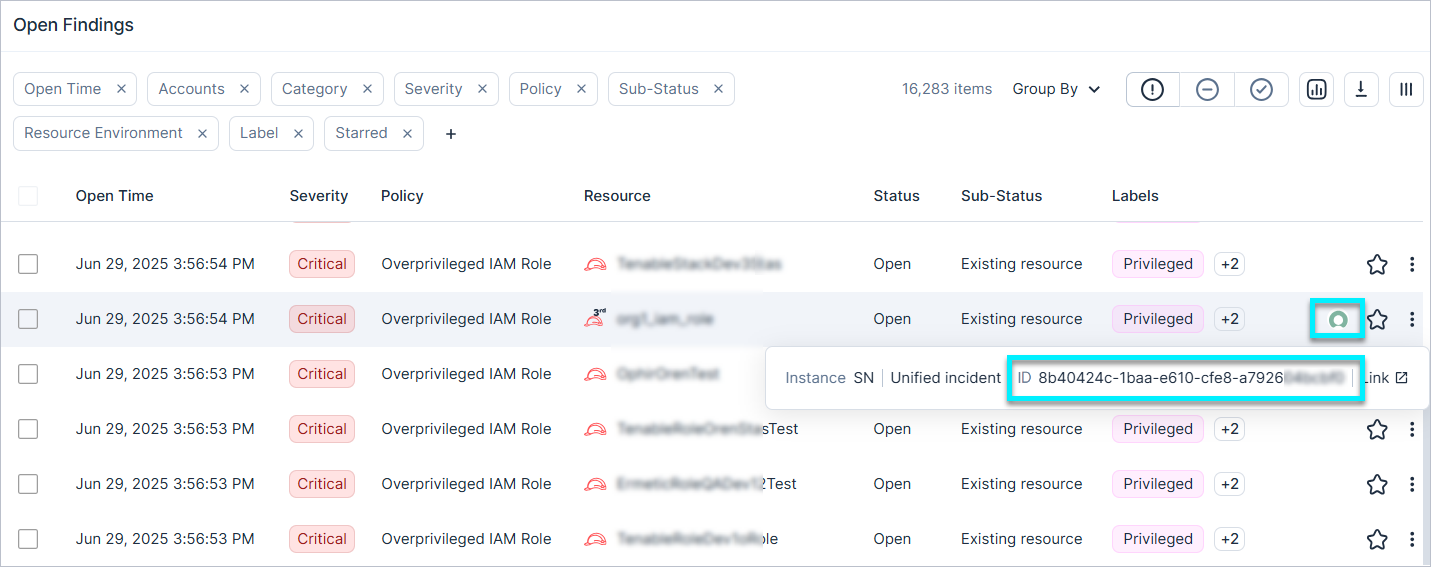
You can now see an ID field on the Findings page, providing visibility into the external ticket ID created in your ticketing platform. Hovering over the vendor icon will display the unique ID of the ticket created in ServiceNow or Jira. This new field streamlines incident management, improves collaboration, and enhances traceability by providing direct access to the IDs linked to your findings.
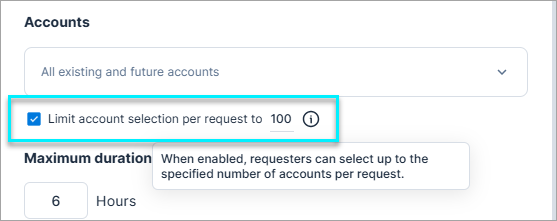
JIT Access: Limit Number of Accounts and Resource Groups per Request
Administrators can now control how many accounts (or in Azure, how many accounts and resource groups) a requester can select in a single JIT access request.
This makes eligibilities more flexible and reduces the number of separate eligibilities administrators need to create and manage, helping organizations move toward least privilege by allowing users to request access only to the resources they actually need.
Data Protection: Support for Scanning Additional PII Data Types
Cloud Exposure now supports scanning the following additional data types
| Data Type | Category | Sensitivity | Description |
|---|---|---|---|
| Israeli ID | PII | Restricted | Israel ID number, compulsory identity document issued by the Ministry of Interior |
| Driver's License: Israel | PII | Confidential | Israeli driver's license number, compulsory identity document issued by the Ministry of Transport and Road Safety |
Workload Protection: Enhanced Exported Scheduled Vulnerability Reports
The CVE First Scan Time column, which indicates when a CVE was first detected, is now available when generating a scheduled Vulnerabilities report. Previously, this field was only available when exporting data directly from the Vulnerabilities page and was not available via the Create Scheduled Report dialog. This update ensures consistent and complete data across all vulnerability report exports.
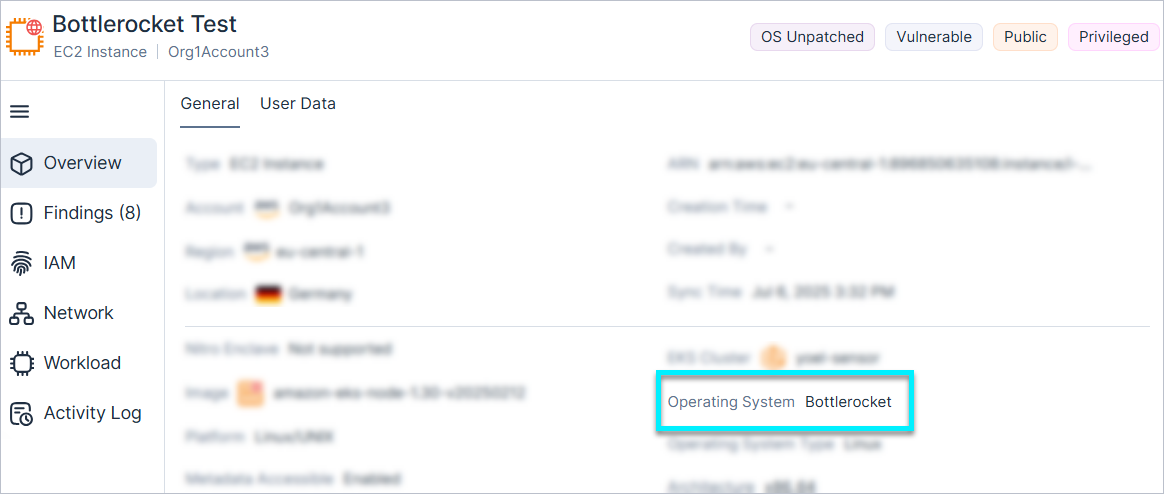
Workload Protection: Support for Bottlerocket (Agent-Based)
Tenable now supports scanning Bottlerocket, a lightweight, secure Linux OS optimized by AWS for running containers. This enables agent-based vulnerability scanning on Bottlerocket, providing visibility into:
- Container Images
- Cluster Nodes
This enhancement extends existing cloud workload protection capabilities to Bottlerocket environments, improving security posture for containerized workloads.
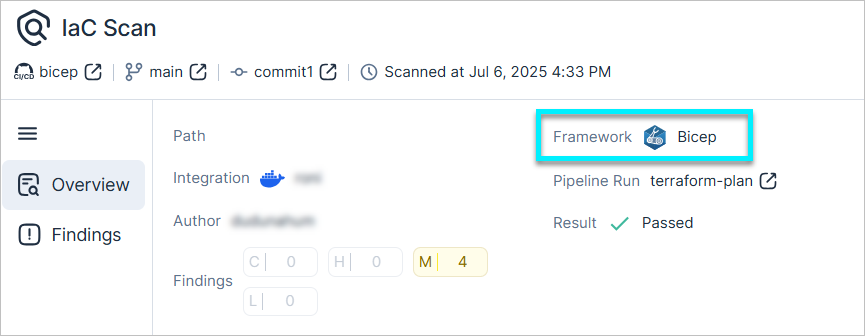
IaC Security: Support for Azure Bicep Scanning
Cloud Exposure now supports Azure Bicep scanning as part of our IaC security offering. To ensure quick and comprehensive coverage, we will progressively extend all Azure IaC policies to support Bicep.
New Policy
API Support
The following policy was added in this release:
| Platform | Category | Name |
|---|---|---|
| Azure | Compute | App Service remote debugging is enabled |