Tenable One Cloud Exposure 2025 Q2 Release Notes
Tip: You can subscribe to receive these release notes by email or RSS.
These release notes are listed in reverse chronological order.
June 29, 2025 (Release 1.168)
New Features
 IAM: Expanded Visibility into Microsoft Entra ID Application Permissions
Tenable now offers comprehensive monitoring of all Microsoft Entra ID application API permissions and delegated permissions. You can view assigned permissions in the application profile and in the inventory.
In addition, we’ve added filtering capabilities to the API Permissions and API Delegated Permissions columns:
- Filter by API permissions (e.g. Microsoft Graph)
- Filter by permissions claim value (e.g. Directory.Read.All)
These enhancements offer a holistic view of application-level permissions across your tenant, making it easier to identify applications with specific permission - such as Directory.Read.All in Microsoft Graph.

IAM: Expanded Export of Results for Permissions Query Page
You can now export unlimited results on the Permissions Query page, removing the previous limit. This enhancement allows for more comprehensive reporting and analysis of large data sets.
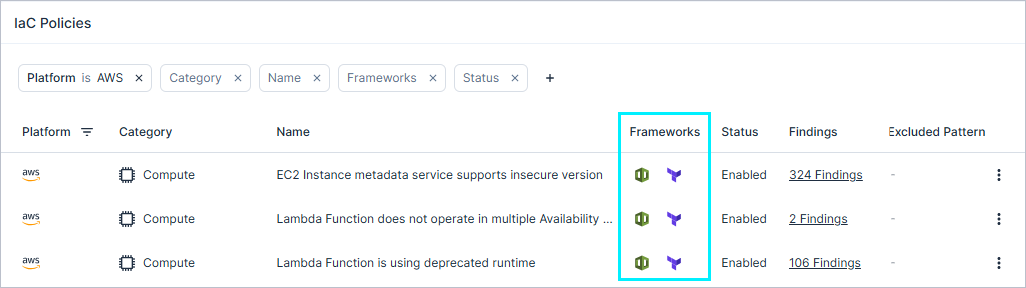
IaC: View Supported IaC Frameworks for Each Policy
You can now easily identify which IaC frameworks are supported by each IaC policy.
The supported frameworks are now displayed in the following locations:
- Policy Table — A new column shows the list of supported frameworks per policy.
- Policy Profile View — The frameworks are listed in the detailed view of each policy.
- CSV Export — The supported frameworks are included as a new column in the exported file.
This enhancement improves visibility into framework compatibility and helps you manage and plan policy usage more effectively.
IaC: Findings API Update
You can now retrieve IaC findings using the Findings query. To do so, use the new Families filter to filter for Code findings.
Refer to the documentation for a detailed example.
New Policies in 168
 API Support
The following policies were added in this release:
| Platform | Category | Name |
|---|---|---|
| AWS, Azure, GCP, OCI, On-Premises | Kubernetes | Kubernetes Cluster API server audit logs forwarding is not enabled |
June 22, 2025 (Release 1.167)
New Features
JIT Access: Role Selection Flexibility for Azure and GCP
Requesters can now choose which roles to request when submitting an access request under a JIT eligibility in Azure and GCP.
Previously, requesters were granted all roles defined in the eligibility. With this update, administrators can still define a set of roles, but requesters can now choose only the roles they need—helping reduce unnecessary access.
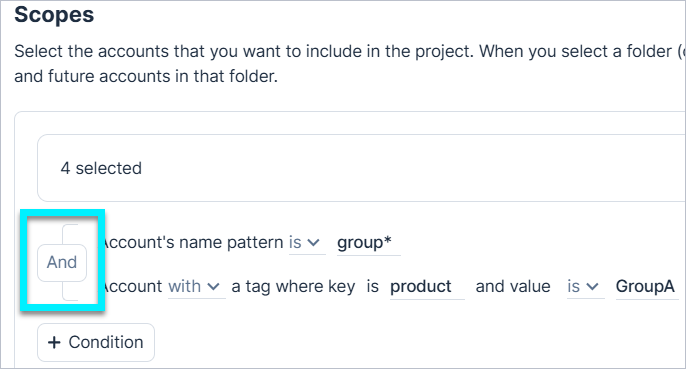
Projects: Choose Operator Logic When Selecting Multiple Conditions
When adding a project, if you select multiple conditions, you can now use either AND (default) or OR operator logic.
Reports: Increased Email Report Limit
When sending reports via email, the file size limit has increased (from 5MB to 14.5MB). Larger reports are now compressed or provided via a download link.
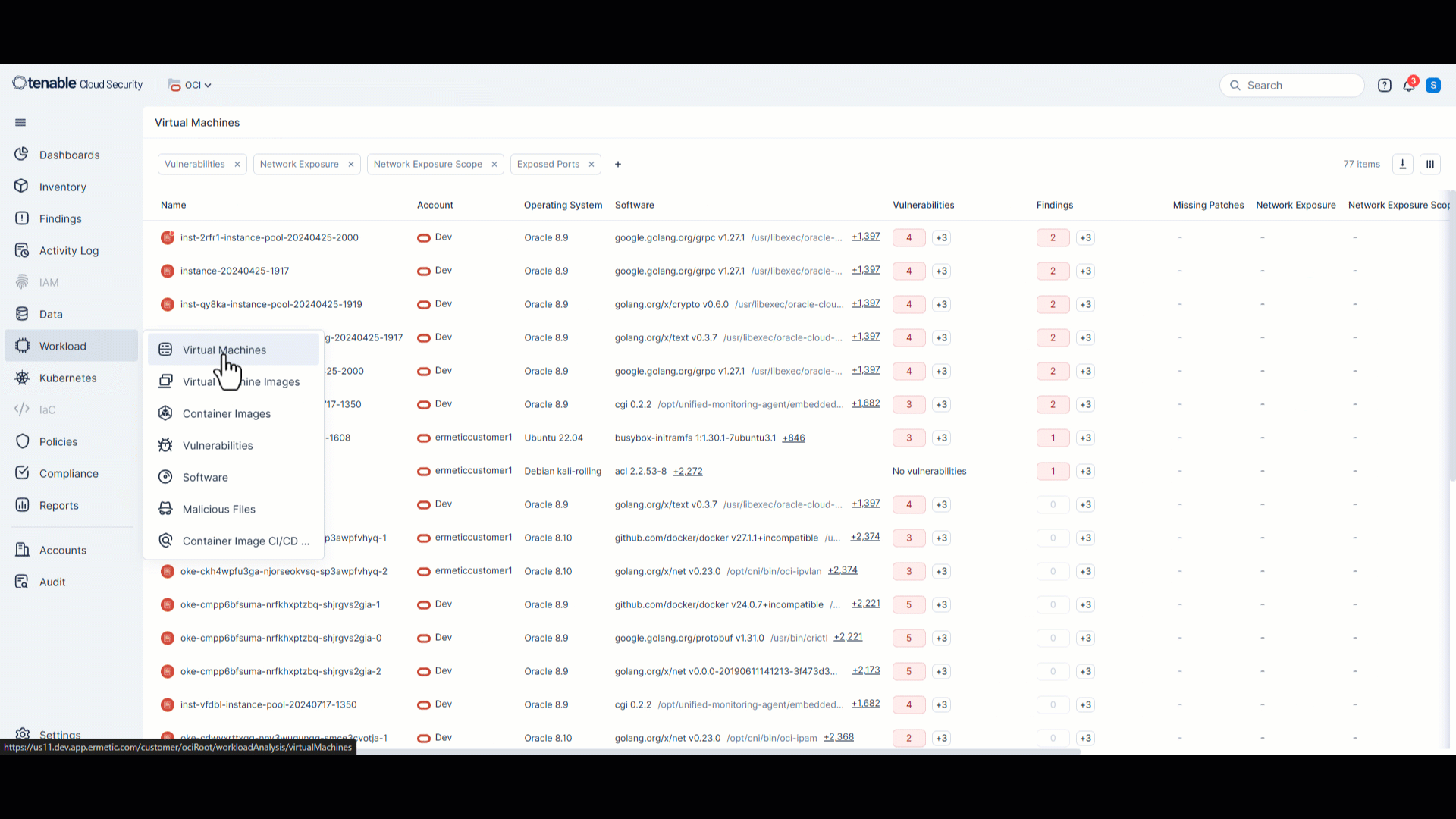
Workload Protection: Oracle Cloud Infrastructure (OCI) Integration
Tenable now supports integration with Oracle Cloud Infrastructure (OCI), expanding workload protection capabilities to OCI environments. This release includes:
- VM Scanning — Detect vulnerabilities and misconfigurations on OCI virtual machines, including support for volumes encrypted with OCI native encryption and Customer-managed keys (CMK).
For more information, see the documentation. - Container Image Scanning — Identify vulnerabilities in container images discovered on OCI VM instances.
- In-Account Scanning — Perform scanning directly within your OCI account.
For more information, see the documentation.
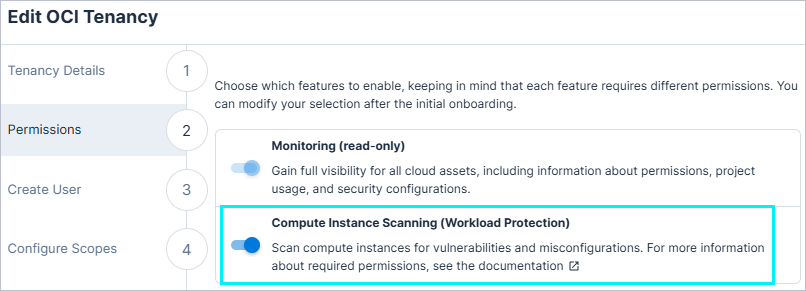
To enable OCI workload protection, you need to enable the Compute Instance Scanning toggle in your OCI onboarding wizard.
Workload Protection: Vulnerability Data Sent to SIEM Integrations
Any relevant vulnerability data is now included when you send Cloud Exposure data to SIEM integrations or via webhook. This includes the vulnerability ID and severity level.
Kubernetes: New Admission Controller Policies in 167
| Category | Name |
|---|---|
| Admission Controller | General - HTTPS Only |
| Admission Controller | Disallow interactive TTY containers |
Data Protection: Support for Scanning Additional PII Data Types in 167
Cloud Exposure now supports scanning the following additional data types:
| Data Type | Category | Sensitivity | Description |
|---|---|---|---|
| Japanese Bank Account Number | PII | Restricted | Personal bank account number issued by financial institutions in Japan |
| Japanese National ID | PII | Restricted | Government-issued individual identifier used in Japan |
| Japanese Passport Number | PII | Restricted | Identity and citizenship document ID issued by Japan |
JIT Access: Maximum Duration Limit for Recurring Access
Administrators can now define a maximum number of days for recurring access requests when creating an eligibility. This limits how far into the future a requester can schedule access, ensuring recurring access requests do not exceed the defined timeframe.
New IaC Policy in 167
The following IaC policy was added in this release:
| Platform | Category | Name |
|---|---|---|
| Azure | Data | Storage Account cross tenant replication is enabled |
New Policies in 167
API Support
The following policies were added in this release:
| Platform | Category | Name |
|---|---|---|
| AWS, Azure, GCP, On-Premises | Kubernetes | Kubernetes Cluster AlwaysPullImages admission control plugin is not enabled |
| Azure | Compute | App Service Microsoft Entra ID registration is not set |
| Azure | Compute | App Service FTP encryption is not enabled |
June 15, 2025 (Release 1.166)
New Features
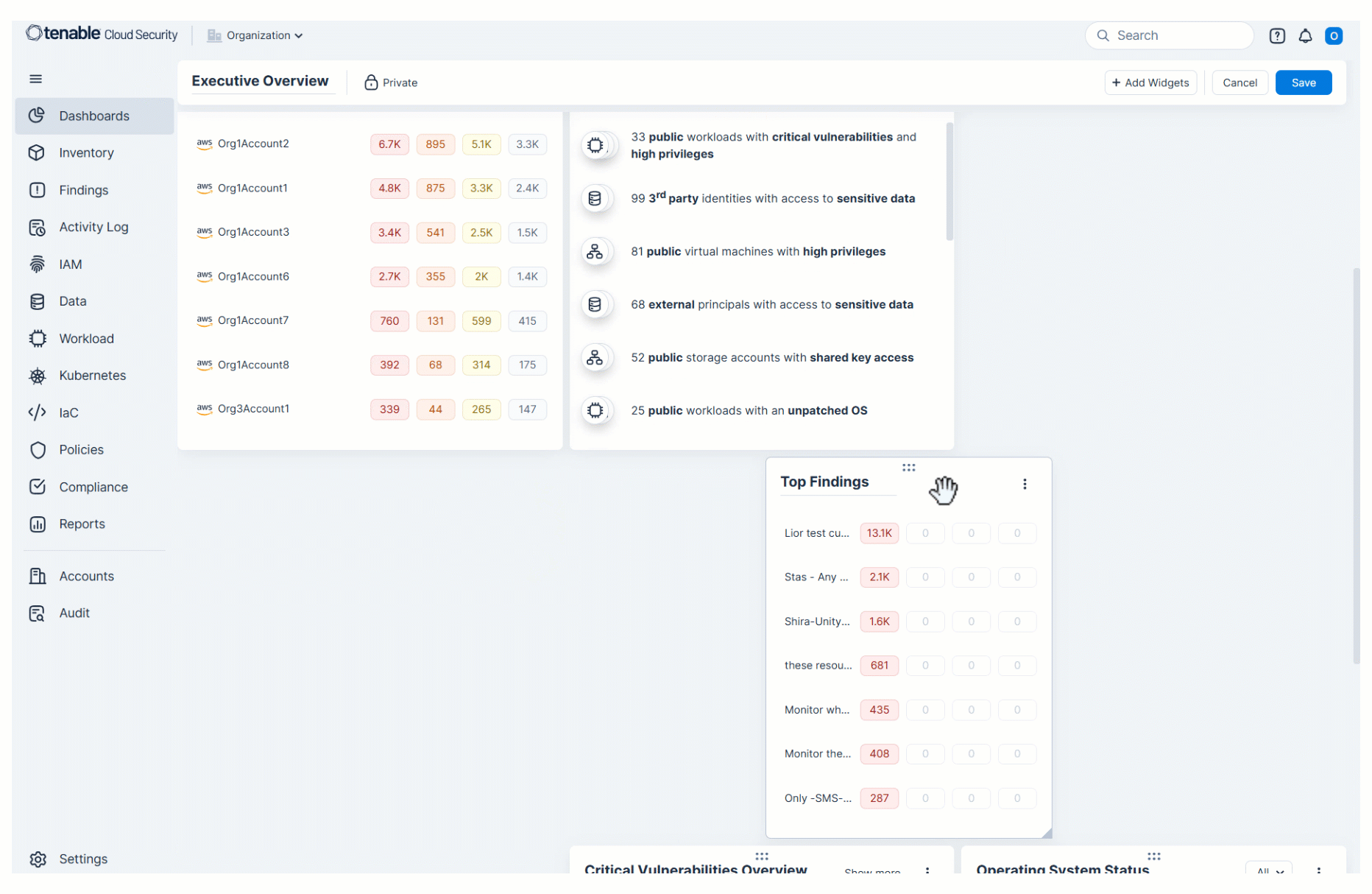
Console: Create Custom Dashboards
You can now create custom dashboards to:
- Design and personalize dashboards to display relevant metrics, findings, and visualizations.
- Duplicate any existing dashboard (built-in or custom) for quick customization.
- Control visibility of custom dashboards by making them private or public.
- See side-by-side comparisons of specific data subsets by adding the same widget multiple times and applying different filters to each.
For more information, see the documentation.
Console: Unified Dashboard Organization
All your dashboards are now centralized under a single Dashboards menu item. Previously, the IAM and IaC dashboards were located under their respective menu items. This enhancement provides a consolidated and intuitive navigation experience, making it easier and quicker to find and manage all your security insights in one place.
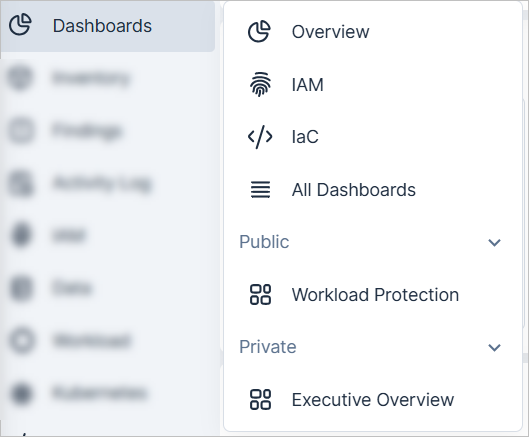
| Dashboard Menu Item | Icon | Description |
|---|---|---|
| Built-in dashboards (Overview, IAM, IaC) |
   |
Built-in Tenable dashboards that highlight common security concerns. |
| Console: Create Custom Dashboards (NEW!) |

|
Customizable dashboards that you create, divided by Public and Private. |
| All Dashboards |

|
View and manage all your dashboards in one place. Create new dashboards. |
For more information, see the documentation.
Integrations: Resource Labels Included
When sending finding data to email, Jira, ServiceNow, Slack, and Teams, relevant resource labels from Tenable are now automatically included. This enhances the context and detail provided in external notifications and tickets.
Kubernetes: New Admission Controller Policies in 166
| Category | Name |
|---|---|
| Admission Controller | Block NodePort |
| Admission Controller | Block wildcard ingress |
Workload Protection: Improved Vulnerability Sorting
The Vulnerability page now uses a clearer, more consistent sort order to help prioritize issues effectively.
Vulnerabilities are sorted by:
- Severity (descending)
- Score (descending by Chosen Score - VPR/CVSS)
- ID (descending)
This update ensures that the most critical and relevant vulnerabilities appear at the top of the list.
Workload Protection: Create Reports from Vulnerabilities Page
You can now generate vulnerability reports directly from the Vulnerabilities page.
IAM: Enhanced Behavior for IAM Access Column on GCP
Tenable has updated the Access column - now renamed IAM Access - to show the highest access level (Internal, Cross Account, External, or Public) a resource has to all principals. This enhancement highlights potential risks by evaluating all access paths.
Now available for GCP resources, this update improves visibility into principal-to-resource relationships.
For more information see the documentation.
IAM: Monitor Activity Custom Policy Configuration Update for AWS and GCP
We've expanded the configuration options for the existing Monitor Activity custom policy in AWS and GCP. You can now define multiple conditions and chain conditions to create more granular and flexible policy logic.
These enhancements allow for more precise activity monitoring, helping you better tailor policies to your organization’s needs.
IAM: New Admin Label Evaluation for GCP and AWS
We've enhanced how we identify "admin" principals in both GCP and AWS with a new, more precise evaluation logic. This update helps you better understand and manage highly privileged identities within your cloud environments. As a result, existing "admin" labels may change to reflect the improved logic.
GCP:
A principal will now be classified as an "admin" if it meets the following criteria:
- Possesses 99% or more of the total permissions of a GCP "Owner" role at the project scope.
- Holds at least one permission with a "Critical" severity level.
AWS:
A principal will now be classified as an "admin" if it meets the following criteria:
- Possesses at least 99% of all possible permissions within AWS.
- Holds at least one permission marked with "Critical" severity.
Data Protection: Support for Scanning Additional PII Data Types
Cloud Exposure now supports scanning the following additional data types:
| Data Type | Category | Sensitivity | Description |
|---|---|---|---|
| Driver's License: Japan | PII | Restricted | Government-issued driver’s license number in the standard Japanese format |
| Place of Birth | PII | Private | Country name that indicates the place a person was born |
| Japanese Corporate Number | PII | Public | Unique identifier issued by Japan’s National Tax Agency for organizations |
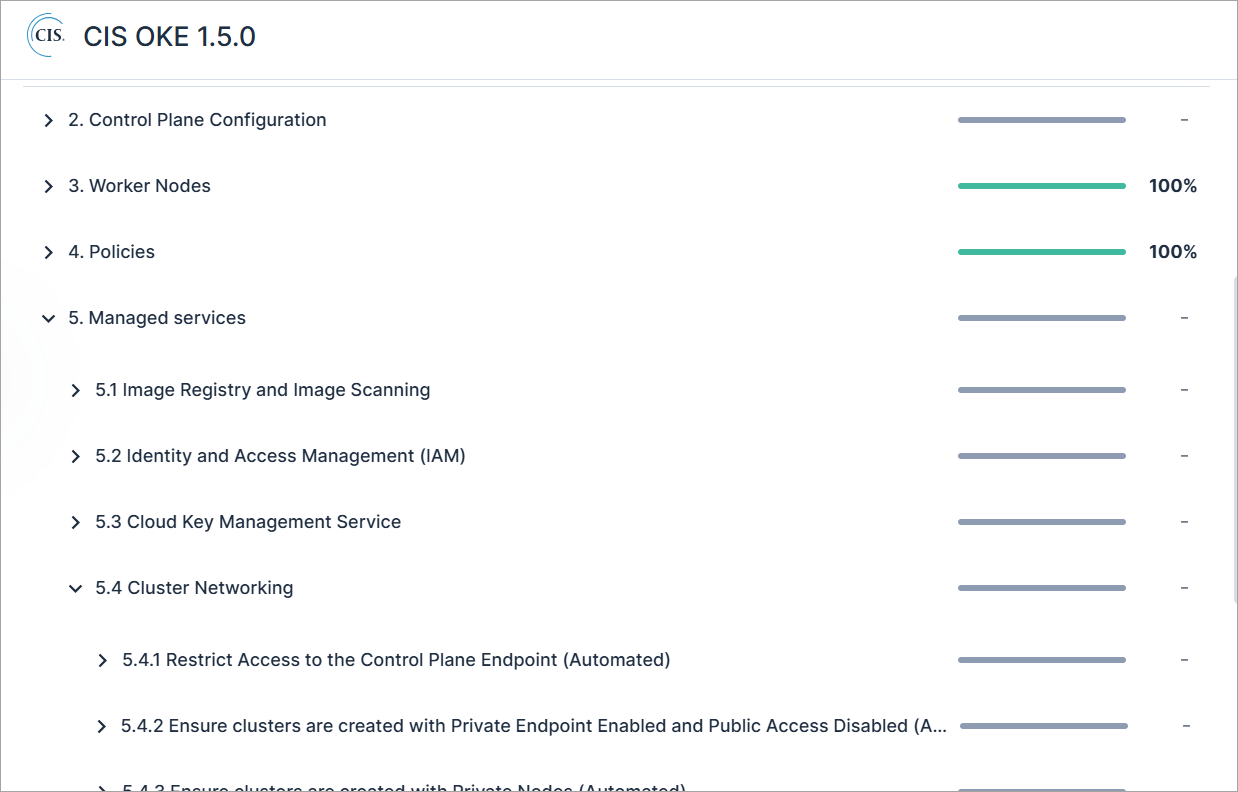
Compliance: Support for CIS OKE 1.5.0
Cloud Exposure now supports CIS OKE 1.5.0 as a compliance standard. This standard provides security guidance for protecting Kubernetes clusters running on OCI, including controls related to the control plane, worker nodes, RBAC, secrets management, and network configuration.
See the documentation to learn more about how to monitor compliance in your cloud accounts.
IaC Security: Export IaC CI/CD Scan Results to CSV
You can now export IaC CI/CD scan results to a CSV file for easier reporting and analysis. The export respects any filters applied to the IaC CI/CD Scans table and includes all table columns - both visible and hidden.
Key capabilities:
- Export filtered CI/CD scan results directly from the table.
- Export individual CI/CD scan result findings from the CI/CD scan details view.
For more information, see the documentation.
IaC Security: Enhanced Code Exclusions in IaC Scans
Tenable has expanded the code exclusion capabilities in IaC policy scans. In addition to excluding specific file paths, you can now also exclude resource types and resource name patterns. This enhancement allows for more precise control over which resources are excluded from scans, helping reduce noise and focus on relevant findings.
For more information, see the documentation.
New IaC Policy
The following IaC policy was added in this release:
| Platform | Category | Name |
|---|---|---|
| AWS | Data | DMS Replication Instance public access is enabled |
New Policies in 166
API Support
The following policies were added in this release:
| Platform | Category | Name |
|---|---|---|
| AWS | Data | DMS Replication Instance public access is enabled |
| Azure | Data | Storage Account cross-tenant replication is enabled |
Policy Name Updates in 166
The following policy names have been updated for improved clarity and consistency:
| Platform | Previous Name | Updated Name |
|---|---|---|
| Azure | Unencrypted App Service traffic | App Service encryption in transit is not enabled |
| Azure | Unencrypted MySQL Database Server traffic | MySQL Database Server encryption in transit is not enabled |
| Azure | Unencrypted PostgreSQL Database Server traffic | PostgreSQL Database Server encryption in transit is not enabled |
| Azure | Unencrypted Storage Account traffic | Storage Account in transit is not enabled |
June 8, 2025 (Release 1.165)
New Features
Automations: Duplicate Existing Automations
You can now duplicate any previously generated automation to use as a baseline for creating a new automation. This allows you to quickly create a new automation with the same configuration as a previous one, saving you time and effort. For example, if you have a ServiceNow automation for AWS findings and need a similar one for Azure, duplicate the report and change the scope to your Azure environment.
For more information, see the documentation.
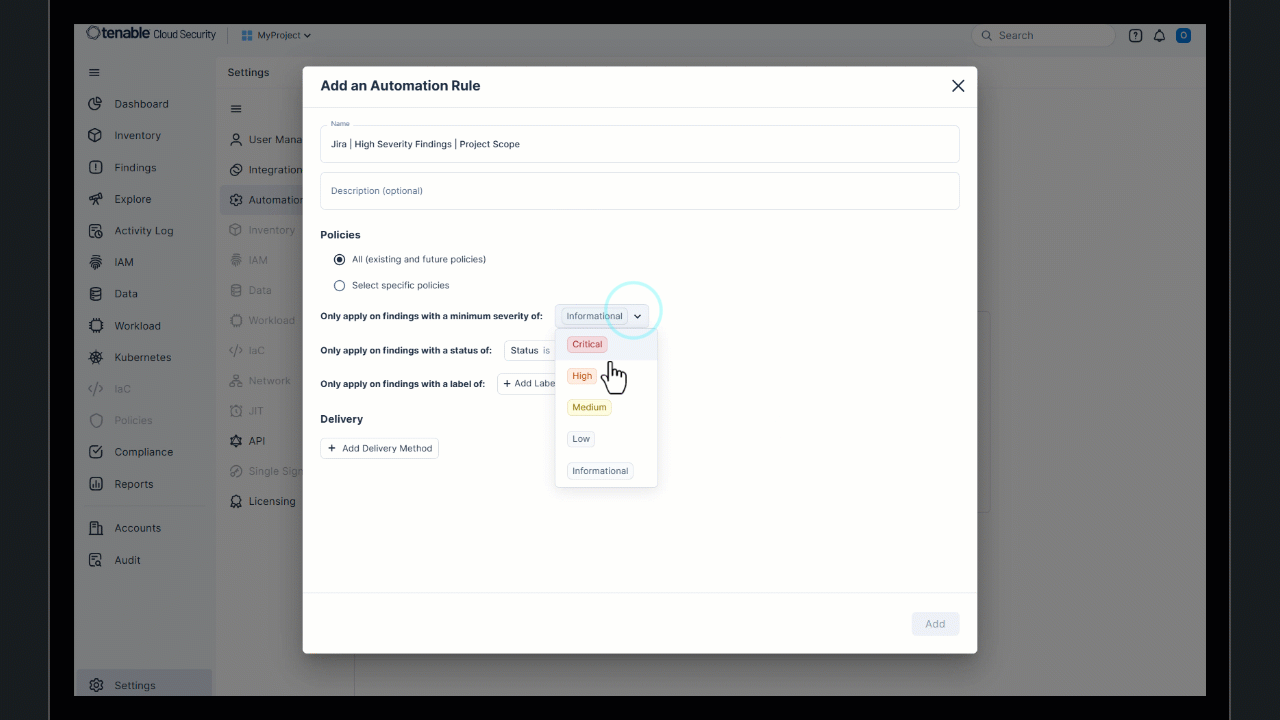
Projects: Create Integrations and Automations per Project Scope
You can now create integrations and automations per project scope, giving you more granular control. This means that the specific accounts or resources grouped within a project can have their own unique integrations/automations configured, providing greater flexibility and alignment with your organizational structure.
For more information, see the documentation.
Data Protection: Scanning for OCI Object Storage Buckets
Cloud Exposure now supports data protection scanning for OCI Object Storage buckets.
If you've granted Tenable the required permissions and enabled object storage scanning, scanning will begin automatically. These resources will be counted as scan-based billable resources once scanning occurs.
JIT Request Access: Recent Eligibilities Shown First
When requesting access, the Eligibilities dropdown now shows your recently selected eligibilities at the top, making it quicker to request access to commonly used resources.
Policy Update: Public Secrets Manager Secret
The policy Public Secrets Manager secret now evaluates public access based on the specific permissions granted. Severity is reduced only when all public permissions relate to data access (for example, GetSecretValue), and the resource is encrypted. This change applies to existing findings as well.
New Policies in 165
API Support
The following policies were added in this release:
| Platform | Category | Name |
|---|---|---|
| AWS | Data | KMS Key is not rotated |
| Azure | Data | Key Vault Certificate automatic rotation is not enabled |
Custom Policies: Improved Finding Accuracy
The following custom policies were updated to more precisely identify the entity at risk. This change may increase or decrease the number of open findings, and lowers the number of findings to those that are more relevant and accurately attributed.
| Platform | Name |
|---|---|
| AWS | New IAM principal created |
| AWS | New identity center users or groups created |
| AWS | Permission Set assigned to users or groups |
| AWS | Permission Set created or updated |
New IaC Policies in 165
The following IaC policies were added in this release:
| Platform | Category | Name |
|---|---|---|
| AWS | Data | DMS Endpoint encryption in transit is not enabled |
| AWS | Data | DMS Endpoint MongoDB authentication mechanism is not enabled |
| AWS | Data | DMS Replication instance automatic minor version upgrade is not enabled |
| Azure | Data | Key Vault Certificate automatic rotation is not enabled |
| Azure | Data | Managed Disk does not block public access |
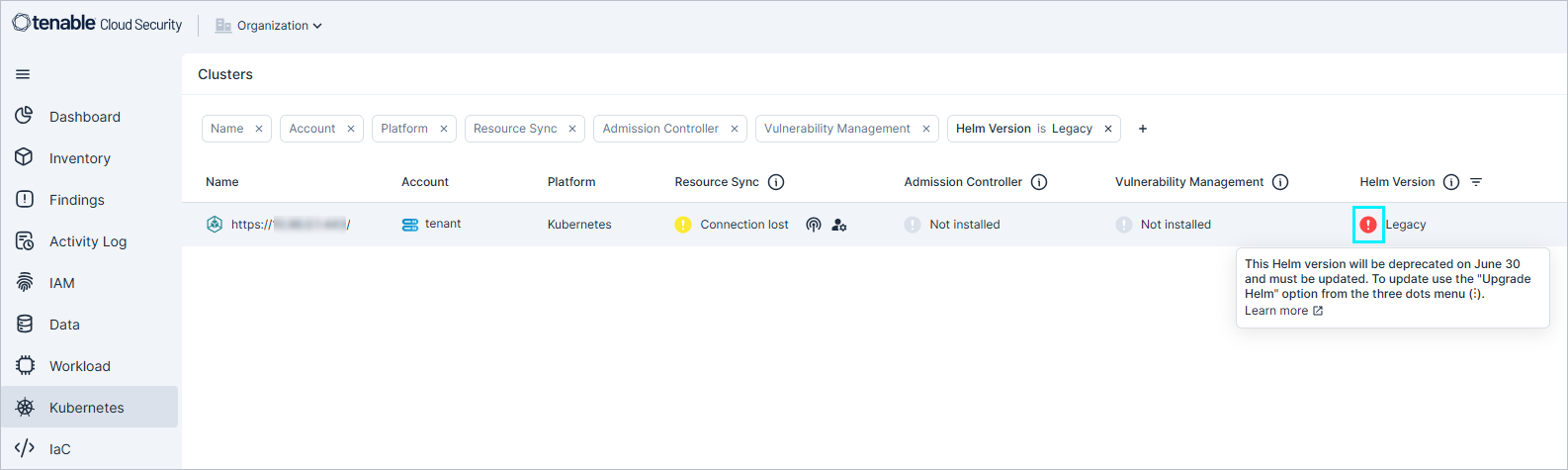
Kubernetes: Helm Version Deprecation Indicator on Clusters Page
Users can now easily identify clusters using Helm versions that are Deprecation of Legacy Helm Chart Versions 1.0 and 1.4 (June 30, 2025) directly from the Clusters page. A red marker and explanatory tooltip have been added to clusters running Helm versions nearing deprecation - specifically, version 1.4 (marked as Legacy) and version 1.0 - indicating upcoming deprecation. This update helps you identify clusters that need to be upgraded before the deprecation deadline.
Kubernetes: New Admission Controller Policies
| Category | Name |
|---|---|
| Admission Controller | Disallow anonymous access |
| Admission Controller | Allowed Users |
Workload Protection: Enhanced Support for FIPS-Certified Container Images
We’ve enhanced support for FIPS-certified container images across the platform. Previously, images deployed using FIPS endpoints were not properly recognized and did not appear as “Used” in the Workload > Container Images view. With this update, all images utilizing FIPS endpoints are now correctly tracked and displayed as “Used,” ensuring better visibility and compliance monitoring in your workloads.
May 25, 2025 (Release 1.164)
New Features
Console: Enhanced Activity Tracking for Findings
API Support
All finding activities are now included in exports, reports, and API output. This enhancement offers a more comprehensive view of each finding's lifecycle and history.
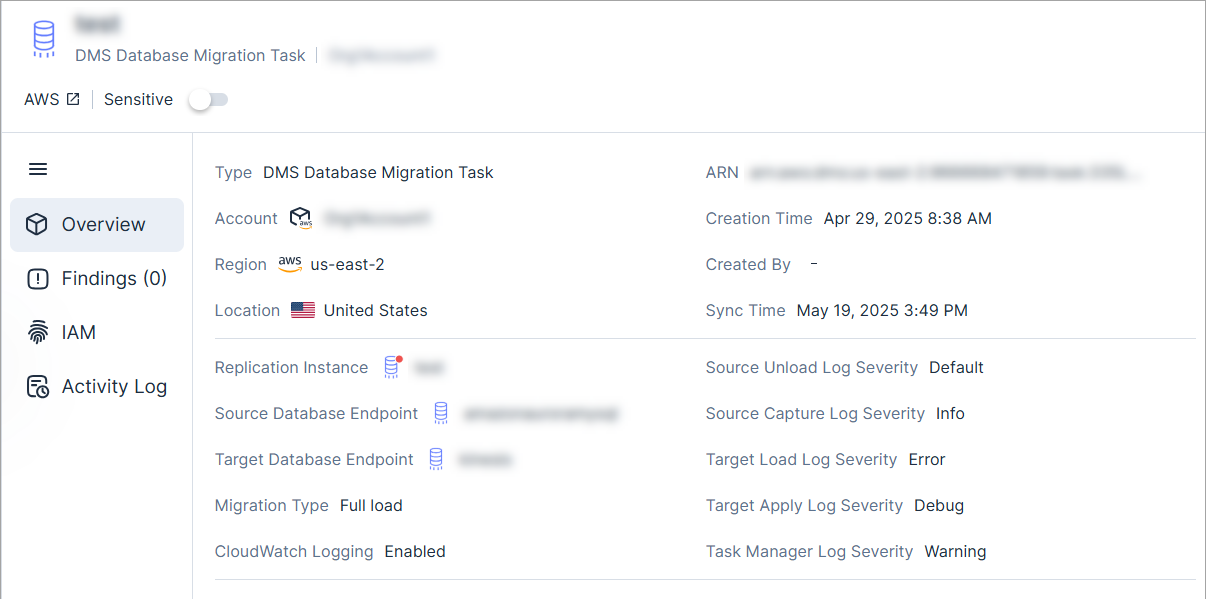
New AWS Resource Type: DMS Database Migration Task
API Support
Cloud Exposure now provides visibility into DMS Database Migration Task via the Inventory view (AWS > Data), and displays relevant information.
See the documentation for a list of all supported resources.
ServiceNow Integration: Sync Incident Priorities and States
Sync incident priorities and states to align the severity/statuses of findings in Tenable with the corresponding priority/state in ServiceNow. ServiceNow incidents created via Tenable are assigned the chosen priority/state.
This sync is performed by defining a custom mapping between Tenable findings and ServiceNow incidents when you add an instance to Tenable. For example, you can map the finding status of Open to the incident status of New, so that any Open findings created by Tenable are marked as New in ServiceNow.
See the documentation for more information.
IAM: Multi-Pattern Support for Principals and Resources in Custom Policies
You can now define multiple values (patterns) for Principals and Resources within custom policies. This enhancement applies when performing the following steps:
-
Select one of the supported custom policies, listed below (step 1 in wizard).
For example: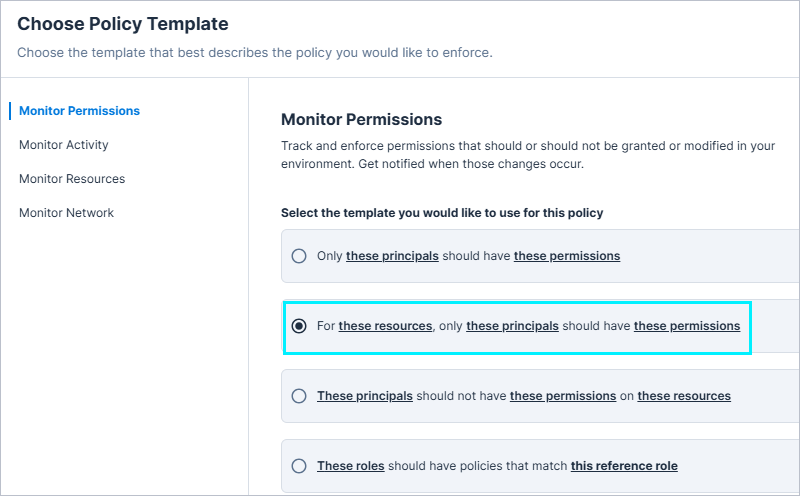
-
Select the condition "Principals/Resources that match any of these patterns" (step 2 in wizard).
Pattern entry behavior update: In all other condition configuration options, a new pattern input appears automatically as you type. However, in these specific custom policies, to add another Principals or Resources pattern, you must explicitly click the "+" button.
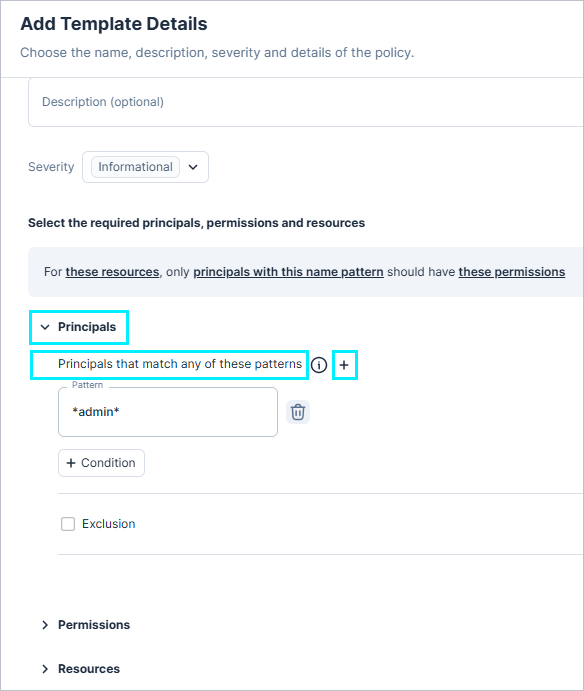
These conditions can be used to include or exclude specific patterns, giving IAM administrators greater flexibility to define granular permission boundaries while enhancing control and visibility across AWS, Azure, and GCP environments.
Supported Custom Policies
| Platform | Policy |
|---|---|
| AWS | For these resources, only these principals should have these permissions These principals should not have these permissions on these resources |
| Azure | Monitor any activity of these identities These managed identities should not have these permissions on these resources These principals should not have these roles on these resources |
| GCP | These principals should not have these roles on these resources |
Kubernetes: Deprecation Notice - Legacy Helm Chart Versions Support Ends at June 30
Support for Helm chart versions 1.0 and 1.4 will end on June 30.
Action required:
-
Review your clusters in the Clusters page to check for deprecated Helm chart versions.
- Version 1.4 is indicated as Legacy in the Helm Version column.
- Upgrade affected clusters using the upgrade guide.
- Ensure any pipeline deploying the Helm chart is updated.
For more information, see the Deprecation of Legacy Helm Chart Versions 1.0 and 1.4 (June 30, 2025) page.
Workload Protection: Malware Detection in AMIs
Tenable has expanded its malware detection capabilities to include Amazon Machine Images (AMIs). When malware is identified in an AMI, a finding will now be generated.
Data Protection: Scanning for Azure SQL Server Resources
Cloud Exposure now supports data protection scanning for Azure SQL Server resources.
If you've granted Tenable the required permissions and enabled managed database scanning, scanning will begin automatically. These resources will be counted as scan-based billable resources once scanning occurs.
JIT Access: Request Access for Azure Resource Groups
Requesters can now request access at the Azure resource group level.
When creating an eligibility, administrators can choose to limit access to specific resource groups, requiring requesters to select at least one resource group.
New IaC Policies in 164
The following IaC policies were added in this release:
| Platform | Category | Name |
|---|---|---|
| AWS | Data | DMS Endpoint for Redis OSS TLS is not enabled |
| Azure | Data | Managed Disk data access authentication is not enabled |
New Policies in 164
API Support
The following policies were added in this release:
| Platform | Category | Name |
|---|---|---|
| AWS | Data | DMS Endpoint encryption in transit is not enabled |
| AWS | Data | DMS Endpoint MongoDB authentication mechanism is not enabled |
| AWS | Data | DMS Endpoint Redis OSS encryption in transit is not enabled |
| AWS | Data | DMS Replication instance automatic minor version upgrade is not enabled |
| Azure | Data | Managed Disk data access authentication is not enabled |
| Azure | Data | Managed Disk does not block public access |
Split Findings for Custom Policies in 164
Creating a finding per resource allows Cloud Exposure to:
- Identify the specific violation, making it easier to remediate the issue.
- Send granular notifications to third party tools for each affected resource.
The following custom policy templates were updated to create a separate finding per resource or principal, instead of aggregating all affected resources or principals into a single finding:
| Platform | Name |
|---|---|
| Azure | Only these principals should have these permissions on these resources |
| Azure | These principals should not have these permissions on these resources |
| GCP | Only these principals should have these permissions on these resources |
| GCP | These principals should not have these permissions on these resources |
May 18, 2025 (Release 1.163)
New Features
Console: Change to Automatic Onboarding of New Accounts
With the recent introduction of the ability to Cloud/Code Onboarding: Include a Subset of Your Environment, the Automatically onboard new accounts1 checkbox has been removed from the onboarding flow. If you are interested in including/excluding specific accounts during onboarding, please use the Configure Scopes step at the end of the relevant wizard.
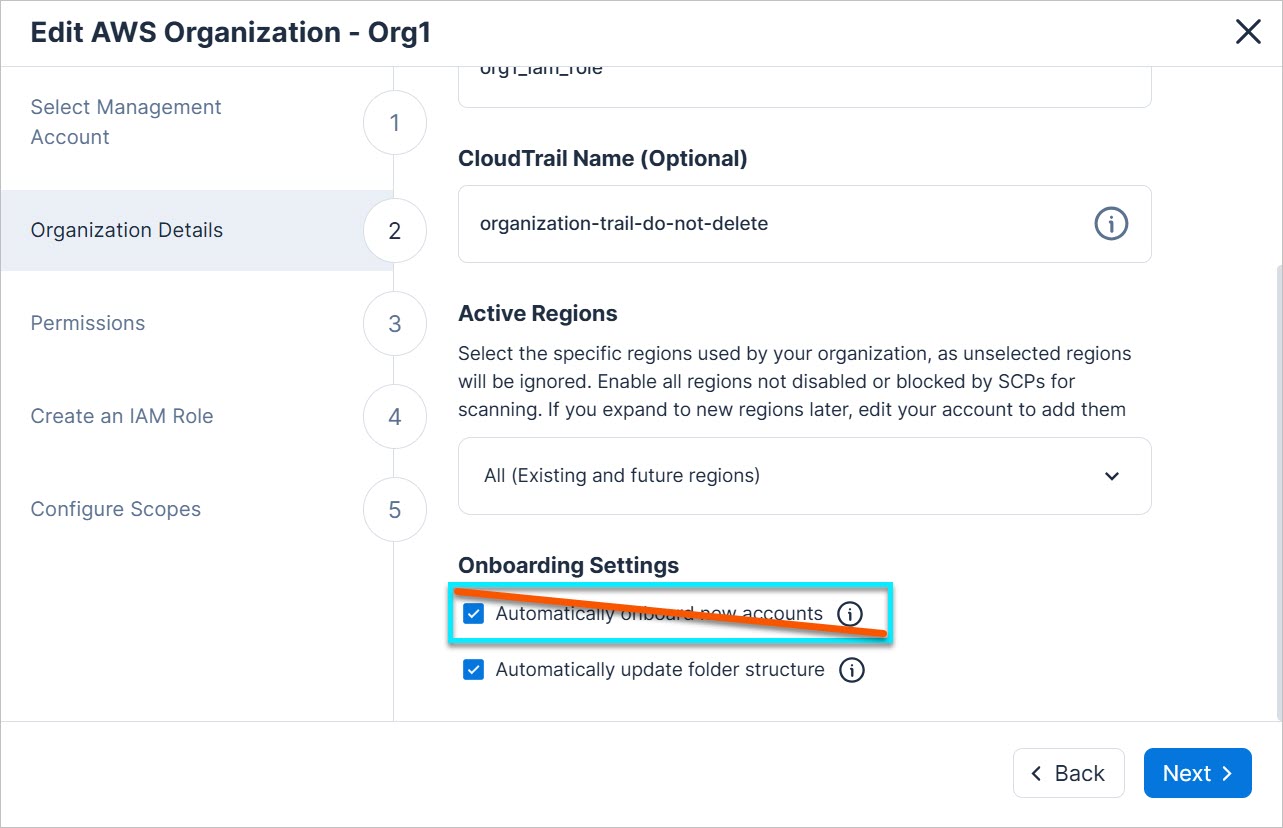
1 Terminology varies by integration. For example: AWS = accounts, GCP = projects, etc.
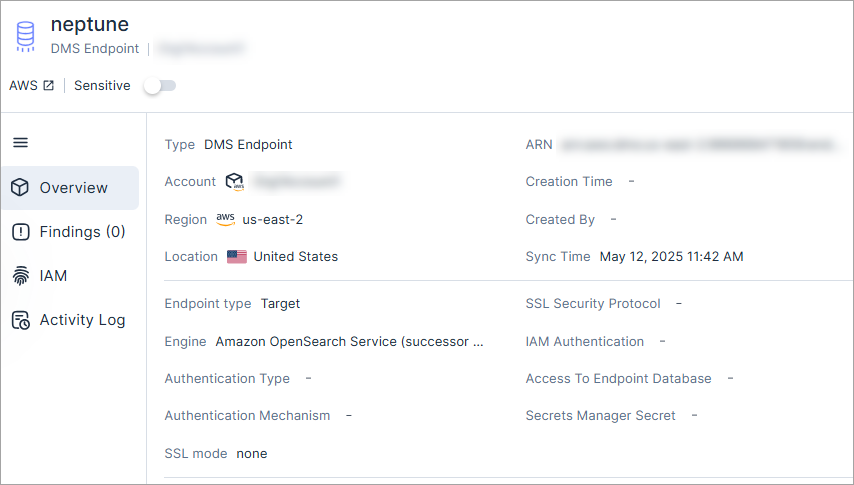
New AWS Resource Type: DMS Endpoint
API Support
Cloud Exposure now provides visibility into DMS Endpoint via the Inventory view (AWS > Data), and displays relevant information.
See the documentation for a list of all supported resources.
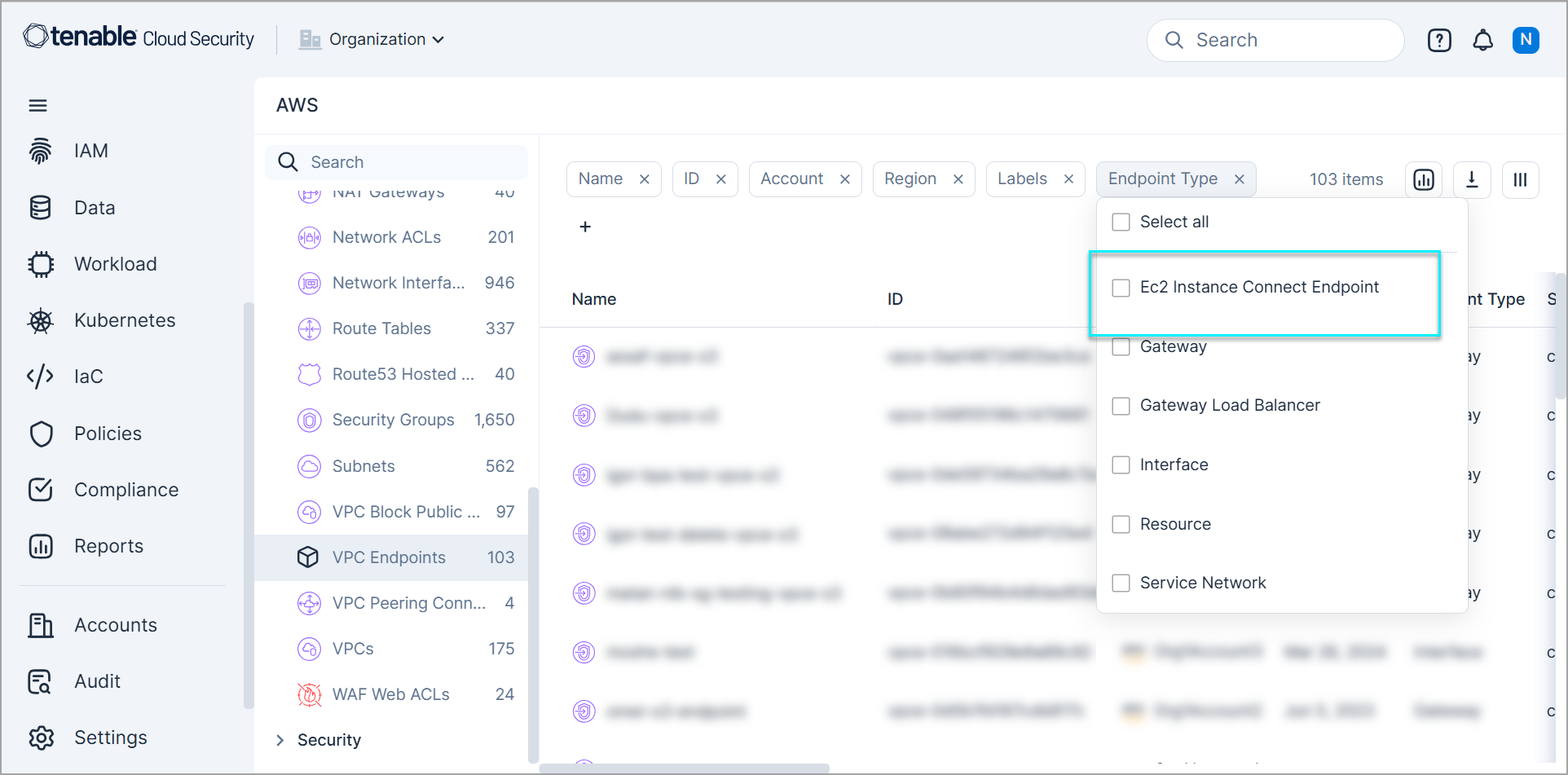
New AWS Endpoint Type: EC2 Instance Connect Endpoint
API Support
Cloud Exposure now provides visibility into the new endpoint type EC2 Instance Connect Endpoints in the Inventory view of VPC Endpoints (AWS > Data > VPC Endpoints), and displays relevant information.
Reports: Duplicate Existing Reports
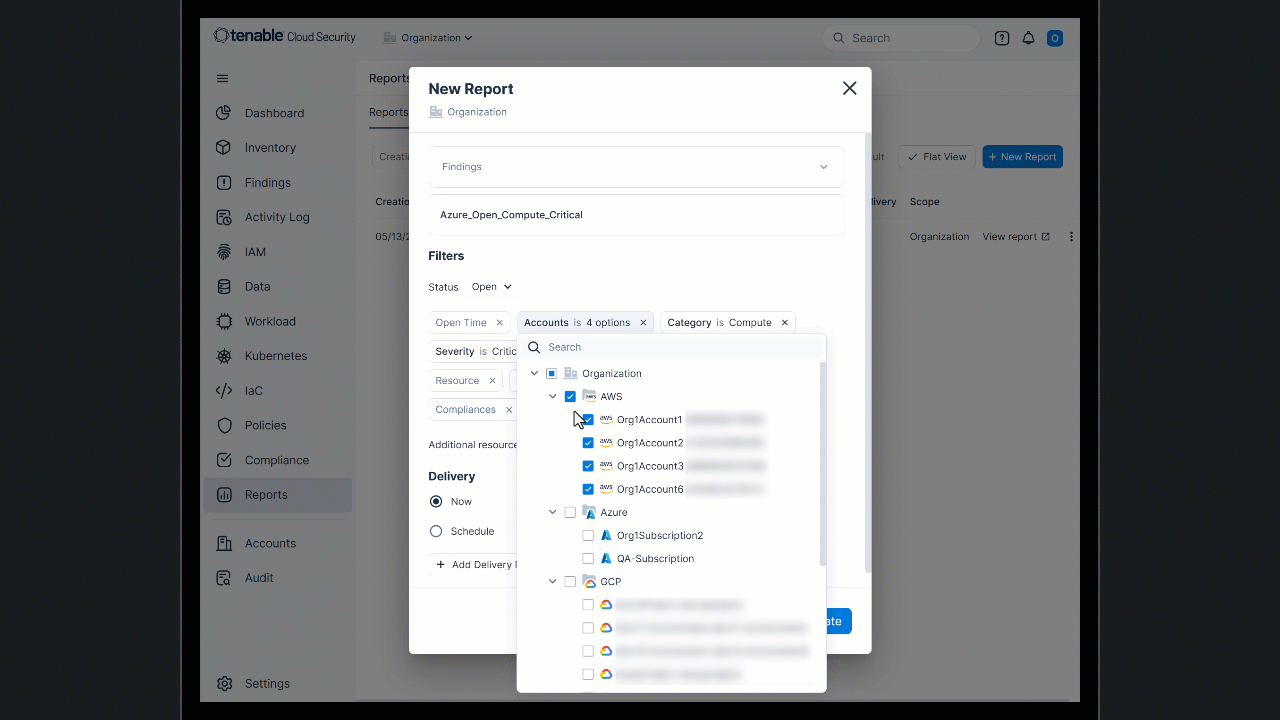
You can now duplicate any previously generated report (one-time, or scheduled) to use as a baseline for creating a new report. This allows you to quickly create a new report with the same configuration as a previous one, saving you time and effort. For example, if you have a weekly Findings report for AWS and need a similar one for Azure, duplicate the report and change the scope to your Azure environment.
For more information, see the documentation.
Workload Protection: Improved CVE Detection and Customizable Severity Metrics
Cloud Exposure now leverages the power of Tenable Vulnerability logic for CVE detection. As part of this update, you can now choose your preferred CVE severity metric.
Key Benefits
- Faster coverage for new vulnerabilities, independent of NVD delays.
- Improved CVE severity accuracy and quicker false positive/negative resolution.
- Detection is better aligned with Tenable Vulnerability Management, reducing discrepancies and improving transparency.
- Choose which CVE severity is shown first, and which drives finding creation: CVSS (default) or VPR.
This update enhances consistency and reliability across the Tenable One platform. CVE severity changes may result in the opening or closure of related findings.
To configure the CVE severity metric, see the documentation.
IAM: Improved Handling of AWS Trusted Accounts in Overpermissive Findings
Tenable has enhanced the evaluation of overpermissive access findings to reflect trusted AWS account relationships, as follows:
- Severity Adjustment for AWS-Owned Accounts — If overpermissive access is granted exclusively to accounts owned by AWS, the severity of the finding is now automatically reduced by one level. This change affects existing findings as well as new ones, ensuring consistent severity scoring across all relevant detections.
- Updated Affected Finding Types — The following findings are impacted by this logic update:
- Overpermissive ECR Repository
- Overpermissive S3 Bucket
- Overpermissive Secrets Manager Secret
API: Query Policy Information
API Support
You can now programmatically access details for all policies (built-in and custom), including name, category, and a newly introduced policy ID, via the API. You can then input this ID into the existing Findings query to retrieve all findings associated with the policy ID.
| Type | Name | Description | Sample Query |
|---|---|---|---|
| New query | Policies | Retrieves comprehensive information about built-in and custom policies, including policy IDs (Id). | API - Policies |
| New filter | policyId | A newly added filter to the existing Findings query. Use the Id obtained from the Policies query to filter findings associated with a specific policy. | API - Findings |
IaC: Support for ARM Template Scanning
Cloud Exposure now supports scanning Azure Resource Manager (ARM) templates as part of our IaC security offering. To ensure quick and comprehensive coverage, we will progressively extend all Azure IaC policies to support ARM, with new policies added on a weekly basis.
IaC: New Severity Column for IaC Policies
The IaC Policies page now includes a Severity column, bringing it in line with non-IaC policies. This addition enables you to sort and filter IaC policies by severity, making it easier to assess and prioritize risks.
IaC Policy Update: Unencrypted Storage Account Traffic Supported by ARM Framework
Until now, the supported framework for the policy Unencrypted Storage Account traffic was Terraform and TerraformPlan. Now the Azure Resource Manager (ARM) framework is also supported.
New Policies in 163
API Support
The following policies were added in this release:
| Platform | Category | Name |
|---|---|---|
| Microsoft Entra ID | IAM | Microsoft Entra ID user MFA is not enabled |
| Microsoft Entra ID | IAM | Microsoft Entra ID Tenant 'Security defaults' setting is not enabled |
May 11, 2025 (Release 1.162)
Upcoming Changes
Data Protection: OCI Object Storage Buckets
Cloud Exposure will be introducing data protection scanning for OCI Object Storage resources.
For more information, see OCI Object Storage Buckets (May 2025).
New Features
Console: Search Inventory by Resource Type
The Console search has been enhanced, making it easier and faster to find the resources you're looking for. Your initial search will display all matching resources. From there, you can choose to narrow down your search by clicking through relevant inventory categories (for example, Compute or IAM) and then selecting specific resource types (for example, GCP VPC Networks) to find the exact resources you're looking for.
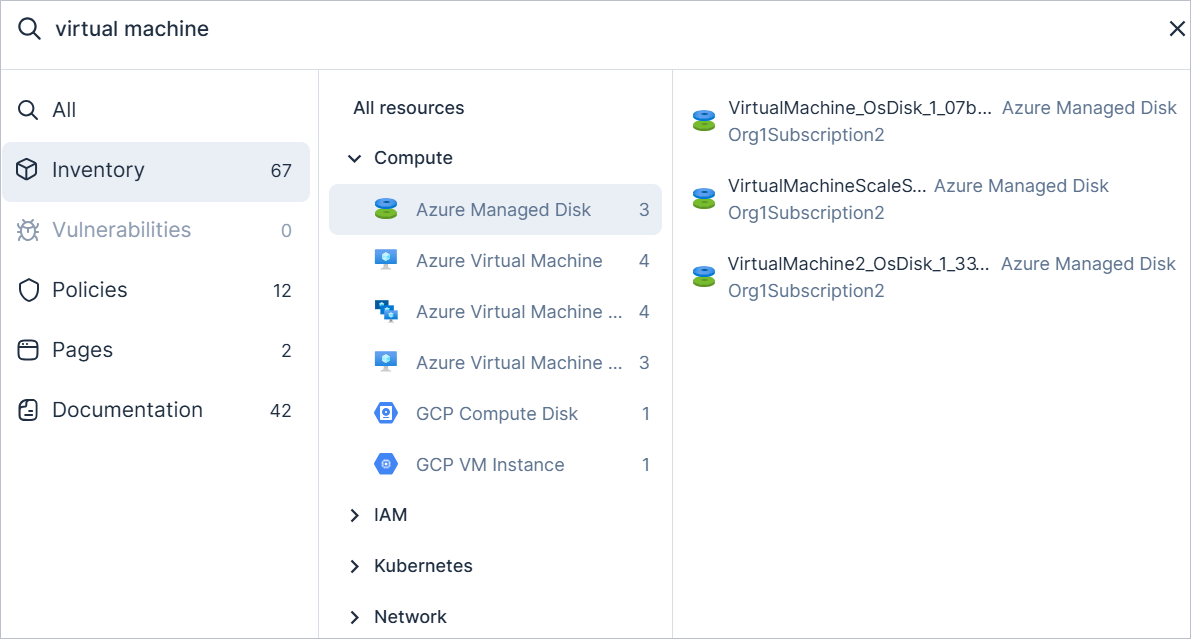
Projects: Create a Custom Compliance per Project Scope
You can now create custom compliance frameworks per project scope, giving you more granular control. This means that the specific accounts or resources grouped within a project can have their own unique compliance requirements, providing greater flexibility and alignment with your organizational structure.
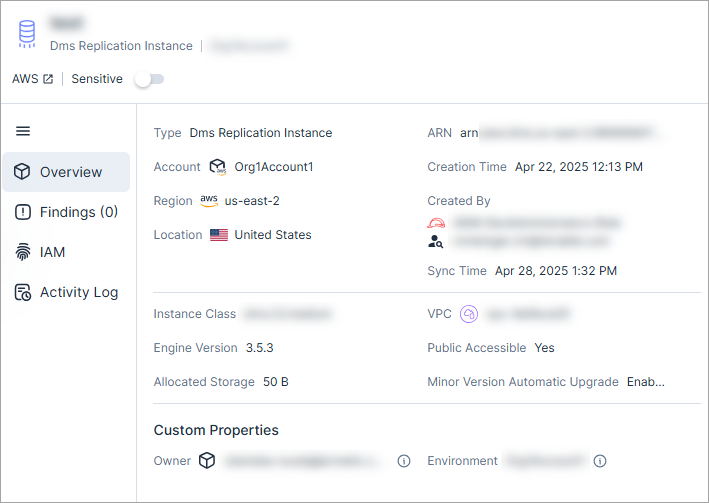
New AWS Resource Type: DMS Replication Instance
API Support
Cloud Exposure now provides visibility into DMS Replication Instance via the Inventory view (AWS > Data), and displays relevant information.
See the documentation for a list of all supported resources.
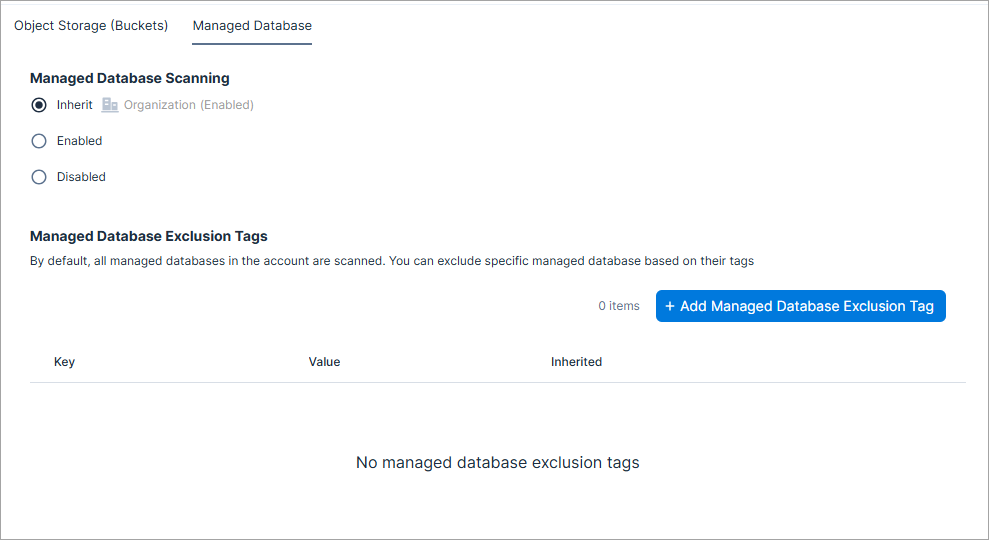
Data Protection: Selectively Scan Resources by Exclusion Tags
You can now add exclusion tags to fine-tune scans of both managed databases and object storage in Cloud Exposure. Exclusion tags allow you to scope out resources starting from the next scanning cycle by specifying tags as configured at the resource level, helping you tailor scans to your environment.
Workload Protection: Integration with ServiceNow Vulnerability Response Platform
Tenable now integrates with ServiceNow Vulnerability Response, enabling seamless import of vulnerability data. This integration helps security teams efficiently prioritize and remediate issues by leveraging Tenable’s actionable insights directly within the ServiceNow environment.
Workload Protection: New VulnerabilityInstances API
This new vulnerability API uses pagination to limit the response. The maximum number of items returned is 10000. Use pagination to get more than 10,000 results.
Key Capabilities:
Filter vulnerability instances by resolution status, resource, resource type, vulnerability ID, and/or vulnerability severity.
Kubernetes: Updated Cluster Statuses
Tenable has introduced a new Duplicate status to enhance cluster management and improve clarity when a cluster is synced more than once.
- If a managed cluster was previously connected on-prem before its account was onboarded, and then the same cluster is onboarded as cloud-managed, the original on-prem cluster will now show a Duplicate status.
- The onboarded cloud-managed cluster will display its current status with a (duplicate) label appended.
The duplicate indicator can apply to any cluster status and helps identify redundant instances during the transition to cloud-managed configurations.
Kubernetes: Support for OCI OKE Cluster Onboarding and Enhanced Kubernetes Resource Coverage
Tenable now supports Oracle Cloud Infrastructure (OCI) OKE cluster onboarding and offers enhanced Kubernetes resource coverage, including expanded inventory of key Kubernetes resource types and improved integration via Helm charts.
- OKE Cluster Onboarding Enhancements — Admission Controller and Connector support (for both public and private clusters) is now available through Helm chart deployments, simplifying integration and configuration.
For more information, see the documantation. - Support for OCI Unmanaged Cluster Onboarding — Users can now onboard unmanaged Kubernetes clusters into OCI for centralized management and visibility.
For more information, see the documantation. - Expanded Kubernetes Resource Inventory for OCI OKE — The Kubernetes resource types are now supported in the OCI OKE inventory.
For more information, see the documantation.
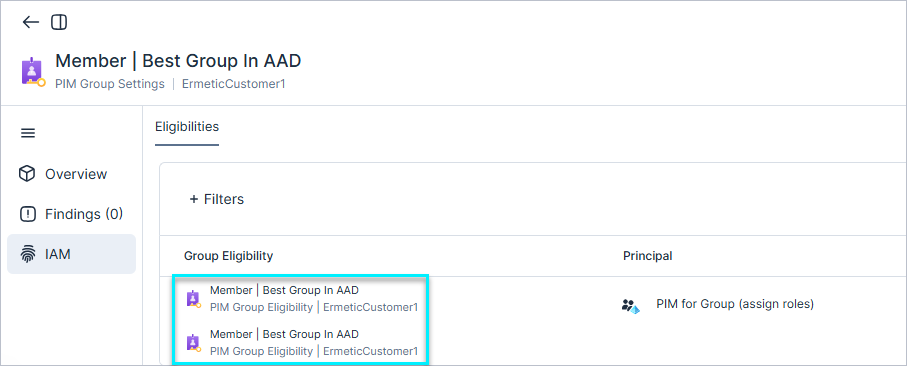
IAM: New Entra ID Resource Type - PIM Group Settings
API Support
Tenable now supports visibility into Entra ID PIM Group Settings through the Inventory > Entra ID > IAM view. This enhancement provides deeper insight into privileged access configurations, including the associated role, maximum assignment duration, and approval requirements.
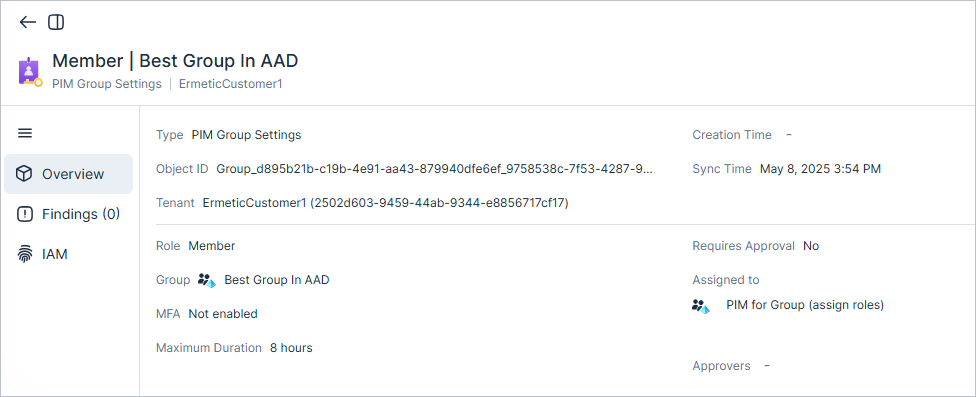
You can also see the group eligible users in the IAM view of the group.
IAM: Azure Role Usage Monitoring
API Support
Tenable now helps you streamline your Azure role management.
-
Roles without assignments for over 30 days will be flagged as "Unused." Easily identify these unused roles through:
- Inventory — Navigate to Azure > Roles and filter by the dedicated column (Unused).
- API
This new capability allows you to identify and remove unnecessary Azure custom roles, improving security and reducing complexity.
IAM: GCP Role Usage Monitoring
API Support
Tenable now helps you streamline your GCP role management.
- Roles without binding or roles that have all their role binding marked as "Unused" for over 30 days will be flagged as "Unused."
-
Easily identify these unused roles through:
- Inventory — Navigate to GCP > Roles and filter by the dedicated column (Unused).
- API
This new capability allows you to identify and remove unnecessary GCP custom roles, improving security and reducing complexity.
IAM: MFA Status Evaluation for Microsoft Entra ID Users
API Support
Tenable introduced a new capability that evaluates whether users have Multi-Factor Authentication (MFA) enabled.
Monitoring MFA status is critical because users without MFA are significantly more vulnerable to account compromise. Ensuring MFA is enabled across all identities helps reduce the risk of unauthorized access to sensitive resources.
- Microsoft Entra ID free tenants.
- Users with external authentication or guests with a Pending invitation status to a tenant.
- A new MFA column has been added to the Users inventory to show each user’s MFA status.
-
The the severity evaluation for Overprivileged Microsoft Entra ID User in subscription finding is also updated. The baseline severity of this finding will be elevated by one level when the identity do not have MFA enabled.
For more information see the documentation.Note: The new MFA evaluation may impact the severity of existing findings.
JIT: Recurring Access for JIT Requesters
Cloud Exposure now supports recurring access requests for JIT users. Instead of submitting a new request each time, users can schedule access to recur automatically at a specified time and frequency. A recurring request requires a one-time approval and then grants access repeatedly as scheduled. This feature is available in the Cloud Exposure JIT Portal and Microsoft Teams (if enabled).
New IaC Policies in 162
The following IaC policies were added in this release:
| Platform | Category | Name |
|---|---|---|
| AWS | Data | RDS cluster automatic minor version upgrade is not enabled |
| AWS | Logging | DocumentDB Cluster does not publish logs to CloudWatch Logs |
| AWS | Logging | Elastic Beanstalk does not publish logs to CloudWatch Logs |
| AWS | Logging | Neptune DB Cluster does not publish logs to CloudWatch Logs |
| AWS | Logging | OpenSearch domain does not publish logs to CloudWatch Logs |
| AWS | Logging | RDS Cluster does not publish logs to CloudWatch Logs |
| AWS | Logging | RDS Instance does not publish logs to CloudWatch Logs |
| Azure | Data | Key Vault Secret is not rotated |
New Policies in 162
API Support
The following policies were added in this release:
| Platform | Category | Name |
|---|---|---|
| AWS, Azure, GCP, On-Premises | Kubernetes | Kubernetes cluster API server number of audit logs files does not meet minimum requirements |
| AWS | Data | RDS cluster is not encrypted with KMS |
| Azure | Data | Key Vault secret is not rotated |
Split Findings for Custom Policies in 162
Creating a finding per resource allows Cloud Exposure to:
- Identify the specific violation, making it easier to remediate the issue.
- Send granular notifications to third party tools for each affected resource.
The following custom policy templates were updated to create a separate finding per resource or principal, instead of aggregating all affected resources or principals into a single finding:
| Platform | Name |
|---|---|
| AWS | For these roles, policies should match the reference role policies |
| AWS | Only these principals should have these permissions |
| AWS | Subnets should not allow inbound internet connection |
| AWS | VPCs should not allow inbound internet connection |
Policy Name Updates in 162
The following policy names have been updated for improved clarity and consistency:
| Platform | Category | Previous Name | Updated Name |
|---|---|---|---|
| AWS | Data | Unencrypted OpenSearch Domain node-to-node communication | OpenSearch Domain node-to-node encryption in transit is not enabled |
| AWS | Data | Unencrypted Redis OSS cluster cache traffic | Redis OSS cluster cache encryption in transit is not enabled |
| AWS | Data | Unencrypted S3 Bucket traffic | S3 Bucket encryption in transit is not enabled |
| AWS | Data | Unencrypted SNS Topic traffic | SNS Topic encryption in transit is not enabled |
| AWS | Network | Unencrypted CloudFront Distribution custom origin traffic | CloudFront Distribution custom origin encryption in transit is not enabled |
| AWS | Network | Unencrypted CloudFront Distribution viewer traffic | CloudFront Distribution viewer encryption in transit is not enabled |
| AWS | Network | S3 Bucket does not block public access | S3 Bucket block public access is not enabled |
| GCP | Data | Unencrypted App Engine Service traffic | App Engine Service encryption in transit is not enabled |
| GCP | Data | Unencrypted Cloud SQL Instance traffic | Cloud SQL Instance encryption in transit is not enabled |
| OCI | Data | Unencrypted Compute Instance volume traffic | Compute Instance volume encryption in transit is not enabled |
April 27, 2025 (Release 1.161)
New Features
Tenable JIT: Just-in-Time Access Now Available to All Cloud Exposure Customers
All Cloud Exposure customers now have Just-in-Time (JIT) access—time-bound, on-demand access to cloud accounts and identity provider (IdP) groups—without requiring any additional purchase or sales process.
A new license tier, Tenable JIT, has been introduced as the most lightweight option available. It is automatically included with all existing licenses: CIEM, Standard, and Enterprise.
The following updates apply to billing:
- 1:1 billing ratio: Each unique user (determined by email address) listed as an eligible requester in any JIT eligibility counts as one billable JIT requester.
- Billing visibility: JIT usage now appears in billing reports and contributes to environment sizing.
To learn more and get started, see JIT Access.
 Console: Unified Search & In-Product Documentation
These powerful new features make it faster and easier than ever to find the information you need, directly from the Console:
-
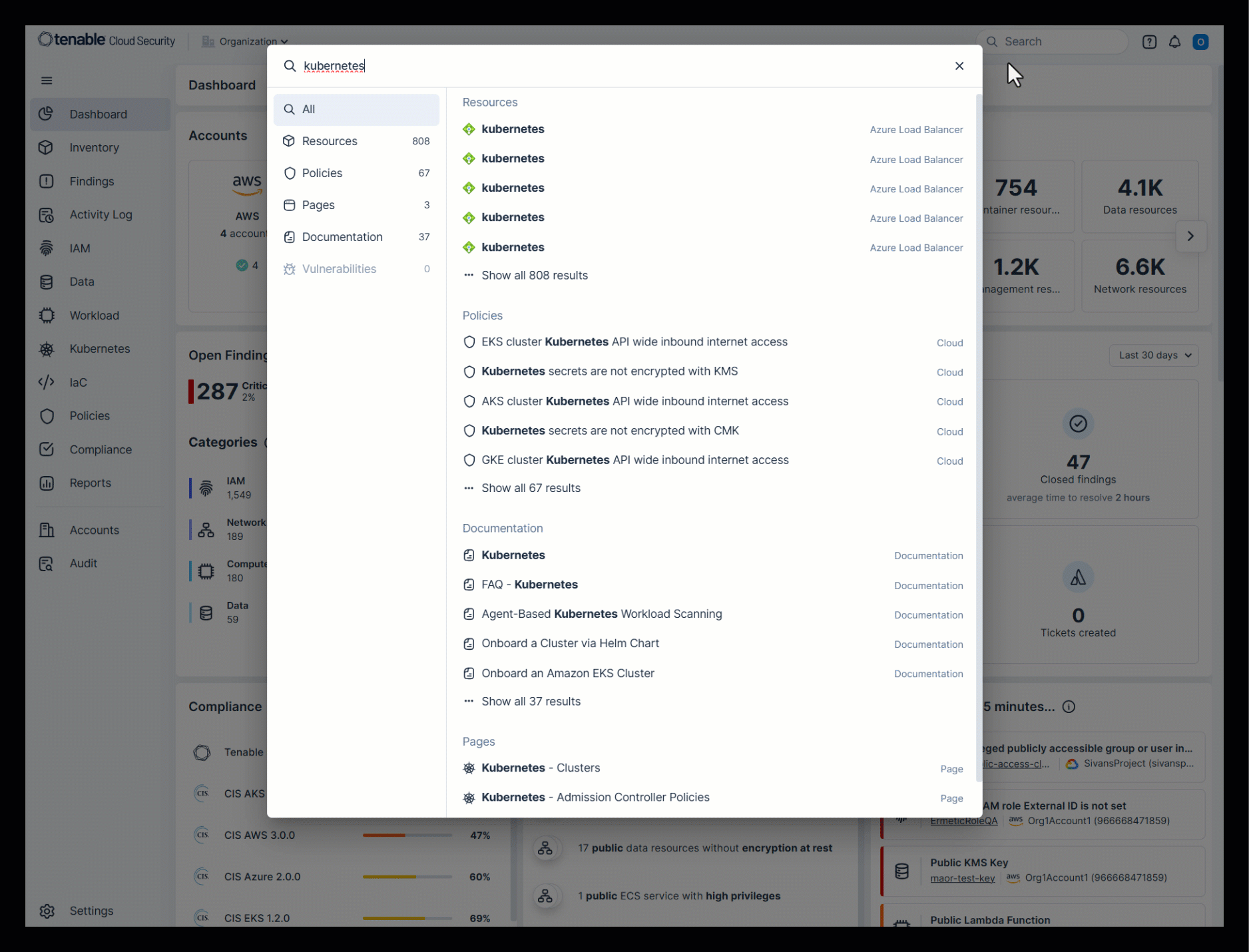
Unified search — The search bar now returns results across all resources, policies, pages, documentation, and vulnerabilities, providing a single, streamlined way to navigate and find what you need.
-
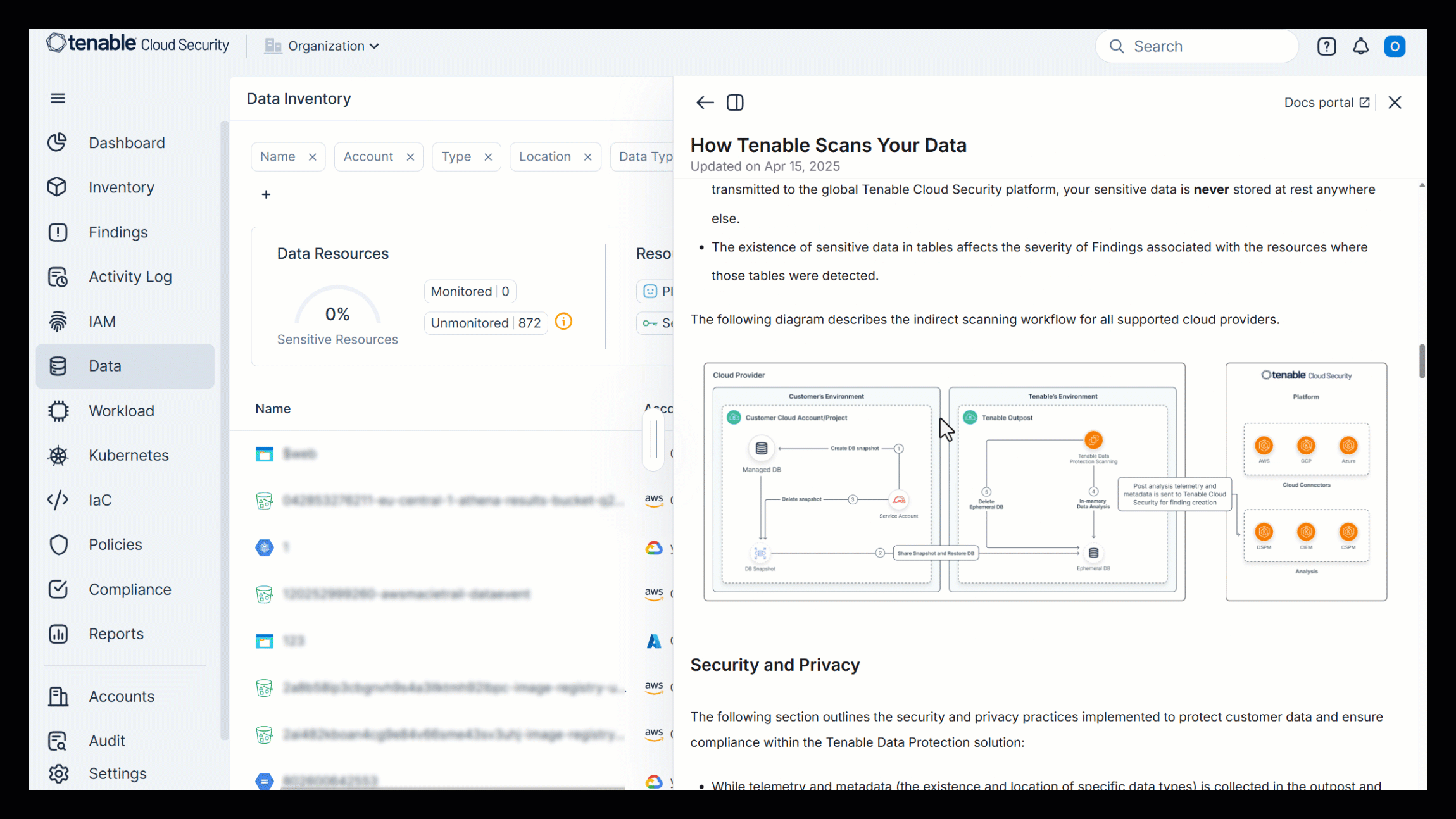
In-product documentation — Documentation is now accessible directly in the Console, both through unified search and contextual help links, giving you context-aware guidance right where you need it.
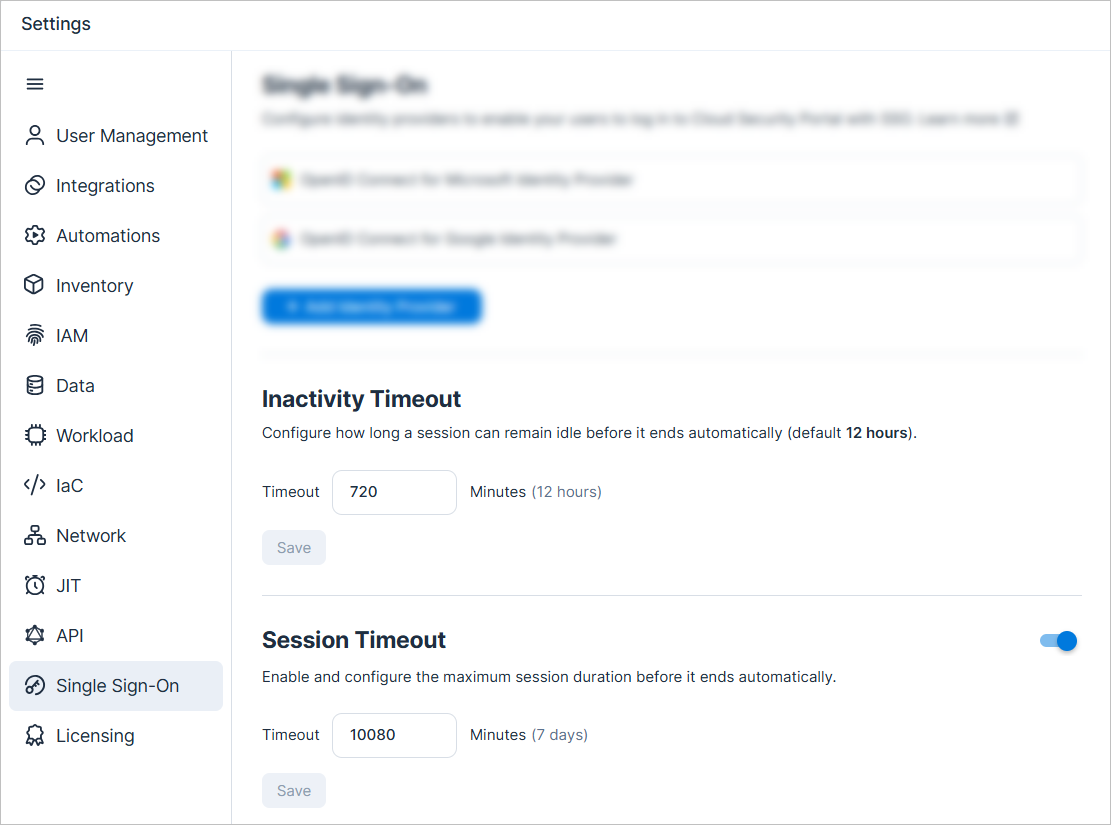
Console: Configure Inactivity and Session Timeout
You can now configure the following timeout periods for the Console (via Settings > Single Sign On:
- Inactivity Timeout — Configure how long a session can remain idle before it ends automatically (default: 12 hours).
- Session Timeout — Enable and configure the maximum session duration before it ends automatically (default: disabled).
For more information, see the documentation.
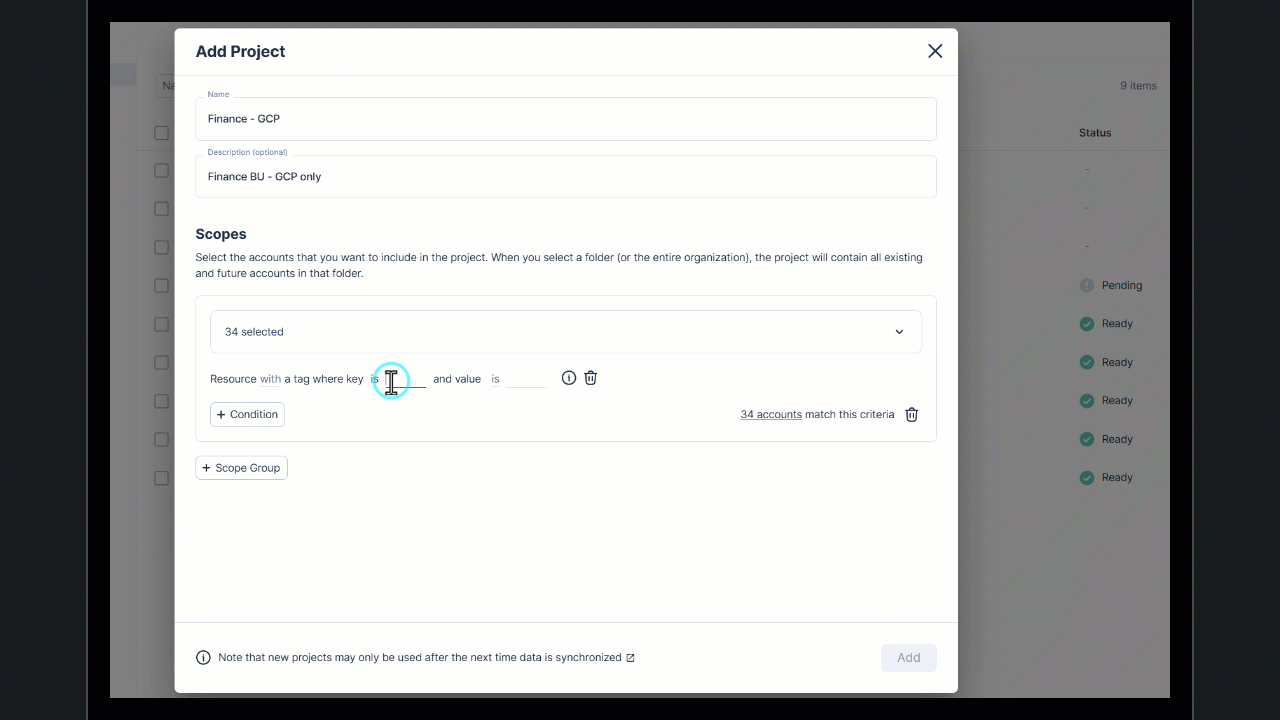
Projects: Define Projects Using Resource Tags and Azure Resource Group Names
You can now define project scopes by resource tag and Azure resource group name patterns. This gives you greater flexibility to align Projects with how your cloud environments are structured, whether that’s by team, business function, or application boundary.
- Reflect business functions by using consistent resource tag patterns (for example, function: finance) to create projects that mirror how your organization operates, even across multiple accounts.
- Align projects with applications and services by using Azure resource group names to group related resources under a single project. Ideal for teams managing customer-facing apps, back-end services, or internal tooling.
- Get a fuller picture — When using resource-based conditions, the system also includes related resources, ensuring dependencies (like secrets tied to a key vault) are visible within the same project view.
For more information, see the documentation.
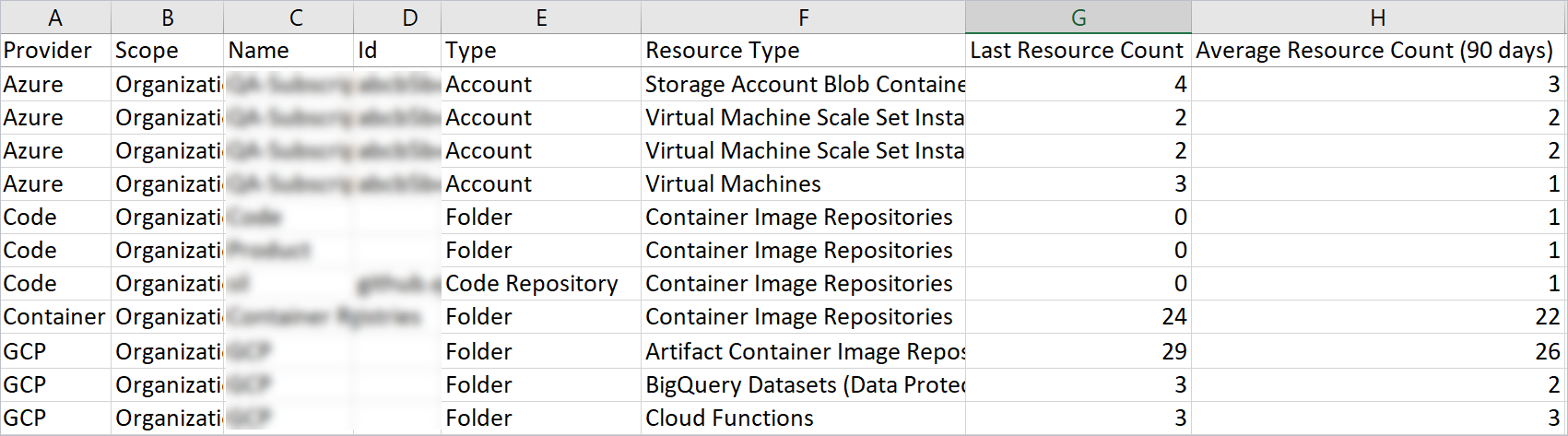
Licensing: Export License Usage Data by Resource Type
Now, when you export license data to CSV, you can see a breakdown of usage by resource type. You can see the last (current) resource count and the average resource count (90 days) for each resource type.
For more information, see the documentation.
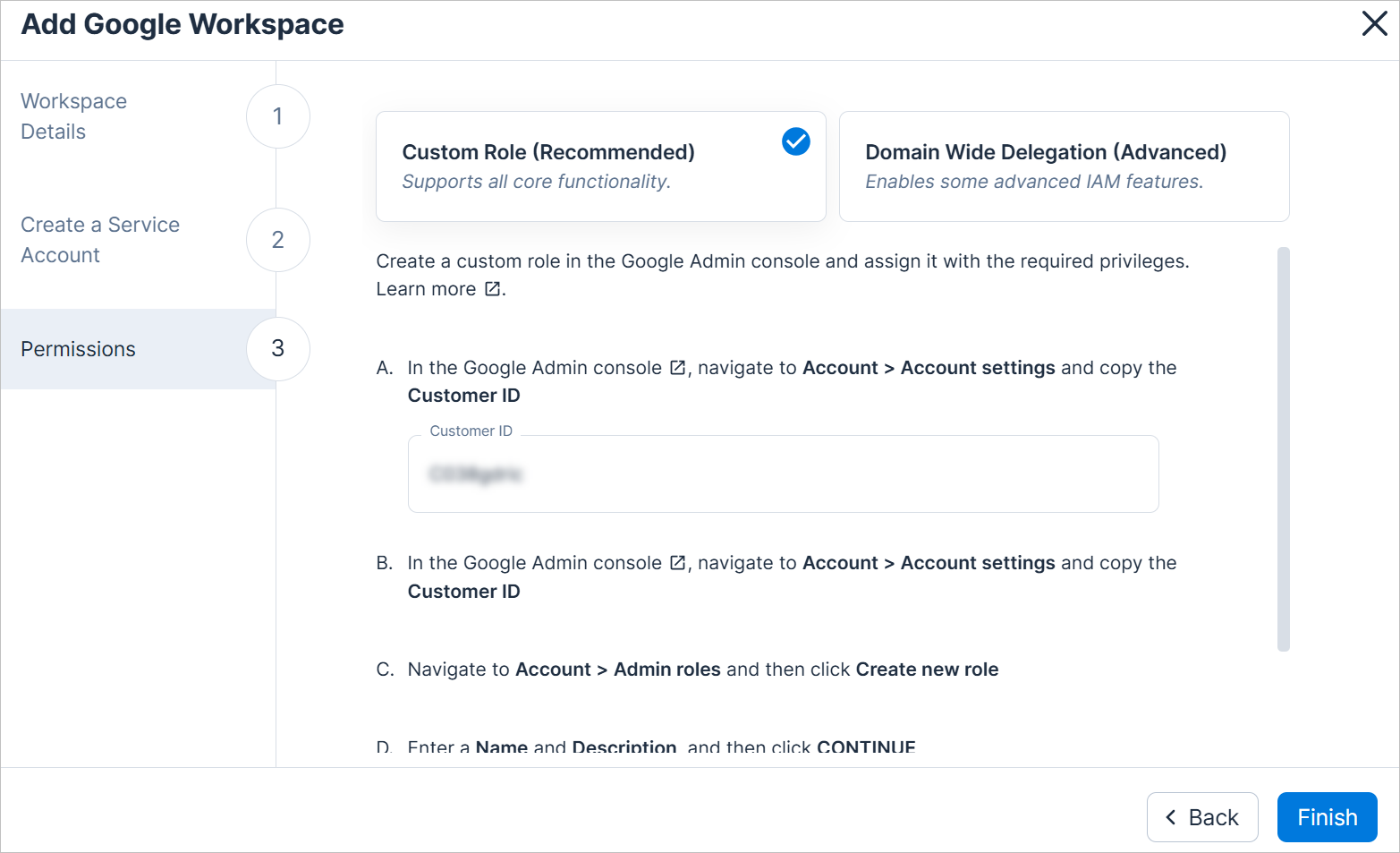
Google Workspace: Improved Onboarding Flow
The Google Workspace onboarding process has been improved, with a simplified and streamlined workflow.
-
Grant Tenable permissions in the way that best fits your organization’s needs, via one of these two options:
- Custom role (Basic) NEW. Supports all core functionality within Cloud Exposure, while requiring significantly fewer permissions. Recommended for most organizations.
- Domain-Wide Delegation (Advanced) — Designed for organizations that require advanced IAM functionality.
- Added an option to create a service account for Tenable via an easy-to-run script (gcloud CLI - Cloud Shell).
- Improved error handling and troubleshooting.
For more information, see the documentation.
Workload Protection: Exclude Detections in CI/CD Pipelines Based on Path
Cloud Exposure has introduced the exclude-paths parameter for GitLab and GitHub CI/CD scan configurations, allowing users to exclude specific files or directories from scans. This enhancement helps prevent the detection of known files or directories that users choose to exclude.
For more information, see the documentation.
Workload Protection: Cloudsmith Container Registry Organization Support
Cloud Exposure now supports scanning container images stored in Cloudsmith container registries. Cloudsmith is a vendor-hosted registry that operates outside of native cloud provider environments. This enhancement expands Tenable’s registry scanning capabilities, enabling visibility into a broader range of artifact sources.
To begin scanning images in Cloudsmith, onboard the organization that contains the registries using the Cloudsmith registry integration workflow.
For more information, see the documentation.
Workload Protection: Configurable EOL Days Threshold for Triggering Finding
Cloud Exposure now supports configuring Operating System (OS) End-of-Life (EOL) finding threshold for virtual machines, virtual machine images, and container images. This enhancement allows users to proactively identify resources nearing or at their end-of-life, improving visibility and strengthening risk management.
For more information, see the documentation.
Workload Protection: Expanded Export of Results for Container Image CI/CD Scans
You can now export unlimited results on the Container Image CI/CD Scans page, removing the previous limit of 10,000. This enhancement allows for more comprehensive reporting and analysis of large data sets.
Workload Protection: Enhanced CVSS Scoring Support with CVSS v4 Priority
When multiple CVSS versions are available for a vulnerability, CVSS v4 will be prioritized to ensure the most up-to-date and accurate severity assessment.
IAM: New and Expanded Support for Microsoft Entra ID PIM Group Eligibilities
Cloud Exposure has expanded the Microsoft Entra ID integration to provide better visibility into group-based access by incorporating Microsoft Entra ID PIM (Privileged Identity Management) eligible group memberships into the platform.
Note: Required Permissions:
Admin consent is required to enable this feature. To grant admin consent, navigate to the Microsoft Azure portal and go to Home > Enterprise applications > [Tenable application] > Security > Permissions > Grant admin consent for [Tenable application].
The required permissions are:
PrivilegedAssignmentSchedule.Read.AzureADGroup
PrivilegedEligibilitySchedule.Read.AzureADGroup
RoleManagementPolicy.Read.AzureADGroup
What’s new:
- Inventory View Enhancements::
- A new PIM Eligible Group Memberships column has been added to the Entra ID resource tables for Users and Groups, displaying Microsoft Entra ID PIM eligibilities alongside direct group memberships.
- The Groups table also includes a new PIM Eligible Members column, providing visibility into users eligible for group membership via PIM.
- User and Group Profiles — Profiles now display eligible group memberships, offering a clearer picture of potential access across both users and groups.
- Access Graphs — Group membership access graphs now visualize both direct members and PIM-eligible users for each group, providing a more accurate and complete view of potential group access.
- New Resource Type — Added a new resource type - PIM Group Eligibilities (under Entra ID).
- Least privilege recommendations and permissions reports — PIM group eligibilities are now incorporated into least privilege recommendations for Azure overprivileged findings and permission reporting, enabling a more complete view of potential access risk.
This update ensures a more comprehensive and accurate understanding of user access, helping organizations make informed decisions and strengthen access governance.
IAM: Refined Detection Logic for Unused Permission Sets
Cloud Exposure introduced a learning period to improve the accuracy of the Unused Permission Set policy.
What’s new:
A permission set is considered unused if it has existed for at least the learning period configured in the IAM settings and all roles within it have remained inactive throughout a 30-day daily evaluation period. Alternatively, if the permission set has existed for at least the learning period and contains no roles for 30 consecutive days, it is also classified as unused.
What to expect:
- Findings that do not meet this new logic will be closed as false positives.
- This change reduces noise and ensures findings more accurately reflect real unused access.
This enhancement aligns with our approach for inactive AWS groups and supports more informed decisions around permission set optimization and risk reduction.
IAM: Azure Custom Policies - Monitor Activity in Azure Environments
You can now monitor Azure activity using the new Azure custom policy template (Monitor Activity). For example, use this template to track actions performed by identities in your environment, such as detecting sensitive operations or unexpected usage patterns. This policy relies exclusively on management write logs from Azure to provide visibility, ensuring consistent activity monitoring across cloud providers.
- Monitor any activity of these identities
IAM: Enhanced Visibility into Microsoft Graph Permissions for Entra ID Applications
Cloud Exposure has expanded the support for Microsoft Entra ID Applications by providing a more comprehensive view of Microsoft Graph Permissions, including Delegated Permissions.
What’s new:
- Dedicated Permissions Profile — View detailed Microsoft Graph Permissions in a dedicated profile for each Entra ID Application.
- Inventory Enhancements:
-
Added new columns (hidden by default) for:
- Microsoft Graph Permissions – Displays direct permissions.
- Microsoft Graph Delegated Permissions – Shows delegated permissions.
-
Added new columns (hidden by default) for:
- Tab Updates:
-
Added new columns:
- Type (Delegated, Application)
- Granted Through (Admin consent, User consent)
- Granted By (Administrator, List of users)
-
Added new columns:
- UI Improvements — Enabled side view support for all application types.
API Support
Full support for Microsoft Graph Permissions, including Delegated Permissions, now available via the API.
New Policies in 161
API Support
The following policies were added in this release:
| Platform | Category | Name |
|---|---|---|
| AWS, Azure, GCP, On-Premises | Kubernetes | Kubernetes cluster API server audit logs are not enabled |
| AWS, Azure, GCP, On-Premises | Kubernetes | Kubernetes cluster API server maximumFileSizeMegabytes argument is not set to 100 |
| AWS | Network | RDS Instance is not associated with a VPC |
Split Findings for Custom Policies
Creating a finding per resource allows Cloud Exposure to:
- Identify the specific violation, making it easier to remediate the issue.
- Send granular notifications to third party tools for each affected resource.
The following custom policy templates were updated to create a separate finding per resource or principal, instead of aggregating all affected resources or principals into a single finding:
| Platform | Name |
|---|---|
| AWS, Azure, GCP | Resources should not allow inbound internet connection from these IPv4 address ranges to these ports |
| AWS, Azure, GCP | these resources should be managed as code |
| AWS | these encrypted resources should be encrypted using these keys |
| AWS | these security groups should allow inbound internet access only from these IPv4 address ranges to these ports |
| AWS | these security groups should not allow inbound internet access from these IPv4 address ranges to these ports |
Policy Name Updates
The following policy names have been updated for improved clarity and consistency:
| Platform | Previous Name | Updated Name |
|---|---|---|
| AWS | Athena workgroup logging is not enabled | Athena workgroup does not publish logs to CloudWatch |
| AWS | CloudTrail Logs are not configured with CloudWatch | CloudTrail Logs does not publish logs to CloudWatch |
April 6, 2025 (Release 1.160)
New Features
Cloud/Code Onboarding: Include a Subset of Your Environment
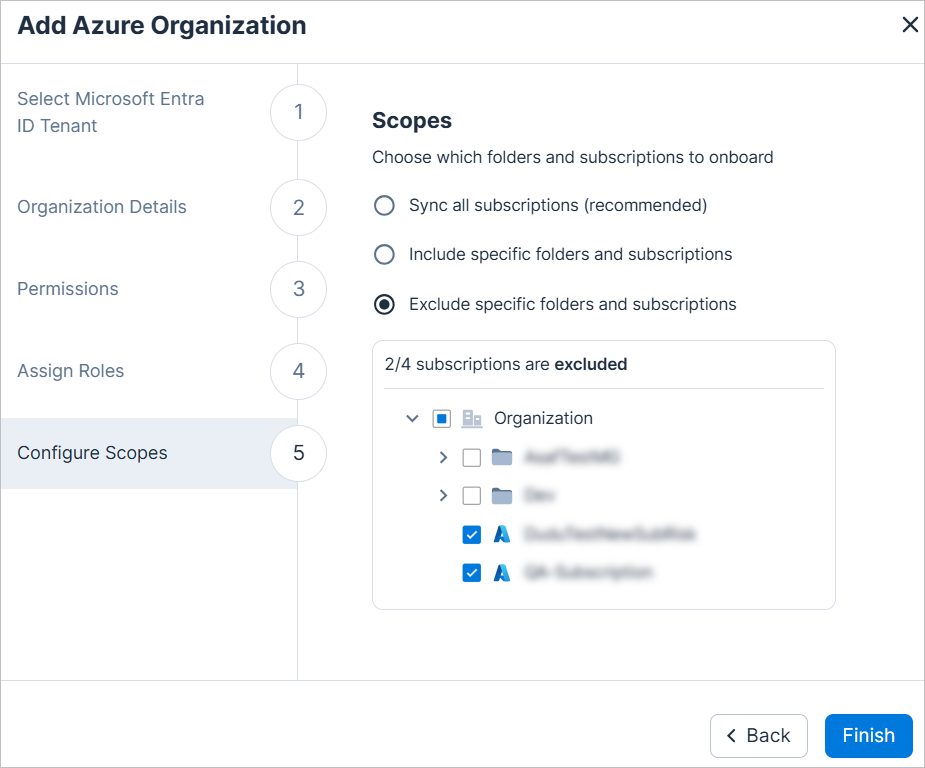
When onboarding cloud or code organizations to Tenable via the Console, you can now include a subset of your environment. For example, if you are onboarding an Azure organization, you can choose to only include specific folders and subscriptions. As a general rule, Tenable recommends including all organization accounts when onboarding.
-
New Console options:
- Sync all accounts1 (recommended)
- Include specific folders and accounts1 2
- Exclude specific folders and accounts1
-
Supported integrations:
- Cloud organizations: AWS, Azure, GCP, OCI2
- Code repositories: Azure DevOps Organization, Bitbucket Workspace, GitHub Organization, GitLab Group
1 Terminology varies by integration. For example: AWS = accounts, GCP = projects, etc.
2 The Include specific folders and projects option is not available for OCI.
Findings: Retrieve Related Resources of Findings via API
You can now retrieve related resources for a finding directly through the Findings API. Use the RelatedResources field to identify all aggregated resources associated with a finding
For example, when several EC2 instances are publicly accessible due to a shared Launch Template, a single finding is created for the Launch Template. Use the RelatedResources field to retrieve all EC2 instances affected by this finding.
To learn more, see View related resources for an aggregated finding.
AWS Policy Update: RDS Instance Automatic Minor Version Upgrade Is Not Enabled
With the introduction of the RDS cluster automatic minor version upgrade is not enabled policy, the existing RDS instance automatic minor version upgrade is not enabled policy has been updated. Since the new policy applies at the cluster level, findings may now cover multiple instances.
Updates to the RDS instance automatic minor version upgrade is not enabled policy:
- Findings are no longer created for instances that are part of a cluster. Instead, they are reported at the cluster level.
- Existing findings for instances that are within a cluster were closed as False positive.
AWS Policy Update: Reduce False Positives for Anomaly Detection Policies
The policy logic for the following AWS anomaly detection policies has been enhanced to reduce false positives. As a result, some previously opened findings may now be automatically closed with the sub-status False positive.
- Unusual Data Access
- Unusual Network Access Management
- Unusual Permission Management
- Unusual Privilege Escalation
- Unusual Reconnaissance
New Policies in 160
API Support
The following policies were added in this release:
| Platform | Category | Name |
|---|---|---|
| AWS, Azure, GCP, On-Premises | Kubernetes | Kubernetes cluster ServiceAccount admission control plugin is not enabled |
| AWS, Azure, GCP, On-Premises | Kubernetes | Kubernetes cluster NamespaceLifecycle admission control plugin is not enabled |
| AWS | Data | RDS cluster automatic minor version upgrade is not enabled |
| OCI | IAM | Admin user has API keys |
New IaC Policies in 160
The following IaC policies were added in this release:
| Platform | Category | Name |
|---|---|---|
| AWS | Data | DocumentDB Cluster backup retention period does not meet minimum requirements |
| AWS | Data | Neptune Cluster backup retention period does not meet minimum requirements |
| AWS | Data | RDS Cluster backup retention period does not meet minimum requirements |
| AWS | Data | RDS Instance backup retention period does not meet minimum requirements |
| AWS | Data | Redshift Cluster backup retention period does not meet minimum requirements |
Data Protection: Support for Scanning DOCX Files
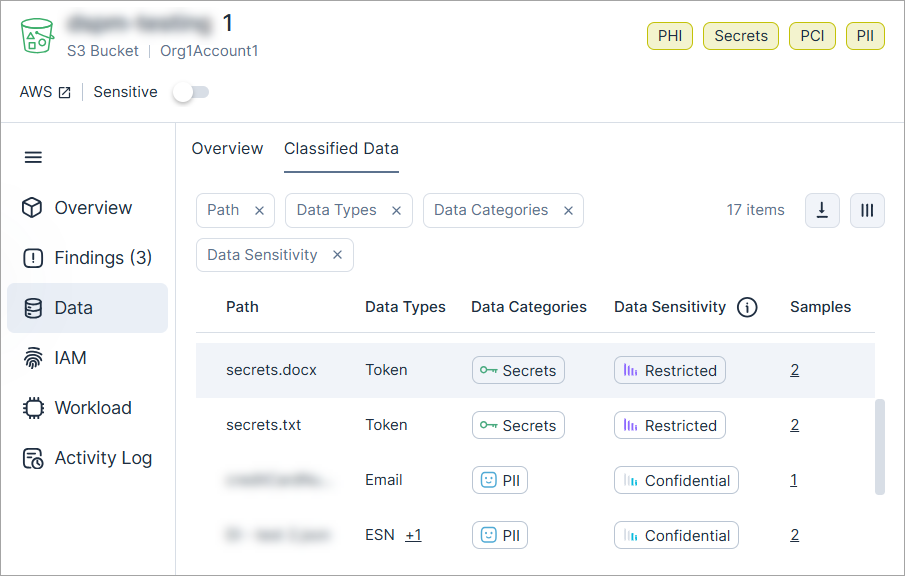
Cloud Exposure now scans docx files for sensitive data, enabling you to detect sensitive data in documents stored across your environments.
For a full list of scanned file types, see the documentation.
Workload Protection: Add a GitHub Actions Parameter for GITHUB_STEP_SUMMARY
Tenable has introduced the summary parameter for GitHub Actions CI/CD scan parameters, allowing users to control the GITHUB_STEP_SUMMARY output. This parameter enables or skips the summary output at the end of a pipeline step execution, providing greater flexibility in workflow reporting.
For more information, see the Container Image CI/CD Scanning.
Workload Protection: Scanning VMs with Azure DM-Crypt Disk Encryption
Tenable supports scanning Linux-based Azure-encrypted resources that use DM-Crypt (supported only on Ubuntu) disk encryption.
To learn more about Azure Linux-based disk encryption support see the Documentation.
IAM: Enhanced Microsoft Entra ID Applications 3rd Party Support
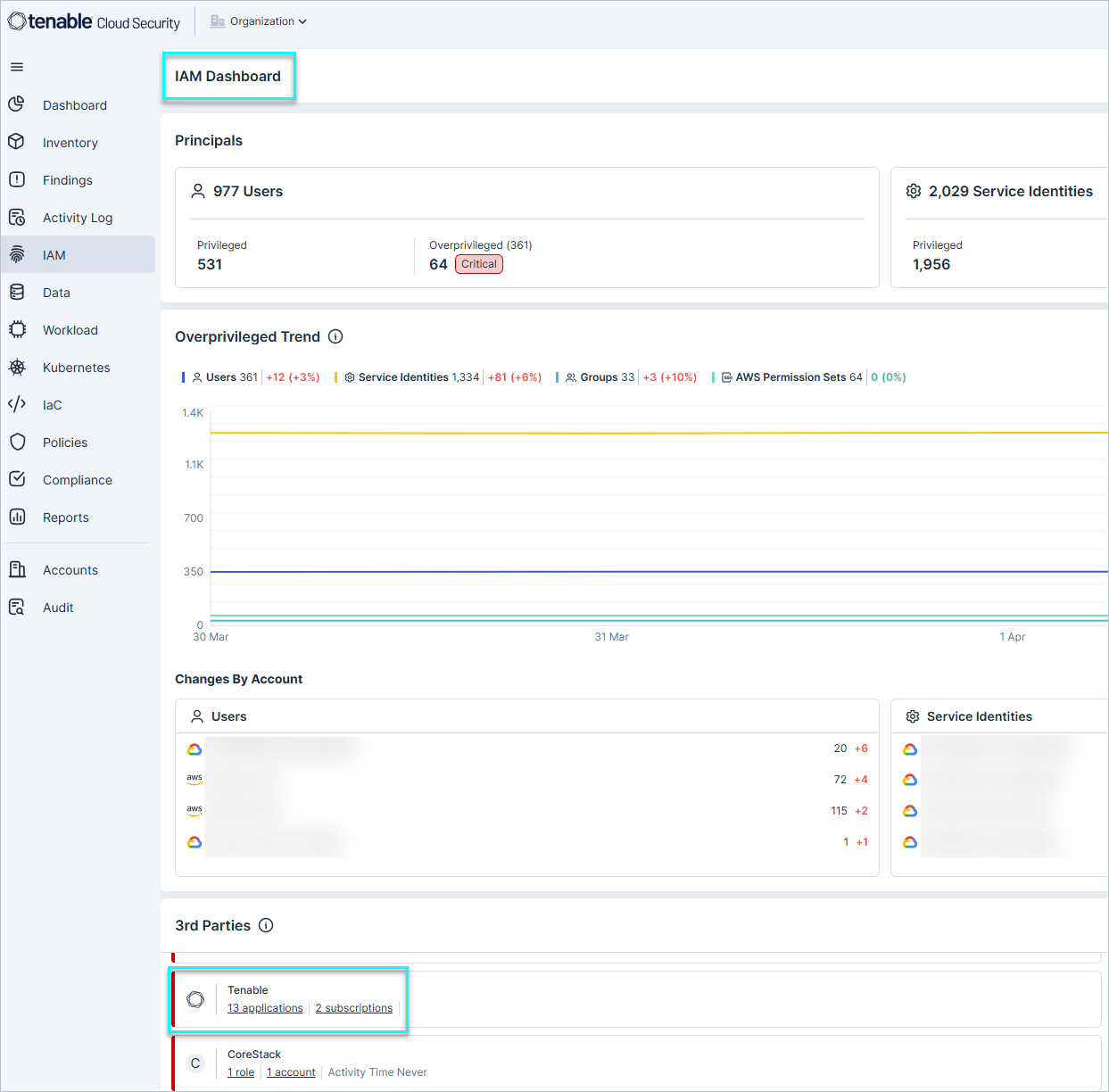
Tenable has enhanced Microsoft Entra ID 3rd party application mapping with support for over 350 applications. This expanded enhancement is now available through the IAM Dashboard, allowing you to click a vendor per cloud component and navigate directly to the Identity Intelligence page, filtered by the relevant vendor.
Additionally, the Microsoft Entra ID Application Inventory now provides a Vendors field for each application, enabling greater visibility and improved management of 3rd party applications in your environment.
For more information, see the Documentation.
CIEM License Upgrade: New Policies Added to License
The following policies are now also included as part of the CIEM license. For existing CIEM customers, these policies will be disabled by default, to minimize unexpected changes due to the creation of new findings. Learn more about how to enable policies.
| Cloud | Category | Name |
|---|---|---|
| AWS / Code |
Data |
|
| AWS / Code |
Secrets |
|
| Azure | Data |
|
| Azure | Secrets |
|
| Azure / Code |
Data |
|
| Azure / Code |
Secrets |
|
| tags | ||
| GCP | IAM |
|
| GCP / Code |
IAM |
|
| GCP | Secrets |
|
| GCP / Code |
Secrets |
|
| Microsoft Entra ID | IAM |
|
| OCI | Data |
|
| OCI | IAM |
|
| OCI / Code |
IAM |
|