Reorder Elastic Asset Patterns
Required User Role: Active User, Cloud Connector Manager, or Business Administrator.
Tenable One Attack Surface Management evaluates elastic asset patterns for an inventory in order, from first to last, and applies the first pattern that matches a given asset. Patterns below it in the list are not evaluated for that asset. Reorder your patterns to control which one applies — for example, to exempt a host from a broader pattern, place the more specific pattern above the broader one.
To reorder elastic asset patterns:
-
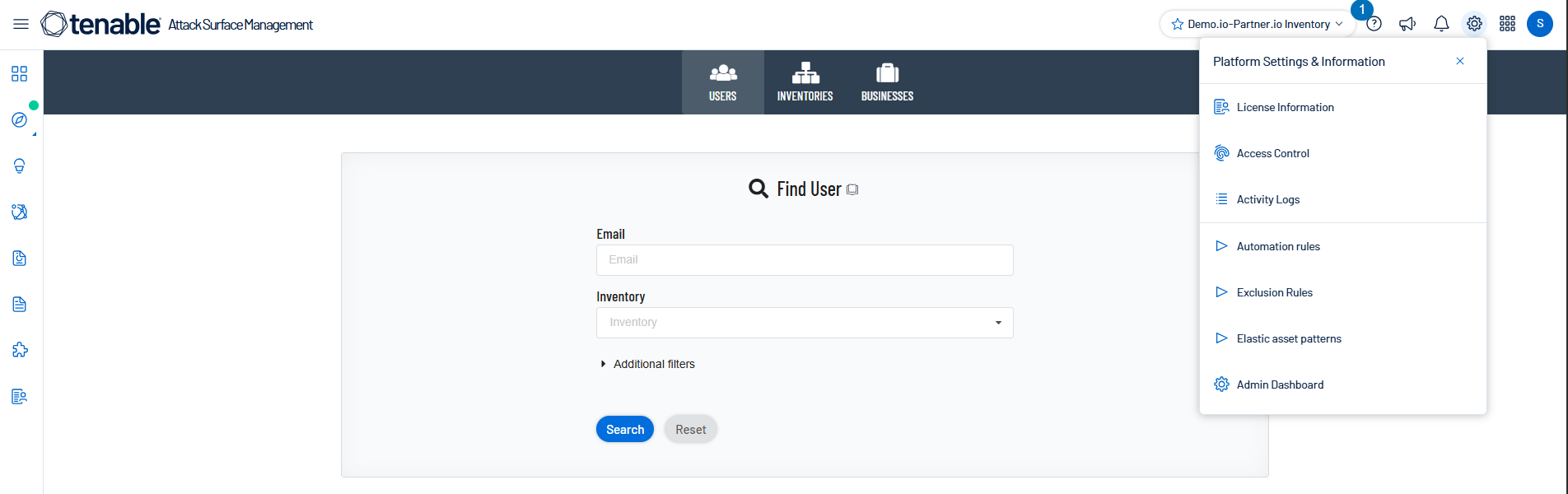
In Tenable One Attack Surface Management, click the
 icon in the upper-right corner.
The Settings and Information drop-down list appears.
-
In the drop-down list, click Elastic asset patterns.
The Elastic asset patterns panel appears.
-
Drag a pattern to the position that you want.
Tenable One Attack Surface Management saves the new order automatically.